Sep 29, 2026
Salesforce and Facebook Conversions API integration guide
Written by
Maryna Semidubarska
Published Oct 23, 2026 comments
Key takeaways
- You can send selected Salesforce lead changes to Facebook through Meta Conversions API, giving your campaigns information about lead quality and, as a result, data to adapt the campaign.
- You can use Data 360 or Stape Conversion Tracking Salesforce app to send the lead status changes you choose from Salesforce to Meta. To report other activity recorded in Salesforce, you can use a custom server-side tracking setup.
- You need accurate identifiers, clear event definitions, and testing before using CRM events for campaign optimization.
What is Meta Conversions API and why do Salesforce teams need it?
Meta Conversions API lets you send event data from your server or CRM to Meta. For your Salesforce integration, those events might represent a qualified lead, a booked consultation, or a completed purchase.
The important shift happens after the initial inquiry. You might receive 100 leads from one campaign and 40 from another, yet find that the second produces more conversations with people who need your product and have the budget to buy it, and are not simply browsing. Sending this data gives Meta additional information about the outcomes you value and can adapt future campaigns.
Start with a shared definition of success. Agree with your sales team on what makes a lead qualified, and which Salesforce updates you want to send to Meta, such as a booked appointment or a completed sale.
Does Salesforce offer a direct connection to Meta?
You can connect Salesforce to Meta through Data 360, previously called Data Cloud. Its Meta Conversions API connector can send updates about your leads, meaning potential customers, to Meta. For example, you can share when a lead moves to a new stage in your sales process.
You need access to Data 360 and its Ad Audiences feature, which requires an additional license.
You also need permission to set up the connection in Salesforce and Meta.
Three ways to send Salesforce updates to Meta
You can send Meta updates about your leads as they move through your sales process. For example, you might send an update when your sales team marks a lead as ready for a sales conversation.
Here is how the three options compare.
| Option | When it may suit you | What you need to set up and manage |
| Salesforce Data 360 connector | You already use Data 360 and have access to its Ad Audiences feature. | Bring your lead information into Data 360, indicate which Salesforce fields provide the information you send to Meta (such as email addresses and phone numbers), choose which updates to send, and check your account permissions. |
| Stape Conversion Tracking app | You want to send updates automatically when a lead reaches a status you choose. | Give the app permission to access Salesforce and enter the details needed to connect your tracking tool. Choose which customer details and lead status changes to share. |
| Custom Salesforce connection through a server | You need custom rules for different Salesforce records, want to change the data before sending it, or need to send it to several platforms. | Set up rules that tell Salesforce when to send updates. Configure your server to receive and forward them, test the connection, and check for updates that fail to arrive. |
Both the Stape Conversion Tracking app and the custom Salesforce connection described above use webhooks, automatic messages that send information when a selected event happens, such as a lead reaching a chosen status in Salesforce.
With the Stape app, you choose the lead statuses and customer details in the app settings. With a custom connection, you create and manage the rules for sending these updates yourself.
You can receive these messages using the server version of Google Tag Manager (GTM), called server Google Tag Manager (server GTM). It lets you choose what information to include and where to send it. This is a form of server-side tracking.
The Stape app also works with server GTM. It sends your updates from Salesforce to server GTM, which prepares and forwards them to Meta or other connected platforms.
You can also send your Salesforce lead updates to Meta through either of these tools:
- Meta Conversions API Gateway may suit you if you only need to send these updates to Meta.
- Signals Gateway lets you send your Salesforce updates to Meta and other platforms, including Google BigQuery, TikTok, and Snapchat.
How to set up Stape’s Salesforce app for Meta Conversions API
Stape Conversion Tracking Salesforce app can automatically send Meta an update when a lead’s status changes in Salesforce.
1. Install the app. Open Stape Conversion Tracking on Salesforce AppExchange. Review what information the app needs permission to access, then click Allow and Install.
2. Choose how to send your updates. Select Meta Conversions API Gateway, Signals Gateway, or server GTM using the comparison in the previous section. Set up your chosen tool in your Stape account before connecting the app.
3. Enter your connection details. The app needs IDs and access codes to connect to your chosen tool. Follow the links below to find the details you need.
| Your chosen tool | Details to enter |
| Meta Conversions API Gateway | Your Meta Dataset (Pixel) ID and CAPIG API Key |
| Signals Gateway | Your Signals Gateway Pixel ID and API Key |
| Server GTM | Your Container API Key |
4. Tell the app where to find your customer details. For each detail you want to send, such as an email address or phone number, choose where it is stored in Salesforce. If you store the Meta Lead ID, select where to find that too. This is the number Meta gives a lead submitted through a Meta form. This step is optional, and the selection list only shows fields your team has added to Salesforce.
5. Choose which lead updates to send. Select the lead statuses you want to report to Meta and give each update a name. Use the same name whenever you report the same status. Click Save and Connect.
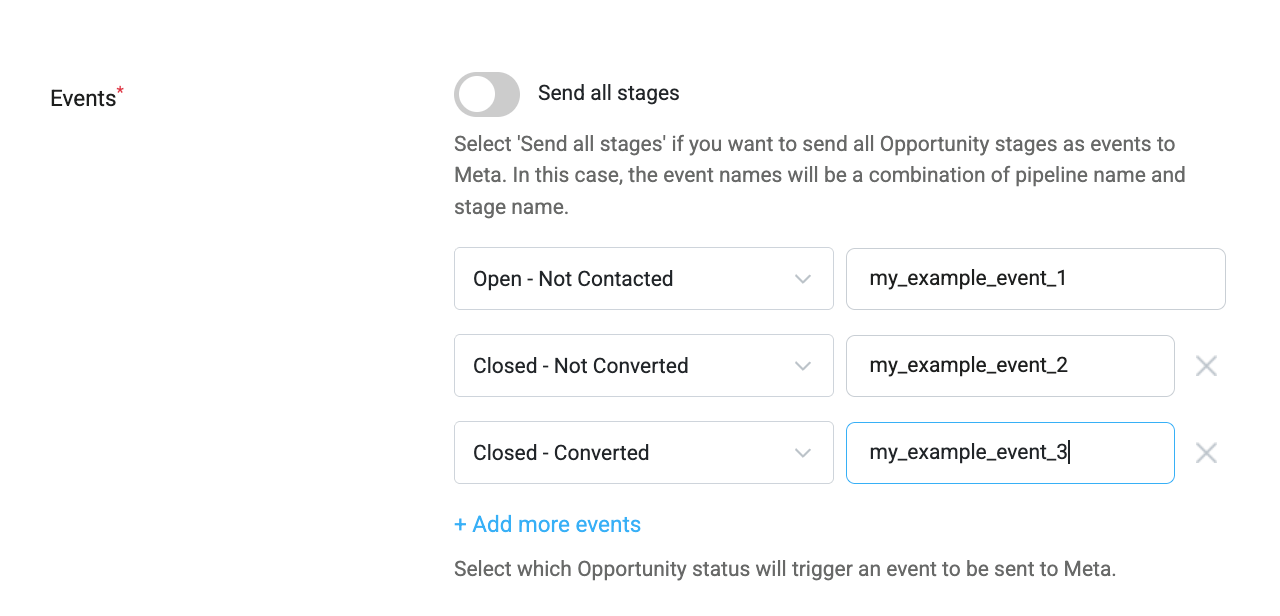
6. Finish the server GTM setup, if you chose this option. Server GTM needs Stape’s Data Client to read the updates from your app and a Meta Conversions API tag to send them to Meta. Follow the Salesforce app setup guide to configure and include the information that identifies Salesforce as the source.
7. Check that your updates reach Meta. Create a sample lead in Salesforce to test the connection. Then change its status to one you chose to send to Meta in step 5.
How to send Salesforce updates to Meta with server GTM
Use this option when you need your own rules for sending updates from Salesforce. For example, you may want to tell Meta when your sales team marks a lead as ready for a sales conversation.
The steps below explain how to build a custom connection from Salesforce to Meta using Salesforce Flow and server GTM. The /salesforce path used in this example is part of that custom setup.
If you choose the Stape Conversion Tracking app, follow our Salesforce app setup guide. Once configured for server GTM, the app sends your selected lead status updates automatically. You do not need to create a separate Salesforce Flow to send those same updates.
Step 1. Choose which update you want to send
Start with one change you want to track. For example, you could send an event called SalesQualified when a lead meets your team’s requirements for a sales conversation.
Decide which information to include.
| Information | What it means |
| Event name | A name that describes the update, such as SalesQualified. |
| Event ID | A unique code for each update of the situation. If the same update needs to be sent to Meta again, for example after a connection problem, reuse its original code. Each new update needs a new code. |
| Customer details | An email address or phone number, for example. |
| Event time | When the change actually happened. You should convert this to Meta’s required format, called a Unix timestamp in seconds. |
| Purchase value and currency | The sale amount and currency when you report an actual purchase. |
Treat a new lead and a lead becoming ready for a sales conversation as two separate events.
Step 2. Set up server GTM to receive your updates
Start by following the server container setup guide to create your server container and host it on Stape. A server container holds the tools and rules that receive your tracking information and send it to your chosen platforms.
Next, add Stape’s Data Client. The client reads the updates Salesforce sends so you can use that information in server GTM.
- 1.Download the template. Open the Data Client download page, click Code → Download ZIP, then unzip the downloaded folder. Inside, find the file named
template.tpl - 2.Open your server container in Google Tag Manager. You will complete the following steps in Google Tag Manager. Open Templates, then click New under Client Templates.
- 3.Import the file. Open the three dots menu in the top right → click Import → select
template.tpl - 4.Create your Data Client. Open Clients → click New → open Client Configuration → select Data Client. Give it a name, such as “Salesforce updates.”
- 5.Choose where Salesforce will send your updates. Open Accepted Path Settings → click Add path → enter
/salesforce
A path is the ending of a web address. For example, if your tagging server address is https://track.example.com, adding this path gives you https://track.example.com/salesforce.
Step 3. Create a Salesforce Flow for the custom connection.
Set up the Salesforce connection settings. These settings store your server’s address and the details Salesforce needs to connect to it.
In Salesforce, open Setup → Flows. A flow is a set of rules that runs automatically.
You should set up a flow that:
- Detects when a lead moves into your chosen status.
- Waits until Salesforce has saved the change, then sends the update in the background.
- Includes the customer details and event information you selected in step 1.
To add the sending step, choose Action → Create HTTP Callout, then select POST. This tells Salesforce to send information to your server. Use your Stape server address with the path you chose, such as /salesforce.
The message must use JSON, a structured format that the receiving tool can read. You need to prepare this format and fill it with the actual Salesforce details. Follow Salesforce’s HTTP Callout instructions for these settings.
Set the flow to send an update when the status changes. Editing an unrelated detail, such as a note, should not send the same event again.
Test the flow in a Salesforce sandbox, a separate environment for testing, before using it with your live records.
Step 4. Set up the tag that sends your updates to Meta
First, check that server GTM receives your Salesforce messages. Follow Stape’s webhook testing guide to make them visible in Preview.
Open Event Data and check that the expected information appears. Then create Event Data variables for the details your Meta tag needs. A variable tells the tag where to find a value, such as an email address or event name.
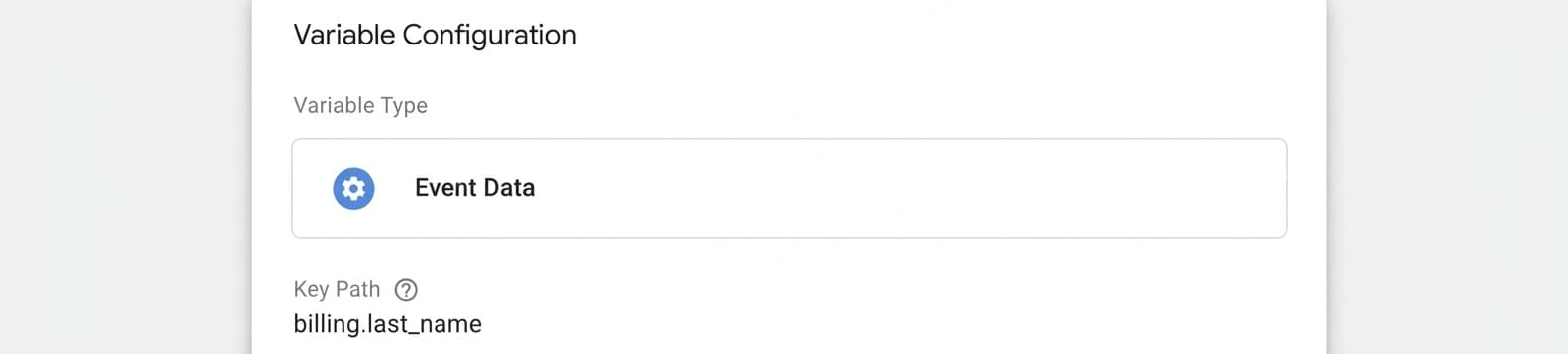
Then, add Facebook Conversions API tag by Stape. This template sends your Salesforce updates from server GTM to Meta.
1. Open your server container in Google Tag Manager.
2. Click Templates in the left menu. Under Tag Templates, click Search Gallery.
3. Click the search icon and search for Facebook Conversions API. This is the name used for the Meta Conversions API tag in the Gallery.
4. Select the template by stape-io, then click Add to workspace. Review the permissions it requests and click Add.
You have now added the template. Next, use it to create your tag.
5. Open Tags in the left menu → click New.
6. Click Tag Configuration → select Facebook Conversions API.
7. Give your tag a clear name, such as “Meta Salesforce updates.”
You can now enter the settings below:
- Under Event Name Setup Method, select Override so you can choose the event name yourself.
- Enter your Meta Pixel ID and API Access Token. These identify where the updates should go and allow the tag to send them.
- Under Action Source, select System Generated for the automatic lead status updates in this example.
- Under User Data, select the variables containing your customer details.
- Under Server Event Data Override, add the event ID and the time the change happened.
Finally, add a trigger with both of these conditions:
- Client Name equals the exact name you gave your Data Client in Step 2. If you named it Salesforce updates, enter Salesforce updates here too.
- Event Name equals SalesQualified, the incoming event name used in this example. If you configured a different incoming event name, enter that name instead.
The tag will run only when both conditions are met. Save the trigger and tag.
You can watch Meta Conversions API setup video for the detailed settings.
Step 5. Check that an update travels from Salesforce to Meta
Open Meta Events Manager → Test Events. Copy the test code into your tag’s Test ID field, following Stape’s testing instructions.
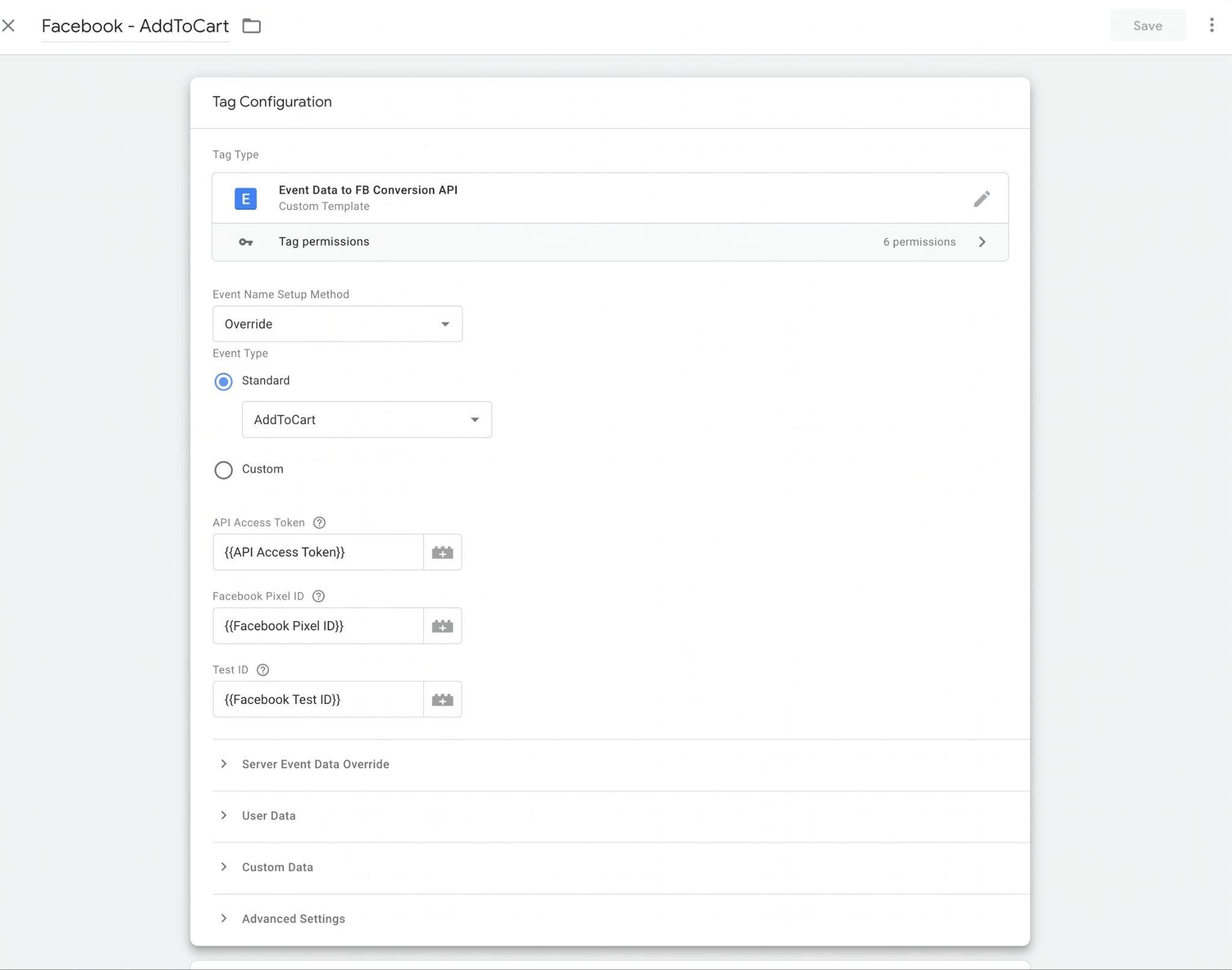
Create a sample lead in your Salesforce test environment. Change its status to the one you chose in step 1.
Check that:
- The update appears in server GTM Preview.
- Meta’s response shows 200, meaning the request succeeded (server GTM Preview → Request → outgoing request to Meta → Response).
- The event appears in Meta Test Events.
- The event name, ID, time, and customer details are correct.
Once your tests pass, remove the test code and temporary preview settings. Publish your server GTM changes and move the tested flow into your live Salesforce setup.
Improving event match quality for Salesforce events
When you send a Salesforce update to Meta, such as a lead becoming a customer, Meta needs to identify who the update is about. Details such as the person’s email address or phone number help Meta connect that update to their Facebook or Instagram account.
Event match quality (EMQ) is Meta’s score out of 10 for how useful those customer details are for making this connection. A higher score suggests that you are sending more helpful information. It does not mean that your ads have generated more sales.
To improve the customer information you send to Meta, focus on three checks:
- Save the codes that help Meta identify your leads. For website leads, save the available
_fbp_fbc - Prepare customer details in the format Meta needs. Email addresses and phone numbers must follow Meta’s formatting rules, then go through SHA256 hashing. This process converts each value into a code made of letters and numbers. Check whether the tool you use to send Salesforce updates to Meta (such as Salesforce Data 360, the Stape Conversion Tracking app, gateway, or Stape’s Meta Conversions API tag in server GTM) already formats and hashes these details. If it does, do not hash them again.
Send the browser, ad click and Meta Lead ID codes (fbp, fbc and lead_id) without hashing.
- Check what your connection actually sends. Review the information sent to Meta for several recent Salesforce updates. Make sure the customer details you chose to share are included. For example, selecting an email field during setup does not help if that field is empty. If you send an IP address, which identifies an internet connection, use the customer’s IP. Do not use your Salesforce server’s IP address in its place.
You can also use our EMQ guide to review missing parameters.
Common errors and troubleshooting
The table below explains what to check for each common problem. Find the description that matches what you see, then work through the suggested checks to understand which settings may need changing.
| What you notice | What to check |
| Salesforce does not send an update | If you use the Conversion Tracking app by Stape, check that it is connected and that you selected the lead status you want to send to Meta. If you use a Salesforce Flow, check that it is active and set to send an update when the lead changes to that status. |
| The update reaches server GTM, but the Meta tag does not send it | Open server GTM Preview. Check that Data Client reads the update. If you configured a custom path, such as /salesforce, check that it matches the path in the URL Salesforce sends updates to. Then check the Meta tag’s trigger: its Client Name and Event Name conditions must match your Data Client name and incoming event name. |
| Meta does not receive or accept the update | In server GTM Preview, open the outgoing request to Meta. Read its Response, if available, and save any error message. Check your Pixel ID or dataset ID, API Access Token, required information, and event time format. Our troubleshooting guide explains where to find these details. Fix the reported issue before retrying. If you resend the same update, keep its original event name, event ID, and event time (the time the change first happened). |
| The same update appears twice | Check whether more than one app or tag sends the same update. Also check whether your Salesforce Flow sends it again when you edit an unrelated detail, such as the lead’s address. If your website’s Meta Pixel and Meta Conversions API both report the same action, make sure both sources send the same event name and event ID. Our guide to preventing duplicate events explains the setup. A later lead status change is a separate event and needs its own event ID. |
| Salesforce and Meta show different totals | Compare the same type of update over the same dates, and check whether your filters exclude any records. Look for updates that failed to reach Meta. If you are comparing Salesforce with Meta Ads Manager, also check which actions Meta counts as results from your ads, including how long after an ad click or view they happened. |
How to send offline conversions from Salesforce to Meta
A customer may see your Meta ad and later buy from you over the phone or in your store. These purchases are examples of offline conversions. If you record them in Salesforce, you can send the purchase details to Meta to help connect those sales to your ads.
When you send an event, tell Meta where the action happened. This information is called Action Source. For example:
- For a purchase completed over the phone, use
phone_call - For a purchase made in your store, use
physical_store
If you use server GTM, either with the Stape Conversions Tracking Salesforce app or a Salesforce Flow, follow these steps:
- 1.Open Google Tag Manager and select the server container you connected to Salesforce.
- 2.Click Tags in the left menu.
- 3.Open the Meta Conversions API tag you created earlier to send your Salesforce updates.
- 4.Click Tag Configuration, then find the Action Source dropdown.
Choose the option for the event you are sending:
- Phone Call for a purchase completed over the phone and reported through your Salesforce Flow.
- Physical Store for a purchase made in your store and reported through your Salesforce Flow.
- System Generated for lead status updates sent by our Conversion Tracking app.
When you connect the Conversion Tracking app by Stape to either gateway (Meta CAPIG or Signals Gateway), Action Source is not a setting you can change in the app. You only choose which lead status changes and customer details to send. If you need to set Action Source yourself, use server GTM and select it in your Meta Conversions API tag.
If you use Salesforce Data 360 to send lead status updates, its setup guide tells you to select system_generated as Action Source. Here, you are reporting a change to a lead’s record in Salesforce, such as a status change after a sales call.
When a sale is confirmed, send a Purchase event. Include the sale amount and currency, and the date and time the purchase happened.
For a video example, watch our offline conversions workshop. The app demonstration starts at 23:00, and the server GTM demonstration starts at 36:11.
FAQ
Want to join the server side?
Try for freeRecommended for you
Sep 29, 2026
Blog
How to set up Salesforce tag using server GTM
Find out how you can set up lead events tracking using the Salesforce tag for server GTM developed by Stape.
Jul 22, 2025

Comments