Jul 16, 2025
CIPA compliance for publishers: data tracking guide
Written by
Uliana Lesiv
Published Nov 5, 2026 comments
Key takeaways
- SB 690 narrows certain CIPA claims (private plaintiffs), but other CIPA claims may still be possible.
- Audit the full data flow, not just the list of tracking tools. Check what each tool collects, where the data goes, and how consent affects data sending.
- Minimize unnecessary data. Keep the events needed for analytics and remove or restrict unnecessary parameters/identifiers.
- Apply consent consistently across the tracking stack. Browser tags and server-side systems should respect the same consent and opt-out choices.
- Server-side tracking adds control, not automatic compliance. You can filter and apply anonymization rules to data before sending it to third-party platforms.
- Balance privacy with measurement needs. A properly configured tracking setup can help you keep useful data and reduce unnecessary data collection.
🤔 Who this article is helpful for: digital publishers, website owners, and marketing/analytics teams that need to understand how CIPA-related lawsuits may affect their tracking practices, audit their current setup, and build a compliant tracking infrastructure without compromising data quality.
CIPA overview
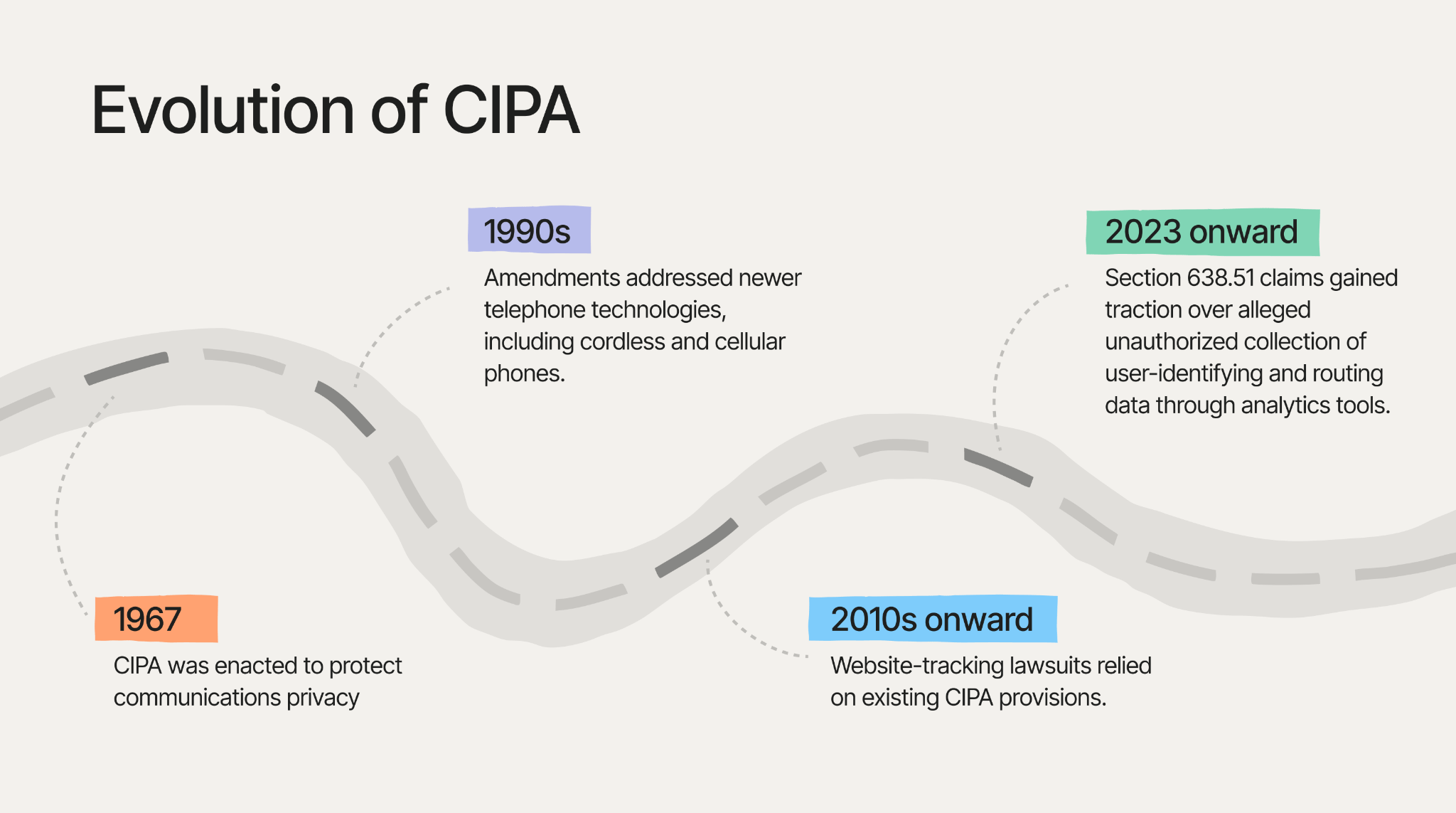
The California Invasion of Privacy Act (CIPA) is a state law enacted in 1967, which was originally aimed at protecting people against unauthorized wiretapping and recording of confidential communications.
CIPA's provisions have evolved since 1967, and plaintiffs have begun arguing that they can be applied to modern data tracking.
Why it matters to publishers
A wave of CIPA-related lawsuits in 2025-2026 has made publishers question how website visitor data is collected and shared with third parties even more. These claims argued that website tracking technologies, such as cookies and pixels, may violate CIPA since they may allow third parties to collect information about users' website activity without their consent.
Such website-tracking litigation can expose publishers to financial risk. Although California's 2026 SB 690 law limits some website-tracking lawsuits starting January 1, 2027 (which we consider in more detail below), other privacy claims are still possible.
CIPA provisions publishers should pay particular attention to
In CIPA regulation, three provisions have been cited in website-tracking lawsuits most frequently, although they involve different legal theories:
- Section 631. Unauthorized interception of communications.
Among other things, this section covers situations where someone intercepts or accesses private communications while they are being sent, without the required consent.
What it means for businesses: plaintiffs may allege that a website allows a third-party provider (such as a chat tool, analytics service, or advertising pixel) to intercept information about a visitor's interactions with the site before the user provides consent for it.
- Section 632. Recording confidential communications.
This section covers recording or listening to private conversations without the consent required by law.
What it means for businesses: a business could face legal claims if its website uses tools, such as chat services or session-replay software, to record private user interactions without the necessary consent.
- Section 638.51. Collecting routing and addressing information.
This section restricts the use of devices that collect information about incoming or outgoing communications without a court order. These devices collect information about communications, such as where they come from or where they go, rather than the actual content of the messages.
This section became common in website-tracking lawsuits because plaintiffs claimed that ordinary website tracking tools could work in a similar way to these devices.
What it means for businesses: plaintiffs have argued that website tracking tools that collect information such as IP addresses, device details, or other connection data may fall under this argument.
What California's SB 690 changes, and what it doesn't
On September 30, 2026, California Governor Gavin Newsom signed Senate Bill 690 into law, but its operative date is January 1, 2027.
SB 690 limits who can file a lawsuit under California Penal Code § 637.2 for violations of § 638.51, which we have considered above.
What it changes: only the California Attorney General can bring this specific type of claim against a private party. Individuals and other private plaintiffs can no longer use CIPA's civil-remedy provision to bring this type of website-tracking lawsuit.
The most important limitation is that SB 690 does not eliminate other CIPA causes of action. It means that private claims will still be possible under § 631, § 632, or any other CIPA sections.
The change also applies retroactively to qualifying pending §638.51 claims in actions commenced within two years before January 1, 2027.
The practical implication is that SB 690 does not remove the need to review tracking infrastructure to ensure compliance.
Another thing worth keeping in mind is that CIPA is only one part of the legal landscape. Other federal and state privacy laws may have separate requirements relating to personal information, consent, disclosures, and data sharing. For publishers who offer video content, the federal Video Privacy Protection Act may also be relevant where video-viewing information is linked with subscriber or user identifiers.
The issue is not just which tools a publisher uses
When the tracking and privacy infrastructure is reviewed, specialists usually start by listing the tracking tools installed on the website. That's a good starting point, but for the more complete picture, it's more important to answer the questions:
✅ What information does each tool collect?
✅ Where does that information go?
✅ Under what conditions is it shared?
✅ How do consent and opt-out choices affect data collection and transmission?
To answer these questions, you need to understand the user journey and different cases, like flows, consent statuses, etc., which can differ. For publishers, mapping user journeys helps identify where audience or revenue measurement should be preserved and limit unnecessary exposure of data.
The table below shows how these questions can help you come up with practical implementation decisions.
| Reader journey | Potential issue to review | Example of a more controlled setup |
|---|---|---|
| Article view | Full URLs, query parameters, or other page information may be shared with multiple vendors. | Send only the page information required for the approved measurement purpose. |
| On-site search | Search terms may contain information the publisher does not intend to disclose. | Exclude, remove, or transform search terms before forwarding events. |
| Newsletter signup | Contact or account identifiers may enter third-party tracking flows. | Send the permitted conversion event and restrict unnecessary user fields. |
| Subscription conversion | Revenue attribution may expose more subscriber information than a vendor needs. | Forward approved conversion and value fields instead of the full account payload. |
| Video view | Content metadata combined with user identifiers may create additional privacy concerns. | Review which identifiers and content details are necessary before sharing them. |
Testing your website tracking and spotting potential problems
To get a clearer picture, you should conduct a tracking audit. The goal is to identify which third-party services receive data, what information is transmitted, and whether tracking behaves consistently with the website's privacy requirements and consent settings.
As part of the audit, pay attention to the pages and elements where sensitive data could be collected or shared. For example:
- On article pages, check whether tracking tools transmit full URLs or query parameters.
- On-site search forms should be reviewed for search terms that may contain personal or sensitive information.
- Newsletter signup forms and subscription flows may expose contact details, account identifiers, or transaction data.
- Video players and embedded content should also be checked to understand whether viewing events, content metadata, and user identifiers are shared with third parties.
For each of these scenarios, check which tracking events are triggered, what data they include, which platforms receive it, and how the behavior changes depending on the user's consent status.
Step 1. Scan your website for tracking tools
Start by identifying the analytics, advertising, chat, video, session-replay, and other third-party services running on your website.
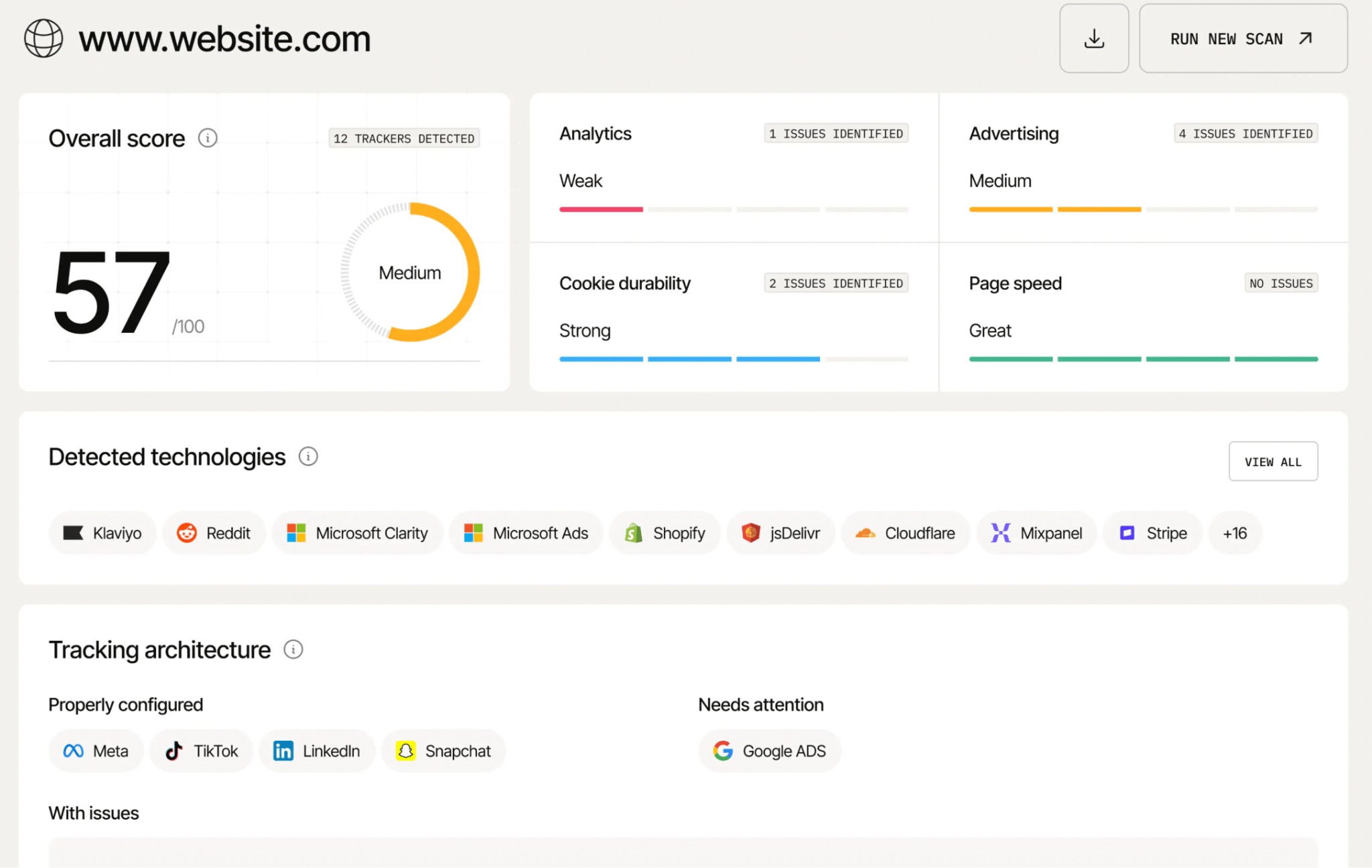
As an initial check, you can use Stape's Website Tracking Checker. The tool scans a website's tracking setup and generates a report on detected trackers, cookies, tracking methods, and suggested configuration improvements.
This can help you identify tracking tools and potential configuration issues, as well as provide detailed guidelines on refining tracking for your specific case. Consider the report as a starting point; the next step is to confirm which detected tools actually receive data during different user journeys, such as article visits, newsletter signups, and subscriptions.
Step 2. Test what happens before and after consent
2.1 Investigate the requests sent.
Open an Incognito window to test the website in different consent states:
- Before choosing the cookie banner.
- After accepting all optional cookies.
- After rejecting optional cookies.
- After changing or withdrawing your preferences.
For each scenario, use Chrome DevTools.
Right-click anywhere on the page and select Inspect → click the Network tab → click More filters → 3rd-party requests to narrow the list to requests whose origin differs from the page's origin.
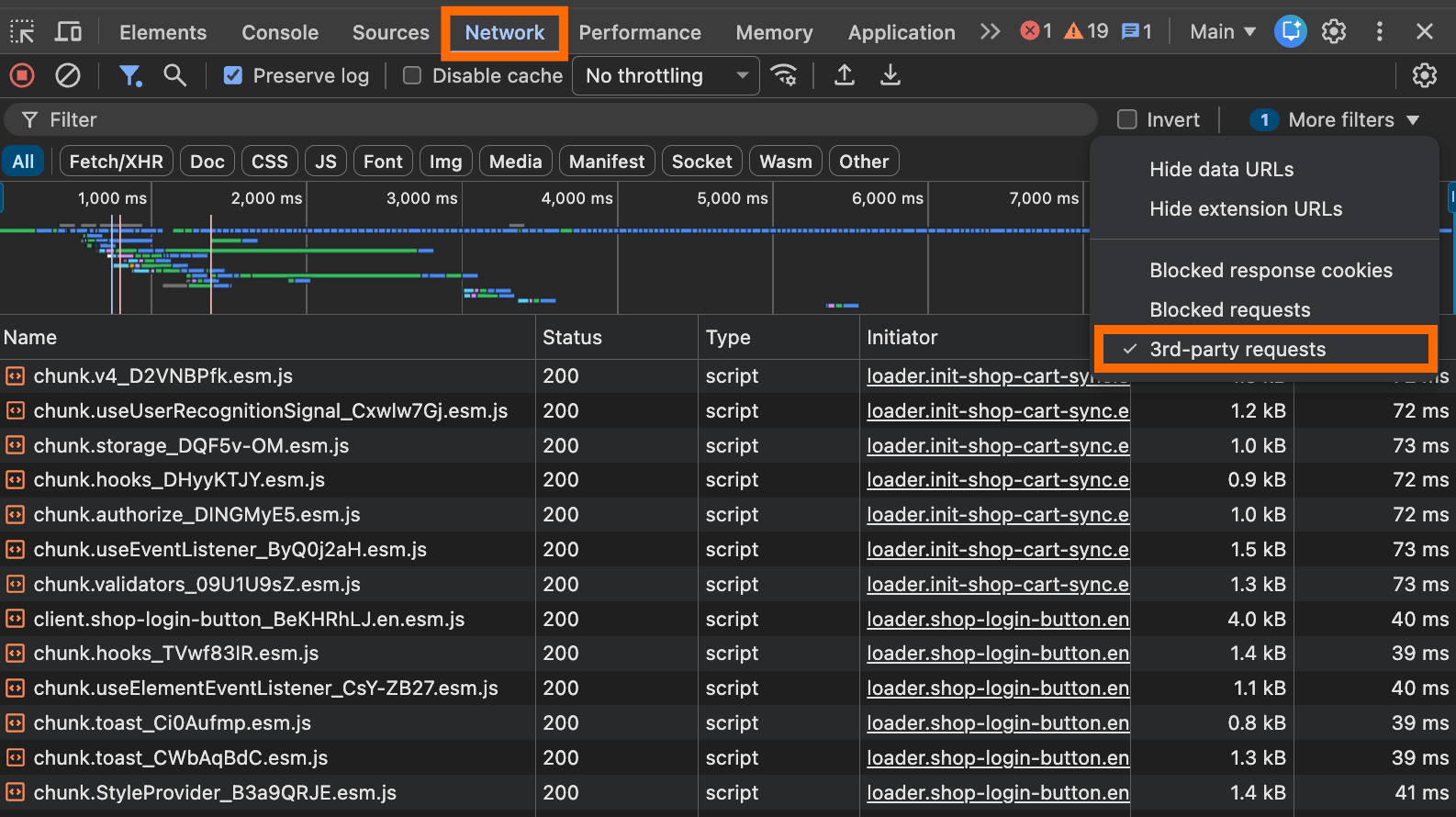
Inspect the requests that were sent under different circumstances. For any suspicious request (like /collect requests sent before setting the consent preferences), be sure to investigate why it triggers and whether it's compliant with data regulations. To do it:
- Look through Headers and find the Request URL and domain.
- If available, open Payload to inspect query parameters and the sent fields.
- Check Initiator to see what triggered the request.
Pay particular attention to whether advertising, analytics, chat, or session-replay tools transmit data before the relevant consent or other required authorization is in place.
2.2 Check which cookies are created.
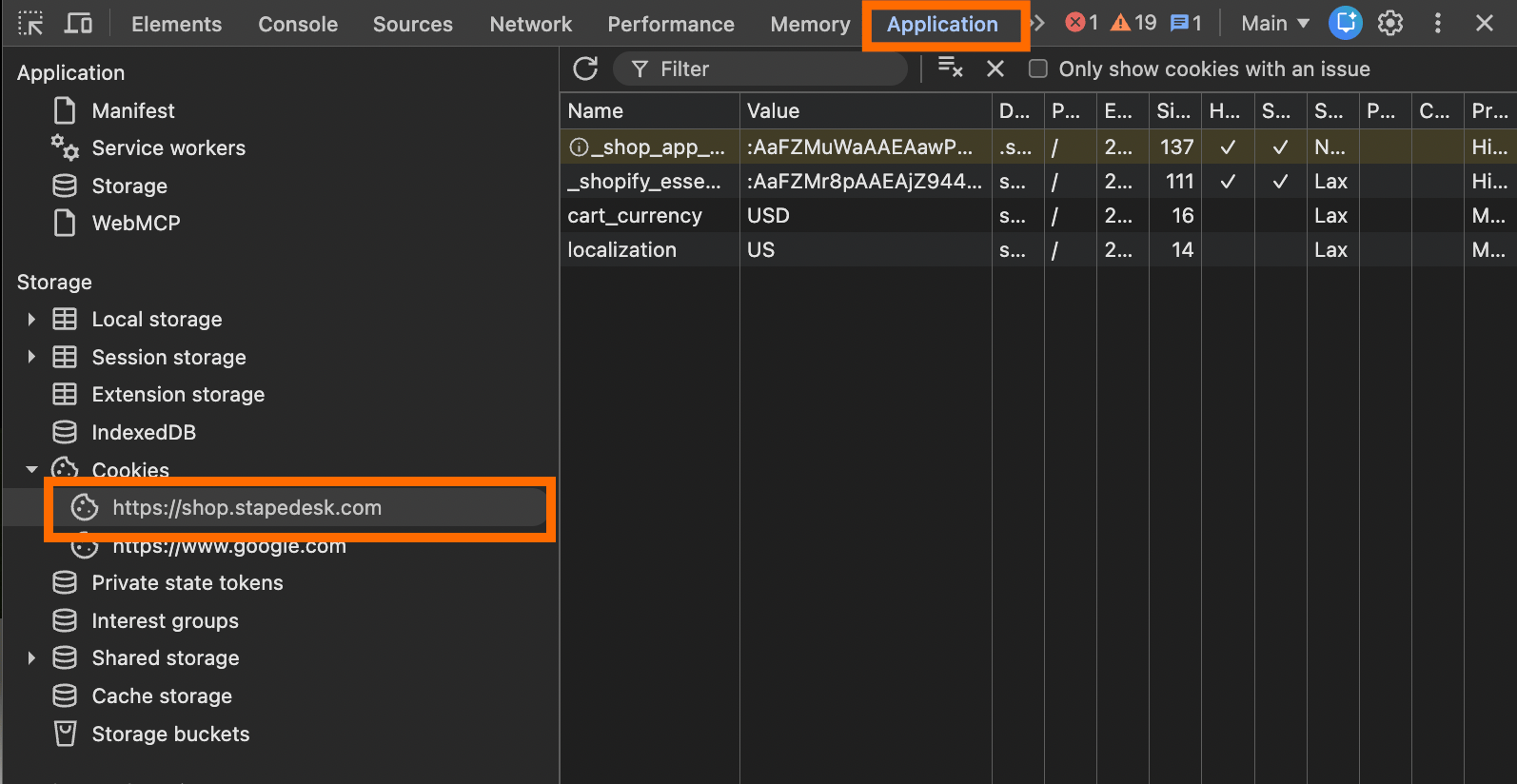
To do it, open Application → in the left sidebar, expand Storage → Cookies and select your website's domain → record the cookie names and domains you see.
Interact with the banner, and check how cookies change: did new cookies appear? Were existing cookies retained? Does their purpose match your documentation?
Be sure to repeat the test for each consent scenario.
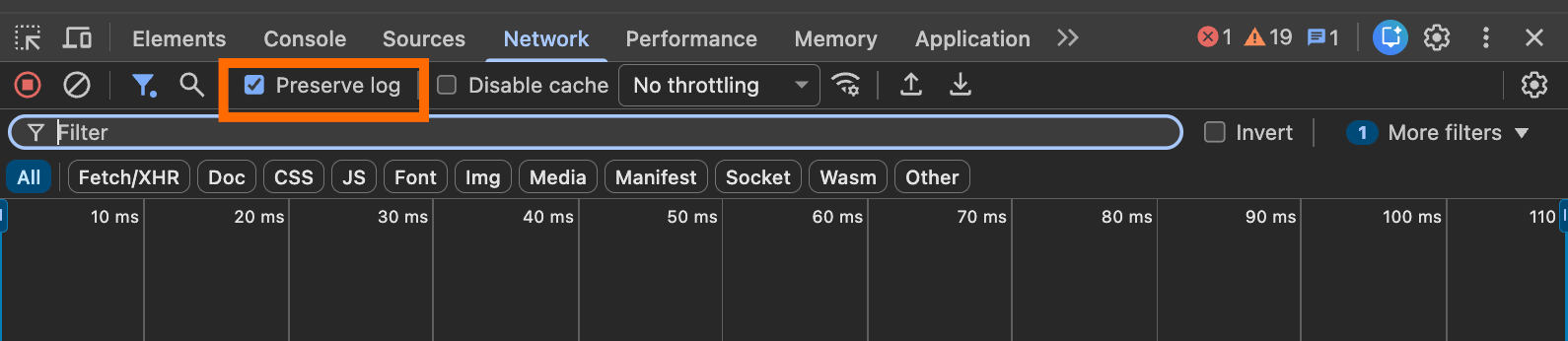
For each test, clear the Network log immediately before the action you're testing. Keep Preserve log enabled if you need to follow navigation across pages.
Step 3. Check where the data goes
You may start by checking it via Chrome DevTools as well. But keep in mind that it has a limitation – it won't reveal the contents of later server-to-server requests.
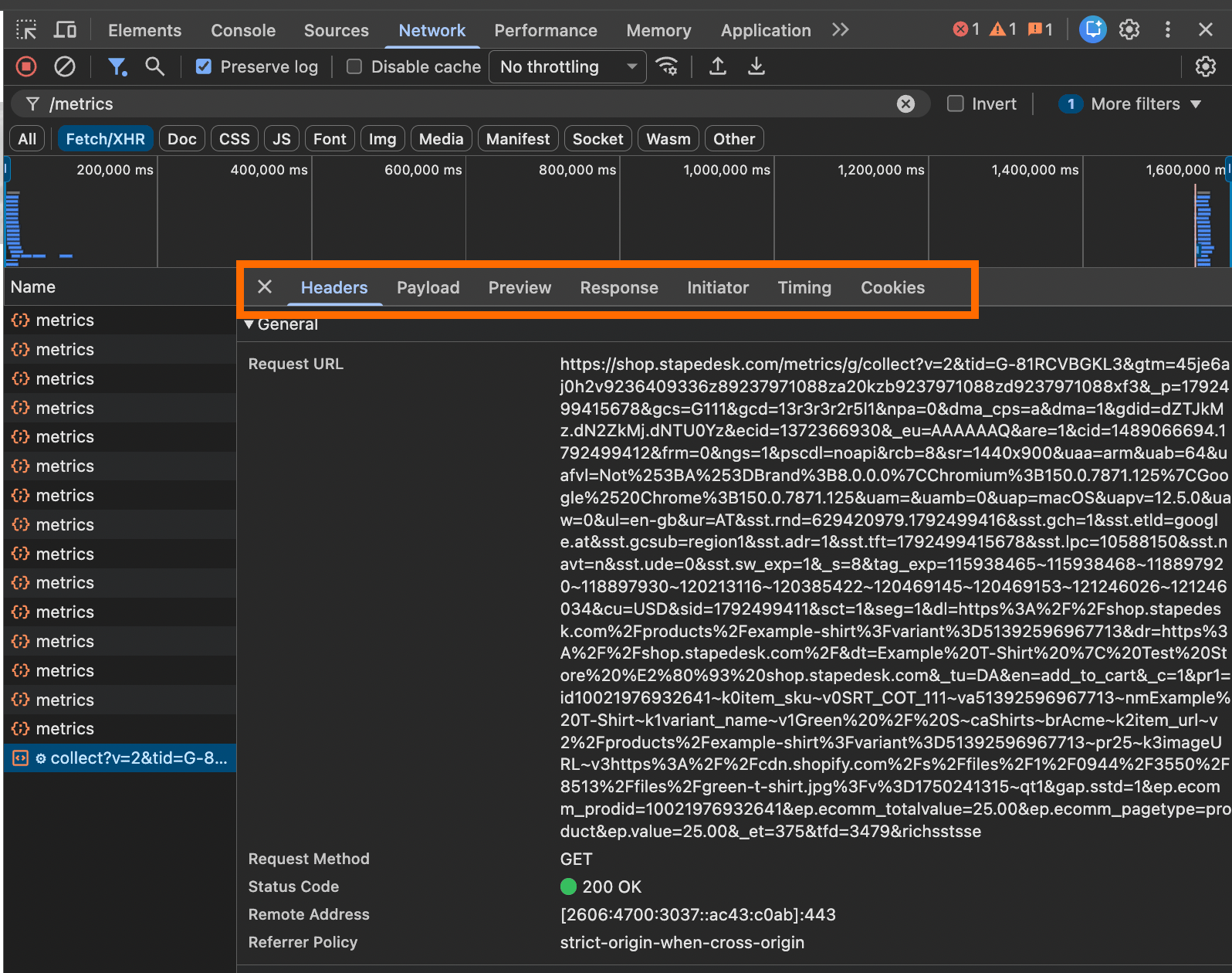
To check via DevTools, go to Network → reload the page → filter for Fetch/XHR or select All. Inspect a request's Headers, Payload, Cookies, and Initiator tabs. Look for the destination domain and data fields sent with the request.
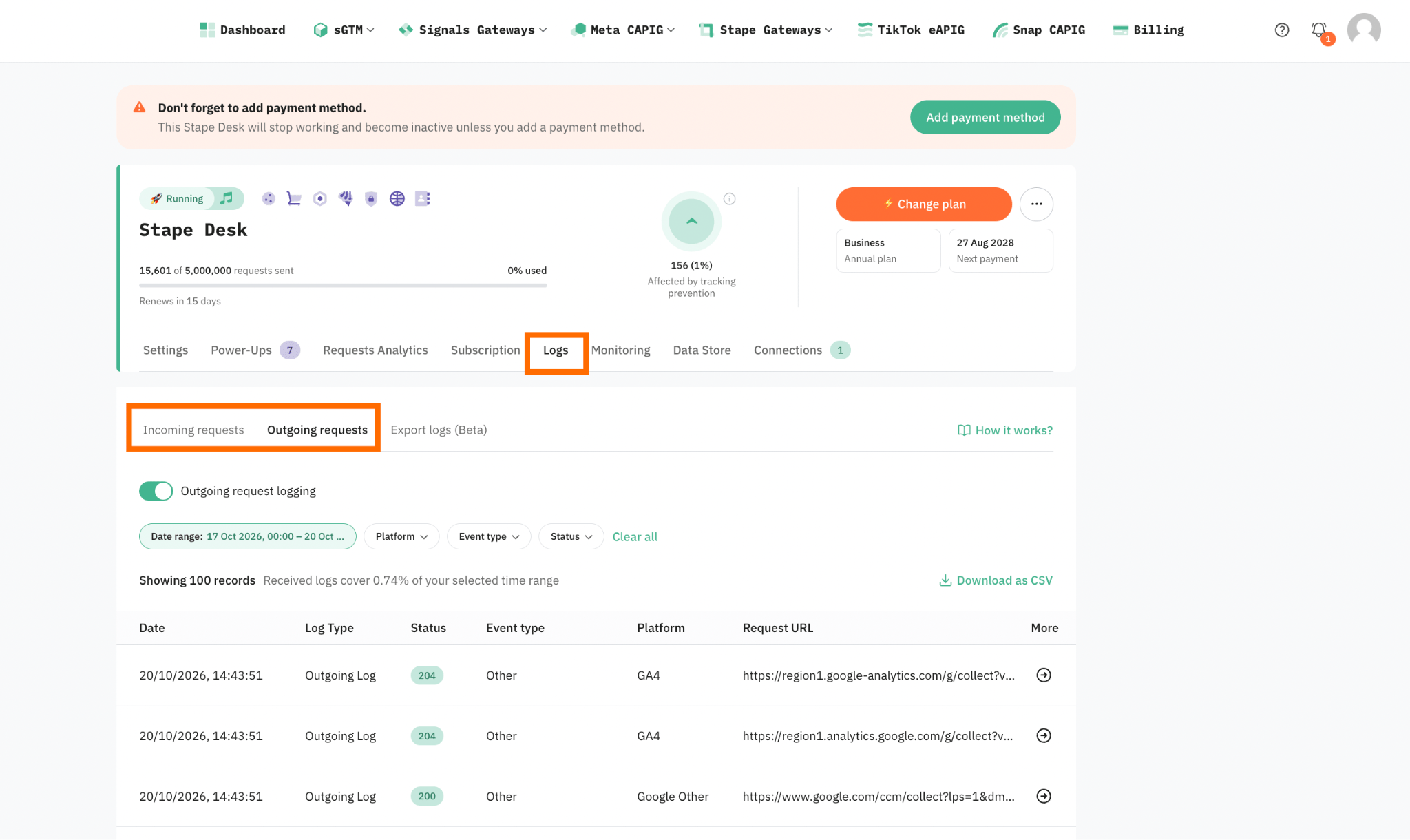
If you're already using Stape for data tracking on at least the Pro plan, you can also inspect Logs.
While browser DevTools shows what the browser sends and receives, Stape logs can help show what reaches the server-side tagging setup and what it forwards onward. You may need both to get the full picture.
The Stape Logs consist of two tabs:
- Incoming requests. Here, you can look for requests generated at the time you performed your test. It shows what requests were received and what data the container got.
- Outgoing requests. In terms of the audit, that's an even more important tab. Here, you should examine, in particular, the destination platform, Request URL, and payload to see where and which parameters and data you send.
Logs is a flexible and convenient feature that should be used for the purpose of consent-related audits. For detailed instructions on how to use the Logs feature, refer to our documentation.
Beyond all-or-nothing tracking
After testing the website tracking and seeing what data is sent, it can be easy to go to extremes and significantly cut the tracked data. Instead, the best approach is to achieve a balance in this matter, so the business doesn't lose data that could be used for further optimization.
The steps to find the right balance include:
✅ Come up with the data required to support specific decisions. Before removing an event or parameter, think about whether it helps to measure the campaign, improve conversion attribution, or other goals.
✅ Reduce detail instead of removing entire events. An event may be useful even if some of its parameters are unnecessary. For example, when a reader subscribes to a paid publication, the publisher can track the subscription conversion event and its value without sending the subscriber's full name, email address, account details, or other personal information that the vendor does not need.
✅ Share the data required for a specific platform. Different platforms have different purposes. Advertising platforms may need certain signals for attribution or optimization, but analytics tools may need different information. Avoid forwarding the same full set of data to every destination by default.
✅ Apply consent and opt-out choices consistently. A consent decision should apply not only to browser-based tracking but also to server-side collection and forwarding. Server-side tracking should not become a way to restore data that the user has chosen not to share.
Need help auditing website tracking?
Talk to us to identify potential privacy risks and find opportunities to make your tracking more privacy-conscious.
Why server-side tracking implementation can be helpful
Server-side tracking can help publishers get more control over how and what data is shared with third-party platforms.
With client-side tracking, the browser sends user data directly to third-party platforms you have configured.
When you set up server-side tracking, the browser sends data to a first-party server-side endpoint before any third-party platforms. On this "intermediate layer," you can configure data review, filtering, and anonymization before sending it onward.
Read a detailed comparison of client- and server-side tracking in our article, since the method you use for capturing users' interactions affects not only your level of control over data but also its quality and reliability.
Depending on the implementation, server-side tracking rules can help you avoid unnecessary data sharing and keep the information needed for the specific business goals. For publishers, those goals might include attributing an advertising campaign or recording a paid subscription without passing a reader's full account details to every platform.
For example, you can configure the server-side endpoint to send only specific events or data fields to a particular platform. Also, you can apply different rules for different destinations.
The legal importance of how data is collected and shared is illustrated by Smith v. Rack Room Shoes. In that case, the court dismissed a claim under the California Invasion of Privacy Act (CIPA) based on server-side tracking because the allegations didn't adequately establish contemporaneous interception.
That ruling should not be read as configuring server-side tracking makes your data collection lawful. No matter how data is collected, you must still review how tracking works, what information is collected and shared, what each vendor does, and which laws apply.
You should also understand the limits of the control that server-side tracking provides. The data review and filtering rules you set only apply to data that passes through your server endpoint (such as a custom subdomain or same-origin URL). They do not automatically affect other tracking scripts running in a visitor's browser. So, you still need to review the overall tracking setup, consent and disclosure practices, relationships with third-party vendors, and legal obligations.
How Stape supports the practical changes
Among the benefits that Stape can offer to help you build a more controlled tracking setup are the following:
- Server GTM container hosting and data filtering. After creating a server GTM container, you need to host it. Stape provides the required hosting infrastructure for receiving events and sending data to third-party platforms.
- Multiple GTM entities with server-side consent controls. Stape is among the largest GTM template contributors. Our team constantly develops new GTM entities to configure server-side tracking as easily as possible. The tags also include sufficient consent controls so that you can configure them according to the data regulations.
- Solutions to meet your tracking needs. Stape provides a range of power-ups, features that help you configure high-end data tracking. For example, among the popular solutions for our clients who need to build compliant tracking is the Anonymizer power-up, which can help you remove or mask IP addresses, user IDs, and other unnecessary data sent to GA4.
However, server-side tracking is not only about data control and privacy. It is also about data reliability. It can help reduce data loss and make tracking more reliable. For example, Stape offers features such as Custom Loader and Cookie Keeper to help reduce data loss caused by browser restrictions, Click ID Restorer to recover missing click IDs for attribution, Enricher to enrich events with existing user data, and many more.
For a deeper look at how our solutions can improve tracking reliability and data control, read our article on the benefits of Stape hosting for sGTM.
Want more control over the data sent to your analytics and advertising platforms?
Tracking configuration practices that can help comply with data regulations
The legal requirements may vary depending on your situation. The tracking practices listed below are intended as general guidance and may not cover all the obligations that apply to your specific circumstances. We recommend consulting a qualified legal professional for advice that will fit your specific needs.
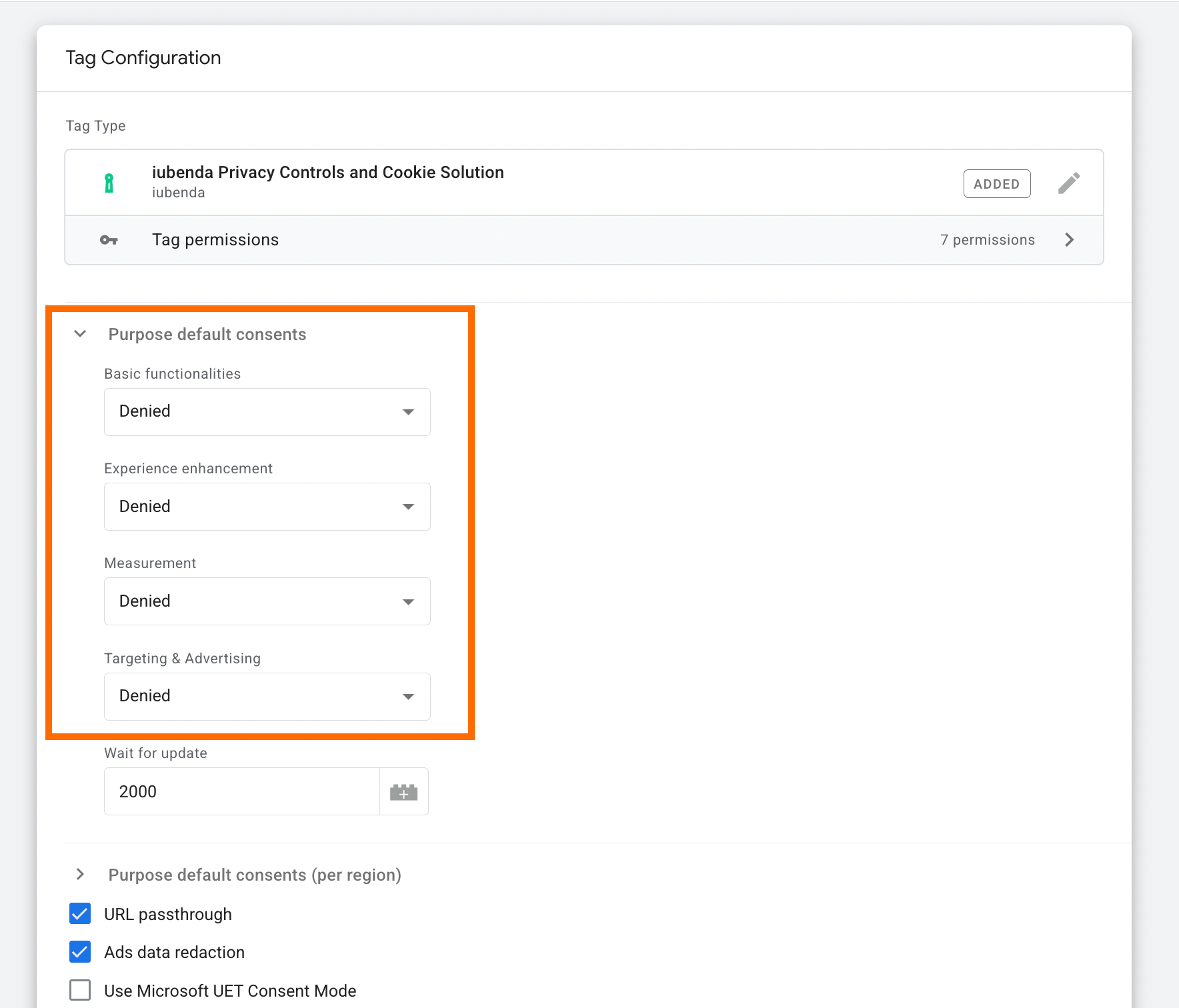
1. Ensure that the Consent Management Platform (CMP) defaults to a denied consent state.
Check the default consents for your CMP (in GTM as shown in the screenshot, or in the CMS app – it depends on your config). As a good practice, set all consent categories to denied before a website visitor has explicitly granted consent.
2. Audit and fix settings for chat, support, and session recording widgets.
The tools that record user sessions and insert chat on the page are a notable area of privacy litigation, in particular CIPA. For example, a review of 58 federal complaints in 2026 found a session-replay vendor in two complaints and a chat widget in one.
To avoid any unlawful data recording and sharing, review the settings, especially if the tool was configured on your website automatically. For example, Clarity provides such an option if you give sufficient access – it can automatically add its configured tag and publish the GTM container version.
However, such a config requires a double-check, since the platform may discard the privacy settings, and its tag will run before the CMP sets a default status.
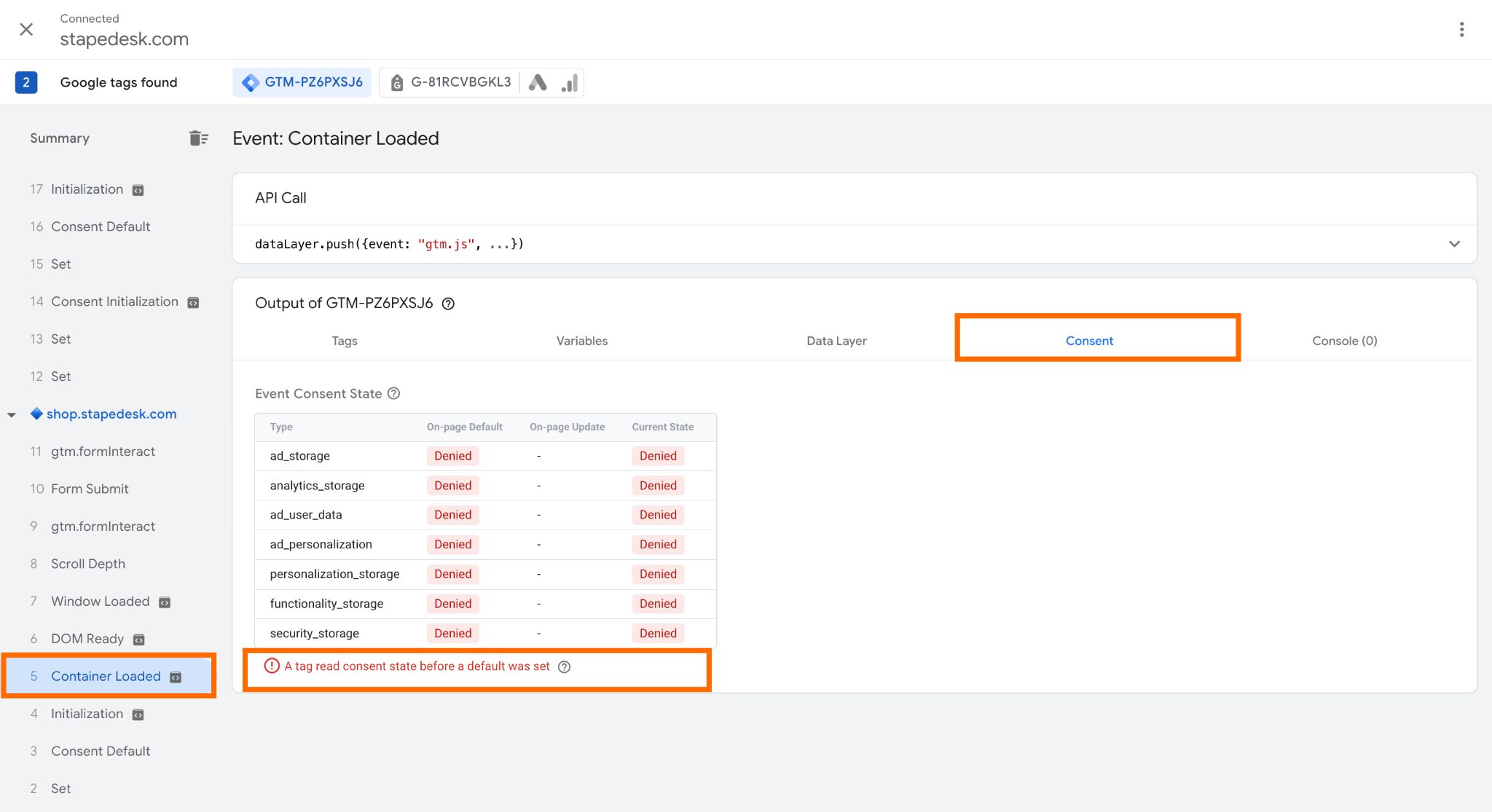
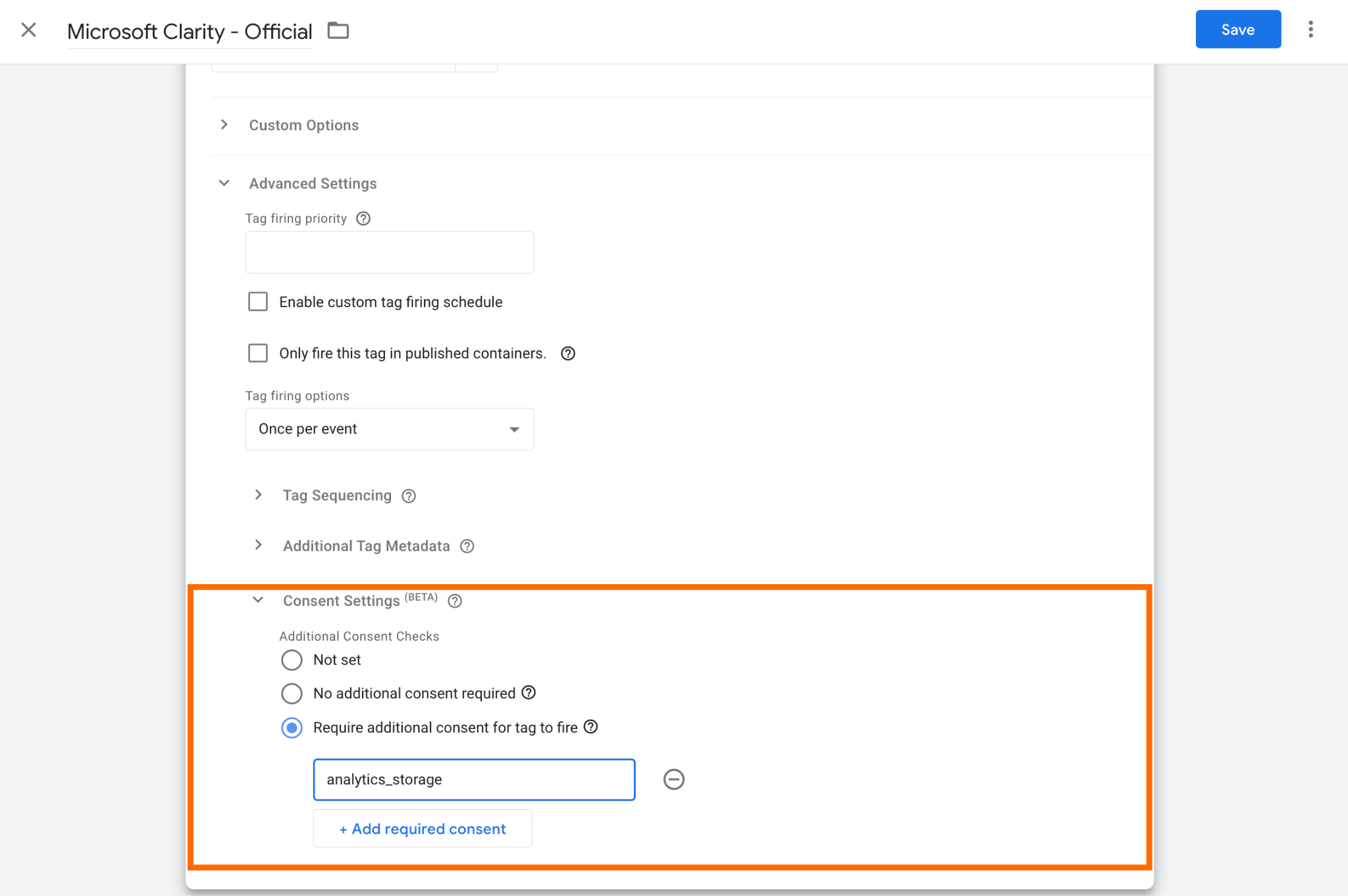
So, ensure that tags run only after sufficient consent is provided. In the tag, extend the Consent Settings section and add a corresponding consent type required for firing it.
Be sure to check all non-Google and custom HTML tags and choose the required purpose. Check the complete list of consent types in Google's documentation.
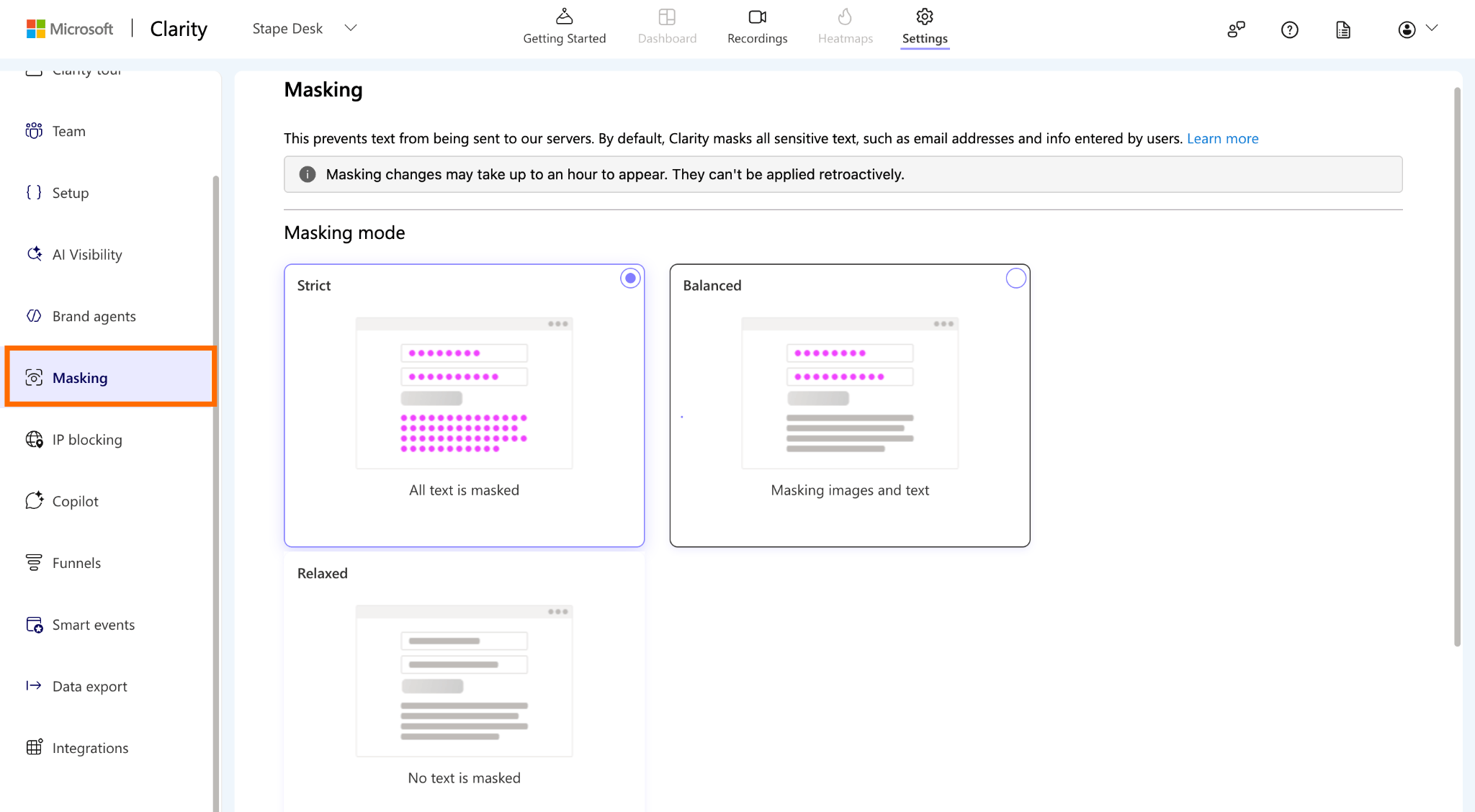
Also, ensure that sensitive data will be masked as strictly as the platform allows. In this way, you can prevent text from reaching the platform servers. Please refer to the specific tools documentation for detailed guidelines.
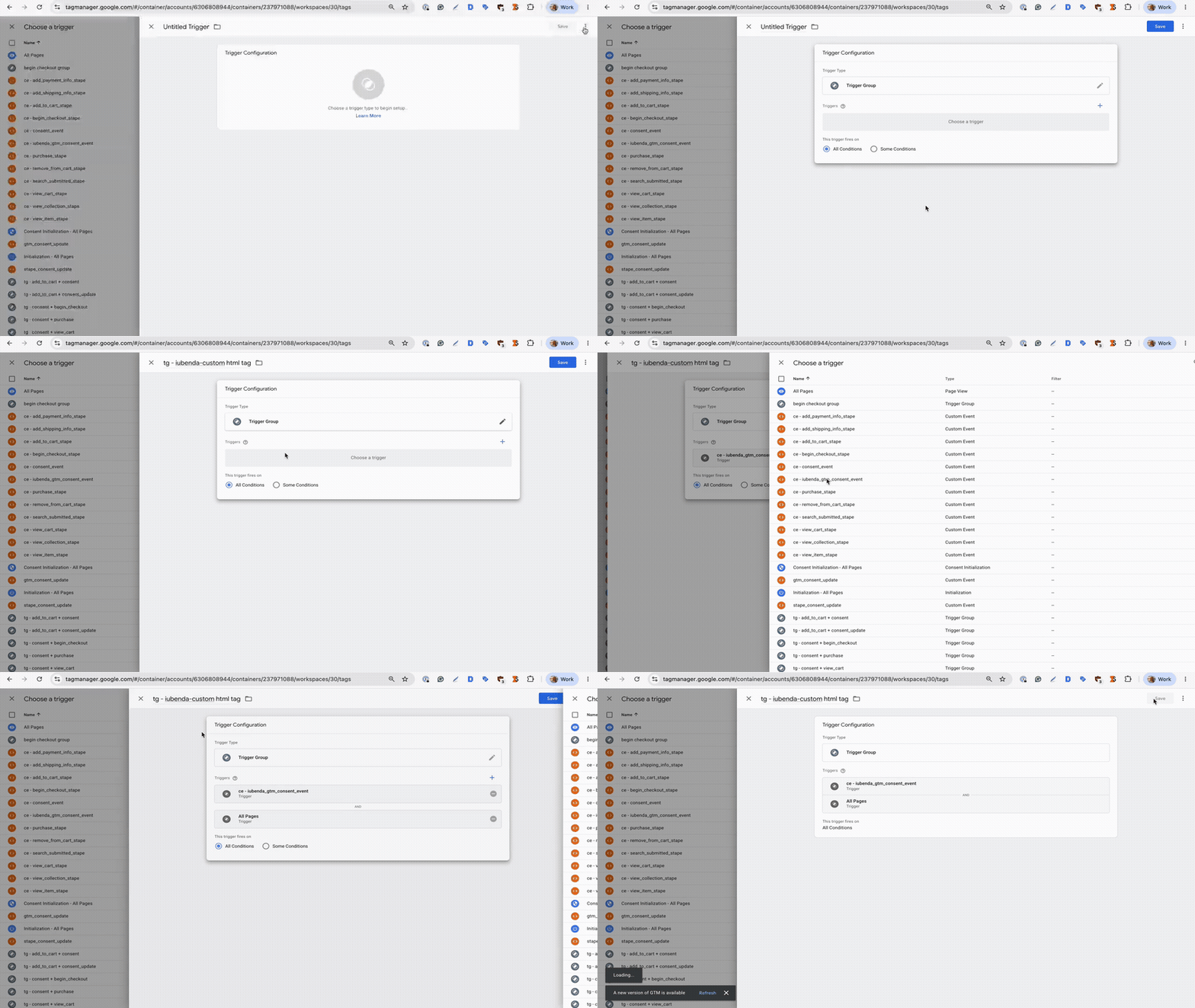
Add a trigger group for such tags. You should have a few triggers for the tag – one for a consent status check and another for firing the tag after the event is triggered.
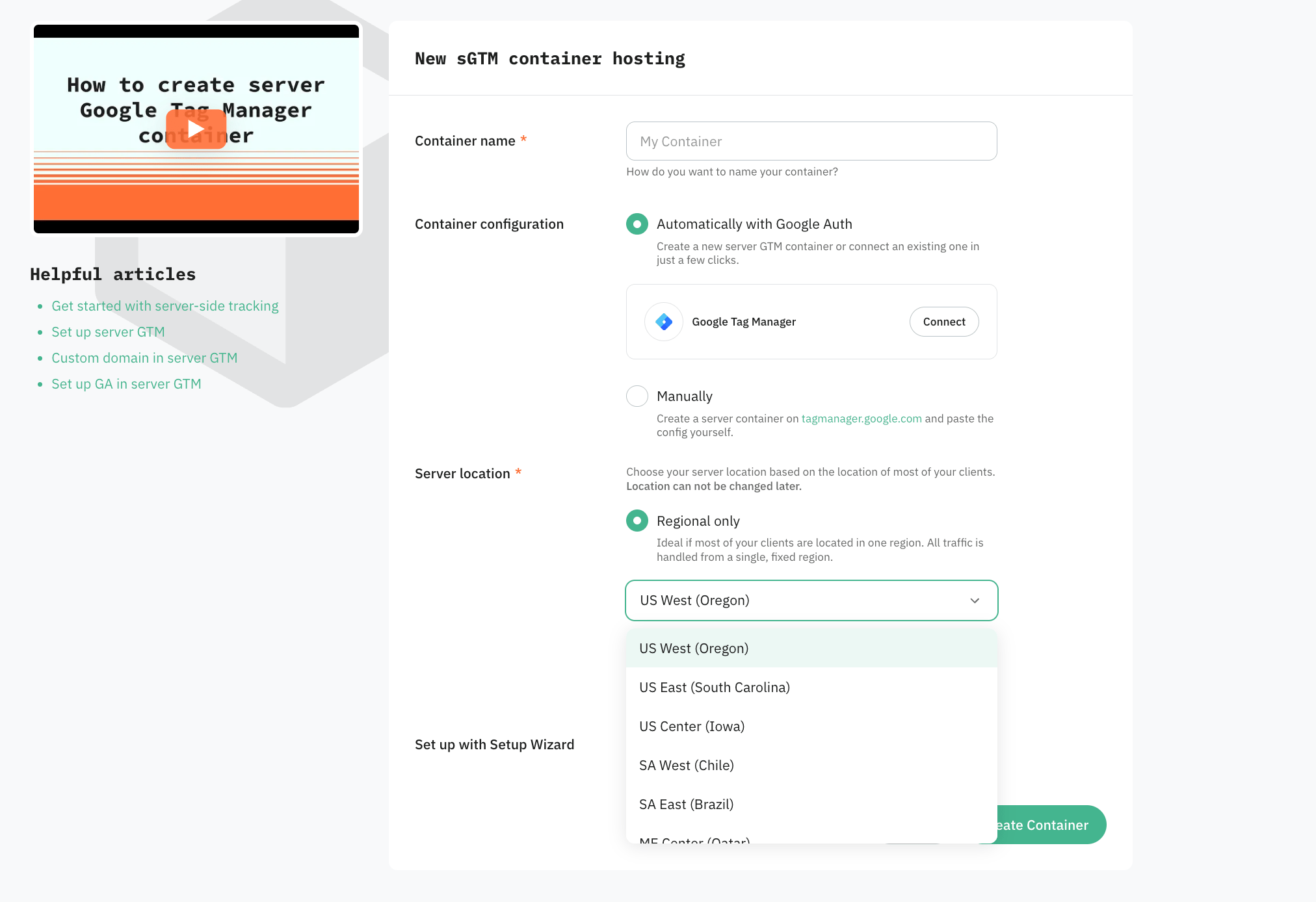
3. Choose a compliant server location for server-side tracking.
When hosting the server, be sure to choose an appropriate server location. Pick the server location based on your audience's geography.
Stape offers server locations across multiple regions worldwide.
4. Consider extra anonymization for sensitive data.
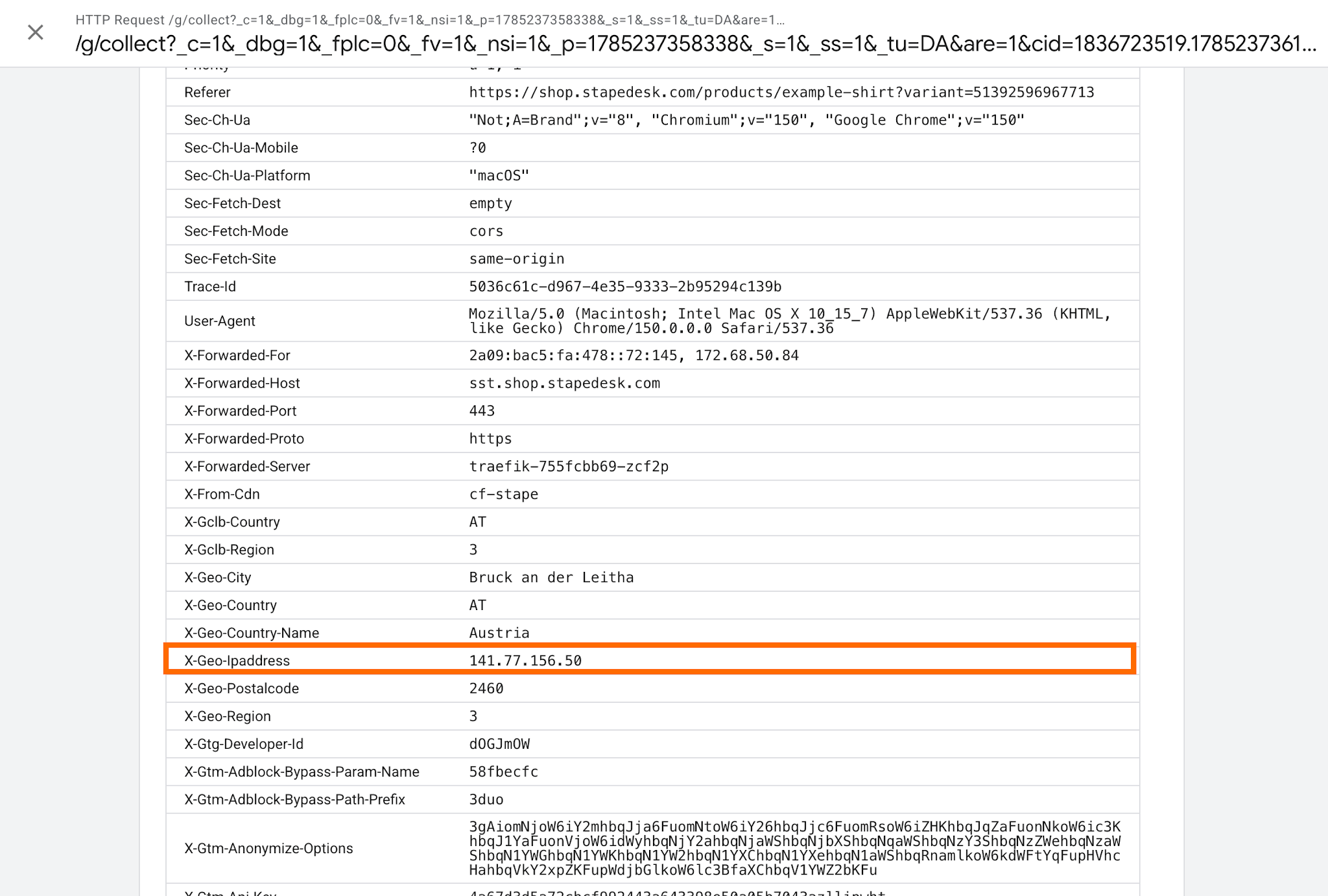
Some tools have their own data anonymization mechanism. For example, GA4 automatically anonymizes IP addresses before storing them. However, for organizations with stricter privacy requirements, this default behavior may not be sufficient.
With sGTM, you can add another layer of privacy – before sending data to GA4, the visitor's original IP address might be replaced. This approach is especially worth considering for websites that process sensitive information, such as healthcare, financial services, insurance, or other high-risk user journeys.
For a step-by-step implementation guide, check Stape's article on GA4 IP anonymization.
5. Always test your setup before publishing changes.
The most convenient way to check the configuration before it goes live is using GTM Preview.
For easier navigation within the GTM Debug window, install a free Stape GTM Helper Chrome extension.

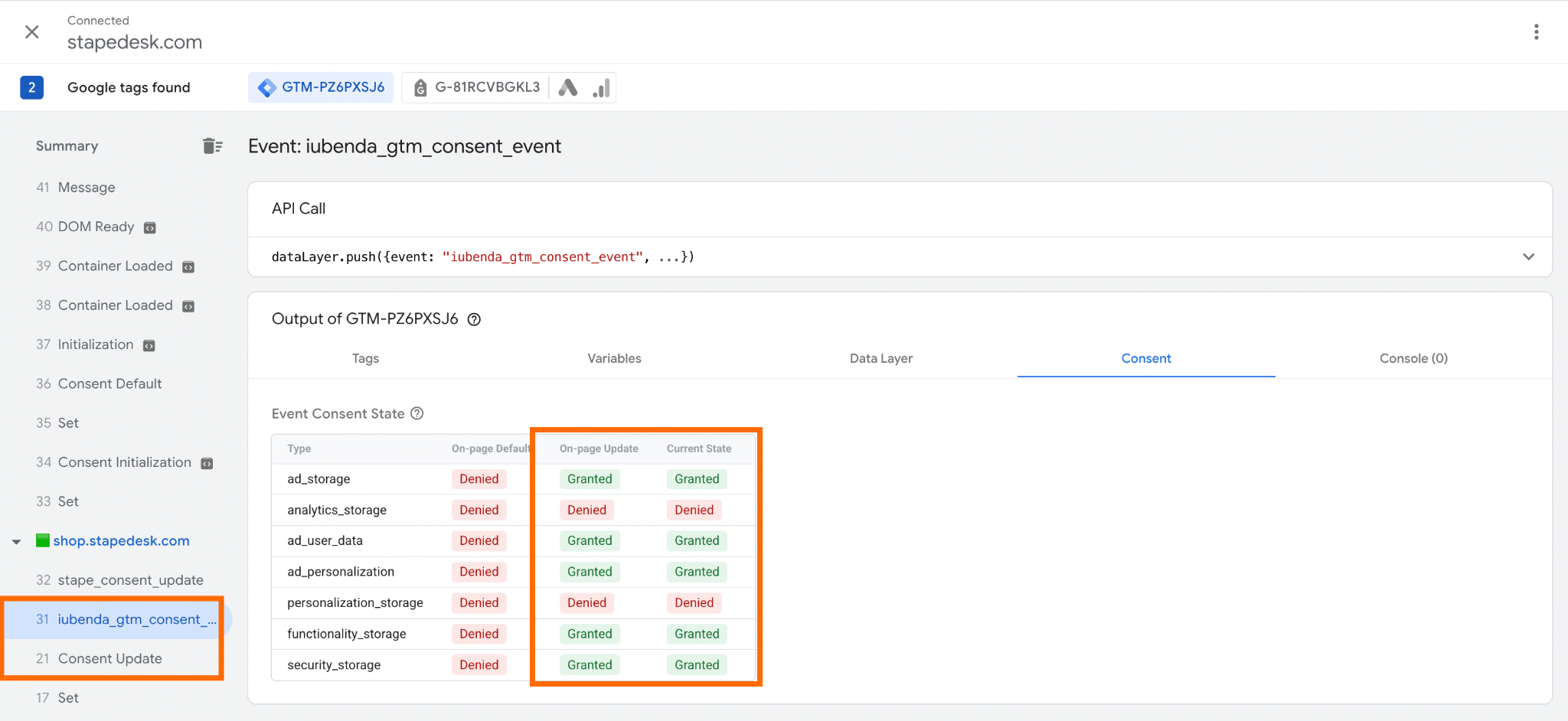
Here are some of the key signs that will point to a correct CMP implementation:
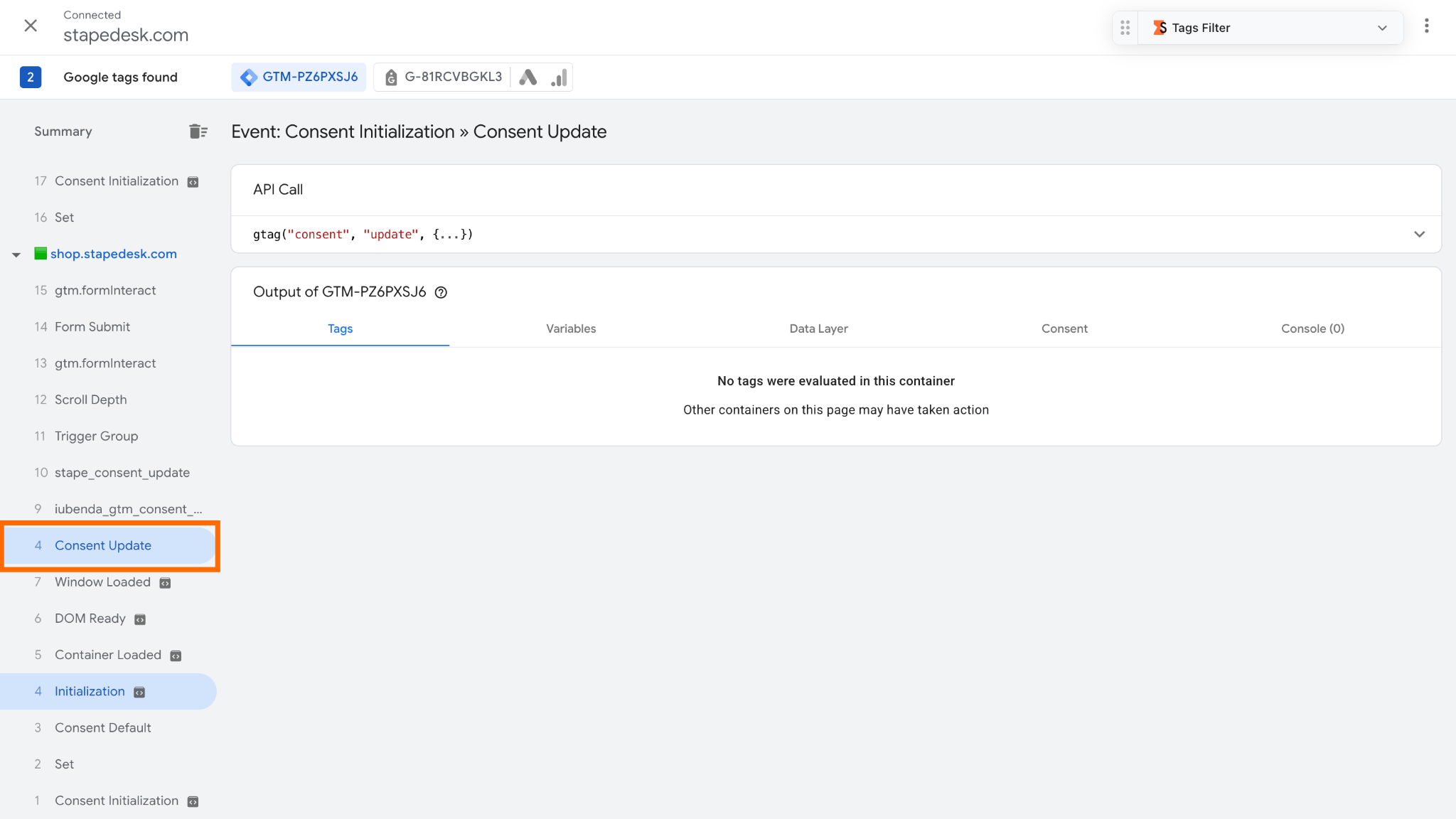
✅ You should see the Consent Update event fire before any other events configured in the container, including page views and clicks. It confirms that the consent state is initialized before any tracking tags execute.
✅ The event that your CMP is pushing must fire after the Consent Update event.
Open the CMP event and go to the Consent tab. Verify that:
- Default statuses (first column) are set to Denied.
- On-page Update and Current State (second and third columns) reflect the consent statuses selected by you through the on-page consent banner.
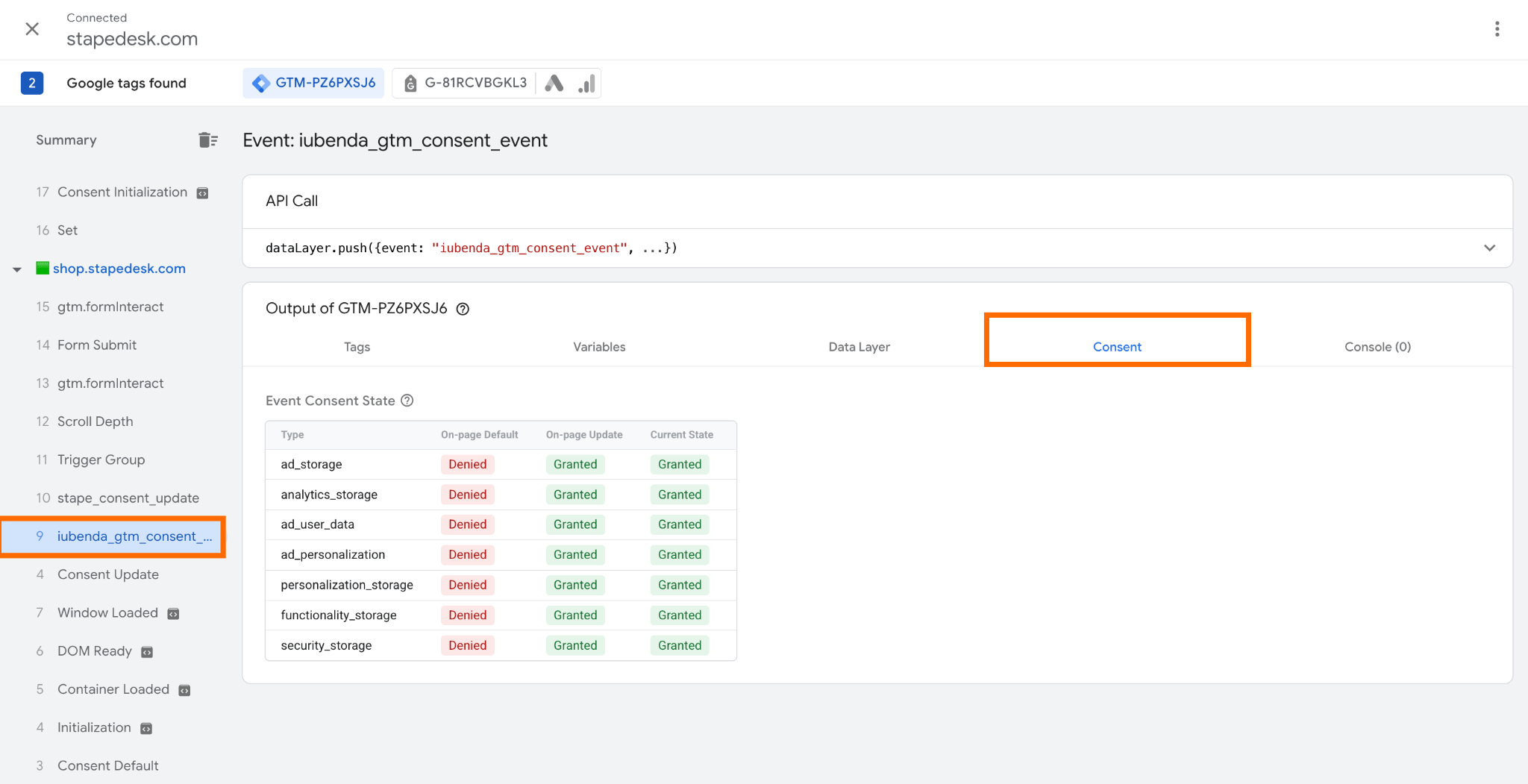
✅ If you update your consent preferences in the banner (for example, by declining certain cookies), the Consent Update event should fire again, and the corresponding columns in the event's Consent tab must reflect the current status.
✅ Test key publisher scenarios under different consent states
Repeat the tests across the key user journeys on your website. Use different consent states, such as before a choice is made, after accepting all cookies, and after rejecting or selectively accepting categories.
It's worth paying particular attention to the following scenarios:
- Article view. Open an article and check which page-view and engagement events fire, whether full URLs or query parameters are transmitted, and which third-party platforms receive the data.
- On-site search. Type a query in the search bar and inspect the events triggered and network requests.
- Newsletter signup. Submit the signup form in a test environment and check which events fire and whether email addresses, names, or other contact details are sent to third-party platforms.
- Paid subscription. Walk through the subscription flow, including the conversion or purchase confirmation step. Check which conversion and revenue parameters are sent and whether sensitive information is included in the event payload.
- Video playback. Start a video and interact with its controls. Check whether play, pause, completion, and engagement events are sent. Review whether content metadata or user identifiers are shared with third parties.
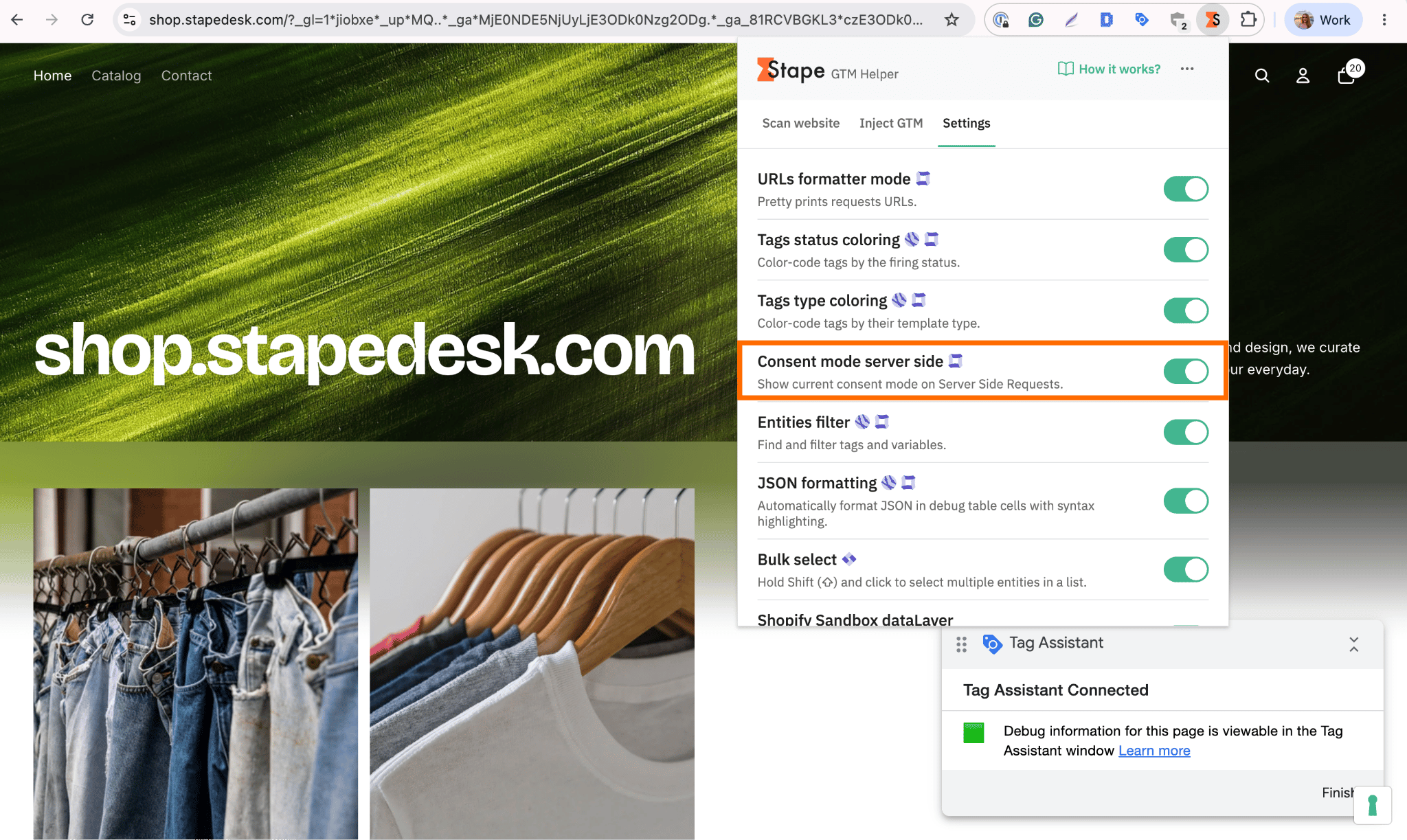
✅ Verify that the consent status is correctly passed to the server GTM container.
To do this, enable the Consent mode server-side toggle in the Stape GTM Helper (the consent status isn't reflected in the server GTM by default).
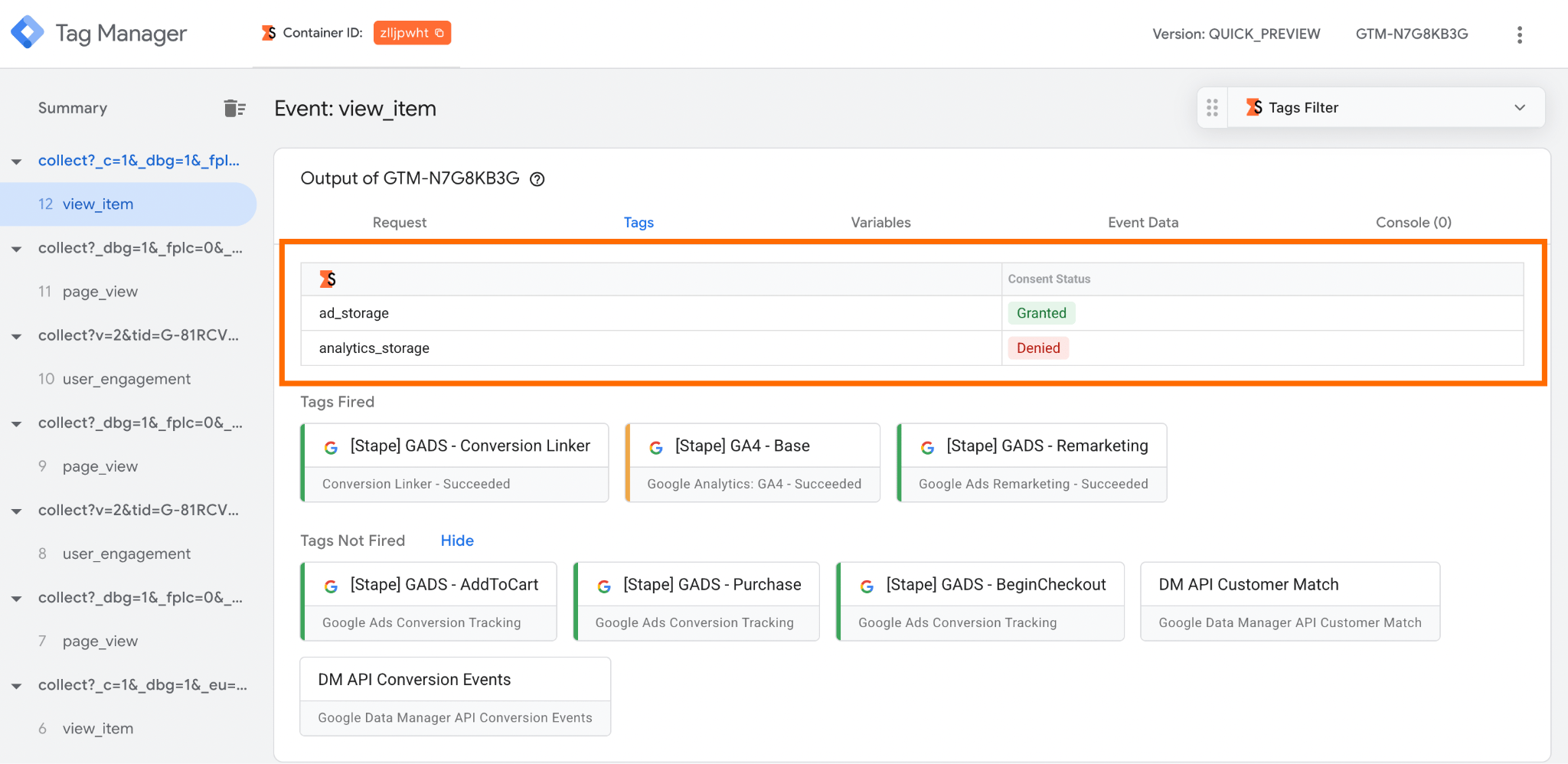
Next, open the server-side GTM preview window and select the most recent event. Check that the consent statuses for ad_storage and analytics_storage match those shown in the web GTM preview.
Conclusion
Even with California's SB 690, which limits some website-tracking lawsuits, CIPA-related website-tracking litigation remains an important consideration for publishers. While the law narrows one category of private claims, it does not eliminate the need to comply with other privacy requirements.
In this context, server-side tracking can support your efforts to comply with data regulations. But it is not a substitute for reliable consent management infrastructure. Instead, server-side tracking solutions must be used as an additional layer for reviewing, filtering, and anonymizing data before it reaches third-party platforms.
The goal is to build a tracking setup that supports business decisions without collecting or sharing more information than necessary. Regular testing, transparent data practices, and properly configured tracking infrastructure can help you comply with privacy regulations and collect data required for making business decisions.
Want to start on the server side?
Try for freeRecommended for you
Oct 5, 2026
Blog
How to protect your data from loss and leakage
Protect your data from loss and leakage with server-side tracking. Filter, validate, and control what reaches analytics and ad platforms.
Mar 20, 2026

Comments