How to protect your data from loss and leakage

Maryna Semidubarska
AuthorKey takeaways
Data loss and data leakage sound similar, but they are not the same problem. One is about data becoming incomplete, corrupted, deleted, or missing. The other is about data reaching a person, tool, or platform that should not receive it. If you work with analytics, ad platforms, CRM data, or customer identifiers, you need protection on both sides.
What is data loss?
Data loss means information becomes unavailable, incomplete, corrupted, deleted, or never reaches the system that needs it. In security work, this can happen because of human error, hardware failure, broken permissions, or bad storage practices. In tracking, data loss also happens when tags fail, browser restrictions block requests, identifiers disappear, or events are not passed correctly from one system to another.
What is data leakage?
Data leakage means sensitive information leaves its safe place and becomes visible to someone or something that should not have it. This can be accidental, such as sending a file to the wrong person, or technical, such as forwarding raw email addresses, phone numbers, full URLs, or login-related details to ad or analytics vendors.
Why protect data?
Protecting data protects revenue, compliance, customer trust, and decision-making. IBM reports that the average global cost of a data breach reached USD 4.88 million in 2024. Verizon’s 2025 DBIR analyzed 22,052 security incidents and 12,195 confirmed data breaches, which shows how common and serious the problem is. For marketers, the impact is also practical: if the data in GA4, Meta, or Google Ads is incomplete or overshared, reporting becomes unstable and optimization suffers.
Types and causes of data loss and leakage
Data loss and leakage come from a small number of repeated patterns:
- Human error, such as deleting a file, exporting the wrong report, or copying data into the wrong tool.
- Malware and ransomware, which can encrypt, destroy, or steal business data.
- Misconfigurations, such as open cloud storage, weak access controls, or unsafe sharing settings.
- Stolen credentials and phishing, which let attackers access systems that look legitimate from the inside.
- Insider misuse, where staff or contractors move data they should not move.
- Bad tracking setup, where tags break, cross-domain journeys lose identifiers, consent logic is wrong, or purchase events never arrive.
- Oversharing to vendors, where more data than needed is sent to external tools. This is where a clear Personally Identifiable Information (PII) plan becomes important.
How can data loss impact business?
The first impact is financial. Breaches are expensive to investigate, fix, report, and recover from. The second impact is operational. Teams lose time, reports break, and campaign decisions move in the wrong direction. The third impact is reputational. Customers do not like brands that lose their data or send it where it does not belong.
In tracking, the damage can stay hidden for weeks. A brand may think a campaign is weak when the real problem is missing conversions or broken attribution. Stape case studies show this clearly. BlueTree reported 15% less data loss after server-side tracking implementation. Another Stape client estimated that nearly 30% of data had been affected by tracking prevention before the server-side setup was added. These are not only reporting issues. They change budget allocation and campaign learning.
30% less data loss for a Swiss fresh pet food brand | Sementa
- Challenge: a custom Wix eCommerce setup rendered standard plugins ineffective, resulting in unreliable analytics and an estimated data loss of nearly 30% due to browser restrictions.
- Solution: a bespoke server-side tracking setup using Stape's Custom Loader and Cookie Keeper to guarantee precise data collection.
- Results: the implementation recovered the lost data signals, leading to a massive 86% reduction in Meta Ads cost per purchase within just one month.
Data loss and leakage in tracking systems
Tracking systems lose data when browser-side requests do not survive the journey. This happens with ad blockers, privacy restrictions, missing cookies, cross-domain breaks, redirects, broken data layers, or missing event IDs. Understanding GTM server side vs client side tracking is key here, since the server layer is far less exposed to these browser-level failures.
Tracking systems leak data when they send too much information to third parties. Examples include raw form values, full query strings, internal IDs tied to a person, or direct identifiers like name, phone, email, address, IP, login details, or health-related fields. This is why data minimization matters. If a field is not needed for analytics or ad measurement, it should not leave your stack.
A second issue is bad input quality. If event names are wrong, values are missing, or required formats are broken, the data can still arrive but remain useless. This is why data validation should happen before data is stored, analyzed, or sent onward.
How to prevent data loss and leakage with server-side tracking
Server-side tracking helps because it adds a control layer between the website and the destination platform. It does not mean all data starts on the server. The tracking still starts in the browser. The difference is that the request can go to a server Google Tag Manager container or a dedicated Gateway first, depending on how hands-on you want to be. Inside that server layer, you can decide what is allowed to leave, what must be removed, and what needs validation before forwarding.
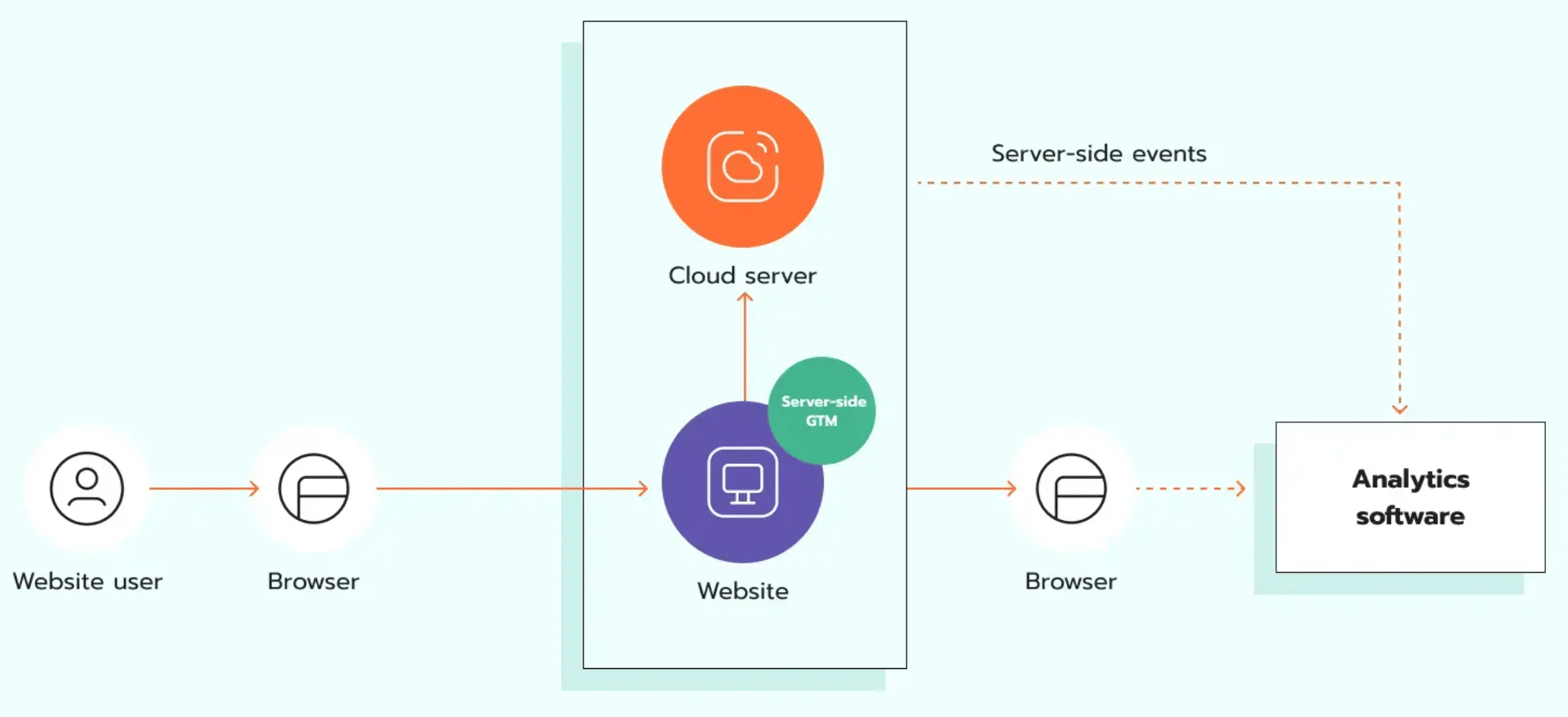
A good flow starts with data mapping:
First, define what events matter and what data each event truly needs.
Second, list the destination platforms.
Third, review which fields are sensitive.
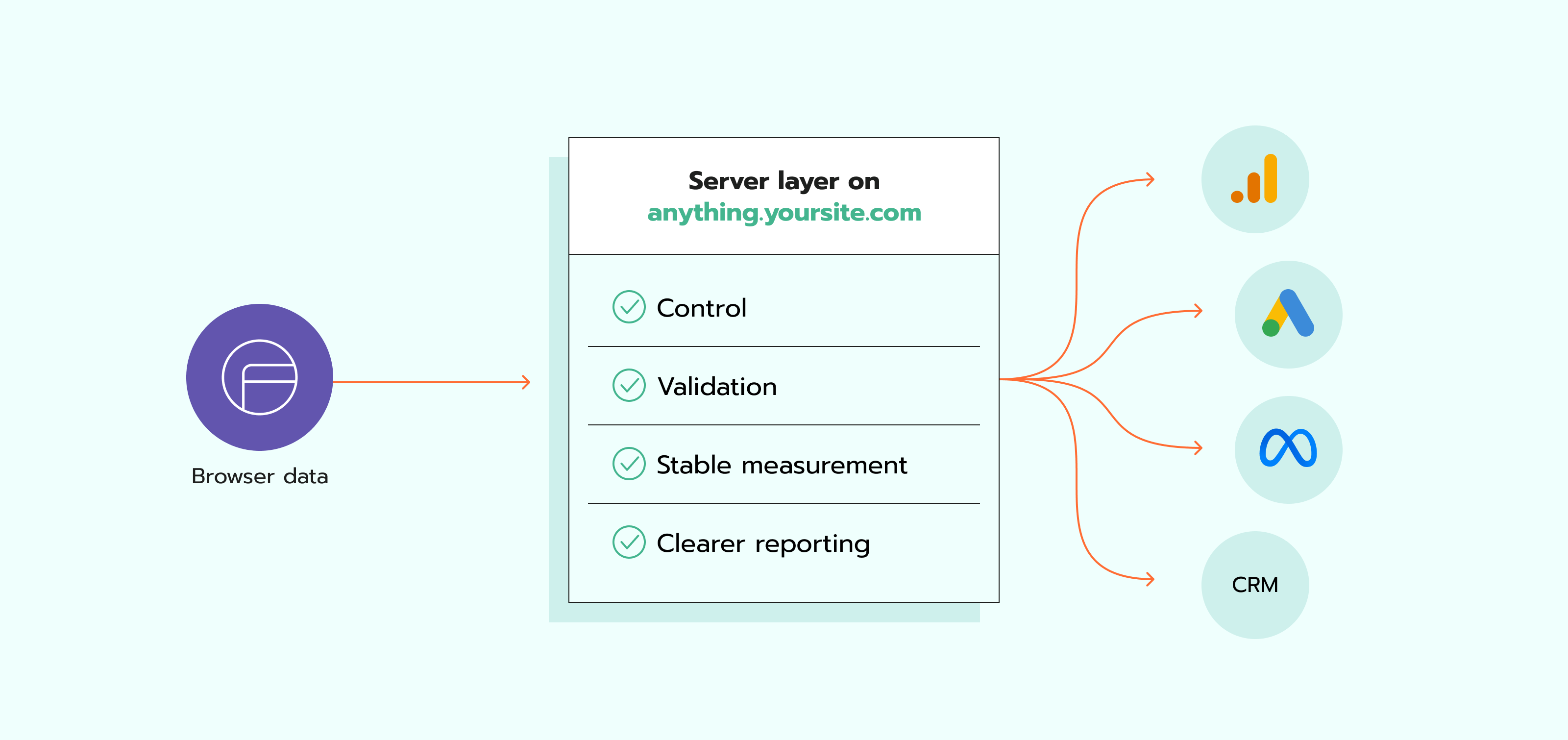
Fourth, send web events to a server endpoint on a cloud server, for example, anything.yoursite.com. Depending on your infrastructure, this can involve a pub sub push subscription to reliably queue and deliver events to your server container.
Fifth, validate the request, remove or hash sensitive fields, apply consent rules, add event IDs for deduplication, and then forward only the approved data. This is also the right moment to connect backend data, such as order confirmation or CRM status, when there is a real business reason and a legal basis to do so.
This server layer is also a place for quality control. You can reject malformed events, block unexpected parameters, standardize field names, and keep logs for troubleshooting. That is closely connected to how to improve data quality and integrity, because secure data is not only hidden data. It is also complete, valid, and consistent data.
After that, you still need testing. Check server requests, compare event structure, review consent behavior, and inspect what is sent to each vendor. In Google Tag Manager’s preview and debug mode, you can confirm that the request contains only the fields you want and that user data is hashed before it is sent. After launch, ongoing monitoring still matters. You need to watch event flow, consent behavior, and the data sent to each vendor. Monitoring by Stape is built for this kind of risk.
Benefits of server-side tracking for data security
The biggest security benefit is control. Instead of many browser scripts sending data out on their own, you get one central layer to inspect and manage what goes where. That makes it easier to enforce data minimization, filter PII, and keep vendor payloads aligned with your policy and legal requirements.
The second benefit is validation. Server-side tracking gives you one place to check formats, required fields, consent state, and event structure before the data reaches GA4, Meta, Google Ads, or a CRM. This lowers the chance of silent reporting errors and bad records. It also supports stronger customer data management with server-side tracking, because storage, routing, and processing become easier to govern.
The third benefit is a more stable measurement. A server layer gives you more control over how events are checked and sent before they reach GA4, Meta, Google Ads, or a CRM. This can make reporting more consistent across tools and reduce gaps caused by browser issues or setup changes on the site.
The fourth benefit is clearer reporting across tools. When event delivery and identifiers are handled more carefully, analytics and ad platforms receive more complete data. That helps with attribution, conversion counting, and marketing analysis. It also supports digital marketing analytics, because analysis only works when the collected data is complete and consistent.
Still, server-side tracking is not a full Data loss prevention (DLP) platform. Server-side tracking helps protect marketing and analytics data flows. But it does not replace enterprise DLP, endpoint security, access control, backups, or incident response. You need all of those layers together.
Other data loss prevention solutions
A full protection program needs more than one tool.
Start with data classification. You need to know what is sensitive, where it is stored, and who can access it. Then apply least-privilege access, MFA, encryption in transit and at rest, and clear retention and deletion rules. ICO and NCSC both stress principles like minimization, accuracy, security, and protecting data at rest, in transit, and at the end of life.
Backups are also non-negotiable. CISA recommends offline, encrypted backups and regular testing of backup integrity and availability. This is what saves you when ransomware, accidental deletion, or system failure hits.
Training matters too. Many leaks happen because a person exports the wrong file, copies data into the wrong place, or trusts a phishing email. Clear rules, short approval paths, and regular reviews cut that risk a lot.
For marketing teams, an extra layer is vendor control. Review what each ad, analytics, CRM, or support tool receives. Turn off fields that are not required, store logs, and use allowlists. And review payloads after every site change. This is one of the easiest ways to prevent data leakage. For Shopify stores, a Shopify Flow webhook trigger can also be reviewed as part of this vendor audit, since it's a common source of outbound data.
Best data loss prevention tools
There is no one best tool for every company. The right choice depends on your stack, your compliance needs, and where the highest risk sits.
- Microsoft Purview DLP. A good choice for companies using Microsoft 365. It covers apps, devices, and even unmanaged AI apps, with policy-based controls across the Microsoft environment.
- Google Sensitive Data Protection. A good fit when you need discovery, masking, tokenization, de-identification, and API-based inspection in Google Cloud or custom workloads.
- Symantec DLP by Broadcom. Known for enterprise discovery, monitoring, and compliance support across many regulated use cases.
- Forcepoint DLP. Useful when you want one policy layer across data at rest, in motion, and in use, including web, email, SaaS uploads, and endpoints.
- Trellix DLP. Focused on broad visibility and controls from endpoint to cloud, with real-time policy enforcement and reporting.
If your main concern is analytics and ad platform data, pair one of these DLP tools with server-side tracking. DLP protects a wide company environment. Server-side tracking protects the measurement layer and gives you control over what marketing data is passed onward.
Case studies
Peak Metrics launched a 10-day test with 7,032,096 requests, where server-side tracking recovered 20.71% of requests affected by tracking prevention. For purchase events, recovery from tracking prevention reached 30.67%. This shows how a server layer can help keep more conversion data in the reporting flow.
The ROI Assist case study shows the same issue from another side. Their client had a 30% conversion data gap in Google Ads and GA4. After moving to server-side tracking on Stape, tracking accuracy in Google Ads and GA4 reached 95%. This gave them a much clearer view of performance and helped them work with more complete reporting data.
Jespers Planteskole had tracking accuracy below 80%. After sending order data to GA4 and Meta through a server Google Tag Manager container, the brand reported 97% to 98% of revenue tracked. The setup also filtered internal traffic at the server level and used self-hosted scripts to support GDPR requirements.
Together, these cases show how server-side tracking can reduce missing data and make reporting more reliable.
FAQs
What is the DLP process?
The DLP process has five parts. First, discover and classify sensitive data. Second, define rules for who can access, move, or share it. Third, monitor data in use, in motion, and at rest. Fourth, alert, block, mask, or encrypt when a rule is broken. Fifth, review the incidents and improve the policies.
What are the essential 9 rules of data loss prevention?
There is no single universal official list called “the essential 9.” A practical nine-rule checklist looks like this.
- Know what data you have.
- Classify sensitive data.
- Limit access by role.
- Use multi-factor authentication.
- Encrypt data at rest and in transit.
- Validate and minimize what leaves each system.
- Keep offline, encrypted, tested backups.
- Train staff and review vendor access.
- Monitor logs and update policies after every incident or major change.
What data can be stolen/leaked?
Any data with business value or personal value can be stolen or leaked. This includes names, email addresses, phone numbers, postal addresses, payment data, health data, login credentials, IP addresses, customer IDs, contracts, pricing files, source code, CRM records, and analytics identifiers when they can be tied back to a person.
Overall, preventing data loss and leakage is about control. You need to know what data exists, who should see it, where it travels, and what must happen before it leaves your environment. Server-side tracking fits into that plan very well because it gives marketing and analytics teams a place to validate, filter, and route data with more control.

Comments