Oct 1, 2026
sGTM vs Gateways: what to choose and why
Written by
Maryna Semidubarska
Updated Sep 11, 2026 comments
Key takeaways:
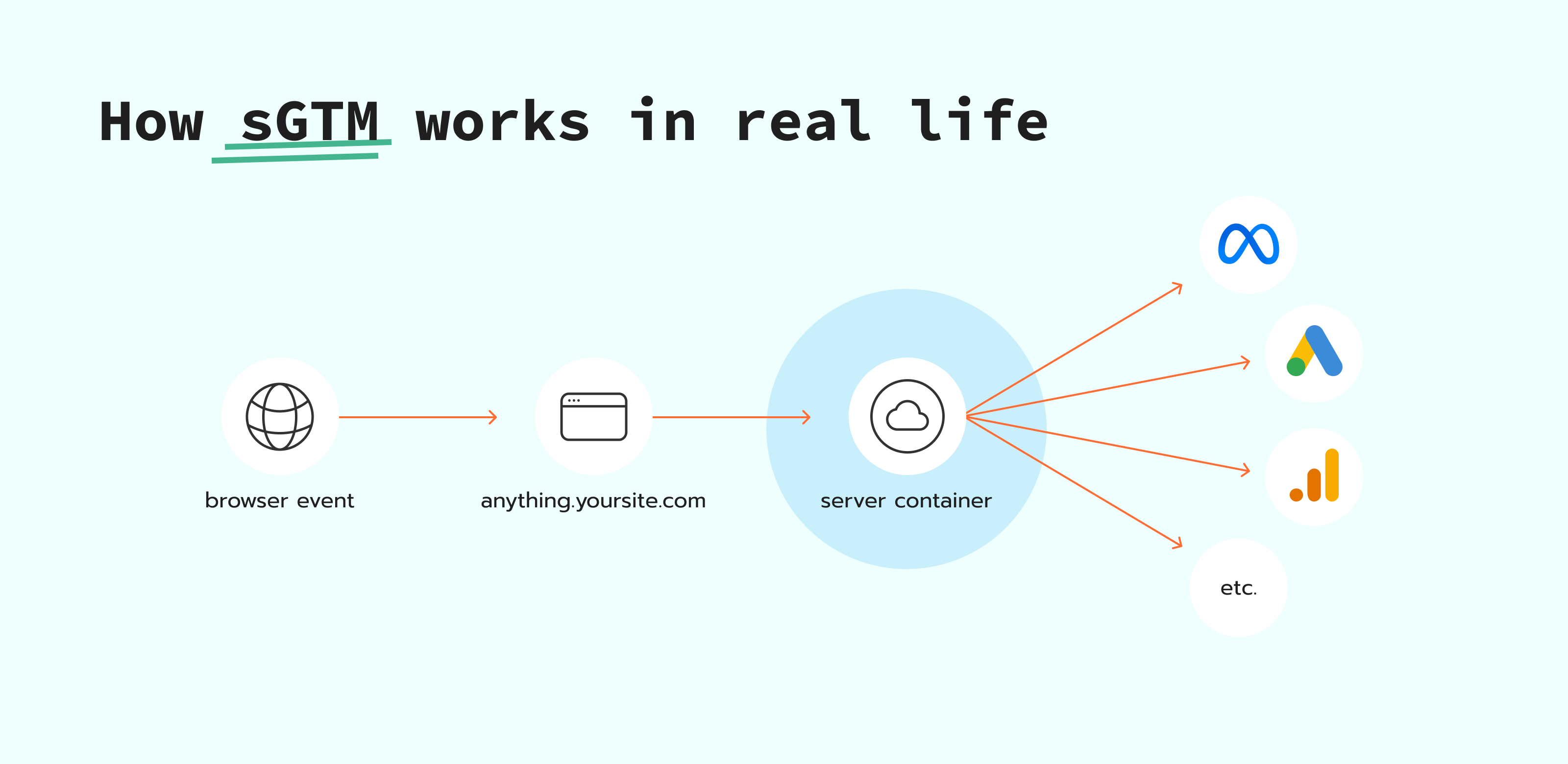
- Server Google Tag Manager is the server-side version of Google Tag Manager. It uses a container that runs on a cloud server. Your web container sends HTTP requests to the server container endpoint (for example, anything.yoursite.com). The server container then forwards event data to platforms you configured, such as GA4, Google Ads, Meta, and others.
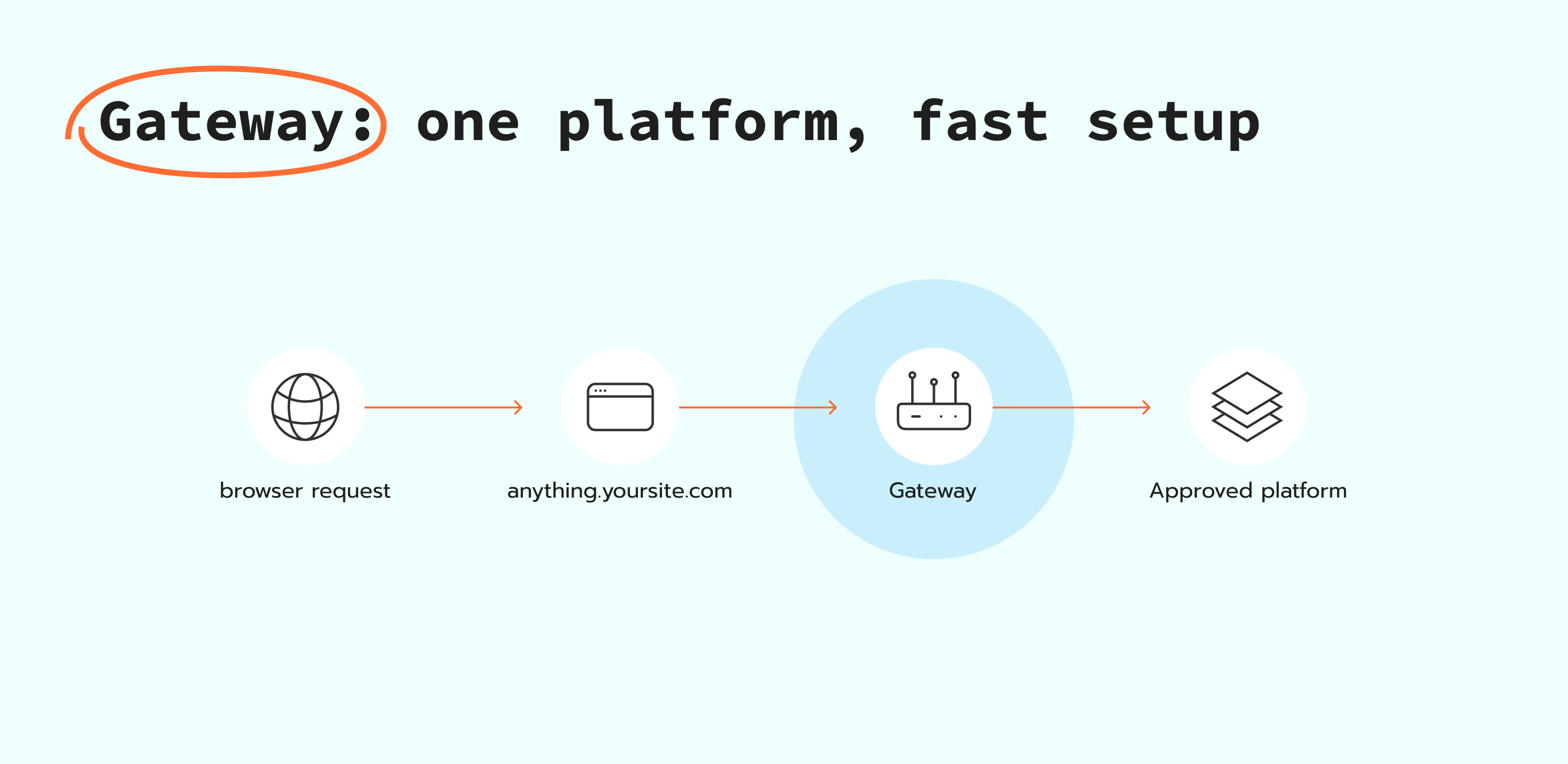
- A gateway is a dedicated proxy between your site and one platform's tracking endpoint. Your site routes pixel hits to a first-party subdomain and then forwards those hits to the platform's servers.
- Stape offers hosting for both solutions. You can host a server Google Tag Manager container or use dedicated gateways like Stape Gateway for GA4 and Google Ads, plus gateways for Meta, TikTok, and Snapchat.
You can think of sGTM and gateways as two different levels of control. sGTM gives you a flexible server container where you can route, filter, and change event data before it goes to ad platforms. Gateways are usually focused on one ecosystem or one platform and aim to make setup faster.
In this article we'll define sGTM, explain what gateways are, then compare sGTM with gateway options and learn what Stape provides in each category.
Watch our webinar on: Conversion API Gateway vs. server GTM
If you don't know what's best for your tracking setup, you are welcome to watch Stape's webinar on Conversion API Gateway vs. server GTM: what to use, why and when.
What is sGTM (server-side Google Tag Manager)
sGTM is an advanced tag management solution from Google that processes tracking on a server container. Events still start in the browser, but then the browser sends the request to your server, and the server forwards it to your ad and analytics platforms. Managing a cloud infrastructure can be a challenge, so Stape provides sGTM an environment that is ready to deploy, scale, and keep it running without handling servers yourself.
This setup gives you benefits that make your data and marketing better, such as more control over tracking before it reaches your ad and analytics tools: you can filter events, remove extra parameters, and apply consent rules in one place. Platforms will also receive more complete data for attribution and reporting because the tracking flow does not rely only on browser-to-platform requests and so there is no data loss from browser limits and blockers. With server-side setup you can also enrich events with details like order IDs or customer IDs, so attribution and reporting are more consistent.
How it works:
- Events still start in the user's browser.
- Scripts or GTM tags running inside your browser send one request per event to your server container endpoint, often on a custom subdomain like anything.yoursite.com.
- Your server container then creates and sends platform-specific requests to Google Analytics, Google Ads, Meta, and others, based on your setup.
What is a gateway?
A gateway is a server layer between your website and the ad or analytics platform. Instead of the browser sending tracking requests straight to the platform, it sends them to an endpoint on your own domain first (for example, anything.yoursite.com). The gateway then forwards those same requests to the platform, usually by calling the platform's API.
This approach changes the path of the data, not the event itself. The click, page view, or purchase still happens on the website. The browser still triggers the event. The gateway just becomes the route the data uses to reach a platform.
A gateway is focused on one platform or one ecosystem. This setup is often faster than building a full server Google Tag Manager configuration for every destination. It is also a good choice when you want to improve how data reaches one platform, while keeping your overall setup simple. If you later need one place to manage many destinations and more complex logic, a full sGTM setup can give you that.
Stape offers hosted gateways, so you get the gateway layer without deploying and maintaining your own server. You can use Stape Gateway for GA4 and Google Ads, and gateway hosting for Meta Conversions API, TikTok Events API, and Snapchat Conversions API.
Types of gateways
People use "gateway" to mean different things in tracking, depending on the platform or tool. In practice, you will see three common types.
Google tag gateway style
Google Tag Gateway is a Google-owned solution that loads the Google tag from your own domain and routes GA4 and Google Ads measurement requests through your domain first. That means your site loads the tag from your domain and sends measurement events to your domain, and your infrastructure forwards them to Google.
If you want the gateway approach and also have hosting and support included, use Stape Gateway. It routes tracking requests through your domain and supports setups beyond Google when your stack includes other ad platforms.
Conversions API Gateway style
This type of a gateway sends web events from your site to an ad platform through the platform's Conversions API. The setup is done inside the platform interface. You manage the gateway configuration and you are responsible for how tracking works.
Dedicated gateways by Stape
These are gateway products hosted by Stape. They offer seamless integration with major ad platforms, ensuring smooth data flow and easy setup. Also, improve data accuracy by bypassing common issues like ad blockers and browser privacy features. With scalable solutions and expert support, Stape provides a secure, customizable, and reliable tracking setup.
sGTM vs Stape Gateway (GA4 and Google Ads)
Stape Gateway is a dedicated product for GA4 and Google Ads. It works only from the data already sent by web GA4 and/or Google Ads requests. So you keep your web tracking, and the gateway helps you route those Google measurement requests in a first-party way.
A server Google Tag Manager container is broader. It receives incoming requests, processes them, and then you decide what tags fire and where the data goes. That makes it the better base when you need custom routing, filtering, or setups beyond GA4 and Google Ads.
The difference is that Stape Gateway keeps the setup focused on GA4 and Google Ads, and a server Google Tag Manager container gives you one server container where you control how events flow to other platforms.
sGTM vs Google Tag Gateway
Google Tag Gateway (GTG) gives advertisers a way to serve a Google tag or GTM web container from their own domain, helping improve data privacy and recover more measurement signals. This means GTG relabels GA4 and Google Ads requests so they appear to come from your own website instead of Google – but it only changes where the request comes from, and it does not give you the same level of control over the data itself.. It works purely for Google (GA4, Google Ads), so anything else you track – Meta, TikTok, LinkedIn – stays untouched and still runs as third-party.
Server-side GTM works differently: instead of just relabeling requests, it actually processes the data through your own server before sending it anywhere. This means you can adjust, clean up, or route the data to any platform you want – not just Google – giving you far more control than GTG offers.
In short, GTG is a simpler option if your main goal is to improve Google tracking, while server-side GTM is the better choice if you want real control over your data or need to track platforms beyond Google. Interestingly, Google's own most advanced GTG setup actually requires adding a server container anyway – so if you're aiming for full control, setting up server-side tracking directly is usually the more efficient path.
sGTM vs Meta Conversions API Gateway
Meta Conversions API Gateway hosting by Stape gives you a ready gateway environment without a need to deploy and maintain a cloud server. You can set up the gateway in your Stape account and connect it to your Meta dataset.
The gateway uses your existing Meta Pixel web events as the input and forwards them to Meta through Conversions API over a server connection.
The difference with a sGTM is that Meta Conversions API Gateway is built for Meta only and a server Google Tag Manager container is built for routing to multiple platforms from one server container, with custom logic before data is forwarded.
sGTM vs Tiktok Events API Gateway
TikTok Events API Gateway hosting by Stape gives you a hosted gateway, so you do not deploy or maintain a cloud server. It takes the web events your TikTok Pixel sends from the browser and forwards them to TikTok through the Events API over a server connection.
This setup is built for TikTok only. And a server Google Tag Manager container is a more complex setup. It lets you route events to TikTok and other platforms from one server container, and apply custom logic before data is forwarded.
sGTM vs Snapchat CAPI Gateway
Snapchat Conversions API Gateway hosting by Stape is a hosted endpoint for your Snap Pixel events. Your site sends events from the browser to a first-party subdomain (for example, on anything.yoursite.com), and the Gateway relays them to Snapchat through Conversions API.
This setup is built for Snapchat only. It keeps your web tracking on the site, and uses the gateway to send those same events through Conversions API.
A server Google Tag Manager container is the option for multi-platform tracking. It receives one inbound event and routes it to all the destinations based on rules you set.
sGTM vs Meta Signals Gateway
Meta's Signals Gateway works like a control panel for first-party data. It brings together events from sources like Pixels, SDKs, offline uploads, or CRM integrations, then routes that data collected on your cloud server to the destinations you choose, such as Meta and other supported platforms like BigQuery.
Signals Gateway by Stape is Stape's hosted setup for this workflow. Stape provides the ready cloud environment and the interface to connect sources, configure routing, and manage destinations, so you do not have to deploy and maintain the server layer yourself. Signals Gateway still relies on your existing web events, so Meta web tracking needs to be set up and working on the site first.
While Meta's Signals Gateway is built as a central routing layer for your data sources and destinations, sGTM is built around a server Google Tag Manager container.
With sGTM, you set up your own clients and tags in a server container, and then connect each destination from there. With Signals Gateway, you connect sources like Pixel, SDKs, webhooks, or file uploads in one place, then choose where to send that data.
Also, Signals Gateway keeps a lot of the setup inside one product, with built-in steps for common sources and a pipeline layer for filtering and routing. sGTM usually takes more manual setup, but it gives you one place to manage logic for many platforms from the same server container.
Quick comparison: server container tag vs gateway
You can connect each platform in two ways: set up a server Google Tag Manager container and use server-side tags, or use a hosted gateway that forwards your existing web Pixel events to the platform's API.
Meta
| Meta CAPI Gateway | Facebook CAPI tag | |
|---|---|---|
| Free trial period | 7-days ✅ | Freemium plan ✅ |
| Prices start at | $8/month | $17/month |
| Step-by-step guide | How to set up Meta Conversions API Gateway | How to set up Facebook Conversions API tag |
| Stape Gateway | GA4 + Google Ads tags | |
|---|---|---|
| Free trial period | 7-day ✅ | Freemium plan ✅ |
| Prices start at | $8/month | $17/month |
| Step-by-step guide | How to set up Stape Gateway | • How to set up GA4 server-side tracking • Google Ads server-side tracking guide |
TikTok
| TikTok Events API Gateway | TikTok Events API tag | |
|---|---|---|
| Free trial period | 7-day ✅ | Freemium plan ✅ |
| Prices start at | $8/month | $17/month |
| Step-by-step guide | How to set up TikTok Events API Gateway | How to set up TikTok Events API |
Snapchat
| Snapchat CAPI Gateway | Snapchat Conversions API tag | |
|---|---|---|
| Free trial period | 7-day ✅ | Freemium plan ✅ |
| Prices start at | $8/month | $17/month |
| Step-by-step guide | How to set up Snapchat CAPI Gateway | How to set up Snapchat Conversions API |
What should I choose?
After the gateway examples, the choice usually comes down to scope, cost, and how much control you need.
Here are the main characteristics of the Google Tag Manager:
- Scope: several platforms managed from one server container.
- Control: done in one place before data is sent out (filtering, routing, event shaping).
- Logic: different event flows per destination (some events only to GA4, others only to Meta).
- Complexity: more technical to set up and maintain, but easier to extend over time.
- Cost: hosting starts from $17/month (free plan available), and the tier can change when you need more capacity.
Here are the main characteristics of a gateway:
- Scope: one platform or one ecosystem.
- Speed: usually faster to launch than a full server container.
- Input: builds on existing web tracking requests.
- Complexity: lower maintenance and fewer moving parts.
- Cost: dedicated gateways start from $8/month (7-day free trial available). Stape Gateway for GA4 and Google Ads is $10/month per domain.
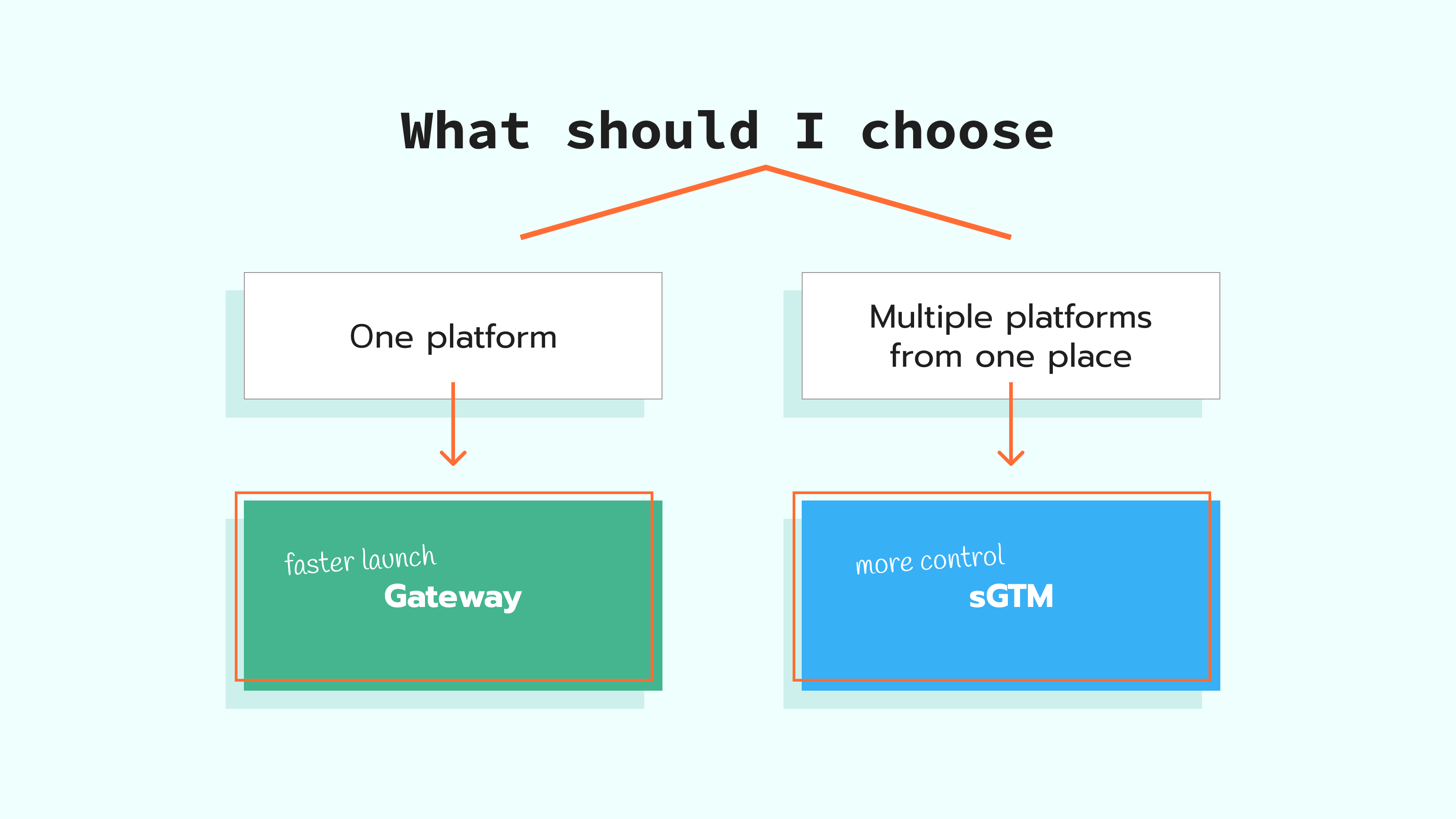
A simple way to decide:
If it is "one platform first," start with that platform's gateway. If it is "multiple platforms from one place," choose sGTM.
Best sGTM tools
⦿ A server container setup and a stable tagging server URL on your own domain. This is the endpoint your web setup sends events to, before the server container forwards them to platforms. Stape's Global Server GTM Hosting includes an easy tagging server URL setup and hosts your server Google Tag Manager container for you.
⦿ Debugging and monitoring:
⦾ Start on the site: use Google Tag Manager's preview and debug mode to confirm the right tag fires and the right event is created in the web container.
• Use sGTM Preview Header if you send requests to the server container from outside web GTM and want to see those requests in the server container preview mode.
⦾ Then check the server step: open the server container preview and confirm the request arrived.
⦾ Make the server preview easier to read with Stape GTM Helper extension for your browser: it formats the request payload, shows platform logos, and highlights tag status so it's faster to spot what worked and what failed.
⦾ Review what the server container receives and sends with Stape Logs: filter by client name, event name, status, and date to find where the flow breaks.
⦾ For one specific event, you can capture the full payload with Logger tag.
⦾ Get alerts when something changes with Monitoring by Stape, like error spikes or drops in event counts.
⦿ Setup Assistant by Stape generates ready GTM templates for web and server containers based on the platforms you select, so you can launch faster with fewer manual steps.
⦿ Multi Domains lets you map several domains (for example, country or language sites) to one server Google Tag Manager container, even though GTM itself allows only one Tagging Server URL per container.
⦿ Custom Loader changes gtm.js and gtag.js loading paths, which can help keep tag loading more reliable under browser limits and blockers.
Conclusion
No matter if you choose a gateway to focus on one platform and reduce setup work, or a server Google Tag Manager container to have more control and use several platforms, you can change the setup later.
You can start with a gateway, keep your web tracking as-is, and switch to a server container when the setup expands.
A very important thing is ownership. Make roles clear in the team: who maintains tags and events on the site, who owns the server container or gateway settings, who checks event quality and deduplication, and who validates changes after each release.
Want to start on the server side?
Try for freeRecommended for you
Blog
Stape Gateway: simplify server-side tracking for GA4 & Google Ads
Simplify GA4 & Google Ads server-side tracking with Stape Gateway. Bypass ad blockers, extend cookies, and enhance data accuracy without complex setups.
Oct 1, 2026

Comments