Subdomain, same-origin, or default? How to pick the right server-side domain
Written by
Manisha Mistry
You got sign-off from a client to set up server-side tracking and you're ready to spin up the server. You spin up your Stape server, and then it comes time to configure the domain. The question is, which domain do you use: Default, Subdomain, or Same-Origin? Worse yet, the client did their research and wants to understand the three domain options, and now they're asking you to explain them.
At MeasureU, where I am the Technical Lead, I am asked time and time again whether someone should set up subdomain or same-origin for their client's server-side setup. Most server-side training or guides dive right into implementation steps. Click the buttons and set up your domain. But the domain decision can directly impact how your tagging server sets cookies and whether Safari users show up as returning or new after 7 days.
Many of us, including myself, default to subdomain – so when Google updated their positioning, it caught my attention:
Image source: Google Tag Manager documentation

But what is same-origin? Why is it recommended? And how can I explain this to my client in a non-technical way?
This blog breaks down the three server-side domain options, so you can understand how each option works, explain them to your client, and make the right call when you need to.
What "domain" actually means in server-side GTM
Before we get into which domain to use, I want to cover the meaning of domain in the context of server-side GTM. Many of us don't fully understand this part when we start with server-side tracking. As I've learned more about request URLs and cookies, and as the privacy landscape has shifted, understanding this has only gotten more important.
How client-side tracking works
The best way to understand tracking on a website is to look under the hood at the Network calls in DevTools. With client-side (browser-side) tracking, when you load the site and check the GA4 collect calls in DevTools → Network, you will notice the domain for the request URL is not the same as the site URL (see image below).
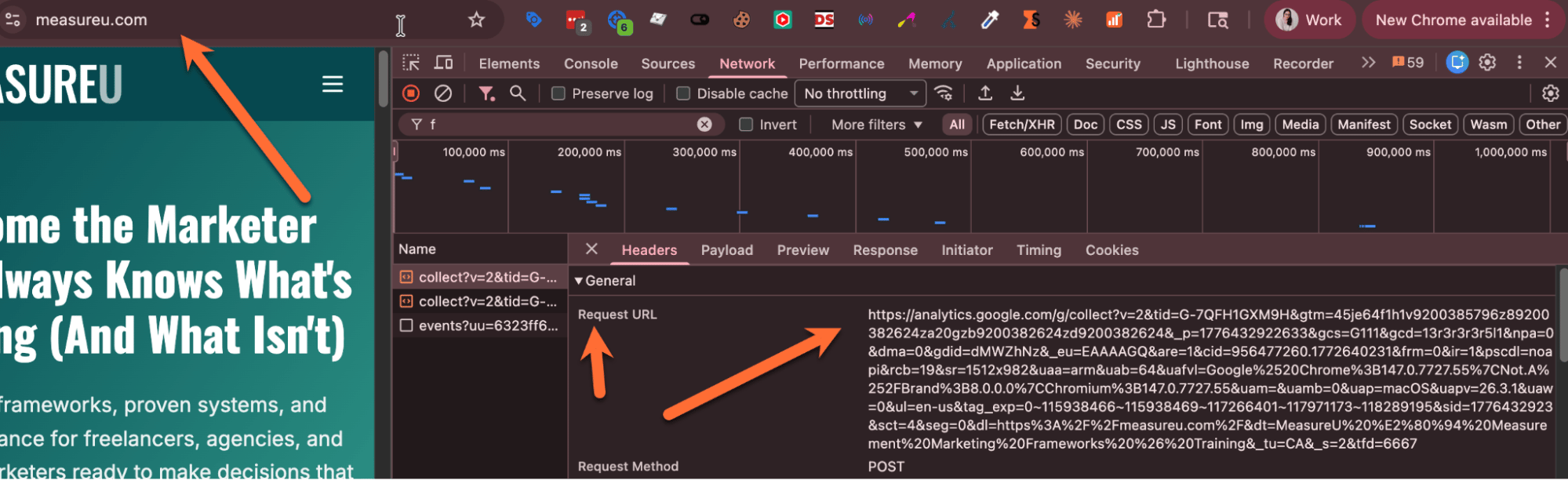
Instead, the request URL domain is a Google domain, usually something like https://analytics.google.com/g/collect?. This is considered a third-party request as the data is going to Google, not MeasureU's domain. This is the true vulnerability of client-side tracking. Specifically, as ad blockers and browser tracking protection become familiar with these common third-party tracking domains like https://analytics.google.com/g/collect?, they have learned to block them. This results in the data never making it to your Google Analytics 4 property.
How server-side tracking is different
Now let's dive into server-side tracking and how it's different and resolves the third-party request concern. For starters, when you set up server-side tracking on a site and look under the hood in DevTools → Network, you will notice the request URLs for your collect calls are no longer Google's domain like https://analytics.google.com/g/collect?. Instead, they are tied to your server domain, such as shop.stape.events, which you select when you set up server-side tracking. This now means your request is a first-party request, as long as your server domain shares an origin with your site, which is exactly the decision we're about to dig into.
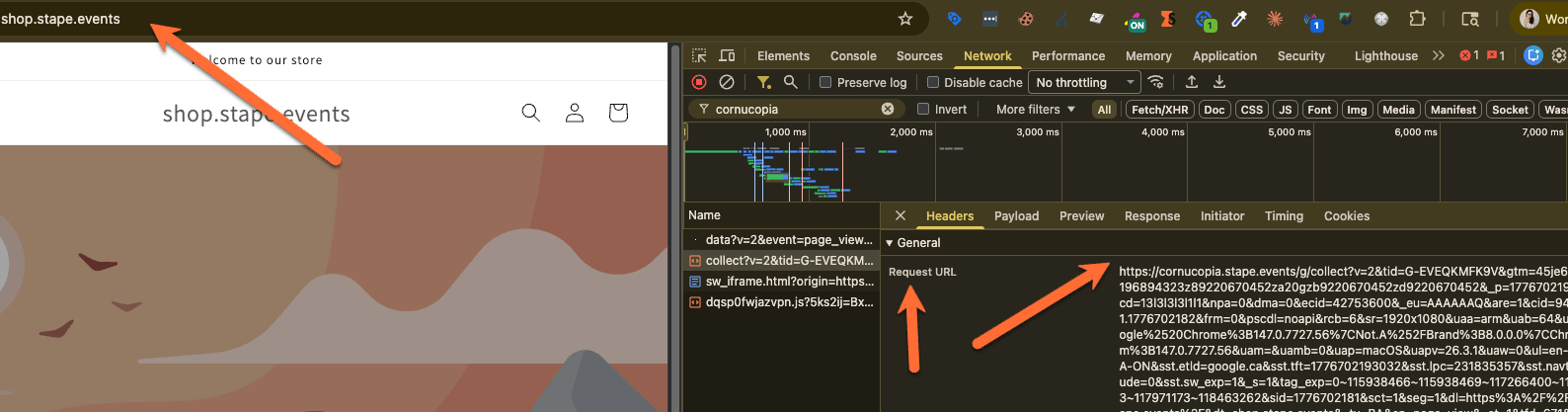
This is one of the many benefits of server-side tracking. When your request URL and site domain share the same root domain, it's less likely (though still possible) that your requests will be blocked by ad blockers or browser tracking protection – resulting in more data captured in your GA4 property. I say less likely as there are a few other things you can do which I won't dive into in this blog, such as enabling Stape's Custom Loader, which helps you get around most ad blockers.
The parts of a domain
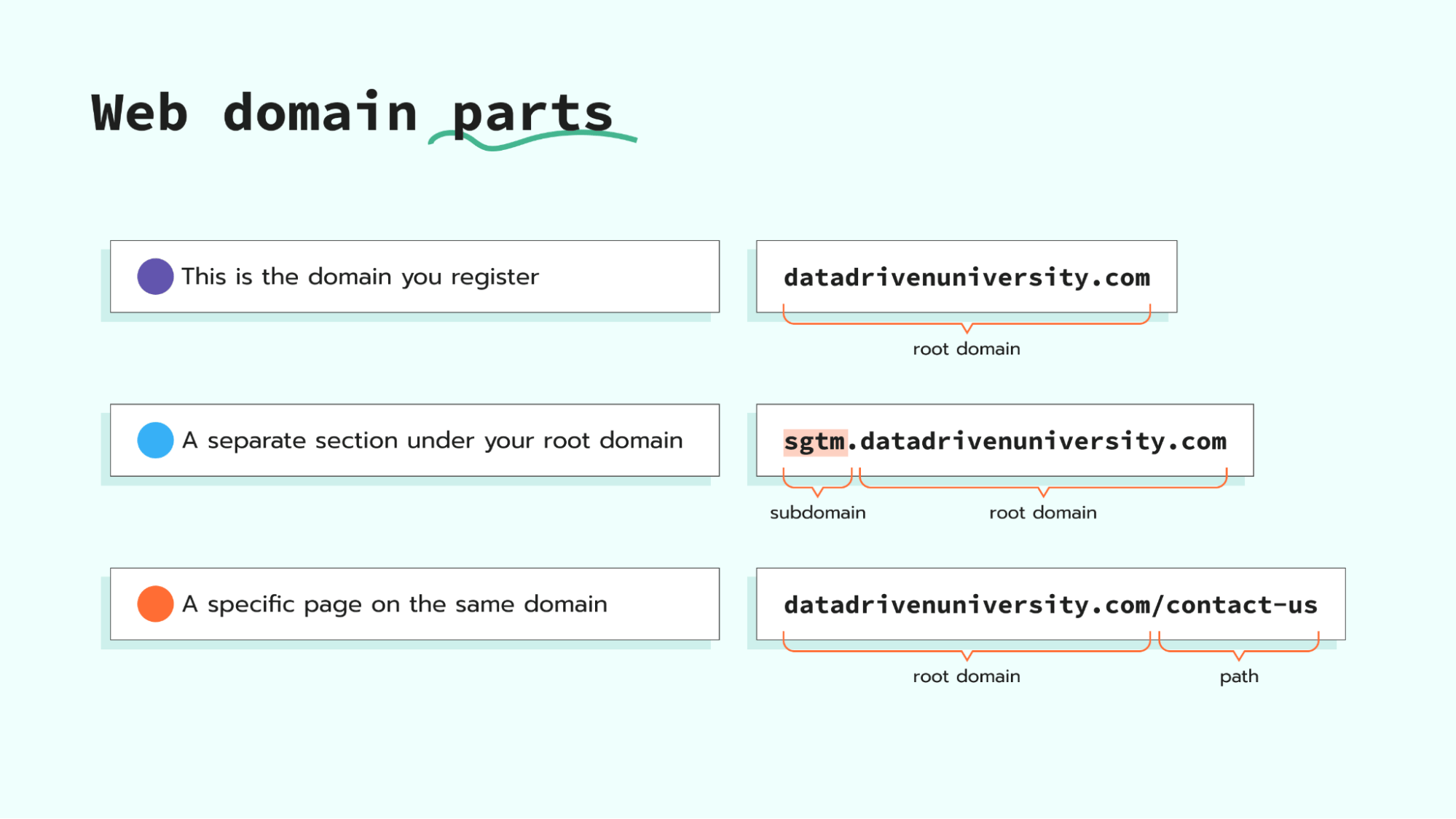
We all interact with domains every day. For example, stape.io is a domain. We use domains like stape.io to visit sites on the Internet.
A domain like stape.io is considered a root domain, and it's the domain we register with domain providers like Google Domains (or Cloudflare Registrar). But we also see domains like sgtm.stape.io or video.stape.io. Adding the sgtm. or video. part in front of the root domain is called a subdomain. A subdomain is a separate section of your domain that lives under your root domain. Finally, there are domains like stape.io/contact-us, which is a path (or folder) on the same root domain. Basically, you're still at the same root domain, just going to a specific path on the site.
How browsers see your domain: what is an origin?
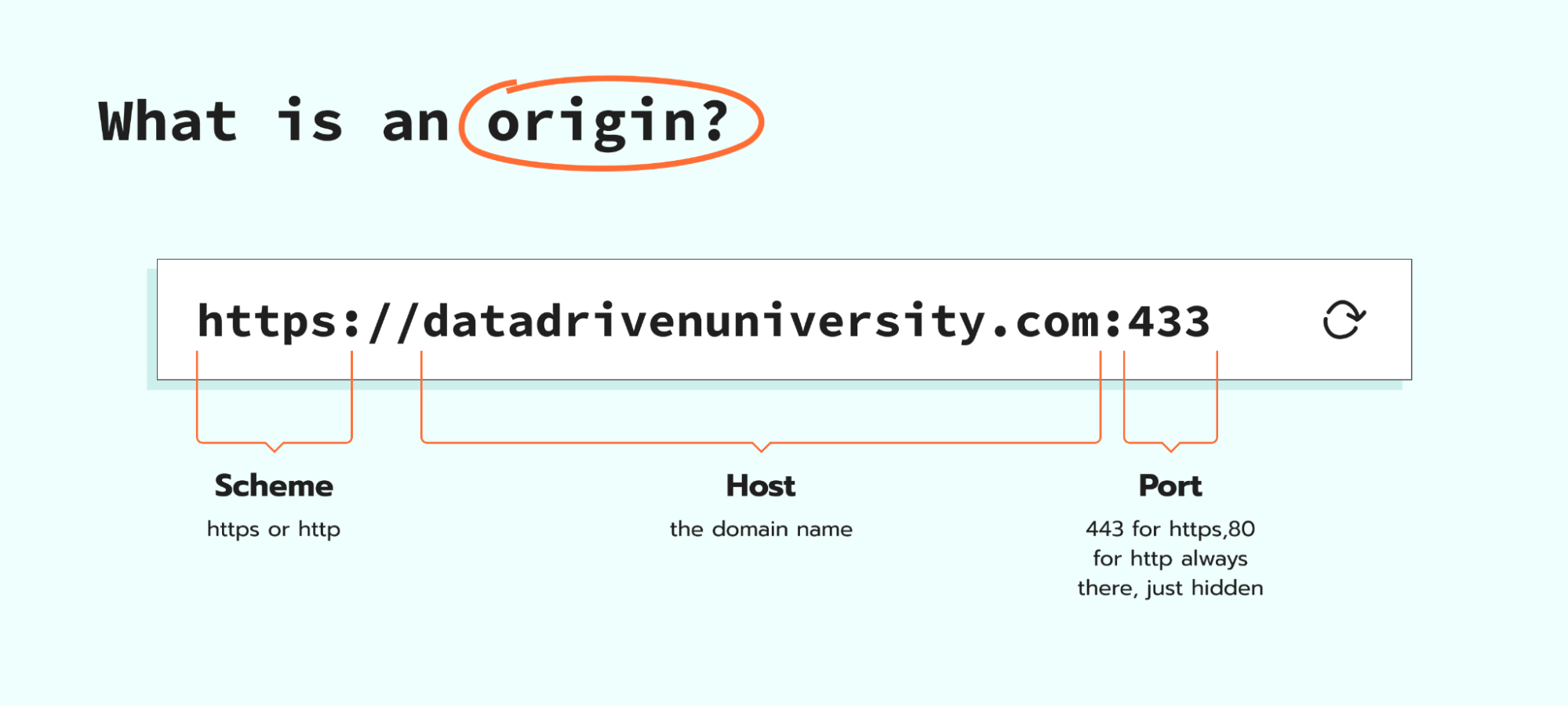
Browsers like Chrome don't just look at your domain, instead they look at the full address, which is called the Origin.
In web terms, an origin = scheme + host + port:
- Scheme → http or https
- Host → the domain name (e.g., stape.io)
- Port → 80 for HTTP, 443 for HTTPS (default values if not shown)
- You don't see it in the address bar, but it's always there when you interact with a domain.
Why does this matter?
Browsers, like Chrome or Safari, compare origins to decide how to treat requests and cookies. Two URLs are only considered the same-origin if all three parts of origin match. For example, https://stape.io and https://sgtm.stape.io share the same scheme and port, but the hosts are different (stape.io vs. sgtm.stape.io). This means that browsers, like Safari, will treat them as different origins, even though they share the same root domain. This is where ITP (Intelligent Tracking Prevention) comes in. Safari uses origin to decide whether to trust or restrict your cookies, and your domain setup is what determines how it sees your tagging server.
Understanding the three domain options for server-side GTM
Option 1: default domain
The default domain is provided when you create a container on Stape, and it looks something like https://quyocnic.usu.stape.io (random subdomain generated by Stape for each container). It requires zero domain setup and works right out of the box as soon as your server is up and running.
I only recommend using it for learning and testing server-side tracking. Think of it as training wheels, so you can play and learn without adding extra setup work.
The reason I call it training wheels is that it's still third-party tracking. The collect request URL will be a stape.io subdomain, not your site's root domain, so browsers will treat it as cross-origin. That means ad blockers can still spot and block it, and Safari's ITP will restrict any cookies your tagging server sets, which means you lose the two biggest benefits of server-side tracking: better data capture and extended cookie life in Safari.
Option 2: custom subdomain
The custom subdomain is the most taught and common production setup for server-side tracking. You set up a custom subdomain in Stape, update your DNS settings (e.g., Cloudflare), and because the subdomain shares your site's root domain, you get first-party tracking. Stape has the full setup instructions in their custom domain setup help article.
That said, there are a couple of downsides when it comes to custom subdomain setup. If you have a large amount of Safari traffic, you can be impacted by ITP's 7-day cookie cap. Over time, some ad blockers have also gotten smarter and know to look for tracking subdomains like sgtm.* or gtm.*, so they can still block them.
One more check for subdomain setups: the IP check
Before you call your server-side setup completed, there's one more check I recommend running. I call it the "IP Check", as Safari doesn't just look at whether your subdomain shares the same root domain as your site. Instead, it also checks whether the first two numbers of the IP address (shown as Remote Address in Network calls) match between the two domains. In cases where they do not match, your Safari cookies are still getting capped at 7 days.
For example:
- Your website
stape.ioresolves to an IP like 104.21.45.12 - Your subdomain
sgtm.stape.ioresolves to Stape's server at 35.190.67.88 - Safari compares 104.21 vs 35.190.
How to run the IP check yourself in DevTools
1. Open DevTools → Network tab, and reload the page.
2. Find your site's HTML document request by searching for your domain in the filter, for example stape.io.
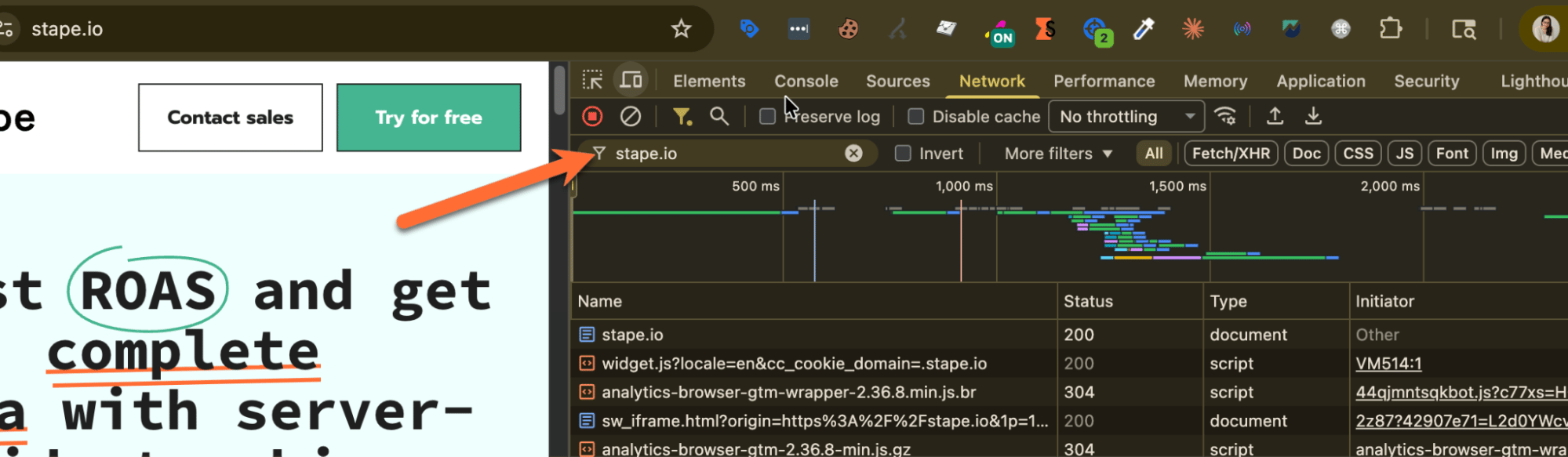
3. Click it, and under the Headers tab look at Remote Address and note the first two numbers.
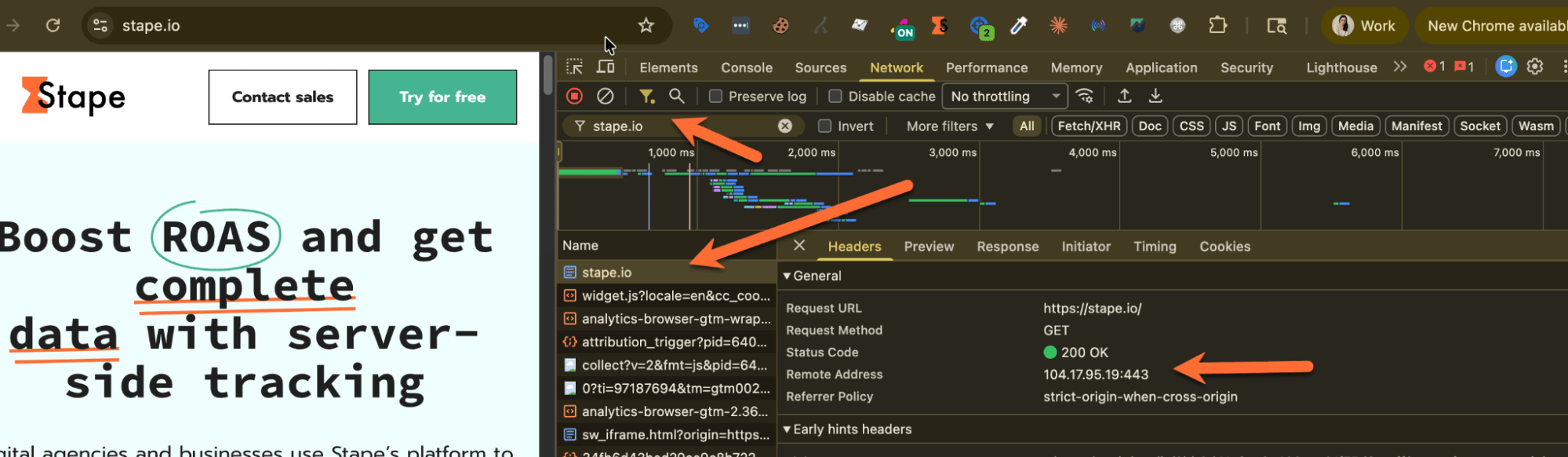
4. Find your server-side collect request (filter by collect).
5. Click it, and check Remote Address the same way.
6. Compare the first two numbers.
- Match → your subdomain setup is good, cookies get full lifetime in Safari.
- No match → cookies are capped at 7 days in Safari. (potentially time to consider Option 3: Same-Origin Path)
Option 3: same-origin path
As mentioned earlier, same-origin is now considered best practice by Google. It's designed to address the Safari ITP limitations we covered earlier, so your server-side cookies can persist for their full intended lifetime. This is because your request URL will share the same origin as your site URL, so the browser treats it as a true first-party request.
Setting it up requires routing through a reverse proxy using something like a Cloudflare Worker or nginx. When you do this, your request URL will have the same domain as your main domain with a path, for example stape.io/utm. Stape has a great help article walking through the full setup: How to use the same-origin approach for server GTM.
That said, I'm not recommending same-origin for every client. It takes more time and is more technical to set up. My personal rule of thumb is to start with subdomain and get server-side working. Then for sites with a high amount of Safari traffic (40%+ of sessions), or when a client is already running on Cloudflare, consider moving to the same-origin path. The extra setup will take time, but it will help your client recover the Safari traffic they're currently losing, leading to more useful reports and marketing decisions your client can actually trust.
A decision framework for selecting your server-side domain
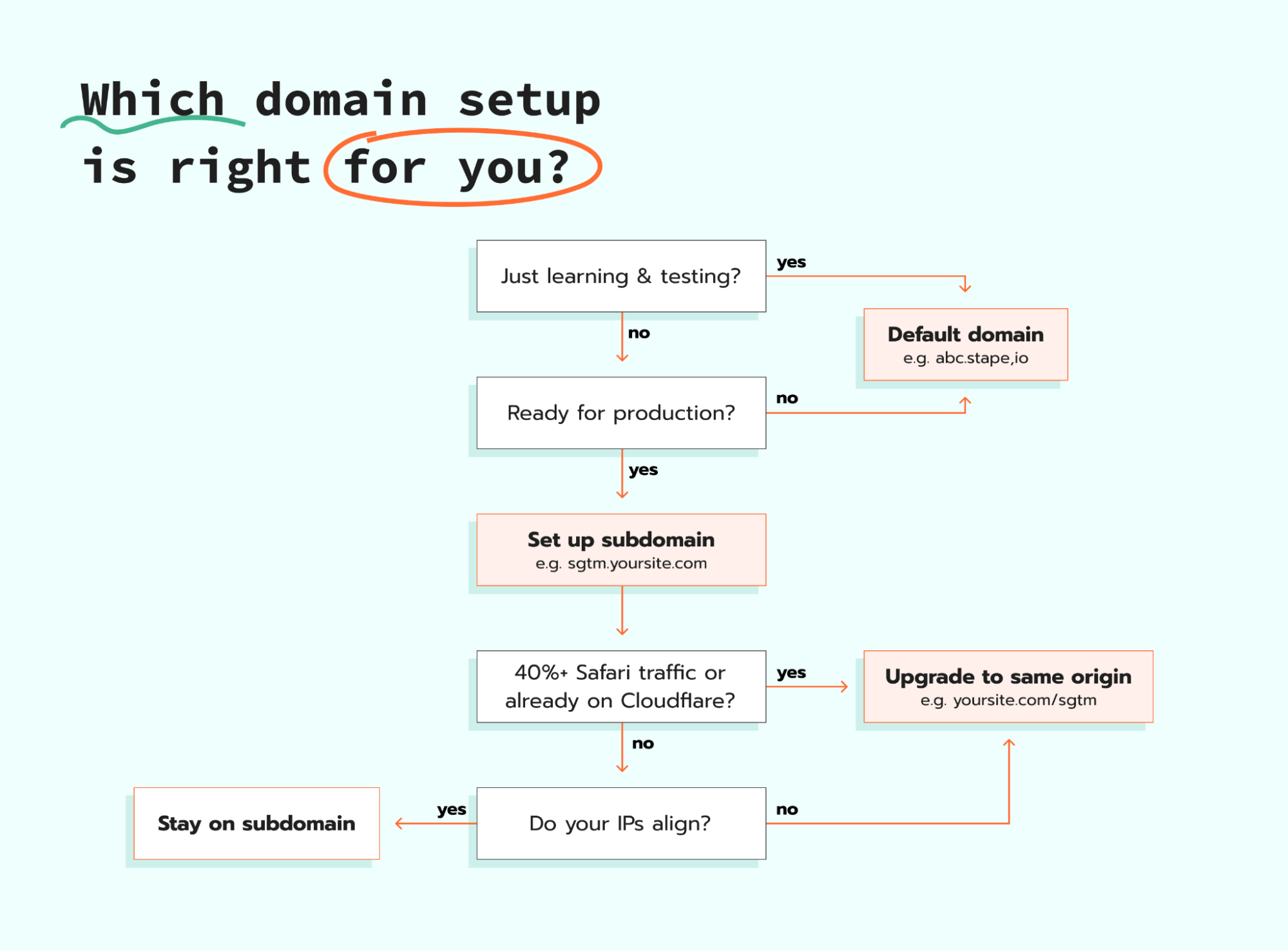
As the Technical Lead at MeasureU and someone who has taught server-side, one of the most popular questions I get asked is: "which domain should I start with for server-side tracking?" To help address this question, I put together the decision framework below.
Like any framework, this isn't meant to be a hard rule. My goal is to give you a starting point for when to consider the default domain, subdomain, or same-origin. That said, you'll always need to factor in time and technical investment, especially for same-origin since it requires more setup work.
How to explain domain options to your client
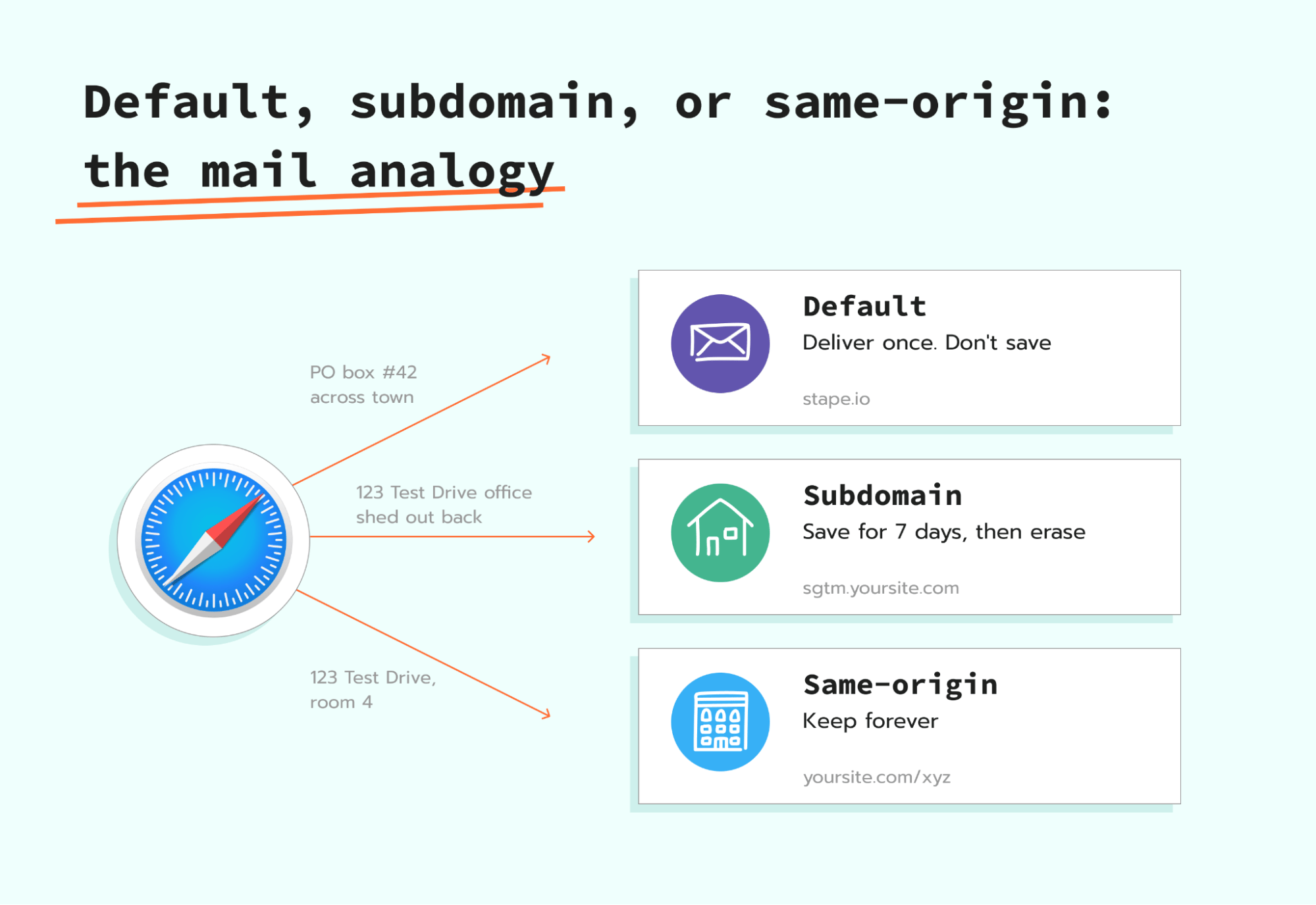
Up until now in this article, we've focused on the technical framing of origin, cookies, and ITP. But many of us will end up in situations where we have to explain this in a meeting to our clients. Over time, I've landed on an analogy that actually works: mail delivery to your house.
Before we dive into the details of the analogy, it's important to note that this analogy is only about server-side tracking and how cookies are treated based on where your request goes.
Everyone has a home address, for this example, let's say mine is 123 Test Drive. That's where I live, and that's the address everyone knows and sends packages to. Now let's say the cookies are the packages and letters people send me. And Safari is our mail delivery service, deciding how much to trust each address on each package.
Default domain → "send it to the PO box across town"
- Package address: "PO Box #42, Across Town"
- Safari's processing: "This PO box belongs to a shipping company across town, where Manisha (me) is renting a mailbox. I'll deliver it once, but that's it, we won't remember it."
- End outcome: Safari delivers the package once, but doesn't hold onto anything personal and doesn't remember this address for next time.
- Technical outcome: This is third-party tracking. The hit will go through if it's not blocked by an ad blocker, but you get none of the first-party cookie benefits, so no extended cookie life and no server-side cookie durability.
Subdomain → "send it to the office shed out back"
- Package address: "123 Test Drive, Office Shed Out Back"
- Safari's processing: "The office shed seems to be at the same address as Manisha's house. Since it looks somewhat the same, I'll trust it, but only for 7 days."
- End outcome: Safari delivers the package and remembers the address, but only for 7 days. After that, Safari forgets this address entirely, and your returning visitor shows up in your reports as someone brand new.
- Technical outcome: This is first-party tracking, but Safari's ITP caps cookies at 7 days when the IP check fails. If your site has meaningful Safari traffic, you're losing return-visitor attribution after a week.
Same-origin path → "send it to 123 Test Drive, Room 4"
- Package address: "123 Test Drive, Room 4"
- Safari's processing: "Yep, this is the right address, trusting it."
- End outcome: Safari delivers the package, remembers the address, and keeps mail flowing with nothing forgotten on a 7-day timer.
- Technical outcome: This is true first-party tracking with no ITP cap, and cookies persist like they would for the main site.
As a visual person, I always like to wrap up my analogies with a diagram. Here's the one I use to walk clients through all three options at once.
Wrap up
The domain decision is one many of us fly through during server-side setup. That said, it is one decision that can impact how browsers like Safari treat your tagging server, how long your cookies persist, and whether your returning visitors stay recognized past 7 days.
There is no one-size-fits-all domain decision. The right call can shift depending on where you are in your server-side journey, the amount of Safari traffic your client gets, and the tech stack they have for each server-side implementation.
My recommendation is to start with a subdomain so you can get your implementation moving forward and get some quick wins. Then for each client, revisit the decision framework by running the IP check, evaluating their Safari traffic, and determining if it's time to re-evaluate their domain setup.
Want to try the server side?
Try for freeRecommended for you
Jul 2, 2026
Blog
DNS configuration for custom domain for server-side tracking
Learn how to configure DNS records for custom domain on server-side tracking. We prepared instructions for top providers: Wix, Shopify, GoDaddy, Cloudflare and more.
Apr 8, 2025

Comments