
Click ID Restorer
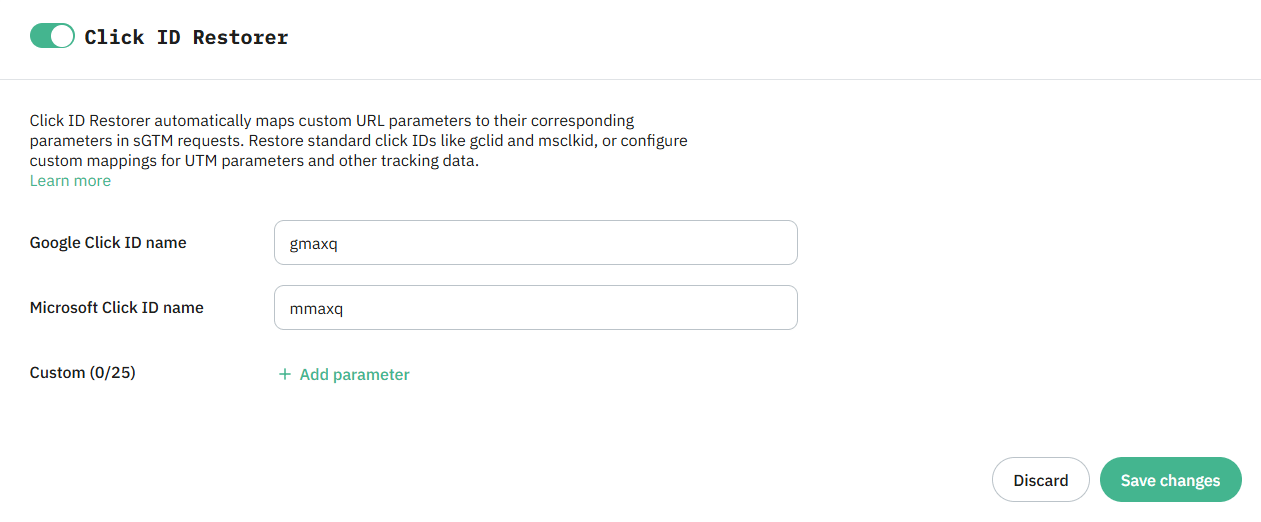
Click ID Restorer power-up helps you keep purchases and signups linked to the ads people clicked. When browser privacy features remove Google Ads or Microsoft Ads click IDs from your URLs, the power-up restores them from a backup copy saved in those URLs.
Click ID Restorer isn’t limited to Google Click ID and Microsoft Click ID – you can also add other custom parameters that you wish to be restored, such as UTM parameters.
ℹ️ Available to all Stape users for Free. To add more than 5 custom parameters (other than GCLID and MSCLKID), you’ll need the following subscription plans:
- Pro: 10 custom parameters
- Business: 20 custom parameters
- Enterprise: 25 custom parameters
How to access Click ID Restorer
Click ID Restorer is available to all Stape users. You can find Click ID Restorer in the Power-Ups tab in your Stape account.
Follow our Click ID Restorer setup guide to add a backup click ID parameter to your ad URLs and enable the power-up.
How Click ID Restorer works
Click ID Restorer uses a backup copy to restore Google Click ID, Microsoft Click ID and custom parameters such as UTM when a browser removes it from your ad link. You add this backup to your ad links during setup.
Benefits of Click ID Restorer
- Keep conversions connected to your ads. Use restored click IDs to link tracked purchases and signups to the Google Ads or Microsoft Ads clicks that brought visitors to your website.
- Custom parameter restoration. Recover tracking parameters beyond
gclidandmsclkidby defining your own parameter substitutions, such as UTM parameters. - Reporting you can trust: Google Ads and Microsoft Ads reports reflect real campaign performance, with fewer missing conversions from Safari and Brave users.
- Larger remarketing audiences: keeps more ad-driven visitors identifiable, so your retargeting and lookalike audiences stay big enough to run.
Restore missing click IDs
Enable Click ID Restorer to use your backup click IDs and keep more ad-click information in your tracking setup.
Useful links
Related to this solution
Blog
Safari click ID removal: recover attribution with server-side tracking
In September 2025, Safari plans to remove GCLID parameters from URLs in standard browsing mode. Server-side tracking can help to make your tracking accurate.
Solutions
Cookie Keeper
Cookie Keeper by Stape restores selected marketing cookies, helps recognize returning visitors, and supports more complete tracking.
Solutions
Query Replacer variable
Find out how the Query Replacer variable can help avoid the removal of UTM parameters in the URL.