Oct 2, 2026
We analyzed 50+ Facebook server-side tracking setups: 7 biggest findings
Written by
Tymofii Sankov
Published Oct 14, 2026 comments
Key takeaways
- Facebook server-side tracking improves measurement by reducing reliance on client-side data only and giving businesses more control over how conversion data is processed before it reaches Meta.
- Better tracking is not about sending more data; it is about sending accurate, complete, timely, and useful signals to Meta.
- The right implementation depends on your needs: server GTM offers more flexibility, while Meta Conversions API Gateway is simpler for focused Meta setups.
- Treat your server-side tracking configuration as a non-stop-evolving measurement infrastructure, with regular checks after changes to your website, tracking stack, or consent setup.
Facebook advertising depends heavily on the signals it receives. Meta needs to know who viewed products, submitted forms, added items to carts, completed purchases, or performed other valuable actions after interacting with your ads.
Traditionally, the Meta Pixel has collected much of this information in the user's browser. The problem is that browsers have become a less reliable source of marketing data. Ad blockers, browser restrictions, cookie limitations, technical errors, and consent choices can all affect what reaches advertising platforms.
This is where Facebook server-side tracking becomes useful. By creating an additional, more reliable path for conversion data, it can help businesses measure campaign performance more accurately, give Meta stronger signals for optimization, and make better decisions about where advertising budget generates value.
We reviewed more than 50 Facebook server-side tracking setups and compared the implementation choices, configuration issues, and recurring patterns that matter most in practice. Here are the seven findings businesses should focus on first.
The 7 biggest findings after we tested 50+ Facebook server-side tracking setups
Facebook server-side tracking involves more than simply sending events through a server. A reliable setup depends on how browser and server tracking work together, how events are matched and deduplicated, which implementation method you choose, and how the setup is maintained over time. The seven points below cover the most important things marketers, store owners, and analysts should understand before implementing or improving Meta server-side tracking.
1. Facebook server-side tracking complements browser-side tracking rather than replacing it
Facebook server-side and client-side tracking are complementary components of the same measurement setup. User interactions are captured on the client side, and server-side tracking then processes information and shares it with analytics. Neither is simply an “extra layer” over the other; they cover different parts of the data flow and work together to create a more complete and resilient tracking system.
For key conversion events, the two components must be well-coordinated. Event names, parameters, identifiers, and deduplication keys must align so browser and server data describe the same customer actions consistently, rather than functioning as two separate tracking systems.
2. Server-side tracking cannot fix events that were never captured
Sending events through a server does not automatically recover conversions missed on the browser level. The event still has to be captured by the website, backend, CRM, or another configured source before the server can process and forward it. Server-side tracking therefore improves data delivery and processing, but it cannot fix an event that was never recorded in the first place.
3. Deduplication is critical when browser and server tracking operate together
When client-side and server-side tracking both report the same customer action, the platform needs to recognize that the two signals represent one event. Without deduplication, a single purchase, lead, or signup may be counted twice.
That directly affects data quality. Duplicate conversions can inflate reported performance, distort attribution and ROAS, affect audience building, and give advertising algorithms incorrect signals for optimization. Event deduplication is therefore not just a technical detail; it is necessary to keep client-side and server-side tracking aligned and prevent the same customer action from distorting reporting and optimization.
4. Better server-side tracking is about signal quality, not simply collecting more data
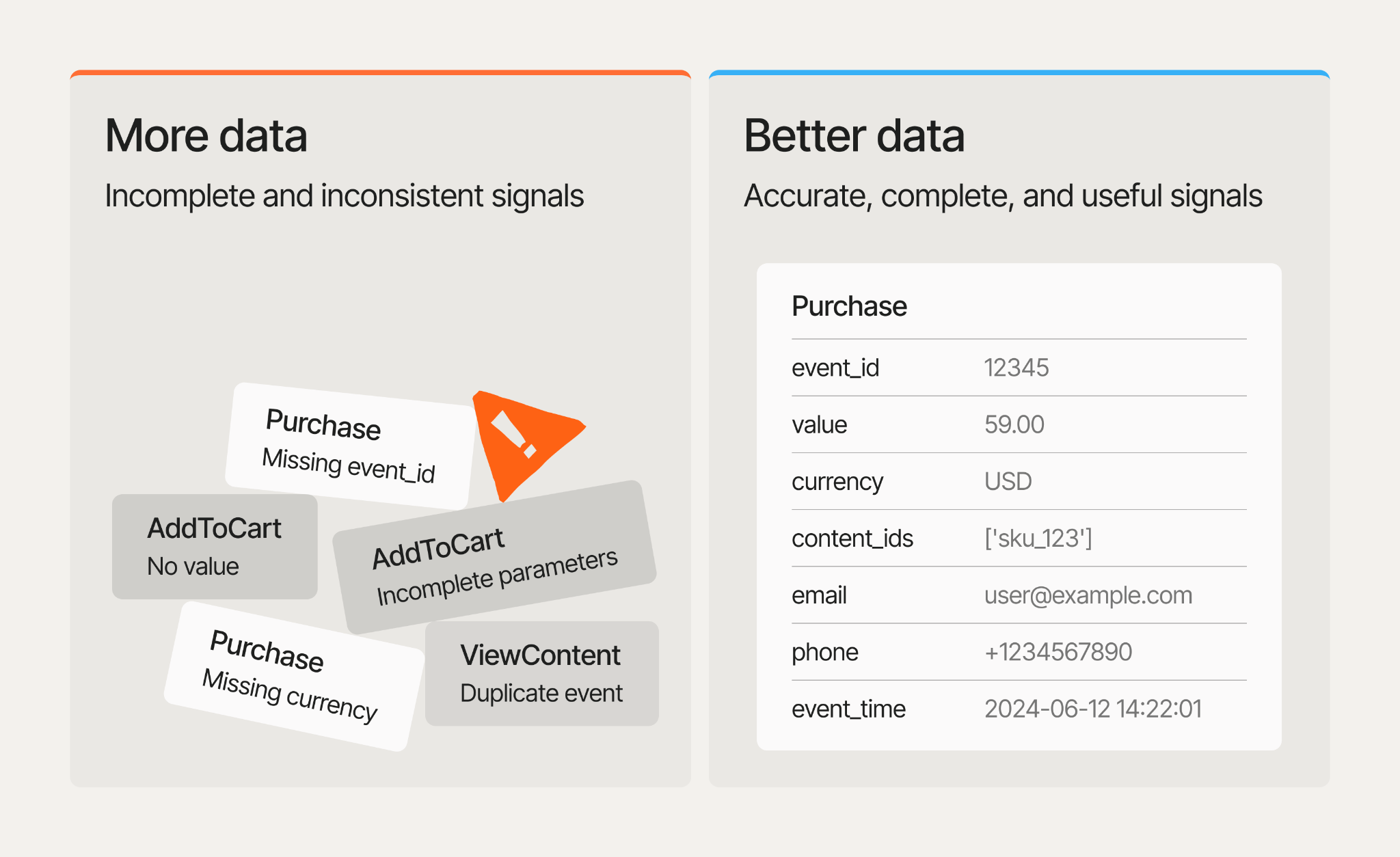
More data does not automatically make server-side tracking more effective. What matters is whether the events being sent are accurate, complete, timely, consistently structured, and useful for measurement and optimization.
A high-quality signal should represent the correct user action, contain the relevant event and conversion details, use consistent identifiers where required, and reach the destination without unnecessary duplication or missing information. Sending additional events or parameters that are inaccurate, incomplete, or irrelevant can make the dataset larger without making it more useful.
For Facebook server-side tracking, signal quality also affects how effectively Meta can match events, attribute conversions, and use conversion data for campaign optimization. The goal is not to send as much data as possible, but to send the right data reliably and consistently.
5. There is no single best implementation method for every business
The right Facebook server-side tracking setup depends on the business’s goals, technical resources, existing tracking stack, and need for control. A small ecommerce store focused mainly on Meta Ads does not need the same infrastructure as an analytics team managing several advertising and measurement platforms.
Simpler implementations prioritize speed, lower maintenance, and easier setup. More advanced approaches provide greater control over event processing, data transformation, integrations, and how information is routed between platforms.
The best configuration matches the complexity of the tracking requirements. Adding more infrastructure than the business needs can increase setup and maintenance effort without meaningfully improving measurement.
6. Simpler implementation options have lowered the technical barrier to server-side tracking
Server-side tracking no longer always requires building and maintaining a complex server-side GTM architecture. Managed solutions and gateway-based implementations now make it possible to introduce server-side event delivery with far less technical work.
Meta Conversions API Gateway is one example. It uses existing Meta Pixel events to generate corresponding server events without a separate server GTM container, making it particularly relevant for store owners, marketers, agencies, and Meta-focused businesses without dedicated technical resources.
The trade-off is flexibility. Simpler implementations reduce setup and maintenance requirements, while more advanced server-side architectures provide greater control over data processing, integrations, and customization.
7. Server-side tracking is not a set-it-and-forget-it project
A server-side tracking setup that works correctly today can become incomplete or inaccurate as the website and marketing stack change. Checkout flows are updated, new events are introduced, consent settings are modified, and data layer parameters are renamed. Any of these changes can affect what data is collected, processed, or sent to advertising platforms.
Therefore, audit server-side tracking periodically. After significant changes and as part of regular maintenance, check event delivery, parameters, deduplication, consent handling, and discrepancies between tracking platforms and backend data. Remember that server-side tracking is measurement infrastructure, not just another marketing tag.
Facebook server-side tracking explained and how it works
Facebook server-side tracking means that event data is routed through a server environment before being transferred to Meta. On the server, the data can be processed, validated, enriched, filtered, and prepared before it is forwarded.
This is what common client-side tracking looks like:
User action → browser → Meta Pixel → Meta
With server-side tracking, the event follows a different path:
User action → browser → server environment → Meta
For events that originate outside the browser, the flow can look like this:
Backend event → server environment → Meta
The important difference is where the event is processed. With client-side tracking, most of the tracking logic happens in the browser. With server-side tracking, the server becomes part of the data flow and gives the business a controlled environment for preparing event data before it reaches Meta.
Key benefits of Facebook server-side tracking
The benefits of server-side tracking for Meta may not be noticeable right after its implementation. If you monitor how it affects day-to-day campaign management, reporting, data operations, and strategy planning, you will notice several (if not all) of the improvements described below.
More reliable conversion data
With client-side tracking, many events can be lost due to ad blockers, browser restrictions, and simply occasional script errors. Server-side tracking doesn't solve these issues directly, but it gives you time and a place to fix them. Once the server gathers all the data, marketing specialists and analysts can review it, enrich it, remove personal information to stay compliant (if required), check identifiers, and validate parameters before forwarding the package to Meta.
As a result, businesses capture a more complete set of conversion events and compare campaign performance against a more reliable dataset. For marketers, that means fewer reporting gaps and greater confidence when evaluating attribution, ROAS, and budget allocation.
Better event matching
Server-side tracking can provide Meta with additional identifiers that help match conversion events to the right users and advertising interactions. Depending on the setup, these may include permitted customer information such as hashed email, phone data, address, as well as technical identifiers.
Better matching helps Meta attribute more conversions correctly and gives its optimization systems more complete information about which ad interactions lead to valuable actions. For marketers, this can improve attribution quality and campaign optimization without simply increasing the number of events sent.
Support for events that do not happen in the browser
Server-side tracking can also work with events that originate outside a website session. For example, a business may record qualified leads in a CRM, confirmed purchases in a backend system, or conversions from offline sales. These events are then sent to Meta through a server-side connection, allowing measurement to include valuable customer actions that are not captured by browser tracking alone.
Ways to implement Facebook server-side tracking
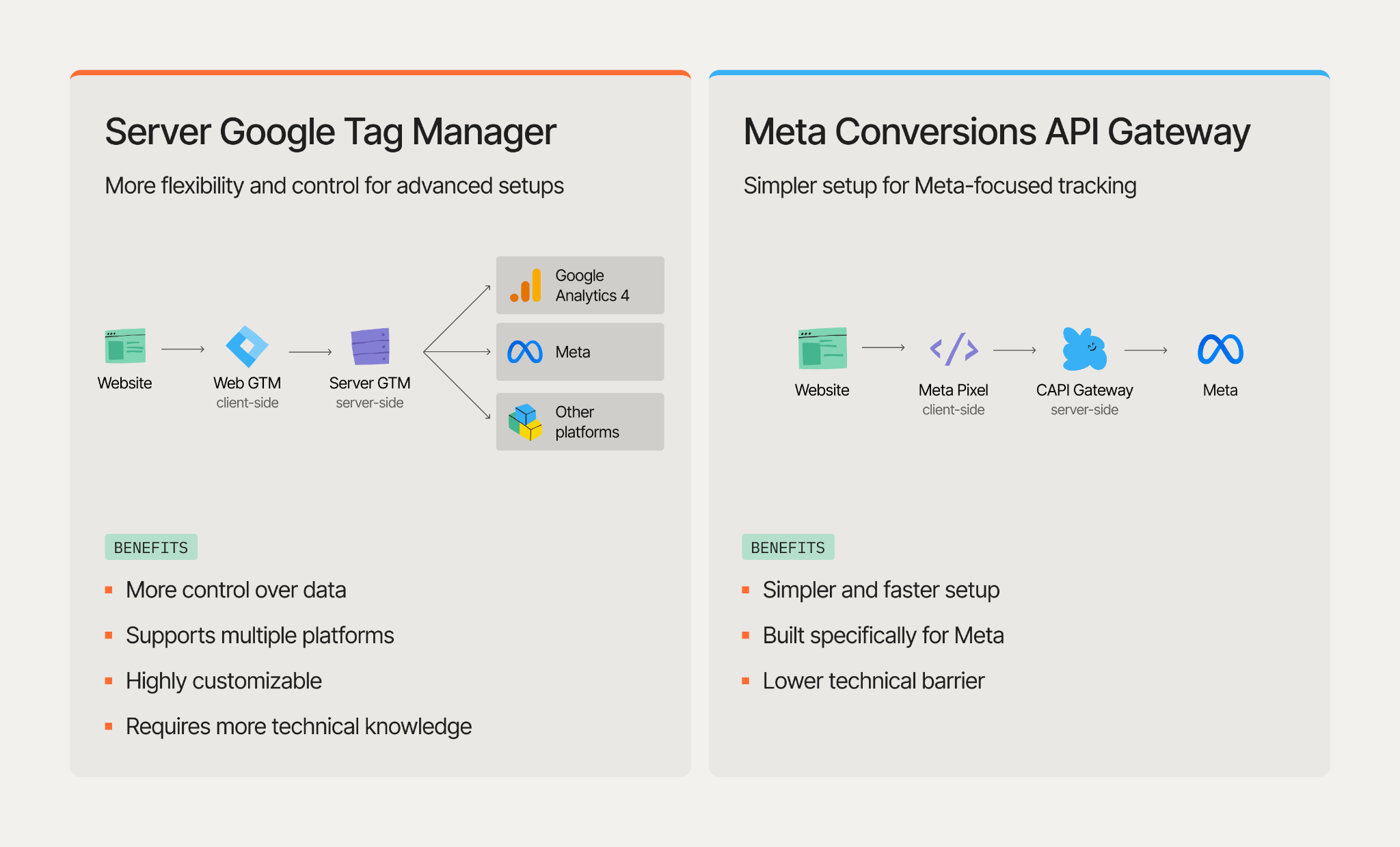
Several ways to set up Facebook server-side tracking exist, and the right approach depends mainly on how much control, flexibility, and technical involvement your business needs. For most marketers, store owners, and analytics teams, two practical approaches stand out: server-side Google Tag Manager and Meta Conversions API Gateway. The first provides a more flexible server-side environment that can support Meta alongside other advertising and analytics platforms, while CAPI Gateway offers a simpler, Meta-focused setup with fewer technical nuances.
| Factor | Server-side GTM | Meta CAPI Gateway |
|---|---|---|
| Main purpose | Flexible server-side tagging infrastructure | Simplified Meta CAPI implementation |
| Technical difficulty | Higher | Lower |
| Requires server GTM | Yes | No |
| Works beyond Meta | Yes | No, Meta-specific |
| Data transformation | Highly flexible | More limited |
| Event customization | High | Depends heavily on existing Meta web events |
| Best for | Advanced or multi-platform tracking | Fast Meta-focused implementation |
| Maintenance | More technical | Generally simpler |
1. The server GTM option
With server-side GTM, Meta event data is configured inside the server container before it is sent to Facebook. You can map website events to Meta events, pass purchase values and currencies, add required identifiers, configure event IDs for deduplication, and control what data is included in each request. In other words, you get flexibility other methods usually struggle to offer.
While manual GTM container configuration is still an option, living without automation nowadays is like making a fire by rubbing two sticks together. That is why we at Stape have the Setup Wizard, a tool that configures server-side tracking for your particular case based on your industry, tech stack, destination platforms, and other setup details, and imports the required configuration into your GTM containers.
Setup Wizard is a great tool for the majority of server-side tracking configurations and supports multiple destination platforms, so it may save the day for non-tech specialists trying to set it up. However, if you need a highly customized setup with unique event logic, unusual parameters, or special routing rules, Setup Wizard will not be enough; you will still have to build the custom logic manually.
Check our Setup Wizard configuration guide for detailed instructions on how to configure server-side tracking for Facebook using this method.
2. Meta Conversions API Gateway
Meta Conversions API Gateway is designed for businesses that want to add server-side tracking to their existing Meta setup without building a more complex server GTM container configuration. It routes website tracking data to Meta through a dedicated server environment while keeping the setup relatively straightforward.
The main benefit is speed and simplicity: you can improve Meta conversion tracking, strengthen event matching, use a custom domain, and manage several Pixels from one environment without adding unnecessary technical complexity. Stape provides the infrastructure to run CAPIG, so businesses can set up and maintain Meta server-side tracking without building or managing the technical environment themselves.
Explore Stape’s guide to configuring the Meta Conversions API Gateway with minimal effort.
What about Signals Gateway?
Meta Signals Gateway is designed for broader first-party data use cases than standard Facebook web tracking. Stape supports it alongside server GTM and Meta CAPI Gateway, allowing businesses to work with data from websites, apps, CRM systems, and offline interactions. For Meta-focused tracking, server GTM or CAPI Gateway are usually the more direct options, while Signals Gateway is better suited to more complex data environments.
Read in detail about what Signals Gateway is and how to configure it.
A quick checklist to audit your Facebook server-side setup
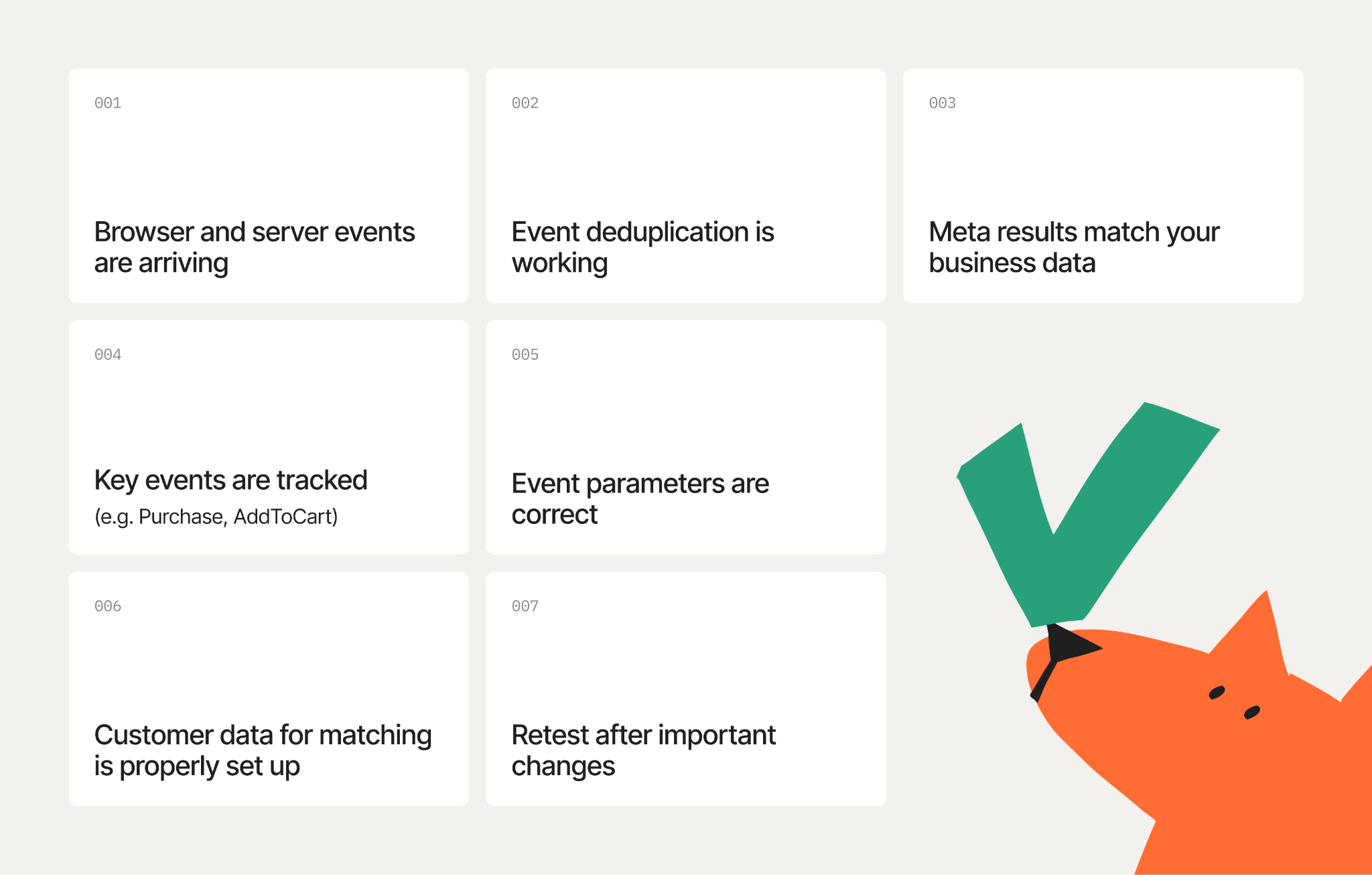
Already using Facebook server-side tracking? Run these checks to confirm that your setup is sending the right data, avoiding duplicates, and reflecting real business activity.
- 1.Confirm that browser and server events are arriving. Open Meta Events Manager and check whether events are reaching Meta from the expected browser and server sources. Review any delivery errors or diagnostics Meta flags.
- 2.Check event deduplication. If the same conversion is sent from both the browser and the server, verify that Meta recognizes the two signals as one event. Matching event names and IDs are essential for preventing duplicate conversions.
- 3.Compare the Meta results with your actual business results. Compare reported purchases, leads, registrations, or other conversions with your ecommerce platform, CRM, or backend records. Exact numbers may differ because of attribution and reporting logic, but large or sudden discrepancies usually require investigation.
- 4.Check event coverage. Make sure you track all actions that matter for campaign measurement. Depending on your business, these may include
ViewContent,Lead,AddToCart,InitiateCheckout,Purchase, and relevant custom events. - 5.Verify event parameters. Ensure that the details attached to each event match the actual action. For ecommerce events, this includes values, currencies, product information, identifiers, source URLs, and timestamps.
- 6.Review customer information used for matching. Check that the appropriate matching data is consistently available where expected. Only send information that is relevant to the setup and permitted by your consent settings, Meta policies, and applicable privacy requirements.
- 7.Retest after important website or tracking changes. Recheck the setup after changing your checkout, forms, CMS or theme, consent platform, GTM configuration, tracking apps, or data layer. Changes elsewhere in the website stack can affect server-side tracking even when you haven't modified the server configuration.
Conclusion
Facebook server-side tracking is most useful when it becomes part of a well-maintained measurement setup, not a one-time technical upgrade. The right implementation depends on how complex your tracking needs are, how much control you want, and how much effort you are ready to invest in setup and maintenance.
For a focused Meta setup, CAPI Gateway is the more straightforward route. For more advanced requirements, server-side GTM offers greater flexibility. Stape supports both approaches, so you can choose the setup that fits your current needs and expand it later if those needs change
FAQ
Want to start on the server side?
Try for freeRecommended for you
Sep 14, 2026
May 6, 2026
Solutions
Meta Connection
Send first-party data to Meta automatically, boost audience match rates, and save hours on manual CSV uploads.
Aug 3, 2026

Comments