Sep 19, 2025
To deduplicate or not to deduplicate...That's the question
Written by
Manisha Mistry
Published Sep 30, 2026 comments
Whenever I'm running a server-side course or chatting server-side on a call, there is one question that comes up every single time.
For X ad platform, do I need to deduplicate?
That X can be replaced by any of the ad platforms, like Facebook, Google, LinkedIn, Reddit, Snap, or Pinterest.
I'll be the first to admit, when I started server-side tracking, this was a common question I had too. Just earlier this year, I ran into this same question when the client I was helping migrate to server-side tracking had Reddit Ads set up. Truth was, it was the first time I had to set up Reddit Ads with server-side tracking, so I didn't know the answer and had to ask around.
After that experience, I realized that there wasn't one place, blog, or post that outlines when we need to deduplicate vs. when we don't, so that's why I'm writing this article.
In this article, we'll go through:
- What deduplication actually is and how it works;
- Platform by platform, do you need to deduplicate or not;
- The resources to get you started with each one;
I know this is one of those tricky topics, so let's dive in!
What deduplication actually is and how it works
First, I love and hate the word deduplicate. I decided to pop over to the dictionary.com and find the official definition, which is:
"1. (tr) computing to remove (duplicated material) from a system"
That definition makes sense, as when you transition to server-side tracking, for some ad platforms you can send the same conversion twice – first from the browser and second from the server container. Now that is confusing, and usually the next question someone asks me is:
"Why are you sending duplicate conversions to the ad platform, won't that cause a double count?"
That's a fair question, as you technically are sending 2 signals for every 1 conversion. This is where the deduplication key comes in.
Here's the thing:
When any ad platform requires deduplication, they usually advise you to send one or more deduplication key(s), such as event ID, with both the browser and server event. Then the ad platform uses the key(s) to determine if they are the same event and only count it once.
Whenever I teach this part, I find it lands better when people can see it visually, so below is what it actually looks like for a single purchase going to Meta.
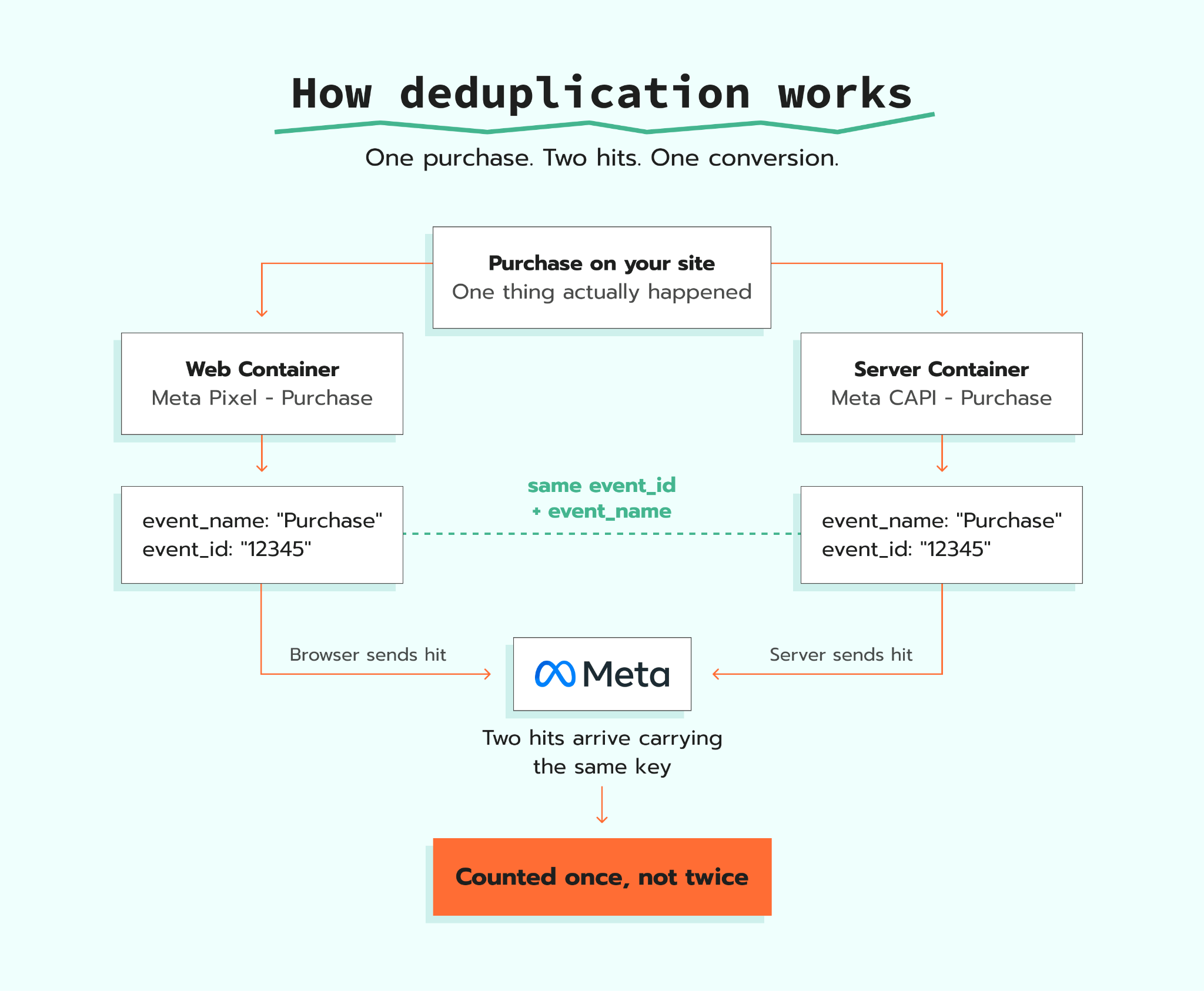
The part I want you to focus on is the two boxes in the middle with event_name. That's where the browser is sending one hit and the server is sending another hit, but both of them are carrying the exact same event_id and event_name. Those two matching values are the only reason Meta knows those two hits are one purchase, and not two separate purchases.
Now it's important to know that every ad platform that deduplicates uses a different key, calls that key something entirely different, and some even allow you to use more than one key. So to help, let's break down which ad platforms require deduplication and the resources to help you set them up.
The quick answer for every platform
Before we go into details for each ad platform, here's a short summary table you can come back to whenever you have the question "For X ad platform, do I deduplicate or not?".
| Platform | Deduplicate? | Recommended deduplication key | Keep the web tag? |
|---|---|---|---|
| Meta (Facebook) | Yes | event_id + event_name | Yes |
| Yes | conversion_id | Yes | |
| Yes | event_id | Yes | |
| Google Ads | No | N/A | No, pause them |
| Yes | event_id + event_name | Yes | |
| Snapchat | Yes | client_dedup_id or transaction_id | Yes |
| Bing (Microsoft Ads) | Yes | eventId | Yes |
Meta (Facebook)
Meta is the one ad platform well known for deduplication. When you set up Meta using server-side tracking, you don't pause your web tags. Instead, you leave your web tags running and add your server tags, otherwise known as Meta CAPI tags, in your server container.
When it comes to deduplication, Meta's own official documentation outlines two options:
- Using
event_idandevent_name(recommended) - Using
fbpandexternal_id(you must also have event_name)
Between the two options, Meta, Stape, and I all recommend using event_id and event_name.
At a high level, to get it working, you need your browser and server events to carry a perfectly matched event_id and event_name. Only if they match will Meta deduplicate. Additionally, it's important to know that Meta prefers the browser event. So when it sees matching events arrive close together, it'll keep the browser event and drop the server event.
To help you with your Meta server-side setup, Stape's Facebook Conversions API guide walks you through it, and the article on deduplication config covers the mechanics.
Reddit was the platform that inspired this article and, just like Meta, Reddit also deduplicates. It's important to know that the Reddit support article on event deduplication states that deduplication occurs every hour, and when it detects a duplicate, it drops the event with less event metadata or the one that came later.
Reddit officially supports two options for deduplication:
- Using Conversion ID (recommended);
- Using session-based deduplication.
The recommended approach from Stape and me is to use Conversion ID. It involves passing a conversion_id in the browser tag and the server-side CAPI tag for every unique conversion event. When setting up the CAPI tag, you need to map the conversion_id in the Server Event Data Override section of the tag configuration.
The how-to article that helped me most with my setup was Stape's Reddit Conversion API guide, so I highly recommend it.
Unlike Meta, where your web and server containers send the same conversion action to the ad platform, LinkedIn makes you create a separate conversion rule for each data source.
With LinkedIn, you need to have one conversion action for the Insight Tag and a completely separate one for the Conversions API. Then in Campaign Manager you'll see the two conversions next to one another, which usually raises the question:
"How does LinkedIn know when to deduplicate if they are separate conversions?"
LinkedIn deduplicates using event_id, so you need to send an identical event_id from your Insight Tag and your CAPI event. Then LinkedIn deduplicates based on a series of rules outlined in the LinkedIn deduplication rules article.
Please keep in mind:
Like Meta, LinkedIn gives the browser event priority, so when it receives a duplicate event, it keeps the Insight Tag conversion and deducts it from the Conversions API count. That means your CAPI conversion number is the one you'll see go down, and when you don't know that, it can look like your CAPI setup is broken even though it's actually working.
One last thing: don't confuse the event_id with LinkedIn's Conversion ID, because they do two different jobs. The Conversion ID tells LinkedIn which conversion rule the event belongs to, and the event_id is what LinkedIn uses to determine that two events are the same conversion.
If you're setting up LinkedIn for the first time, the LinkedIn Conversions API tag guide has you covered.
Google Ads
Google Ads doesn't deduplicate the way Meta does. Instead of setting up both web and server container tags, you pause (or don't set up) your web tags, and everything is set up in your server container.
It's really important that you pause or don't set up your web tags, because I've helped many implementers resolve "Google Ads is counting conversions twice" issues, and it came down to finding that their Google Ads web tags were never paused.
Google Ads conversion tracking guide covers all the setup options along with common issues.
Pinterest's server-side setup is a lot like Meta, as they use event_id and event_name for deduplication too. One important difference to be aware of is that in their support article on how to prevent event duplication, they clearly state that they remove duplicates within 48 hours, so Pinterest doesn't deduplicate as quickly as Meta does.
You can read more on how to set up Pinterest server-side tracking in the Pinterest Conversions API guide.
Snapchat
Snapchat is also like Meta and Pinterest, but it uses different terminology. Instead of event_id, the deduplication key is client_dedup_id, with a second option of using transaction_id.
It's important to note that those two options don't operate the same way. With client_dedup_id, it deduplicates within a 48-hour window, while transaction_id gives you a 30-day window. So before you set up Snapchat server-side tracking, you need to find out from your client what their conversion timeline looks like – that'll determine the deduplication key you use.
Snapchat CAPI guide walks you through it step by step.
Bing (Microsoft Ads)
Coming late to the game is Bing (Microsoft Ads), as their deduplication setup was released very recently. The first thing I recommend is that if you've set up server-side tracking for a client in the past, go review their setup. If they have Bing (Microsoft Ads), you can now transition that over to server-side as well.
Like Pinterest and Snapchat, Microsoft Ads works like Meta too. You'll keep your Microsoft UET tags in the web container, add new Microsoft CAPI tags in your server container, and deduplicate them using the eventId.
Stape has you covered with the Microsoft Ads Conversion API guide.
So, to deduplicate or not to deduplicate?
There you have it: we just covered the major ad platforms and laid out when you need to deduplicate versus when you don't. The next time you're implementing server-side tracking for a client and you want to know if you need to deduplicate for a certain ad platform, come back to this article and find your answer fast.
The key thing to take away is not to assume that because Meta deduplicates, every other major ad platform does too. Go platform by platform with any server-side setup; do them one at a time, and if you get stuck, the community is always there to help.
Want to start on the server side?
Try for freeRecommended for you
Jul 24, 2026
Blog
A guide on how to set up Google Ads conversion tracking in 2026
A step-by-step guide to conversion tracking Google Ads setup: configure the conversion tag in GTM, plus fixes for firing, duplication, and reporting issues.
Sep 28, 2026

Comments