Sep 14, 2026
Requests Analytics: measure the impact of your server-side tracking
Written by
Liudmyla Kharchenko
Updated Oct 1, 2026 comments
Server-side tracking is becoming very important for collecting accurate data. When you use only client-side tracking, a lot of your data gets lost before it reaches your analytics tools.
But it can be hard to measure how well server-side tracking works. To solve this, we at Stape created the Requests Analytics feature. It gives clear insights into how server-side tracking improves data collection. This tool also makes it easier for agencies to show results to their clients.
People using Stape have already tested Requests Analytics and are sharing examples of how server-side tracking improves data collection.
What is Requests Analytics?
Requests Analytics is a feature inside the Stape platform that helps you measure how well server-side tracking works. It shows how your data quality improves after you start using server-side tracking.
You can see this in key metrics, like the share of traffic recovered by avoiding ad blockers and and cookie life expansion in browsers that limit cookie lifetime.
How to access Requests Analytics?
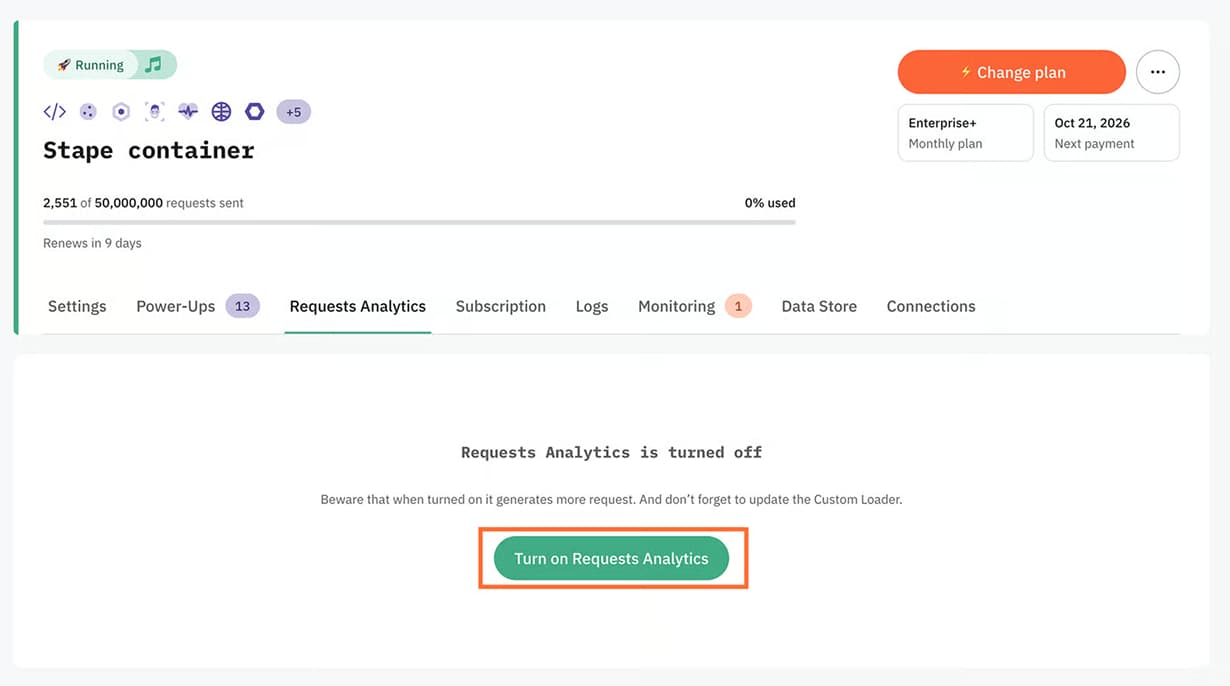
You can find the feature in your container in the section "Analytics". Requests Analytics is available for everyone who uses Stape Custom Loader (a free power-up by Stape that makes GTM scripts more resistant to ad blockers).
How does Requests Analytics work?
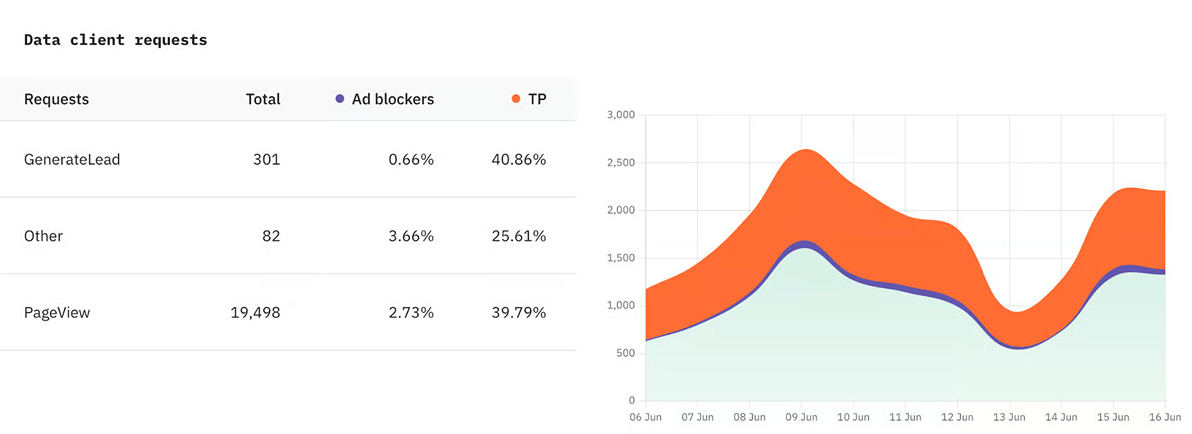
Requests Analytics uses a Custom Loader to measure how many requests were recovered. It looks at two main things: requests blocked by browsers that shorten cookie lifetime, and requests recovered from users with ad blockers.
Based on your server-side tracking setup, Requests Analytics also shows:
- Requests by client
- Requests from bots
- Requests by consent choice
- Requests by browser
Who should use Requests Analytics?
This feature helps businesses check how well their server-side tracking works. It shows how data quality improves after moving from client-side tracking to server-side tracking.
The feature will be beneficial for everyone who uses server-side tracking and wants to check its effectiveness:
- Website owners: if you run your website, you may want to know how beneficial server-side tracking is for data collection.
- Agencies. Easily present results of server-side tracking to your clients.
| For agencies, analytics can also become a paid service. This fits well with data-driven marketing and other extra services that help clients use reports to increase profit. |
How to use Requests Analytics?
Requests Analytics is OFF in every Google Tag Manager (sGTM) container on Stape by default.
Below, we’ll provide you with a short guide.
To find the detailed step-by-step instructions, please continue reading the article.
If you have a Stape account
1. Go to your Stape account and open the sGTM container.
2. Click on power-ups, select Custom Loader.
3. Follow the steps of configuring Custom Loader.
4. Go to the Analytics section and turn on Requests Analytics.
If you don’t have a Stape account
- 1.Go to the Stape sign-up page.
- 2.Follow this guide to create a Stape account and host your server GTM container.
- 3.Go to your Stape account and open the sGTM container.
- 4.Click on power-ups, select Custom Loader.
- 5.Follow the steps of configuring Custom Loader.
- 6.Go to the Analytics section and turn on Requests Analytics.
Please keep in mind the following information:
- You must use Stape Custom Loader to enable Requests Analytics.
- The instructions differ based on whether you use Stape apps or plugins (WordPress, Shopify, BigCommerce, Magento).
- It may take up to two days to gather Requests Analytics data and display it in your container.
- If any issues with the Requests Analytics configuration are detected, an email notification will be sent to your account.
- Analytics will only be available from the date you enabled it. Data for the period before you enabled and configured Requests Analytics will not be available.
How to enable Requests Analytics for server-side tracking setup
Using Stape plugins (WordPress, Shopify, BigCommerce, Magento)
1. Open your sGTM container and click Analytics
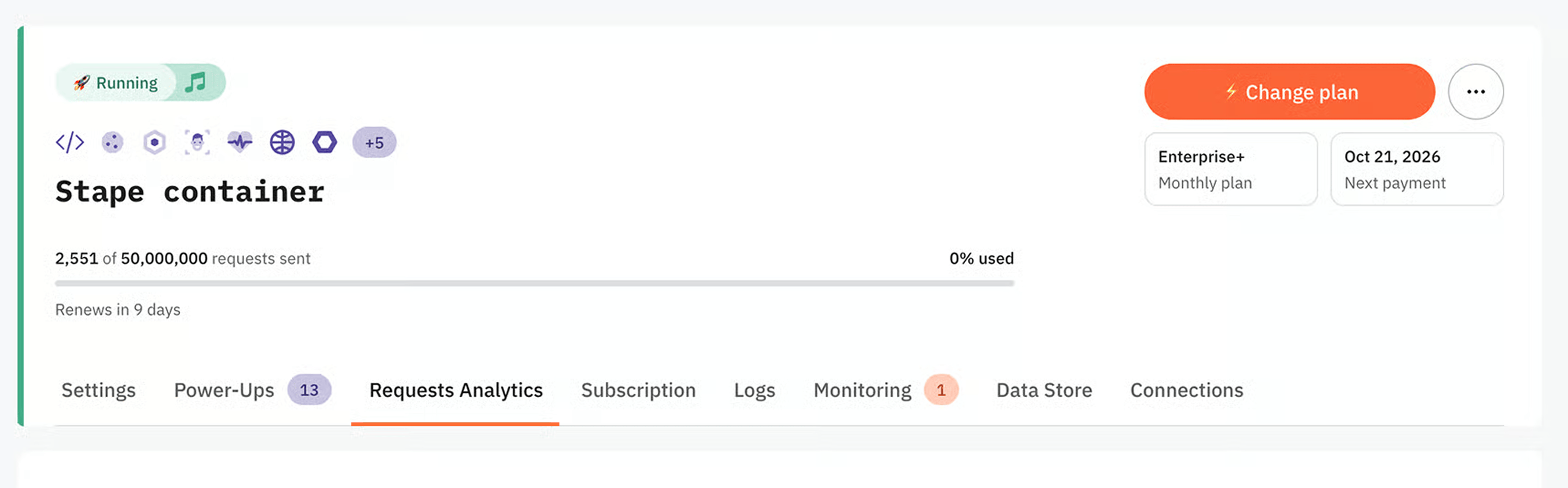
2. Click Turn on Analytics.
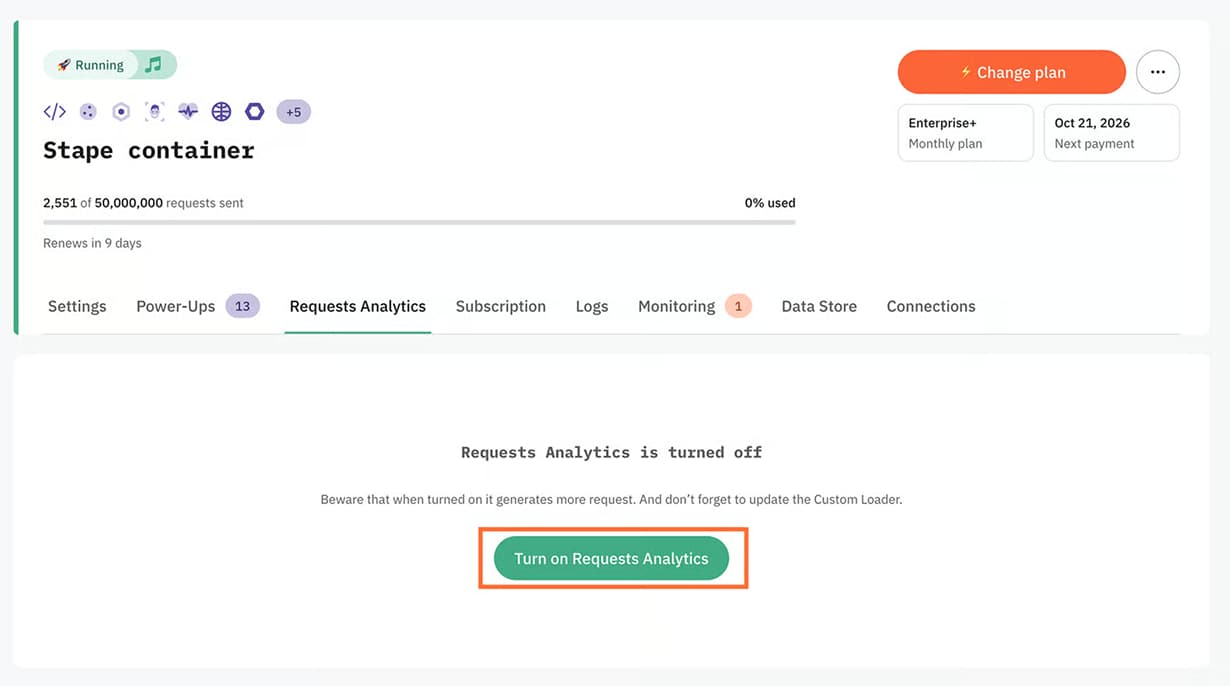
3. Go to the admin panel of the CMS you are using and ensure the Stape GTM Server Side plugin is updated to the latest version. If it's not updated, you will see an alert that the new version is available. In this case, please update the plugin or simply enable the auto-updates.

No Stape plugin is used
- 1.Open your sGTM container and click Analytics.
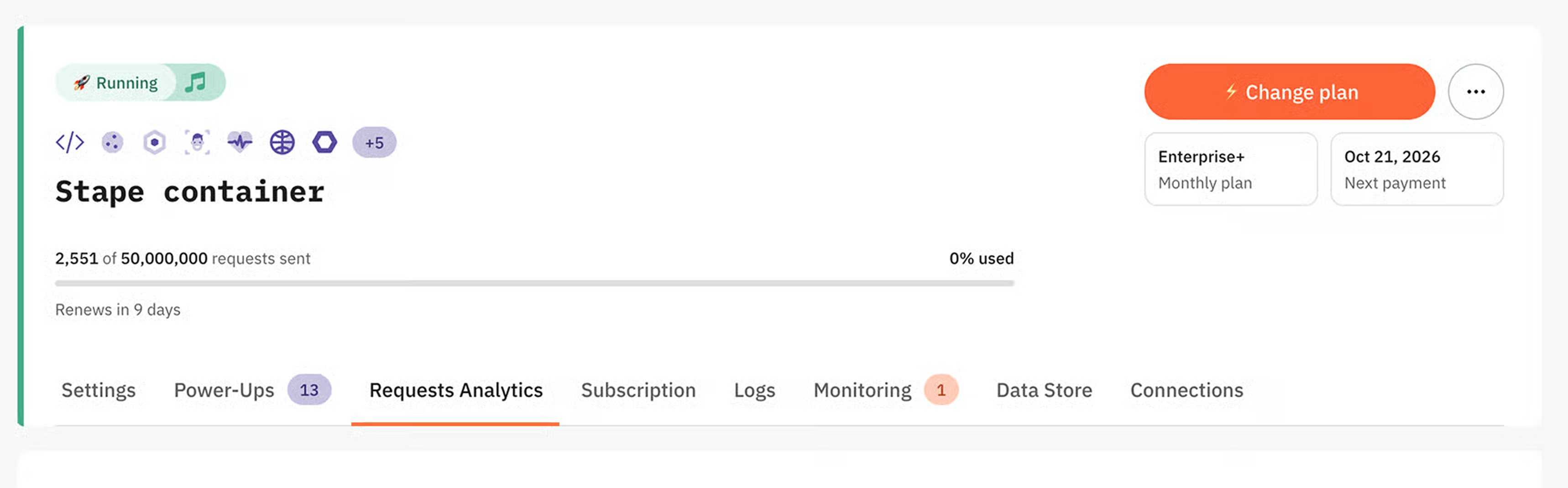
2. Click Turn on Analytics.
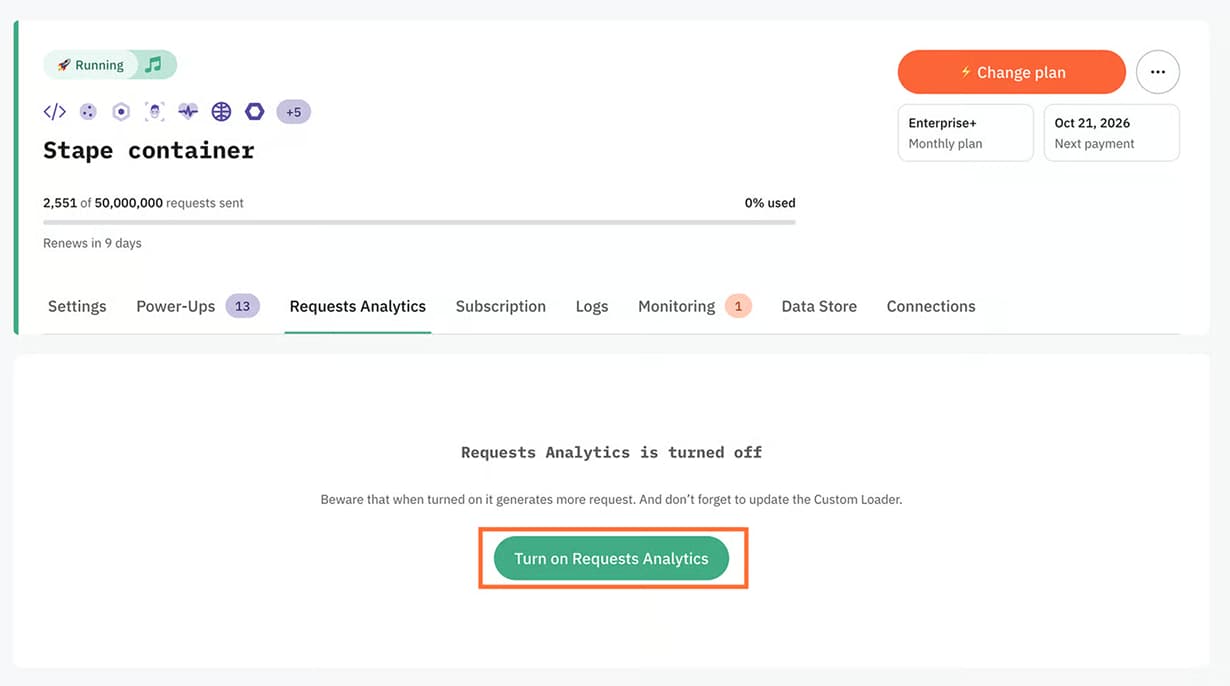
3. Go to Power-ups and click Use next to the Custom Loader panel.
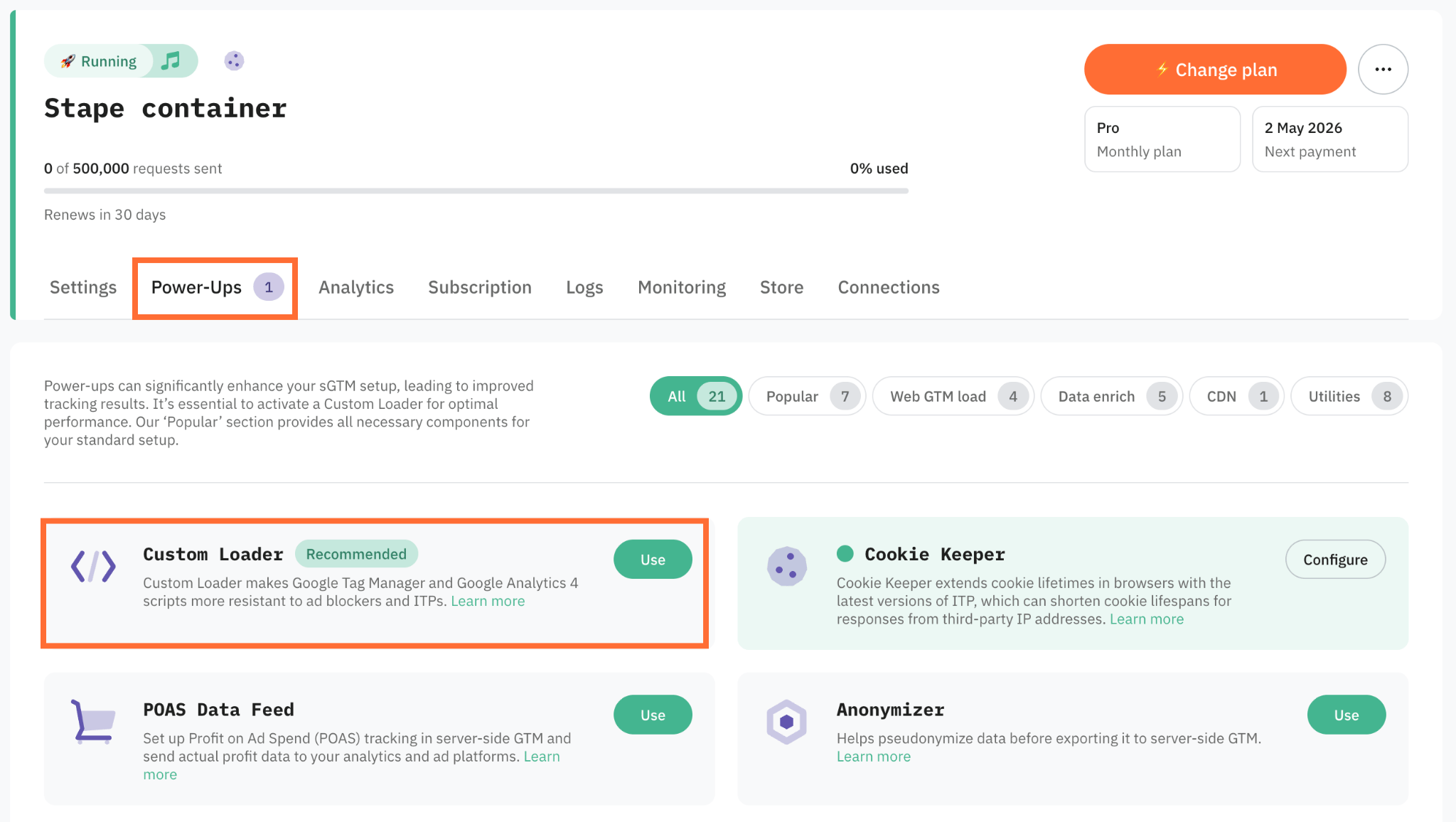
4. Toggle the Custom Loader switch to enable it.
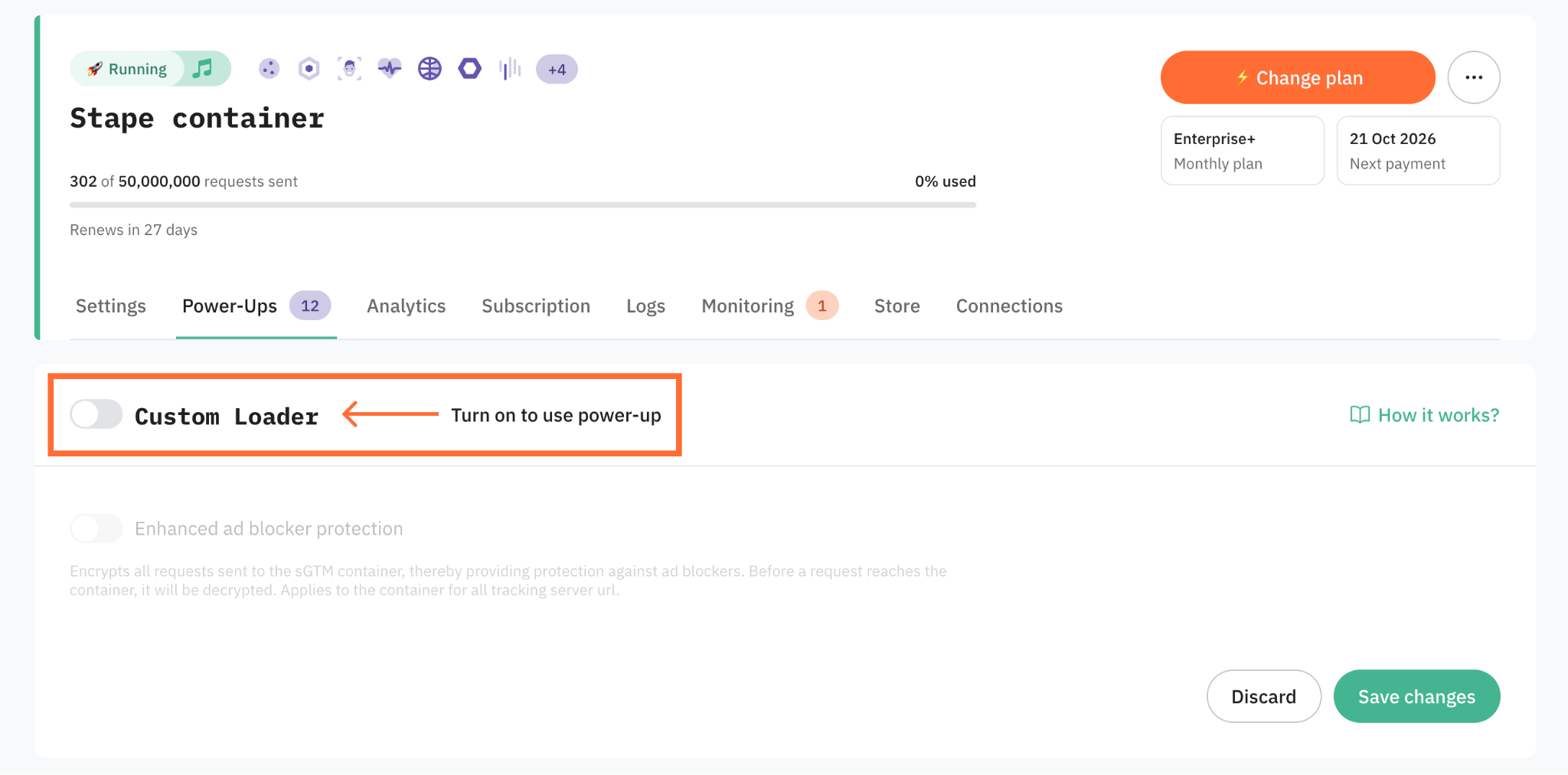
5. If you want to encode tracking requests sent from the browser to your sGTM container, toggle the Enhanced ad blocker protection. By masking recognizable URL patterns and tracking signatures, it prevents ad blockers from identifying and intercepting those requests.
6. Click Save changes.
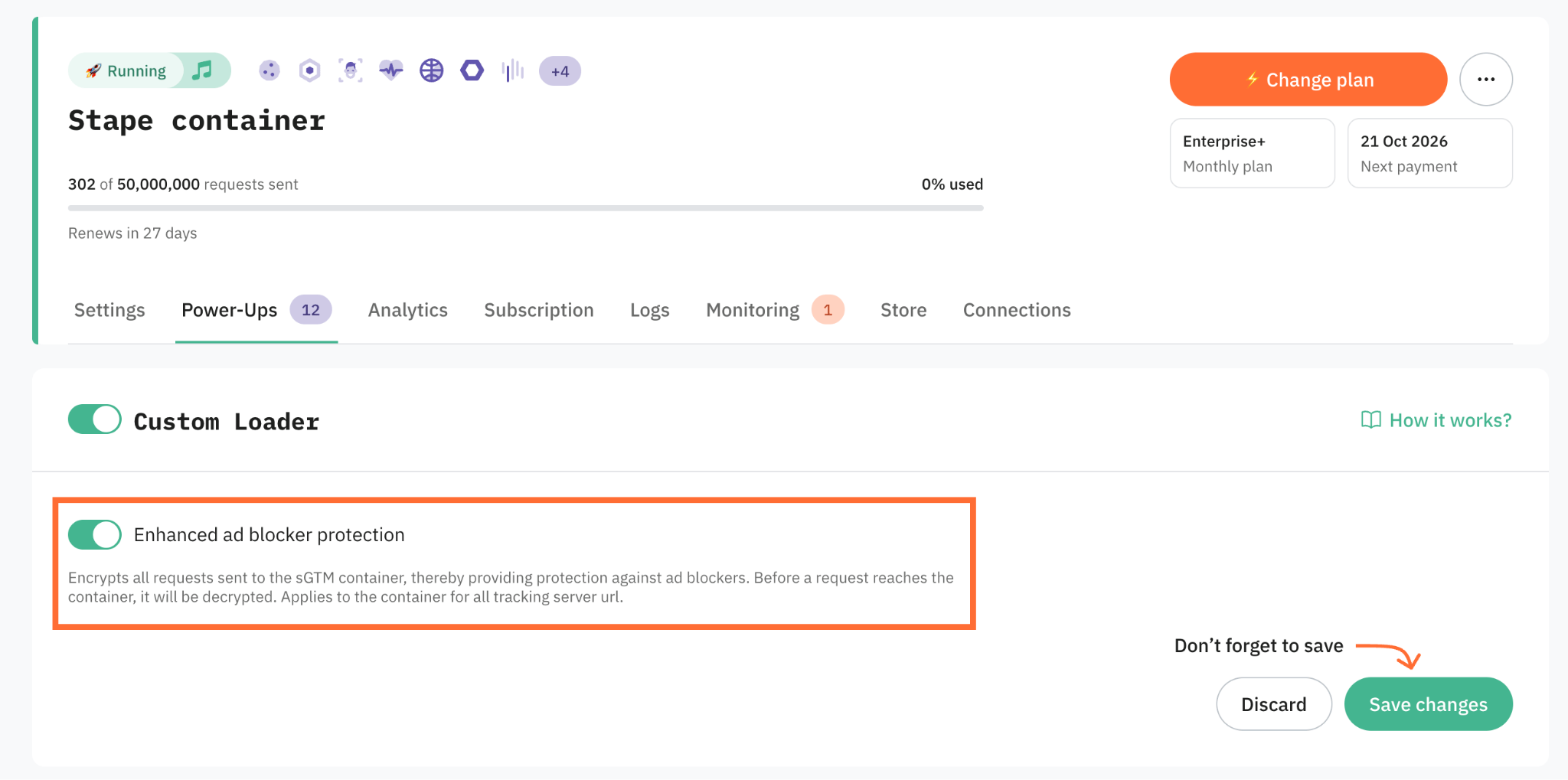
7. In the Code & Setup information section, choose the Platform - here you can either:
- Select your CMS platform (such as Shopify, Wordpress, etc.). In this case, you’ll be required to install and configure a Stape app.
- Select Other to receive a JS snippet in case you’re using another platform or a custom website.
That’s it! Now, your Requests Analytics is ready to go.
We also have instructions on how to turn off Requests Analytics.
Requests Analytics features for data accuracy
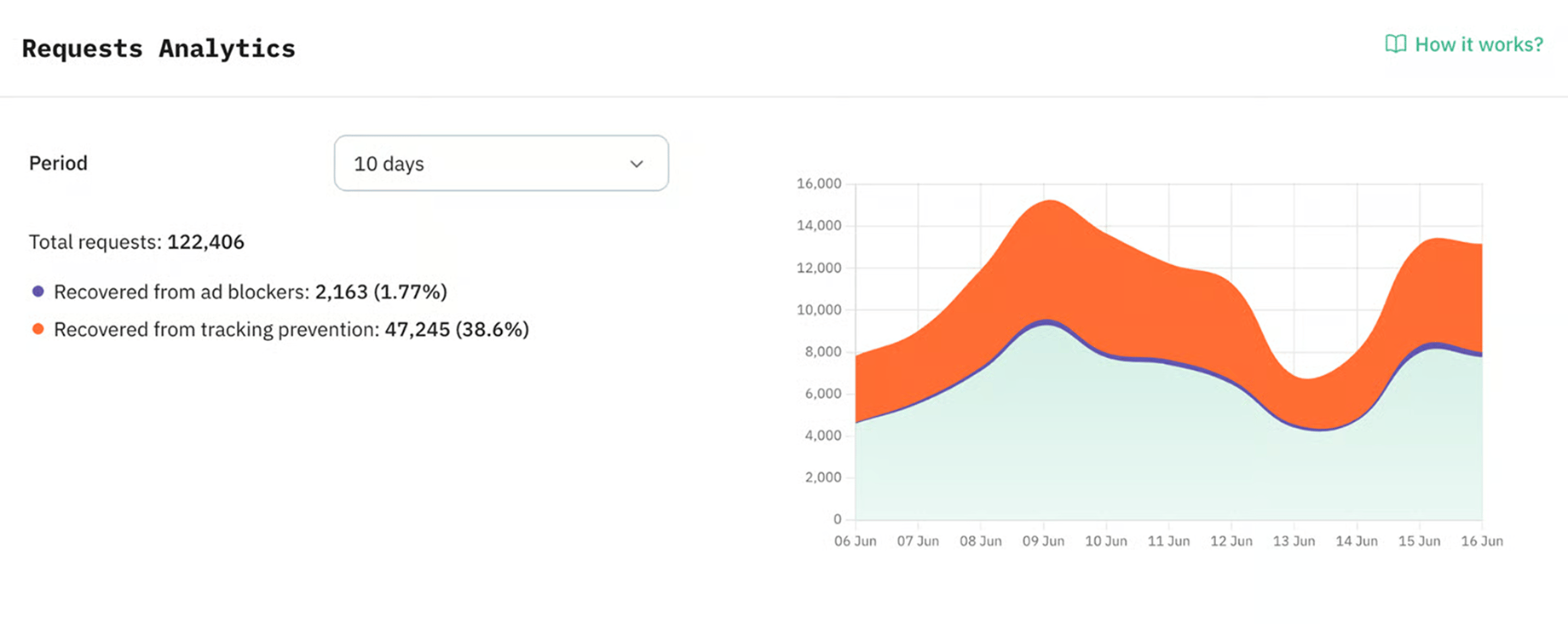
Overall statistics for 10 / 30 / 90 days
It shows the total number of requests for the selected period and separately the requests from users with ad blockers and users with tracking prevention.
Here, you can generally estimate the % of requests that would be lost without using the server side.
Separate statistics are available for each client who receives requests on your sGTM
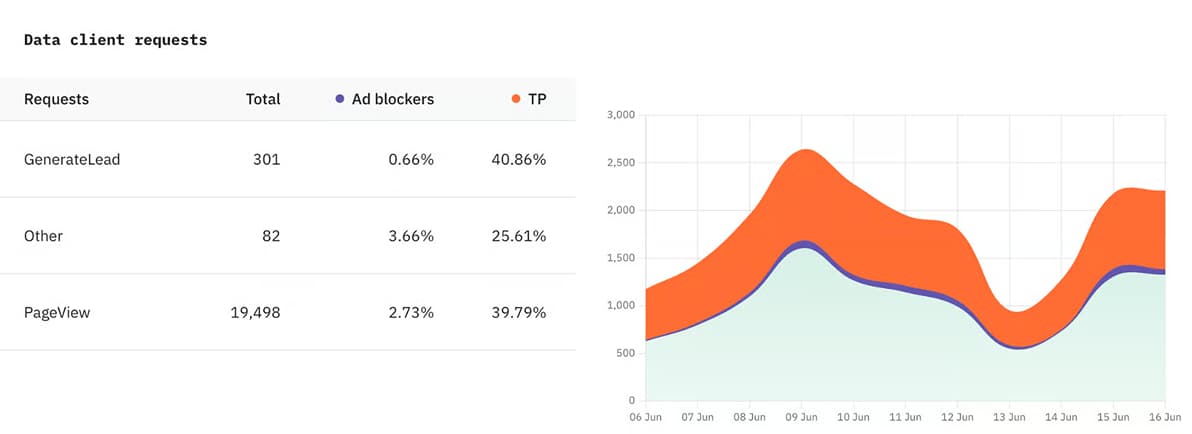
Further, you can see the statistics for each client that processes incoming requests on your sGTM separately, as well as a breakdown of the main events for this client.
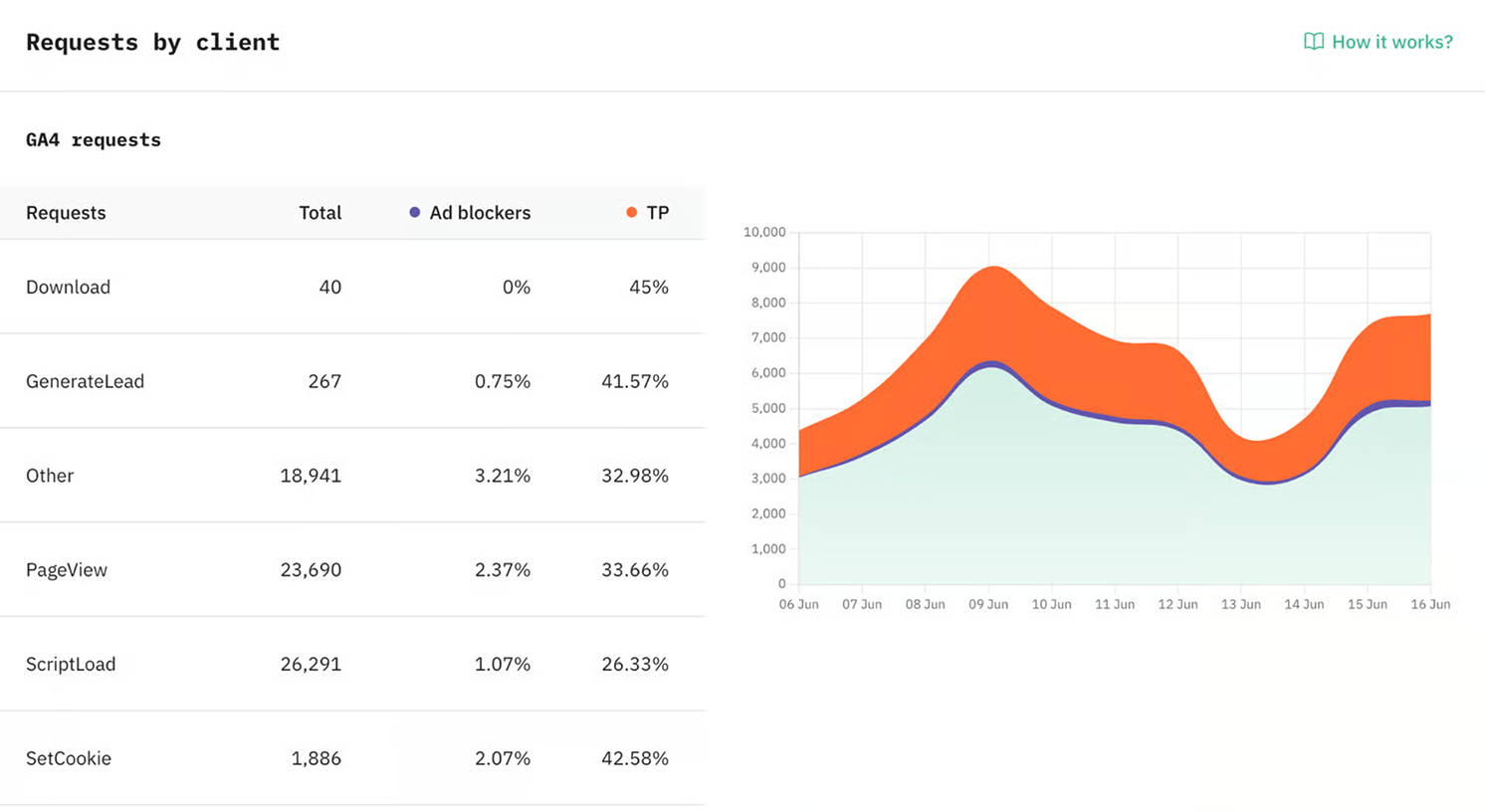
You can also select the event you are interested in, and the graph will display data only for that event.
Requests from bots
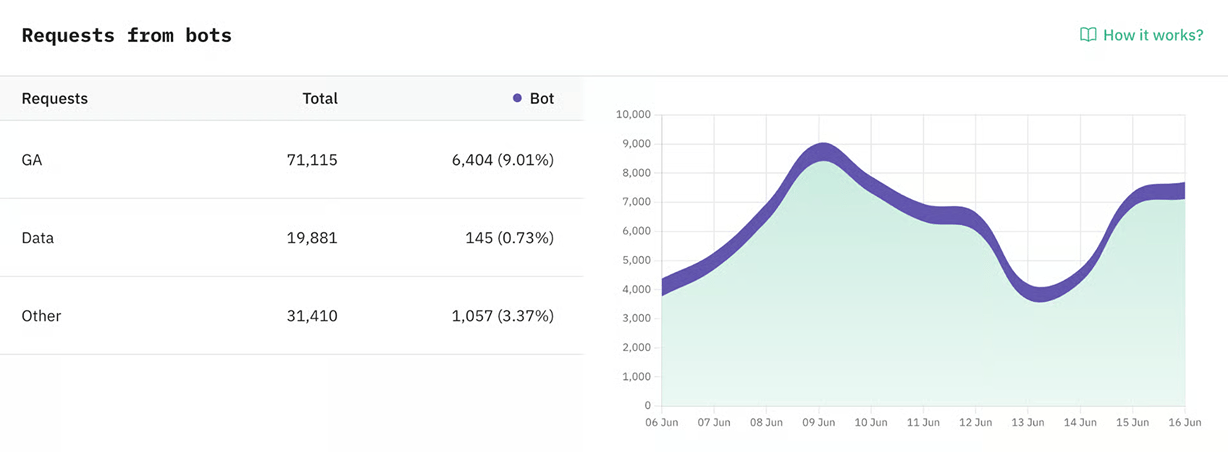
Bot requests include those identified by GA4, Data Client, and other sources. These additional sources may include, but are not limited to, Cookie Keeper, JavaScript events, GTM script loads, and more. The displayed data may vary depending on the selected period. On the infographic, you can monitor the number of bot requests and their percentage from the total number of requests.
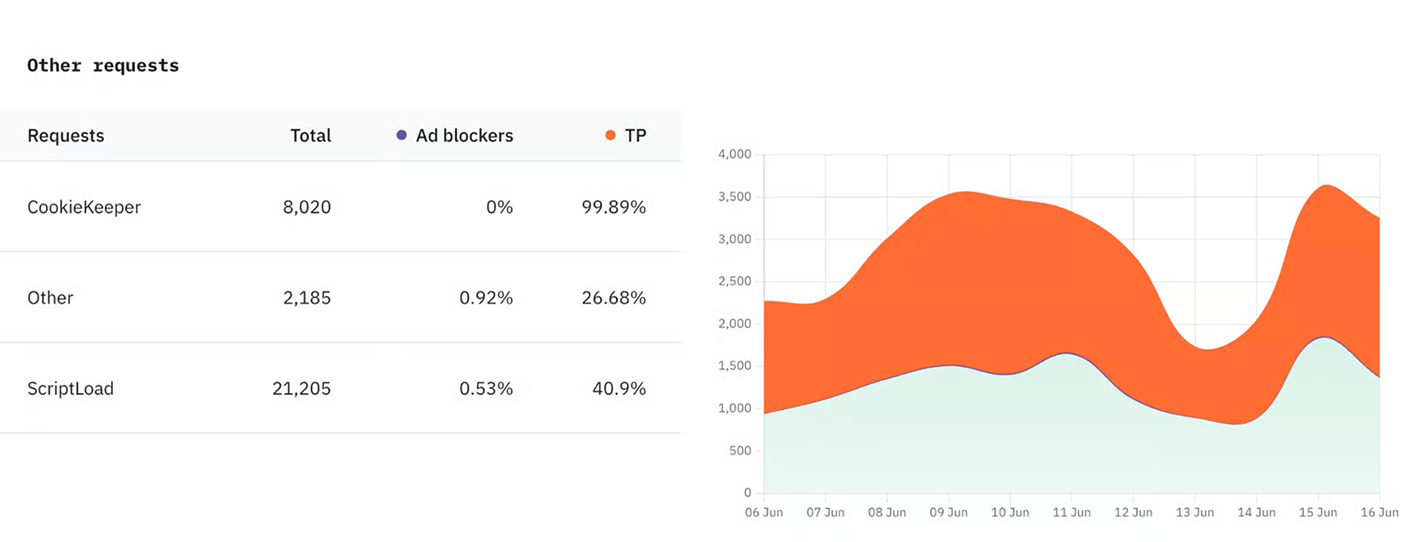
Other requests statistics
This shows stats for other requests or unknown clients, including Cookie Keeper power-up and GTM loading via Custom Loader.
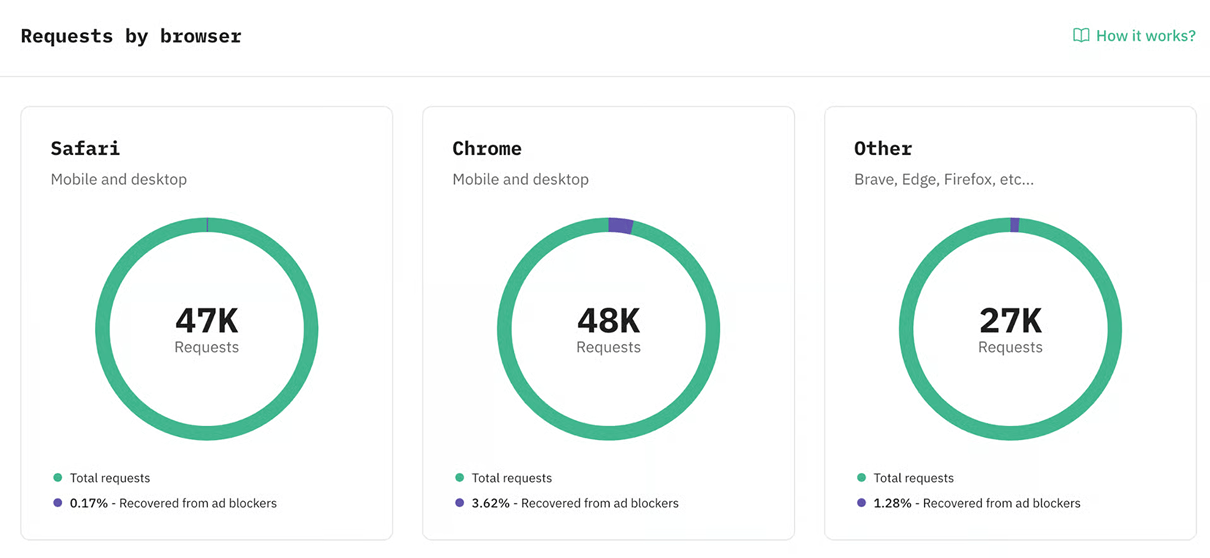
Browser statistics
It displays statistics on browsers used by your users and % of requests from these browsers that were restored, i.e., when ad blockers were used.
From Requests Analytics to stakeholder ROI proof.
See how to report server-side tracking results to stakeholders in a clear, business-focused way.
Server-side tracking impact examples
Procab Studio: records 35.71% more purchases for PPC campaigns
Stape's client, Procab Studio - a Swiss digital web agency - has kindly provided the data collection results after using server-side tracking.
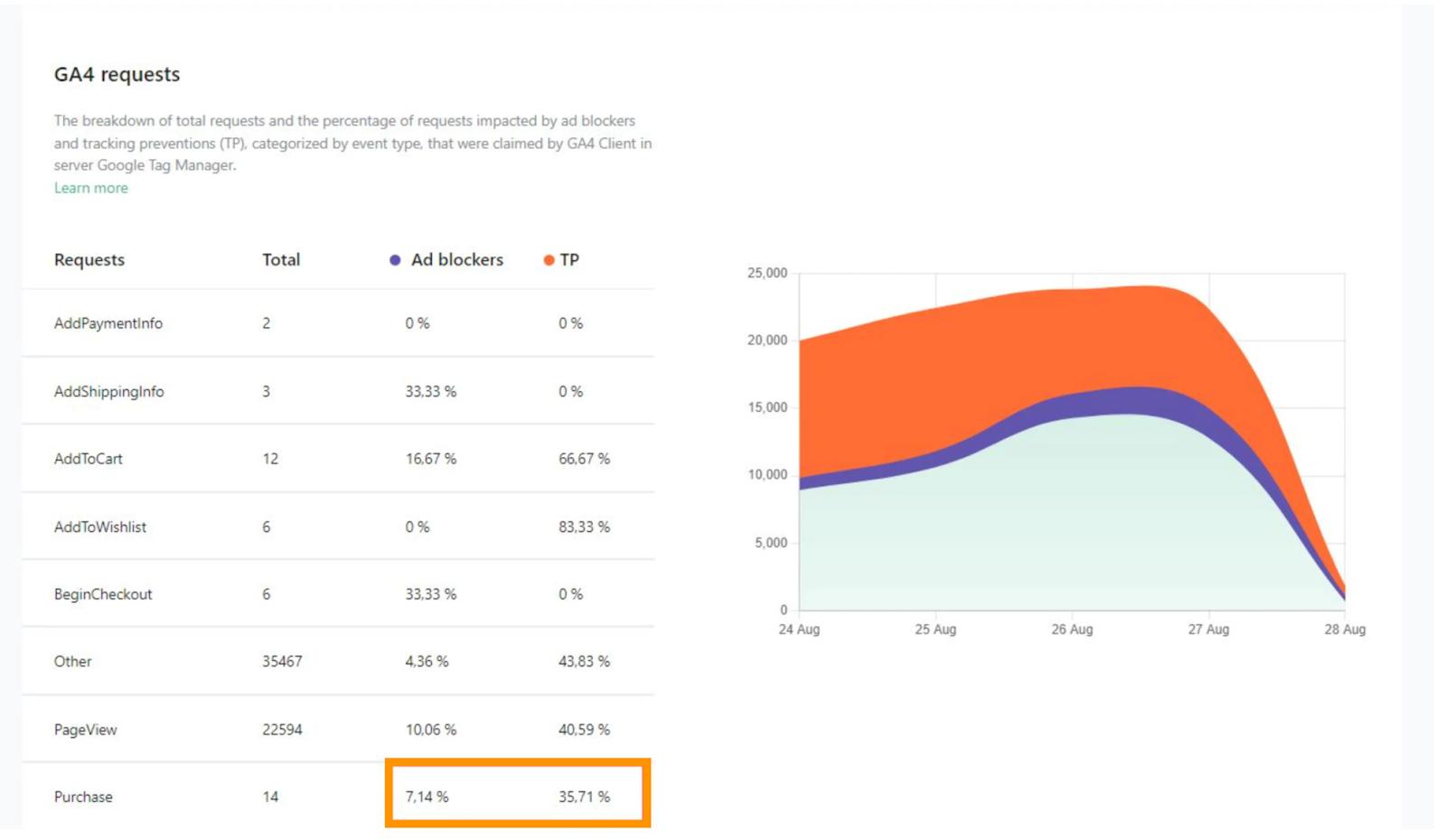
Procab Studio has an e-commerce client that runs PPC campaigns. Getting as accurate data as possible is crucial to managing ad budgets effectively, so they decided to use server-side tracking. Stape's analytics platform has shown impressive results:
- +7.06% (7,384) of retrieved requests came from visitors that used ad blockers.
- +40% (41,856) of recovered requests were initially blocked by tracking prevention mechanisms, such as Apple's Intelligent Tracking Prevention (ITP) and Mozilla's Enhanced Tracking Protection (ETP).
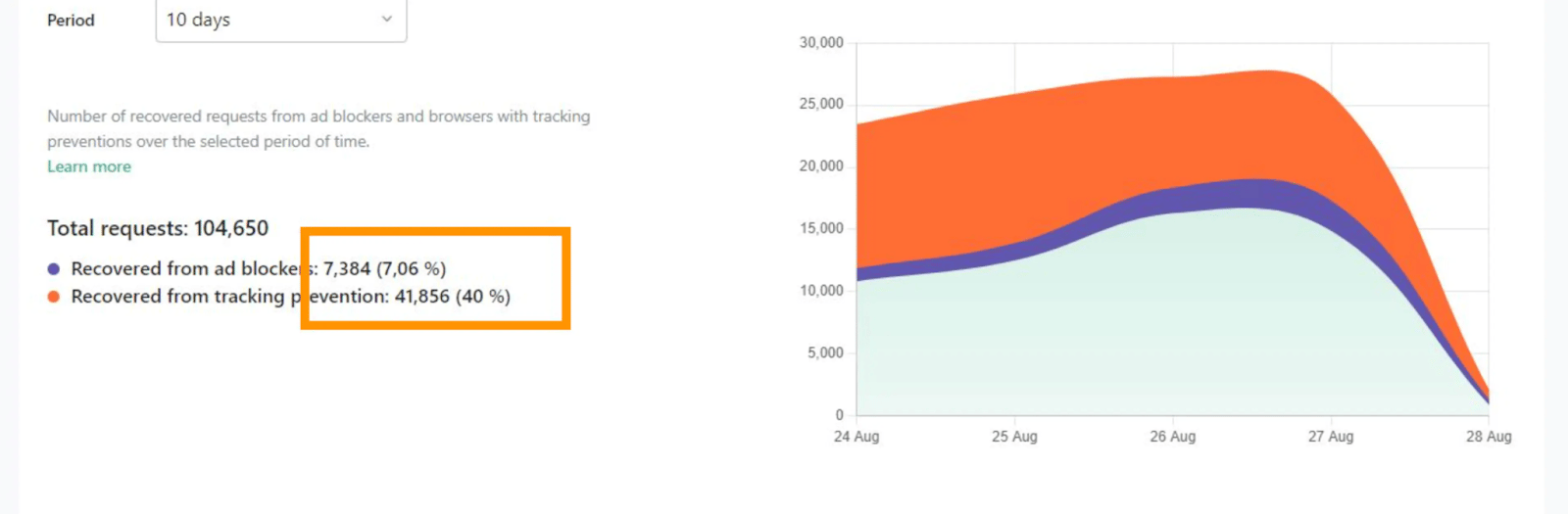
Most importantly, +35.71% of requests were retrieved for main events like purchases.
Another case study reporting data accuracy increase
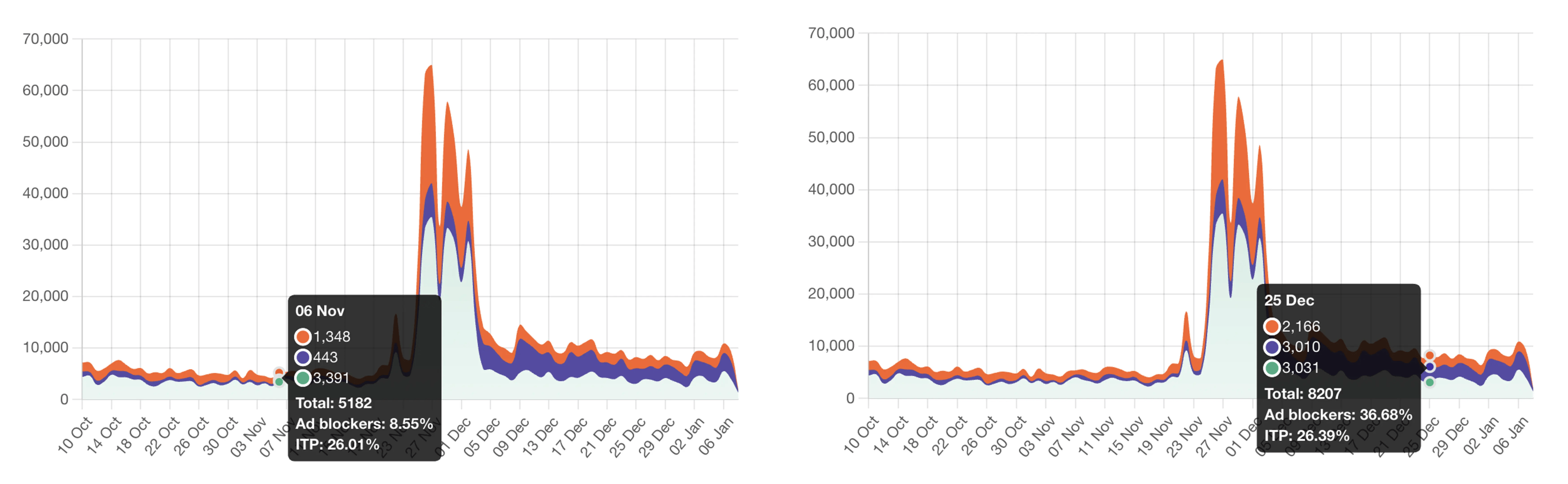
A client using Requests Analytics improved GA4 tracking from 8.55% to 35% of visitors with ad blockers by enabling the "GA4 Ad Block Bypass" feature, recovering valuable data and insights.
| Find out more about GA4 Ad Block Bypass in our blog post. |
Case studies
Read the case studies from our partners at Stape to see the impact of server-side tracking and the impressive results they got thanks to choosing server-side tagging:
| Link to case study | Description |
| ASENTO is measuring 62% more revenue for WoodUpp with server-side tracking | For six months, the ASENTO agency has separately tracked and compared data from client- and server-side tracking. As a result, they got 62% more revenue tracked with a server-side tracking setup. |
| Scandinavian Biolabs amplifies Klaviyo revenues with server-side tracking | Biolabs aimed to boost its email marketing revenue, so they needed to track the users' behavior more accurately. As a result, using server-side data collection, the measured Product Views increased by 91.84%. |
| Immune and wellness supplements company has a 34% increase in conversions recorded with sGTM | Measure Your Web’s client from Slovenia needed precise data to optimize PPC campaigns. With server-side tracking, they recorded a 34% increase in conversions. |
Read more case studies in our blog category with case studies.
Conclusion
The value of server-side tracking is different for every site. It mostly depends on how many of your users have ad blockers, browser restrictions, or issues with third-party cookies.
Requests Analytics helps you see these benefits clearly and makes it easier for agencies to show results to clients. With it, you can track how server-side data collection improves accuracy and boosts your business. It also helps monitor conversion tracking and find new opportunities.
A strong server-side setup is key to good performance. It often needs in-house expertise or help from analytics vendors to manage integration and ongoing support.
Top reasons to use Requests Analytics:
- View everything in one dashboard
- See the number of requests handled by the server container
- Check the share of requests from users with ad blockers or browser tracking limits
Need help with setup? Drop us a line at support@stape.io (available 24/7) or a message in a chat window (in the bottom right corner of this page).
Would like to try server-side tracking?
Try for freeRecommended for you
Sep 16, 2026
Blog
How to effectively use GTM Tools by Stape
Initially created by Simo Ahava, GTM Tools is now managed by Stape. Find out the tool’s benefits and how to use it.
Oct 3, 2025

Comments