Oct 2, 2026
Facebook Ads for healthcare: how to adapt conversion tracking to Meta restrictions
Written by
Tymofii Sankov
Published Nov 12, 2026 comments
Key takeaways
- If reported conversions drop while running Facebook ads for healthcare, check Events Manager for data-source restrictions. A tracking failure or an attribution difference can produce a similar drop.
- To spot potential Facebook Ads healthcare violations, audit the full request each integration sends to Meta. A generic event like Lead can still reveal health information through the URL or event fields. If HIPAA applies to your organization, assess those disclosures separately.
- If Meta restricts a conversion event, choose an available campaign goal that serves your business. Keep measuring outcomes such as attended appointments, completed consultations, or sales in your own systems.
- Server-side tracking gives you control over what your server forwards to Meta. Meta's restrictions still apply, and your team needs to check any booking tools or CRM integrations that send data directly.
Your clinic's booking system shows a full week of appointments, but Meta Ads Manager reports fewer conversions. Then the booking event disappears from your ad set. For healthcare businesses that rely on Facebook ads to reach new patients and customers, that creates two problems. It's harder to tell which campaigns are driving bookings or sales, and Meta may have fewer signals to find people likely to take those actions.
If you follow Facebook Ads healthcare policy news, you may already know that Meta's data-sharing restrictions can reach even beyond clinics and telehealth providers. A company that sells a sleep-tracking app, for example, might run ads to drive paid subscriptions. If Meta classifies the app as Health and Wellness and restricts its subscription event, the team may lose the ability to optimize campaigns for paid sign-ups.
Whether Meta blocks the Purchase event for healthcare ads or your booking conversions suddenly drop, start by checking what changed. A restriction can make an event unavailable for optimization, while a booking tool update can stop it from firing and an attribution change can affect how many conversions Ads Manager reports. This guide shows you how to tell those cases apart, review what your tracking sends to Meta, and decide which signals you can still use to measure and optimize your campaigns.
Sometimes, Meta can label as Healthcare and Wellness something entirely unrelated (for instance, an online store selling t-shirts). If that happens, contact the Meta Representative assigned to you and highlight the issue.
What Meta restricts and why
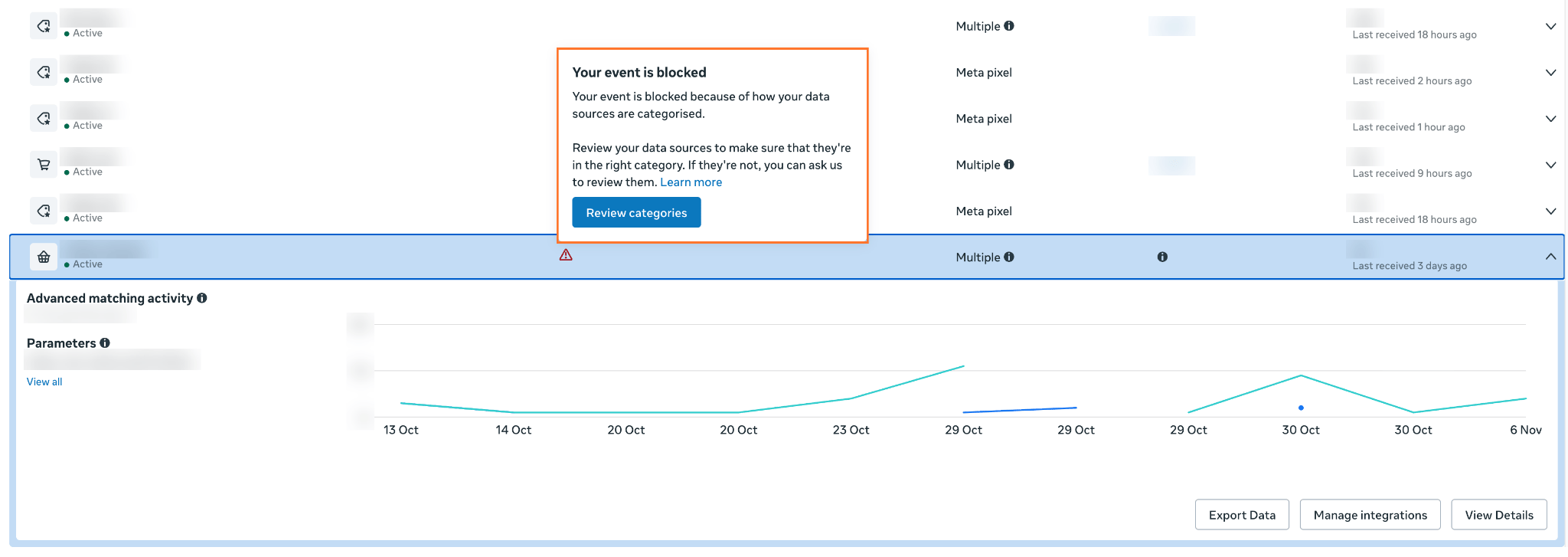
Meta's Business Tool Terms prohibit businesses from sending event data that includes or is based on someone's health information. This applies to both Meta Pixel and the Conversions API. The system can also categorize websites and apps based on their subject matter and offerings. Health and wellness sources, as mentioned, can face additional restrictions because of the nature of the data they may possess. To see what applies to your case, open the dataset that receives tracking events in Meta Events Manager and look for a data-sharing restriction notice.
| Restriction | What it can affect | Healthcare example |
|---|---|---|
| Core setup | Meta can remove URL details after the domain and limit custom event parameters. Custom conversions that depend on those details can stop counting. | A clinic may still see eligible events while losing the URL parameter used to distinguish two landing pages. Check that rule before relying on its reporting or audience membership. |
| Restrictions on certain standard events | Specific events can be restricted, affecting conversion reporting or the events available for optimization (using custom event names is often considered a potential solution to this issue). | A wellness retailer sees Purchase named in its notice and finds that it can no longer select the event in the affected ad set. Its eCommerce platform still records orders. |
| Full restrictions | Meta can block event sharing for the affected domain within the scope shown in the notice. Those events become unavailable for conversion reporting and optimization. | A telehealth provider faces full restrictions for a website in one market. Its team checks the campaign goals still available there and continues measuring completed consultations internally. |
It's good practice to check delivery and eligibility separately. Test events can show whether a test request reached the dataset. The ad set's settings show whether the event is available for the selected objective and performance goal.
Take control of your healthcare Facebook tracking
Use Stape to configure server-side tracking and manage which events and fields your setup sends to Meta.
How to audit what your healthcare tracking send to Meta
Whenever you face any issues with Facebook marketing for healthcare tracking, your first step is always the same. Open Ads Manager, select the affected ad set, and choose Edit. In the conversion settings, record the conversion location, performance goal, dataset, and conversion event. Use the dataset ID to locate the same source in Events Manager, especially if the account has several datasets with similar names.
If you need to hand the issue over to analytics, IT, or privacy reviewers, share the dataset and ad set IDs, when the issue started, what changed around that time, and the internal totals for the same period.
Meta requirements and HIPAA are separate
Even if your events appear in Meta Events Manager without warnings or restrictions, you may still have privacy obligations to meet. If your business operates in the United States, the main regulation to check is HIPAA, a federal law whose rules protect certain health information held or handled by covered entities and their business associates.
Meeting Facebook ads healthcare requirements does not establish HIPAA compliance. If this regulation applies to your organization, you're responsible for determining whether your tracking sends protected health information (PHI), whether the disclosure is permitted, and what safeguards or vendor agreements are required. That assessment is your organization's responsibility, no matter what is displayed in the Events Manager.
To ensure that you are covered on all fronts, check how to make your tracking HIPAA-compliant with Stape. By hosting your server GTM container on Stape, you can route only the events your privacy or legal team has approved and set separate rules for what Meta receives. However, keep in mind that our tools help you to apply an approved data plan, but they don't replace legal review of your full data flow.
Discuss your healthcare tracking setup
Contact our team to learn how we healthcare organizations with compliant advertising and conversion tracking.
What server-side tracking can and cannot solve for Meta Ads tracking
If your healthcare Facebook ads audit reveals unintended data sharing with Meta, first review the events and fields being sent. Your team can then decide which to keep, exclude, or change based on your measurement needs and data-sharing requirements. After that, server-side tracking can be used to implement those decisions for requests routed through your server container. The main point is that it is you who configures which events trigger a request to Meta and which fields each request includes.
For example, a clinic can use server-side Google Tag Manager to send Meta a PageView event when someone visits its locations page. All the bookings will be kept in the booking system only; neither appointment events nor appointment details to Meta.
That setup gives the clinic control over what its server forwards to Meta. The limits become clearer when you look at what happens before data reaches the server and after it leaves.
- Meta still applies its restrictions. If a data-source restriction makes
Purchaseunavailable to an ad set, sendingPurchasethrough CAPI leaves that restriction in place. - Event names and hashed identifiers can still convey sensitive information. Even a generic event like
Completecan reveal that someone finished a symptom questionnaire if the URL or another field identifies that step. A hashed email can still serve as a matching identifier. - The container controls the routes it handles. A Pixel embedded in a scheduler or a CRM connector with its own CAPI integration can continue sending data directly. Review and test those routes separately.
- Filtering an outgoing request happens after collection. If symptom answers should stay inside the telehealth intake platform, they should be excluded even before data is sent to the server. Review what it receives and what it retains in its logs.
- Sharing less data can leave Meta with fewer optimization signals. Your internal system can still count attended appointments. Meta needs an eligible signal it can receive and use to optimize toward an outcome.
So don't make changes blindly. Before changing your campaign, check which events are still eligible for optimization and which outcomes you'll need to measure outside Meta.
Control what your server sends to Meta
Get help reviewing your data flows and configuring which events and fields your server forwards to the platform.
How to adapt measurement and campaign optimization for healthcare ads
Choose a response based on the restriction and the outcome your business needs to measure. A clinic trying to fill appointments has a different problem from a wellness retailer that can still count purchases but can no longer optimize for them in Meta.
| What you found | What to do next | What to account for |
|---|---|---|
| The category appears inaccurate | In Events Manager → dataset → Settings → Manage data source categories, open the affected source and request a review if the option is available. A B2B healthcare software provider could document who the site serves, what its demo form collects, and which fields its tracking sends to Meta. | Meta decides whether to change the category. Base the request on how the site and its tracking actually work. |
| A standard event is restricted | If a clinic can no longer optimize for Schedule, check which goals are available in the affected ad set. If the clinic tests a campaign optimized for landing page views, compare ad spend and the number of attended first appointments across comparable periods using its internal booking records. | More landing page views can coincide with fewer attended appointments. Without a reliable way to link visits to the campaign, treat the appointment count as a clinic-level trend. |
| URL details or parameters are limited | Identify which custom conversions, audience rules, or reports rely on the missing details. A clinic that used treatment-page URLs to compare campaigns can use its approved internal reporting system to see which services patients actually booked. | Bookings by service show demand. Assigning those bookings to specific campaigns requires reliable acquisition data. |
| A custom event requires review | Before submitting the event for review in Events Manager, trace where it fires and inspect what it sends. If a telehealth provider's Complete event reveals that someone finished an eligibility assessment, stop sending that event to Meta and count completed assessments in the intake system. | The intake system can still show where people drop out before booking a consultation. Meta's event review and your organization's decision about what it can share are separate checks. |
| Full restrictions apply in a market | Check which campaign goals remain available in the affected market. If a telehealth provider tests a traffic campaign, set a test budget and compare spend and completed first consultations in that market with a period that had similar clinician availability. | Traffic metrics tell you whether the ads brought people to the site. Consultation totals show whether more people received care, though seasonality and other acquisition channels can also affect those totals. |
Evaluate the signals that remain available
If Meta advertisement healthcare rules restrict the event your campaign used to optimize for, start with the events that are still available for that campaign and that your organization has cleared for sharing. Evaluate each one against the healthcare outcome you're trying to improve.
- Intent. If a clinic is trying to fill first appointments at a new location, a click for directions to that location may tell you more than a visit to the general locations page. But existing patients also look up directions, so the click is an imperfect signal for new-patient demand.
- Volume. A small clinic may see too few direction clicks at the location it's promoting for the event to be useful for optimization. A location-page view may give the campaign a more frequent signal, with less insight into whether visitors intend to come in.
- Reliability. For a clinic with multiple locations, check that the event fires once when someone actually clicks for directions to the location in the ad. If the same event also fires when the page loads or when someone selects a different branch, its count tells you less about interest in the location you're promoting.
- Fit with the care journey. A telehealth provider may have no meaningful public-site action between reading about a service and starting a symptom questionnaire. If the remaining events tell you little about consultation intent, you can test an available traffic goal to bring people to the public site and use your intake system to see how many go on to complete the screening.
Before launching a test, agree on what would make it worth continuing. If directions clicks rise but the promoted clinic still has the same number of unfilled first-appointment slots, hold off on increasing the budget until you understand the gap.
How to implement and validate the revised setup of your healthcare Facebook ads
Once you've decided which signals to use, map the entire journey you'll test. For a clinic, that means following a visitor from the public website into the booking tool, where a separate integration may handle tracking.
- 1.Define the business outcomes. Marketing identifies the decisions measurement needs to support and agrees on definitions for inquiries, bookings, attended visits, or revenue.
- 2.Approve collection and sharing by destination. Privacy, legal, and technical owners review event fields, identifiers, page context, vendor roles, and required agreements. Record which steps and fields each service may receive.
- 3.Configure the approved routes. Analytics or IT updates triggers, integrations, and server-side rules. Keep unknown events out of advertising destinations pending review.
- 4.Test every route with synthetic data. Inspect browser requests, server previews or approved logs, and scheduler or CRM integrations. Test the permitted path, the excluded path, and a reload or retry.
- 5.Verify delivery and campaign eligibility separately. Use Events Manager for delivery and diagnostics, and the ad set's conversion settings for eligibility. Document how the Meta result differs from the internal outcome.
- 6.Assign ownership. Name the tracking owner and the reviewer for changes to forms, booking tools, URLs, and integrations. Keep the approved event specification with the test evidence.
What a passing test looks like.
A clinic approves one event from a general location page and keeps appointment confirmations in its scheduler. The team opens the location page in a test session, verifies that the event appears in the intended Meta dataset, and inspects the request against the approved fields. If the event is intended for optimization, the marketer also confirms that it is selectable in the intended ad set.
The tester then makes a test appointment through the third-party scheduler and reloads the confirmation page. The scheduler records exactly one test booking. Browser network traffic, the server tag trace, the scheduler's integration settings, and delivery logs show that the booking step sent no Meta request. The clinic can still measure bookings internally while sending the separately approved location-page signal.
Where Stape fits
Stape brings server-side tracking setup, management, and troubleshooting into one platform. It makes your setup easier to configure and gives you more control over which events and fields reach Meta.
However, hosting a server GTM container with Stape does not mean automatically that your organization follows Meta's Business Tools Terms. If a booking integration sends an appointment type alongside a patient identifier, your team needs to find where that data is sent and stop the disclosure at its source.
Here are Stape's features that can be useful for solving specific Facebook healthcare marketing tracking problems.
| Problem | Stape's solution |
|---|---|
| Meta stops receiving an event after a site update. | Use Logs to check whether the event reached your server-side GTM container, whether the container sent a request to Meta, and what response it received. |
| Your team finds out about delivery failures only after campaign reports change. | Set up Monitoring alerts for failed requests or unusual drops in activity so your team can investigate when they happen. |
| You're unsure which tracking scripts run on a clinic's public pages. | Scan a public page with the Website Tracking Checker to see which trackers it detects and how they send data. Use the results to decide which requests to inspect during your audit. |
| Your Meta tag receives fields it doesn't need. | With Stape's server-side GTM hosting, you can use GTM Transformations to control which fields the Meta tag can access. Keep sensitive intake or booking details out of the tracking pipeline before they reach the container. |
| A booking tool or CRM sends a webhook, but you can't see how GTM processes it. | Use sGTM Preview Header config to bring a synthetic webhook request into GTM Preview. Check which trigger and tag fire, and verify whether the container forwards anything to Meta. |
| The Pixel and server both report the same permitted event. | Use Stape's Duplicate Transaction Checker Variable to block new events with the ID that has already been processed. This helps to avoid event duplication. |
| The organization needs a BAA or specific infrastructure and retention terms. | BAA is included into server-side GTM Custom plans, alongside options such as private clusters and custom log retention. Confirm the covered services and terms before processing data that requires an agreement. |
For many companies complexity is the main factor for not switching to server-side tracking. Stape eliminates it; Setup Wizard automates configuration and provides you with a ready-to-use tracking setup for the chosen platforms.
If your domain gets completely blocked by Meta, the reasons can vary a lot. Every case is unique and needs a thorough investigation, so our team can review your setup and suggest possible solutions. Contact us to review your case.
FAQ
Conclusion
When Meta healthcare events in your advertising campaign get restricted, it is important to understand why that happened. Was your organization classified as healthcare and wellness? Or some sensitive data was unintentionally shared to the platform? Whatever the reason is, you need to identify to understand what you can do next.
If a tracking audit for your Meta healthcare ads reveals that PHI is being sent to Meta, server-side tracking gives you more control over what gets forwarded. Stape, in turn, allows you to configure server-side tracking quickly, easily, and power it up with additional features. Checking and meeting the Meta regulations requirements, though, is still your responsibility.
Need help reviewing your tracking setup, identifying what data you may be sharing unintentionally, or planning a server-side implementation? Contact Stape team. They will answer your questions and advice on further steps.
Want to start on the server side?
Try for freeRecommended for you
Blog
Personally Identifiable Information (PII) data explained
Discover what PII is, and how you can ensure compliance with data privacy regulations, safeguarding customer trust and protecting your business from legal risks.
Oct 5, 2026

Comments