AI traffic, actually measured: GA4, BigQuery & your CRM
Written by
Josh Silverbauer
Key takeaways
- GA4’s AI Assistant channel relies on the referrer. Visits without one land in Direct or Unassigned, and AI Overviews and AI Mode stay in Organic Search.
- Stape’s AI Traffic Detection adds X-User-AI headers at the request level. The signal reaches GA4, BigQuery or your CRM before a single tag fires.
- “AI traffic” is three things: crawlers, fetchers and humans. Pair X-User-AI with X-Device-Bot to keep bots out of your acquisition numbers.
- GA4 custom channel groups can’t see custom dimensions. Use a referrer-based AI channel or write your own medium (ai-detected) into the landing page URL.
- BigQuery and your CRM show whether AI traffic turns into revenue. Start the benchmark now and carry the first AI source into pipeline reporting.
If you work at an agency, you've heard this on a client call this year. Probably more than once. Probably in the last five minutes, and someone, somewhere in the world, is hearing it RIGHT NOW!
"So...are we showing up in ChatGPT?"
UGH.
Until recently, the answer was a shrug. In GA4, AI visits got scattered across Referral, Direct and a handful of source names nobody could explain. Then in May 2026, Google added a native AI Assistant channel to the default channel group. Great but not much better than a custom channel grouping…
GA4's AI Assistant channel tells you about the AI visits that came to the website via decorated links or referral channels. It doesn't tell you about the ones that didn't.
That's where Stape's AI Traffic Detection power-up comes in. Stape already published a solid setup guide on How to track AI traffic with Stape, so I'm not going to make you sit through the toggles again. I’m here to guide you through what you can do with the data so it turns into reporting a client can use.
What GA4's AI Assistant channel actually catches
When a session's referrer matches Google's list of AI assistants, GA4 sets the medium to ai-assistant, sets the campaign to (ai-assistant), and drops the session into its own channel bucket. Google names ChatGPT, Gemini, Deepseek, Copilot and Grok as examples (Google's channel definitions).
It’s better than it was before BUT:
- It runs entirely on the referrer. No referrer, no AI Assistant. Links copied out of a chat window, in-app browsers and apps that strip referrers all show up as Direct (or Unassigned, GA4's other favorite shrug).
- AI assistants that aren’t on GA4’s list are counted as regular Referral traffic. Their visits end up in the same bucket as that one blog that linked to you in 2019.
- Google's own AI doesn't count. AI Overviews and AI Mode are filed under Organic Search, by design. It says so right in the channel definitions.
So the same person, reading the same ChatGPT answer, can land in AI Assistant, Referral, Direct or Organic Search depending on how they got from the answer to your site.
Kinda lame knowing that a lot of people don’t actually click a link when doing research.
The quick version of Stape’s power-up
Here's what AI Traffic Detection does.
When the power-up identifies an incoming request as AI traffic, it adds two headers to that request before it reaches your server GTM container:
X-User-AIwith the valuetrueX-User-AI-Namewith the name of the AI platform, when Stape can identify it
WHERE that signal shows up is the whole point. GA4's channel gets assigned after your data lands in Google's processing pipeline. These headers exist at the request level, inside your container, BEFORE a single tag fires. Anything server GTM can send data to, the AI signal can go along with: GA4, Amplitude, BigQuery, a Make webhook, your CRM.
Two housekeeping notes before you go hunting for the toggle:
- It's available on Stape's Pro plan and higher.
- The Custom Loader power-up has to be configured first, or the AI Traffic Detection switch won't activate (Custom Loader is free. If you're on Stape without it, let's talk about that).
Three kinds of "AI traffic" (and why lumping them together is just not a good idea)
Here's the trap: "AI traffic" is three mischievous kids wearing one trench coat.
1. Training crawlers. GPTBot, ClaudeBot, CCBot, Bytespider and friends. They read your content to train or improve models. Nobody is visiting you. Nobody is converting. If you want to know how often they stop by, that's a job for server or CDN logs, not your acquisition report.
2. Live fetchers. ChatGPT-User, Perplexity-User, OAI-SearchBot, Claude-SearchBot. That's an assistant grabbing your page in real time to answer somebody's question. Still not a visit, but it IS a signal: your content made it into an answer. That's visibility, not acquisition.
3. Humans clicking through. Somebody asked an assistant a question, got an answer with your link in it, and clicked. THIS is the one that belongs in your acquisition reporting, right next to Organic Search and Paid Social, with engagement and conversions attached.
Mix those together and your "AI traffic" number is part content scraping, part answer-engine visibility and part actual customers. Then someone looks at the conversion rate, sees it's terrible, and declares AI traffic worthless. (It's not worthless. You averaged a mindless robot with a buyer.)
The two AI headers tell you a request is AI-related and, when possible, which platform. They don't tell you which of these three buckets it falls into. So I pair it with another Pro-plan power-up: Bot Detection. It scores every incoming request from 0 to 100 and, in header mode, adds X-Device-Bot (true at a score of 50 or higher) and X-Device-Bot-Score.
Put the two together and you get a first cut that's surprisingly useful:
| X-User-AI | X-Device-Bot | What it probably is | What to do with it |
|---|---|---|---|
| true | false | A human who came from an AI platform | Send to GA4 as AI traffic, then the warehouse and CRM |
| true | true | An AI fetcher or agent | Keep it out of GA4 and ad platforms; log it separately as visibility |
| (empty) | true | A plain old bot | Exclude, same as always |
| (empty) | false | Everybody else | Business as usual |
This is a guide, not your bible. Bot scoring is probabilistic, and Stape itself treats the 50 to 75 range as suspicious rather than confirmed, so check a sample of requests in Preview before you build a dashboard on it.
Wiring it into GA4 the way I'd do it
Stape's guide covers the basic GA4 mapping, and it's the right foundation:
- 1.In GA4, create two event-scoped custom dimensions:
ai_trafficandai_traffic_source. - 2.In your server container, open your GA4 tag and add two event parameters with those exact names.
- 3.For the values, create two Request Header variables, one reading X-User-AI and one reading
X-User-AI-Name.
Before you publish ANYTHING, open server GTM Preview, go to the Request tab, click the incoming HTTP request and check the request headers. Go ask ChatGPT about your own brand and click through to generate a test visit. (I hope you show up cause if you don’t that’s kinda sad) If you don't see X-User-AI on that request, nothing downstream is going to fix it. Debug at the request, not in GA4, unless you want to wait a day to find out you were wrong.
Don't assume every event in the visit carries the header.
Request headers live on requests. While you're in Preview, click through a few more pages after the landing page and watch whether the header sticks around. If it only shows up on some requests, your add_to_cart three pages later is unflagged. Your generate_lead is unflagged. Your "AI conversions" exploration comes back looking like AI visitors never convert, someone in a meeting says "see, AI traffic is junk," and now you get to spend a quarter un-ringing that bell.
The fix is to persist the signal the moment you see it:
- Write a first-party cookie when
X-User-AIistrue, holding the platform name (orunknownwhenX-User-AI-Nameis empty). Any cookie-setter tag template works, or a few lines in a custom template using thesetCookieAPI. - Read it back with a Cookie Value variable, and use it as the fallback for
ai_traffic_sourcewhenever the header is empty. - Or skip the cookie and write it to Stape's Data Store, keyed on client ID, then look it up on later events.
- Respect consent. This is attribution storage like any other, so it follows the same consent rules as the rest of your analytics cookies.
One last tip if you're rolling this out across a portfolio: pick the parameter names once and don't let anyone make them up. ai_traffic and ai_traffic_source, everywhere, forever. Future you, building a cross-client dashboard at 11pm will be very happy with you.
The GA4 gotcha: custom channel groups can't see custom dimensions
Okay. You've got ai_traffic_source flowing into GA4. The obvious next move is to build a custom channel group with an "AI" channel that uses it, drag it above Referral, and bask in a beautiful acquisition report.
You can't.
Option A: work around it inside GA4. This is my default:
- Use the dimension where GA4 lets you. Explorations, comparisons, segments and audiences all accept custom dimensions. "Sessions where
ai_traffic = true" stacked against your channel report is a perfectly good view. - Still build a referrer-based AI channel group. Copy the default group, add an "AI" channel with a "matches regex" condition on source, and drag it above Referral (order matters, because traffic lands in the first channel it matches). Standard properties only get two custom channel groups, so spend one here. This is a decent starting regex:
.*(chatgpt|openai|perplexity|claude\.ai|gemini|copilot|deepseek|grok).*
- Keep the native AI Assistant channel as a subset, not the definition. Google's list, your regex and the header together get you a lot closer to the real number than any one of them alone.
Option B: hand GA4 the answer before it asks.
Hypothetically (and not so hypothetically), you can also write the AI signal into source and medium yourself, so channel groups CAN see it. GA4 reads UTMs from the page URL, so the cleanest route is to override page_location in your server GA4 tag on the session's landing page_view, appending UTMs built from the headers:
https://example.com/pricing?utm_source=chatgpt&utm_medium=ai-detected
Then your custom channel group gets one simple rule: medium exactly matches ai-detected OR medium exactly matches ai-assistant. Now there's a real AI row in the standard Acquisition reports, and you can still tell Stape's detection (ai-detected) apart from Google's (ai-assistant).
Notice I did NOT say "rewrite the medium to ai-assistant." It's tempting, because GA4's native channel would pick it up automatically. But then Google's detection and yours are blended forever, and you can never untangle which one caught what. Use your own medium.
Guardrails (this is really important):
- Landing hit only. Only touch the event that starts the session. Rewriting mid-session hits is how you get attribution soup.
- Never overwrite real campaign data. Skip the rewrite if the URL already has UTMs or a click ID (
gclid,fbclid,msclkid), or if the referrer is already on Google's AI list. - Humans only. Only rewrite when
X-Device-Botis false, so fetchers and agents don't turn into "AI sessions." - Handle unknowns. Fall back to
utm_source=ai-unknownwhenX-User-AI-Nameis empty. - It's forward-only. Historical data won't change, so annotate the date you flipped it on before somebody panics at the step change.
- Document it. Somewhere a future analyst will actually look. Otherwise they find ai-detected in BigQuery in 2028 and assume it was ghosts.
- Test it in DebugView
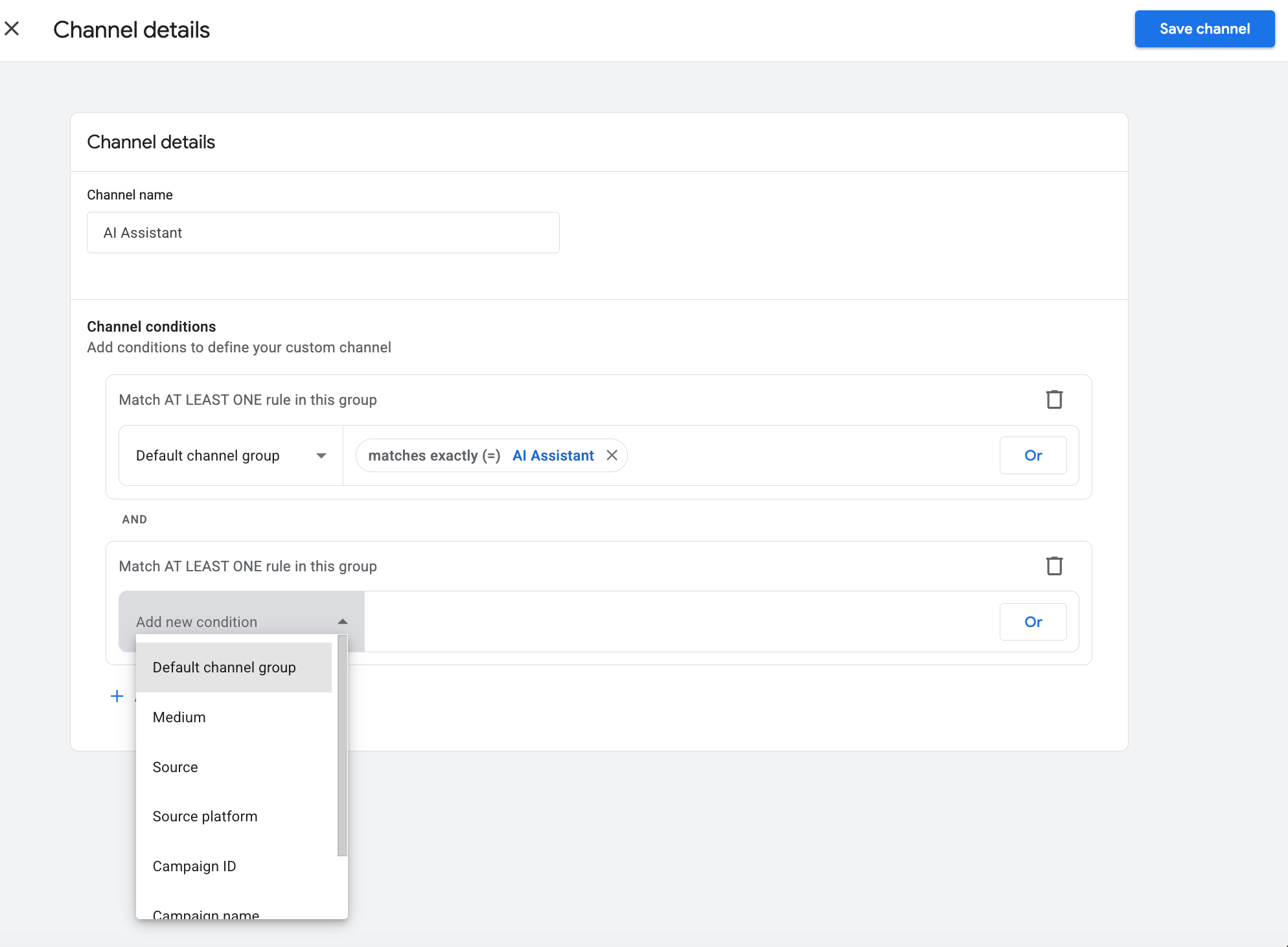
So which one do I pick? Both, honestly. Option B gets AI into the reports your clients already are familiar with, but Option A keeps the raw signal on every event, untouched. For a more technical team, there's the warehouse.
Take it to the warehouse
Plot twist: the header data is MORE useful in BigQuery than in the GA4 interface.
Custom channel groups aren't in the BigQuery export schema at all (Google's docs), so any channel logic you build in the UI has to be rebuilt in SQL anyway. Event parameters, on the other hand, export as-is. That means ai_traffic and ai_traffic_source are next to page_referrer, ready to be combined however you want.
It also kills the scope problem from earlier. In SQL you can roll events up to the session and ask "did ANY event in this session carry the flag?" with a single LOGICAL_OR.
Here's a starter query that builds one AI definition from both signals (the header OR an AI referrer) and returns monthly AI share of sessions:
Monthly AI share of sessions from the GA4 BigQuery export
WITH events AS (
  SELECT
    PARSE_DATE('%Y%m%d', event_date) AS event_date,
    CONCAT(
      user_pseudo_id, '.',
      CAST((SELECT value.int_value FROM UNNEST(event_params) WHERE key = 'ga_session_id') AS STRING)
    ) AS session_key,
    (SELECT value.string_value FROM UNNEST(event_params) WHERE key = 'ai_traffic') AS ai_flag,
    (SELECT value.string_value FROM UNNEST(event_params) WHERE key = 'page_referrer') AS referrer
  FROM `your-project.analytics_123456789.events_*`
  WHERE _TABLE_SUFFIX BETWEEN '20260101' AND '20261031'
),
sessions AS (
  SELECT
    session_key,
    MIN(event_date) AS session_date,
    LOGICAL_OR(
      IFNULL(ai_flag, '') = 'true'
      OR REGEXP_CONTAINS(IFNULL(referrer, ''),
        r'chatgpt\.com|perplexity\.ai|claude\.ai|gemini\.google\.com|copilot|deepseek|grok\.com')
    ) AS is_ai
  FROM events
  WHERE session_key IS NOT NULL
  GROUP BY session_key
)
SELECT
  DATE_TRUNC(session_date, MONTH) AS month,
  COUNTIF(is_ai) AS ai_sessions,
  COUNT(*) AS total_sessions,
  ROUND(100 * SAFE_DIVIDE(COUNTIF(is_ai), COUNT(*)), 2) AS ai_share_pct
FROM sessions
GROUP BY month
ORDER BY month;
Swap in your project, dataset and date range. Add a LOGICAL_OR for your key events in the sessions step and you've got AI conversion rate in the same view.
Then start the benchmark NOW, even if the numbers are tiny. Stape pitches this power-up partly on building historical benchmarks before AI becomes a major channel, and they're right. When AI share goes from a rounding error to a real line item, you're going to want the "before." Track monthly AI share of sessions, top AI landing pages, engagement next to Organic Search, and key events. Pipe it into Looker Studio and it becomes a standing row in the monthly report.
Does AI traffic turn into revenue?
The part that matters most to people is does this traffic MAKE DAT MONEY!
If you're B2B with a 60-day (or six-month) sales cycle, sessions are a vanity metric. The question your CMO actually cares about isn't "how much traffic did ChatGPT send?" It's "did any of those people become pipeline?" And GA4 is not going to answer that, because the deal closes in Salesforce two months after the session expired.
So carry the AI source to where the revenue lives. It's the same closed-loop pattern I build for paid media click IDs, just with one more field:
- 1.Persist first touch. When
X-User-AIfires, write a longer-lived first-party cookie with the platform name. Only write it if it's empty, so it stays first touch. Set it from your first-party container domain (Stape's Same Origin setup is the cleanest route) so Safari is less likely to chop it down to 7 days. And make sure it isn't HttpOnly, because the next step reads it in the browser. - 2.Put it in the form. Use your web GTM container to copy the cookie into a hidden field on every lead form: HubSpot, Gravity Forms, Pardot, whatever you've got.
- 3.Land it on the record. Map the hidden field to a property like "First AI Source." In HubSpot that's a custom contact property. In Salesforce it's a Lead field mapped through to Contact and Opportunity on conversion.
- 4.Report on the money. Now you can build the report that ends the argument: pipeline and closed-won revenue by First AI Source, right next to every other channel.
If you already run a closed-loop setup that sends CRM stages back to the ad platforms (through Make, Zapier or a server-side tag), you've already done most of it. The AI source is just one more column riding along the same pipe.
Traffic is a vanity metric until it shows up in the CRM. Make it worth something!
What the headers can't tell you
I promised honesty, so here's what this setup still can't see:
- AI Overviews and AI Mode. Google files these under organic search. Unless the power-up flags them, a click from an AI Overview looks like a click from a regular search result. From here on, assume some of your organic search is also AI.
- AI browsers. Atlas, Comet and similar Chromium-based browsers can send the same user agent string as Chrome. Stape's own testing found exactly that (AI browser tracking).
- Unknown platforms.
X-User-AI-Nameis only filled in when the platform can be identified. Expect sometrueflags with no name, and report them as "AI (unknown)" instead of dropping them. - Zero-click influence. Somebody reads ChatGPT's recommendation, remembers your brand, and types your URL three days later. No tool on earth is catching that as AI. That's what branded search trends, direct traffic trends and good old "how did you hear about us?" fields are for.
GA4's native channel is the floor. The headers are like third floor stuff.. Neither one is the ceiling, and anybody who tells you they've measured 100% of AI influence is talkin out of their…AISS.
The bottom line
The next time a client asks "are we showing up in ChatGPT?", you'll be able to give a response that’s better than a shrug. You'll have a number, a trend line, and maybe even a closed-won deal with ChatGPT's name on it.
AI Traffic Detection is available on Stape's Pro plan and higher. Not on Stape yet? Start for free, get your server container in place, and start building that benchmark before everyone else does.
Now go find out what ChatGPT or Claude has been doing for you! And maybe AI search Josh Silverbauer and Intrepid Digital so we see that trend line go up a bit.
Want to start on the server side?
Try for freeRecommended for you
Aug 11, 2026
Blog
How to track AI traffic with Stape
Identify traffic from AI tools and bots, set up the AI Traffic Detection power-up, and send AI traffic data to GA4, Matomo, and other analytics tools.
Sep 29, 2026

Comments