Aug 18, 2026
How to track AI traffic with Stape
Written by
Uliana Lesiv
Published Sep 29, 2026 comments
Key takeaways
- AI traffic is growing with significant year-over-year increases across industries (on average by 186%).
- AI traffic isn't always easy to identify because analytics platforms may classify it under different referral or acquisition sources.
- The Stape AI Traffic Detection power-up identifies AI-driven traffic and adds detected data to incoming requests in a server GTM container.
- Detected AI traffic can be sent to analytics platforms such as GA4, Matomo, or other tools by passing the detection data through your server-side tracking setup.
- AI traffic data can be used for custom reporting. You can monitor AI traffic share, analyze engagement, and measure conversions.
What Is AI traffic?
AI traffic is website visits or requests that originate from AI platforms, assistants, browsers, or automated AI systems. AI traffic can include both human visits (when a user clicks a link on AI platforms) and automated requests generated by AI systems (such as training crawlers and search fetchers, which we consider below).
Is AI traffic tracking relevant for your website?
AI is becoming an important source of website traffic. Its constant development has already impacted multiple industries (according to the research cited below), and most likely it may already be affecting your website's traffic acquisition reports.
Before setting up AI traffic detection, it is worth looking at how quickly AI adoption and AI-referred traffic are growing.
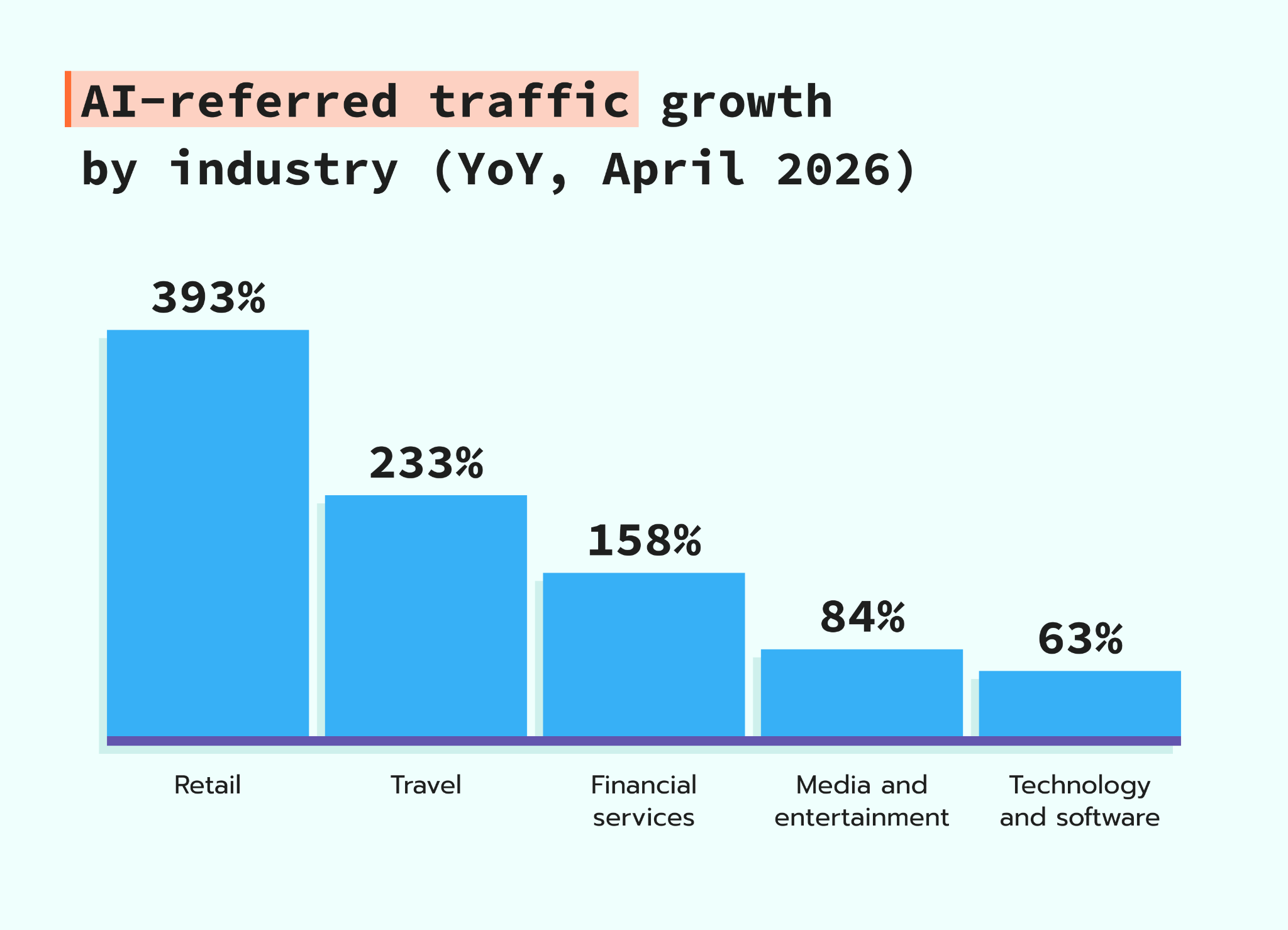
Adobe released an AI traffic report in April, 2026. The platform analyzed the growth in AI visit share across different industries:
- Retail saw the largest year-over-year increase at 393%
- Travel at 233%;
- Financial services at 158%;
- Media and entertainment at 84%;
- Technology and software at 63%.
The growing adoption of AI among consumers is also contributing to this trend. In Adobe's March 2026 Consumer Survey, 54% of respondents said they were using AI more often.
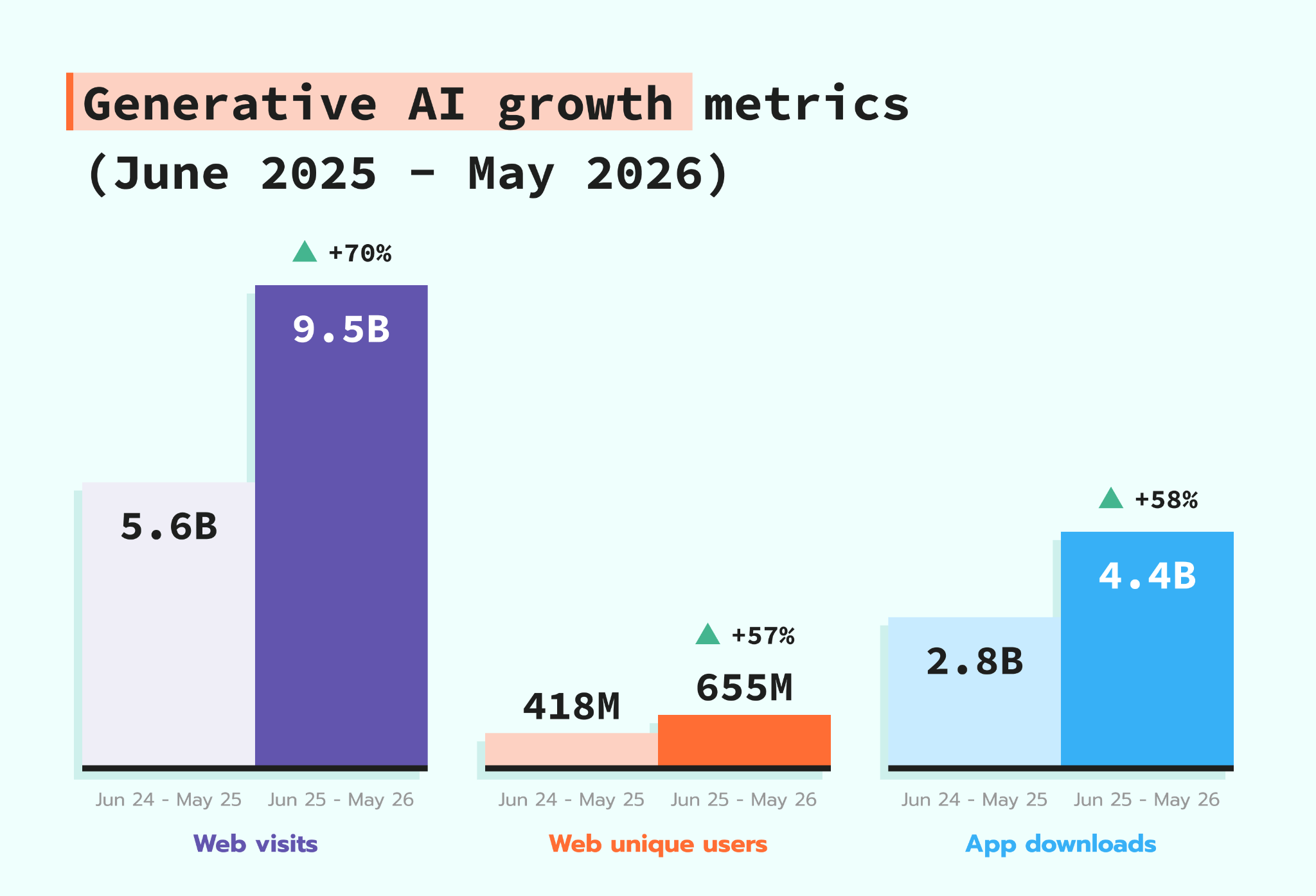
According to SimilarWeb's 2026 Generative AI Landscape report, generative AI continues to grow. Between June 2025 and May 2026:
- Average monthly web visits reached 9.5 billion, a 70% year-over-year increase;
- Monthly unique visitors grew 57% to 655 million;
- Mobile app downloads also increased 58% to 4.4 billion.
How to detect AI bot traffic?
AI bots can access websites for different purposes, so before trying to detect them, it’s important to understand that not all AI-related bot traffic should be considered the same. Some bots crawl publicly available content to train or improve AI models, and others access pages in real time to retrieve information for a user's query or generate an AI answer.
Training crawlers
The bots listed below crawl publicly available web content that may be used to develop, train, or improve AI models:
- GPTBot
- ClaudeBot
- Google-Extended
- Applebot-Extended
- Bytespider
- CCBot
- Meta-ExternalAgent
Training crawler visits don’t necessarily mean human website visits. However, tracking them can help you understand how often AI systems access your content and distinguish automated AI crawling from user-driven traffic.
Live and search fetchers
These bots can access web pages in response to user requests. For example, an AI assistant or AI search system may retrieve information from your website to generate an answer, summary, or search result:
- OAI-SearchBot
- ChatGPT-User
- Perplexity-User
- Claude-Web
- Claude-SearchBot
🤔So, how to detect these types of AI bots?
AI bots can be detected by analyzing incoming requests to your website. The most common method is to check the request's User-Agent header and compare it against known AI crawler and fetcher identifiers.
For example, a request can be identified as coming from an AI bot when its User-Agent contains identifiers such as GPTBot, ClaudeBot, OAI-SearchBot, or Perplexity-User.
However, the User-Agent is only one signal and cannot reliably identify all AI traffic. Some AI agents may use a regular browser User-Agent, making them difficult to distinguish from human visitors based on the request header alone.
For more reliable detection, you can also analyze visitor behavior and other request-level signals. For example, AI agents may have:
✅ very short page interaction times;
✅ may not scroll or interact with page elements;
✅ can generate navigation patterns that differ from those of human visitors.
Other signals, such as request frequency, session patterns, JavaScript execution, and the sequence of pages accessed, can also help distinguish automated traffic from human users.
Therefore, reliable AI traffic detection usually combines User-Agent analysis with behavioral and technical signals.

You can detect AI bot traffic using:
- Server logs, which contain details about incoming requests, including User-Agent strings.
- CDN or web server logs, such as Cloudflare, Nginx, or Apache logs.
- Bot detection tools, which automatically identify known AI crawlers and categorize their traffic (one of the similar solutions we consider below in this guide).
How to track human AI Traffic vs. LLM agent traffic
Not all AI-related traffic represents the same type of visitor. Human AI traffic occurs when a person uses an AI platform, such as ChatGPT or Perplexity, and then clicks through to your website. LLM agent traffic is generated when an AI system or agent accesses your website directly to retrieve information, complete a task, or interact with your site on behalf of a user.
These two types of traffic can be difficult to distinguish because they may be associated with the same AI platform but appear differently in your analytics data.
The most reliable approach is to analyze traffic at the request level before it reaches your analytics platform:
- Human AI traffic. Look for visits where the referral or acquisition data indicates an AI platform and where the request behaves like a regular user session, such as loading pages and triggering client-side events.
- LLM agent traffic. Look for requests from known AI crawlers, search fetchers, or agent user agents, such as
OAI-SearchBot,GPTBot, orClaudeBot. These requests can often be identified from the User-Agent and other server-side request data.
Why is AI traffic difficult to track?
AI traffic can be difficult to measure because it doesn't always appear as a clearly identifiable traffic source in analytics platforms. Depending on how a visitor reaches your website, traffic from AI platforms may be recorded as a referral, direct traffic, organic search, or another acquisition channel.
👉For example, if an AI platform doesn’t pass referral information, the visit may be attributed as direct traffic. If you got traffic from an AI search feature (such as AI Overview in Google), the visit may be attributed to the search engine instead of the AI platform. This makes AI traffic attribution inconsistent.
Another challenge is identifying traffic generated by AI browsers. Many AI browsers are built on Chromium and can use the same or very similar user agent strings as Chrome. For example, our tests showed that browsers such as Atlas and Comet can send the same user agent string as Chrome, with the browser version being the main difference. We have a dedicated blog post on AI browser tracking; please refer to it for more details.
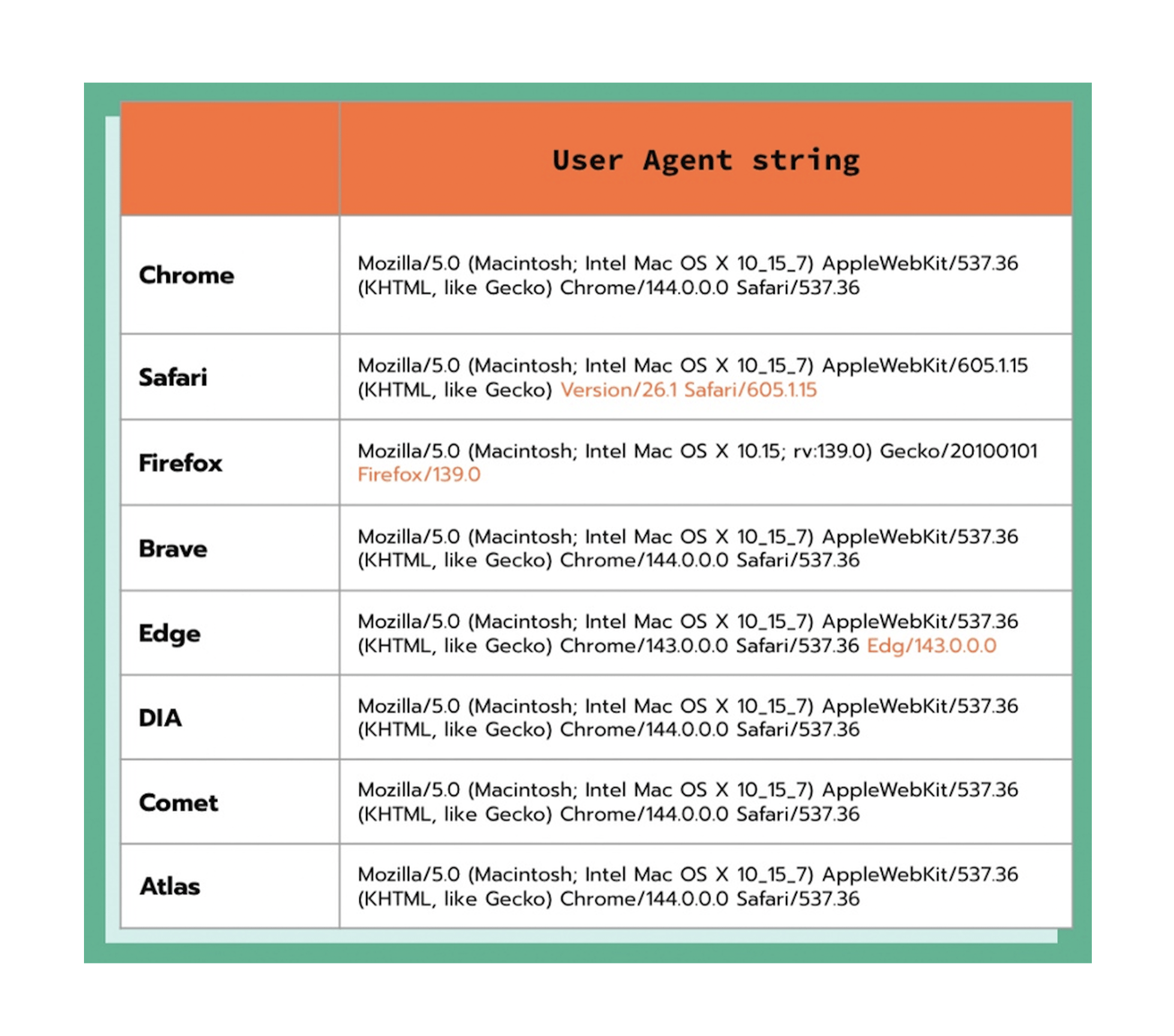
This also makes AI traffic analysis more challenging. Without a dedicated way to detect AI traffic, it can be difficult to identify which AI platforms bring new visitors, monitor AI referral traffic, and measure engagement and conversions from AI sources.
What is AI Traffic Detection power-up?
Stape's AI Traffic Detection power-up helps identify AI-driven traffic and add this information to incoming requests in a server GTM container. This makes it easier to distinguish AI traffic from other sources and use the detected data for AI traffic analytics and attribution (we'll provide an example on how to configure it below).
Instead of relying only on standard referral data or user agent strings, you can use the detected information in your server-side tracking setup and pass it to analytics platforms such as GA4, Matomo, or any other you need.
The power-up is available for Stape's clients who are on the Pro plan or higher.
With the power-up's help, you can measure AI-driven traffic and understand how AI platforms contribute to website visits and conversions. You can also use the detected data to build custom reports and monitor changes in AI traffic over time.
How to set up AI traffic tracking with Stape
🤔 New to server-side?
Be sure to create an account on Stape to use the power-up. Also, if you want to quickly have the server-side tracking configured for your website, use our free tool – Setup Wizard. Most of the configs will be generated on our end and added to containers automatically; a few steps will require your manual input, but no worries, we provide detailed guidelines.
Step 1: Set up Custom Loader power-up
The Custom Loader free power-up must be configured before proceeding; otherwise, you won't be able to activate the AI Traffic Detection power-up. If you don't have this set up yet, please click on the collapsed element below for the detailed instructions:
Step 2: Activate the AI Traffic Detection power-up
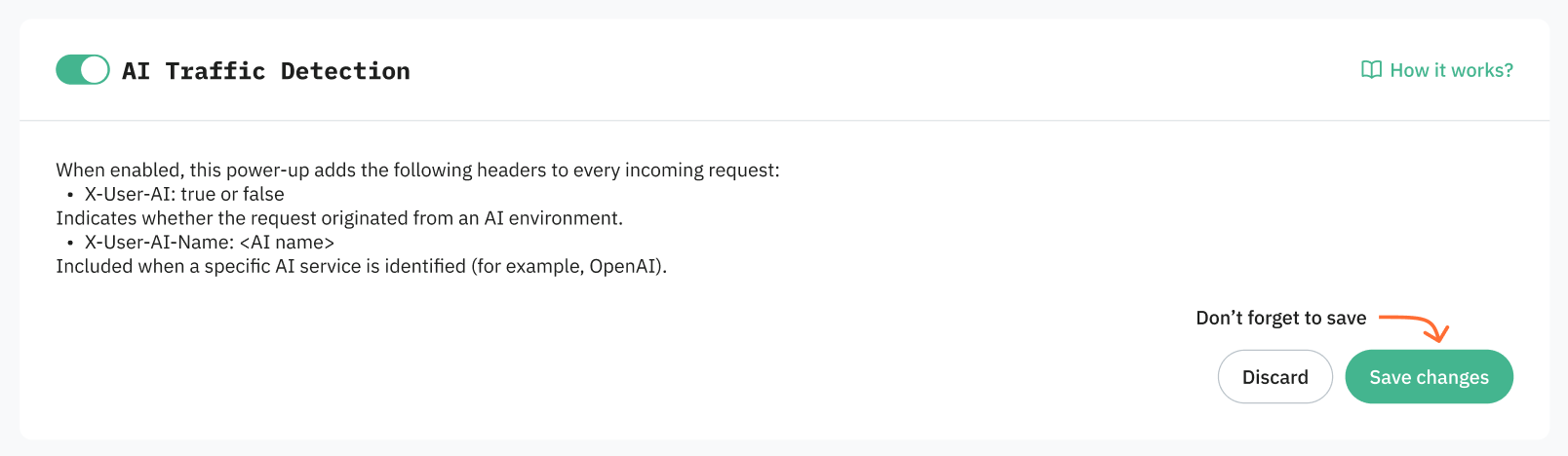
2.1 Navigate to your Stape account and select your sGTM container from the dashboard.
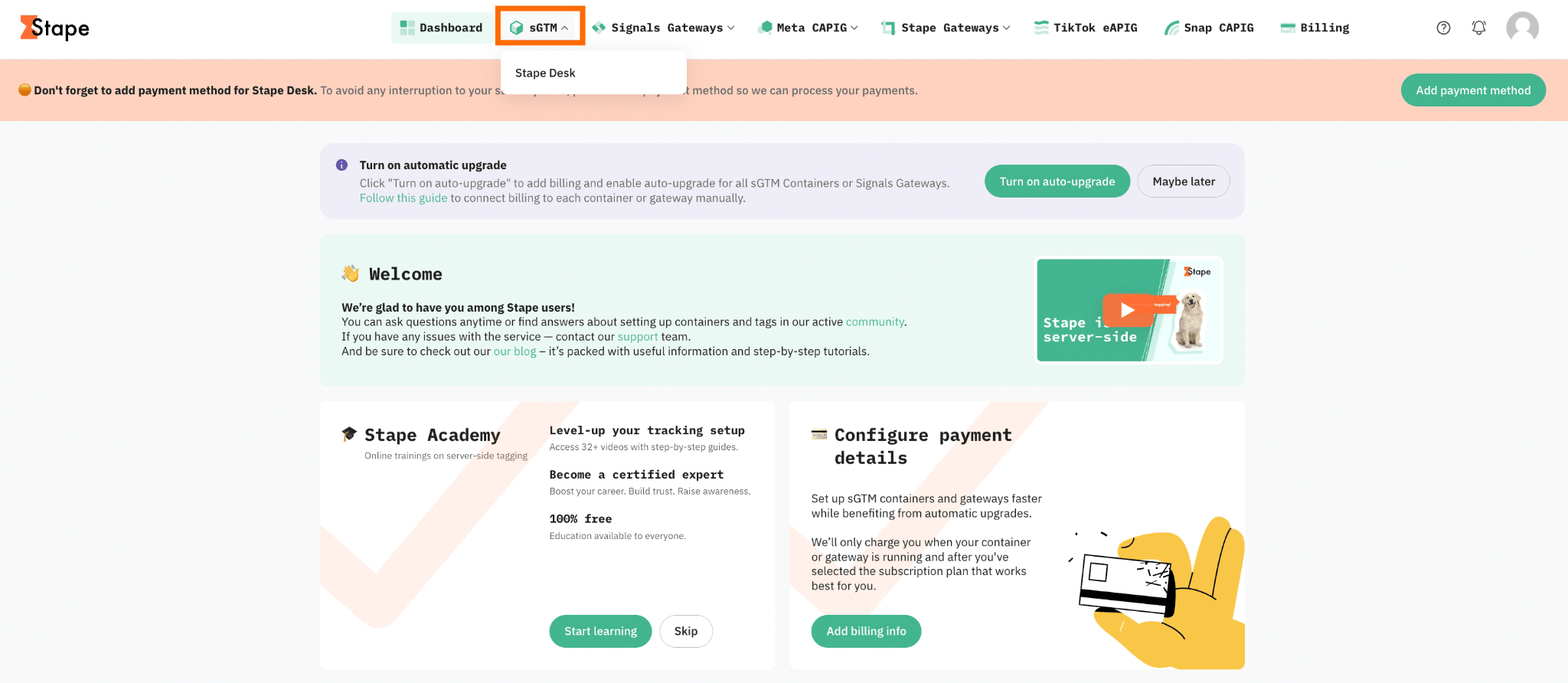
2.2 Go to Power-ups and click Use next to the AI Traffic Detection panel.
2.3 Toggle the AI Traffic Detection switch to enable it and click Save changes.
Step 3: Configure sending detected AI traffic data to analytics platforms
Sending data on AI traffic to the platforms you use (such as Google Analytics 4, Matomo, or any other) allows you to analyze AI traffic alongside your existing website data and understand how different AI systems contribute to visits, engagement, and conversions.
It can be configured by creating custom dimensions in your analytics system (please refer to the platform's official documentation) and editing the corresponding tag in the server GTM container.
We will consider, as an example, Matomo, since the platform doesn't provide any default channel group for AI-driven traffic.
3.1 Create the custom dimensions in Matomo. For example, you can create dimensions for AI traffic type and AI source. When creating them, note the exact names you use, as you will need these names when configuring the Matomo tag in server GTM.
3.2 Once done, go to your server GTM container and open the Matomo server-side tag.
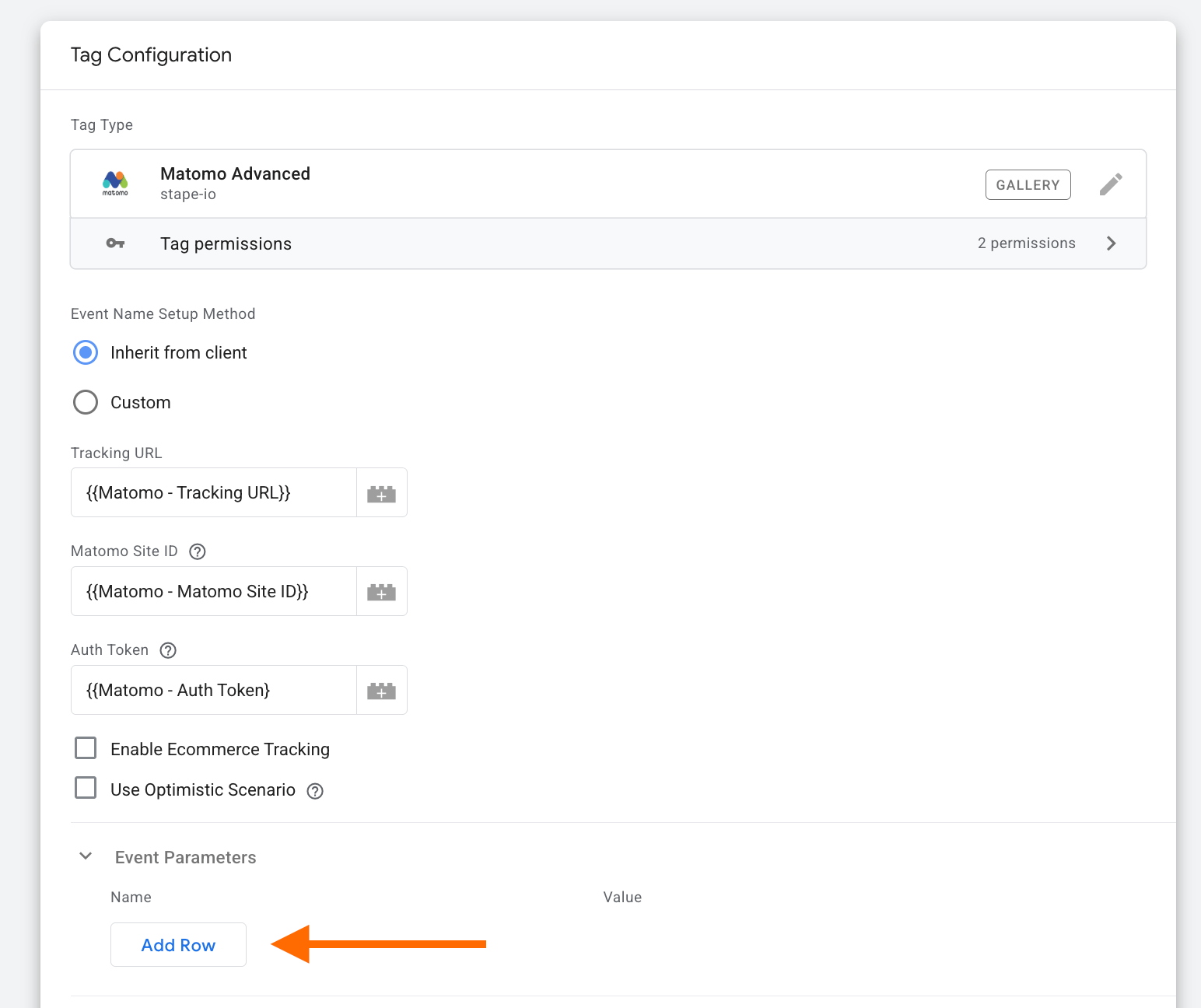
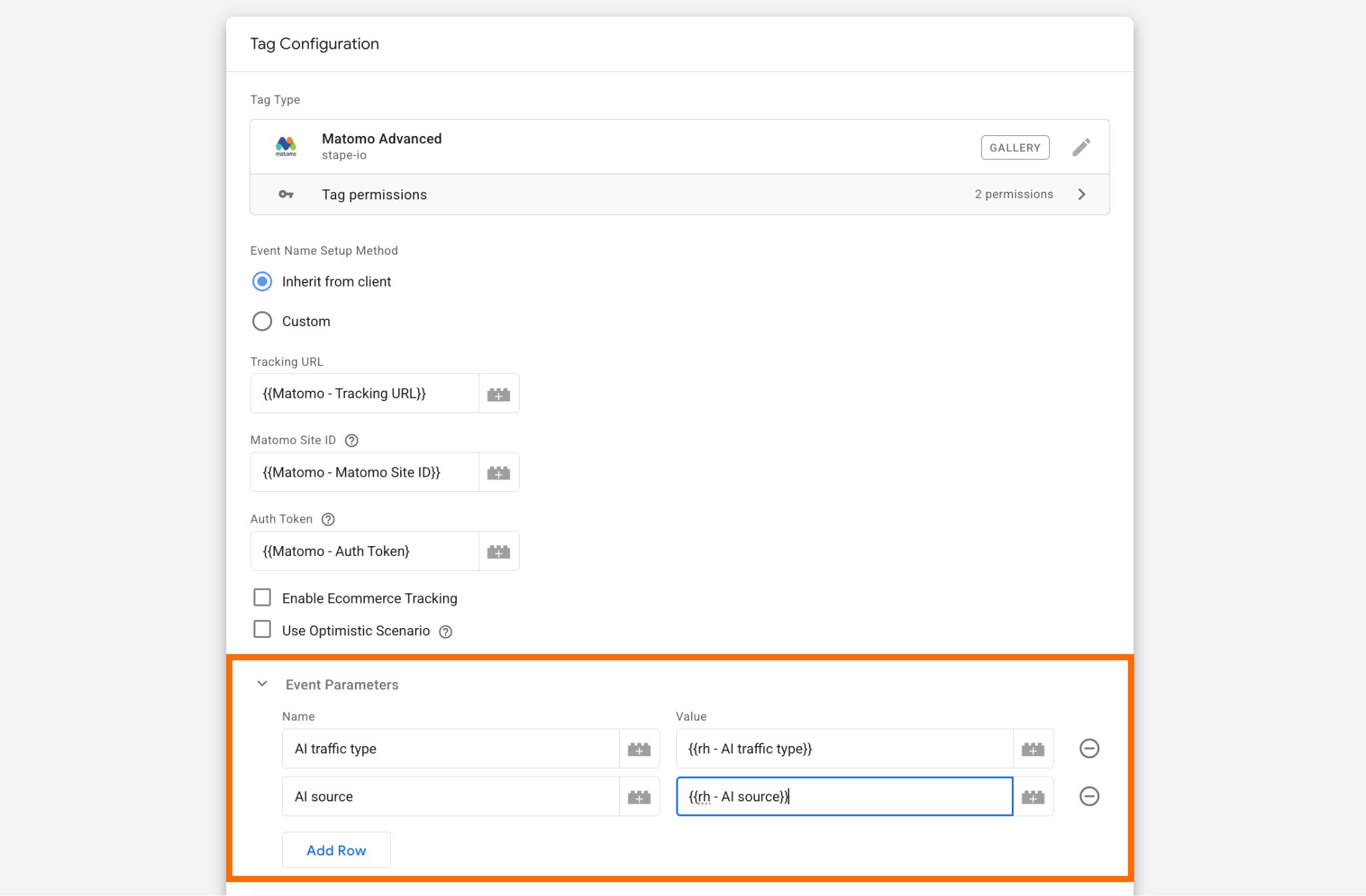
3.3 In the section "Event Parameters," add a new event parameter for each custom dimension you want to send to Matomo. Use the exact name of the corresponding Matomo custom dimension as the event parameter name.
For example, if you created the following custom dimensions in Matomo:
- AI traffic type
- AI source
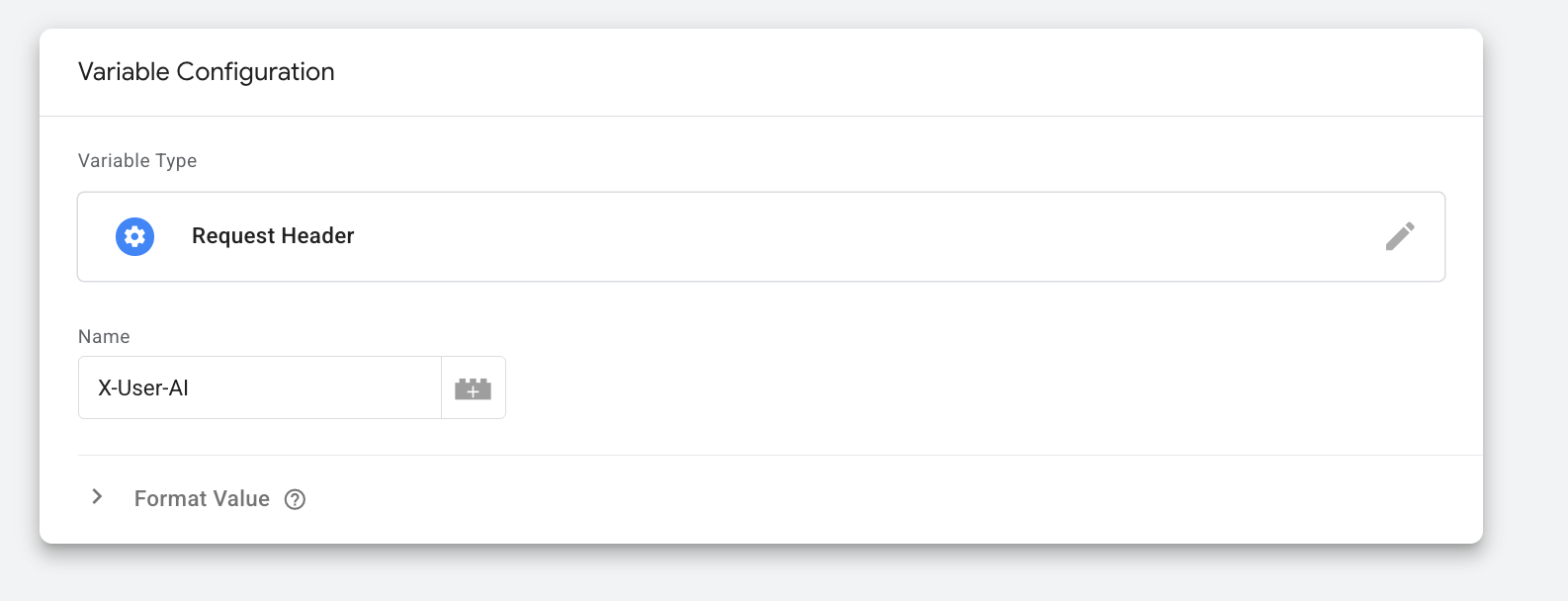
3.4 As the value, add request header variables:
- X-User-AI to identify the AI traffic;
- X-User-AI-Name to send to Matomo the name of AI platforms.
Here’s how it looks in the Matomo tag:
Step 4: Test the setup and verify detected traffic
When the power-up is active, two headers will be added to the incoming requests:
- X-User-AI with the value ‘true’ if it is AI traffic;
- X-User-AI-Name with the name of the AI platform as its value, if we were able to detect the platform.
How to track AI traffic in GA4?
To track AI traffic more accurately, you can identify AI requests before they reach GA4 and send this data to your analytics setup as a custom event parameter or other traffic attribute.
Once you've configured AI Traffic Detection power-up as shown above, you can send the AI detection data as event parameters and register them as custom dimensions in GA4. So, the setup is basically the same as with Matomo we’ve shown above.
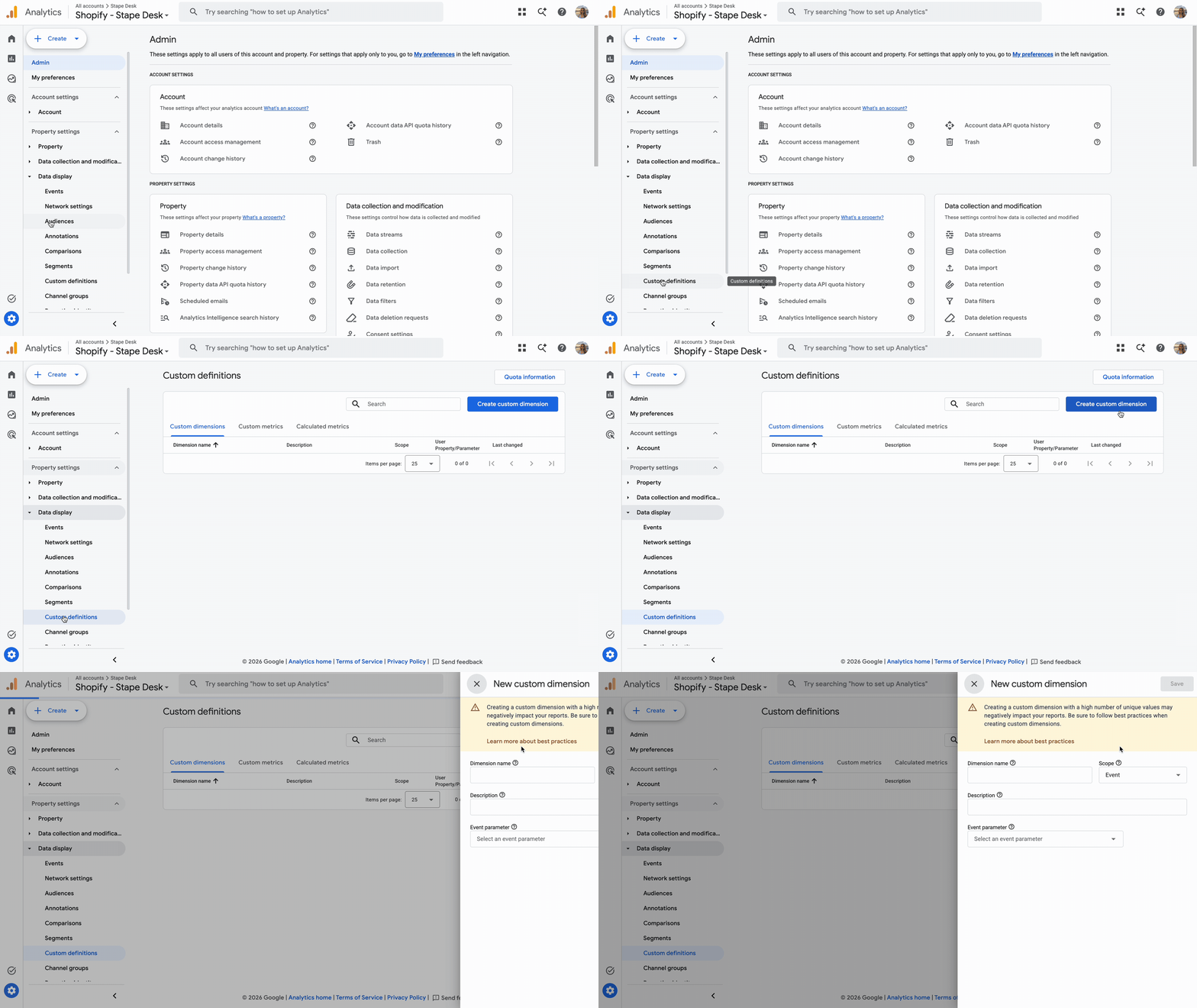
1. Create custom dimensions for the AI traffic data you want to analyze in GA4.
For example, you can create:
- AI traffic – indicates whether the request was identified as AI traffic.
- AI traffic source – identifies the AI platform, when available.
Go to Admin → Data display → Custom definitions → Create custom dimension in your GA4 property.
For the AI traffic dimension, use the event parameter name that you plan to send from server GTM, for example ai_traffic.
For the AI traffic source dimension, you can use a parameter such as ai_traffic_source.
Save the parameter names you specified in the GA4 interface while creating dimensions; you’ll need them in the next step.
2. Add AI traffic data to the GA4 tag in server GTM.
To do it, go to the Tags section → open the GA4 Base tag → expand Event Parameter section → click Add Row.
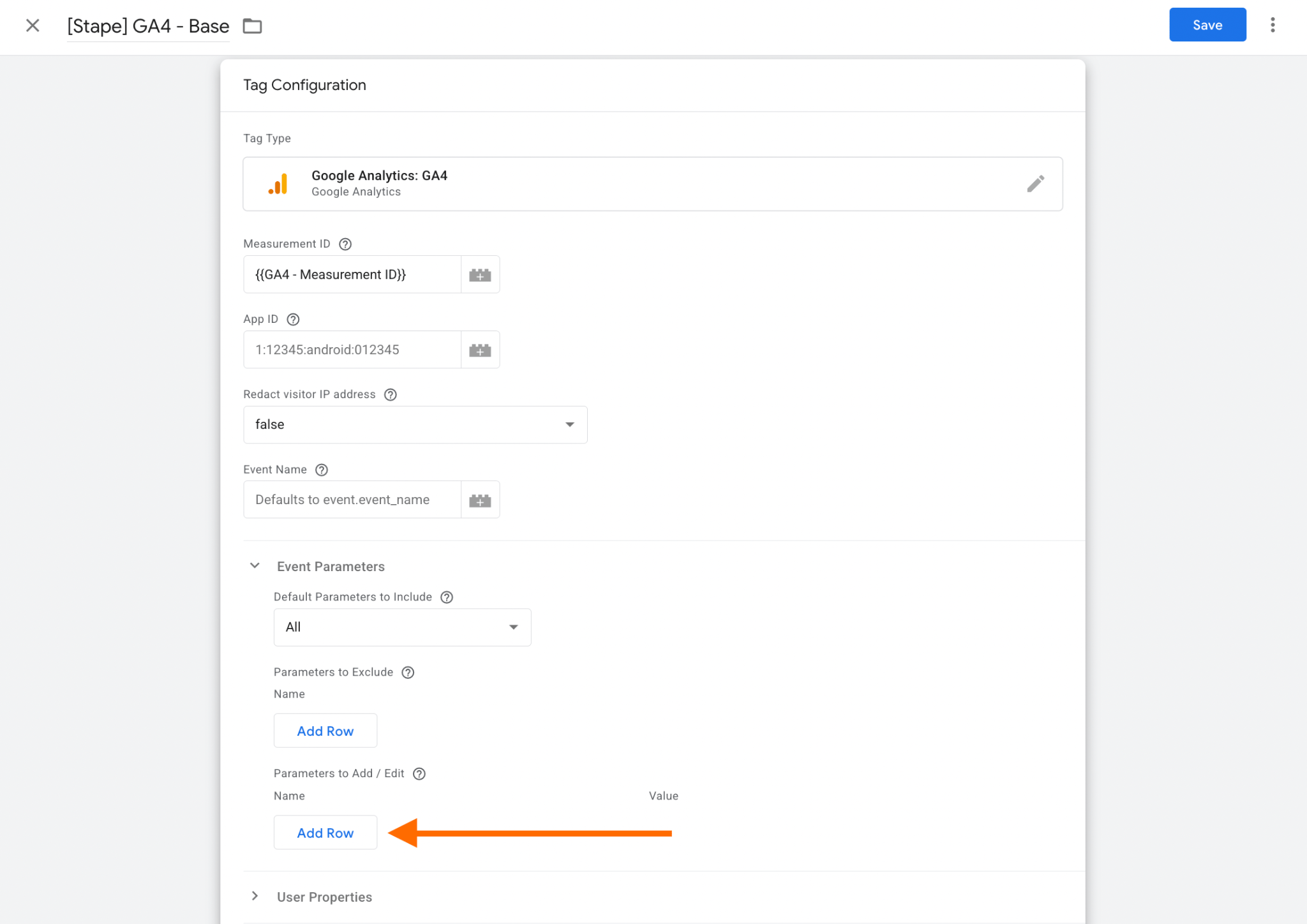
As the name, specify the name you used to create the new dimension in GA4.
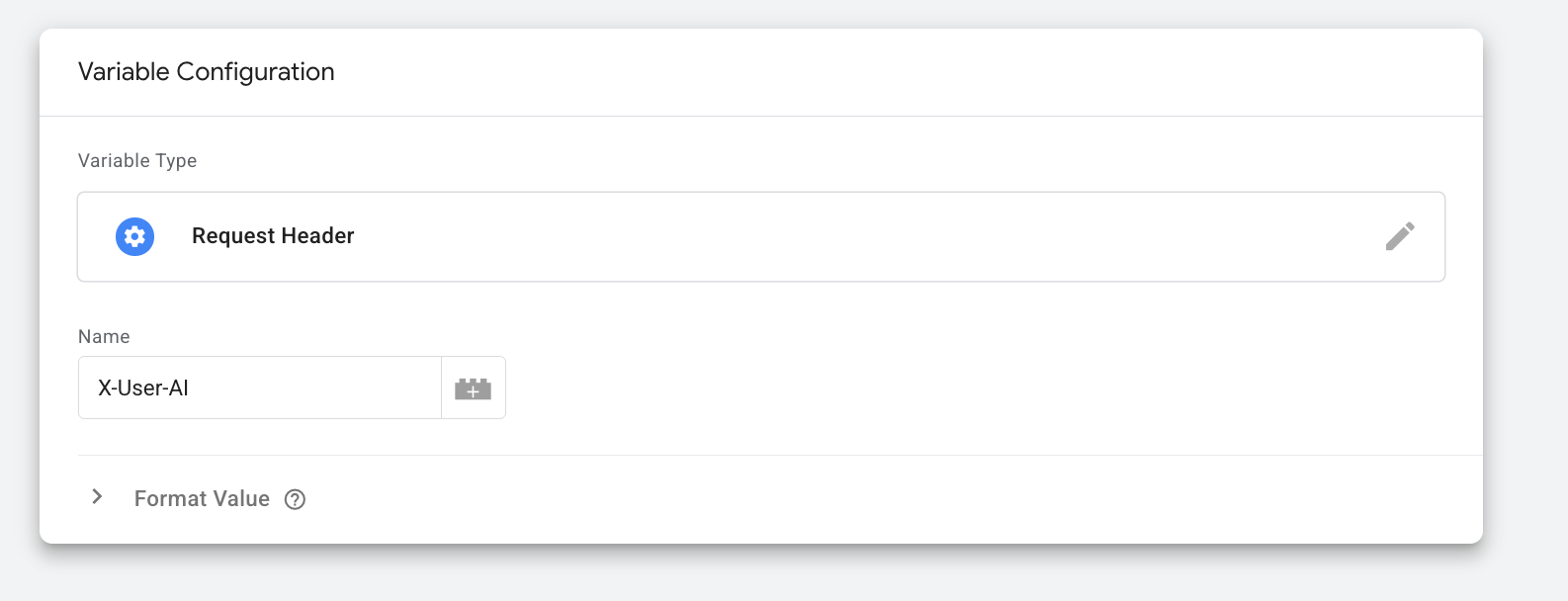
As value, create a new variable:
- Variable Type: Request Header
- Name: X-User-AI
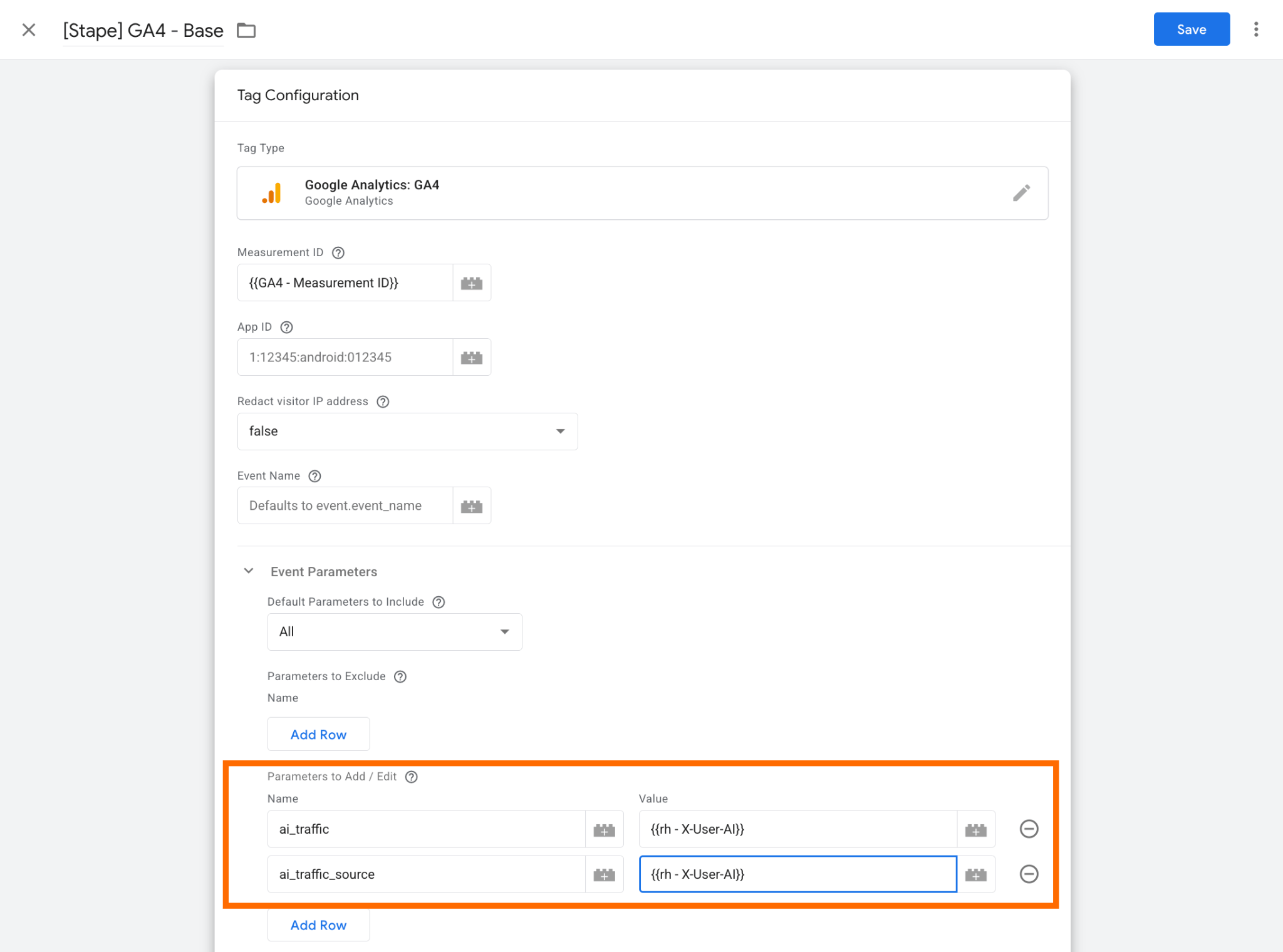
Add a new row to add the second dimension (the one to identify the source – ai_traffic_source). Opt for Request Header variable type as well; just be sure to use X-User-AI-Name as the name.
Here’s how it looks in the tag:
FAQs
Final thoughts
AI traffic is becoming an important part of the customer journey, but standard analytics tools don't always make it easy to identify and analyze this type of traffic.
With Stape's AI Traffic Detection power-up, you can identify detected AI traffic and send this information to your analytics platforms. This allows you to analyze AI-driven visits alongside your existing traffic data, monitor changes over time, and better understand the role AI plays in your website's acquisition and conversion journey.
Want to start on the server side?
Try for freeRecommended for you
Dec 19, 2025
Blog
Understanding AI browser tracking: marketer and analyst guide
AI browsers mimic Chrome, skewing your data. Check tracking challenges and why identifying AI-driven traffic often remains uncertain.
Feb 6, 2026

Comments