Sep 8, 2026
Understanding AI browser tracking: marketer and analyst guide
Written by
Uliana Lesiv
Published Feb 6, 2026 comments
Key takeaways:
- AI browsers are powered by Chrome; they use Chrome's user-agent string, making their traffic look like Chrome visits for analytics tools.
- Most AI browsers block scripts, cookies, and ads by default, making client-side tracking unreliable.
- AI browsers create spikes in "new users," break referrer headers, and cause not set or direct traffic in GA4.
- AI agents can perform searches, add items to carts, or even complete purchases, bypassing browser-based trackers (cookies, pixels).
- Identifying AI agents requires analyzing behavioral patterns, such as near-zero millisecond gaps between events and "out-of-order" execution sequences.
The market share of AI browsers isn't as clear as it looks
According to the BrowserStack data, AI browsers, like Atlas, Comet, Dia, or any others, are still below 3% of global usage. Their share remains very small compared to Chrome, Safari, and Edge.
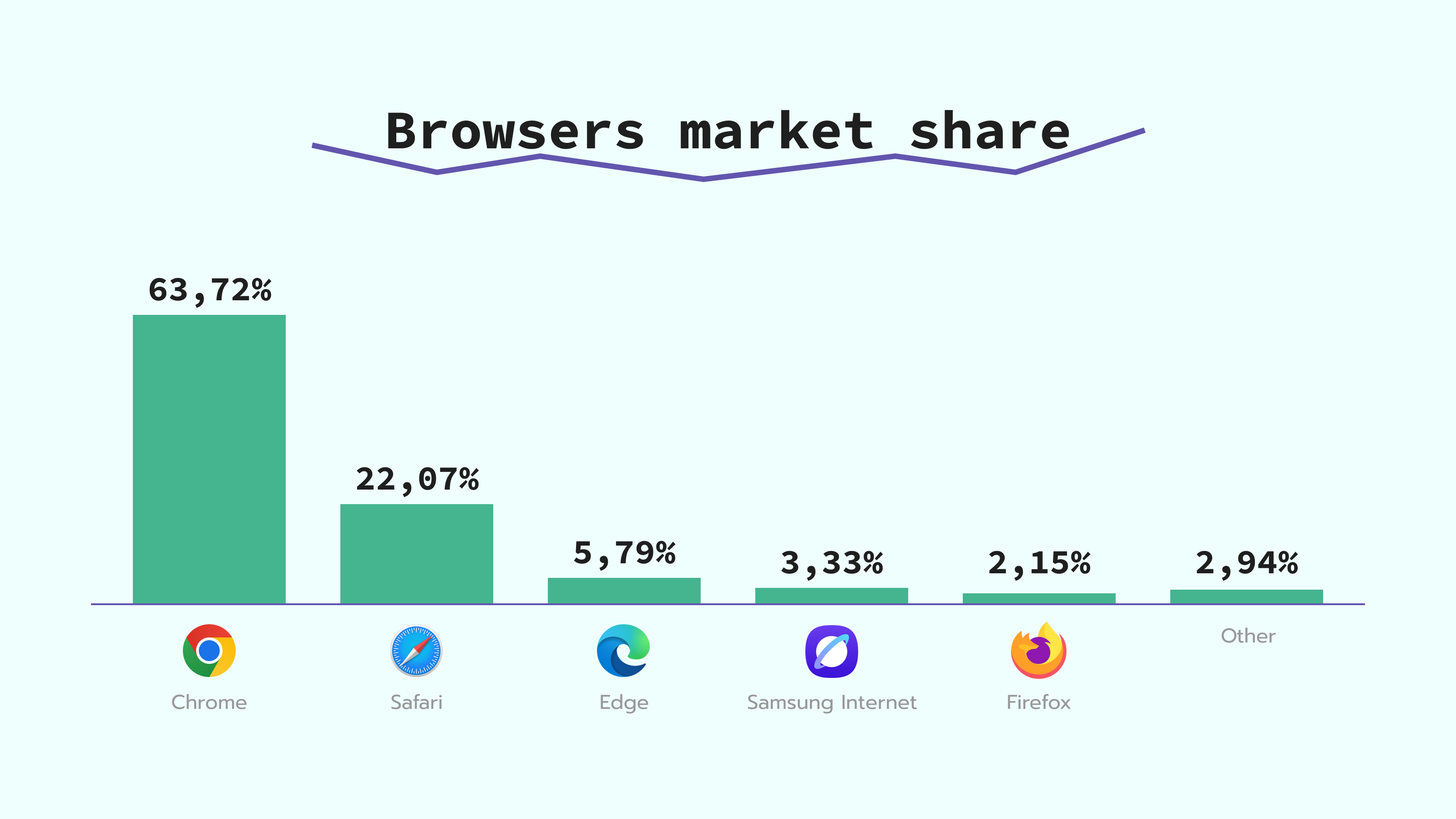
The tricky point is that AI browsers are powered by Chrome. Tests show that browsers like Atlas and Comet use the same user agent string as Chrome does. We have conducted research comparing the user strings for different browsers. As you can see from the table below, they often have identical strings, just the version can differ:
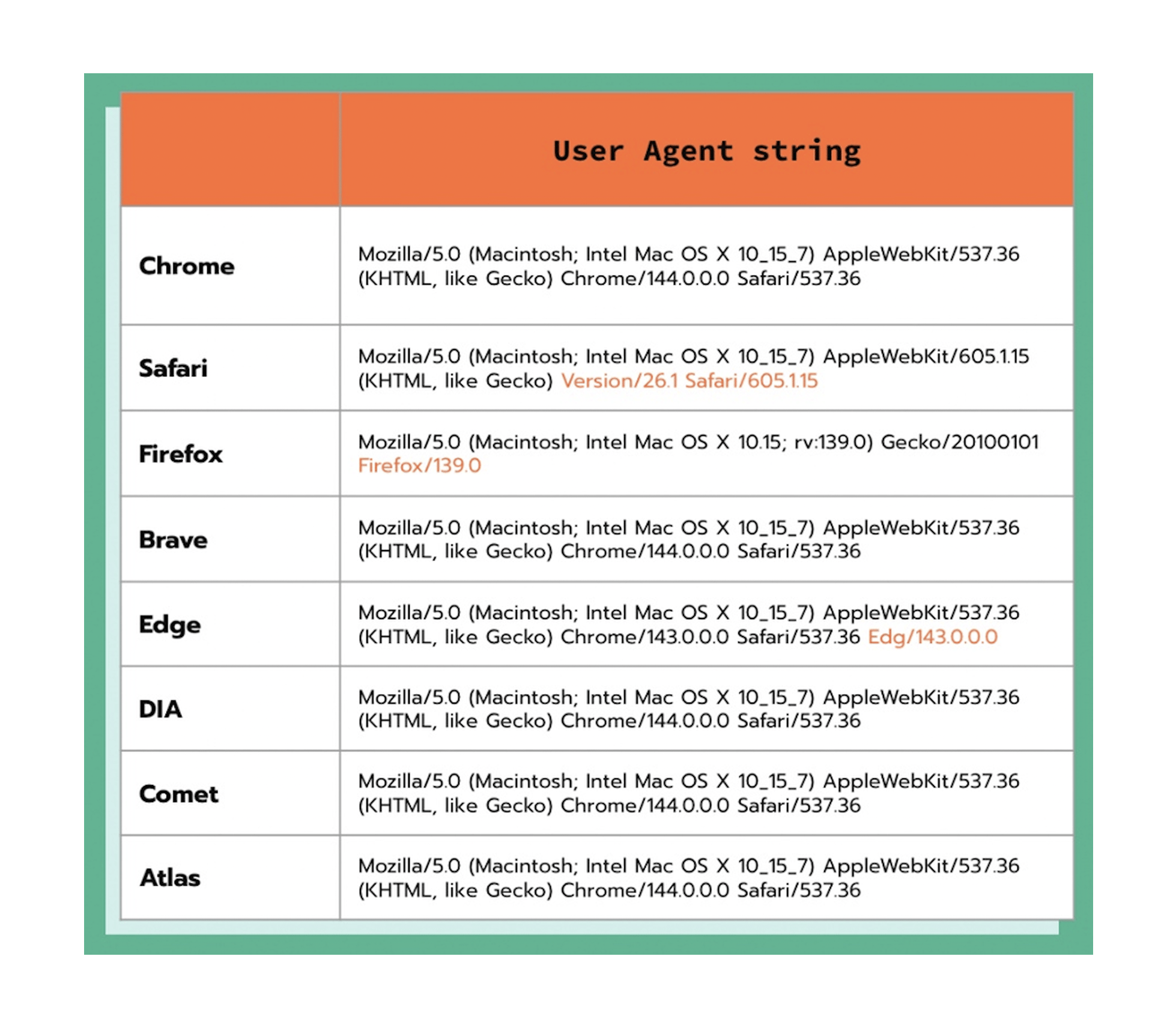
Due to the same user agent, traffic from an AI browser can be attributed to Chrome in analytics tools like Google Analytics 4. As a result, actual AI browser usage may be higher than in market share reports.
Check our AI Traffic Detection power-up – it detects AI traffic and adds the data to incoming requests in your server GTM container. When detected, this data can be sent to analytics platforms for further analysis. Learn more in our guide on how to track AI traffic.
AI browsers offer little to track
At the moment, most AI browsers have no built-in signals to notify you that a visit came from an AI source. These tools often act as proxies and blend in with organic traffic. Just a few of them can be identified:
- Atlas - if a person visited your website from Atlas, in the analytics tool, you can check such traffic using the
utm_source parameter, it will bechatgpt.comandpage_referer-https://chatgpt.com. - Comet - to identify traffic from this browser, look for the
page_referer parameterwith the valuehttps://www.perplexity.ai.
The impact of AI browsers on data tracking
Issue 1: Default tracking restrictions and scripts blocking
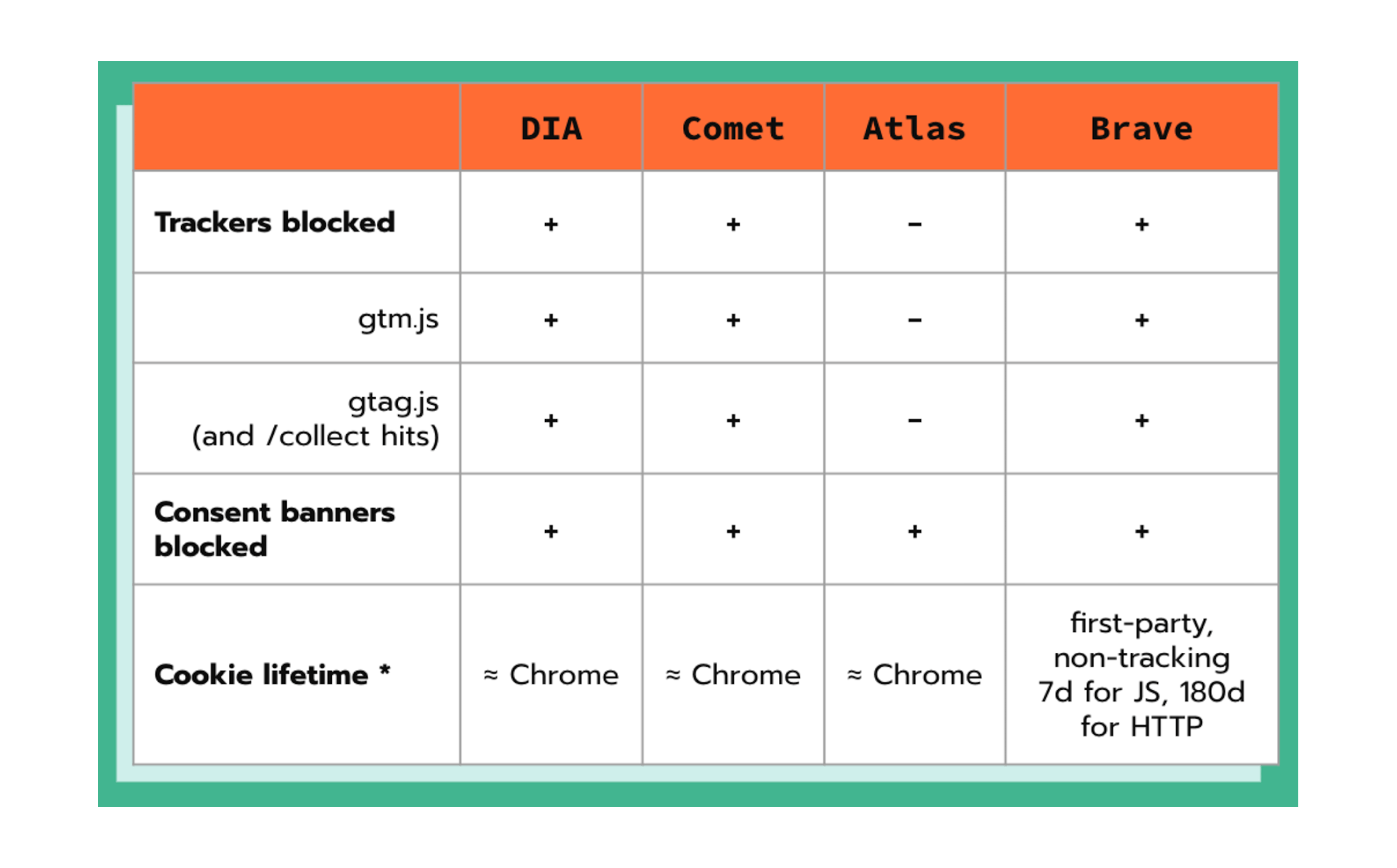
AI browsers usually have strict tracking restrictions, with script blocking enabled by default. In many cases, they also have limited or no cookie consent flows. It means that users may never see a consent banner, and behavioral data is not collected.
For example, the Comet AI browser has a built-in ad blocker. It blocks the ads and neuters the gtm.js script, which prevents data tracking.
In the Dia browser, the third-party trackers are blocked by default as well, and these also include cookie banners.
Here is the comparison of popular AI browsers and the tracking restrictions they have:
This mirrors a broader regulatory trend toward "consent automation" to deal with banner fatigue. If you are interested in how this might become the legal standard across Europe, our breakdown of the Digital Omnibus explains how these changes (if adopted) might impact data collection.
Issue 2: Spikes in new users and unattributed traffic
The AI browsers have created a "masking effect" that analytics tools, such as GA4, are not yet ready to handle. As a result, you could notice a spike in new users and unassisted traffic in GA4.
AI browsers often operate in isolated execution contexts. Unlike traditional browsers that maintain persistent cookies, AI browsers may open pages in temporary "task-oriented" sandboxes. Every time the AI agent "visits" your site to complete a task, it does so without the history of previous sessions. In this way, "new users" appear in your analytics.
A second issue is broken attribution logic. AI browsers often act as intermediaries; they process information before the user even lands on the page. These browsers don't add the "referrer" header (the piece of code that tells your site where the visitor came from). Analytics systems like GA4 often categorize those sessions as Direct or (not set).
Issue 3: Non-human events
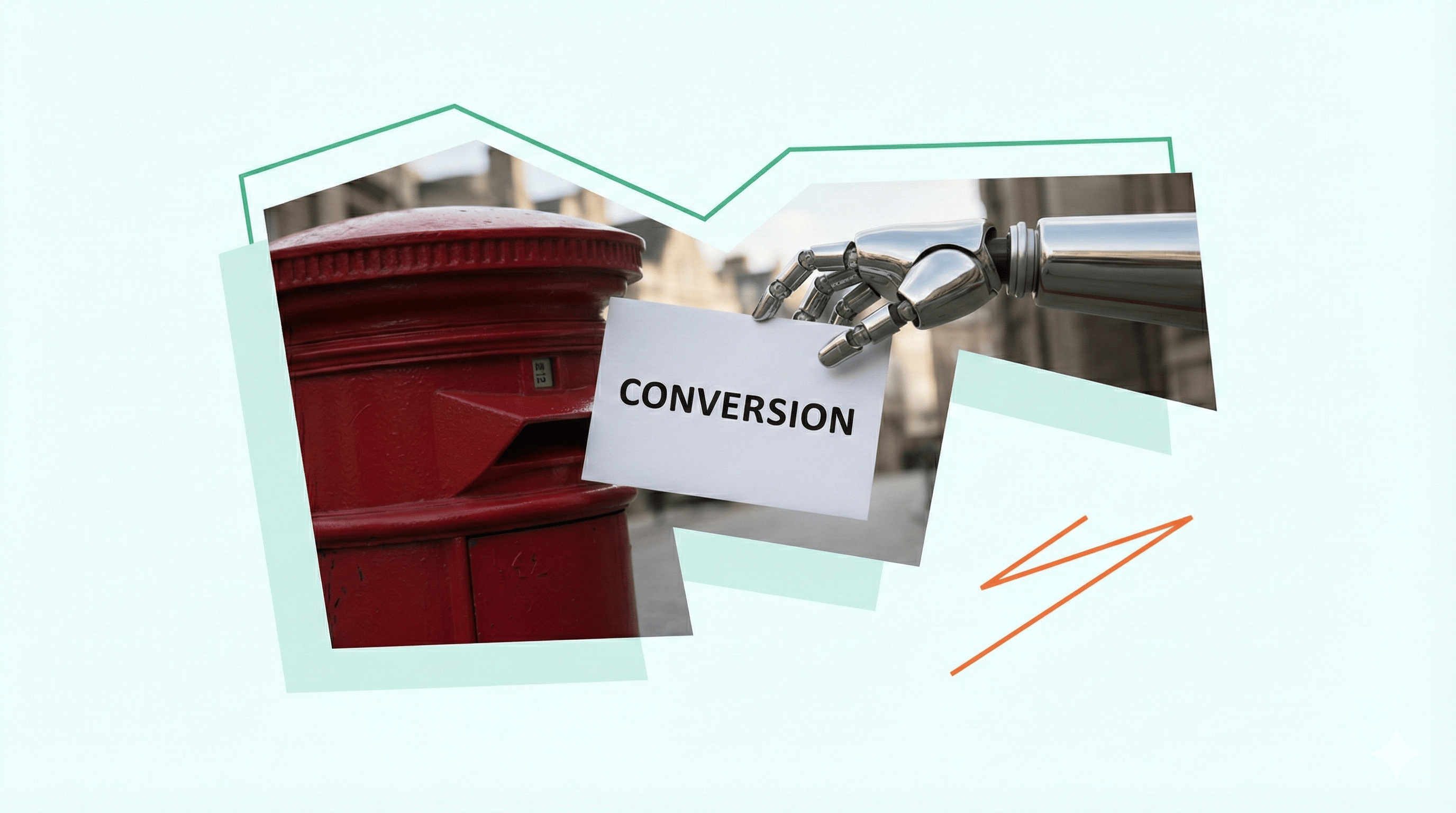
Besides the traffic, AI browsers can trigger events and conversions. You may have already seen how AI browsers (usually on paid plans) can perform actions for the users. For example, they can:
- search for specific products or services on selected websites;
- select items/services based on the provided buying criteria;
- add selected items to a shopping cart;
- provide a checkout link for the user to review and finalize the order themselves.
Such activity caused by AI agents creates conversions that are difficult to understand what source they come from.
In some niches, this type of automated flow is already popular and can cause direct harm to companies. One of the recent and well-known cases is Tailwind's "death by popularity." This case is not the main focus of this article. However, if you’re unfamiliar with it and would like more context, please expand the section below for a detailed explanation:
Approaches to consider for identifying AI traffic
AI traffic & non-human events
When a human user visits your website from an AI browser
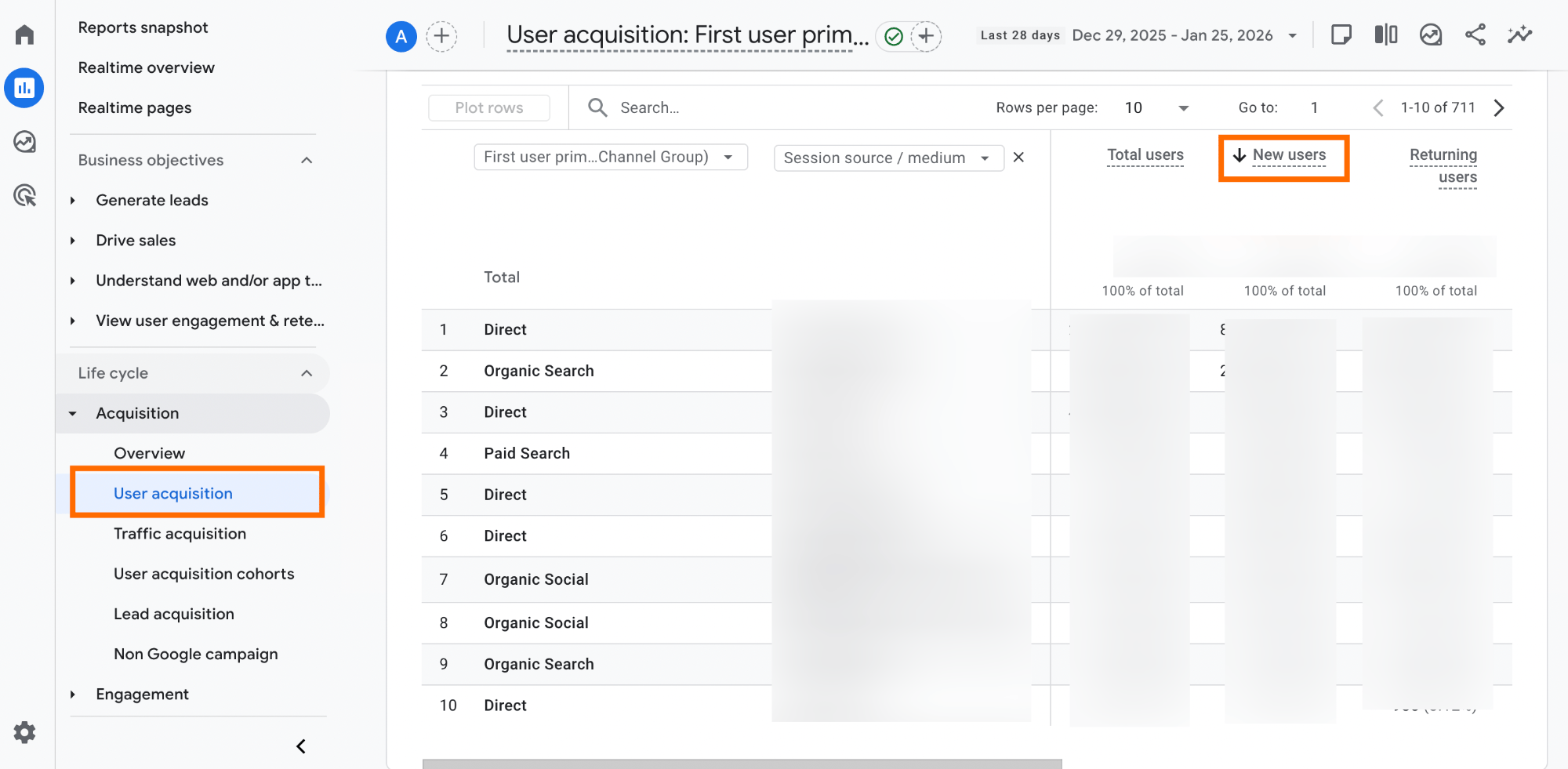
Tracking and filtering such traffic is usually easier than just AI agent interactions. The tests show that "human" traffic from AI browsers is usually marked as referral traffic. At this point, the best thing you can do is monitor spikes in new user traffic to report any changes and be able to explain them to stakeholders. Another practical tip is to filter them (there is a list of sources that point to AI) and create a separate Channel Group, which we explain below in this article.
When an AI agent accesses or interacts with your website
Identifying AI agents' interactions is more complex. For this purpose, BigQuery will work the best (it has easy scaling and advanced analytical functions to filter the data). You need to search for the specific patterns in the behavior of your users and filter such traffic. The following behavioral patterns often point to the AI agent traffic:
- heavy event load with close-to-zero gaps in between;
- odd user agent strings;
- high frequency from a single IP or geo in small timeframes.
The list of patterns can be extended to include other behavioral patterns; these are our observations.
Another way to detect AI browser events is a bit tricky, but can also point at AI agents events - client-side signals from browser API, albeit far from ideal - navigator.userActive and event.isTrusted.
The navigator.userActivation signal provides two states to check how the user is currently interacting with your page:
navigator.userActivation.isActive- it indicates whether the user is currently interacting with the page, or has done so within a very small time window (usually around 1 second). The property becomestruealmost immediately (initial click/scroll) and can point out AI browser traffic if it staysfalse. The reason behind - AI browsers often use document methods instead of real inputs.navigator.userActivation.hasBeenActive- it indicates whether the user has ever interacted with the page after it was loaded. This property also often staysfalseif it is AI traffic.
The problem is that the .userActivation API is a state-based mechanism, not an identity-based one. AI agents can simulate user-gesture-like sequences, causing userActivation to be true.

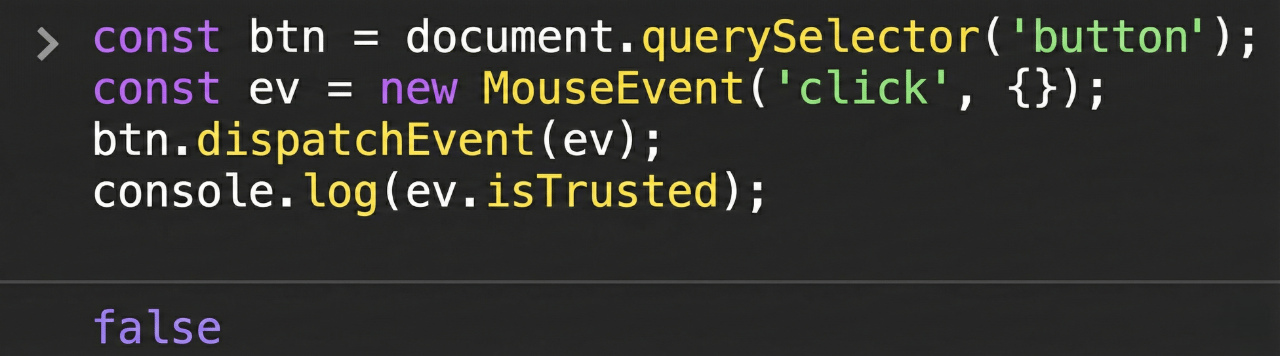
The event.isTrusted is a security feature that allows your code to distinguish between a real human interaction and a simulated action (DOM events like clicks, keydown, submit, etc.) triggered by script.
-
event.isTrusted = true- indicates that the event was triggered by a real user action, such as a mouse click, key press, or touch interaction. -
event.isTrusted = false- indicates that the event was created and dispatched programmatically by JavaScript.
The event.isTrusted can't also be used as a 100% proof for identifying AI traffic since:
1️⃣ Automation can still produce trusted events. A lot of tools (WebDriver, Playwright, accessibility automation, and OS‑level scripting) can create real mouse and keyboard events. Since these tools simulate hardware-level inputs (mouse clicks, keystrokes), the browser can treat them as user interactions.
2️⃣ AI in a "real" browser looks human to the Document Object (DO). When an AI agent controls a normal Chromium-based browser, it interacts with the page through the browser’s native automation protocols rather than the website's internal JavaScript logic. As a result, the events it generates are marked as trusted by the DO.
3️⃣ Scripted flows on your own site will show false. If you simulate events in your own code (programmatically or by dispatching custom events), those events will be isTrusted=false even though the underlying flow is "legitimate" and user-driven.
Why bot detectors may not work for identifying this traffic
AI browser traffic is similar to the bot traffic, but bot detectors like Stape's Bot Detection power-up won't be able to identify this traffic. Since anything that looks like a normal browser session from Google’s point of view will pass straight through in most of the cases. So a lot of agents, automations, and scrapers will bypass such bot detectors.
Separate Channel Group to track AI traffic
Dana DiTomaso has provided a solution to track and filter AI traffic (note: it refers to the cases when a person visits your website by clicking a link in an AI browser) - creating a separate Channel Group for AI traffic.
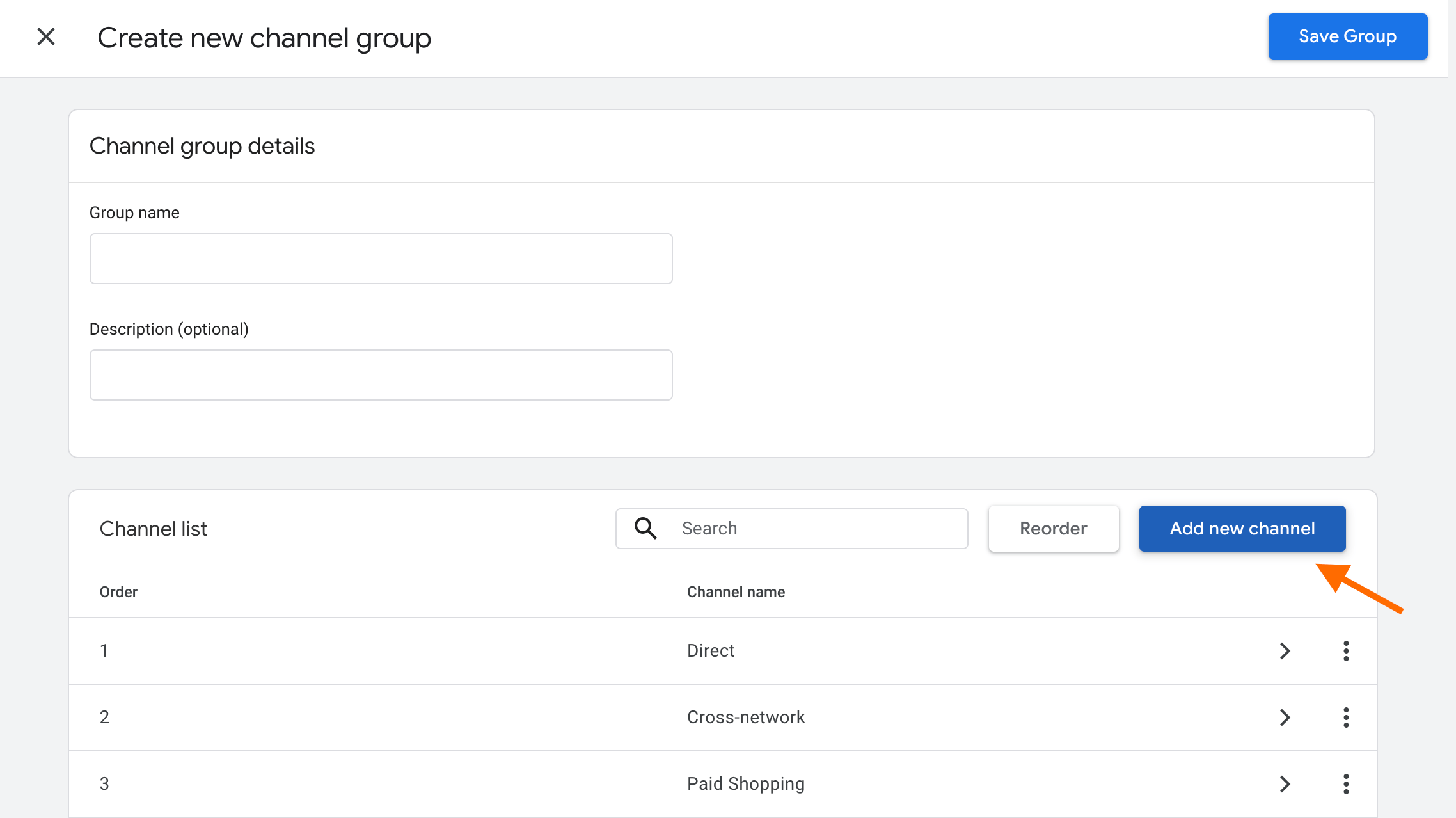
To do it, you need to go to Admin in GA4 → navigate to Channel groups → click Create New Channel Group → click Create new channel.
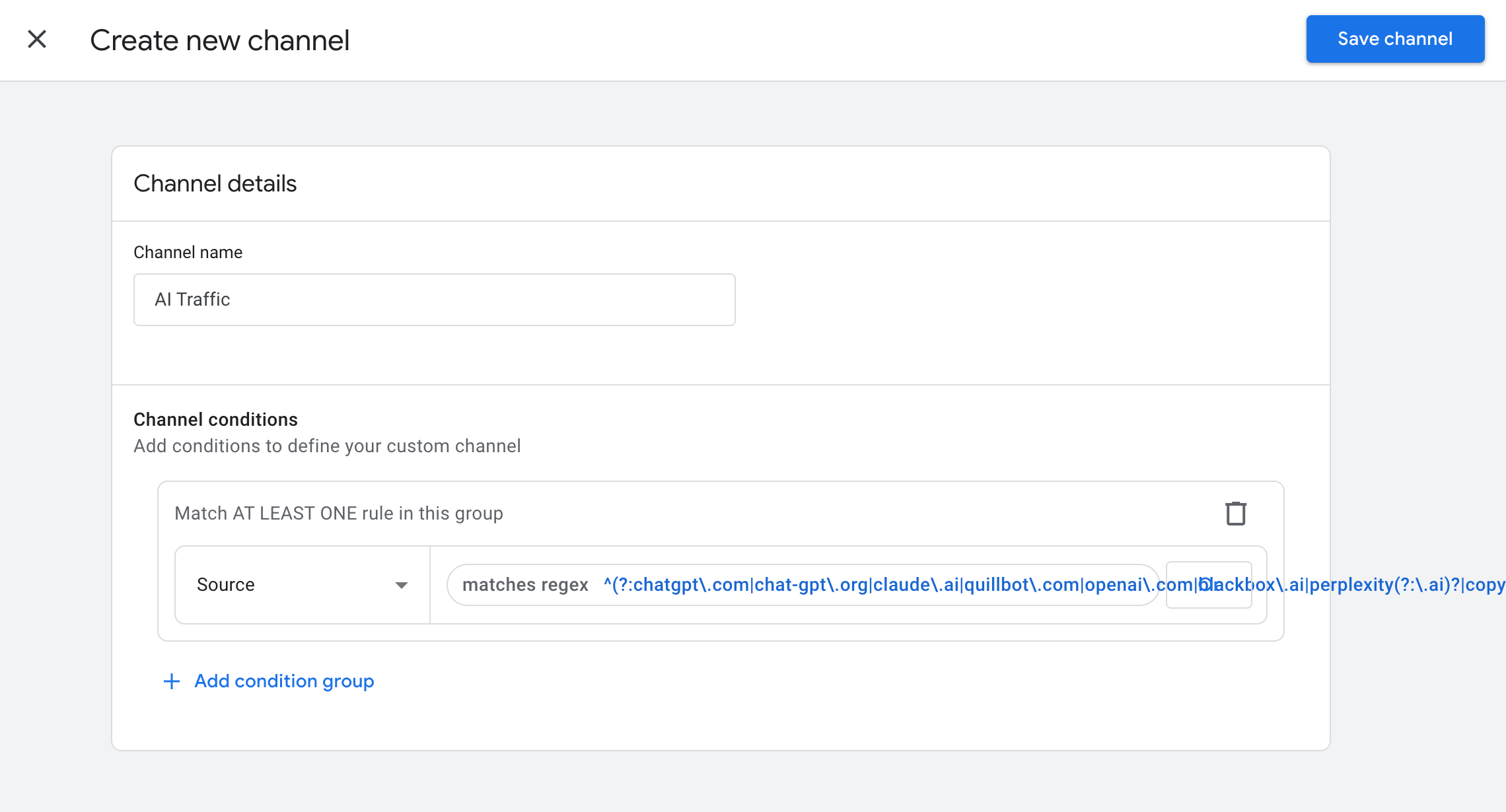
Add the name of the channel (e.g., AI traffic) → click + Add Condition Group → select Source → as a condition select matches regex and add the sources of AI traffic which are popular for your business, usually these are the most frequently met:
^(?:chatgpt\.com|chat-gpt\.org|claude\.ai|quillbot\.com|openai\.com|blackbox\.ai|perplexity(?:\.ai)?|copy\.ai|jasper\.ai|copilot\.microsoft\.com|gemini\.google\.com|(?:\w+\.)?mistral\.ai|deepseek\.com|edgepilot)$| 💡You can also refer to Dana DiTomaso's post to see the detailed instructions and complete list of AI traffic sources. |
Once done, click Save channel.
Path forward
The rise of AI browsers marks the end of the "easy" attribution. A part of the journey will remain in the shadows. The potential next step for marketers and analysts is the implementation of a custom AI Channel Group in GA4 to segment the known AI referrers. However, tracking the non-human conversions is still difficult. Marketers and analysts may need to identify behavioral patterns and filter this traffic themselves, as there’s currently no reliable solution to fully track it.
Want to start on the server side?
Try for freeRecommended for you
Jul 20, 2026
Blog
Digital Omnibus: What you need to know & steps before rollout
End of cookie consent fatigue? The Digital Omnibus unifies EU data laws and introduces automated consent via browsers. Check why you need server-side tracking.
Dec 19, 2025

Comments