Aug 19, 2026
Practical prompts for AI Assistant: analyze tracking and analytics configurations
Written by
Alina Zatyshna
Published Sep 1, 2026 comments
Working with tracking setups manually can take a lot of time. You need to review tags, triggers, variables, and configurations across different platforms, and finding the cause of an issue is not always straightforward.
To make this process easier, we created an AI Assistant, which is available directly in your Stape account. It can help you analyze tracking configurations, investigate issues, and get useful insights without checking everything manually.
In this article, we’ll show you a few practical prompts you can use with AI Assistant in your everyday tracking work. If you haven’t used it yet, you can learn more in the AI Assistant overview and follow the guide on how to use AI Assistant to get started.
Practical prompts for AI Assistant
The easiest way to understand what AI Assistant can do is to see it in action. Here are some practical prompts you can try in your Stape account to analyze data, troubleshoot tracking, update configurations, and automate everyday tasks.
#1: Audit a GTM container
Prompt:
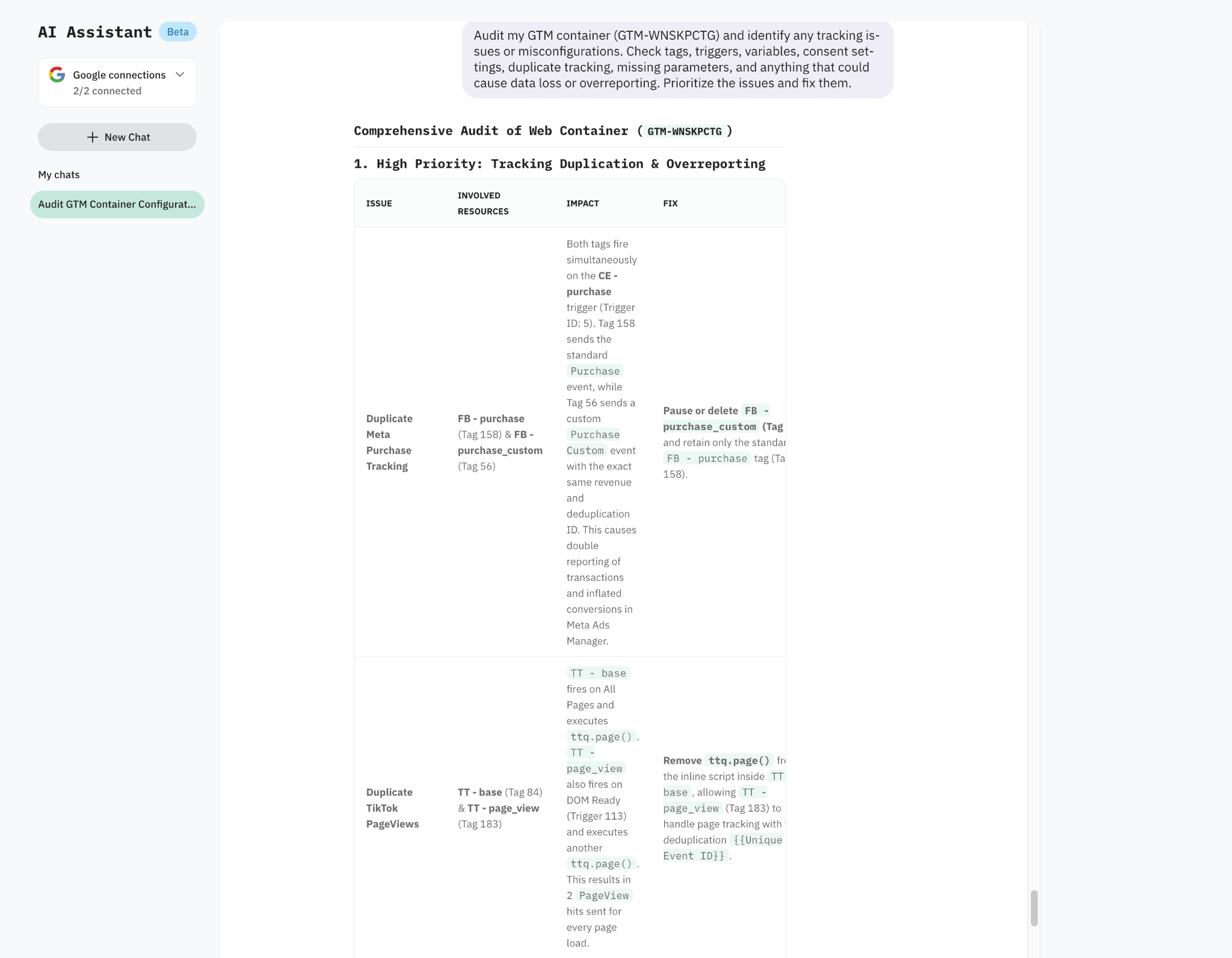
Audit my GTM container and identify any tracking issues or misconfigurations. Check tags, triggers, variables, consent settings, duplicate tracking, missing parameters, and anything that could cause data loss or overreporting. Prioritize the issues and fix them.
What it does: AI Assistant reviews your GTM container for common tracking and configuration issues, highlights the most important problems, and suggests how to fix them.
#2: Analyze your GA4 data
Prompt:
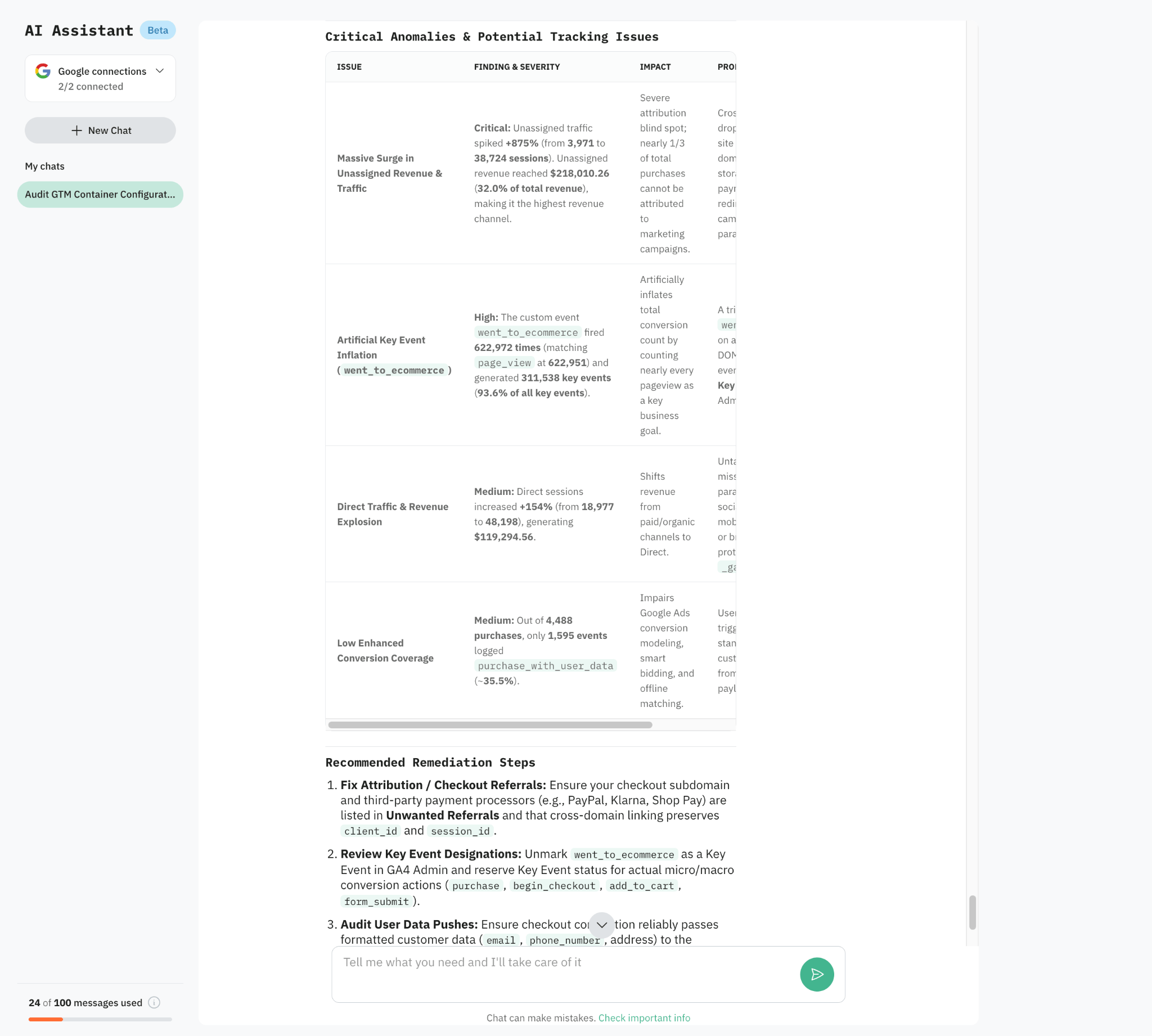
Analyze my GA4 data for the last 30 days and identify any unusual trends or potential tracking issues. Check traffic, users, sessions, key events, conversions, traffic sources, and channel attribution. Look for sudden increases or drops, unusual Unassigned or Direct traffic, missing events, and other anomalies. Compare the data with the previous 30 days, highlight the most important findings, and explain what could be causing them.
What it does: AI Assistant analyzes your recent GA4 performance and compares it with the previous period. It looks for unusual changes in traffic, conversions, events, and attribution that could indicate either a tracking problem or a real change in user behavior. It then highlights the most important findings and suggests possible reasons behind them.
#3: Fix tracking issues in your GTM container
Prompt:
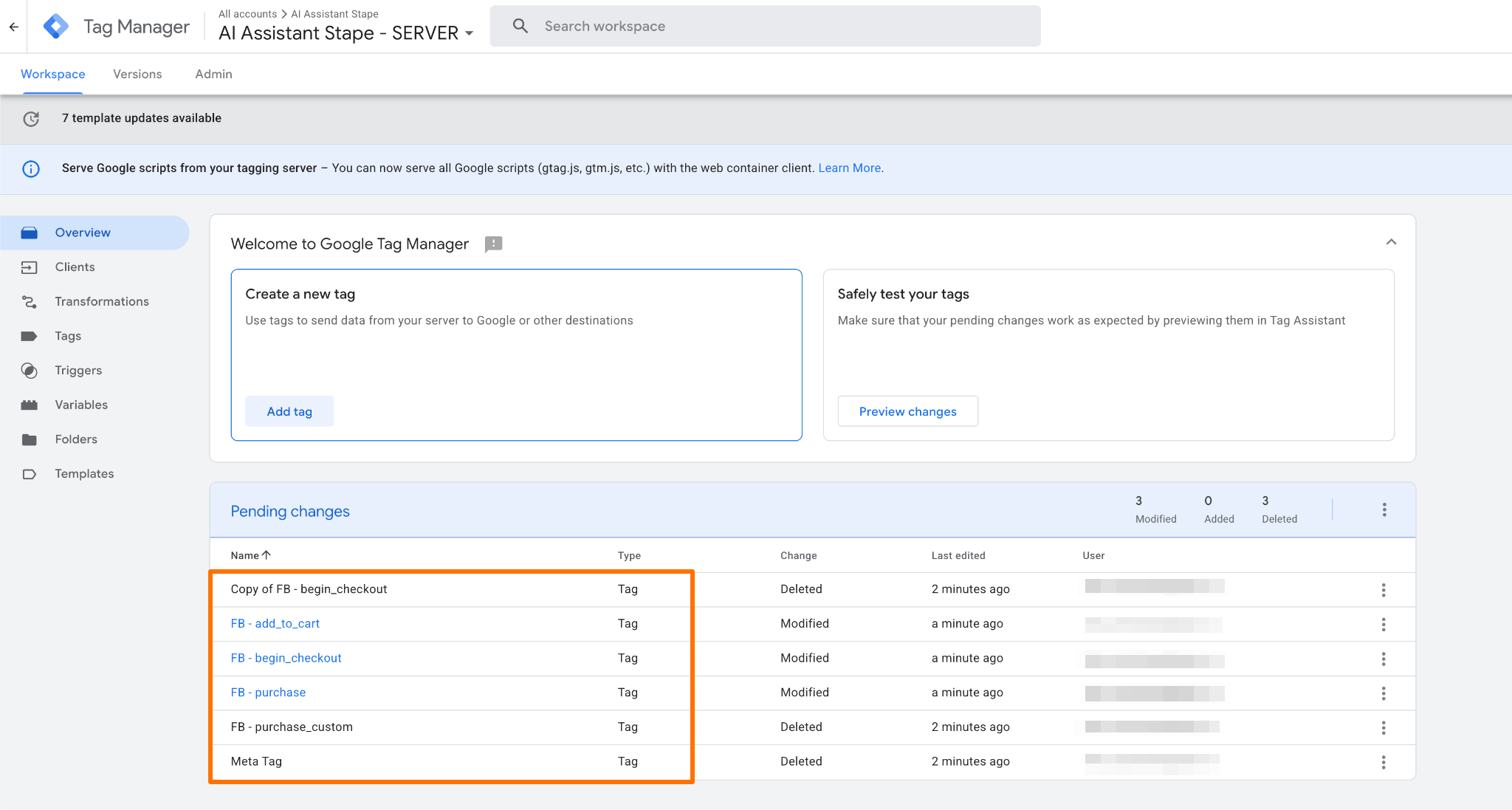
Review the Meta tracking setup in my GTM container and fix any issues you find. Check browser and server-side Meta events, triggers, event names, parameters, user data, event_id deduplication, consent settings, and duplicate tracking. Make the necessary changes so the setup follows Meta best practices and avoids data loss, duplication, or overreporting.
What it does: AI Assistant reviews the existing Meta tracking configuration and identifies problems in both browser and server-side GTM containers. Instead of only describing the issues, it can make the required changes in the GTM container, such as adjusting triggers, fixing parameters, or removing duplicate tracking.
#4: Analyze your Stape Analytics
Prompt:
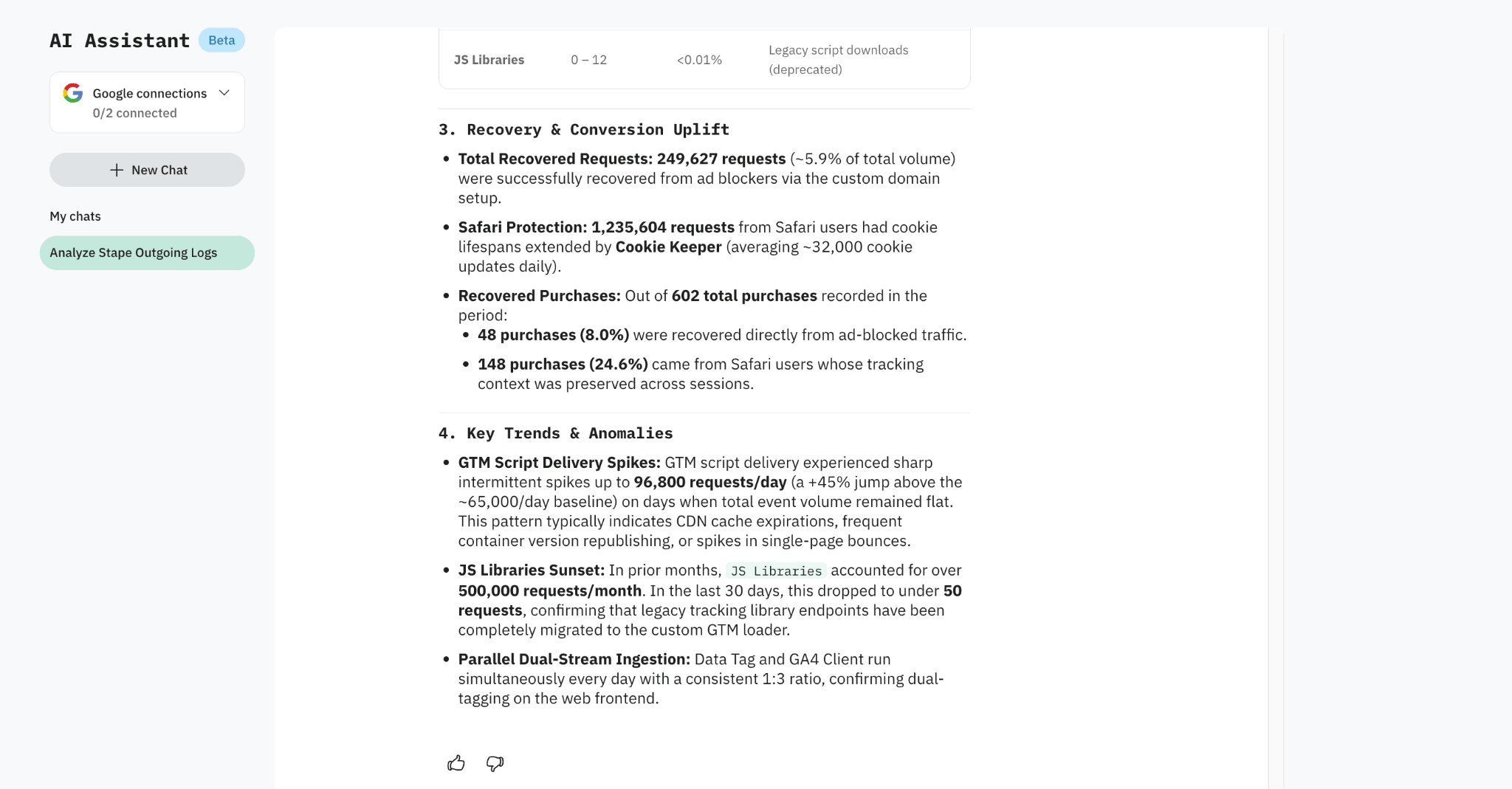
Analyze my Stape Analytics for the last 30 days and identify any unusual trends or patterns. Review request volume, request categories, recovery from ad blockers and tracking prevention, and usage changes over time. Highlight significant increases or drops and explain what could be causing them.
What it does: AI Assistant turns your Stape Analytics data into an easy-to-read overview of your container’s performance. It summarizes request usage, shows where requests come from, measures the impact of ad blocker recovery and Safari protection, and highlights unusual changes or patterns that may require attention.
#5: Configure Stape power-ups
Prompt:
Analyze my GA4 data for the last 30 days and identify any unusual trends or potential tracking issues. Check traffic, users, sessions, key events, conversions, traffic sources, and channel attribution. Look for sudden increases or drops, unusual Unassigned or Direct traffic, missing events, and other anomalies. Compare the data with the previous 30 days, highlight the most important findings, and explain what could be causing them.
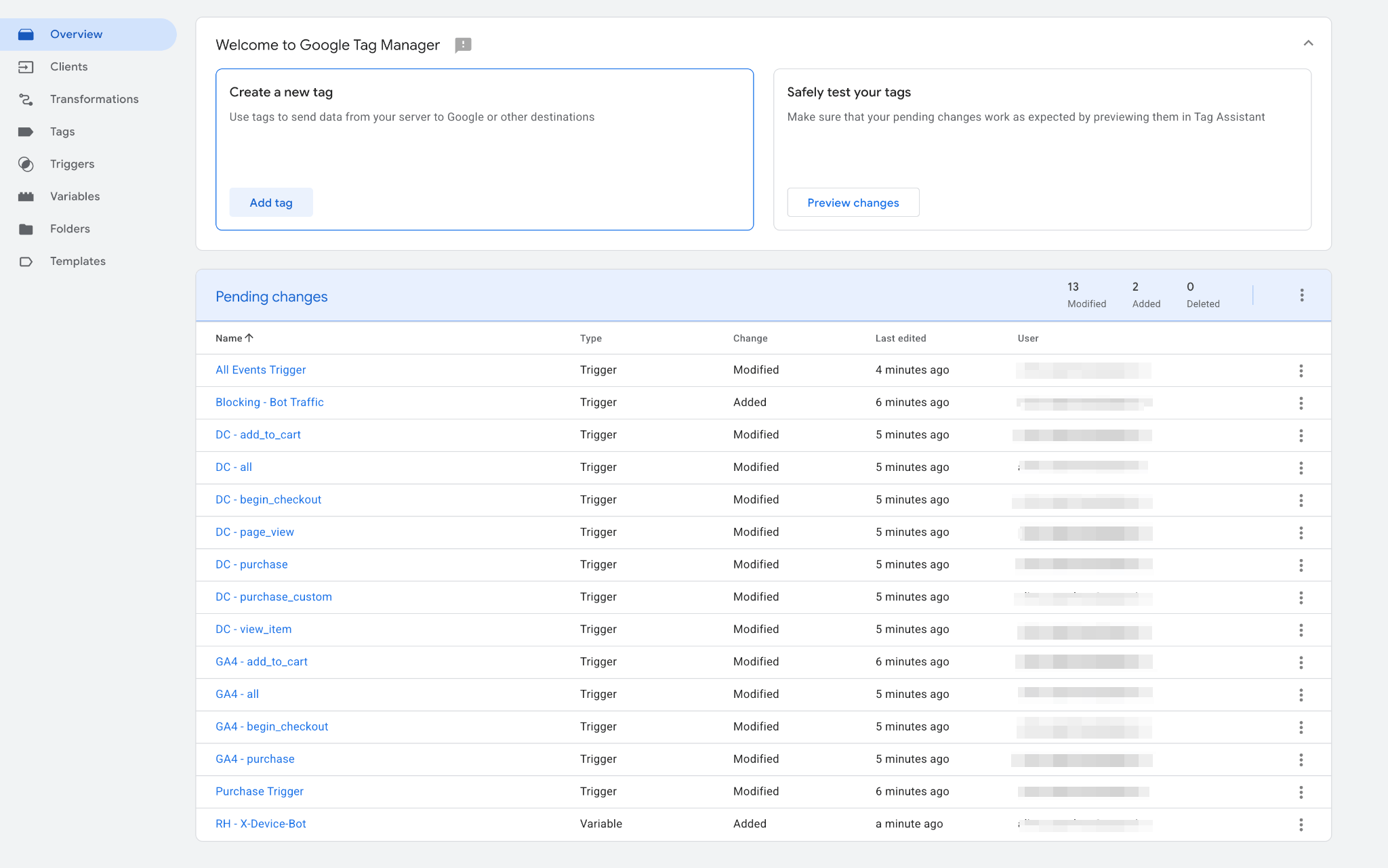
What it does: AI Assistant can help configure Stape power-ups directly from the chat, so you don’t need to manually go through settings. In this example, it enables Bot Detection, and this allows the container to automatically filter detected bot traffic before events are sent to analytics and advertising platforms.
Other use cases
Organize your GTM container
Prompt: Review my GTM container and organize all tags, triggers, and variables into folders based on the platforms they belong to.
What it does: AI Assistant can help keep large GTM containers organized and make configurations easier to navigate and maintain.
Visualize your analytics data
Prompt: Create a chart showing my GA4 purchases by traffic source for the last 30 days.
What it does: AI Assistant can turn analytics data into visualizations, making it easier to spot trends and compare performance without manually building reports.
Understand your tracking setup
Prompt: Explain how purchase tracking works in my current GTM setup, from the dataLayer event to the final marketing platforms.
What it does: AI Assistant can help you understand an existing configuration by explaining how different parts of your tracking setup work together.
Check your Stape usage
Prompt: What is my current request usage for this billing cycle?
What it does: AI Assistant can quickly check your current Stape container usage and help you understand how close you are to your plan limits.
Get help with Stape
Prompt: Which Stape power-ups could improve tracking for Safari users, and what does each one do?
What it does: AI Assistant can answer questions about Stape power-ups and help you understand which tools are relevant to your setup without searching through documentation manually.
Ready to try it yourself?
AI Assistant can take a lot of repetitive work out of tracking analysis and configuration. The prompts above are just a starting point – you can adjust them to your setup, add more context, or simply describe what you want to achieve in your own words.
Before applying any changes suggested by AI Assistant, take a moment to double-check what it changes in your container.
We’re also continuously working on making AI Assistant more useful. If you have ideas for features or ways we could improve your workflow, share them with us on our Feature Request board.
And if you’ve found a useful prompt that saved you time or helped solve a tricky tracking problem, share it in the comments below. We’d love to hear how you’re using AI Assistant in your daily work.
Want to start on the server side?
Try for freeRecommended for you
Blog
AI that actually helps with measurement: Stape's AI Assistant and three free MCP servers
Stape's free MCP servers and AI Assistant bring AI into GTM, GA4, and server-side tracking. Here's what each tool does and when to reach for it.
Jul 23, 2026

Comments