Mar 2, 2026
Server-side tracking for agencies: best practices for smooth client setups
Written by
Maryna Semidubarska
Updated Sep 2, 2026 comments
Key takeaways
- Agencies need more than a technical setup. A clear process helps them collect client input, choose the right setup path, check the work before launch, and explain results in a way clients understand.
- Stape already fits that workflow: Website Tracking Checker offers a free tracking audit, Setup Wizard generates ready-to-use GTM container templates, the Stape GTM Helper Chrome Extension helps with debugging, and Requests Analytics shows how much data was recovered through server-side tracking.
- Stape Agency account is built for client management in one dashboard. It lets agencies create and manage client accounts, handle billing, and share team access.
Day-to-day work gets harder when every setup is handled in a different way. One client uses Shopify, another uses WordPress. One needs Meta and Google Ads. Another needs CRM events. Also, if every team member names events differently and implements or QA’s the setup in their own way, delivery becomes slower and more difficult to control.
This is why agencies need guidelines. It helps them launch setups faster and give clients a more stable tracking service.
Why agencies need an implementation framework
An in-house team usually works with one website setup for a long time. An agency works with different client websites, tools, and reporting needs. If the team has to start from zero for every client, the work takes more time, and mistakes are more likely to happen. Your team ends up rebuilding work that should already be standardized.
Guidelines fix that. It gives your team one way to collect requirements, one way to decide which setup path fits the client, one way to QA the build, and one way to report the result. This kind of process helps teams work faster, reduces setup differences, and gives clients a more stable service.
For beginner clients, this matters even more. Most clients do not care about container structure or event routing. They care about missed conversions, weak attribution, rising CPA, and reports that do not match what happened in the business. A good agency process turns technical work into a service clients understand.
Audit before you build
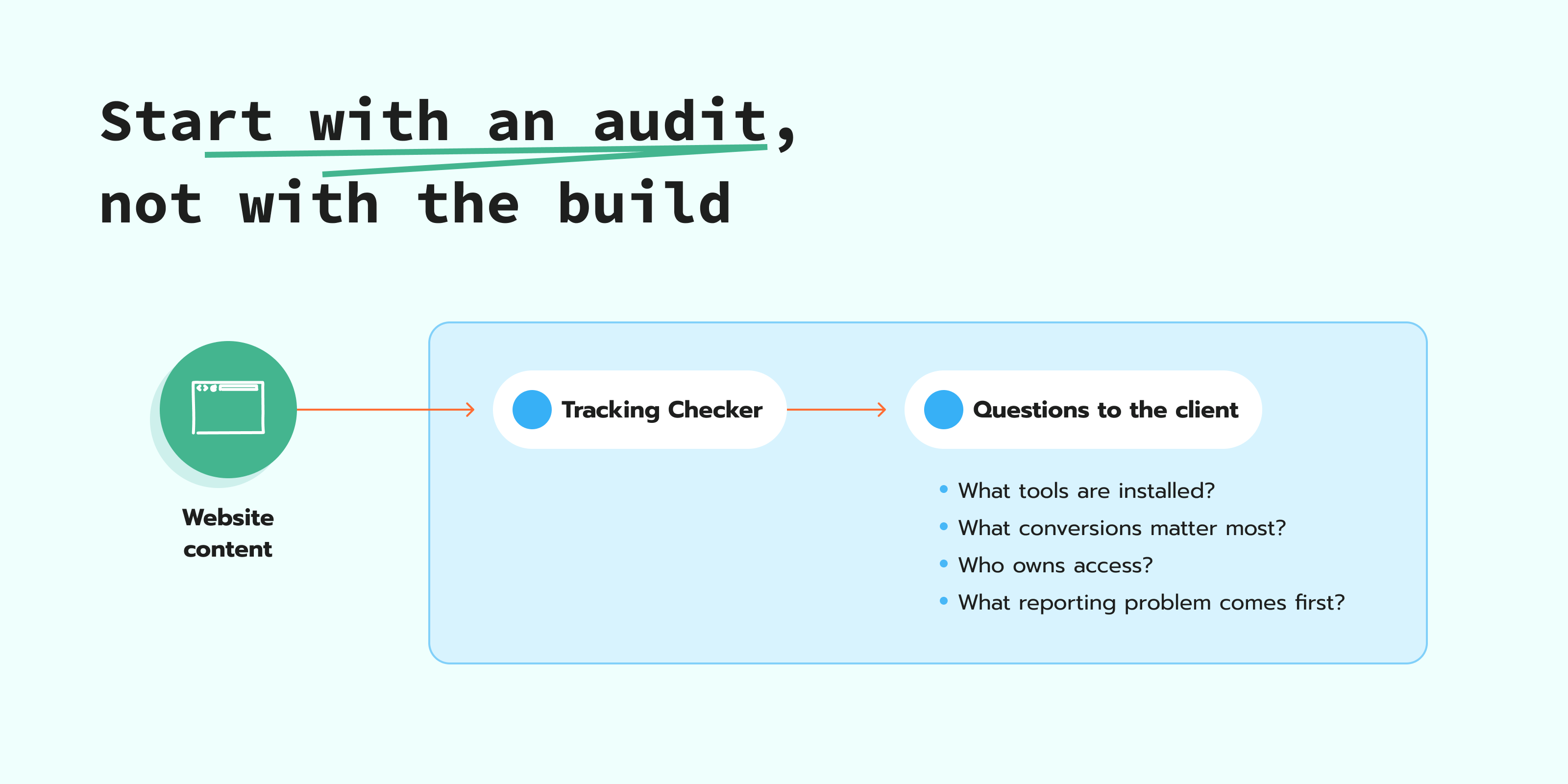
Before you decide how to implement server-side tracking, you need to know what your client has, what is missing, and what matters most for their business. You should also address common server-side tracking misconceptions before implementation, so everyone starts with the same expectations about what the setup can and cannot achieve.
Website Tracking Checker by Stape is built for this first step. It is a free tracking tool with recommendations, which makes it a good way to define priorities before any rebuild starts. You enter the client’s website URL, and the tool scans the tracking setup. After the scan, you get a report that shows what tracking tools were detected on the site and where problems or gaps may need attention. This gives you a clearer starting point before any setup work begins.
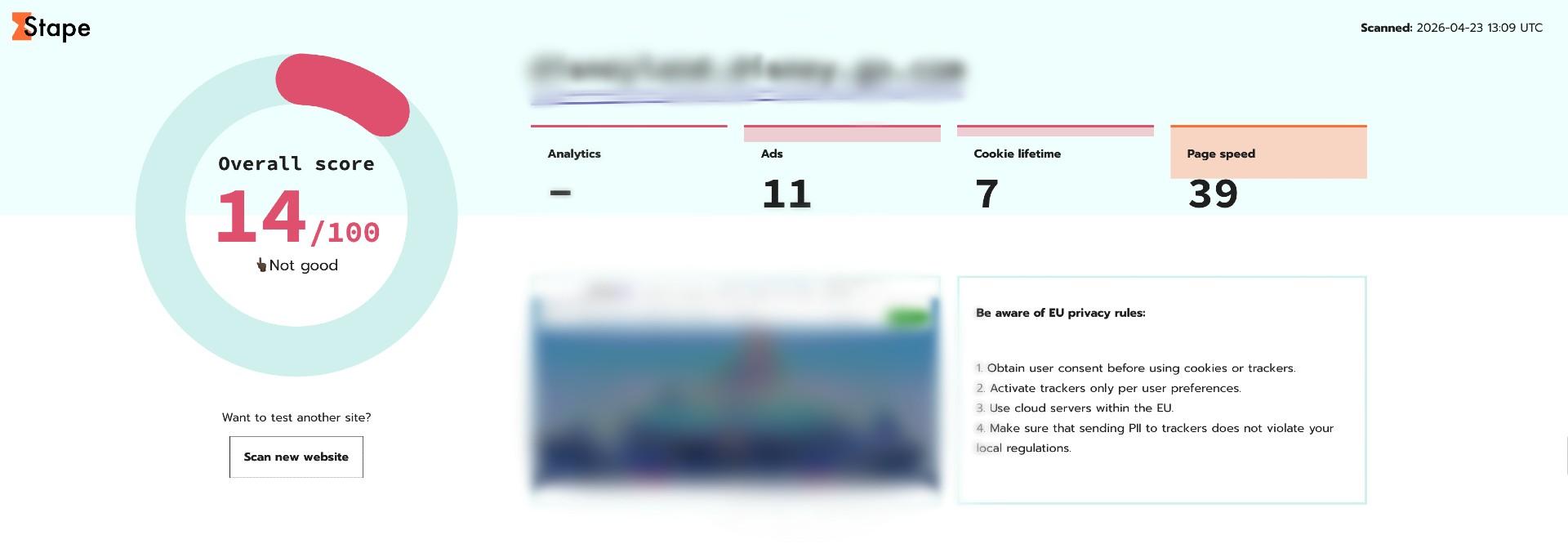
After that, agencies should get answers from the client on the following:
- Which platforms are the most important for the business, for example, GA4, Google Ads, Meta, or TikTok.
- Which conversions matter most to the business.
- Where those conversions are confirmed, for example, on the thank-you page, in the CRM, in the backend, or through the call center.
- Which consent tool is active on the site.
- Who owns access to GTM, GA4, ad accounts, CMS, DNS, and CRM.
- QA rules for testing before publishing.
- What reporting problem does the client want to fix first.
Pick the right setup path for each client
For some clients, a server Google Tag Manager setup makes sense because they need flexibility across several platforms, custom routing, CRM or webhook events, and deeper control. For others, a gateway is the faster fit.
A common misconception is that an sGTM setup takes too much time and is hard to manage. To reduce this setup work, Stape created Setup Wizard. An agency fills in a short form, chooses what they want to set up, and adds the needed platform details. After that, Setup Wizard generates ready-to-use web and sGTM templates created by Stape, with best practices already included.
Multi-client scaling best practices
Once an agency starts managing server-side tracking for several clients, there is a risk of getting lost in organizational moments. Different team members can name tags in different ways, publish changes without the same checks, or apply the client’s requests differently. Over time, this can turn into a messy setup.
To avoid this, the agency needs a shared way to prepare and manage each client project that can vary by platform, event list, and tracking goals. Nevertheless, the agency needs to agree on how they work with projects.
Your internal process should cover:
- Templates on how to name tags, triggers, and variables.
- When to publish.
- What has to be checked before launch.
- Who approves the final QA.
Tools to make the work easier
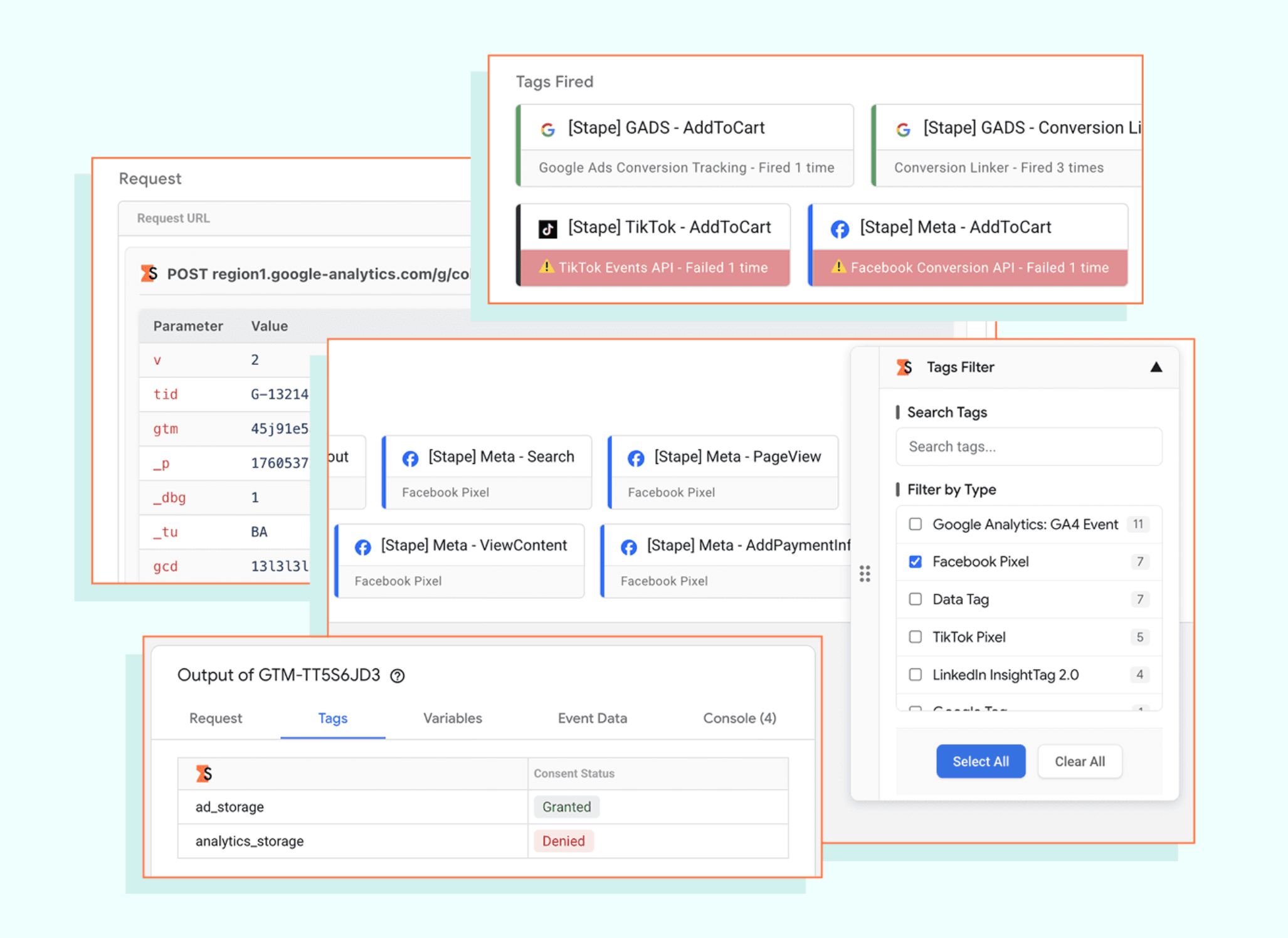
Stape GTM Helper is a free Chrome extension that makes Google Tag Manager's preview and debug mode easier to read for web and server Google Tag Manager containers. It gives the preview window more structure, so specialists see which tags failed to send a request to the server. The extension also makes platform checks easier with color codes and platform logos on the tags. This helps teams debug Shopify checkout tracking, filter the tags they need to check, read request data in JSON or table format, check consent status in server GTM preview, scan website tracking health, and work faster with large containers through bulk selection.
GTM Tools helps agencies manage GTM assets across client accounts. It can be used to create, update, organize, review, clone, and visualize GTM assets. This is useful when a team needs to review setups, copy proven assets, or keep containers organized without extra manual work.
GTM templates are made to save time and benefit from the knowledge and experience of the Stape team, which is the biggest contributor to the GTM Template Gallery.
Stape apps can make setup easier when an agency needs to connect a client’s website, store, or CRM to the tracking setup. Instead of preparing every connection manually, the team can use apps built for common eCommerce platforms, CMS platforms, and CRM systems. This helps agencies pass the needed events and customer data into the setup with less manual work, especially when they manage similar tracking tasks for many clients.
Check and monitor the client setup after launch
Agencies should not stop at the first setup check. After the setup goes live, the team still needs to check if events are coming through, if key conversions are stable, and if anything changes after website updates, consent changes, or platform updates.
Logs and Monitoring by Stape help with this. Logs show what happens with requests in the server Google Tag Manager container, so the team can check errors, missing events, or unexpected changes in the data flow. Monitoring helps agencies follow key events after launch. For example, if purchase events suddenly stop coming through, the team can notice it faster and check the setup before the client sees bigger reporting gaps.
This gives agencies a way to keep client setups under control. Running this as a structured maintain, monitor, and debug process, with set intervals for proactive checks, alerts for what logs won't surface on their own, and a clear order for debugging when something looks off, is what turns a good launch into a stable long-term service.
Focus on signal quality, not only event count
As ad platforms automate more of the bidding, signal quality becomes a key lever for performance. Agencies should first get signal volume as close as possible to the source of truth, such as the CRM or CMS, and then enrich events with the relevant parameters the platform needs. User data is especially valuable for ad platforms, alongside core data like IP address and user agent.
For agencies, this means they need to check if they send the data according to the platform's official recommendations and requirements, which may include a different list of parameters and/or formats for a specific event
This is where server-side tracking brings value comparing to the browser-only setup. Server-side tracking improves the quality of signals that ad platforms receive in two ways. First, it helps send more complete event data, including events that could be missed in a browser-only setup. Second, the server layer gives agencies an option to enrich events before they are sent further. For example, instead of sending only revenue, an agency can add profit value, so the ad platform receives a signal based on purchases that bring more profit.
Note:
For more information on signal quality, feel free to watch the Stape webinar on Conversion signals and server-side tracking.
Prove impact after launch
When server-side tracking is live, clients want to see what changed in their data and what they should do next. Platform reports can go up even when the marketing activity stays the same. That is a measurement lift. More events reach the platforms, attribution becomes stronger, and traffic acquisition becomes more accurate.
This is why client reporting should show two layers. The first layer is tracking impact. The second layer is business impact.
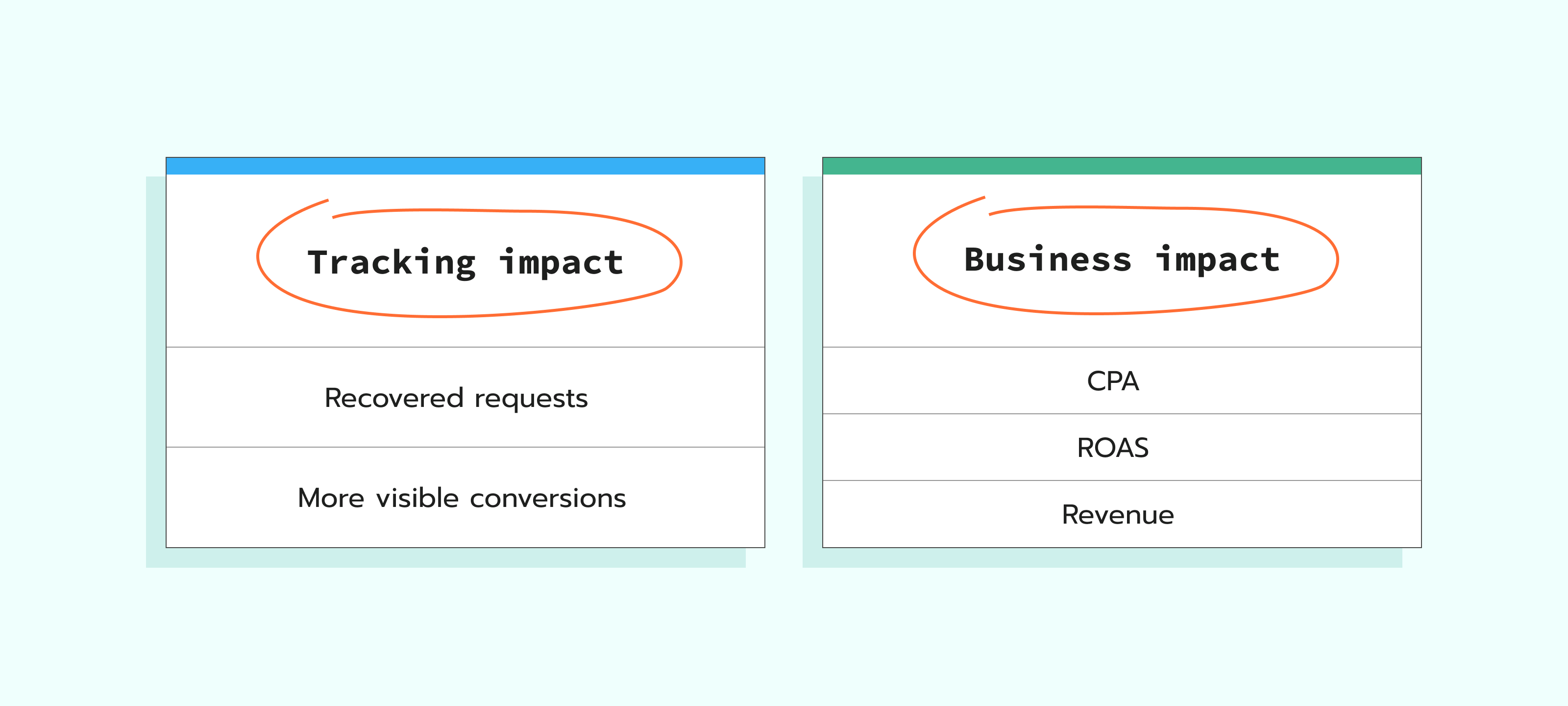
For tracking impact, use proof such as:
- recovered requests;
- browser or ad blockers-related recovery;
- event delivery stability;
- platform-side conversion visibility.
For business impact, show the trend in CPA, ROAS, cost per lead, revenue, or qualified pipeline, depending on the client model.
Requests Analytics is useful here because it is built to analyze the effectiveness of a server-side tracking setup. It breaks down total versus recovered requests by client and by event name, so agencies can show not just that traffic exists, but what the server setup actually recovered.
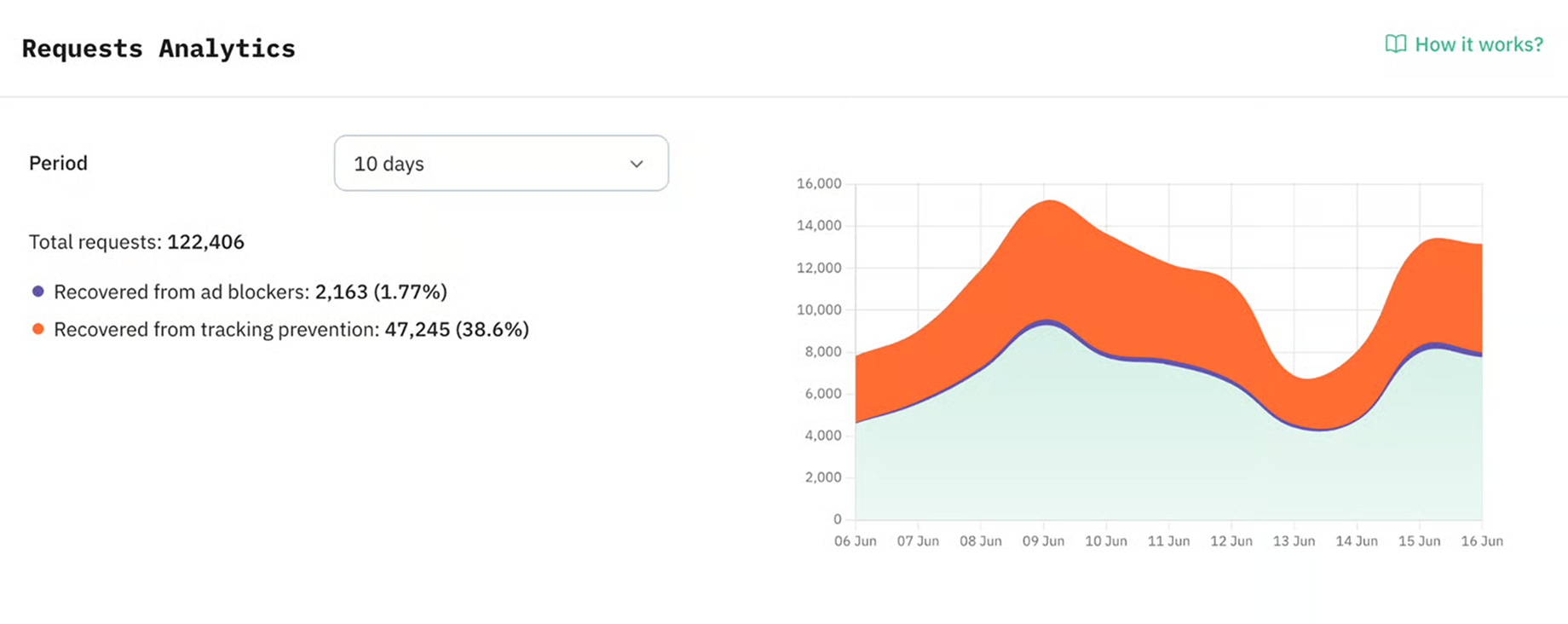
Seoplus+ used Requests Analytics and measured more than 200,000 requests over 90 days, with 12% recovered from browser-level disruptions, 3.37% blocked by ad blockers, and 8.62% affected by ITP or ETP. The result reported in the case study was 24% more Google Ads conversions. That kind of proof is much easier for an agency to use in client reporting than a vague claim that “tracking is now stronger.”
Agencies should also follow those rules to provide an objective view on their added value:
- Compare equal periods, for example, one non-holiday week and another.
- Write down all the changes that happened during the same window, such as consent. updates, budget shifts, landing page edits, or event changes.
- Give reporting tools 24 to 48 hours to process the new data before you show results.
Use the Agency account to manage client work at scale
When an agency manages server-side tracking for several clients, it needs one place for access, billing, and account management.
A Stape Agency account gives the team a dashboard for managing several accounts instead of switching between separate logins or handling each setup manually. This way, the agency manages client accounts, invites teammates, and controls access.
Each client keeps their own Stape account where their server Google Tag Manager containers or Gateways are created and managed. The Agency account works as the management layer above these client accounts, so the agency keeps client work separate but manages it from one place.
With an Agency account, agencies manage the main account tasks in one dashboard:
- Create and manage client accounts.
- Invite teammates and manage role-based access.
- Request access to client accounts or log in as a user when support is needed.
- Check accounts with exceeded limits, billing issues, or required actions.
- Manage billing with separate client payments or one consolidated invoice.
- Export client account data when needed.
If you also want to earn recurring commission for bringing clients to Stape, you can apply to the Stape Partner Program. Partners can earn up to 40% recurring commission for life. The first partner level starts when your Agency account reaches at least 5 paid products or $50 in monthly referral value.
Check out the Agency Handbook by Stape to get a practical workflow for selling, launching, and managing server-side tracking services for clients.
Final words
Server-side tracking becomes easier to sell and manage when agencies treat it as a service with a template and a step-by-step guide. The team needs a process for checking the client’s current tracking, choosing the right setup path, launching with the same QA rules, watching key events after go-live, and reporting the results in easy-to-understand words.
This work helps clients get more complete data and stronger signals for ad platforms. It also helps agencies show what changed after launch, where tracking became more stable, and which next steps matter for campaigns.
With the right tools, shared internal rules, and a Stape Agency account for client management, agencies deliver server-side tracking across several clients without losing control of access, billing, setup quality, or reporting.
Download the Agency Handbook
Recommended for you
Blog
7 extra services every marketing agency should offer in 2026
Extra services agencies can offer in 2026: server-side tracking with Stape, analytics, AI implementation, and CRM/CMS integrations.
May 20, 2026

Comments