Browser tracking pixels and page speed: what a Lighthouse test actually shows
Written by
Luc Nugteren
Key takeaways
- Browser pixels burden the network and block the main thread. Each script queues behind the visitor’s tap, so the cost shows up in sluggish interaction as much as in a slow initial load.
- The numbers make the case. Six platform pixels doubled the JavaScript and main-thread work, and pushed Time to Interactive from 5.3 to 8.6 seconds on mobile, a cost that disappears once tagging moves off the browser.
- Server-side speed only materializes when the replaced pixels are actually removed from the browser. Running a server container next to existing ones changes nothing; the gain lives in what gets deleted.
- The setup that works is a web container that collects and sends data once to a first-party server container, which routes it to every platform and manages the cookies platforms rely on for conversion matching.
- The migration isn’t complete until match quality is confirmed. Platform diagnostics and backend order counts are what show whether browser IDs survived the move. If they didn’t, the conversion data didn’t either.
Fewer tags, faster site
Most web containers I open look the same. A GA4 tag, a Google Ads tag, the Meta pixel, the TikTok pixel, something for Pinterest or Microsoft, a heatmap tool. Each one is a script the visitor's phone downloads, parses, and runs on every page, before they've tapped anything.
Server-side tagging was supposed to fix that. In most setups, it didn't, because the server container was added next to the web container and every pixel stayed where it was. Two of everything, and a site that's exactly as slow as before.
I wanted to know what those pixels actually cost. So I measured it.
The test
One product page with the things a real shop ships: theme scripts (jQuery, a slider, Bootstrap), a web font, product images, and a consent banner. I tested it in four states:
- 1.Theme only. No tracking at all. The baseline.
- 2.Plus the consent tool. Cookiebot, the same on every page below.
- 3.Plus my own web container. The exact setup that runs on my site: consent tool, one Google tag, two GA4 event tags, and a small script that stores non-Google click IDs in a first-party cookie. Everything else happens in the server container.
- 4.Plus six platform pixels. The same page, but with GA4 and Google Ads through gtag.js, the Meta pixel, the TikTok pixel, the Pinterest tag, Microsoft UET, and the LinkedIn Insight Tag in the browser. A normal eCommerce web container.
I measured each state with Lighthouse 13 on a simulated mobile connection, three runs per page, and kept the median.
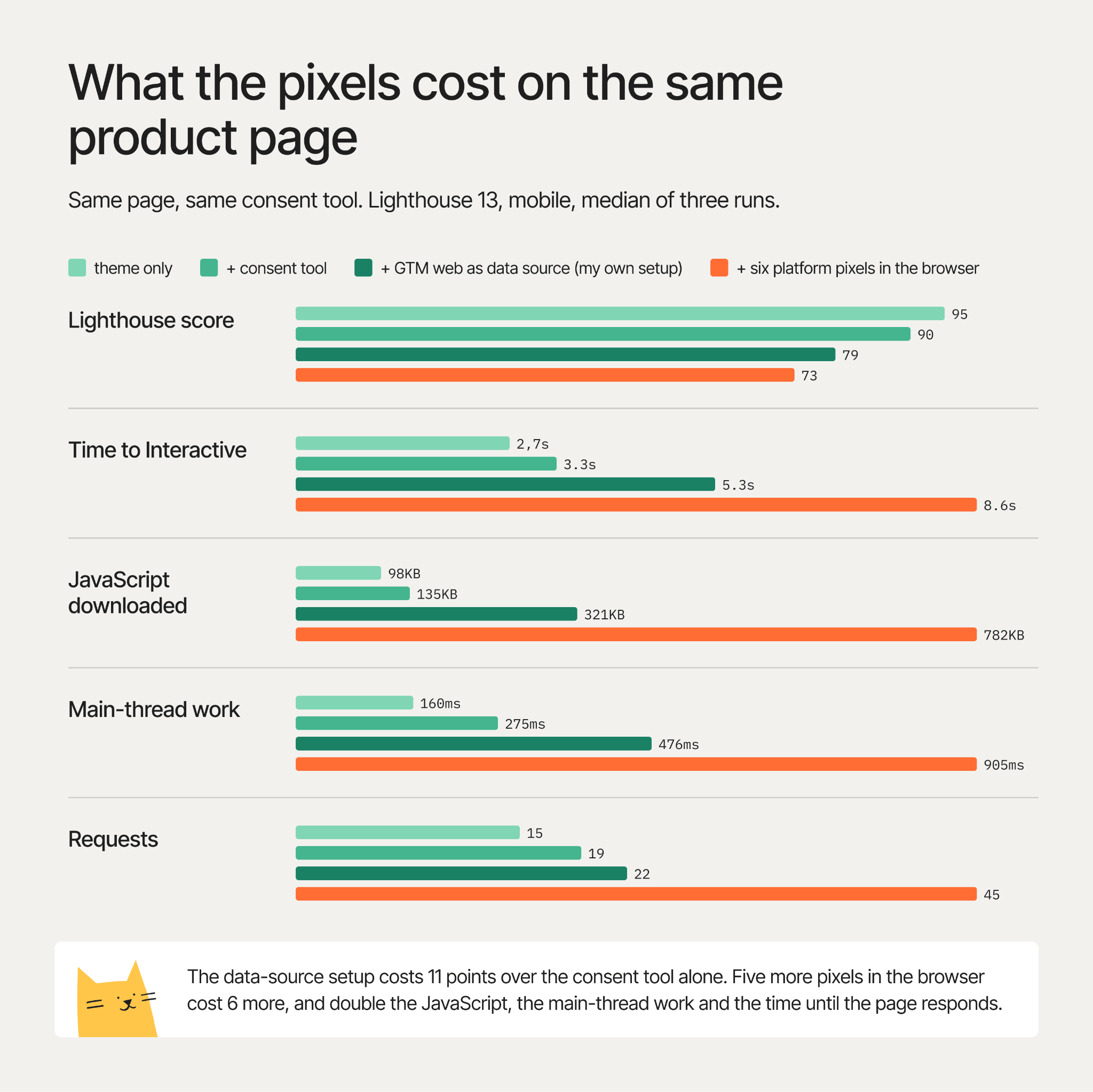
Read it from the top. The consent tool costs 5 points. My web container, which does the collecting and leaves the tagging to the server, costs 11 more. That part is unavoidable: something has to run in the browser to collect the data, and that something has to load.
Then the pixels. gtag.js was already there, so that's five more scripts in the browser. They cost another 6 points, double the JavaScript (321 to 782 KB), double the main-thread work (476 to 905 ms), and push Time to Interactive from 5.3 to 8.6 seconds. On a mid-range Android, that's the difference between a page that responds to the first tap and a page that doesn't yet.
Every one of those five scripts can be replaced by a tag in the server container that the visitor never downloads. The platforms get the same events.
Why a pixel costs more than its file size
A browser has one main thread. Think of it as one cashier. Rendering the page, reacting to a tap, and running every tracking script all wait in that one queue. A pixel doesn't just download: it's parsed, executed, sets cookies and fires its own requests, and all of that happens in the queue the visitor's tap is waiting in.
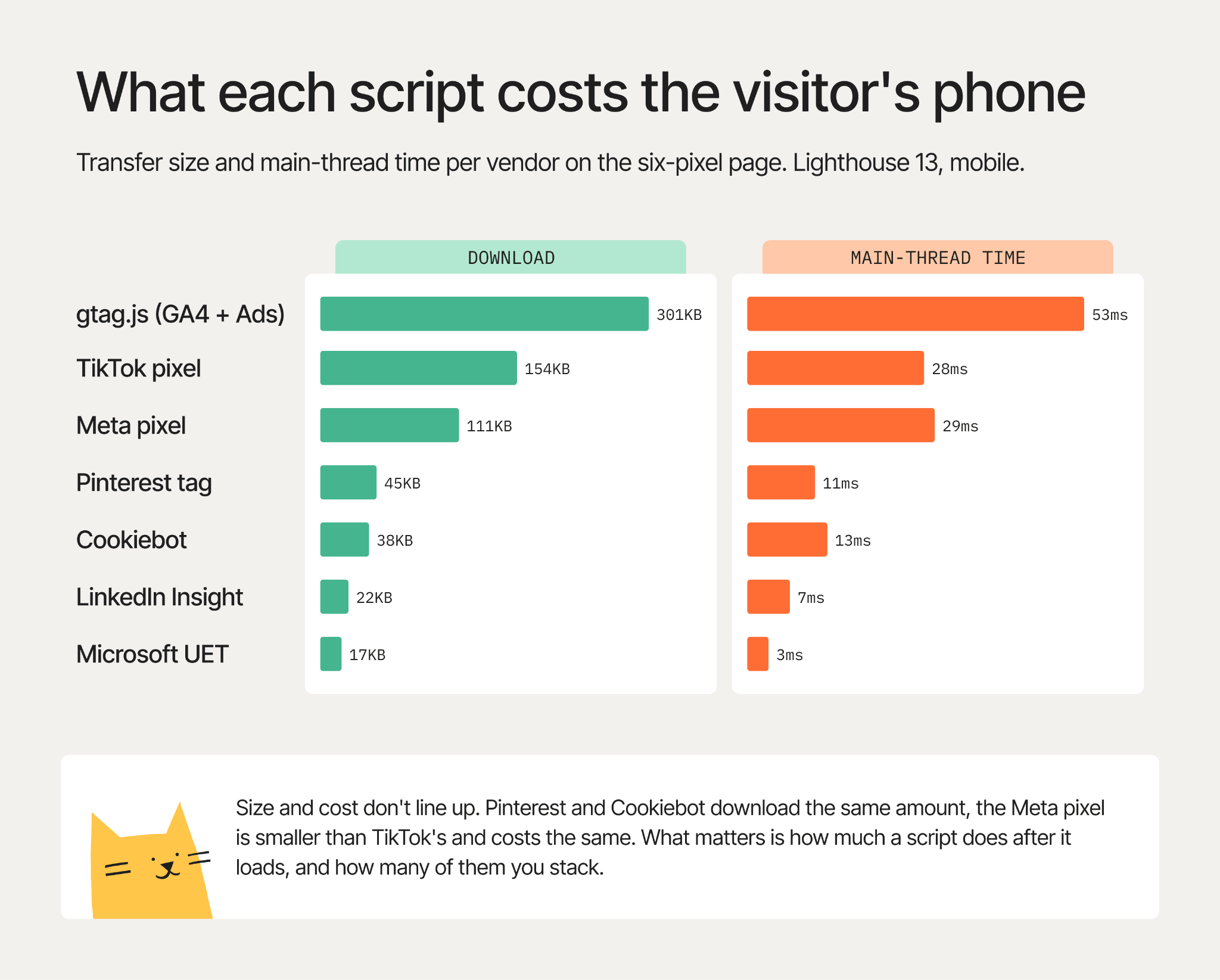
File size says little about that cost. The Pinterest tag and Cookiebot download the same amount and cost about the same. The Meta pixel is a third smaller than TikTok's and costs the same. gtag.js is the biggest file by far and, per kilobyte, among the cheapest. What matters is how much a script does after it loads, how often, and how many of them you stack. Lighthouse calls that main-thread time. Your visitors feel it as Interaction to Next Paint (INP), the Core Web Vital for responsiveness, and third-party scripts are the most common reason a shop fails it on mobile.
The setup: web container as data source
The alternative is a web container that does three things: load the consent tool, collect the data, send it once. The server container does the tagging.
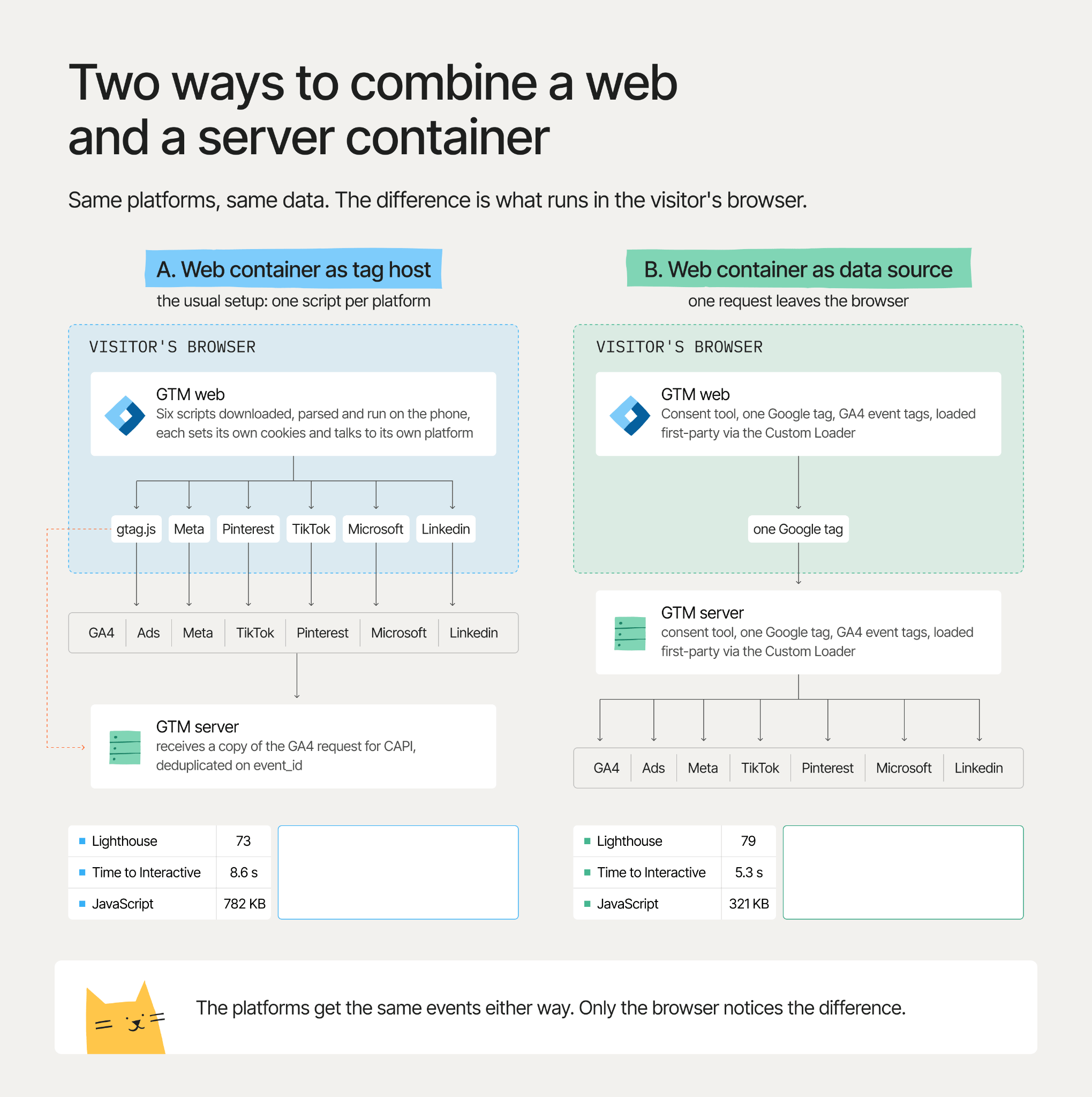
My own web container, the third state of the test, has five tags. Everything else lives in the server container behind it. Three steps get you there.
What you give up
- The browser-vs-server comparison. Many teams find bugs by comparing the two. Compare against your backend orders instead, which is the number that matters anyway.
- Some platforms. A few have no server endpoint worth the name, or need a browser SDK for on-site features. Those stay, deliberately.
- Request volume at your tagging provider doesn't drop. The server container now does the fan-out. Keep it as tidy as the web container.
- Match quality needs checking. Compare Meta's Event Match Quality and Google's Enhanced Conversions diagnostics before and after. If a platform drops, a browser ID didn't survive, and step 1 tells you where to look.
Consent still applies. The Google tag carries the consent state to the server, and every server tag has to honor it, or you've moved the problem out of sight.
Test it yourself
Your own product page and three Lighthouse runs are enough.
1. Before you change anything, open the product page in Chrome, open DevTools, go to the Lighthouse tab, choose Mobile and Performance only, and run it three times. Keep the reports.
2. Ignore the score, read four numbers. Largest Contentful Paint and Total Blocking Time at the top. Then expand 3rd party lower down: that's the table of every tracking script, with what it downloaded and how long it kept the main thread busy. Note the total requests and JavaScript bytes as well.
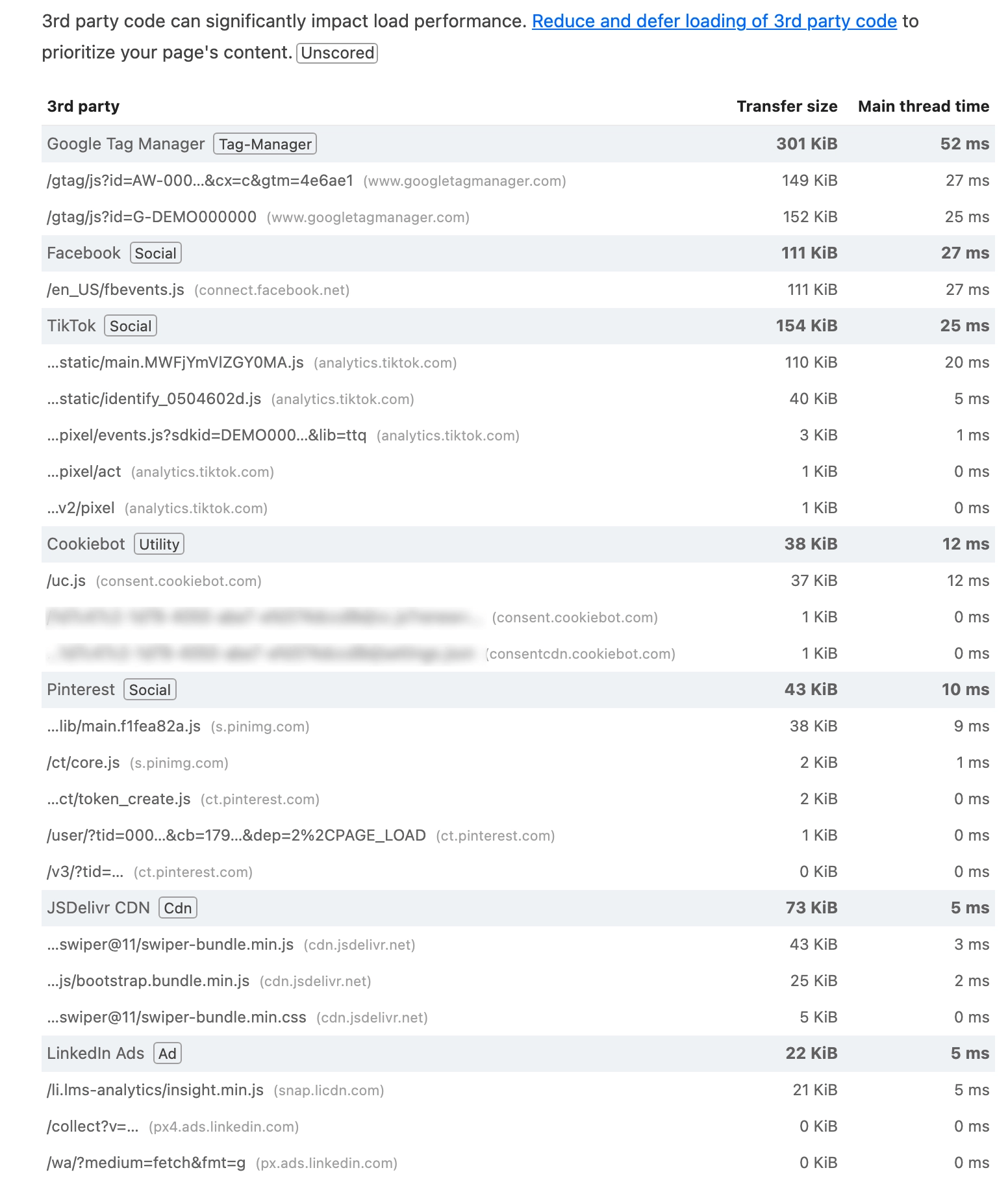
3. Make the change, publish, and run the same three times. The score moves a little. The 3rd parties table, the JavaScript bytes, and Total Blocking Time are where you see it.
4. Then check INP the way a visitor feels it. Performance panel, 4x CPU slowdown, record, tap add-to-cart, stop. Look at the main thread between the tap and the repaint. Listeners from pixels and heatmap tools show up there, and Lighthouse never sees them.
On the data side: preview the server container and confirm every platform tag fires on a purchase with the IDs it needs. A week later, compare purchases per platform with your backend.
Final words
Collecting data in the browser has a price you can't avoid: a consent tool and one container cost my test page 16 points. Tagging in the browser has a price you can avoid: five pixels cost 6 more points, doubled the JavaScript and the main-thread work, and added three seconds before the page responded.
A web container that only collects, and a server container that does the tagging, is the simplest version of server-side tagging and the fastest one. It forces you to get the first-party setup right. In return, the site gets its main thread back, and the tracking lives in one place instead of two.
Want to start on the server side?
Try for freeRecommended for you
Nov 16, 2026
Blog
How to audit Google Tag Manager setup for better data
Find duplicate events, missing data, consent issues, and server container errors in your Google Tag Manager setup.
Nov 5, 2026

Comments