Oct 2, 2026
WooCommerce conversion tracking with server-side GTM
Written by
Maryna Semidubarska
Updated Oct 2, 2026 comments
Key takeaways:
- WooCommerce is built on WordPress, so server-side tracking for WooCommerce starts with the WordPress setup, but then adds store events like product views, add to cart, checkout, purchase, and refund.
- Server-side tracking does not move all tracking away from the browser. The browser still collects website events, then the data passes through a sGTM container before it goes to platforms like GA4, Google Ads, Meta, or TikTok.
- For WooCommerce stores, server-side tracking helps send more complete data, prolongs the cookie lifetime, and gives ad platforms better event signals for reporting and optimization.
What is server-side tracking for WooCommerce?
Server-side tracking for WooCommerce is a tracking setup where website events pass through a server Google Tag Manager (sGTM) container before they go to analytics and ad platforms.
This is how it works: a visitor does something on your WooCommerce store. For example, they view a product or complete a purchase. The browser collects this event. Then the event is sent to a sGTM container. From there, the event goes to tools like GA4, Google Ads, Meta, TikTok, or other platforms.
Server-side tracking is not a server-only setup. The browser still collects the website event first. The server then becomes the next step in the data flow, where the event can be processed, adjusted, and sent to the right platforms.
For WooCommerce, this is especially important because store events include product and order details. A purchase event needs the order ID, value, currency, products, customer details when allowed, and consent status. If this data is missing or sent in the wrong format, platforms receive weaker conversion signals.
WordPress and WooCommerce are connected, but they are not the same thing. WordPress is a website platform. WooCommerce is the eCommerce plugin that adds store features to WordPress, such as products, cart, checkout, orders, and refunds.
That is why a general server-side tagging for WordPress setup is the base, while WooCommerce tracking needs extra attention to eCommerce events.
Benefits of server-side tracking for WooCommerce stores
WooCommerce tracking is connected to the same store actions across several platforms. A purchase in WooCommerce becomes revenue data in GA4, a conversion in Google Ads, a purchase signal in Meta, and a customer action in email or CRM tools. When this event is sent with missing value, currency, product data, order ID, or consent information, every connected platform receives an incomplete version of the sale. This makes reports impossible to trust, undermines your ability to monitor key eCommerce KPIs, and gives ad platforms less complete conversion data for optimization.
Server-side tracking gives WooCommerce stores more control over how purchase and customer events are sent to analytics and ad platforms.
First, it sends more complete event information to platforms. Browser-only tracking loses part of the picture because of browser limits, consent settings, page speed issues, and tracking prevention. Server-side tracking adds a server layer, so the store has more control over event delivery.
Second, it supports tracking with first-party cookies. When a WooCommerce store uses a custom subdomain like anything.yoursite.com for the sGTM container, tracking runs closer to the store’s own domain. This allows cookies to function with greater longevity and stability.
Third, it gives more control over data before it reaches platforms. For example, you can decide which parameters are sent to GA4, Google Ads, or Meta. You can also remove, change, or enrich event data before forwarding it. This is useful when different platforms need different fields.
Fourth, it helps with ad platform optimization. Google Ads, Meta, and TikTok use conversion events to understand which campaigns bring sales. When purchase events include the right order value, product data, and user data where consent allows it, platforms receive stronger signals for reporting and optimization.
For WooCommerce, it is important because the purchase flow is not one event. It is a chain. Product view, add to cart, checkout, payment, purchase, and refund should work together. Server-side tracking helps keep this chain more stable.
WooCommerce server-side tracking architecture
WooCommerce server-side tracking has several parts.
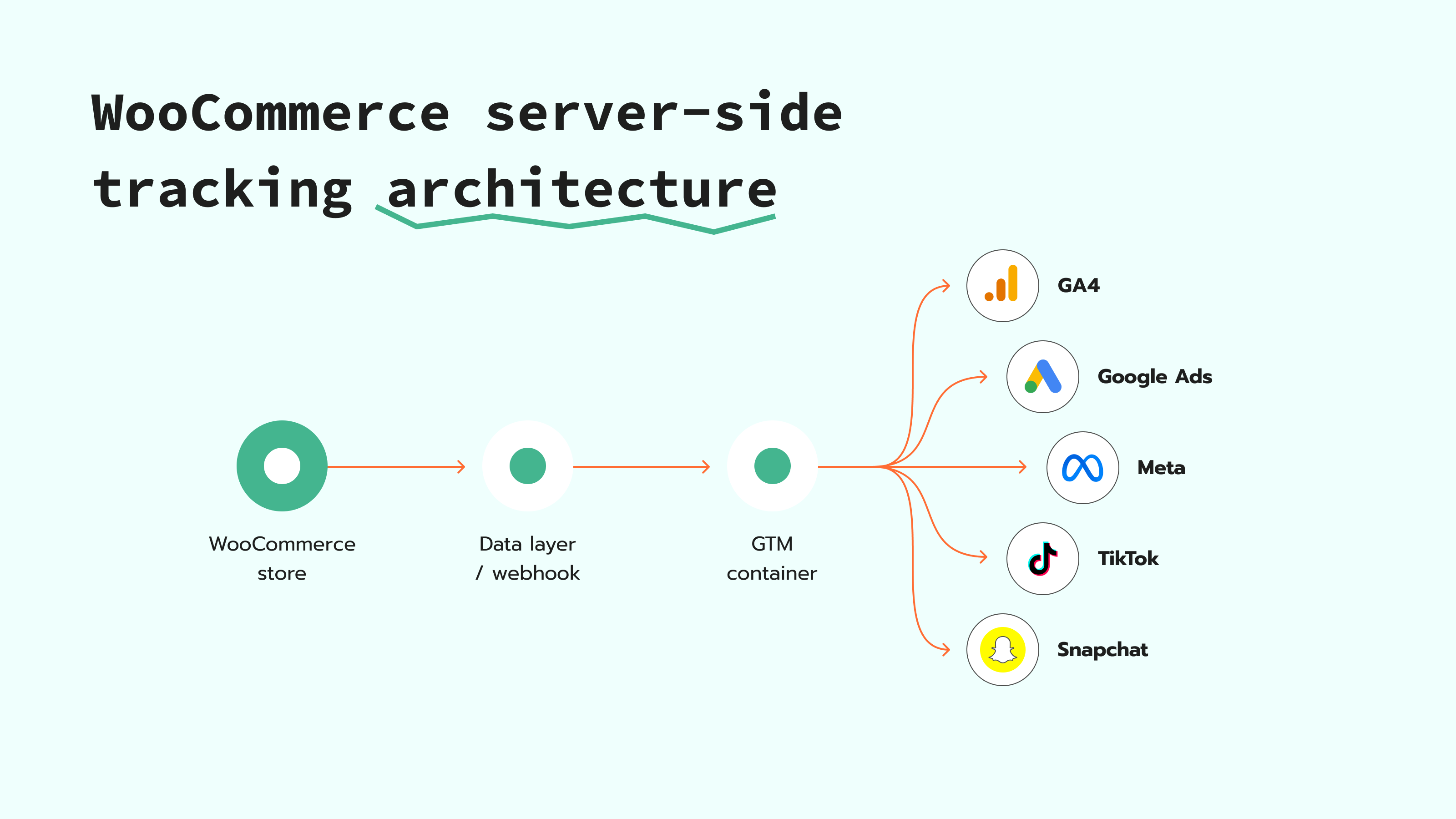
The first part is the WooCommerce store. This is where the visitor acts. They view a product, add it to the cart, enter checkout, and pay.
The second part is the data layer. The website or WooCommerce plugin pushes structured event data into the data layer. The data layer stores event details that Google Tag Manager reads and uses in tags, triggers, and variables. For WooCommerce, this data includes eCommerce events and values such as product ID, product name, price, currency, cart value, order ID, and purchase value.
The third part is the web GTM container. It reads data layer events and decides what tracking should happen on the website. In a server-side setup, the web GTM container sends event data to the sGTM container instead of sending everything directly from the browser to destination platforms.
The fourth part is the sGTM container. This is the part where you can control what happens to the event before it reaches GA4, Google Ads, Meta, TikTok, Snapchat, or another platform. In this container, you can set up Clients, tags, triggers, variables, change or remove selected parameters, and decide which platforms should receive the event.
The fifth part is the destination platform. This is GA4, Google Ads, Meta, TikTok, Snapchat, or another tool that receives the event data.
So a WooCommerce architecture looks like this:
- 1.The customer clicks or buys on a WooCommerce store.
- 2.WooCommerce sends the event into the data layer or through a webhook.
- 3.The web GTM container reads the event.
- 4.The event goes to the sGTM container.
- 5.The server container sends the event to a marketing or analytics platform.
- 6.The platform reports the event and uses it for optimization.
The main difference between a WordPress site and a WooCommerce store is the event depth. A WordPress site might only need page views, form submissions, and lead events. A WooCommerce store needs eCommerce events with order and product details.
How to set up WooCommerce server-side tracking
WooCommerce server-side tracking is easier to understand when you look at it in small steps. First, the store needs to send key events like product view, add to cart, checkout, purchase, and refund. Then these events go through the web GTM container and the sGTM container to finally reach platforms like GA4, Google Ads, Meta, TikTok, or Snapchat.
For the technical setup, follow our step-by-step guide on setting up an sGTM container for WordPress. To prepare WooCommerce events without building the full data layer manually, use the Stape Conversion Tracking plugin for WordPress.
WooCommerce server-side tracking issues and fixes
WooCommerce tracking can break when a store action is missing, sent twice, or sent with the wrong value. This usually happens around purchase events, product data, consent settings, or plugin configuration.
The good part is that most issues can be checked in the same order: what WooCommerce sends, what GTM receives, and what the final platform reports.
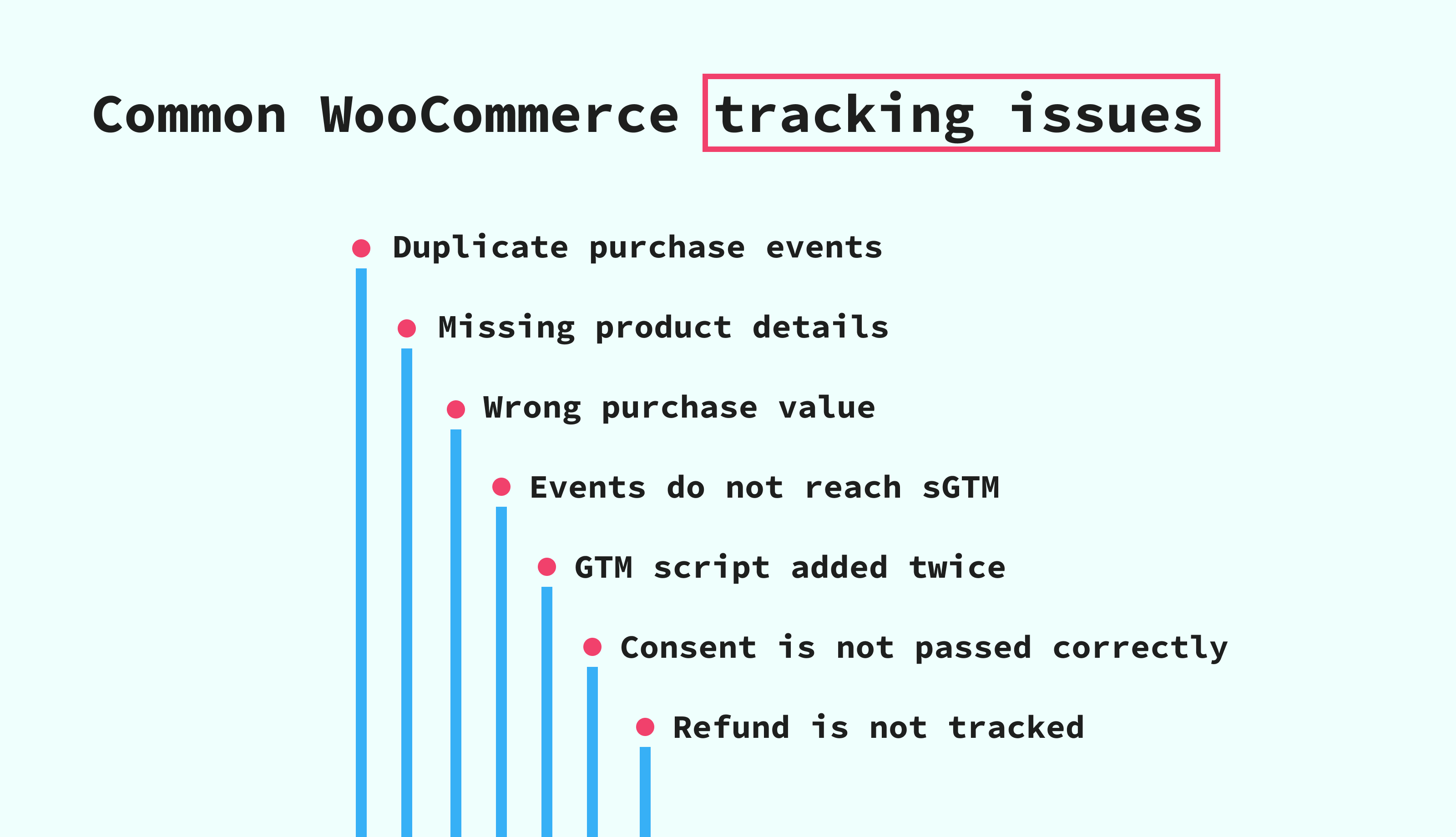
Duplicate purchase events
A purchase can be counted twice when the browser tag and the server tag send the same order with different event IDs or without a shared event ID. The platform needs the same event ID to match both versions of the purchase and deduplicate them.
Fix it by using the same event ID or transaction ID for the browser and server versions of the purchase event. For Meta, you can follow this guide on Facebook event deduplication in GTM.
Missing product details
A purchase event should include product details, such as item ID, item name, price, quantity, currency, and order value. If these fields are missing, GA4 and ad platforms receive only part of the order story.
Fix it by checking the WooCommerce event before it is sent to platforms. The WordPress server-side tracking guide shows how the Stape Conversion Tracking plugin sends WooCommerce eCommerce events into the tracking flow.
Wrong purchase value
A purchase value can look wrong when tax, shipping, discounts, or currency are mapped in the wrong way. This matters because ad platforms use purchase value in reports and optimization.
Fix it by checking the same purchase in three places: WooCommerce, the sGTM container, and the final platform. The order value should follow the same logic across the full flow.
Events do not reach the sGTM container
Sometimes events appear on the website, but they do not reach the sGTM container. In many cases, the issue is connected to the tagging server URL or the way GTM is added to the WordPress site.
Fix it by checking that the website sends requests to the correct tagging server URL, for example, anything.yoursite.com.
A GTM script is added twice
A WordPress store can have several plugins that add tracking code to the site. For example, one plugin can already add the web GTM script, and another plugin can add the same script again.
When this happens, the same page view or store action can be sent twice. Reports can then show more visits, clicks, or events than really happened.
Fix it by choosing only one place to add the web GTM script. If another plugin already adds GTM to the site, do not turn on the same GTM script again in the Stape Conversion Tracking plugin. Use the plugin for WooCommerce tracking features, such as product, cart, checkout, purchase, and refund events.
Consent is not passed correctly
Server-side tracking should follow the visitor’s consent choice. It should not be used to send marketing or analytics events when the user hasn't approved the use of cookies to be tracked.
Fix it by checking how consent is collected on the site and how this consent is passed to the web GTM and the sGTM container. For a deeper setup, follow the guide on Consent Mode in the server Google Tag Manager.
Purchase works, but the refund does not
Purchase and refund events do not always come from the same WooCommerce action. A purchase happens when the visitor completes checkout on the website. A refund happens later, for example, when the store owner refunds an order in WooCommerce.
That is why refund tracking needs a webhook. A webhook is a message that WooCommerce sends when something happens after a website visit, such as a refund. In WooCommerce setups with the plugin by Stape, refund tracking is available through webhooks.
Fix it by checking whether refund webhooks are enabled in the plugin settings and whether the refund event is sent to the sGTM container. Then test the refund event in preview mode before publishing.
Testing is skipped before publishing
A setup can look correct in WordPress, but still send wrong events to GA4, Google Ads, Meta, or another platform. This is why testing is part of the setup, not an extra step.
Fix it by checking the event path before publishing: website event, web GTM, sGTM container, and final platform. Use Google Tag Manager's preview and debug mode to check tags before they go live, and use the server-side tracking debugging guide to review incoming requests, triggered clients, server tags, and outgoing requests to platforms.
FAQ
Want to start on the server side?
Try for freeRecommended for you
Blog
Advanced eCommerce performance analytics for 2026
Discover top strategies and tools in this 2026 guide to advanced eCommerce performance analytics. Boost ROI and make smarter data-driven decisions.
Sep 16, 2026

Comments