Nov 18, 2025
Safari click ID removal: recover attribution with server-side tracking
Written by
Vlad Lykhodii
Updated Oct 13, 2025 comments
Safari has announced a significant change for digital marketers: the removal of GCLID (Google Click Identifier) parameters and other click identifiers from URLs in standard browsing mode. While we haven't observed any changes yet, it's best to prepare for these updates in advance.
While the current beta version only strips GCLID in Safari’s Private Browsing Mode, the official release is anticipated to extend this restriction more broadly.
We investigated which parameters will be affected by these changes. The table below highlights them in orange:
- Google Ads: GCLID removal
- Facebook: FBCLID removal
- Microsoft: MSCLKID removal
- Twitter: TWCLKID removal
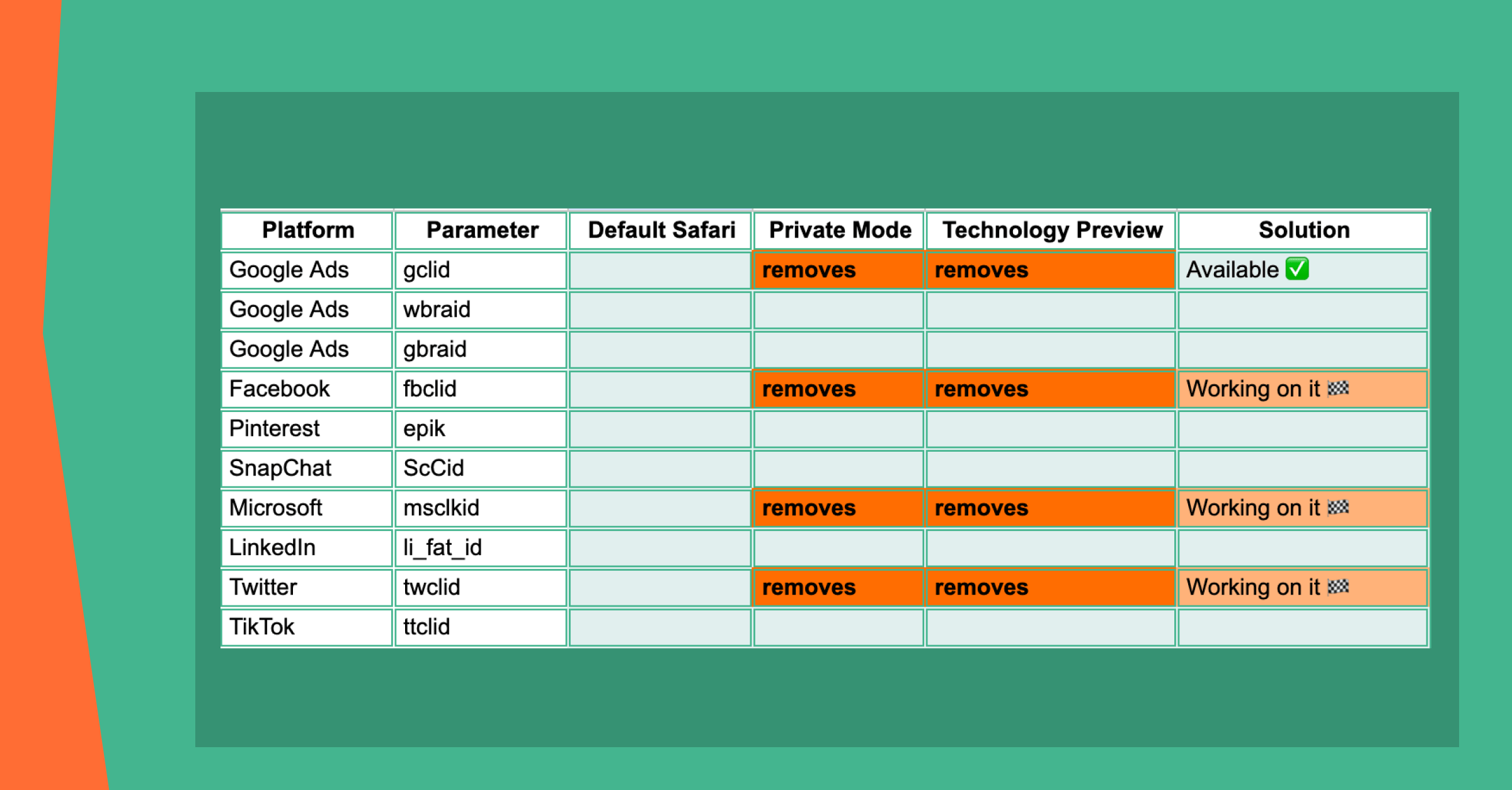
Further in this article, we'll guide you through how to prepare your Google Ads setup. For Facebook, Twitter, and Microsoft, unfortunately, no solution is available yet.
But rest assured, we'll update this article as soon as one emerges :)
GCLID and its role in conversion attribution
GCLID is the foundation of accurate conversion attribution in Google Ads and Microsoft. If Safari removes it from users’ URLs, conversions may go untracked – resulting in lost data, incomplete reports, and less effective campaign optimization.
Without the GCLID, linking a website conversion to a specific ad click becomes nearly impossible. This can lead to:
- Underreported conversions in Google Ads and Microsoft: conversions from Safari users may not be correctly attributed, making it harder to evaluate campaign performance.
- Difficulty in ROI calculation: marketers may struggle to calculate the true return on investment for campaigns, particularly if a large portion of their audience uses Safari.
- Reduced audience size in Google Ads and Microsoft: fewer conversions and user interactions tracked mean smaller remarketing and custom audiences.
How to address Safari's update with server-side tracking
There are two ways to handle Safari's upcoming changes: client-side or server-side.
Client-side solutions are technically possible, but they come with certain drawbacks. You'd need to manually set a GCLID cookie for each user, constantly monitor it, and update it whenever Google changes the cookie's name or format. Since these updates aren't announced or documented, this approach can quickly become unreliable and time-consuming.
Server-side tracking is the safer and smarter choice. With this method, your GA4 setup (at least the page_view event) and the Conversion Linker on sGTM handle everything automatically. The native Conversion Linker sets the GCLID cookie correctly – even if Google updates its format or name – so you don't have to worry about manual fixes or missed conversions.
Switching to server-side tracking ensures that your Google Ads conversions are tracked accurately, reports remain reliable, and campaign visibility remains intact – even for Safari users.
In our blog, you'll find detailed step-by-step instructions on how to set up:
Step 1. Configure a backup parameter in Google Ads
The first step is to configure an additional custom parameter to serve as a backup for the original GCLID, in case Safari restrictions delete the original parameter.
1. Go to your Google Ads account → Admin → Tracking tab.
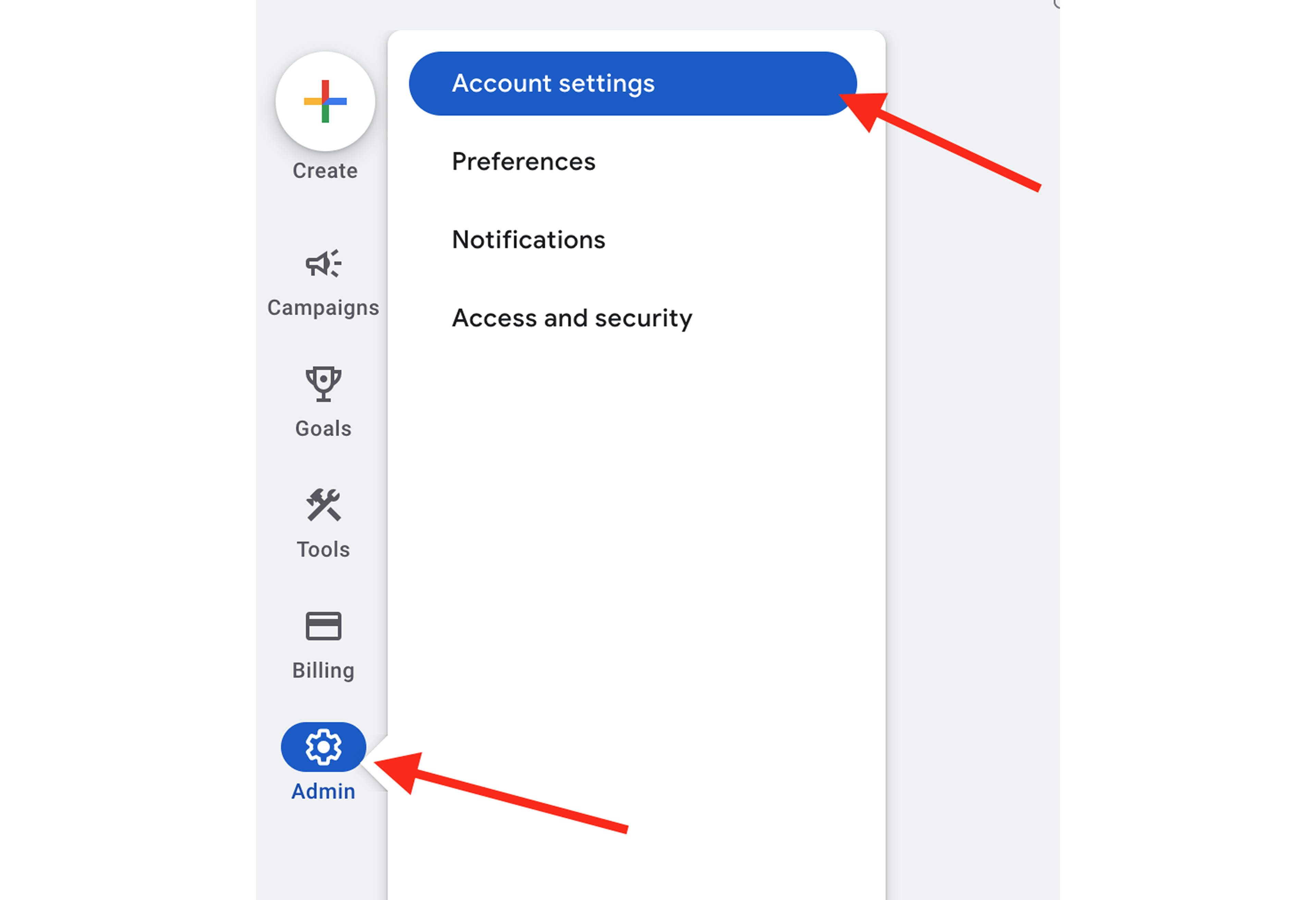
Here, you'll see a list of parameters that are added to the user's URL when they click on your ad and land on the site.
2. In the Final URL suffix field, add a custom backup parameter with the value set to {gclid}.
Here is an example of how this can be implemented:
This example uses qwerty as the backup parameter. You can use a parameter name you are comfortable with. The most important thing you should consider is that the value of this parameter must be ={gclid}.
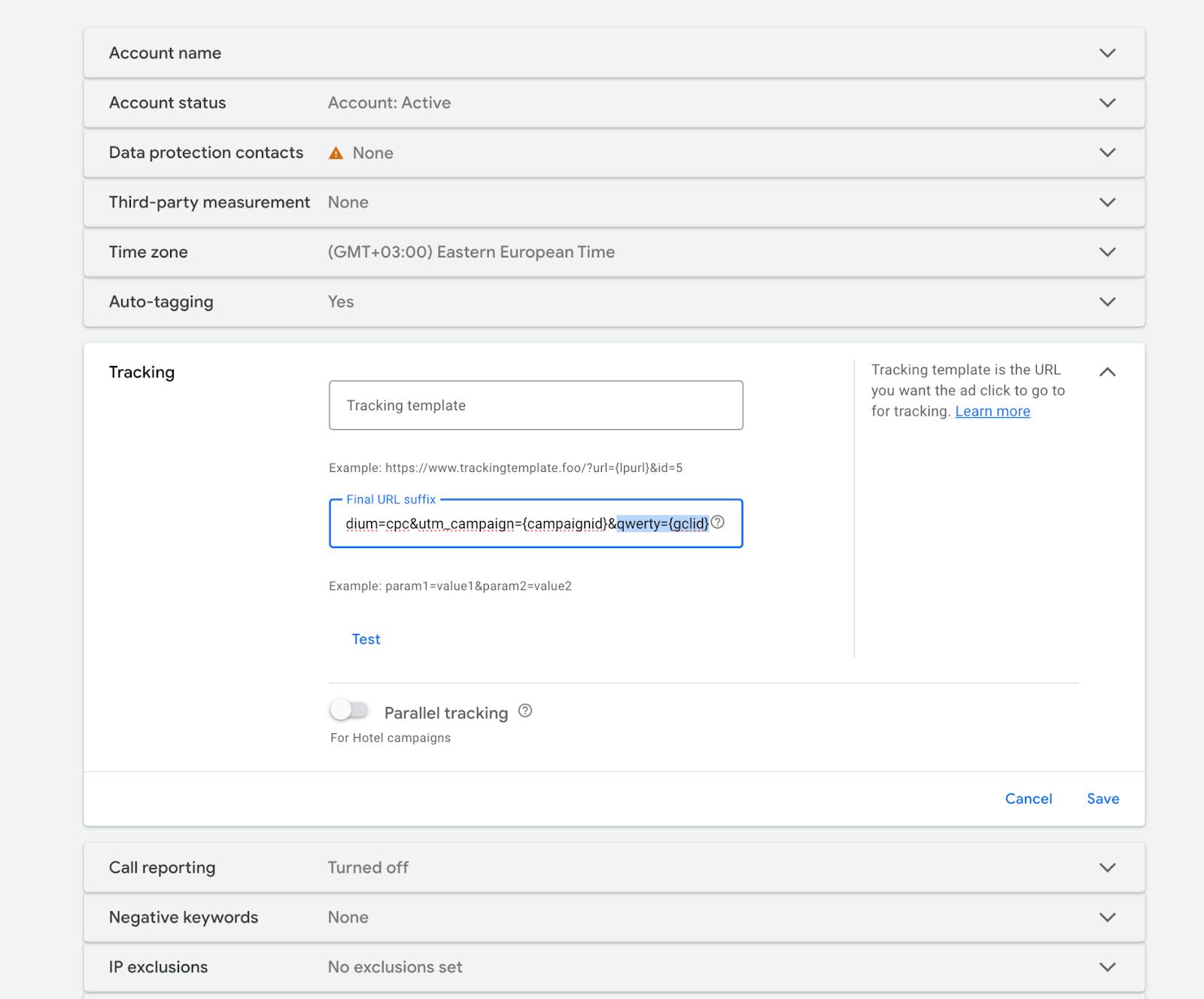
As a result of these steps, every user who lands on the site will have two URL parameters containing the GCLID value:
| https://yourwesite.com/?qwerty=CjwKCAjwtfvEBhAmEiwA-DsKjn4iVaWK4-kko_VTDnqiRl4tngqcYCpDlfhL4MV7tCbfl2l75VmJXRoCVNAQAvD_BwE&gclid=CjwKCAjwtfvEBhAmEiwA-DsKjn4iVaWK4-kko_VTDnqiRl4tngqcYCpDlfhL4MV7tCbfl2l75VmJXRoCVNAQAvD_BwE |
If Safari removes the gclid parameter, the user will automatically fall back to your custom query parameter.
| https://yourwesite.com/?qwerty=CjwKCAjwtfvEBhAmEiwA-DsKjn4iVaWK4-kko_VTDnqiRl4tngqcYCpDlfhL4MV7tCbfl2l75VmJXRoCVNAQAvD_BwE |
Step 2. Configure Click ID Restorer
1. Log in to your stape.io account.
2. Select your sGTM container on the dashboard.
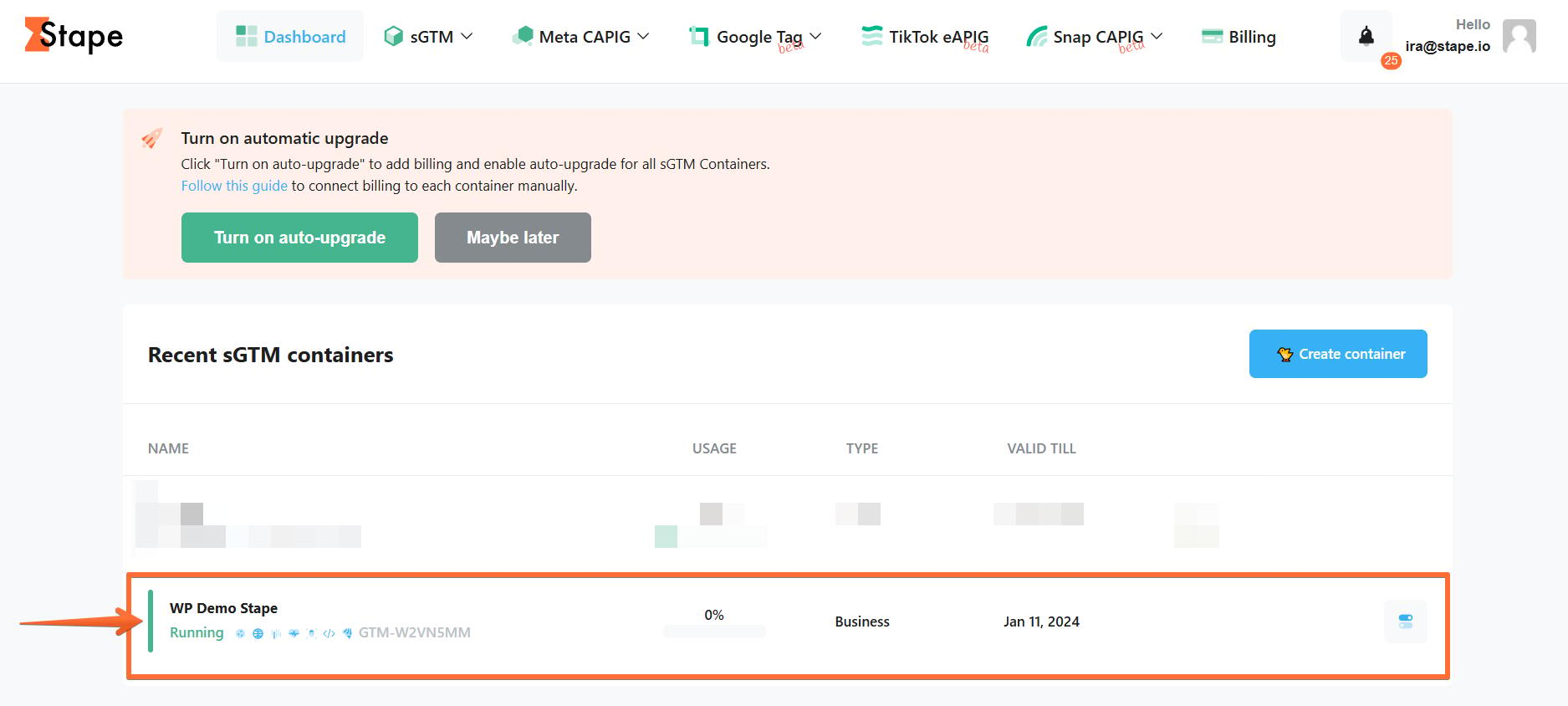
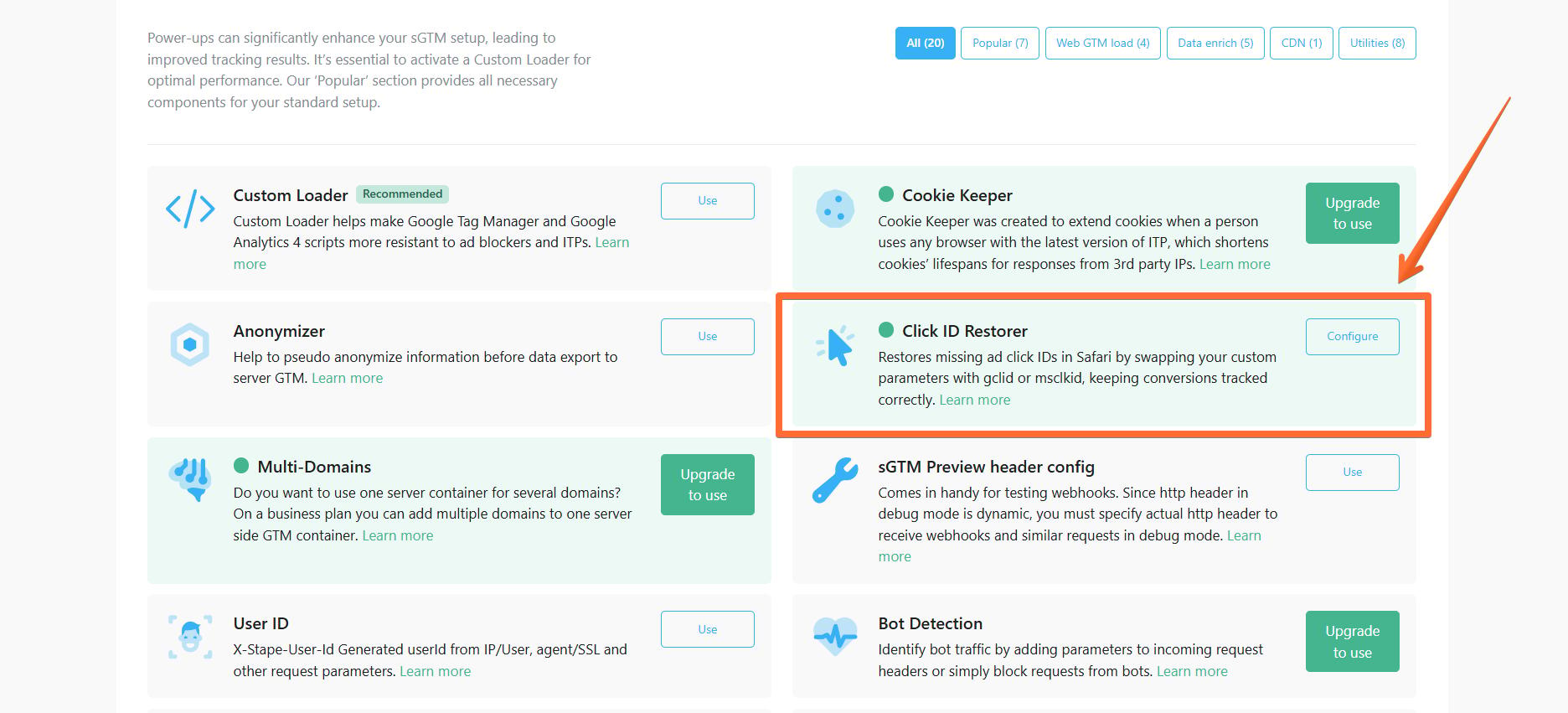
3. Click Power-ups and the Use or Configure button next to the Click ID Restorer panel.
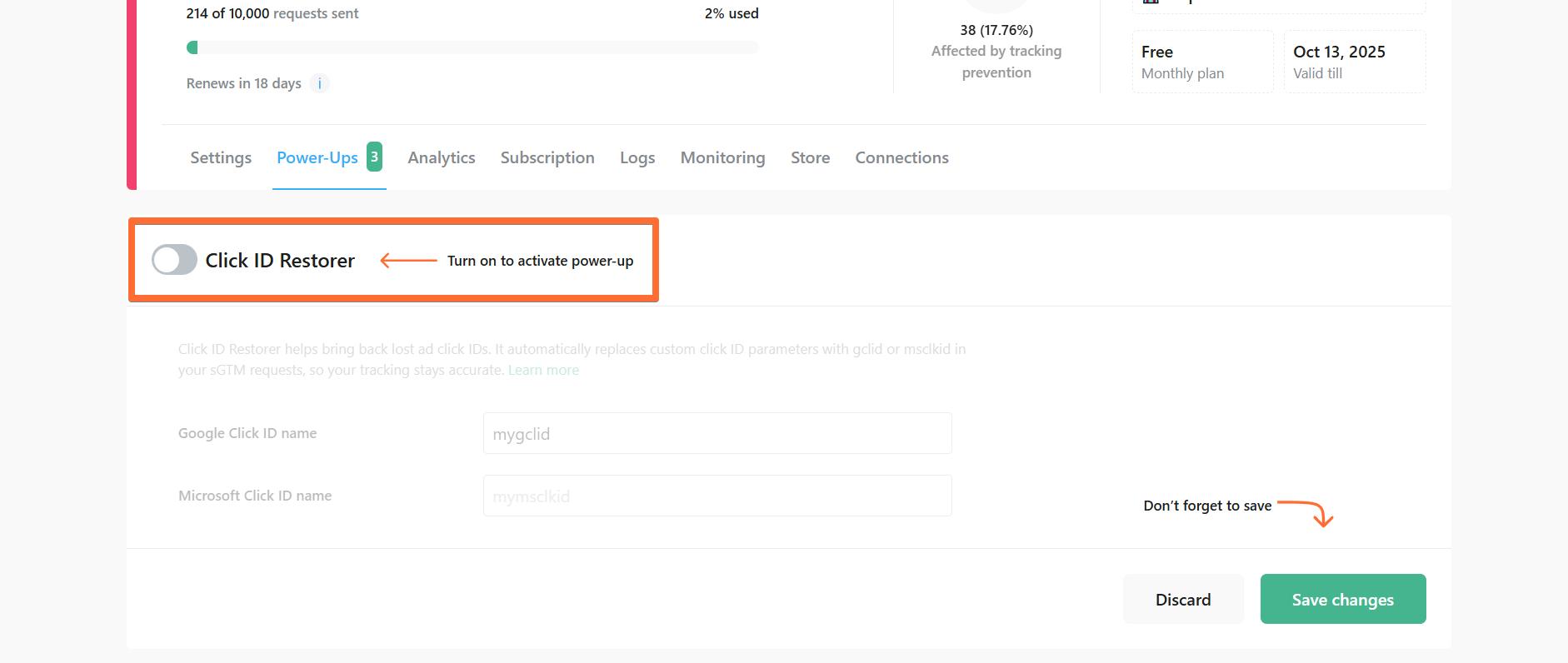
4. Toggle the Click ID Restorer switch.
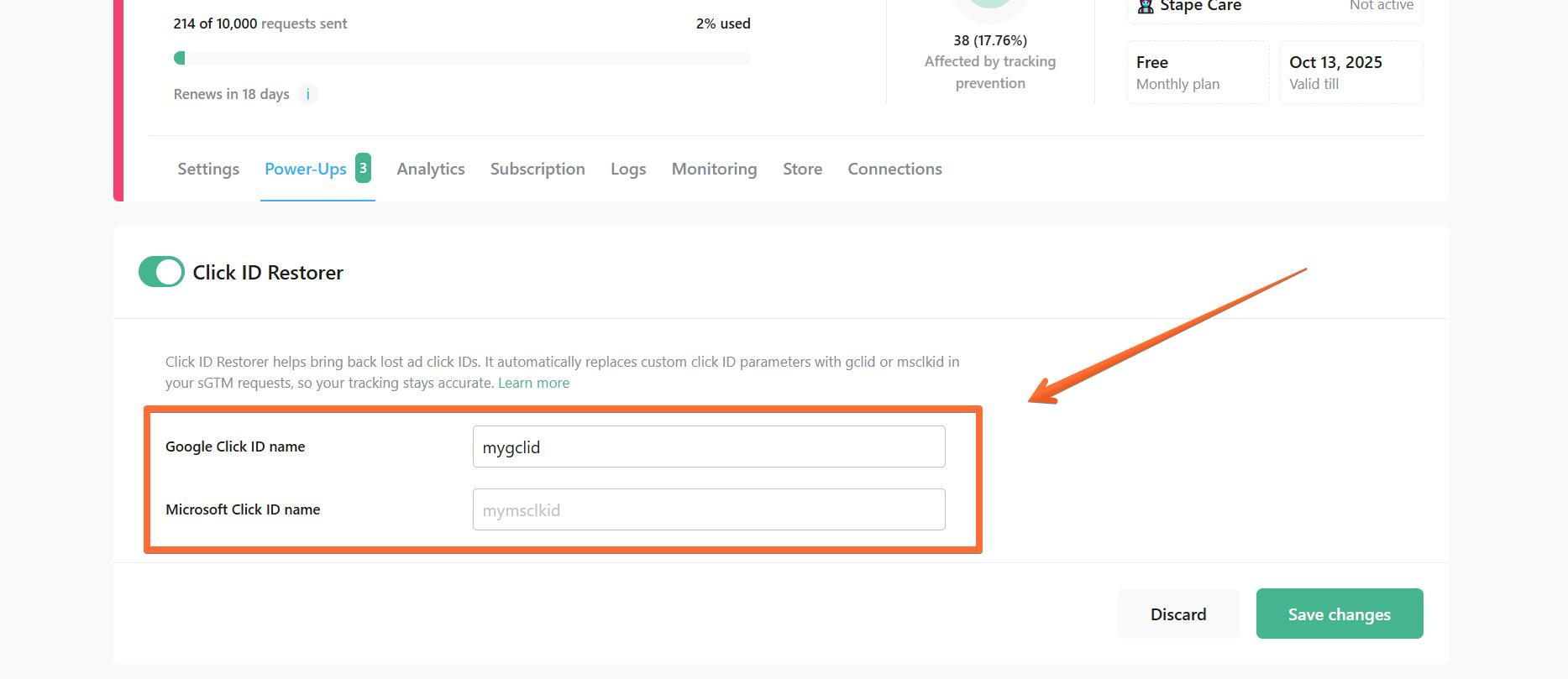
5. Enter your custom click ID query parameter name for Google or Microsoft Ads.
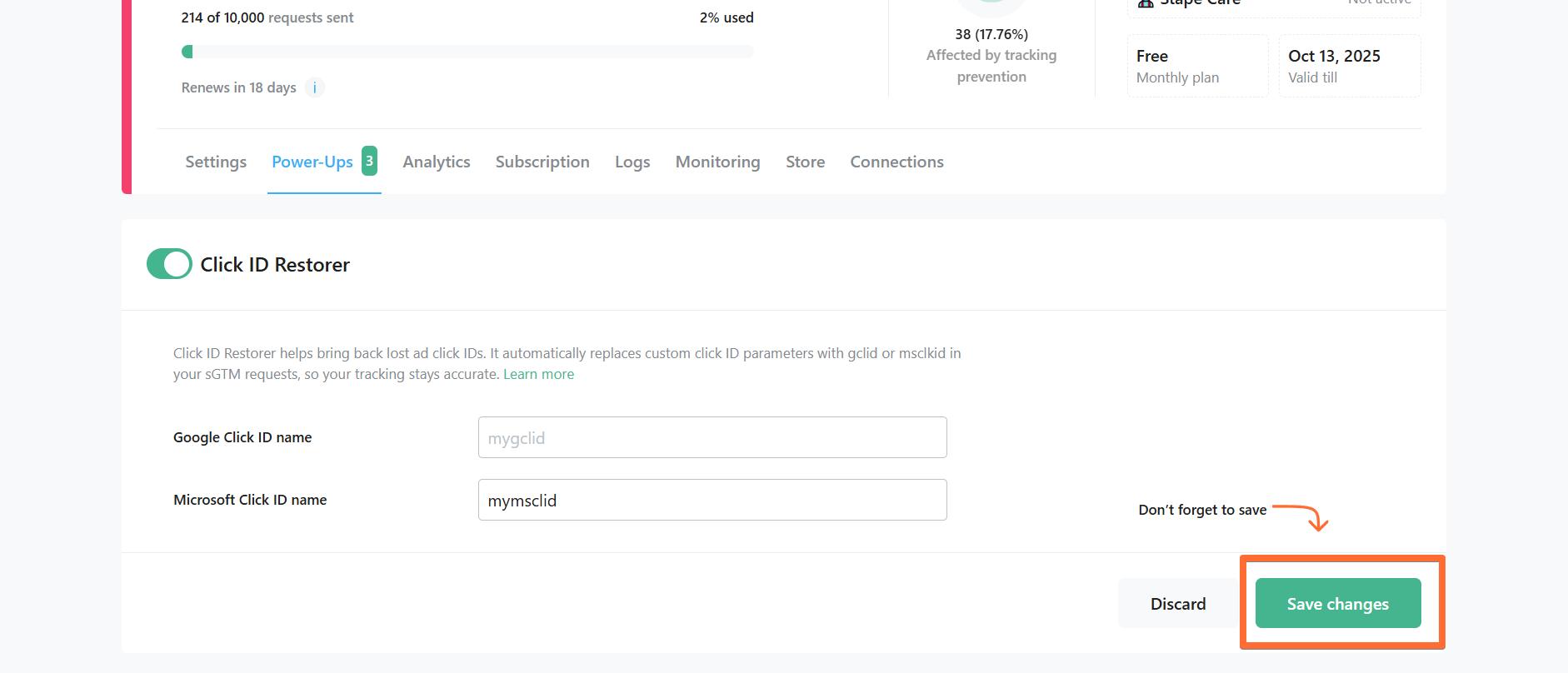
6. Click Save changes.
Step 3. Test your setup
You can manually add parameters to the URL for debugging. The most important ones are the native gclid parameter and your backup parameter that you specified in Google Ads.
Here's an example of a test URL:
| https://shop.stape.beer/?gclid=CjwKCAjwtfvEBhAmEiwA-DsKjn4iVaWK4-kko_VTDnqiRl4tngqcYCpDlfhL4MV7tCbfl2l75VmJXRoCVNAQAvD_BwE&utm_source=1111&utm_medium=2222&qwerty=CjwKCAjwtfvEBhAmEiwA-DsKjn4iVaWK4-kko_VTDnqiRl4tngqcYCpDlfhL4MV7tCbfl2l75VmJXRoCVNAQAvD_BwE |
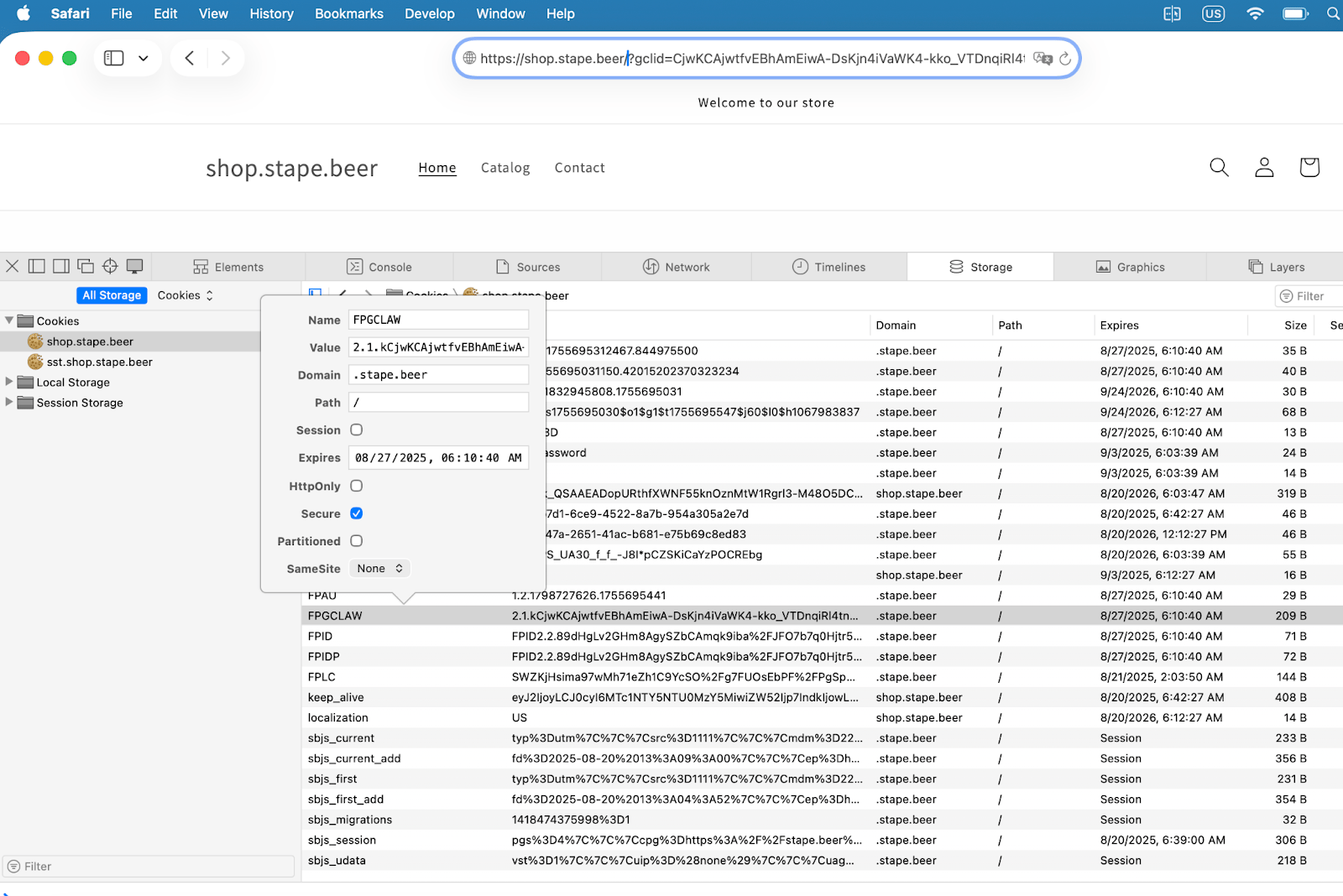
3.1. Safari's default browse mode
In the current beta version of Safari v26, the gclid is not removed by default, so FPGCLAW is set without any issues.
⚠️ Note: This behavior may change in the official release version of Safari.
3.2. Safari’s private mode
The following test should be performed in Safari's Private Mode.
Currently, Safari's Private Mode removes the gclid parameter from the URL. However, as shown in the screenshot below, the FPGCLAW cookie is still set because our backup parameter qwerty automatically replaced the removed gclid.
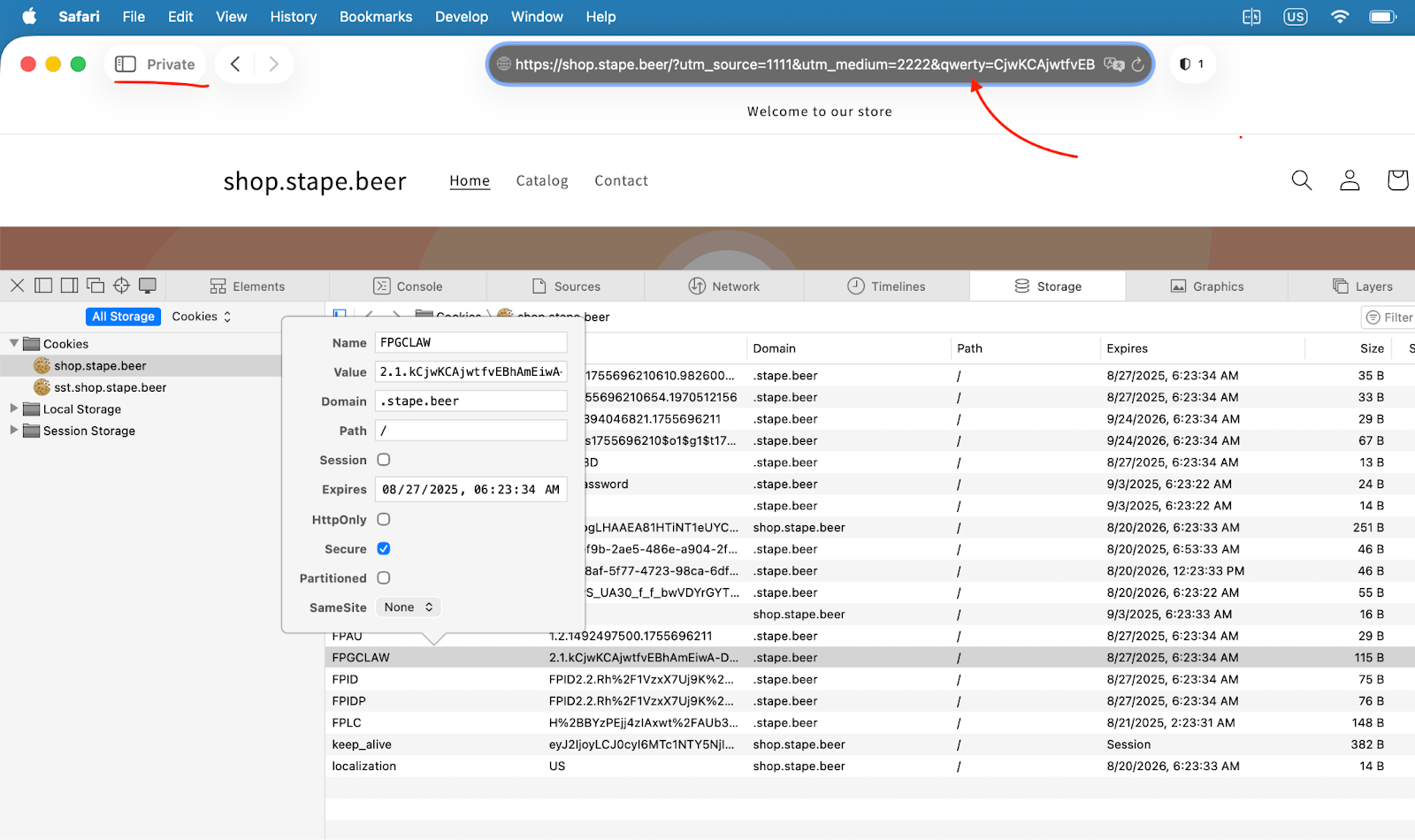
If you see that the gclid parameter has been removed from the URL, but the FPGCLAW cookie is set correctly, this indicates that you have followed all the steps properly and your tracking is now secure.
Conclusion
The upcoming Safari update poses a serious risk to accurate conversion tracking, particularly if a significant share of your audience uses Safari. Without a safeguard in place, you could lose valuable Google Ads data, leading to underreported conversions and weaker campaign performance.
By adopting a server-side tracking solution, you can maintain reliable attribution, preserve audience data, and ensure your setup remains resilient against future changes.
Want to switch to the server side?
Try for freeRecommended for you
Blog
Attribution tracking guide
Learn how attribution tracking works, why it matters, and how Stape improves analytics with server-side tracking for accurate multi-channel attribution.
Apr 22, 2025

Comments