Apr 3, 2026
Martech tools, solutions, and trends for 2026
Written by
Maryna Semidubarska
Published Jun 15, 2026 comments
Key takeaways:
- In 2026, the martech landscape reached 15,505 products, but it grew by only 0.79%. The market is moving toward updating the tools companies already use.
- AI is becoming part of the marketing daily routine, but it needs strong data and human control. Marketing trends are shaped by AI agents and data governance.
- From August 2026, the EU AI Act will add new transparency rules. In the US, new state privacy laws and California privacy updates already started applying in January 2026.
What is a marketing technology?
Marketing technology, or martech, means software that helps a business do marketing work. A martech tool can help you send emails, track website events, manage leads, run ads, check SEO, create reports, or connect data between platforms. For example, Google Analytics 4 shows how people move through your website. A CRM keeps contacts and deals organized. A server-side tracking setup sends more complete conversion data to Google Ads, Meta, TikTok, GA4, and other platforms.
A basic martech stack answers these questions:
- Where do visitors come from
- What actions do they take on the website
- Which campaigns bring leads or sales
- Which customers should receive follow-up emails
- Which data can be sent to each platform
- Which reports show business results
The important part here is to make the tools work together.
What is a must-have marketing technology stack nowadays?
A marketing technology stack should cover three layers: acquisition and engagement, customer data and measurement, and reporting, QA, and optimization.
Acquisition and engagement tools help marketers attract people, convert them into leads or customers, and keep communication going after the first visit. This layer includes ad platforms, email marketing tools like Mailchimp, Klaviyo, or Brevo, marketing automation platforms like HubSpot or ActiveCampaign, landing page tools, and lead nurturing flows. For example, a business uses Google Ads to bring traffic, Klaviyo or Mailchimp to send emails, HubSpot or ActiveCampaign to follow up with leads, and abandoned cart emails to bring shoppers back.
Customer data and measurement tools collect, connect, and send customer or conversion data across the stack. This layer includes website and product analytics tools like GA4, Amplitude, or Mixpanel, CRM tools like HubSpot, Salesforce, or Pipedrive, CDP tools like Segment, Tealium, or mParticle, and tag management tools like sGTM.
GA4, Amplitude, or Mixpanel show how people move through a website or app. HubSpot, Salesforce, or Pipedrive keep contacts, deals, and conversations organized. Segment, Tealium, or mParticle connect customer behavior across tools and send that data to analytics, email, and ad platforms.
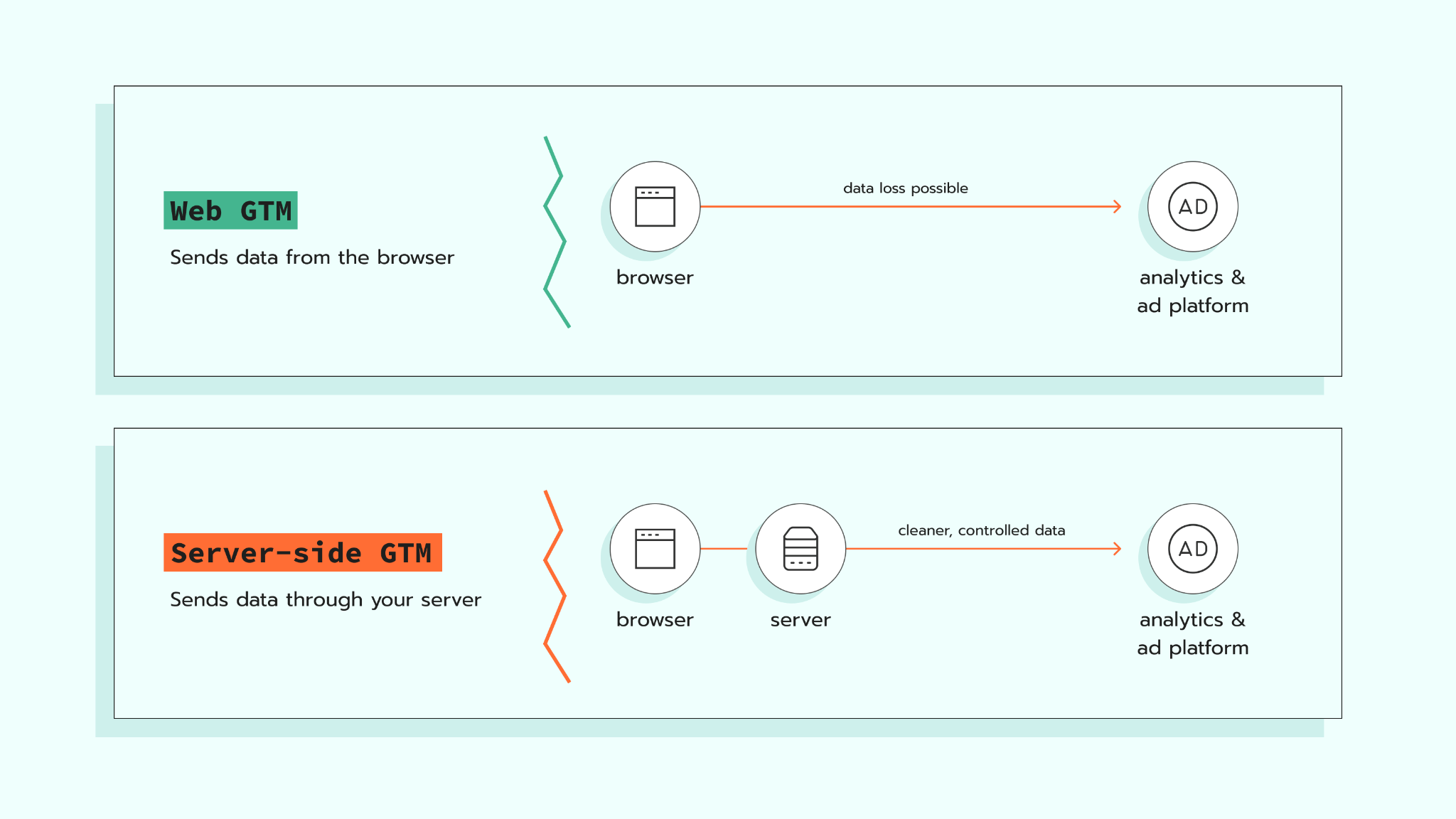
Server-side tracking works with this event data too. The browser collects website events and sends them to an sGTM container on a server. Then the data goes to platforms like GA4, Google Ads, Meta, TikTok, or other tools. This gives platforms more complete conversion data and gives marketers more control over what is shared.
Reporting, QA, and optimization tools show what works, what breaks, and what needs to change. This layer includes dashboards, BI tools, tracking checkers, QA tools, and testing tools. For example, Looker Studio, Power BI, or Tableau connect marketing results to revenue, leads, profit, or qualified pipeline. QA tools check if events are collected correctly before marketers trust campaign numbers.
What are the key martech trends to discover for 2026?
AI moves from content help to workflow help
AI is no longer only a tool for brainstorming posts or ads. Now, more teams use AI to organize campaign steps, analyze data, suggest segments, prepare reports, and support media planning. IAB says AI is moving into media planning, audience segments, partner selection, forecasting, and performance measurement.
Still, AI needs data. If a company feeds AI incomplete customer and conversion data, the output will be of no use to the company.
Martech stacks become shorter and more connected
The 2026 martech landscape has 15,505 products, but the growth is almost flat. The market added 1,488 products and removed 1,367 products, which shows a high level of tool churn.
This means companies should not add a new platform for every small problem. They should review what they already use and remove duplicate tools.
Data control becomes part of everyday marketing
Today, marketing teams work with more privacy rules, stricter platform requirements, and more AI tools. This means they need to know what data is collected, where it goes, why it is needed, and who can access it.
Server-side tracking helps here because it adds a cloud server layer between the website and destination platforms and lets the business control, edit, enrich, or block data before it is sent further.
First-party data gains more value
First-party data is data a business collects directly through its website, app, CRM, checkout, or customer account. In 2026, this data matters because privacy rules, browser limits, consent choices, and platform changes make third-party signals less stable.
The goal is to collect only the data the business needs, explain how it is used, respect consent, and control which details go to each platform.
Reporting moves closer to business results
Marketing reports used to focus mainly on clicks, impressions, open rates, and sessions. These metrics show activity, but they do not show how much revenue marketing brings.
In 2026, martech reporting needs to connect campaigns with leads, sales, profit, and retention. A martech stack proves its value when the team uses it to see which campaigns bring revenue or profit, and where the budget should go next.
15 martech tools for your company
1. Google Tag Manager
If you want to collect website events and send them to platforms like Meta, Google Ads, or GA4, Google Tag Manager helps organize this flow in one place. For example, when a user completes a purchase, GTM can fire the right tag and send the event to the selected platform. This makes tracking easier to manage, especially when several marketing and analytics tools are used on the same website.
2. Stape
Stape helps businesses set up website tracking and collect customer data in a reliable and safe way. It supports server-side tracking, so website events can pass through a server before they are sent to tools like GA4, Google Ads, Meta, or other platforms.
3. Google Analytics 4
GA4 follows website and app behavior. It shows traffic sources, events, conversions, audiences, and user journeys.
4. HubSpot
HubSpot brings CRM, email marketing, forms, landing pages, automation, and sales pipeline management into one platform. It works well for teams that want marketing and sales features in one place.
5. Salesforce
Salesforce is a CRM for managing leads, accounts, sales processes, and customer relationships. It is a good choice for larger sales teams or companies with longer sales cycles.
6. Twillio
Twillio is a CDP that helps collect customer data and send it to other tools. It fits companies that need one data flow across analytics, ads, email, and product tools.
7. Klaviyo
Klaviyo is used for email and SMS marketing, especially in eCommerce. It helps create flows for welcome emails, abandoned carts, product recommendations, and customer reactivation.
8. Mailchimp
Mailchimp gives small and mid-size teams a place to send newsletters, build email lists, and create basic automation. It is a common starting point for email marketing.
9. Semrush
Semrush supports SEO, keyword research, competitor research, content planning, and paid search analysis.
10. Ahrefs
Ahrefs is an SEO tool for backlink analysis, organic keyword research, competitor pages, and content opportunities.
11. Screaming Frog
Screaming Frog audits websites for SEO and technical issues. It checks pages, redirects, metadata, broken links, canonicals, and other website elements.
12. Hotjar
Hotjar shows how visitors use a website through heatmaps, recordings, surveys, and feedback widgets.
13. Data Studio
Data Studio turns data from GA4, Google Ads, Search Console, spreadsheets, and other sources into dashboards.
14. Make
Make connects marketing, sales, and data tools through visual workflows. Teams use it to send leads to a CRM, update spreadsheets, create tasks, sync data between tools, and automate repeatable work without building a custom integration from scratch.
15. Canva
Canva gives teams a way to create social posts, ads, presentations, and basic visuals without asking a designer for every small task.
How to prepare for the future of martech in 2026
Before choosing tools, decide which results matter most: purchases, qualified leads, booked calls, subscriptions, renewals, profit, or customer lifetime value.
Then look at how data moves between your tools. A purchase event, for example, starts on the website. The browser collects the event, the data passes through a server Google Tag Manager container, and then it goes to GA4, Google Ads, Meta, the CRM, or a dashboard.
After that, clean up the stack. Remove tools that do the same job. Keep the platforms your team uses every week, as many companies pay for tools that teams barely use.
Check that each key event fires after the right user action and sends the details your reports need. For eCommerce, this includes events like view_item, add_to_cart, begin_checkout, and purchase. For lead generation, it includes form_submit, qualified_lead, booked_call, and closed_won when the CRM sends this data back to ad platforms.
Possible marketing tech problems in 2026
Too many tools
A large martech stack looks good on paper, but it slows work down when tools repeat the same job or store the same data in too many places. If specialists need five platforms to answer one business question, the stack needs cleanup.
The fix is to review every tool by role. Keep the tools that support a clear task, remove duplicates, and decide which platform is the main source for each type of data.
Poor data quality
AI, reporting, automation, and ad optimization depend on data quality. If events are missing, duplicated, or named differently across platforms, reports become unreliable.
The fix is to create one event naming system and test key actions before using reports for decisions. Companies should check purchase events, lead events, customer IDs, order IDs, and consent status across analytics, CRM, and ad platforms.
Weak consent setup
Consent should work together with tracking. The setup needs to read the user’s choice, send it with events, and control what data goes to each platform.
The fix is to connect consent with the tracking setup from the start. Consent should pass from the website to tools like GTM, sGTM, analytics platforms, and ad platforms, depending on the setup. Server-side tracking gives more control over data flow, but it does not make a company compliant by itself.
Misaligned data and attribution
Marketing tools do not always count the same action in the same way. GA4 may record a form submission when it happens on the website, while the CRM may count it only after the lead is marked as qualified. Google Ads, Meta, and TikTok may also connect the same sale to different campaigns because each platform uses its own attribution window and reporting logic.
Before comparing numbers, decide what each platform should answer. GA4 shows website behavior. The CRM shows lead and revenue status. Ad platforms show campaign performance inside their own systems. This helps marketers avoid treating every mismatch as a tracking error.
If the numbers do not match, start with the tracking setup before changing campaigns. Check which event each tool receives, which user or order ID it uses, and which attribution window is applied. Data discrepancies troubleshooting helps compare reports across GA4, ad platforms, and server-side tracking tools, so marketers can find where the gap starts and fix it with less manual checking.
AI without control
AI speeds up research, reporting, and content work, but it needs review. Without rules, it creates wrong claims, uses customer data in the wrong place, or produces content that does not match the brand.
The fix is to create clear AI rules. Companies should define which data AI tools may use, who checks the output, and what must be approved before publication.
FAQs
Want to try the server side?
Try for freeRecommended for you
Aug 7, 2026
Blog
7 extra services every marketing agency should offer in 2026
Extra services agencies can offer in 2026: server-side tracking with Stape, analytics, AI implementation, and CRM/CMS integrations.
May 20, 2026

Comments