Sep 28, 2026
Set up Facebook server-side tracking with Facebook Conversions API
Written by
Ira Holubovska
Updated Oct 23, 2026 comments
Facebook Pixel lets you track user activity on your site, collect remarketing audiences, and create lookalike audiences. When implemented correctly, the Facebook Pixel feeds relevant information to Facebook's machine learning algorithms (FB ML), which use this data to show your ads to individuals most likely to convert.
For several years, we have tracked events on our sites using JavaScript code, the Facebook SDK within apps, or by uploading offline events. But how do you track users with ad blockers, monitor events outside your site, or extend a cookie's lifetime? This can be achieved by implementing the Facebook Conversions API or the Facebook Conversions API Gateway.
This article will focus on Facebook conversion tracking and guide you on setting up the Facebook Conversions API via Google Tag Manager Server Container. Additionally, check out Stape's pre-configured templates for Meta CAPI. Configuring your setup has never been easier; everything is pre-configured and ready for you!
| Related: Facebook Lead Ads. |
Your Meta Pixel is missing sales
Set up Meta Conversions API with Stape and build a hybrid tracking setup using both browser and server events.
What is Facebook Conversions API?
Let's take a look at what the Facebook Conversions API is and how we can use it to improve event tracking, attribution, and data collection on Facebook. The Facebook Conversions API allows you to send events directly from your server to Facebook's server.
Facebook CAPI serves the same purpose as the Facebook Pixel but relies on different technology. The policies and restrictions surrounding FB CAPI make it more suited to the needs of the modern tracking environment. Unlike the Facebook Pixel, the Conversions API does not rely on the user's browser to send tracking information; everything is processed through the cloud server, enhancing data security and accuracy.
Unlike the Pixel, Facebook server-side tracking does not depend on what happens in the user's browser, meaning ad blockers, ITP, and iOS restrictions have little to no effect on data collection. This makes it a more stable foundation for conversion tracking, especially as browser privacy restrictions continue to grow.
When examining the URLs of Facebook ads, you'll notice that FB appends an additional parameter, fbclid, at the end of almost any URL. The pixel code on the landing page stores this parameter's value in a cookie and sends it along with any Facebook event. In addition to the click ID (fbclid), Facebook uses the browser ID (fbp). The fbp and fbc cookies help Facebook identify the type of user who landed on your site and who converted.
Facebook can match users through other parameters such as email, phone number, first/last name. The more user data you send to the Facebook Conversions API, the higher your match rate will be.
Meta Conversions API server-side tracking shifts the entire data flow away from the browser and onto your server infrastructure. Instead of waiting for a JavaScript snippet to fire inside someone's tab, where a slow connection, a privacy-focused browser, or a third-party cookie restriction can silently drop the event, your server sends the hit directly to Meta's endpoint. The event gets through regardless of what is happening on the client side. When run in parallel with the Meta Pixel, Meta Conversions API server-side tracking creates a two-channel setup: the Pixel captures the browser-side signals Meta uses for audience building, while the server layer fills in the gaps and delivers the user data the Pixel might have missed. That combination is what makes the overall tracking more complete and reliable.
While most businesses focus on web events, Meta now allows you to sync a physical store with online data. Check our Meta omnichannel ads guide to learn how to combine online and offline conversions.
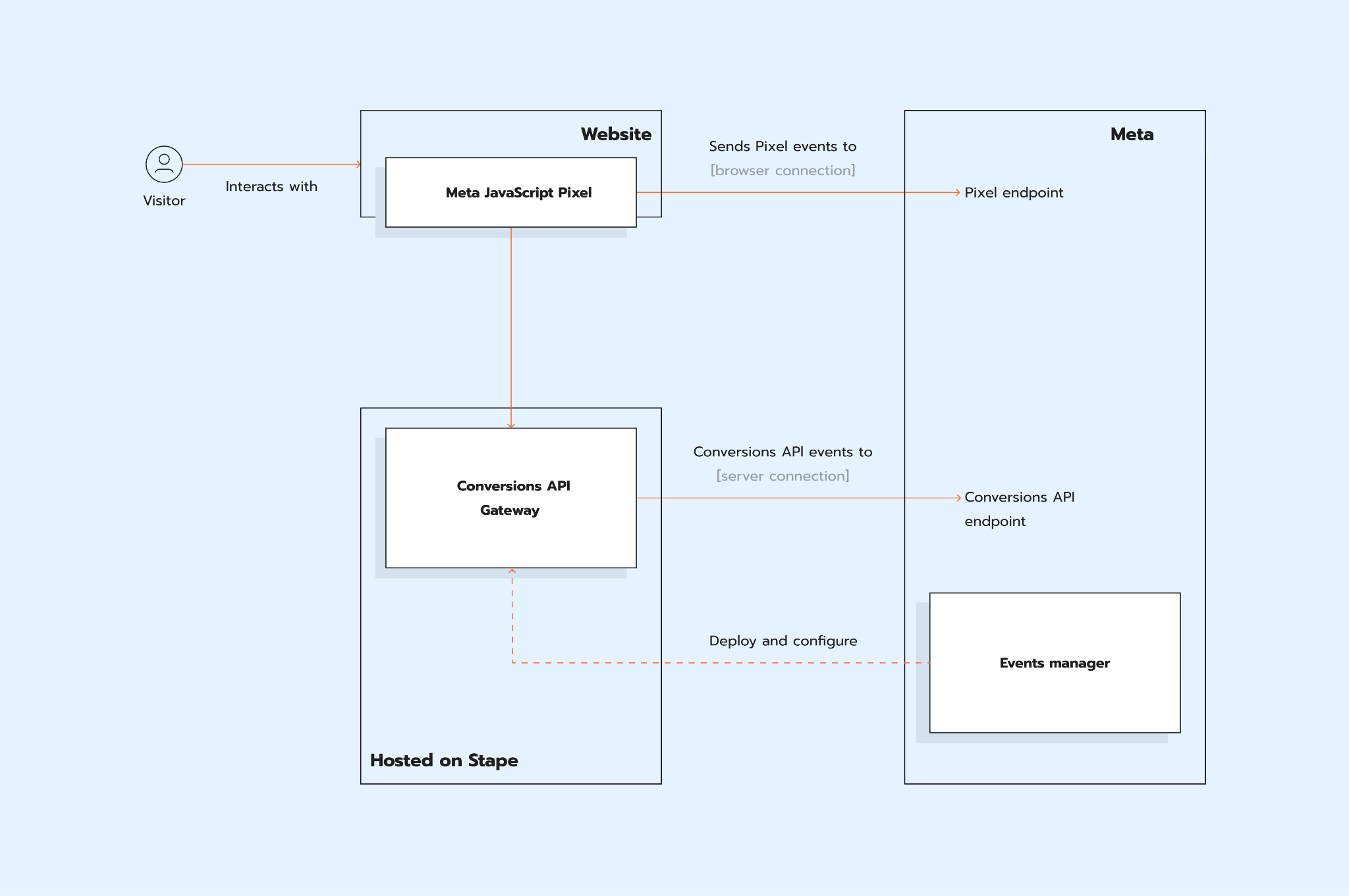
What are the main benefits of Facebook Conversions API?
Facebook server-side tagging, or the Facebook Conversions API, has been available for several years. However, starting in 2021, Facebook began to promote the Conversions API more aggressively. If you have a dedicated Facebook representative managing your ad account, they will likely recommend setting up the Facebook Conversions API.
Here are the most important reasons to consider implementing the Facebook Conversions API. See the details below.
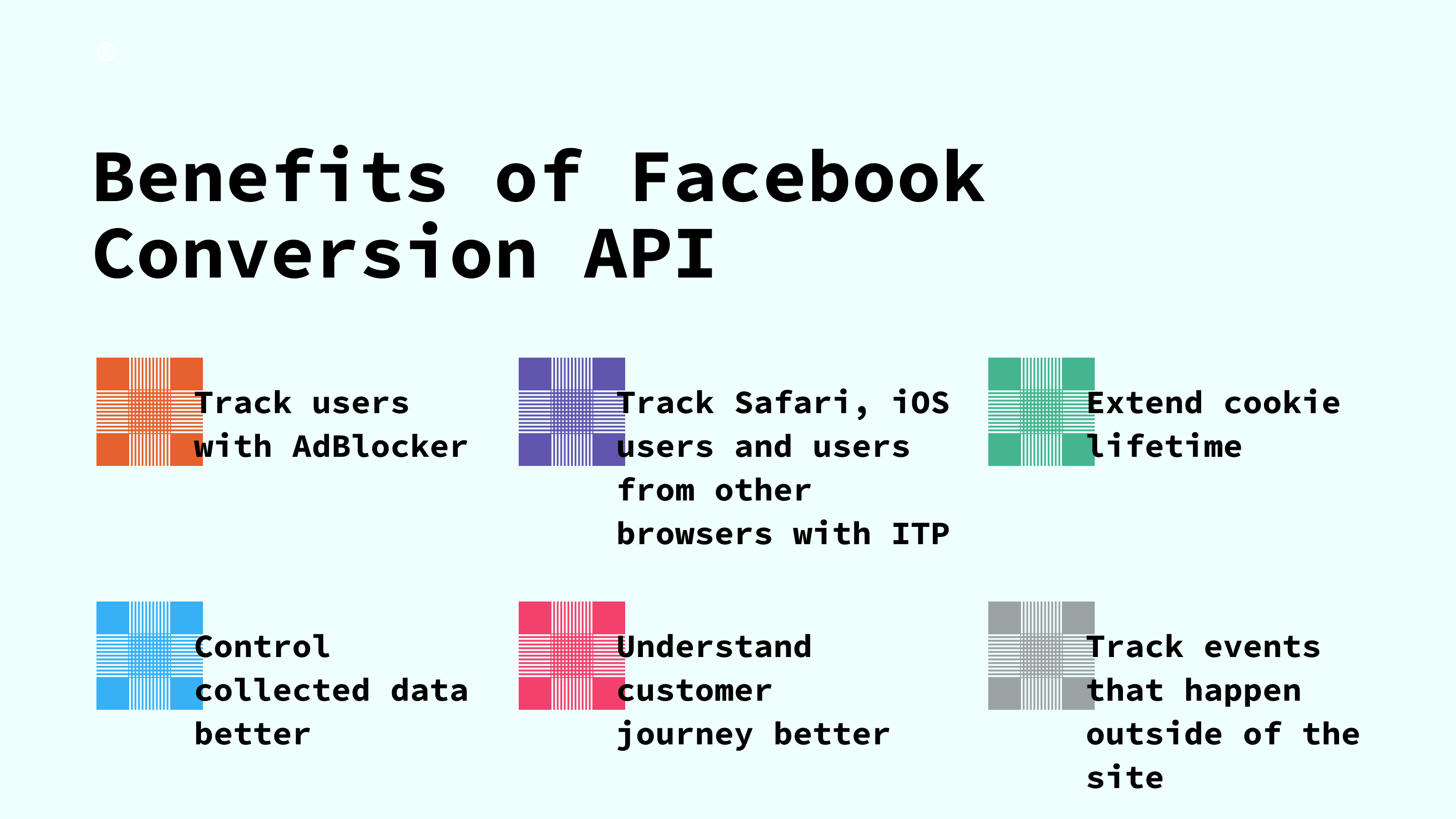
- 1.It can help you track users who have installed ad blockers, those using Safari (or any other browser with intelligent tracking prevention algorithms), or people who opted out of FB tracking in iOS 14/15. This is possible because requests are sent from the server rather than the user's browser. And third-party cookies will not be blocked. With the help of user parameters you send together with FB CAPI events, FB will match events to users in their database. As a result, you will have more reliable data.
- 2.Extended cookie lifetime. With the Facebook Conversions API, you can extend the Facebook cookie lifetime to 6 months. In contrast, if you do not use the FB Conversions API, Safari limits cookie lifetime to 1-7 days.
- 3.The Conversions API gives you greater control over your data and a better understanding of the customer journey.
- 4.You can use the Facebook Conversions API to track events that occur off your site. For example, phone calls or offline sales.
Businesses that switch to Facebook server-side tracking typically notice an improvement in reported conversions, not because more conversions are happening, but because fewer are being lost due to tracking limitations. The difference is most noticeable among audiences that heavily use Safari, Brave, or ad blockers.
Real-world example of Meta Conversions API value
By integrating the Conversions API alongside the Meta Pixel, Ray-Ban was able to significantly improve its advertising results. The combination led to a 36% greater reach on Facebook and Instagram compared to using the Meta Pixel alone.
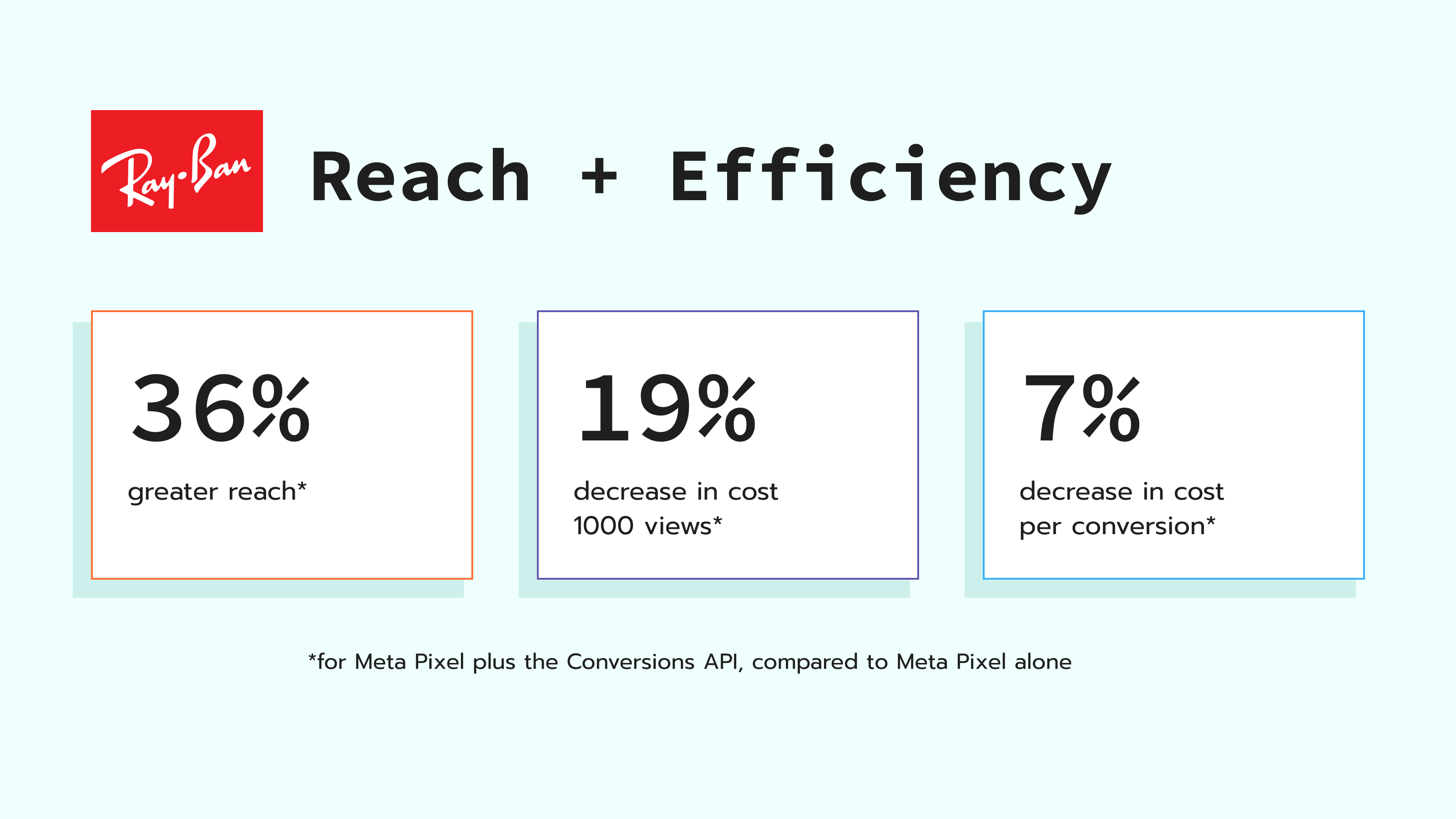
Additionally, the brand saw a 19% reduction in cost per 1,000 views and a 7% decrease in cost per conversion, demonstrating the effectiveness of the Conversions API in optimizing their campaigns and driving better performance.
Ways of setting up Facebook server-side tracking
Using Meta Conversions API Gateway
The Meta Conversions API Gateway is the fastest solution for implementing Meta server-side tracking and does not require any specialized knowledge.
Using the server GTM
One of the most accessible ways is to use server Google Tag Manager (sGTM). With sGTM, businesses can send customer data directly to Facebook's servers. If you already use GA4, Facebook server-side tracking via sGTM requires minimal additional configuration, as GA4 events can be reused directly as a data source for the Facebook tag. This makes sGTM the most practical starting point for most setups.
Pros of setting up Facebook CAPI via sGTM:
- Flexible customization options
- Ability to implement both pure server-side and hybrid (web + server) tracking
- Opportunity for data enrichment
Cons of setting up Facebook CAPI via sGTM:
- Requires technical knowledge of the server Google Tag Manager
- Needs cloud infrastructure to host sGTM
In this article, we will focus on configuring Facebook server-side tracking via server GTM.
How to set up Facebook Conversions API with server GTM?
We will set up Facebook Conversion API with Google Tag Manager using the server container. You will need these things to configure the Facebook Conversions API:
- A configured Google Tag Manager web container
- Server-side Google Analytics 4 or Data Tag/Data Client to deliver data to sGTM.
We also have a blog post about the Tag Manager server container and its benefits on our blog.
This video shows how to set up Facebook Conversions API using Google Analytics 4.
Facebook / Meta Conversions API setup + Event Deduplication [Step-by-step guide]
Steps to set up Facebook Conversions API
2. Send data to the server GTM container. The two most popular methods for sending data to sGTM are Google Analytics 4 and Data Client Stape.
3. Go to your Google Tag Manager Server Container. Add the Facebook Conversions API tag from the Template Gallery.
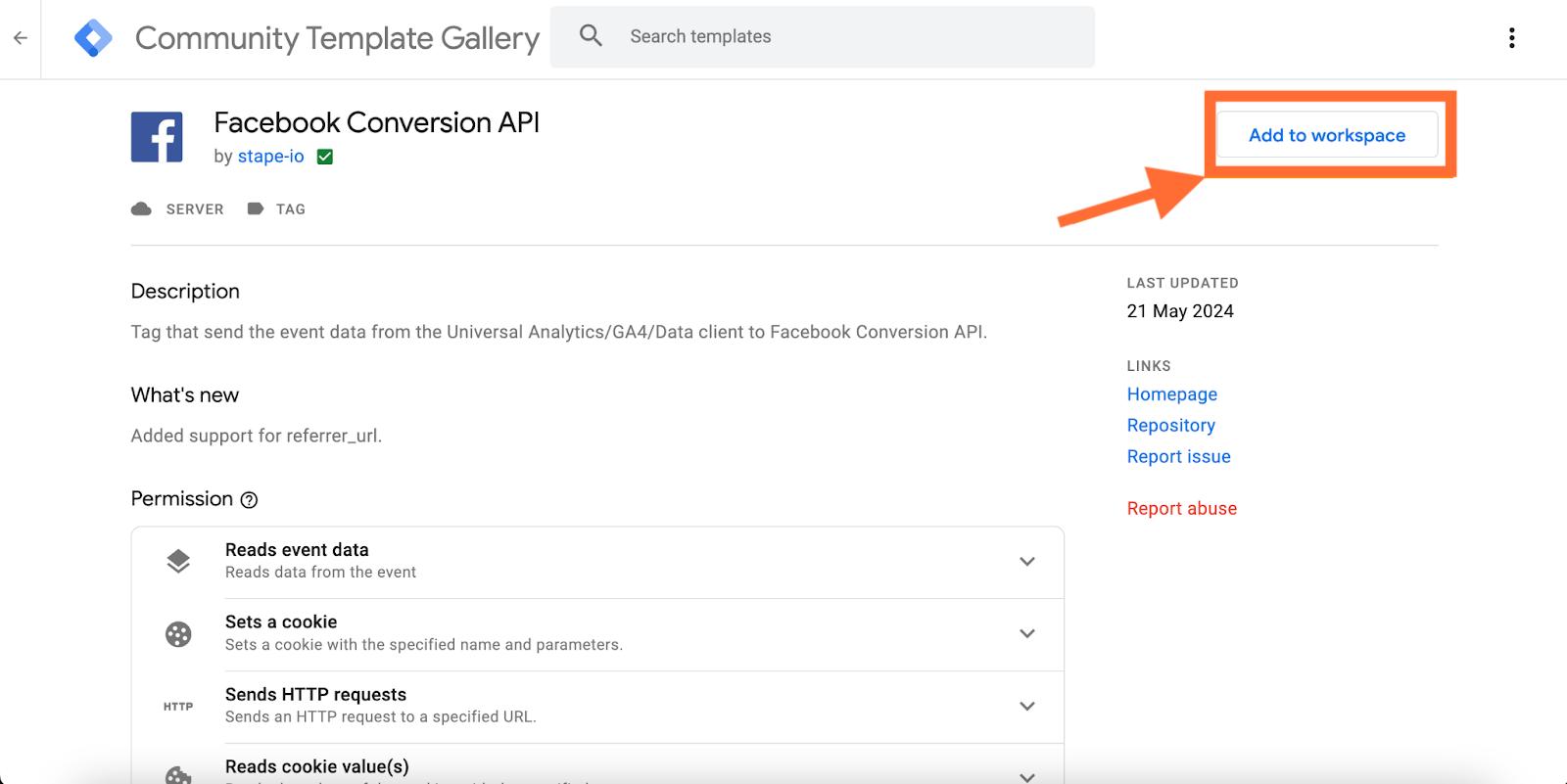
4. Create a Facebook Conversions API Tag inside sGTM. Select Tag → Click New → Choose the Facebook Tag that you've added in the previous step.
Add your Facebook Pixel ID and Facebook API Access Token (we recommend adding it as a variable since you will need these values for each Facebook event you want to track). If you don't know your Facebook API Access Token, please refer to Meta's documentation.
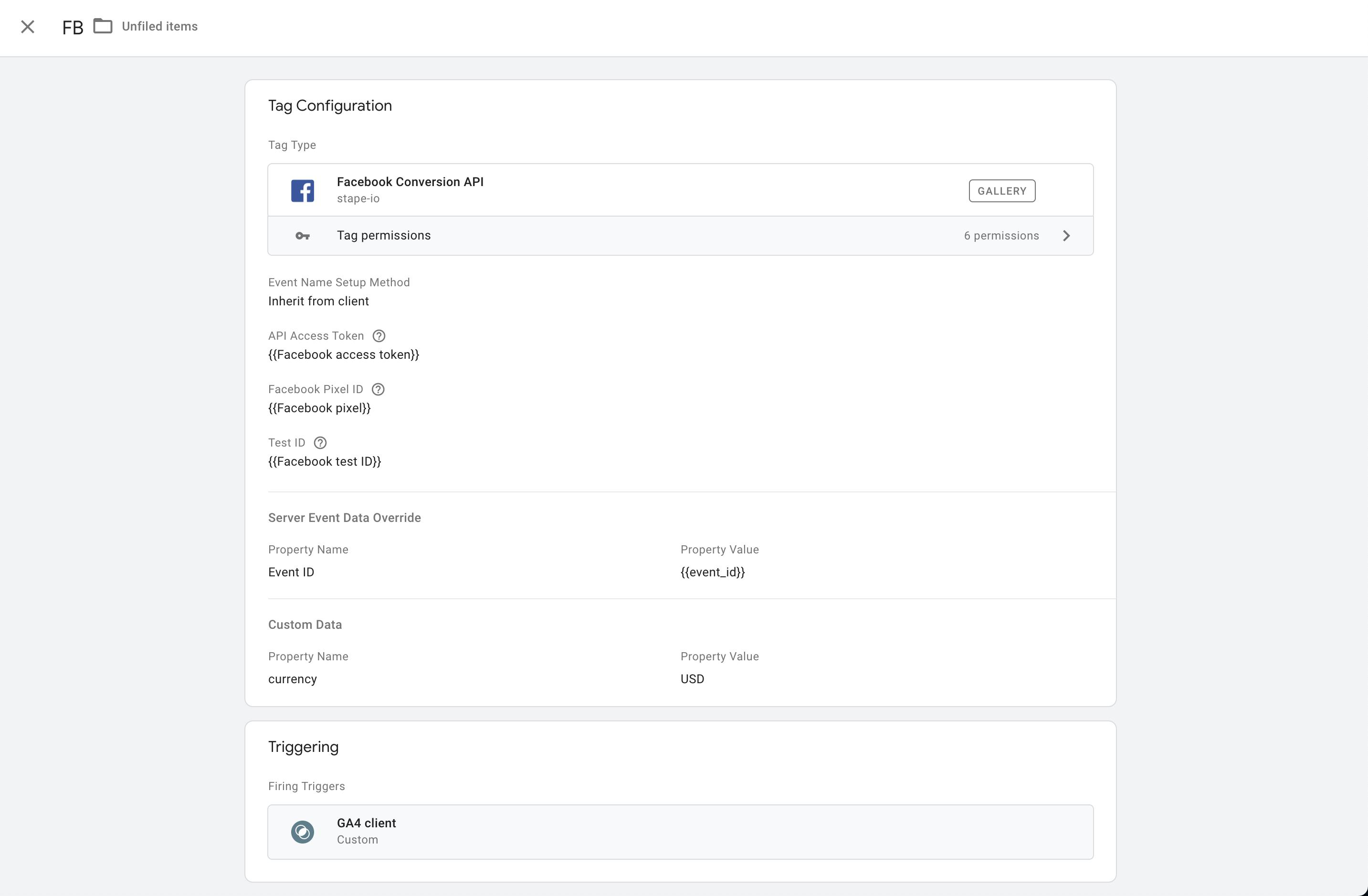
5. You have 2 options for configuring our Facebook Conversions API tag:
- Override. In this case, you'll need to set up Facebook events manually. We will cover how to manually set up Facebook server events in step six. This is the preferred option, but it requires more time and knowledge to implement. This allows you full control over the event's payload and ensures that your web Facebook events and server Facebook events are identical.
- Inherit from client. In this case, the tag will match your GA4/Data event's payload to Facebook standard events. If the tag can't match the GA event to the standard FB event, it will send it as a custom event. Everything will be done automatically; there's no need to set up Facebook events.
6. If you've selected the override option, you'll need to use GA4 or Data Tag/Data Client events to trigger Facebook server events. The Facebook pageview event should trigger on a custom event page_view that was claimed by a specific client (for example, if you chose to use GA4 as a data source for the Server GTM, then you should use the page_view event when the client name equals GA4).
To set up other events, go to sGTM preview mode, perform an action on your site that you want to track inside Facebook, and check the event name that GA4 or Data Tag sends to your Server Container.
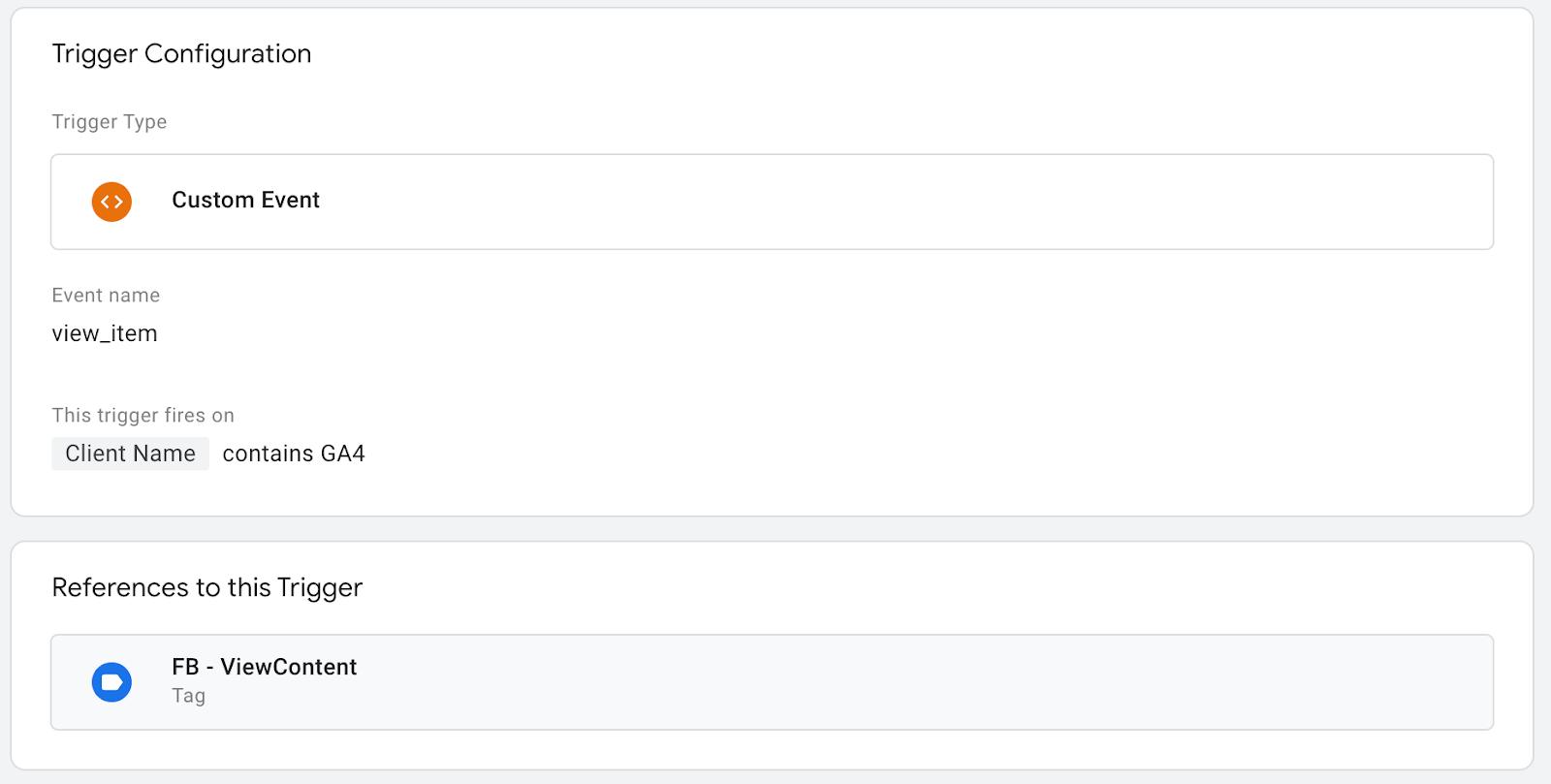
In the screenshot below, we want to set up a Facebook event ViewContent when someone opens the product page on our site. Ensure you also send with your GA4 event / Data Tag from the web container any additional data you want to use for the server event. The example below also uses standard Facebook eCommerce parameters and user data.
To do that, we created a new tag inside the Server container, set it to override, selected the standard event ViewContent, added the API Access Token, and Facebook Pixel ID. We also added User Data and created a new trigger with the event name equal to view_item and Client Name equal to GA4.
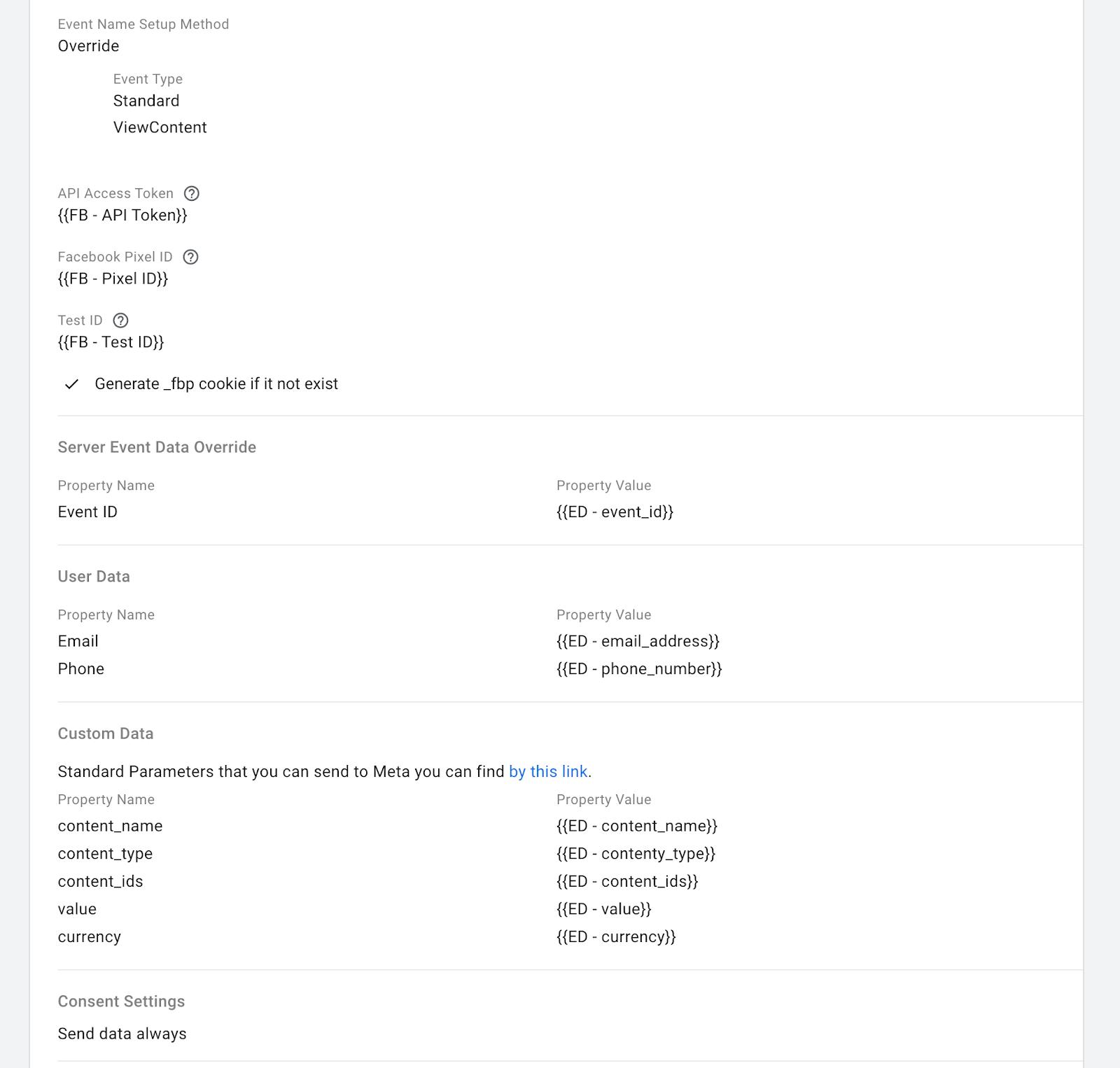
7. You can pass custom parameters using the fields Server Event Data Override, User Data, and Custom Data. You can send user data to increase the matching score on Facebook via the User Data field. Note that the user information you want to send to the Facebook Conversions API should be hashed. Our Facebook tag automatically hashes the necessary data.
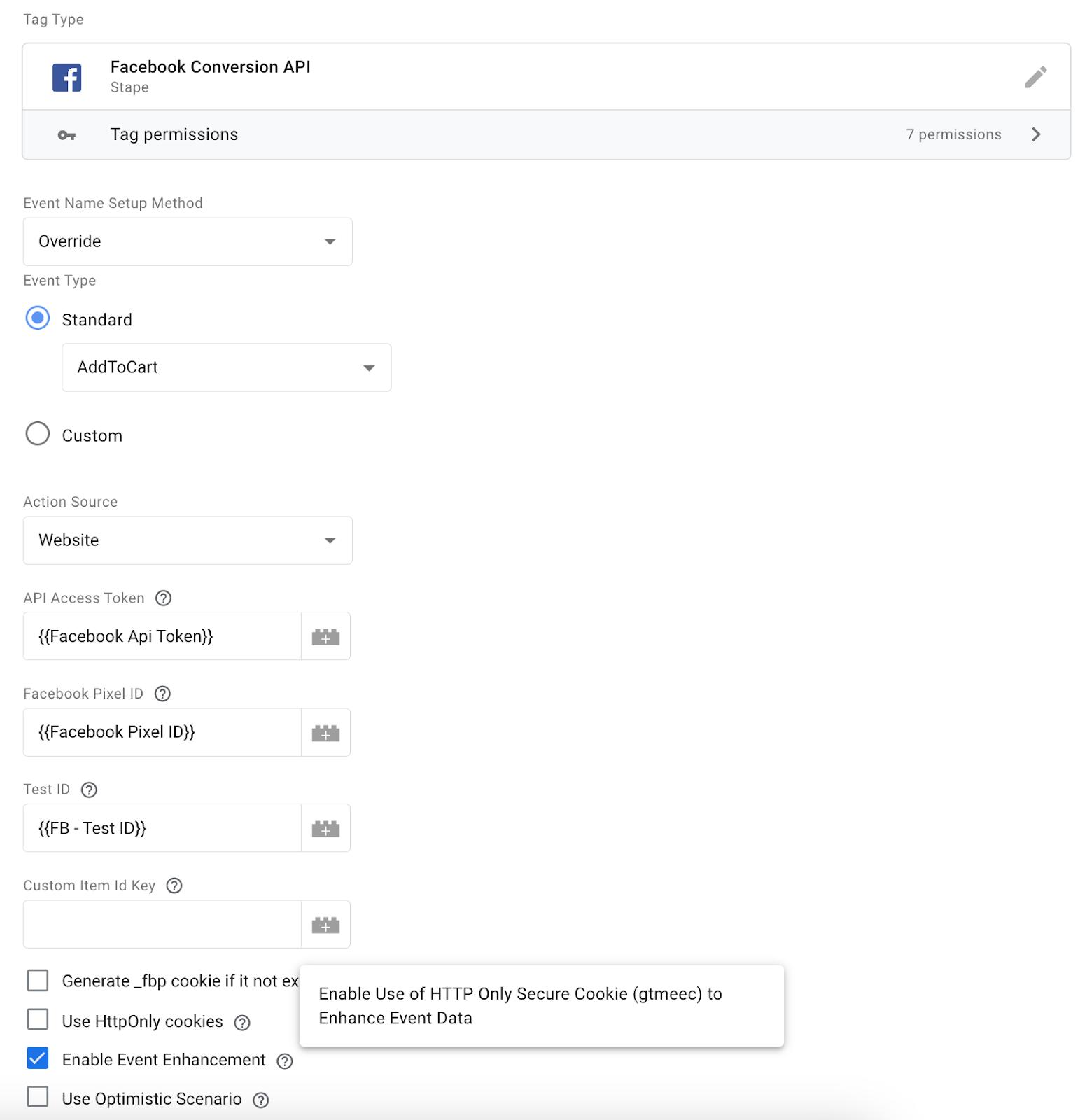
You can also enable Event Enhancement to use the HTTP-only secure cookie (gtmeec) in order to enhance event data. When this feature is enabled, the tag will store user data in cookies and enrich events with user data when it is not available. This way, you can increase event match quality, which can improve conversion attribution to campaigns.
8. When you are done setting up all your Facebook events, open Google Tag Manager debug mode and test if Facebook events work correctly. You can also go to your Facebook tag inside the server container and add the Facebook test ID. You can find the test ID inside the Meta Events Manager under the Test Events tab.
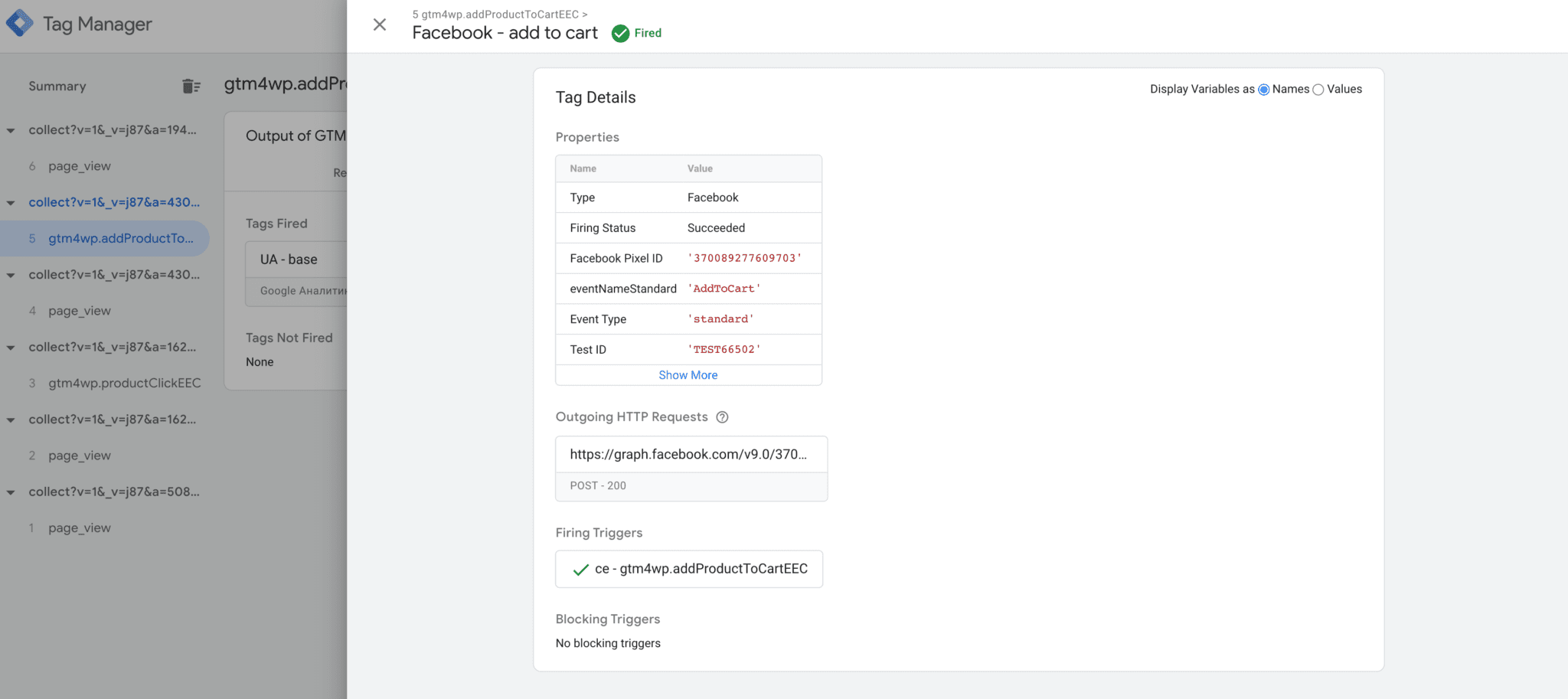
9. Once you've set up and verified that Facebook Conversions API works correctly, you need to remove FB browser tracking or set up event deduplication. Otherwise, your events will be duplicated.
Test Facebook Conversions API
You can also set up Facebook CAPI with GTM Templates
With Stape, you can boost tracking accuracy and campaign results with server-side tagging.
Based on the platform you use, you can set up tracking quickly and effectively with our custom templates. Follow the step-by-step guides to set up Meta CAPI using server GTM for:
Templates and guides for Wix, Shopware, PrestaShop, and more are coming soon. Let us know if you need a template for another CMS.
Event deduplication for Facebook pixel and Conversions API events
Facebook recommends using both the Pixel and Conversions API to track events, but without event deduplication, duplicated data from the browser and server can skew results. Deduplication ensures that only one event is kept by using unique event IDs shared between both sources. Proper setup requires generating and syncing these IDs across browser and server events, which can be tested in Facebook's Events Manager.
A common mistake with Facebook server-side tracking is sending events only from the server and skipping the Pixel entirely, as this reduces audience match rates since Facebook relies on browser-side signals like fbp and fbc cookies for user identification. Running both in parallel with proper deduplication gives you the best of both worlds. You get the reliability of server-side data collection combined with the browser signals that Facebook needs to build accurate audiences and optimize your campaigns effectively.
Additionally, sending user data via the Conversions API improves match quality and event match scores, enhancing ad performance. User data should ideally come from a data layer and comply with privacy policies. Tools like Stape plugins simplify integrating user data for better Facebook campaign optimization.
Send user parameters using Facebook Conversions API
To match users who visit your site with their database, Facebook uses User Data for the Conversions API.
Facebook requires you to hash some parameters before sending them, but you don't need to worry about that; Facebook's tag will automatically hash all the data before it's sent.
The more user parameters you send to Facebook, the higher the chances they will match a user, resulting in a higher event match score.
Sending user parameters from your site to Facebook is a sensitive topic since you'll be sharing user data with a third-party service. So before sending this data to Facebook, ensure it complies with your privacy policy.
Ideally, you should have the user data added to the data layer. If this isn't possible, try to collect it from the page using custom JavaScript code and send it along with the conversions or events you are interested in.
For example all Stape plugins for CMS (for Facebook CAPI for Shopify, WordPress server-side tracking, Magento 2 Google Tag Manager, GTM app for BigCommerce) add a data layer that also contains user data.
You can easily retrieve it from the data layer and add this data to Facebook events in a web container.
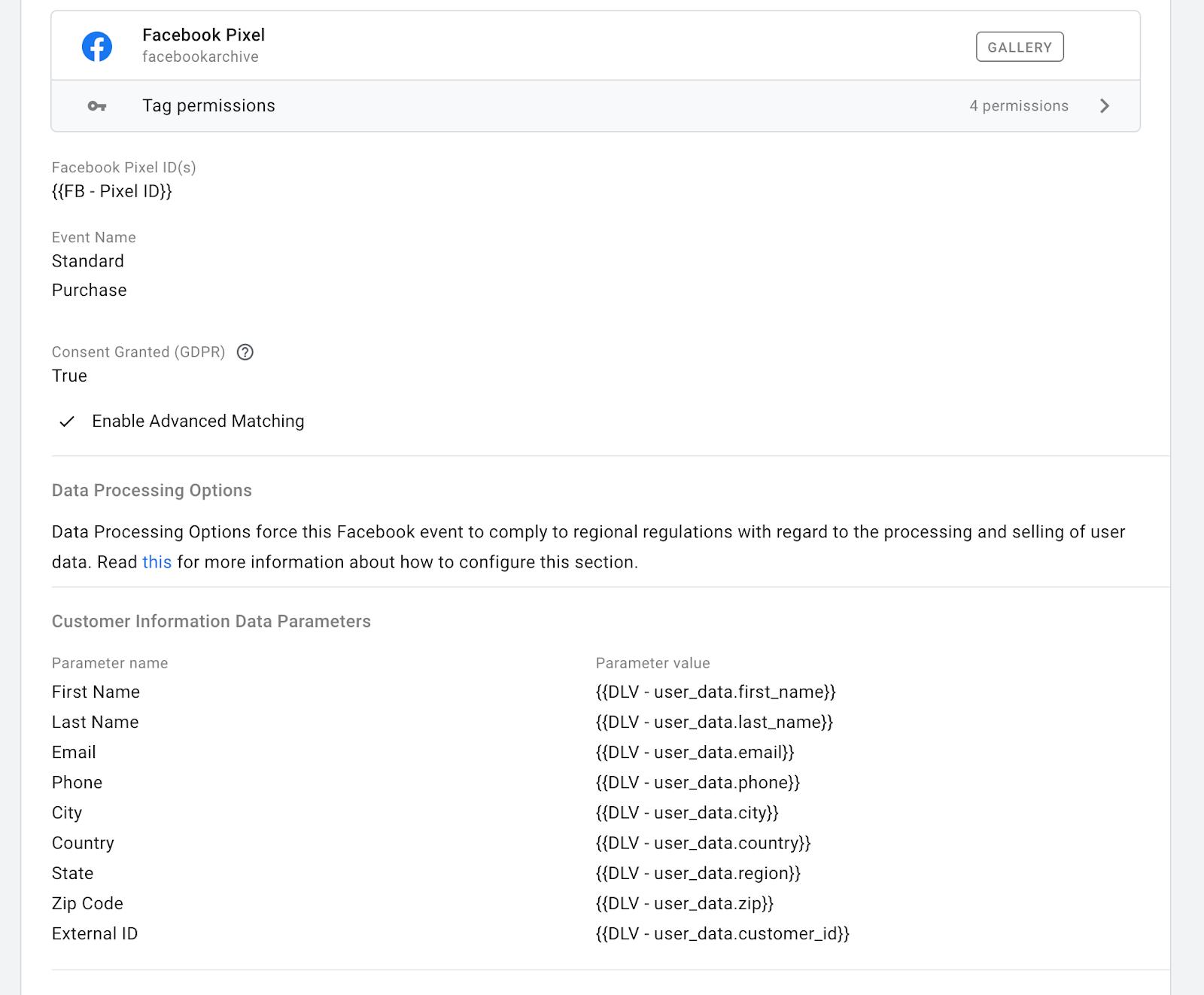
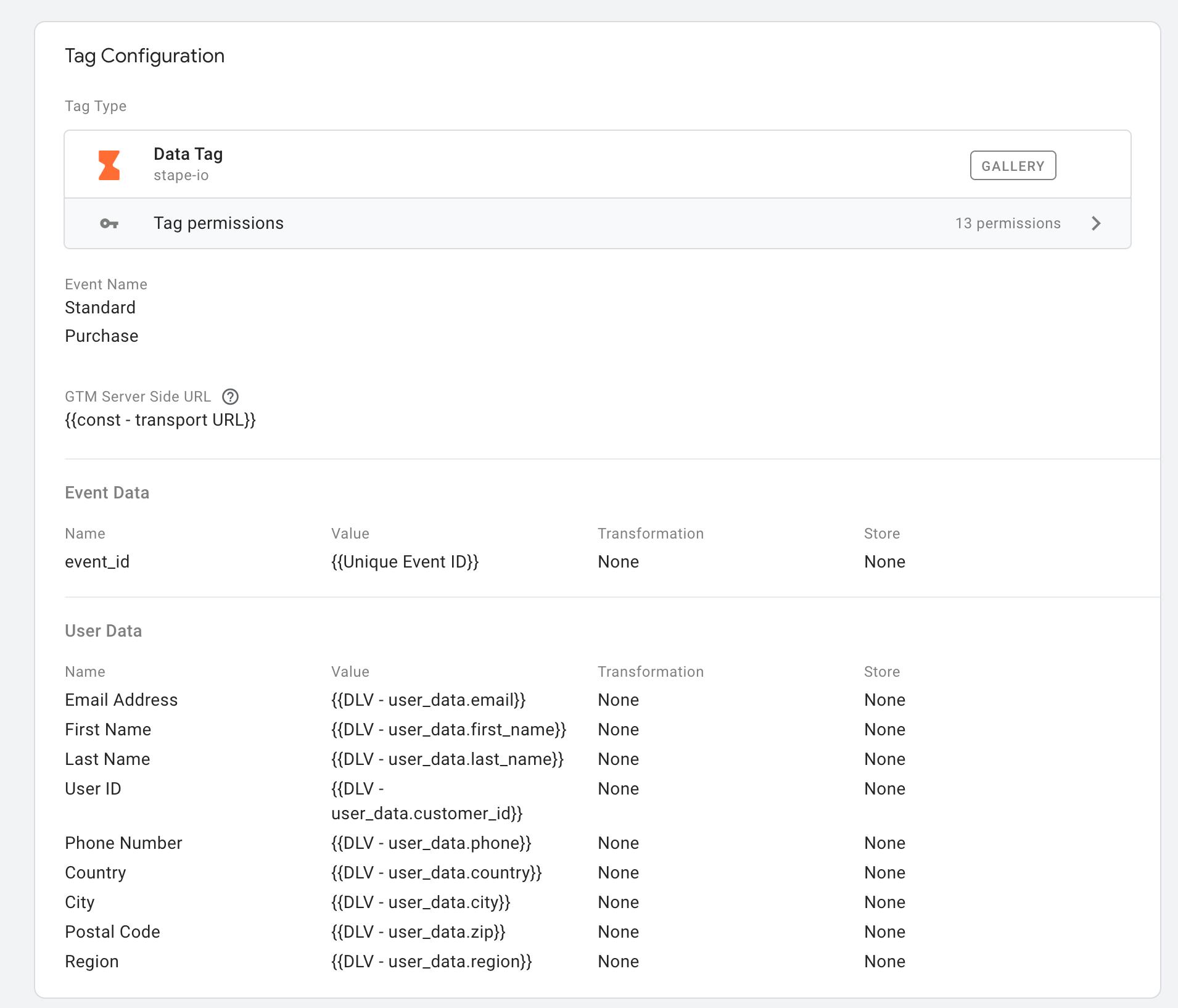
Then, transfer the required data to the server container (in the payload GA4 or Data tag, depending on what you use).
Finally, add this data to your server-side Facebook event.
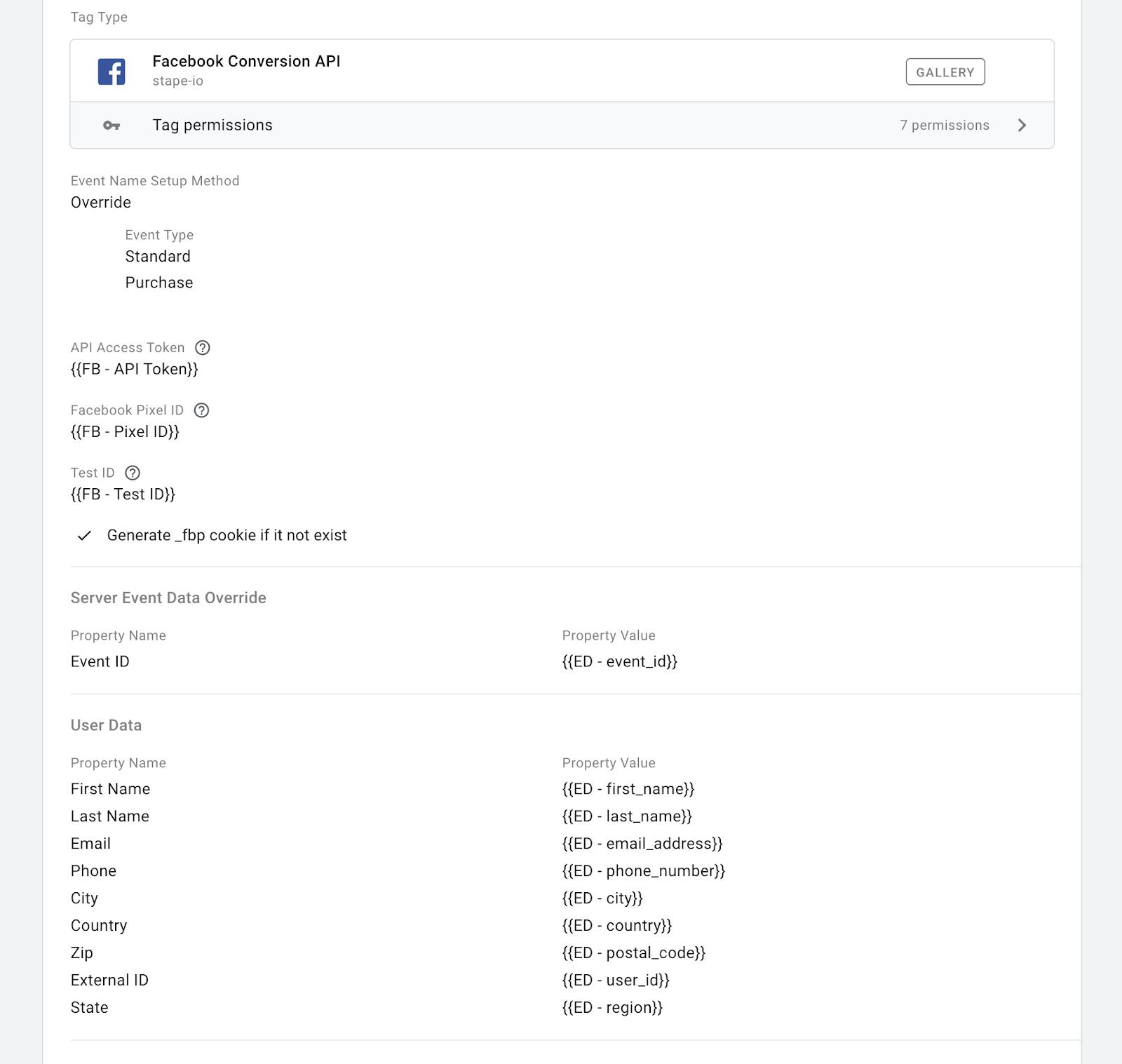
This way, you will achieve better match quality of your Facebook events, potentially improving the performance of your advertising campaigns, as Facebook will better understand your audience and optimize your advertising campaigns.
What are the most popular Facebook pixel and Conversions API errors, and how to fix them?
Event Name mapping
By default, the tag attempts to map GA standard events to Facebook standard events. If it cannot match them, the raw event name from the GA client will be used. For example, if you send an event name like this: gtag(‘event’, ‘UserLikedProduct’), you will see the event UserLikedProduct in the Facebook event manager.
Below is the mapping scheme from GA events to Facebook events that we use in this tag by default:
| page_view | PageView |
| add_payment_info | AddPaymentInfo |
| add_to_cart | AddToCart |
| add_to_wishlist | AddToWishlist |
| sign_up | CompleteRegistration |
| begin_checkout | InitiateCheckout |
| generate_lead | Lead |
| purchase | Purchase |
| search | Search |
| view_item | ViewContent |
| contact | Contact |
| customize_product | CustomizeProduct |
| donate | Donate |
| find_location | FindLocation |
| schedule | Schedule |
| start_trial | StartTrial |
| submit_application | SubmitApplication |
| subscribe | Subscribe |
Facebook server-side tracking: real Stape users' problems solved
1. A user in the Community noticed that after switching to Facebook server-side tracking, their retargeting audience was much smaller than GA4 traffic (about 15% match rate). The issue wasn't broken tracking but unrealistic expectations: Facebook can't reliably match users using only IP and User Agent. The solution was to follow Meta's recommended hybrid setup (browser + server with deduplication) and send all available user data (like email or name when possible). This approach improves match quality and audience size, while pure server-side tracking alone limits retargeting potential.
2. Many users in this thread face issues with Facebook server-side tracking and FBP/FBC mapping, especially on third-party checkouts. Using Stape's Facebook CAPI template on a first-party subdomain, firing key events on the main domain, implementing hybrid browser+server events for deduplication, and optionally using webhooks solves most problems. Always verify data via browser network tools rather than relying solely on Tag Assistant.
FAQ
Want to start on the server side?
Try for free
Comments