Sep 2, 2026
Google Tag & GTM updates 2026: key changes explained
Updated Oct 16, 2026 comments
Google is rolling out a series of updates to the Google Tag and Google Tag Manager throughout 2026 to create a more unified experience for users. Here’s what’s changing, how it affects client- and server-side tracking, as well as what to check before migrating your existing setup.
Bigger picture: how it works and what Google’s goal is
To understand the rolling out changes, it’s important to remind how Google’s tagging architecture has worked lately.
Google Tag and Google Tag Manager have provided different ways to manage website measurement:
- Google Tag is used to send measurement data to Google destinations such as Google Analytics and Google Ads;
- Google Tag Manager provides a container for managing tags, triggers, variables, and configurations for GA4, Google Ads, and a long list of other platforms.
When these tools are implemented separately, a website can end up with additional JavaScript and a more fragmented tagging setup, especially if Google products have been implemented independently over time.
The goal:
Google is unifying Google Tag and Google Tag Manager so that the same tagging infrastructure can provide centralized configuration, debugging, version control, and direct data transmission to Google destinations.
What’s changing with Google’s updates
October 2026 updates
New Destination tags replace legacy Google Tag implementations
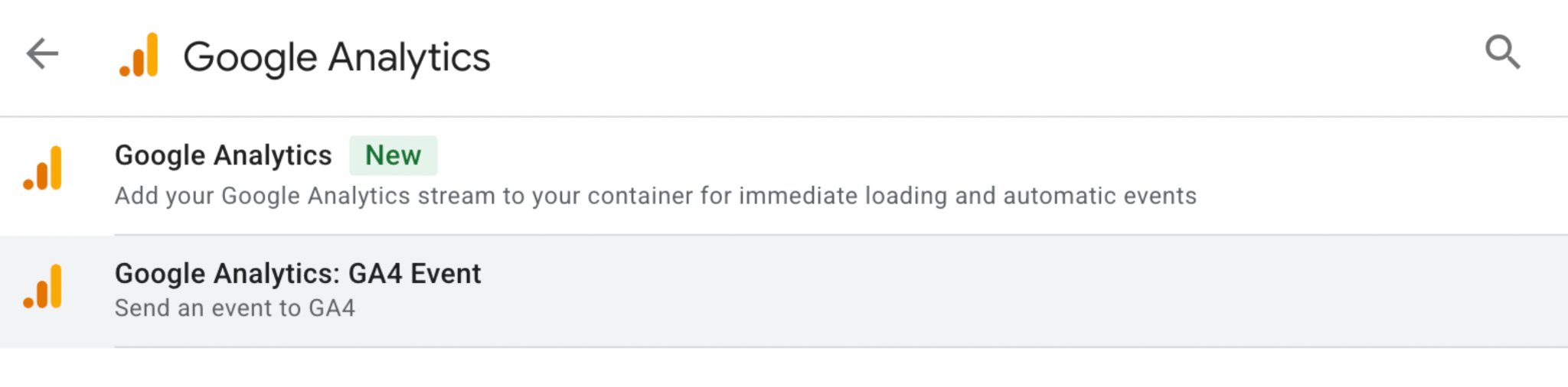
Google has added new Destination tag types in GTM for Google Analytics, Google Ads, and Google Floodlight. These tags use the configuration available in the GTM container, so no need to load additional gtag.js resources for each destination.
The legacy Google Tag is still available, but it should be reviewed during migration because it may continue to load extra JavaScript. Conversion Linker is also considered a legacy tag in this setup, as its functionality is now handled by the new Destination tags.
Shared settings for more centralized configuration
When a Google product, such as Google Analytics or Google Ads, is connected to a GTM container as a destination, it inherits the settings defined at the container level.
These settings influence:
✅ how events are detected automatically;
✅ how data is collected;
✅ how measurement works.
The Destination tags can change some shared settings, but they cannot bypass restrictions set at the container level.
The optimization wizard to migrate more easily
The optimization wizard helps users migrate the existing containers to the new tagging setup.
You can choose which Google Tags to connect as destinations and which to leave unchanged. Also you may select an existing tag configuration to use as the shared settings or create a new configuration from scratch.
Before implementing the changes, the wizard provides a summary so you can review how the tags and their settings will be updated.
Permissions management
Linking a GTM container can change who has access to the container. Users who already have access to the Google Tag may receive Read access to the GTM container when the tag is linked as a destination.
GTM users don’t automatically receive access to the linked Google Tags. This is especially important for organizations where different teams manage analytics, advertising, and website tracking.
Access to linked destinations can also be reviewed and managed in GTM under External account links settings.
Consent management gets more centralized controls
The “Manage data transmission settings” option gives users more control over when Google sends data to third-party platforms.
Depending on the configuration, GTM can delay sending data until the required type of consent is granted by the website visitor. For advertising tags, you can choose to allow limited data sending (similar to Advanced Consent Mode), or block advertising requests until “ad_storage” consent is granted.
Better visibility in Preview mode
The updated Preview mode in GTM makes it easier to check how tags and destinations work. Users can see which data requests have been sent, review the settings applied to each destination, and identify requests that were delayed because there was no consent from the user.
This is especially helpful when testing consent settings to make sure data requests are delayed and sent at the right time.
To make debugging even easier, install a free Chrome extension – Stape GTM Helper. It helps you inspect your GTM setup, check tag activity, and troubleshoot tracking issues more efficiently. Combined with GTM Preview mode, it can make validating tag behavior and consent settings simpler and help you identify potential issues.
August 2026 updates
Google Tag Manager gets a simpler interface
Google has introduced a redesigned Overview page in Google Tag Manager. The new interface moves container configuration into a Settings section. Less frequently used tagging features such as triggers, variables, templates, and folders are grouped under a collapsible Advanced section.
The redesign aims to make GTM easier to navigate without removing existing functionality.
Google Tag and Google Tag Manager are becoming one system
One of the bigger changes is the closer integration between Google Tag and Google Tag Manager.
Websites using only Google Tag will get access to Tag Manager capabilities such as:
✅ Interface-based tagging;
✅ Debugging;
✅ Version control.
Google says the update doesn’t change the in-page behavior of existing Google tags. Each Google destination will still have its own tag, but the settings can be managed through the unified container experience.
Google is also encouraging advertisers to optimize their existing GTM containers. The optimization flow can move Google tag settings into the new Settings tab, connect the container with relevant Google destinations, and make changes available for review before they are published.
Better performance
Google team says that the updated architecture can improve website performance since it allows Tag Manager containers to send data directly to Google destinations. Previously, GTM could load additional gtag.js JavaScript to send data to a Google destination, potentially adding latency to measurement transmission.
For teams managing several Google measurement products, the changes also provide a more centralized way to manage tagging settings and access.
Visual tagging brings point-and-click tracking to GTM
Google is also introducing Visual tagging, which allows advertisers to configure certain events and conversions by selecting elements directly on their website.
Instead of manually defining selectors, triggers, and other technical settings, users can interact with a website through Tag Assistant.
The feature is currently in beta for purchase conversions in Google Ads, with additional use cases expected to roll out during the year.
You can find more details on the updates in Google’s documentation.
What does it mean for client- and server-side tracking?
Google's new approach provides several potential improvements.
On the client side, businesses can benefit from fewer Google scripts loading and simplified, centralized Google tagging configuration.
For server-side tracking, these changes don’t really impact a lot. It can simplify the browser-side Google tagging setup, but they do not inherently reduce the number of requests sent to a server-side GTM container.
Are the changes mandatory to accept?
No, at least at this point. Google says no changes will be made automatically, and advertisers can choose whether to adopt the new configuration. You can review the proposed changes before publishing them.
What’s worth doing now?
1. Review legacy tags and plan the migration.
Identify Google Tags that could be replaced with the new Destination tag types. Check whether Conversion Linker and other existing tags are still needed in their current form.
2. Check shared settings before connecting destinations.
Compare the settings used by existing Google Tags and decide which configuration to apply at the container level. Pay attention to data collection, automatic events, and consent-related settings.
3. Review permissions before optimization.
Check who has access to the relevant Google Tags and GTM container before linking destinations. Make sure that any additional Read access is appropriate.
4. Test consent behavior in Preview mode.
Verify how analytics and advertising hits behave before and after consent is granted. Check whether requests are deferred or blocked according to your configuration.
5. Test the data flow before publishing.
Review tag firing, destination configuration, initialization, and data transmission. For implementations using server-side GTM, confirm that the browser-side changes do not introduce unexpected behavior in the existing setup.
Was this article helpful?

Comments