Sep 28, 2026
Google's new additional sources measurement feature
Written by
Uliana Lesiv
Updated Mar 19, 2026 comments
Key takeaways
- Google aims to centralize the API layer, and the Data Manager API is used as a unified solution. The new approach encourages server-to-server, first-party data integration, similar to Meta's Conversions API.
- Google has released a new feature (in Beta). It allows advertisers to connect regular conversions to external sources like CRMs and cloud databases.
- A
transaction_idparameter is used to match external data with data from tags. If matched, additional source data overwrites the initial tag signal, becoming the "source of truth." - Benefits of using a feature include accurate lead attribution, recovering lost conversions, and unifying online/offline data.
- There are three methods to configure the feature. The easiest and most reliable for Stape users is via the Data Manager API.
- Early Data Manager API implementation is recommended due to Google's API consolidation strategy.
Google is moving towards API centralization
Google seems to be working on creating a unified API layer. This trend proves recent updates, such as the disabling of the Google Ads API for Customer Match and the planned deprecation of the Partner Audience API in 2027. Instead of numerous APIs, Google promotes using the Data Manager API.
To us, this strategy looks like Google is on the way to creating its own version of "Google Ads Conversion API," similar to solutions already offered by other platforms; for example, Meta (Meta CAPI). For years, Meta has pushed advertisers toward using first-party data as a "source of truth" to minimize the limitations of client-side tracking. Google's new approach with tag-based measurement (which we consider in detail below) shows a shift to server-to-server data integration.

In practice, this could mean fewer Google APIs and a stronger focus on first-party data.
Google's feature: tag-based measurement with additional data sources
Note:
At the moment of writing the article, the feature is in Beta, so it may not be available to you yet.
Google has released a new feature within Google Ads that allows advertisers to improve their tag-based measurement (online conversion tracking) with data from additional sources. With its help, you can supply the data captured by your website tags with first-party data from external sources, such as CRMs, cloud databases (like BigQuery or MySQL), and other systems. The complete list of supported sources can be found in Google's documentation.
After you connect additional data sources to the conversion actions in Google Ads, the feature creates a more accurate measurement.
How it works
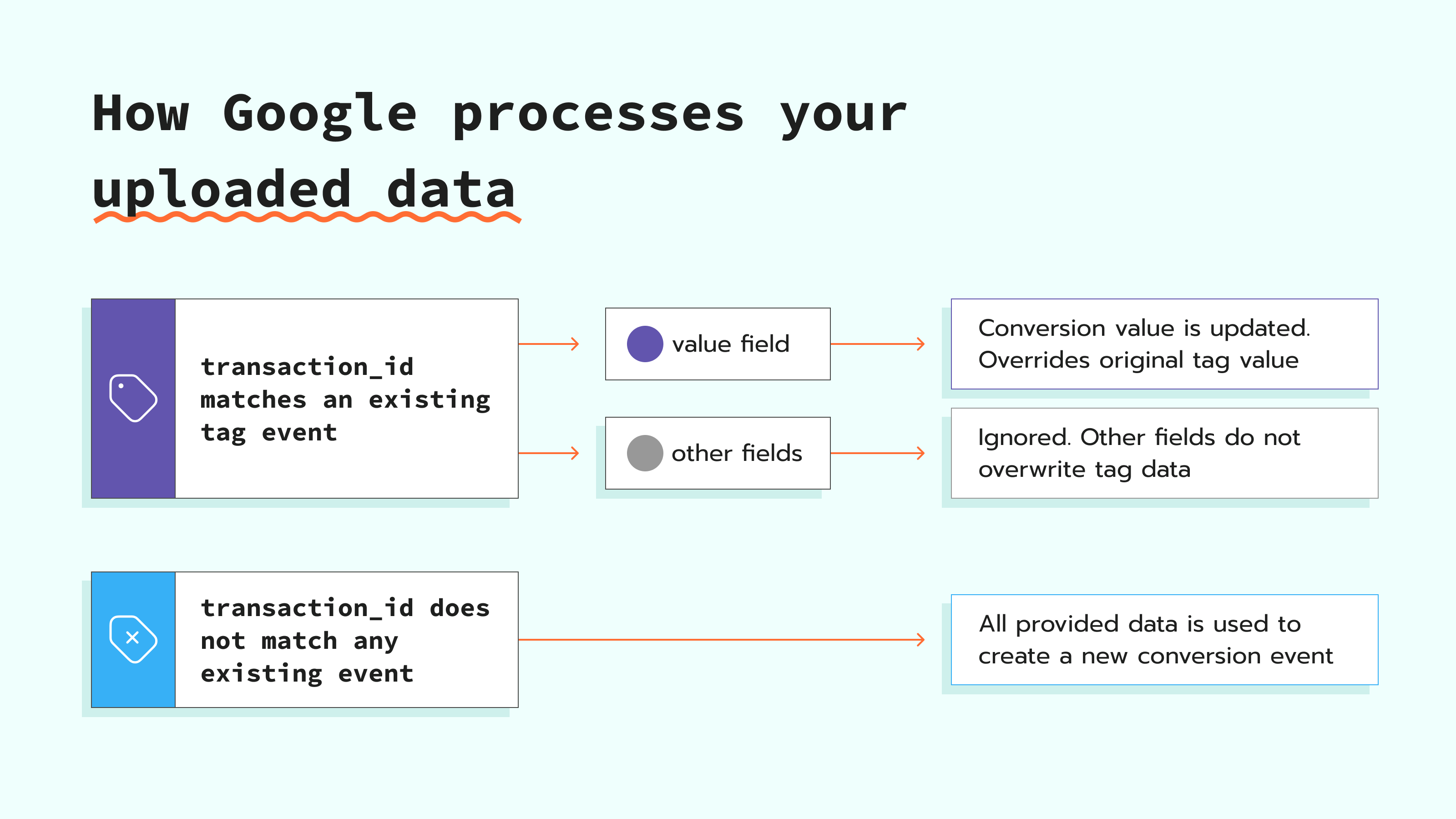
When you upload conversion data from the external source to Google, the system uses the transaction_id to match your external source's events with those already tracked by your website tag. If a match is found via the transaction_id, your data from the external source becomes the source of truth.
Hint: see the section on Data Manager errors and transaction_id requirements, which explains when transaction_id is mandatory and how mismatches or missing IDs are handled.
There are three scenarios of how the uploaded data you provide to Google can be processed:
Use cases & benefits of implementing the feature
Google's feature has the following applications and benefits:
- Attribute conversions to the campaign. Your sales team may log high-value conversions (like enterprise deals) in an internal database, but these conversions don't trigger web tags. You can import transaction data from your database into the Google Ads tag environment to attribute conversions to ad campaigns.
- Improve bidding and target high-intent leads. The feature allows you to enrich Enhanced Conversions in Google Ads. As described in the previous point, after importing high-value transaction data from internal databases or CRMs, you improve attribution and get a more complete and accurate dataset. As a result, Google Ads can use the data to target high-intent leads.
- Recover "lost" conversions. The website tracking tags can't capture some conversion events (e.g., due to ad blockers, browser restrictions). When you upload data from external sources, these conversions are included in your reports. In this way, you get a more complete picture of campaign performance.
- While there is no retraction functionality, the precedence of additional data sources' data over the original one can be viewed as an enhancement flow from Conversion Adjustment.
Configuration options
In its documentation, Google provides three ways to configure the feature:
- via editing your conversion action
- through Data Manager
- through the Data Manager API
A quick note on the difference between Data Manager and Data Manager API, as it may be confusing on this point:
So, what method is worth choosing?
If you are a Stape user and already have or are going to start any paid plan on Stape, the Data Manager API is the best option. Here is why:
- API usage without code. For teams that need to integrate Google Ads Data Manager API without writing custom code, Stape provides solutions that connect to the API through a user-friendly interface.
- Data flows, automation, and scalability. Stape provides a server-side integration that automatically sends conversion events, synchronizes customer lists, and connects multiple data sources automatically. In this way, you can be sure that data is always up-to-date, without additional manual actions. For advanced setups, a pubsub push subscription can also be used to reliably queue and deliver these events.
- Easy authentication. Easy authentication. It can be complex to manually implement the management of OAuth2 flows and API tokens. Stape simplifies the authentication process to connect with the Data Manager API. The user just needs to sign in and authorize the connection. After that, Stape manages the communication between systems.
In addition, as we mentioned at the very beginning of the article, Google seems to be moving towards API centralization. So, it is just one more reason to switch to the Data Manager API and gear up for even more features it will eventually bring.
Sending online conversions through the Data Manager API automatically converts the conversion to a hybrid. Functionally, this means a few things for the advertisers:
- The conversion is enrolled in a 14-day trial period, where they can observe the uplift due to hybrid and resolve any setup issues.
- After the 14-day trial, the conversion action is converted officially, and both the tag and the uploaded data are counted.
- Since a hybrid combines multiple conversion streams, advertisers should use transaction IDs to deduplicate conversions.
If you don't use Stape, you can opt for Data Manager or editing your conversion action. In their documentation, the Google team explains how to configure the feature using these methods.
The pitfall: it may still not be available for you yet, as it is in Beta. We have noticed that there is no option to add a data source for a conversion in many accounts yet: If you use Amplitude alongside Google Ads, an Amplitude Google Tag Manager integration can also help centralize your event data while this feature rolls out.
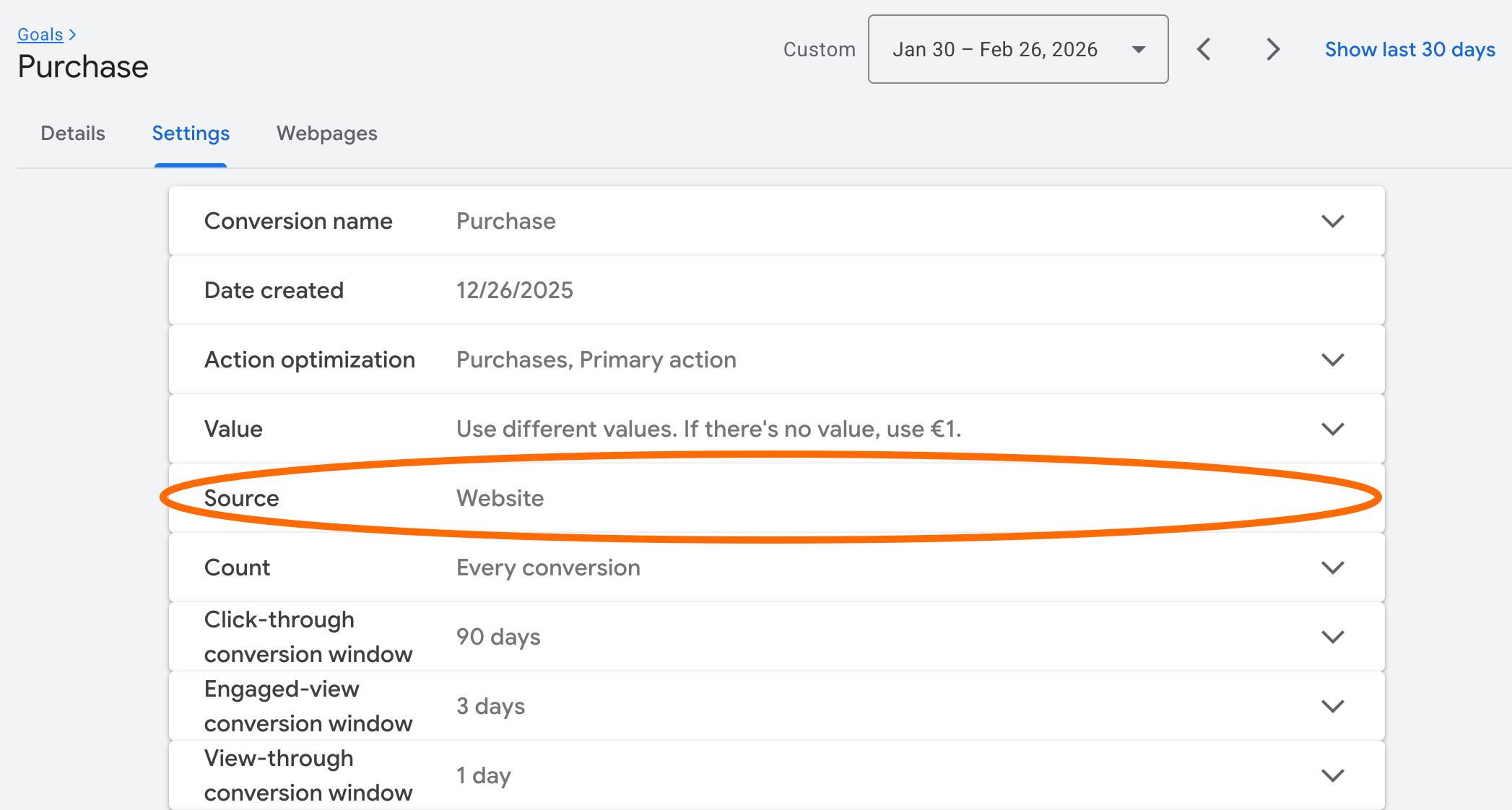
Setup process
In Google's documentation, you may have noticed that to send event data as an additional data source via the Data Manager API, you need to be a whitelisted partner.
By using Stape’s solution, you don't need to submit a request form to Google. Stape is a whitelisted partner. You can use the Data Manager API immediately through our platform. Simply create a Stape account on any paid plan.
👉 We have a guide on how to track Google Ads conversions via the Data Manager API, please follow it for detailed configuration instructions.
In a nutshell, the configuration process includes the following steps:
- 1.Activating Google Data Manager API connection to access the Data Manager API via Stape.
- 2.Configuring the Google Data Manager API Conversion Events tag to track online/offline conversions and send them to Google.
- 3.Start using Google's feature right away :)
Summary
Google's move toward centralizing its API layer points to a shift in how advertisers will collect and process data. Google is focused on promoting and adopting server-to-server, first-party data integration (in particular via Data Manager API).
The new tag-based measurement feature, even in its Beta stage, gives advantages for advertisers: attribution of high-value leads, recovery of lost conversions, and unification of multiple data sources under a single "source of truth." Adopting this feature early makes sense, especially for businesses that are going to scale their advertising.
Want to start on the server side?
Try for freeRecommended for you
Sep 17, 2026
Blog
Track Google Ads Conversions using Data Manager API
Google Data Manager API is a tool for the management and integration of first-party data within Google Ads. It simplifies data sending by using a direct API call.
Sep 14, 2026

Comments