Google Tag Manager GDPR compliance: a complete guide
Written by
Usman Qureshi
Key takeaways
- GTM isn't inherently compliant or non-compliant – compliance depends on how tags and consent settings are configured.
- Consent runs on six signals:
analytics_storage,ad_storage,ad_user_data,ad_personalization,functionality_storage,security_storage. - A CMP must set a "denied" default state and push updates to GTM as users make choices.
- Google tags respond to Consent Mode automatically; other tags (Meta, TikTok, custom HTML) need explicit blocking and consent-based triggers.
- Server-side GTM adds control over data sent to vendors, but the web container still must pass consent signals to it – it doesn't replace consent management.
Installing Google Tag Manager (GTM) is generally a simple task: install the code in the <head>, and you’re done!
But with more and more privacy awareness and data protection laws, the trickier part is ensuring that everything is compliant, even more so with different regional laws and whether they apply to you or not.
This blog isn’t a legal advice piece; it aims to talk about what these commonly used terms and laws can mean when using GTM, and how you can make your setup compliant. It is always prudent to consult with your legal team to ensure that your business is meeting all legal requirements.
Sounds serious, no? Well, that’s because it is. Since data records began for GDPR penalties, there’s been ~$7 billion (€6.1 billion) reported in fines between 2018 and 2026. To put things in further perspective, that’s a yearly average of $762 million.
Certain GDPR penalties can be €20 million (~$23.2 mil) or 4% of annual worldwide turnover of the preceding year, whichever is higher. But that’s a maximum, which doesn’t apply to every configuration error, thankfully.
Financial penalties aside, there are also other resource costs like investigating complaints and explaining why the consent wasn’t respected and fixing or rebuilding tracking.
So, there’s a lot of risk if the business is not GDPR compliant or flouts any of these laws. Now that the serious part is over, let’s get down to how it all ties together when using GTM.
What is Google Tag Manager and how does it relate to GDPR?
GTM is simply a tag management tool that, in itself, doesn’t track or record anything but can be used to install or load other tracking scripts. The usual candidates are your analytics and ad platform tools.
This helps you rely less on your development or engineering team to install any scripts, as well as add any additional tracking e.g. form submissions, button clicks, file downloads, purchases… well, you get it, any action that you might want to track on your website can be tracked with GTM.
Right, so where does GDPR fit in all this tracking of what users are doing on your website? It becomes relevant when the site processes any personal data, which can include any online identifiers that can identify individual users, even if you don’t collect their name.
So, is GTM then GDPR compliant? GTM itself isn't compliant or non-compliant; it's a delivery mechanism. What determines compliance is what you configure inside it: which tags fire, what data they collect, when they're allowed to fire, and where that data ends up
This involves assessing each GTM container separately (if you have multiple for your business) and all the tags it fires individually.
Perhaps only an empty GTM container is compliant. And if you don’t install it, then it’s definitely compliant.
But GDPR isn’t just about collecting data, as it covers several data areas like storage/retention, minimization, transparency, security, and any individual rights that apply throughout the tracking lifecycle.
If you want to get into the whole legal text, read the EU GDPR Regulations. There are also some subtle differences between EU and UK GDPR laws.
How to make Google Tag Manager GDPR compliant
You might have heard terms like “GDPR cookie consent”, “Consent banner”, and “CMP (Consent Management Platform)” being used in conjunction with tracking on the website.
Using a CMP can help make tracking via GTM compliant by ensuring only essential cookies are accepted before the user has provided their consent, whether it’s acceptance or denial. GTM starts that by setting the default consent as ‘denied’.
CMP sends these signals to GTM, which in turn can pass these details to tags. Some tags would then be ‘consent-aware’ and adjust the tracking accordingly, while others would have to be explicitly blocked and only fire when relevant consent is accepted.
So essentially, GTM listens to user consent and ensures that tags only send tracking info to their platforms when appropriate consent is received. To oversimplify, GTM configuration can be compliant by:
- 1.Setting a ‘denied’ default consent state.
- 2.Firing tags based on the user’s consent choices.
Again, it’s a lot more nuanced than that. Speaking of consent choices, these are communicated via the following signals:
| Signal | What it controls | Category in CMP* |
analytics_storage | Storage used for analytics | Preferences or Statistics |
ad_storage | Storage used for advertising | Marketing or Advertising |
ad_user_data | Sending user data to Google for advertising purposes | |
ad_personalization | Personalized advertising | |
functionality_storage | Remembering user choices, e.g. language, preferences, etc. | Functional or Preferences |
security_storage | Core website functions e.g. secure logins, page navigation, etc. | Essential or Strictly Necessary |
*The names of these categories in a CMP can differ as they simply group certain types of cookies in a category.
So, if a user accepts ‘Marketing/Advertising’ cookies, then all three signals are accepted. This makes it easier for the end user to make a choice vs them having to see the actual signal they are consenting to.
Now, let’s look at how to do that practically.
1. Audit existing tags and data
Start by auditing your existing tags and what data is being collected on your site, whether it’s by GTM, any plugins, apps, or simply hard-coded. For each tool, note down the following:
- What fires it
- What data is it collecting and sending (including any event parameters)
- What cookie or browser storage it’s using
- What consent category (or signal) is relevant to it
- What built-in consent checks the tag template has and/or if any additional consent checks are set
Remove any unused scripts and/or tags so you only focus on the ones that matter.
2. Install the CMP
You can either install the CMP directly or use GTM; the latter is better if you want to keep everything in one place. But even if your CMP is hard-coded or installed via any plug-in, as long as it can communicate with GTM, that works!
If using GTM, then make sure that it fires on the Consent Initialization trigger, as its sole purpose is to run before any other tags and collect consent so other tags are aware of the user’s choice.
As discussed above, the CMP tag should set ‘denied’ as the default consent state except for the essential / necessary category in GTM.
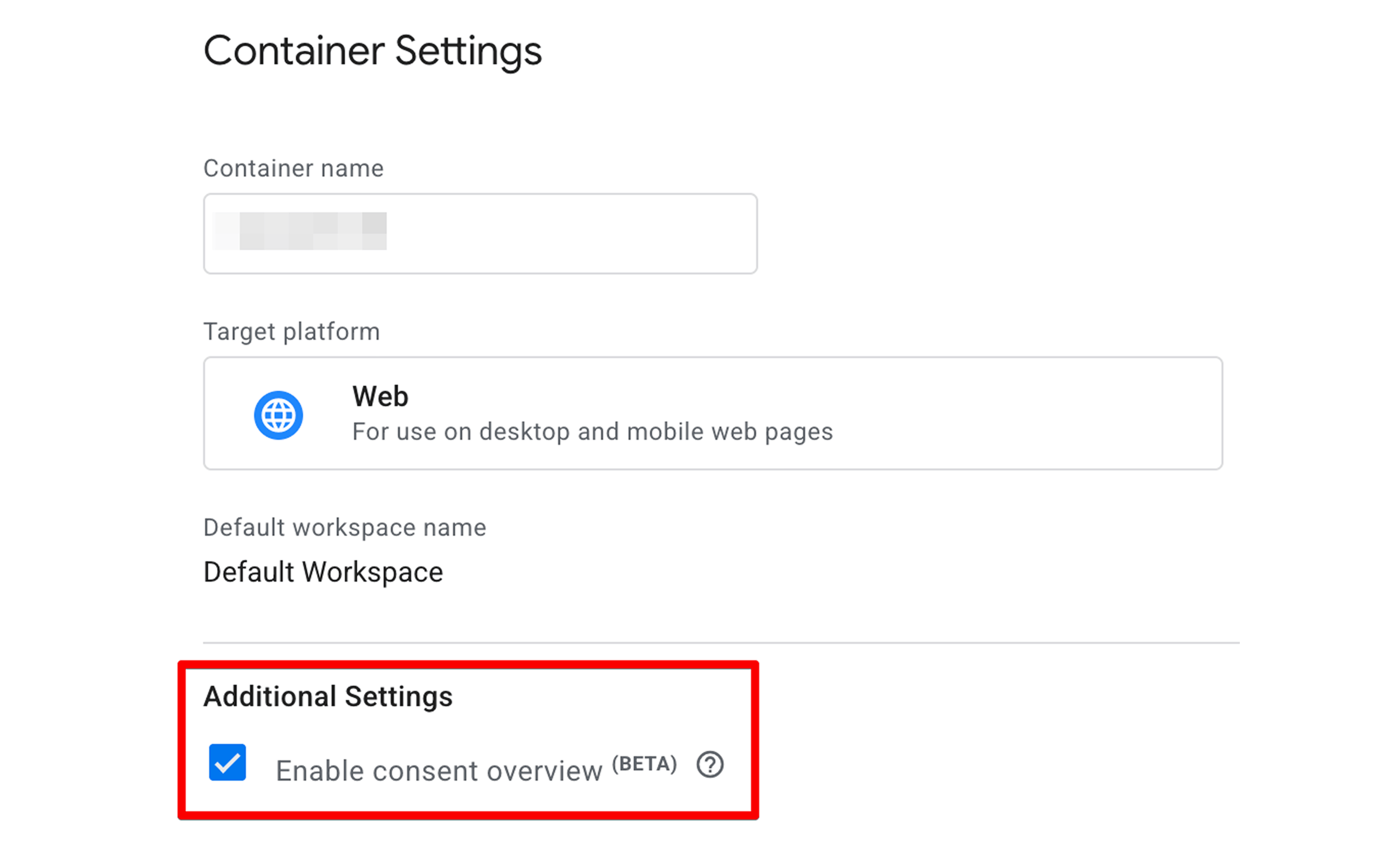
You can also enable ‘Consent Overview’ from GTM’s settings; it makes it easier to manage consent for all tags.
Next, ensure the tags respect user choices.
3. Configure consent updates
The update doesn’t happen only the first time the user sees a consent banner and makes choices. Users can withdraw or adjust consent later as well; for any of those scenarios, GTM should record and send the user’s consent to the relevant tools.
So, map the user’s choices to the appropriate consent signals we discussed above. For instance, if a user accepts only analytics cookies, then the advertising cookies shouldn’t be accepted, nor should any marketing tags fire.
It’s also important to send updates right away on the same page they happen as opposed to after navigation, because a user might accept the tracking and leave the page before the signal is sent to the tag.
There are also two types of consent modes:
- 1.Basic - Blocks all Google tags before the relevant consent is granted, meaning no information whatsoever is sent.
- 2.Advanced aka v2 - Lets Google tags fire even if the consent is denied, and sends cookieless pings to Google tools. It then feeds the disconnected data to its machine learning algorithms to model data.
Advanced consent mode is pretty much the standard now, unless there’s a specific legal or other requirement to completely block the tags. Just because a tool allows you to send cookieless pings doesn’t mean you’re legally allowed to as well. This should be assessed separately.
So far, this has been about Google official tag templates, but other custom tag templates like Meta and TikTok templates, and any custom HTML tags don’t respond to ‘Google Consent Mode aka GCM’ and have to be configured differently.
This means that the tags should be ‘explicitly’ blocked until a clear ‘granted’ consent is received. The trigger in GTM can then be the ‘dataLayer event’ pushed by the CMP or specific to an event with relevant consent signals stored in a variable.
For instance, fire the Meta pixel when cookie_consent_update fires, where the relevant variable has advertising or marketing cookies granted, and fire AddtoCart on the relevant trigger e.g. add_to_cart, where again, the marketing cookies are accepted.
Thankfully, the tag templates for popular tools now have some form of GCM check available at the tag level; enabling this means the tag reacts based on the consent signal GCM receives from the CMP.
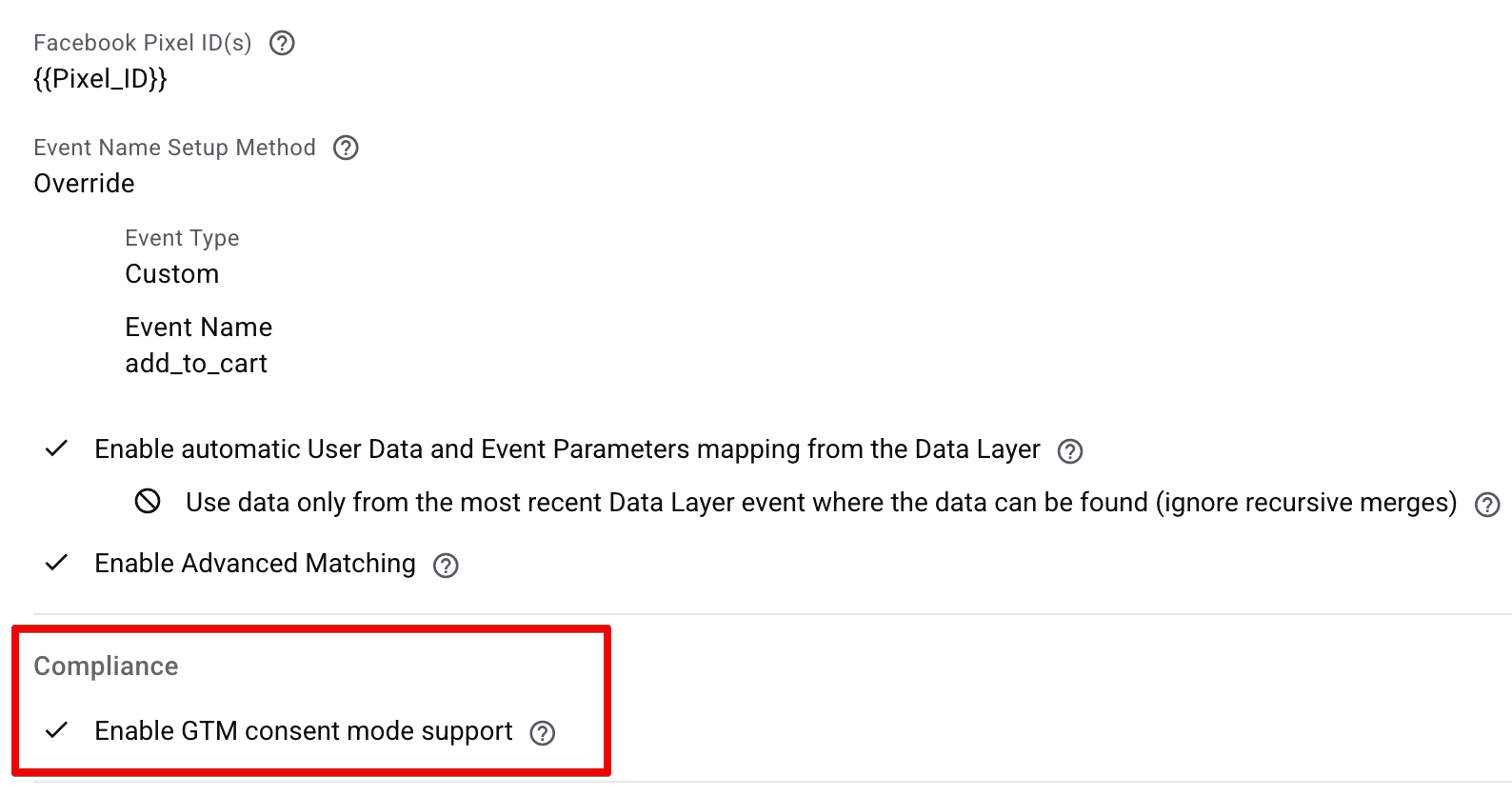
But even with a check like this, it’s important to verify if consent is being respected or not by testing the preview mode as well as checking the Network requests in your web browser, which is what we are going to talk about next
4. Test, test, test!
Lastly, run thorough tests to see how the tags and scripts behave in different scenarios. These could be:
- No banner interaction - consent should be default denied.
- Only accepted essential cookies - consent should be denied, tags shouldn’t fire or only send cookieless pings where applicable.
- Accept analytics only - only
analytics_storageshould be ‘granted’, no marketing tags should fire. - Accept advertising only - only three ad signals should be ‘granted’, no analytics tags should fire.
- Accept all - this is simple, all signals should be ‘granted’.
- Withdraw previously granted consent - tags should adjust behavior going forward.
- Return with saved consent - See if the original choices are preserved.
When you’re doing all this testing, observe GTM’s preview mode, alongside browser storage and network requests, to see what’s being dispatched to the tools in these different states. If you have server-side tracking, then make use of sGTM’s preview mode as well.
Pay special attention to important actions e.g. first page views, checkouts, and moving between domains, to catch any inconsistencies or updates etc.
Common GTM GDPR mistakes
Some common mistakes are easier to make; knowing them can help you avoid them:
- 1.No full control in GTM - visitors might be rejecting cookies, but if some of your tracking is coming from a plugin or third-party tool, then it will still fire.
- 2.Setting consent states too late - if a user denies, but the update happens late, then the fired tag’s request will have already been dispatched.
- 3.Treating ‘not set’ as denied - explicitly set default consents and test what happens if the CMP doesn’t load or loads slowly.
- 4.Granting all signals together - an analytics-only consent should not result in accepting all other signals.
- 5.Not testing withdrawal and adjusting signals - reopening the banner and changing the consent should affect the tracking from that point onwards.
- 6.Hashing doesn’t mean compliance - a hashed email for advanced customer matching in ad platforms doesn’t mean it’s completely anonymous and legal.
While these are mostly GTM-specific mistakes, a cleaner and compliant CMP banner setup should in general cover the following areas:
- A clear explanation: tell visitors what each tracking category means and tracks.
- An active choice: ignoring the banner, scrolling, or continuing to browse doesn’t count as consent. Users must actively agree to optional tracking.
- Separate categories: visitors should be able to accept only analytics without accepting advertising and vice versa.
- An accessible rejection: make rejecting as simple as accepting i.e. don’t hide it behind 3 clicks or bury it deep.
- Easy withdrawal/adjustment: keep cookie preferences available after the banner disappears.
The CMP should also record and store user consent i.e. what they saw, agreed to and when. You can also force the banner interaction before a user is able to browse the site or navigate, but acceptance, rejection, and customization should be equally and clearly accessible.
Talking about CMPs, let’s see what the best tools and solutions are.
GTM GDPR cookie consent - best tools & solutions that work
There’s no best tool per se; it depends on what your team can manage and what suits your current tech stack.
But there are some CMPs that are well-known in the industry e.g. Cookiebot, CookieYes, Usercentrics CMP, etc. At their core, they all (should) do the same job:
- Communicate default consent states
- Send update commands based on user choices
- Keep a record of user consents
- Allow you to add a banner and customize it
- Scan the cookies and let / help you categorize them
- Integrate with Google Consent Mode (GCM)
The pricing tiers and UI will be different, understandably. Therefore, the above tools are not an endorsement. But if you're interested in a curated list, check out Google's certified CMP partners.
So, when you’re deciding on a CMP, check how they compare on the above features as well as how well a specific tool can work with your website or CMS, e.g. Shopify, WordPress, or a custom one. Most of the CMPs have free trials, so you can experiment with a few before committing to one.
Another solution is implementing server-side tracking. A lot of GDPR and cookie consent issues come up because of how data is sent to third-party tools.
These could be resolved by adopting a first-party context i.e. you track data by sending it to your own server first and then have more control over what would be sent to these tools, whether it’s Google Analytics or any ad platforms.
There are different tools that you can use to host your server, and what you get out of each of them differs quite a bit:
- Automatic cloud provisioning - Google Cloud Platform
- Specialized managed hosting providers - like Stape
- Manual / self-hosting (Alternative Clouds & Docker) - AWS, Microsoft Azure, Render, or Cloudflare Workers
Depending on the tool you pick, the costs can vary significantly, as can the effort to set up and maintain, which requires its own dedicated discussion because what’s best for you depends on your use-case and other factors.
We mentioned server-side GTM aka sGTM, a few times now. It’s time we talk about it a bit more.
Server-side GTM and GDPR compliance
With server-side GTM, your web or client GTM would send the requests with collected data to your sGTM first, before they are forwarded to their respective destinations.
This gives you another layer to inspect and control what data should be sent to the third-party vendors. For supported Google tags, the web Google tag sends consent parameters to the server container, and consent-aware server tags then adjust their behavior accordingly, as they would in the web container.
Other vendors and custom events need their own consent controls, but generally the web container can send consent parameters to the server for them. What it means is that sGTM can then configure what consent signals should be present to forward the data to those vendors.
For sGTM, it’s a good idea to review:
- Data being sent to each platform - event parameters, URLs, identifiers and review anything the platform doesn’t need.
- Consent management - ensure that users’ choices are being sent to the server container as they are collected by the web container and the firing tags respect those choices.
- Data retention - if your setup saves request logs or user identifiers, check what is stored and when it is deleted. Hosting providers, any storage database, and receiving platforms all have their own policies.
- Server location - where the server runs and where the receiving platforms process the data. European server location doesn’t mean that data also stays in Europe; that requires additional assessment.
sGTM gives you a lot of control, but you still have to use that control to ensure compliance and your legal team should be consulted for it. With that thought, we’ll move towards the conclusion.
Conclusion
Installing GTM, adding tags and designing a nice banner sure takes effort, but none of it ensures compliance on its own. The whole journey of user data collection needs to respect the user’s consent by communicating it to all the respective platforms and carry them across all the touchpoints.
A thorough audit of the existing setup, tracking needs, and documentation can go a long way in helping to set up GTM in a compliant way. Then you can take it a step further by going down the path of server-side tracking, which is where the future of tracking lives.
FAQs
Want to switch to the server side?
Try for freeRecommended for you
Blog
Cookies, the GDPR, and the ePrivacy Directive
What cookies do and why they matter. How cookies are affected by the GDPR, CCPA, ePrivacy Directive and ePrivacy Regulation. Cookie compliance best practices.
Oct 5, 2026

Comments