Sep 9, 2026
Google Consent Mode V2
Written by
Ivanna Holubovska
Updated Sep 9, 2026 comments
Google Consent Mode V2 is an updated version of the original Consent Mode developed by Google. As we have already described in our previous article about consent mode, this tool allows websites to communicate users' cookie consent choices to Google tags more effectively. However, implementing Google Consent Mode V2 has been mandatory for all websites using Google services since March 2024.
Here we will discuss what’s new in Google Consent Mode V2, how it differs from the last version and if there’s an impact on server-side tracking.
Consent Mode in GTM
Key features of Consent Mode V2
Consent Mode V2 introduces more granular control over the data types collected based on user consent.
New parameters
Google added two parameters to the existing ones (analytics_storage and ad_storage) in Consent Mode V2:
- ad_user_data: controls whether user data can be sent to Google for advertising purposes.
- ad_personalization: controls whether personalized advertising (remarketing) can be enabled.
These new parameters are specifically designed to enhance user privacy. The settings determine if personal data is sent to Google based on user consent, which applies to services like Google Ads, Google Shopping, Google Play, etc.
Two more parameters that were already used in the previous version:
- ad_storage: сontrols the storage of user’s personal data for advertising.
- analytics_storage: manages the storage of data for analytics.
Google Consent Mode OneTrust and Consent Mode V2 CookieYes are common consent management platforms used to manage this consent process.
Two implementation options
Google Consent Mode offers two levels of implementation - Basic and Advanced.
Basic Consent Mode V2 implementation
If a user consents to cookies, the website behaves normally, firing all tags and collecting full data. However, if a user does not consent, no data is collected, and cookieless pings are not sent. It’s a little bit straightforward but limits data collection significantly when users do not consent.
To implement Basic Consent Mode, website owners need to:
- 1.Set up a Consent Management Platform (CMP) to manage user consents.
- 2.Configure their website so that, when a user rejects cookies, Google Analytics 4 (GA4) tags or similar tags are not fired.
- 3.Integrate a consent flag to communicate the user's consent decision to Google.
Advanced Consent Mode V2 implementation
It offers a more nuanced approach. Even when users do not consent to cookies, it allows anonymous, cookieless pings to be sent to Google for modeling purposes. This enables websites to recover some level of data for Google Ads and GA4, even without user consent.
In Advanced Consent Mode, implementation involves:
- 1.Using a CMP for user consent management.
- 2.Configuring the website so that GA4 cookies are not set when consent is denied, but a consent flag is passed to Google.
- 3.Sending cookieless pings to Google for data modeling.
Consent Mode v2 helps businesses respect user choices and recover measurement through data modeling, but some businesses may require additional control over the data sent to Google. For example, companies with stricter privacy policies may need to replace IP addresses before GA4 receives them. Learn how to configure GA4 IP anonymization beyond default settings in our other blog post.
More a requirement than an option
The Digital Markets Act (DMA) and Google Consent Mode V2 are closely interconnected, especially in the context of digital advertising and data privacy regulations. This legislation requires "gatekeepers" like Google to obtain explicit consent for collecting and using European citizens' personal data. In response to this and other privacy regulations, Google has updated its Consent Mode to version 2, making it compulsory for advertisers who wish to use Google Ads for remarketing and auto-bidding.
Advertisers and publishers, especially in the European Economic Area (EEA), must ensure compliance and maintain the quality of their audience and measurement data in Google Ads. Without implementing Consent Mode V2, advertising platforms like Google Ads and GA4 will not capture data about new EEA users after March 2024, significantly impacting advertising strategies and effectiveness.
Cookie banner is a must
To use Google Consent Mode V2, you must have a cookie banner in place. This means you need to have, or get, CMP running that aligns with Google's standards, server-side tracking, GDPR, and the e-privacy directive. The Consent Mode V2 functionality is contingent on the language of the banner being in line with Google’s standards for compliance.
How it works: when a user consents, the cookie banner communicates this to Google via the Google Consent Mode, allowing normal data collection. And vice-versa: if consent is rejected, Google reduces data collection of those users. In this scenario, Google employs conversion modeling, which uses machine learning to infer connections between user interactions and conversions.
For Shopify stores, the correct Consent Mode v2 implementation is especially important because consent signals must remain synchronized across storefront and checkout. This detailed Pandectes setup guide explains how to configure Consent Mode v2 with GTM for Shopify.
Consent Mode V2 and server-side tagging
Google Consent Mode is required regardless of whether you use browser or server-side tracking. It's a widespread misconception that server-side tracking exempts the need for user consent before tracking, but this is incorrect. User consent is still necessary even when tracking occurs on the server side.
This is particularly relevant under the server side tracking General Data Protection Regulation and the EU User Consent Directive, which require explicit, informed consent for data processing and handling.
How does Consent Mode V2 work in server-side Google Tag Manager?
When a user interacts with a cookie banner on your site, their consent choice is passed to Google Tag Manager via the Consent Mode V2 signals. In a server-side setup, this process involves two layers working together.
On the client side, your web GTM container receives the consent state from your Consent Management Platform (CMP) and applies it to all tags before any data is sent. On the server side, your sGTM container receives the same consent signals forwarded from the web container and uses them to decide what data gets passed on to platforms like Google Ads or GA4.
When integrating Consent Mode with server-side tracking, you need to make sure that user consent is respected on both sides. This includes:
- 1.Configuring Consent Mode in web Google Tag Manager.
- 2.Passing user consent from the web GTM to the server-side GTM.
- 3.Setting up server-side tags to respect users' consent state, for example, ensuring that data sent to Google Ads only fires when
ad_storageis granted..
In Advanced Consent Mode, cookieless pings are still sent to Google even when consent is denied, which supports conversion modeling for GA4 and Google Ads. That said, it's worth consulting your legal team before enabling this – collecting any signals from users who haven't consented carries legal risk. It's also worth keeping in mind that technologically savvy visitors may notice Google signals firing without their consent, which could affect how they perceive your brand.
Consent Mode V2 parameters
Google has not yet released any official documentation on Consent Mode V2. Still, according to our recent test, they integrated a new parameter responsible for handling the consent status. This is a new parameter named gcd. GCD is present in every interaction with Google services, regardless of whether Consent Mode is enabled or not. It also has information on how the consent signal was generated. This allows for a more precise interpretation of user consent decisions and helps Google maintain compliance with evolving privacy regulations. The parameter reflects whether consent was granted or denied and whether it was set by default or updated based on user interaction.
Here’s how the string looks like:

- String starts with 11.
- The letters are the values of each of those consents. And they make up a matrix of two coordinates: one that determines whether consent is given or not and another that determines whether the consent is by default (almost never) or because it is updated (that the user has accepted or rejected it).
- ad_storage and analytics_storage already existed before (it is the same information of the GSC parameter).
- ad_user_data and ad_personalization is the new and important thing. The first is advertising consent and the second is remarketing.
- Different consent signals are separated with 1.
- String ends with 5.
Below you can find a table with the values for the signals:
| Values | Meaning |
| l | Signal has not been set with Consent Mode. |
| p | denied by default (with no update). |
| q | denied both by default and after update. |
| t | granted by default (no update). |
| r | denied by default and granted after update. |
| m | denied after update (no default). |
| n | granted after update (no default). |
| u | granted by default and denied after update. |
| v | granted both by default and after update. |
Examples of how gcd parameter may look:
gcd=11p1p1p1p5
- ad_storage=denied
- analytics_storage=denied
- ad_user_data=denied
- ad_personalisation=denied
gcd=11t1t1t1p5
- ad_storage=granted
- analytics_storage=granted
- ad_user_data=granted
- ad_personalisation=denied
How to test Google Consent Mode V2?
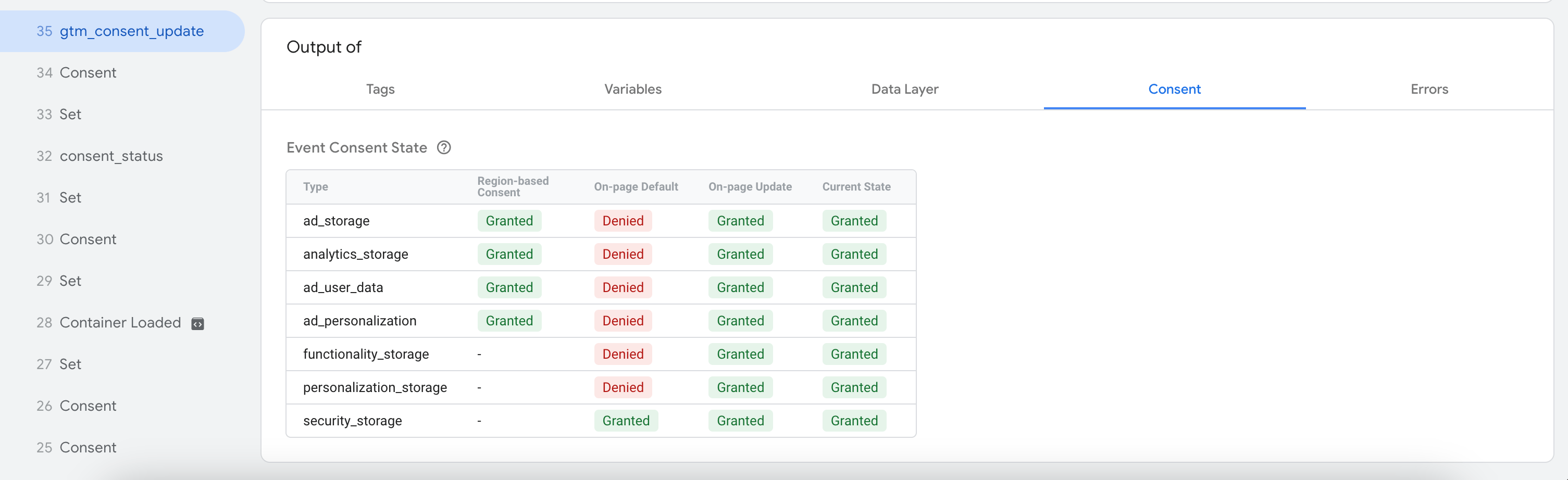
1. Using GTM Preview mode. Open your web GTM container → click Preview → navigate to your site and trigger a few events. In the GTM debugger, open the Consent tab for any event. You'll see the consent state for each parameter (ad_storage, analytics_storage, ad_user_data, ad_personalization) and whether it was granted or denied at the time the event fired.
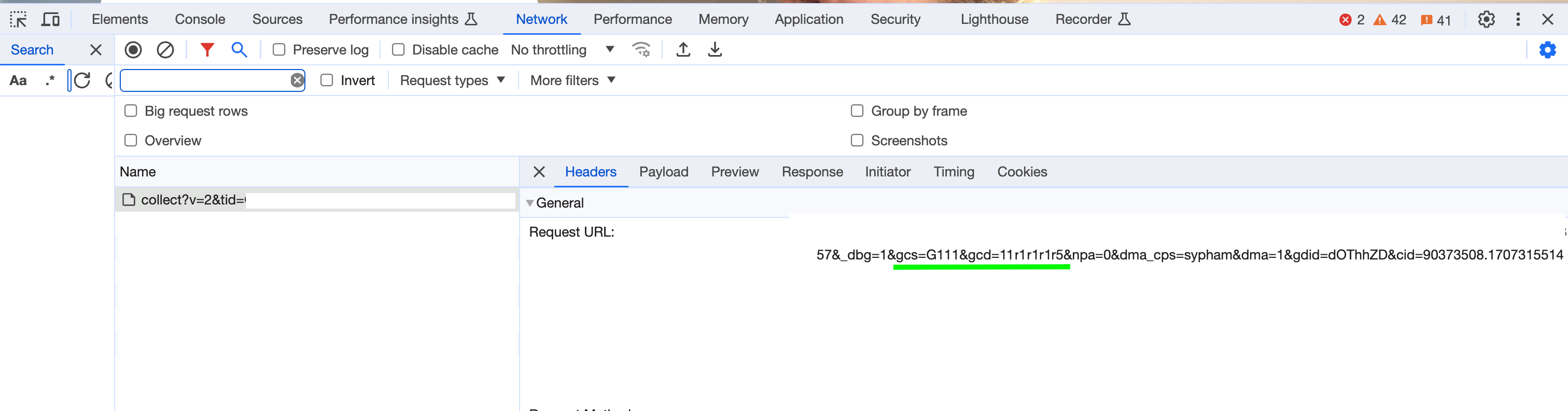
2. Using browser DevTools. Open DevTools → go to the Network tab → filter by collect to find GA4 requests. Click on a request and look for two parameters in the URL:
gcs– the original consent signal parameter.gcd– the new parameter introduced in Consent Mode V2, which reflects the full consent state across all four parameters and how the consent was set (by default or after user interaction).
If both parameters are present and the gcd value matches the consent state you'd expect based on user interaction, your setup is working correctly. You can use the values table earlier in this article to decode what each gcd string means.
If your CMP updates Consent Mode but doesn’t push a dedicated dataLayer event, GTM may not have a reliable trigger for consent-dependent workflows. See our guide on fixing missing consent update events in GTM.
Conclusion
Consent Mode V2 provides advertisers and website owners the flexibility to tailor their data collection strategies based on user consent, thereby balancing the dual needs of privacy compliance and data-driven insights.
Server-side tracking significantly improves data accuracy and resilience, especially when integrated with Consent Mode V2. Together, they enable more innovative and more compliant data strategies.
We can highly recommend to:
- 1.Check whether you have EEA traffic.
- 2.Collect user consent for EEA users (via any Consent Management Platform).
- 3.Share collected CMP consent signals with Google tools. In other words, make the correct setup of Consent Mode v2.
- 4.If you are sending offline data to Google via API, add consent signals as well.
And if you have other questions about server-side tracking and Stape, don’t hesitate to contact our support team.
Want to start on the server side?
Try for freeRecommended for you
Blog
Consent Management in Microsoft (Bing)
Consent Management for Microsoft Ads ensures GDPR compliance. Learn how to implement Bing Ads conversion tracking with UET tags and consent mode.
Sep 16, 2026

Comments