Sep 26, 2025
Google Tag Gateway: what, why, and when
Written by
Manisha Mistry
Published May 27, 2026 comments
Over the past few months, Google Tag Gateway (also referred to as GTG) has gone from a quiet rollout to a regular discussion topic. I believe this is because Google has started to push it during calls and because there's increased demand for first-party tracking.
I'm Manisha Mistry, the Technical Lead at MeasureU. I love teaching topics like server-side tracking, which has resulted in me receiving more and more questions on Google Tag Gateway. Specifically, over the last few months I have been asked the following four questions a number of times.
- What is Google Tag Gateway?
- Should I use it?
- How is it different from server-side tracking?
- Do I need it if I already have server-side tracking?
My goal in this blog article is to answer all four questions. As always, I'll start with the basics, then dive deep into how Google Tag Gateway works and how it's different from server-side tracking. I'll close with a decision framework you can come back to from time to time to make the call on which tracking works for you and your client.
One quick note before we dive in: this article is written based on my own setup and testing of GTG at the time this article was written. Google is always evolving GTM, GTG, sGTM, and the broader tagging ecosystem, so elements of this may shift over time as Google enhances the product. The core concepts will hold; the exact paths, toggles, and screens may not.
What is client-side tracking?
Every analytics setup starts with client-side tracking.
Usually it involves installing GA4 on your site, either using Google Tag Manager (my preferred option) or website integration. Either way, the scripts run in the visitor's browser, and the domains for those scripts are usually Google's.
For example, they can be something like...
www.googletagmanager.com(for the GTM container script)www.google-analytics.com(for GA4 collect events)googleads.g.doubleclick.net(for Google Ads conversions)
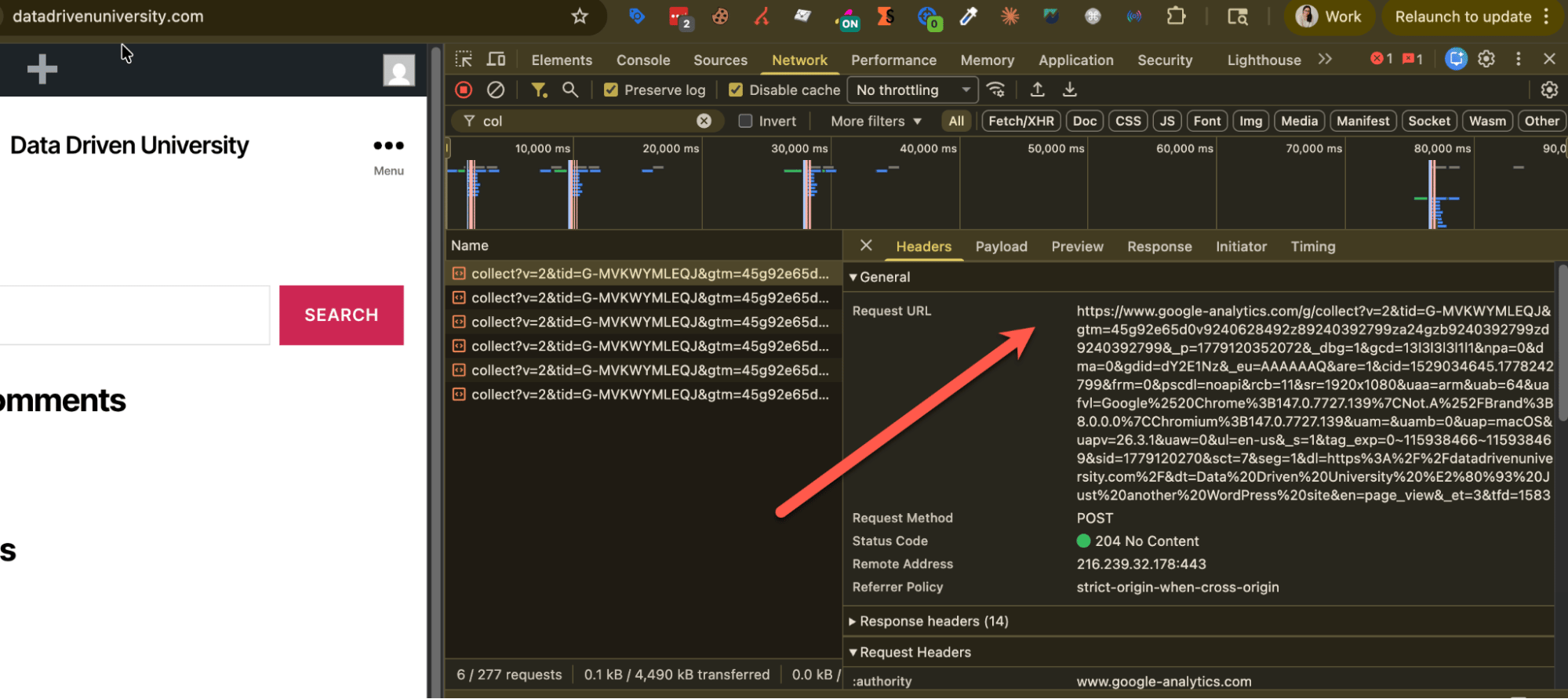
The key to notice is the hostnames are Google domains, not your site domain. That makes these third-party requests, not first-party requests, from the visitor's browser's perspective.
Third-party requests are not a problem, until you start losing data to ad blockers, Safari Intelligent Tracking Prevention (ITP) and just everything else blocking them.
When you are just starting your tracking journey or have a site with low traffic, low-spend, client-side tracking is a great place to start and stay. That said, as traffic increases and marketing budgets go up, you (or your client) really start caring about the gap between "what fired" and "what was actually recorded." That's when first-party tracking enters the conversation.
What is a gateway?
Before we dive into Google Tag Gateway specifically, let's pause and understand what a gateway actually is and how it works.
The true technical definition of a gateway is that it is a reverse proxy. It sits between your visitors and a vendor's endpoint, and it re-fronts the request as if it came from your domain. The contents of the request don't change AT ALL, only the carrier, which is the hostname.
Gateways are everywhere today, for example Meta has the Conversions API Gateway, TikTok has the Events API Gateway and many other platforms are building gateways too. They are popular as every vendor has the same problem: their script runs in the browser, gets blocked and we lose signals. Setting up a gateway is the quickest fix to getting the requests from being third-party to first-party.
As always, I like my analogies, so to help me understand gateways and explain them to clients I have an analogy that seems to land well.
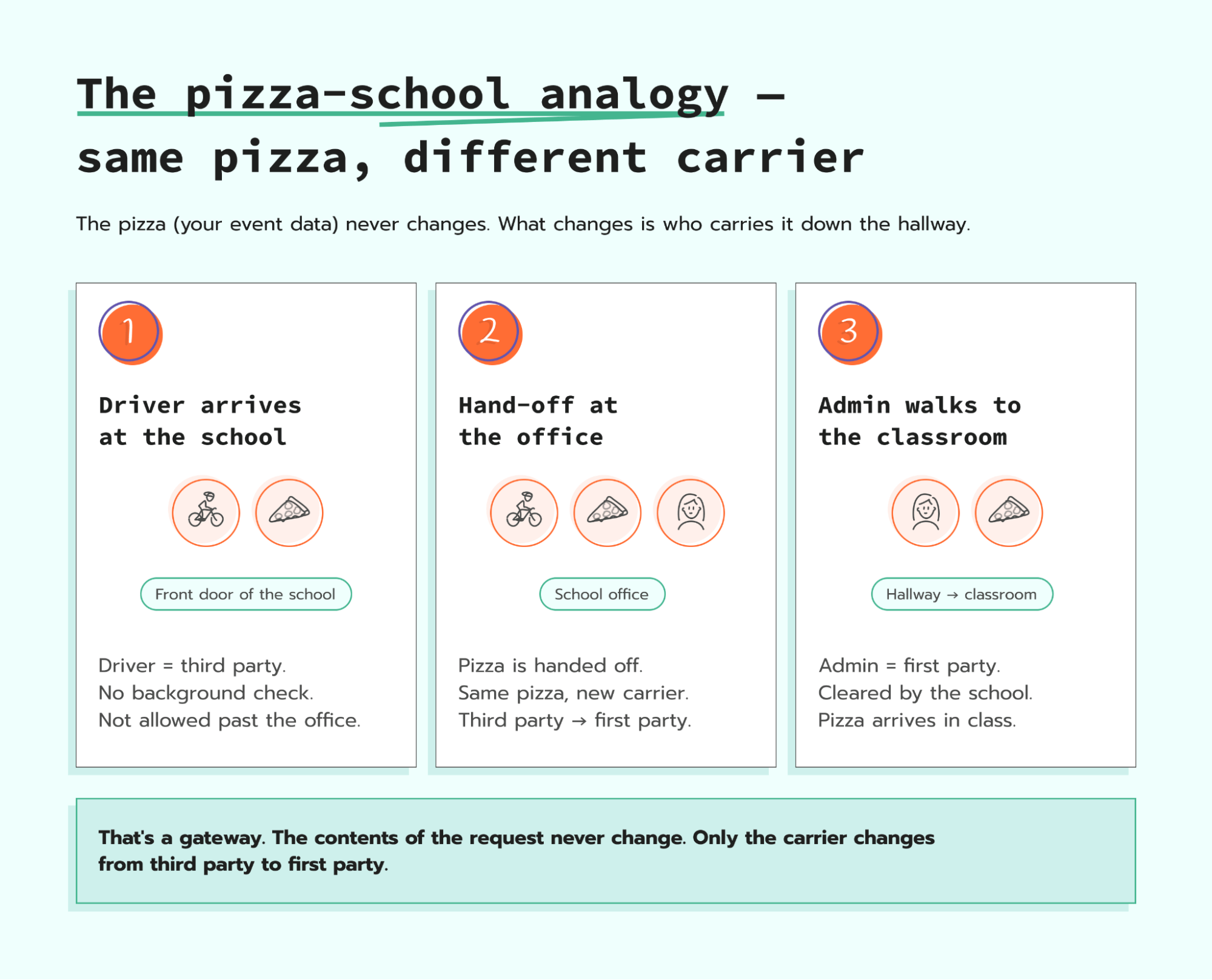
We all attended school at some point in our lives or have kids in school today. Sometimes to celebrate a teacher would order pizza for their class and have it delivered to the school.
Where I live, schools don't let a delivery driver walk into the front door, down the hall, and straight to a classroom. This is because the driver is a third party to the school. They have not completed a background check and they don't have a school ID.
The school's job is to keep third parties like this driver out of the hallways during the day to keep the students safe.
Instead, the driver doesn't take the pizza directly to the class. Their job is to go to the school, walk into the front office, hand the pizza over to a school admin, and then the admin walks the pizza the rest of the way to the classroom.
The pizza that arrives in the classroom is the exact same pizza that the driver brought to the school. It's still a pepperoni pizza, still warm, and still in the same box. What changed is the person carrying the pizza down the hallway. Instead of a third-party driver carrying it, it is carried by a first-party school admin who has gone through all the required background checks and is allowed in the hallways. The class receives the exact same pizza, but the hand off from the school's perspective looks completely different.
In simple terms, that's a gateway.
The contents of the request didn't change. It was still a pizza, but the person carrying the pizza changed. Everyone who saw the pizza walking through the hall had no issues with it, because the school admin was first-party to the school. They worked at the school and were cleared to be there.
On the other hand, if the driver had walked through the school, it would have been a problem. They most likely would have been blocked from going in at all, or stopped somewhere along the way, because they're not allowed in the school.
What is Google Tag Gateway?
Now that we have a handle on what a gateway is, let's dive into Google Tag Gateway (GTG).
Here is Google's own definition, straight from their help page:
Google Tag Gateway for advertisers allows you to deploy a Google tag or GTM container using your own domain, enhancing data privacy and improving signal measurement recovery.
In plain terms, GTG is a reverse proxy that flips the hostname of your GA4 and Google Ads requests from Google's domains to your site domain. The contents of the requests, such as the events, parameters, cookies, and consent state, don't change, just the carrier. Think back to the pizza analogy: the pizza stayed the same, only the carrier changed.
Before we go any deeper into GTG there are a few important details you need to know...
- GTG is Google-only - GTG is designed to only re-front Google scripts such as GA4 and Google Ads. That means Meta Pixel, LinkedIn Insight, or any other requests will remain third-party requests.
- Cookies remain as JavaScript cookies - GTG does not change how cookies are set. The browser still runs the GA4 client script and any cookies are still written via JavaScript. So you can still be limited by Safari ITP's 7-day cap on JavaScript cookies.
- GTG on its own does not transform or remove data - GTG doesn't allow you to adjust or modify any data in the actual request. It only adjusts the header; the request body (the contents of the request) remain the exact same.
It is key to understand those three details, as they are important when you are considering Google Tag Gateway vs server-side Tag Manager.
Three ways to implement Google Tag Gateway
Google's documentation page outlines three implementation options for GTG. Each one moves a different part of your tracking from third-party to first-party, and each comes with its own level of complexity. I set all three up on my own demo site, datadrivenuniversity.com, so for each option you'll see a real before and after image of how the tracking changed.
One thing I want to flag before we dive in. Google presents these as three separate options, but after setting up each one, I don't think of them that way. Instead I feel that each option builds on the previous one. This is my personal opinion based on my experience, with that out of the way let's dive into each option.
Option #1 – make your GA4 (and Google Ads) requests first-party
This is the simplest version of GTG as you don't need to adjust any of your existing setup and it only takes a few clicks.
What changes: GA4 collects and Google Ads conversions fire using your-domain.com instead of google-analytics.com / googleads.g.doubleclick.net. They become first-party requests.
What does not change: the GTM container script itself is still loading from googletagmanager.com. I confirmed this in my own setup. The contents of your GA4 and GAds request remain exactly the same as well.
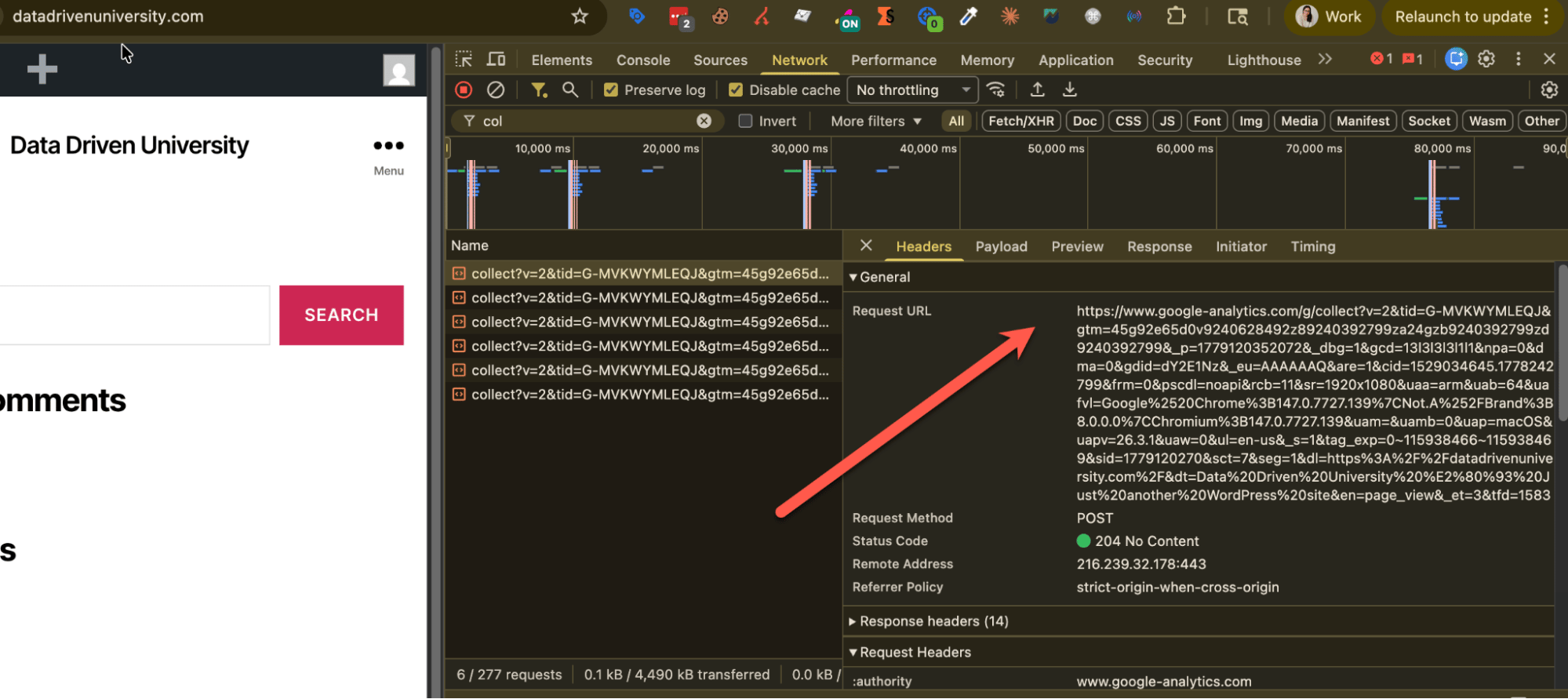
To show you this in action, I set up Google Tag Gateway using Cloudflare on my test site datadrivenuniversity.com. Below is what my GA4 requests looked like before I had Google Tag Gateway running.
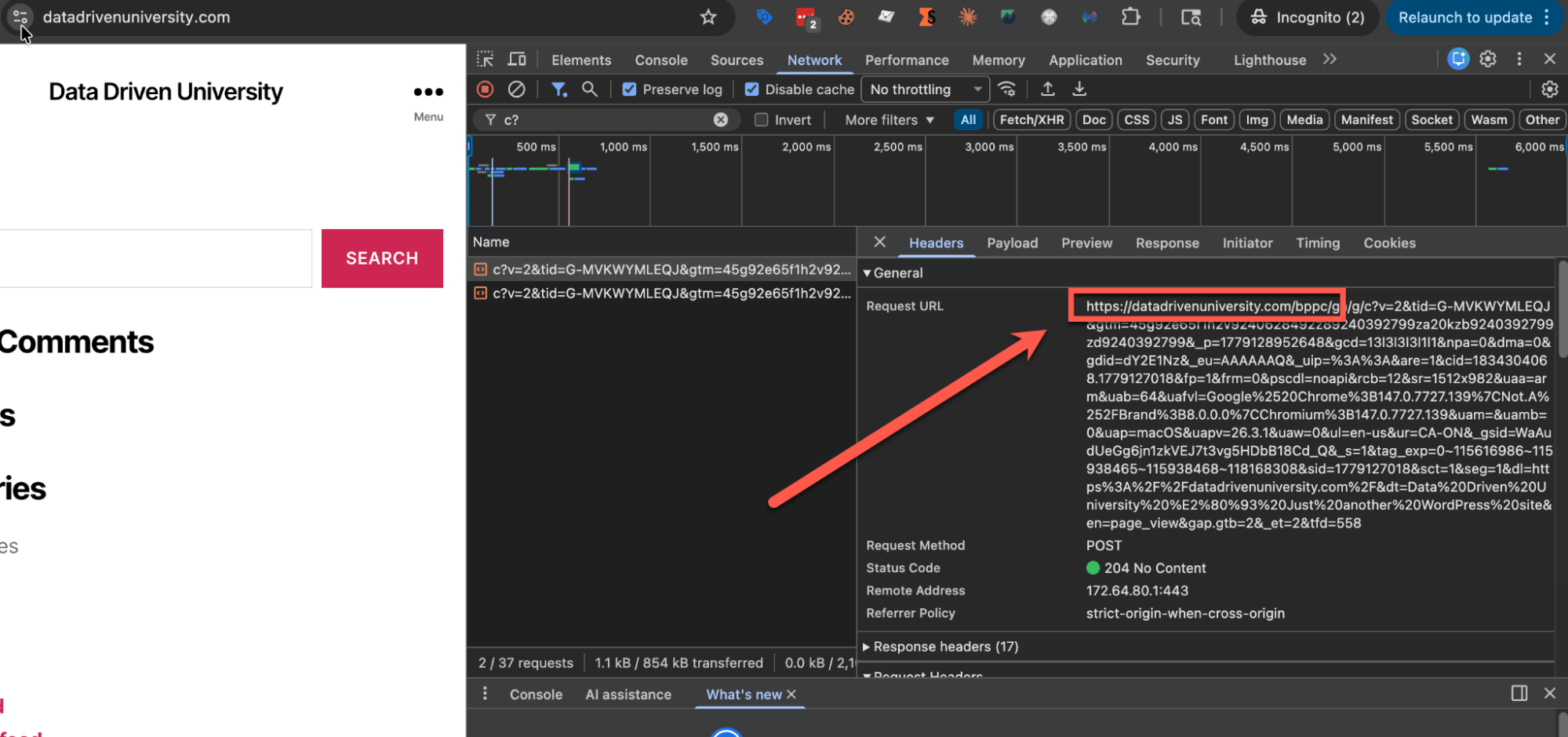
Then I set up GTG using Cloudflare and GTM. The whole setup took about three clicks. After that, you can see the same GA4 hit is now coming through my own domain datadrivenuniversity.com/bppc.
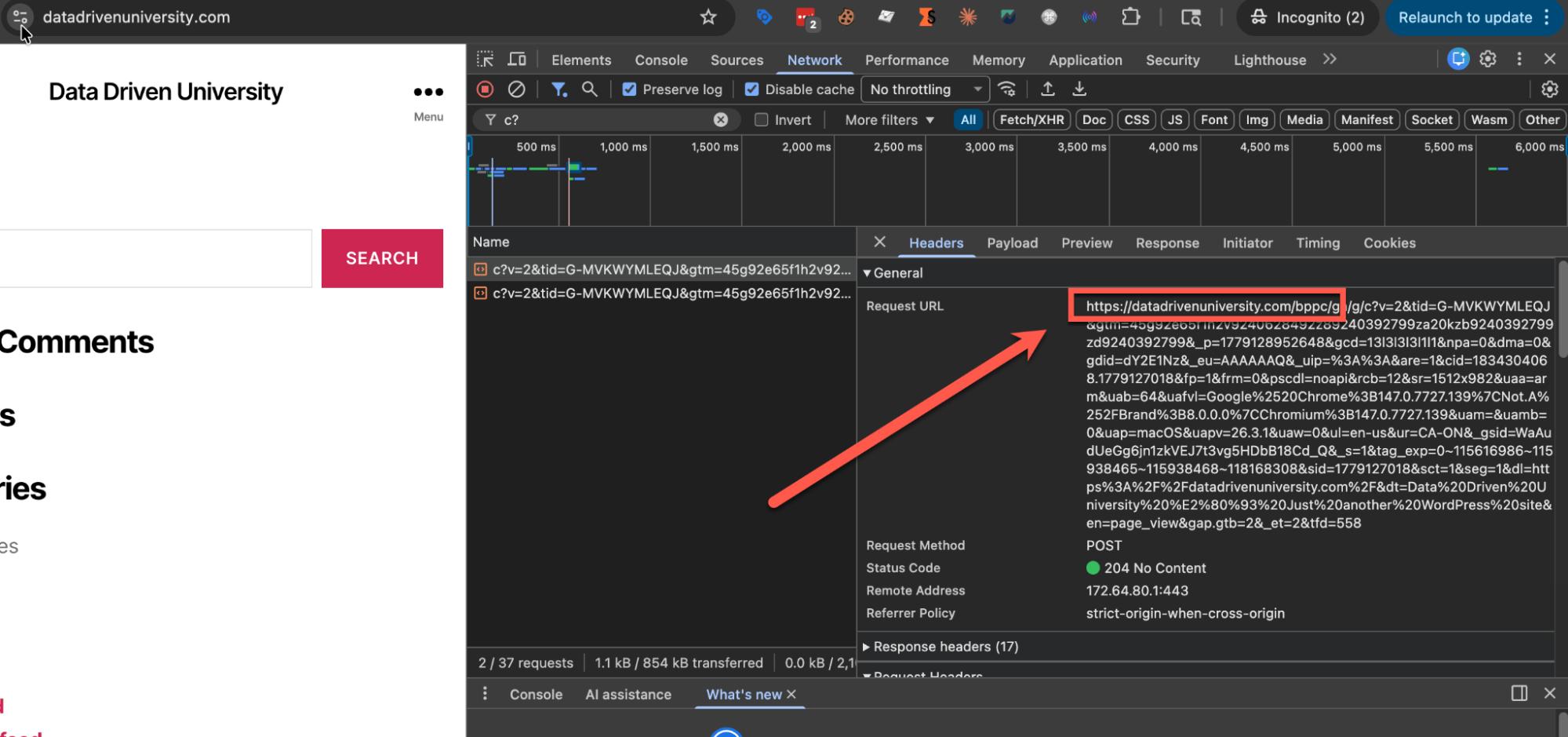
Note: you will notice the GA4 hits are now named starting with c? instead of collect?, this is because of GTG.
With this implementation I've moved my GA4 requests from third-party to first-party requests. They're now routing through datadrivenuniversity.com/bppc instead of google-analytics.com. The same applies to my Google Ads conversions, which flip from googleads.g.doubleclick.net to the same first-party path.
Option #2 – move your GTM container to first-party
When I was testing Option 1, the one thing I noticed was that my Google Ads and GA4 requests moved to first-party, but my Google Tag Manager container script was still loading from googletagmanager.com. GTM was still a third-party request and this is where Option 2 comes in.
What changes: gtm.js now loads from your own domain, for example datadrivenuniversity.com/metrics/custom-path, instead of googletagmanager.com. Now your GTM, GA4, and Google Ads are all first-party hits from the visitor's browser perspective.
The way I set this up was with an sGTM container, using a Google Tag Manager: web container client that allows me to load the web GTM container from the server container and set a custom path. There are other ways to make GTM first-party, but sGTM is the path I tested.
What does not change: your non-Google hits, such as Meta Pixel, TikTok Pixel, LinkedIn Insight, and any other non-Google tag still remain third-party requests.
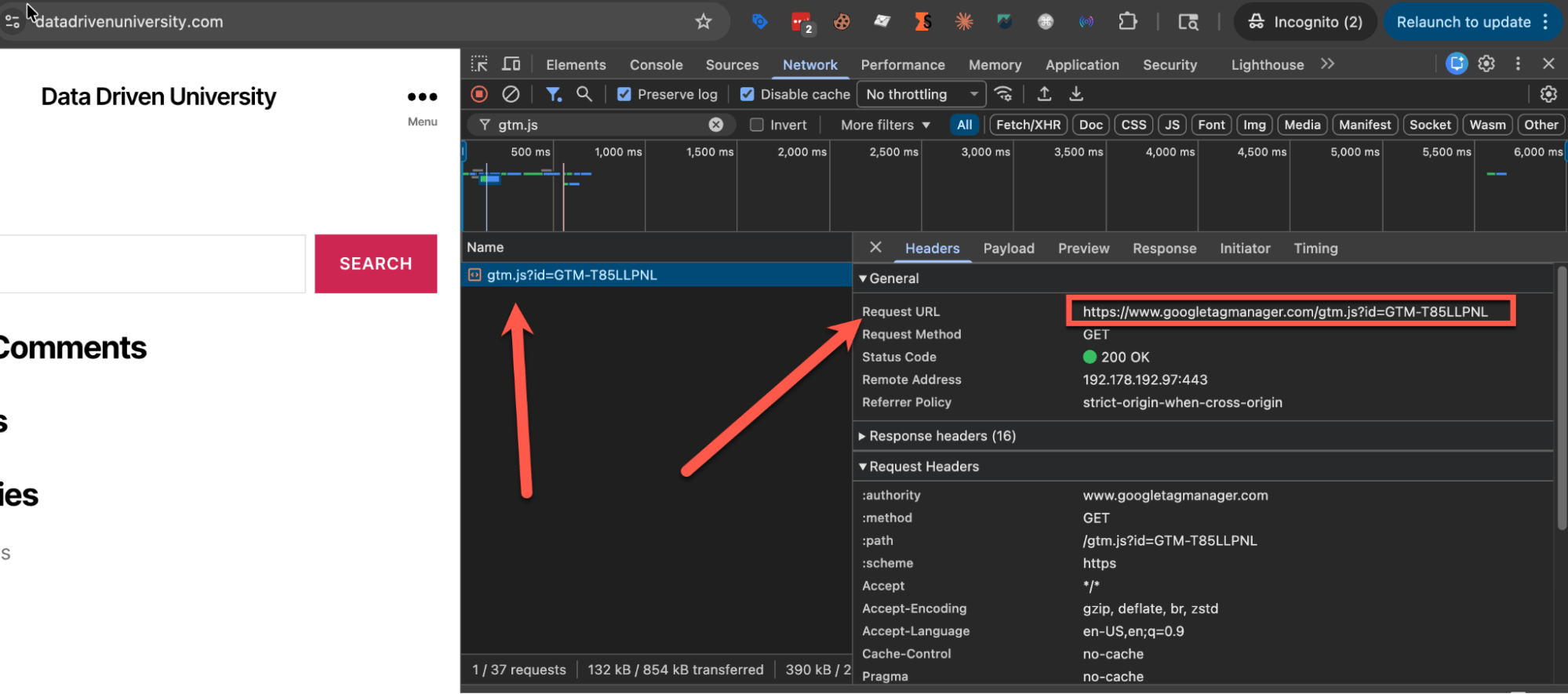
To show you this in action, here's what my web GTM container script looked like in DevTools before I added the sGTM container and had it load my web container.
After standing up a server and setting the sGTM container, where I set up a client and specified the tag serving path, here is the request now using my domain and custom path.
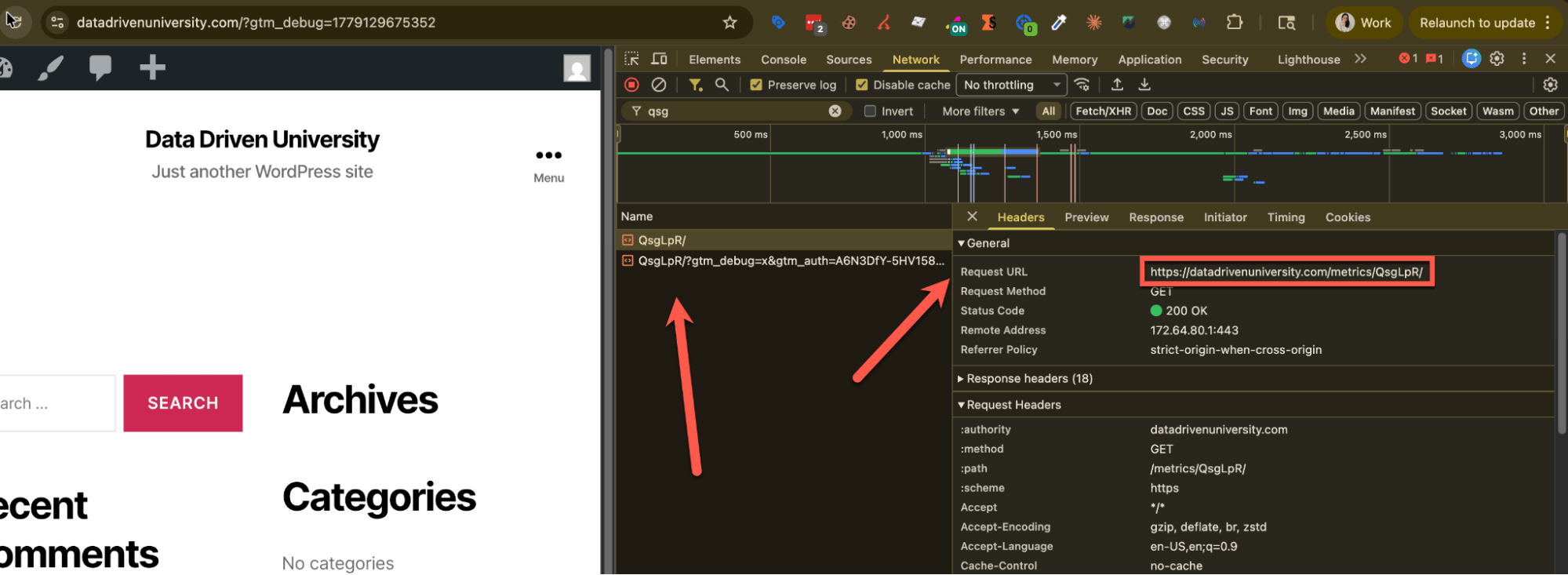
At this point, I have my GA4 and Google Ads requests coming through Cloudflare as first-party, and my sGTM container loading my GTM web container from a first-party domain too. All other platforms are still third-party.
Option #3 – GTG with CDN and sGTM (Google's recommended setup)
Option 3 is the recommended GTG implementation by Google, and the truth is this was the most confusing to get set up and understand. It also changed how I think about GTG versus server-side tracking, but I'll save that take for the wrap-up so it lands after you've seen the full setup.
A quick recap of where we are:
- In Option 1 we moved our GA4/Google Ads requests from third-party to first-party via the gateway (e.g. Cloudflare). This means requests for both GA4/GAds (Google only) scripts and data collection moved to first-party.
- In Option 2 we moved our GTM container script from third-party to first-party via a server container, our data collection for Google only tracking still remained using the gateway.
- In Option 3, our scripts keep loading exactly the same way (GA4 scripts via the gateway, GTM via the sGTM container). What changes is the data collection routes through the server allowing you to transform it before it heads downstream.
What changes: Instead of our event data flowing through the CDN as first-party hits routed straight to Google, the data now flows through our sGTM container. The sGTM container receives the events, and from there we can transform, enrich, or strip the data before it goes anywhere downstream. In effect, server-side tagging is running in parallel with GTG. We're using both at the same time.
This setup also opens the door to moving non-Google tags, such as Facebook, LinkedIn, and TikTok, to first-party. That said, it would require us to set up those tags in our sGTM container and do a full server-side implementation. Once we complete that setup in the sGTM container, those hits also flow through the server and become first-party hits too.
What does not change: Our GTM container script is still served from our sGTM server (carried over from Option 2). The GA4 config calls are still served from our CDN (carried over from Option 1).
To show you this in action, here's what my GA4 collect hits looked like in Option 2, flowing through my Cloudflare path.
After setting the server container URL in my GTM web container config tag and configuring a GA4 client and tag in my sGTM container, my collects now flow through the sGTM server.
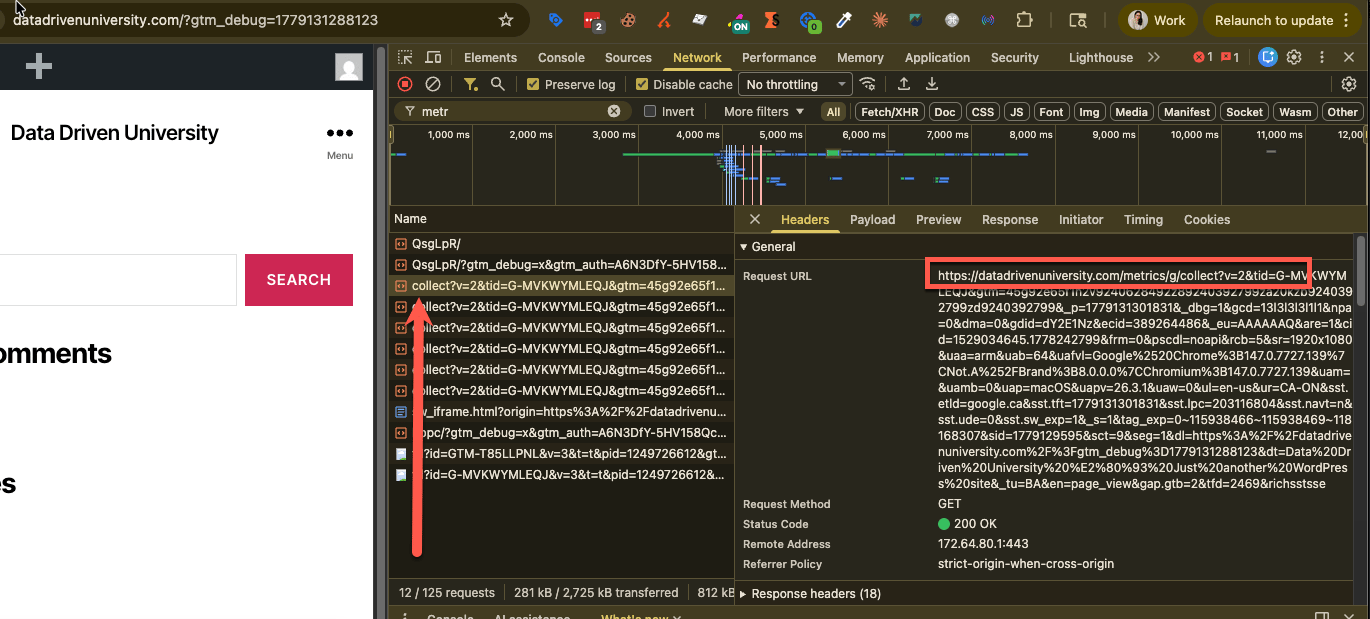
With this implementation, my GA4 event data collection now flows through my sGTM container, where I can route, enrich, or strip the data before it goes anywhere downstream. The same can be applied to any other platform including non-Google platforms as long as I set up the required tags and triggers in my web/server container.
How Google Tag Gateway compares to server-side GTM
Now that we understand what Google Tag Gateway is and the three ways to implement it, the next natural question I always get is: how is Google Tag Gateway different from server-side tracking?
In my opinion, they are not competing products.
Google Tag Gateway, specifically Option 1, is about routing your events so they move from third-party to first-party at the request-header level. Server-side tracking is about control: having more control over your data and as a result moving to first-party tracking. You can see this in Google's own documentation, where in Option 3 outlined above, to get more control over your data, you have to introduce a server container and route your events through that container.
To help explain the difference between the two, here is a quick comparison table:
| Google Tag Gateway | Server-side GTM | |
| What it is | A reverse proxy that re-fronts requests so the header is first-party. | A server that lets you transform data before you send it downstream to other platforms. |
| What it changes | Only the hostname on the requests. Data in the request does not change. | The data itself, which you can transform, enrich, strip, gate, and route based on your needs. |
| What it sends to | Google only (GA4, Google Ads, GTM). | Any vendor, including Google, Meta CAPI, TikTok Events API, LinkedIn CAPI, custom endpoints, BigQuery, and your CRM. |
| Effort to set up | Low - Three clicks if you're on a supported CDN and only want to move Google tracking to first-party (Option 1) | Medium - A server, server container, configuration, and ongoing tag work as needed |
| Cost | Free (your CDN bill, if any). | Server hosting cost (Stape, Google Cloud, etc.). |
To sum it up, Google Tag Gateway and server-side tracking are not competing products. One moves you quickly to first-party tracking, purely from a request perspective. The other gives you full control of your data. You could start with one and upgrade to the other as your needs change, and that is exactly where the decision framework comes in.
Google Tag Gateway vs server-side tracking: a decision framework
Deciding between Google Tag Gateway, server-side tracking, or even staying on client-side tracking is one of the most common questions I get, both at MeasureU and from the LinkedIn community. It's also one of the first things clients ask when we start implementation work. That is why I put together a decision framework to help make that decision.
The key thing to know is that this framework is not designed to be run once. You go through it once and then you come back to it time and time again as your measurement journey continues. You might start on client-side tracking, upgrade to GTG, and later move to server-side tracking as your needs change.
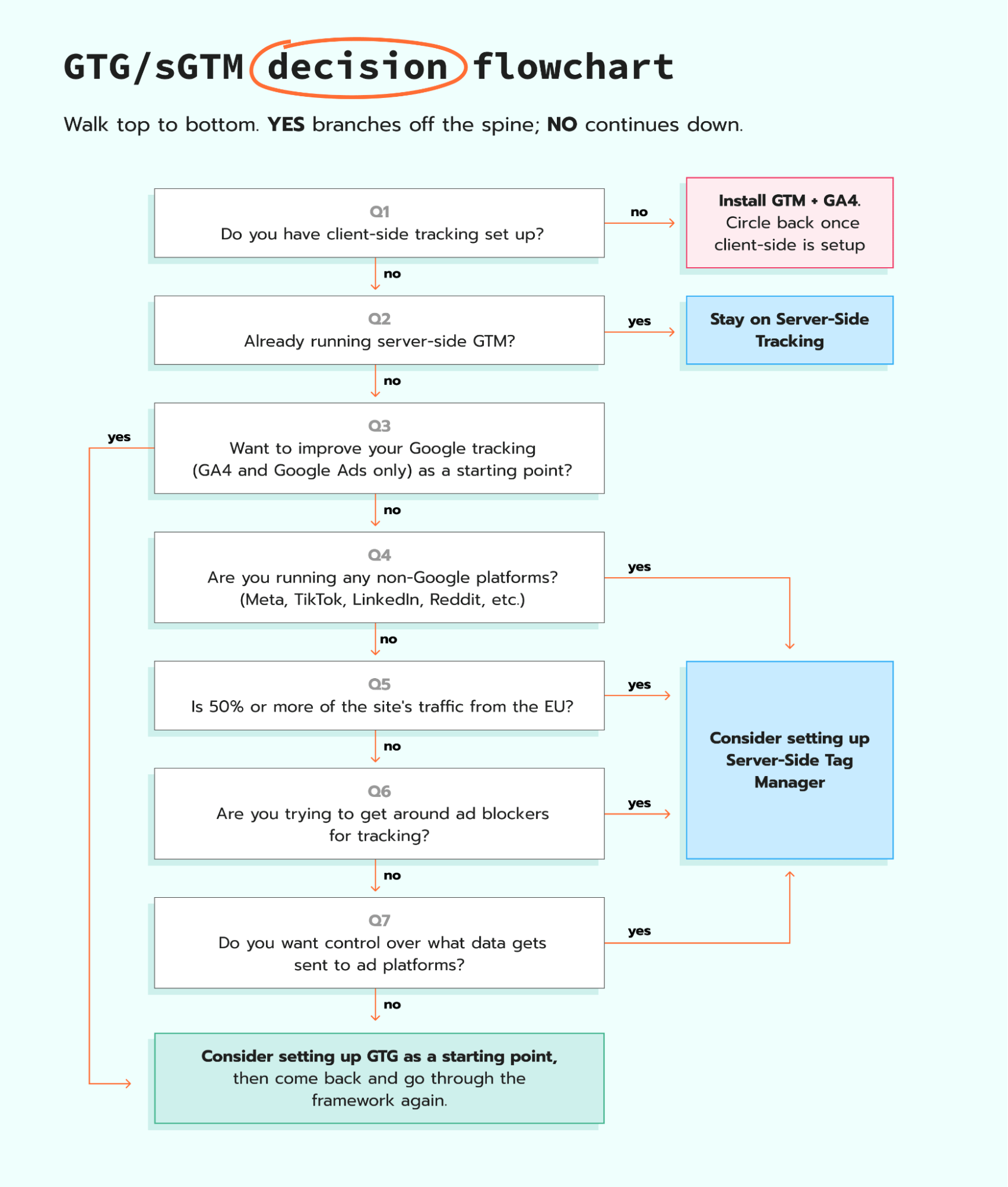
Go through the framework today and figure out where you are on your journey. Then, after a few weeks or months of work, circle back and run through it again. Use it as your guide for when to enhance your measurement for either you or your client's site.
Wrapping up
In my personal opinion, after trying and testing Google Tag Gateway, it is a great quick win for Google-only tracking. If you just do Option 1, in about three clicks your GA4 and Google Ads switched from third-party to first-party requests.
That said, as we saw in Google's own documentation, the moment you want more control over your data you have to move to Option 3. That means standing up a server and a server container, then routing your data collection through the sGTM container. Every organization has their own measurement stack, a different level of traffic, and requirements for control over their data. That is exactly what the decision framework is for, and it is why I built it to be run more than once.
As someone who has done both: Google Tag Gateway, specifically Option 1, is a great quick win for Google tracking only. That said, my personal opinion is, if you truly want control of your data across every platform, Option 3 is actually more work than just doing server-side tracking from the start, because you would be doing most of that work anyway. If that is where you are headed, I recommend you go straight to server-side tracking. You can spin up your own server and container here.
Want to try the server side?
Try for freeRecommended for you
Sep 19, 2025
Blog
sGTM vs Gateways: what to choose and why
sGTM gives full control across platforms, while Gateways offer a platform-focused setup for Google, Meta, TikTok, Snapchat.
Sep 11, 2026

Comments