How to track affiliate conversions and pay partners correctly
Written by
Maryna Semidubarska
Key takeaways:
- Affiliate conversion tracking shows which affiliate, partner, or publisher helped bring a sale, lead, signup, or another valuable action.
- Server-side affiliate tracking gives brands more complete conversion data because the final conversion signal is sent from the server side, not only from the user's browser. In a test of 150,000 tracking calls, server-side tracking saved 12.6% more affiliate cookies than browser-only tracking.
- Browser-only tracking is weaker today because Safari blocks third-party cookies by default, Firefox blocks cross-site tracking cookies by default, and Chrome users control third-party cookies through privacy settings.
What is affiliate conversion tracking?
Affiliate conversion tracking is the process of tracking actions that come from affiliate partners.
A conversion can be:
- A product purchase.
- A lead form.
- A trial signup.
- A subscription.
- A booked call.
- An app install.
- An offline sale matched later in CRM.
The tracking system connects this action to the affiliate who sent the visitor.
How does affiliate tracking work?
Affiliate tracking works by connecting an affiliate click to the final conversion.
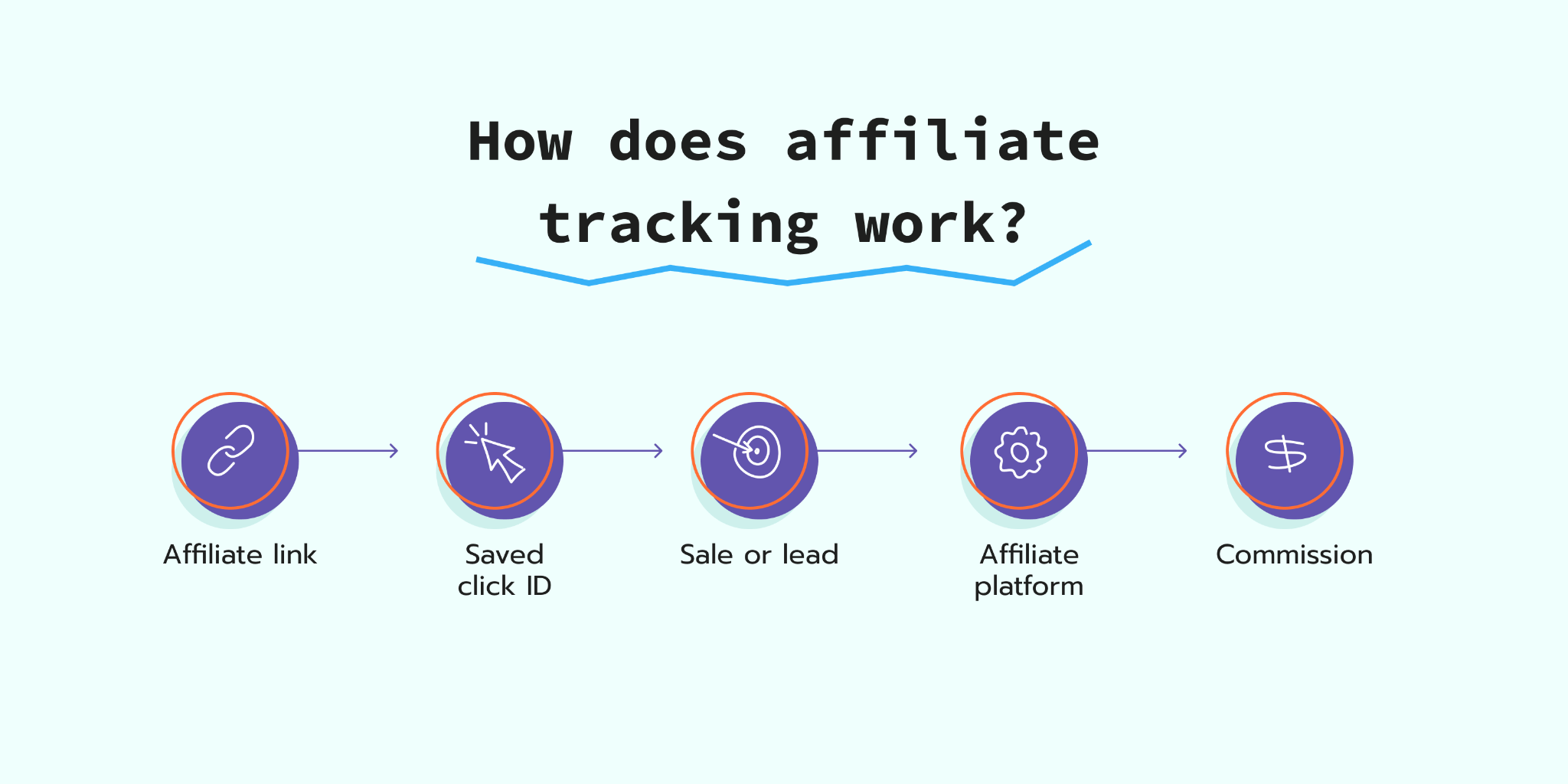
The tracking flow works like this:
- 1.The affiliate promotes a product, service, or offer.
- 2.A user clicks the affiliate link.
- 3.The website receives the affiliate ID, click ID, partner ID, or campaign parameter.
- 4.The website saves this value so it can remember which affiliate sent the visitor.
- 5.The user browses, compares products, leaves the site, or comes back later.
- 6.Later, the user buys something, signs up, or sends a form.
- 7.The conversion tag, pixel, or server-side event sends the conversion details to the affiliate platform.
- 8.The affiliate platform matches the conversion with the affiliate that receives credit under the program rules.
- 9.The platform calculates the commission.
A conversion event normally includes:
- Order ID
- Conversion value
- Currency
- Product data
- Click ID or affiliate ID
- Event time
- Customer or lead ID, if allowed
- Consent status, if required by the setup
Server-side affiliate tracking with server GTM follows the same logic, with the conversion request passing through the server GTM container before it is sent to the affiliate network.
6 key ways to track affiliate conversions
There are six common ways to track affiliate conversions. Each one has a different level of accuracy, setup work, and browser risk.
| Tracking method | How it works | Best for | Main limit |
|---|---|---|---|
| Affiliate links | The link passes the affiliate ID or click ID in the URL | Most affiliate programs | The ID must be stored and connected to the final conversion |
| Cookies | The site stores the affiliate ID in a cookie after the click | Web purchases and lead forms | Browser limits and consent rules affect cookies |
| Pixel tracking | A browser pixel fires on the conversion page | Basic programs and quick setups | Ad blockers, browser limits, and consent choices affect it |
| Server-side tracking | The server sends conversion data to the affiliate platform | More stable conversion tracking | Needs a setup and correct event mapping |
| Promo codes | Each affiliate gets a unique code | Influencers, podcasts, and offline mentions | Users forget codes or share them outside the original partner |
| CRM or offline import | Leads or sales are matched later using lead ID, order ID, phone number, email hash, or promo code | Long sales cycles and offline sales | Needs clean CRM data and strict matching rules |
Server-side tracking is the stronger option for the final conversion signal because it sends the conversion from the advertiser's server side to the affiliate network.
What are the key benefits of proper affiliate tracking?
Proper affiliate tracking helps brands pay partners fairly and avoid making budget decisions on incomplete data.
The main benefits are:
- More complete conversion data. Browser-only tracking misses more events because of browser restrictions, blockers, consent choices, and broken checkout flows.
- Fair commission payouts. Affiliates get credit when their traffic leads to sales.
- Cleaner partner reporting. The brand sees which partners bring revenue, and not only clicks.
- Fraud detection. Suspicious clicks, fake leads, cookie stuffing, and unusual conversion patterns are easier to notice.
- ROI control. Teams compare commission cost with revenue, margin, new customer rate, and average order value.
- Stronger partner relationships. Affiliates trust programs that track sales correctly and pay on time.
Affiliate tracking links explained
An affiliate tracking link is a URL that includes partner information.
It can look like this:
https://example.com/product?affiliate_id=123&utm_campaign=spring-sale
Or like this:
https://example.com/product?click_id=abc123
The exact parameter depends on the affiliate network or platform.
Common parameters include:
affiliate_id.partner_id.click_id.sub_id.utm_source.utm_medium.utm_campaign.coupon.
The affiliate link tells the tracking system who sent the visitor.
The link works like a name tag. When the visitor arrives, the website reads the name tag and stores it. When the visitor buys later, the system checks the stored value and sends it with the conversion.
How to increase affiliate conversions and ROI?
To improve affiliate ROI, the brand first needs to know which partners bring valuable sales or leads. Then it can reward strong partners and pause partnerships that bring refunds or low-quality conversions.
First, measure what affiliates bring:
- Conversion rate.
- Revenue.
- Average order value.
- Gross margin.
- New customer rate.
- Refund rate.
- Cancellation rate.
- Commission cost.
- Partner-level ROI.
Then, improve the setup step by step.
1. Track the full funnel.
Do not track only the final purchase. Track clicks, product views, add_to_cart, checkout starts, leads, purchases, refunds, and cancellations where relevant.
This helps you see where affiliate traffic drops.
2. Use server-side tracking for final conversions.
Browser pixels are useful for fast setup, but the final sale is too important to depend only on the browser.
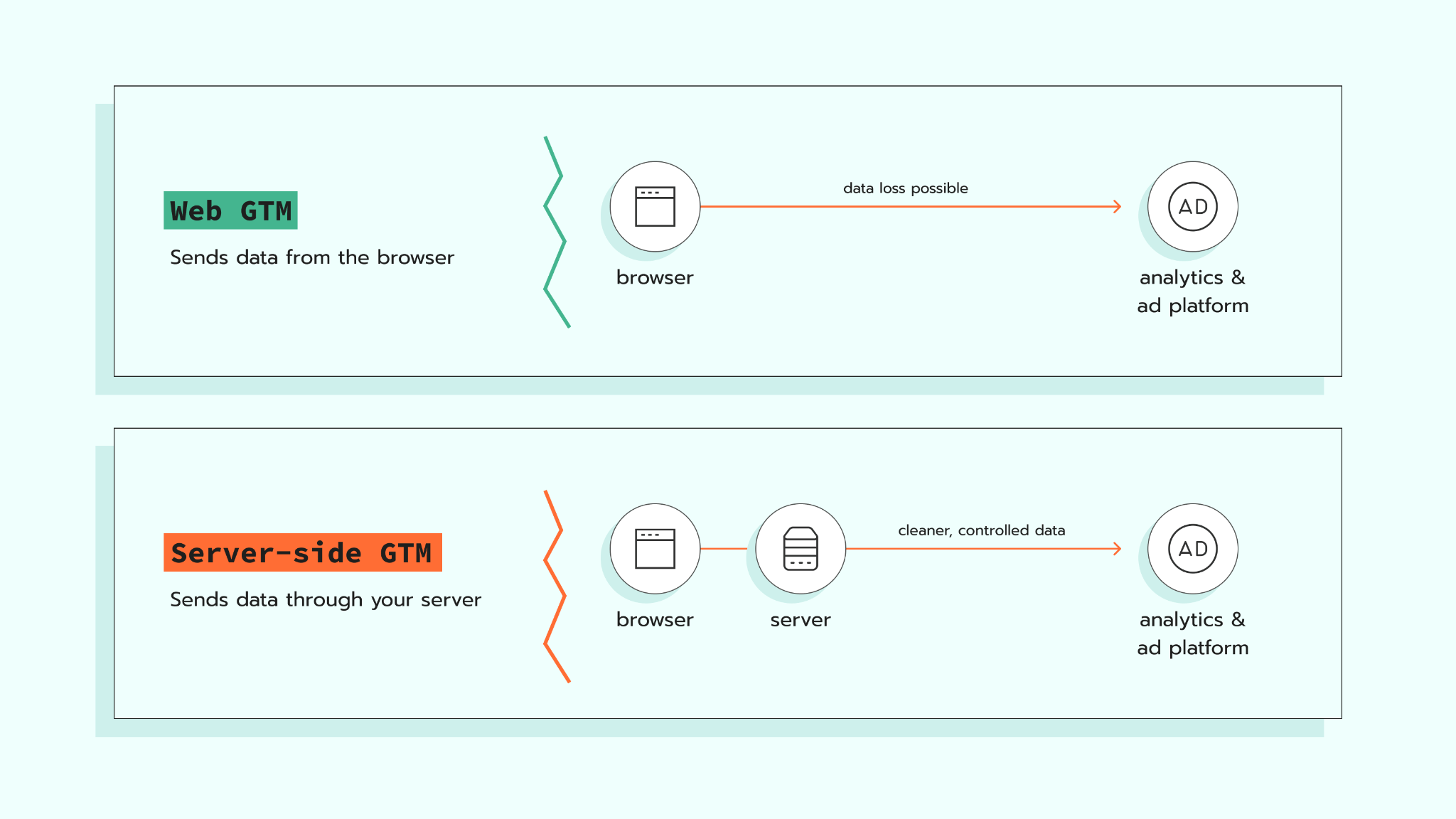
With server-side affiliate tracking, the browser collects the first click and saves the affiliate ID or click ID in a cookie. When the user converts, the sGTM container sends the conversion request to the affiliate platform with the needed parameters.
This gives the business a more stable way to credit final conversions. Working with an experienced Google Tag Manager consultant can help ensure these sGTM tags and cookie parameters are configured properly. It also reduces the number of affiliate JavaScript tags running in the browser, which supports page speed and gives the company more control over what data goes to affiliate networks.
For affiliates, the benefit is direct too. More valid conversions are counted, so commissions are less likely to be lost because of browser limits, cookie restrictions, or blocked client-side scripts.
3. Check partner quality.
Do not judge affiliates only by clicks.
Look at:
- Sales.
- Revenue.
- Refunds.
- New customers.
- Repeat purchases.
- Fraud signals.
- Assisted conversions.
4. Use commission tiers.
Pay more for partners who bring high-value customers.
Pay less or remove partners who bring low-quality leads, fake traffic, or many refunds.
5. Improve landing pages.
Affiliate traffic converts when the landing page matches the promise in the affiliate content.
Check:
- Page speed.
- Mobile layout.
- Product details.
- Price clarity.
- Reviews.
- Checkout flow.
- Payment options.
6. Measure ROI after tracking is stable.
Before changing commissions or partner budgets, check that the data flow is complete. To improve affiliate ROI with more complete conversion data, brands need to connect the full funnel with partner quality, commission costs, refunds, and revenue.
7 best tools for affiliate conversion tracking
The right affiliate tracking tool depends on your setup. Some tools are affiliate networks. Some are partner platforms. Some help with server-side tracking.
| Tool | Best fit | What it helps track |
|---|---|---|
| Stape Affiliate Conversion | Brands that use server Google Tag Manager and want server-side affiliate tracking | Affiliate pageviews and conversions through server GTM |
| Awin | Brands that want an affiliate network with server-to-server options | Affiliate sales, publisher activity, and server-to-server conversions |
| Impact | Brands that manage affiliates, creators, and referrals in one platform | Partner activity, custom tracking, offline conversions, fraud scoring |
| Partnerize | Larger partnership programs that need recruitment, tracking, payment, and fraud prevention tools | Affiliate and partnership performance across partners |
| CJ Affiliate | Brands and publishers that want a large affiliate network | Affiliate sales, publisher relationships, and partner performance |
| Rakuten Advertising | Brands that need affiliate network access and partner discovery | Affiliate performance, publisher relationships, and compliance monitoring |
| Everflow | Brands, agencies, and networks that need partner tracking across channels | Affiliate, influencer, media buying, and performance partner data |
Best practices for affiliate tracking
Affiliate tracking is easier to manage when the rules are set before the program starts growing.
Use these rules:
- Track clicks and conversions with the same ID logic.
- Store click IDs in a first-party context where possible.
- Send order ID with every purchase.
- Send value and currency with every revenue event.
- Pass refunds and cancellations back to the affiliate platform.
- Keep consent logic connected to the tracking setup.
- Test in Safari, Firefox, Chrome, and mobile browsers.
- Compare affiliate platform data with GA4, CRM, eCommerce backend, and payment data.
- Create rules for cookie lifetime, attribution window, and commission approval.
- Review suspicious partner patterns every month.
Client-side and S2S affiliate tracking: which one should you use?
Client-side tracking runs in the user's browser. Server-to-server (S2S) tracking sends the final conversion from the server side.
Compare the two methods before choosing the setup:
| Point | Client-side tracking | S2S tracking |
|---|---|---|
| Where it runs | Browser | Server side |
| Common setup | JavaScript tag or pixel | API, postback, or server GTM tag |
| Setup speed | Faster | More technical |
| Browser risk | Higher | Lower |
| Consent needs | Yes, when required | Yes, when required |
| Best use | Pageviews, clicks, basic events | Final conversions, revenue, backend-confirmed events |
| Main weakness | Browser limits and blockers | Needs correct backend or sGTM setup |
The strongest setup uses both. Client-side tracking helps collect the click and browser events. Server-side tracking sends the confirmed conversion with the right click ID, order ID, value, and commission data.
Affiliate marketing conversion rates by niche
Affiliate conversion rates change by niche, price, brand trust, traffic quality, partner type, and tracking setup.
Public benchmark data should be used as a direction, not as a fixed rule. Impact's 2025 affiliate benchmark found that clicks grew 2% year over year, while conversion rates fell 6%, which shows how user research behavior affects affiliate results.
Use this table as a planning guide:
| Niche | Typical conversion pattern | Why it happens |
|---|---|---|
| Fashion and apparel | Medium to low | Many users compare prices, sizes, and return policies |
| Beauty and wellness | Medium | Reviews and creator content influence buying, but users research ingredients and trust signals |
| Home and garden | Medium to high when demand is active | Users buy when they have a clear need, but they compare products first |
| Electronics | Lower for expensive products | Users compare specs, prices, reviews, and warranties |
| SaaS and B2B | Low on purchase, higher on trial or demo | Sales cycles are longer and decisions include more people |
| Finance | Lower volume, higher value | Trust, regulation, and approval steps affect conversion |
| Travel | Seasonal and price-sensitive | Users compare dates, prices, and cancellation terms |
The safest benchmark is your own program data.
Compare conversion rates by:
- Affiliate type.
- Landing page.
- Device.
- Country.
- Product category.
- New vs returning customers.
- First click vs last click.
- Commission model.
How to improve affiliate conversion rates
Affiliate conversion rates improve when the partner, promise, landing page, and tracking all match.
Start here:
1. Match partners with the right offer.
A coupon partner, review site, creator, and B2B consultant do not influence users in the same way. Give each partner the offer that fits their audience.
2. Use landing pages for affiliate traffic.
Do not send every click to the homepage.
Use pages with:
- The product from the affiliate content.
- Clear price.
- Clear next step.
- FAQs.
- Reviews.
- Mobile-friendly layout.
3. Remove low-quality partners.
3.1. A partner with many clicks and few sales is not always useful.
Check if they bring:
- Low engagement.
- Strange traffic spikes.
- High refunds.
- Fake leads.
- Many duplicate conversions.
3.2. The conversion rate looks lower when conversions are missing.
Check if purchases are lost because:
- The checkout is on another domain.
- The user pays through a third-party payment page.
- The pixel does not fire after payment.
- Consent is not passed.
- The affiliate ID is not stored long enough.
- The order confirmation page loads too slowly.
4. Test S2S tracking.
Server-side tracking helps send more complete conversion data because the final event is sent from a server and not a browser. Brands need this because third-party cookie changes affect affiliate marketing and make browser-only tracking less stable.
How to track affiliate sales
To track affiliate sales, the brand needs to remember who sent the visitor and connect this visitor with the final sale.
The setup works like this:
1. Add tracking details to affiliate links.
Each affiliate link should include a small value that shows who sent the visitor. It can be an affiliate ID, partner ID, click ID, or sub ID.
2. Save this value on the website.
When the visitor comes to the website, the tracking setup saves this value.
This matters because people do not always buy right away. They may visit the site, leave, and come back later.
3. Send the sale data.
When the visitor buys something, the sale should be sent to the affiliate platform.
The sale data usually includes:
- Order ID.
- Sale value.
- Currency.
- Product ID.
- Coupon code.
- Affiliate ID or click ID.
- Event time.
- Consent status, where required.
4. Match the sale with the affiliate.
The affiliate platform uses the saved value to understand which affiliate brought the sale.
Then it adds the sale to the right affiliate report.
5. Check the sale in your backend.
Compare the affiliate platform with the store backend or payment system.
This helps spot missing sales, duplicate sales, wrong values, or orders that should not be paid out.
6. Send refunds and cancellations.
If the customer cancels the order or asks for a refund, send this update to the affiliate platform.
This helps the brand pay commission only for valid sales.
How to cope with offline conversions in affiliate marketing
Offline conversions happen when the affiliate journey starts online, but the final sale happens outside the website.
Examples include:
- Phone sales.
- In-store purchases.
- Sales team deals.
- CRM-approved leads.
- Bank or insurance approvals.
- Bookings confirmed later.
- Subscription upgrades after a trial.
To track offline conversions, you need a stable ID that connects the online click to the offline sale.
Use:
- Click ID.
- Lead ID.
- Customer ID.
- Order ID.
- Coupon code.
- Phone call tracking number.
- Email hash, where allowed.
- CRM record ID.
The flow looks like this:
- 1.The user clicks the affiliate link.
- 2.The site stores the affiliate ID or click ID.
- 3.The user submits a form, calls, or creates an account.
- 4.The CRM stores the same ID.
- 5.The sale happens later.
- 6.The CRM sends the approved sale back to the affiliate platform.
- 7.The affiliate platform attributes the sale and calculates commission.
How to make affiliate tracking compliant
Affiliate tracking compliance depends on the country, data type, tracking method, and partner model.
For the EU and UK, cookie and tracking rules matter. Sites need a consent mechanism for cookies that are not strictly necessary, and they need to keep consent records for an appropriate period.
For US affiliate content, Federal Trade Commission (FTC) rules also matter. Affiliate disclosures should be easy to see and simple for ordinary consumers to understand.
A compliant setup should cover these points:
- Explain affiliate tracking in the privacy policy.
- Explain cookies and tracking technologies in the cookie policy.
- Collect consent before non-essential affiliate cookies where required.
- Respect consent choices in web GTM, server GTM, pixels, and affiliate tags.
- Do not send personal data that the affiliate platform does not need.
- Sign data processing agreements where needed.
- Keep commission and conversion logs for audits.
- Require affiliates to use clear disclosures.
- Monitor partner claims and traffic sources.
Tracking affiliate conversions across devices explained
Cross-device affiliate tracking means connecting a user journey that starts on one device and converts on another.
Example:
- 1.A user clicks an affiliate link on mobile.
- 2.The user reads the product page.
- 3.Later, the same user buys on a desktop.
- 4.The system needs to connect both sessions.
This is hard because cookies are stored per browser and device.
Common ways to improve cross-device tracking include:
- Logged-in user IDs.
- CRM lead IDs.
- Email capture before purchase.
- Promo codes.
- Affiliate platform matching.
Need to connect affiliate clicks across devices?
Cross-device tracking helps match actions from the same user when they start on mobile and convert later on desktop. This helps affiliate platforms credit the right partner when consent, identifiers, and platform rules allow it.
Do not use fingerprinting as a default solution. It creates privacy risk and can conflict with consent expectations.
How to use JavaScript and pixels for affiliate conversion tracking
JavaScript and pixels are browser-side tracking methods.
They help track:
- Pageviews.
- Clicks.
- Landing page visits.
- Add-to-cart events.
- Checkout starts.
- Purchases.
- Lead forms.
A pixel is a small tracking request that fires when the user reaches a page or completes an action. JavaScript can read URL parameters, store affiliate IDs, and send events to an affiliate platform.
A basic browser-side flow looks like this:
- 1.A user clicks an affiliate link.
- 2.JavaScript reads the affiliate ID from the URL.
- 3.The site stores the affiliate ID.
- 4.The user converts.
- 5.A pixel fires on the thank-you page.
- 6.The affiliate platform receives the conversion.
This setup has limits.
Browser-side tracking is affected by:
- Consent choices.
- Ad blockers.
- Safari and Firefox tracking limits.
- Slow page loading.
- Checkout redirects.
- Payment providers.
- Users closing the page before the pixel fires.
JavaScript and pixels work well for actions that happen in the browser, such as clicks, pageviews, and checkout starts. For purchases, approved leads, refunds, and cancellations, server-side tracking gives the affiliate platform a more stable signal for reporting and commission payouts.
How to analyze and optimize affiliate conversion data
Affiliate data should show partner value, not only partner activity. Do not stop at clicks.
Check these metrics:
| Metric | What it shows |
|---|---|
| Clicks | How much traffic a partner sends |
| Conversion rate | How much traffic turns into action |
| Revenue | How much money the partner brings |
| Average order value | How much users spend per order |
| New customer rate | Whether the partner brings new buyers |
| Refund rate | Whether sales stay valid |
| Commission cost | How much you pay for partner sales |
| ROI | Whether the program brings profitable revenue |
| Time to conversion | How long users take to buy after the click |
| Device split | Where tracking gaps may appear |
Then look for patterns.
Ask:
- Which partners bring high-value customers?
- Which partners bring many clicks but few sales?
- Which partners have many refunds?
- Which landing pages convert affiliate traffic?
- Which devices lose conversions?
- Which countries need different offers?
- Which partners need custom commission rules?
- Which events are missing from tracking?
Affiliate tracking data should lead to action.
Actions include:
- Increase commission for strong partners.
- Lower commission for low-margin products.
- Remove partners with fake or low-quality traffic.
- Create partner-specific landing pages.
- Add server-side tracking for key conversions.
- Fix checkout or cross-domain tracking gaps.
- Send refund and cancellation events back to the affiliate platform.
FAQs
Want to start on the server side?
Try for freeRecommended for you
Case studies
EMQ 9 and Meta CPA reduced by over 50% with server-side tracking | 1900film
See how 1900film reached an EMQ score of 9 and reduced Meta CPA by over 50% using Stape's server-side tracking infrastructure.
May 18, 2026

Comments