Aug 3, 2026
Marketing ROI: calculation, benchmarks, and strategies to improve it
Written by
Maryna Semidubarska
Updated Sep 4, 2026 comments
Many marketers ask themselves: how do I get the maximum from my marketing campaigns?
Often, you don’t need a bigger budget to get better results. You need better tracking and a clearer view of what works.
That is why we’ve made this guide on how to increase marketing ROI, which includes:
- A clear formula for calculating marketing ROI, including which costs to count in addition to ad spend
- ROI benchmarks across email, SEO, and PPC, so you know what results to aim for
- Ways to get cleaner tracking using server-side tracking to capture more conversions and make smarter decisions
- Strategies to increase ROI on Facebook and Google Ads by improving targeting, relevance, and bidding through accurate data
Let’s dive in and learn what marketing ROI is and what to do to get the most out of your marketing campaigns.
What is marketing ROI?
Marketing ROI is the revenue or profit you gain from marketing activities.
For example, if you spend $10,000 on a campaign that generates $50,000 in revenue, your ROI is high, meaning the campaign was efficient and worth the effort.
Marketing ROI matters because it shows the impact of marketing spending on your company's financial success and gives you a concrete way to measure marketing impact across all your channels.
How to calculate marketing ROI
To calculate your marketing ROI, use this formula:
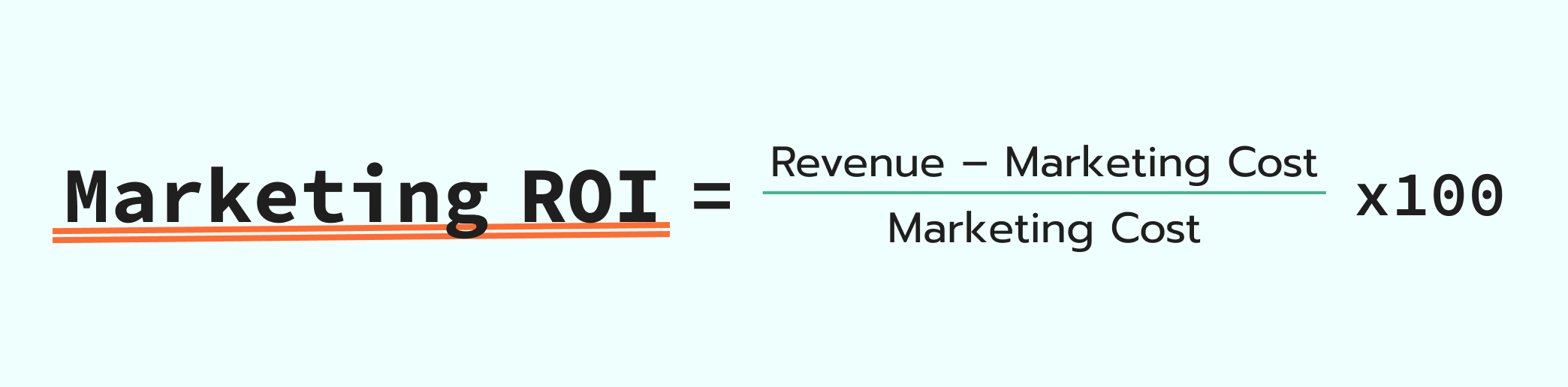
For example, if a campaign cost $10,000 and brought $50,000 in revenue, the ROI would be ((50,000 – 10,000) ÷ 10,000) × 100% = 400%. This means a $4 return for every $1 spent.
💡When analyzing marketing ROI, make sure to understand how it’s different from Return on Ad Spend (ROAS).
ROAS covers only revenue vs. ad spend difference, while Marketing ROI includes all relevant marketing costs.
| Learn how to measure ROAS and estimate the impact of server-side tracking on your CPA. |
Marketing costs typically include:
- Advertising spend: costs for running paid campaigns on Google, Meta, LinkedIn, etc.
- Marketing tools and software: subscriptions to email marketing tools, analytics dashboards, and landing page builders.
- Third-party fees: payments to agencies or freelancers for SEO, copywriting, or design.
- Team salaries: a proportional share of your internal marketing team’s salary.
- Creative production: expenses for hiring photographers or videographers, renting studios, buying props or outfits for shoots, purchasing stock images or videos, and editing services for visuals and video ads.
- Promotions and discounts: costs related to special offers, affiliate commissions, or referral bonuses.
- Event marketing: fees for organizing, sponsoring, or participating in online and offline events.
Marketing ROI benchmarks
Once you understand how to calculate ROI and what expenses to include, you might ask yourself: what’s a good ROI to aim for?
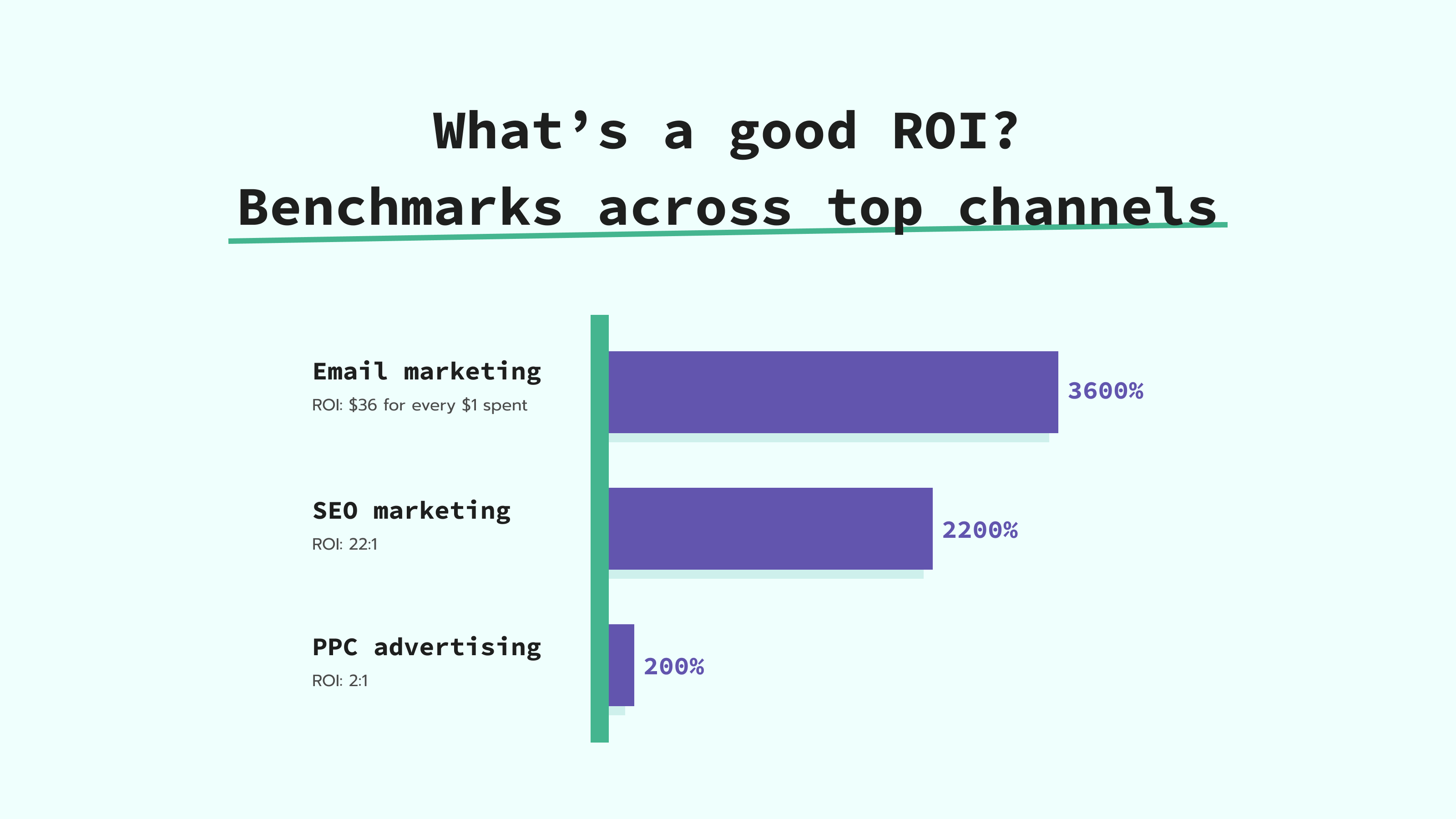
Here are average ROI benchmarks across different marketing channels:
- Email marketing: an average ROI is $36 for every $1 spent, or up to 3,600%;
- SEO marketing: an average return is 22:1, or 2,200% ROI;
- PPC advertising: an average ROI is 200% (19% of businesses call it their most profitable channel).
What is marketing ROI optimization?
Marketing ROI optimization is the process of improving the return on investment from marketing activities by making data-driven decisions. It involves analyzing which channels, campaigns, and touchpoints contribute most to revenue — and marketing ROI improvement starts with adjusting strategies to focus on what works best.
This can include implementing server-side tracking for more accurate data, fixing attribution gaps, and integrating platforms like Google Analytics 4 and Facebook CAPI. The goal is to reduce wasted ad spend, enhance targeting, and increase the efficiency of every marketing dollar.
How server-side tracking can boost marketing ROI
To increase marketing ROI, you need accurate data, and that's exactly what traditional browser-based tracking struggles to deliver.
Browser privacy updates and ad blockers regularly block cookies, pixels, and JavaScript tags, causing purchases, form submissions, and other key events to go untracked. When conversions disappear from your data, campaigns look less effective than they are, and ad platforms can't optimize properly, which drives up cost per acquisition and hurts your overall marketing efficiency.
Server-side tracking fixes this at the source. Instead of relying on the user's browser, data is sent from your server directly to ad platforms like Meta or Google. This means:
- First-party cookies that aren't blocked or shortened by browser restrictions;
- More complete conversion data reaching your ad platforms;
- Better algorithm input, which leads to smarter bidding and lower costs;
- Improved attribution, so you know which channels actually drive revenue.
The result is a clearer picture of what's working, and a direct path to improve marketing ROI without increasing your budget.
Sementa, a Stape partner, saw a 30% increase in data accuracy and a 86.28% lower cost per purchase after switching to server-side tracking.
💡To see it in action, check out Server-Side Tracking Done Right on YouTube, showing how better data improves online marketing ROI.
Strategies to boost ROI and marketing efficiency (with cases)
Strategy and the right tools matter when working on improving your digital advertising ROI. Here are key strategies and case studies to learn from:
1. Track conversions more accurately: if your analytics misses conversions, you’re not seeing the whole picture.
This often happens with traditional web tracking methods like browser cookies or JavaScript tags. Browser privacy updates and ad blockers prevent important actions from being tracked.
Server-side tracking solves this by sending data from your cloud server instead of the browser. Since it bypasses browser restrictions, more customer data can be captured, giving platforms like Meta or Google better input to optimize your ad campaigns.
Real-life example: after switching to server-side tracking with Stape, Hide and Seek’s clients were able to track 15–30% more conversions.
2. Use first-party data to improve ad performance: ad platforms give better results when they receive accurate, first-party data from you.
By sending conversions directly from your cloud server using tools like Meta Conversions API, you help platforms like Facebook or Google understand what actions matter and who took them. This leads to better attribution, smarter targeting, and more efficient campaigns.
Real-life example: after implementing Meta Conversions API with Stape, a client of Forward Media Turkey recorded 93% more conversions, compared to their previous pixel-only setup.
3. Optimize ad spend with better attribution: efficient marketing is a lot about knowing which channels actually drive conversions.
If you use browser-based analytics, your tracking system can miss or mislabel which ad led to the sale or how the customer found you because of browser limits, privacy settings, or blocked scripts.
This way, it is hard to tell which campaigns are actually working, and platforms like Meta don’t get the customer data they need to improve targeting.
Server-side tracking fixes that by sending accurate data directly from your cloud server, helping platforms deliver your ads to people who are more likely to convert.
Real-life example: New Path Digital helped their client, a public university, reach 100% more conversions and reduce cost per acquisition by 56.64% by switching to server-side tracking by Stape.
Key tools for marketing efficiency improvement
The right tools are as important as strategy when increasing your marketing ROI.
The right setup can help you collect cleaner data, fix broken attribution, and avoid wasting budget on ineffective campaigns, all of which directly increase marketing efficiency.
Here are the key tools marketers use to track results more accurately, avoid losing data, and get more conversions at a lower cost:
1. Conversions APIs (CAPI) and API Gateways
Conversions APIs let you send events like purchases or signups directly from your cloud server to platforms like Meta, TikTok, or Snapchat.
This helps recover data lost due to browser restrictions and gives platforms the context they need to optimize your campaigns.
If you’re tracking for just one platform, dedicated gateways can simplify the setup. They come preconfigured, so you don’t have to build out the server GTM manually.
- Meta Gateway: a quick way to send events to Meta using Conversions API.
- Stape Gateway: built for Google Ads and Google Analytics 4 (GA4). It automatically sets up the core tags in your server container.
- TikTok Events API Gateway: helps send conversions to TikTok with minimal setup.
- Snapchat CAPI Gateway: lets you track Snapchat conversions server-side, even when browser tracking fails.
Each gateway is tailored to its platform, so you get accurate tracking with less manual work.
2. Cookie Keeper and Custom Loader by Stape
These power-ups from Stape help you collect more complete data when using server-side tagging.
- Cookie Keeper keeps your first-party cookies alive for up to 180 days instead of just 7, helping you keep attribution data for longer.
- Custom Loader makes your tracking scripts look native to your domain, which helps bypass ad blockers and privacy restrictions.
Together, they strengthen your server-side setup and improve marketing efficiency by making sure your data doesn't disappear along the way.
3. Analytics platforms
To increase your marketing ROI, you need to see the full customer journey.
Tools like GA4, Matomo,or Piwik PRO can help you understand which channels and actions actually lead to conversions.
But to get reliable insights, your data needs to be complete. And server-side tracking makes that possible.
It helps send cleaner, more accurate data to any analytics platform you use by reducing losses from browser restrictions, blocked scripts, or short-lived cookies.
Use server-side setups to feed your analytics tools with the full picture, so your marketing decisions are based on what really works.
Improve Facebook Ads ROI
Facebook and Instagram ads can bring great results for your business only if Meta gets the full data.
The more accurate your event tracking, the better Meta can optimize your ad campaigns and send them to the right audiences.
That’s where server-side tracking comes in.
With Stape, you can set up server-side Google Tag Manager and use the Meta Conversions API to send event data (like purchases, leads, and signups) directly from your cloud server. This helps avoid data loss caused by browser restrictions, ad blockers, or iOS privacy updates.
This will give you:
- Better event match quality: Meta can more accurately link your conversion events (like purchases) to real users, improving targeting and attribution.
- More efficient algorithm optimization: Meta gets cleaner data to learn from, so it can show your ads to people more likely to convert.
- Lower cost per conversion: with better targeting and fewer missed conversions, you pay less to bring someone to buy or sign up.
Real-life example: ROI Assist, a digital agency, had significant challenges with tracking accuracy on Facebook Ads for its clients. By implementing Stape's server-side tracking, they achieved a 33.65% increase in Facebook Ads conversion tracking accuracy.
Once your event tracking is complete and stable, you can start fine-tuning your campaigns to improve Facebook ads performance. To do this, consider refining your targeting consistently.
When Meta receives high-quality data, its algorithm becomes more effective at finding similar audiences and optimizing for results. That’s when it’s worth testing broader targeting.
Test creative approaches in your content creation to speak directly to each segment’s needs. The more relevant your messaging, the higher your engagement and conversion rates.
Improve Google Ads ROI
Google Ads can be an important part of your business growth.
To get the most from Google Ads, you should monitor tracking accuracy. If key actions go untracked, your budget will disappear quickly without much return.
Here’s how to improve your Google Ads ROI:
Track every conversion to improve Smart Bidding
If Google Ads or GA4 misses conversions, your ROI calculation will not reflect the real impact, and Smart Bidding will not work properly.
That’s why tracking every conversion is important, even when browsers block scripts or cookies.
With server-side tagging, your cloud server sends conversion data directly to Google, so fewer events get lost. This leads to better bidding decisions and more reliable attribution.
Improve ad relevance to lower cost per click
Google rewards relevant ads with a higher Quality Score, reducing your click cost.
To get a higher Quality Score, you should:
- Match keywords, ad text, and landing page content
- Write ad copy that clearly answers the searcher’s intent
- Use landing pages that deliver on the ad promise
Use Smart Bidding and target high-value audiences
Manual bidding gives you control, but Smart Bidding often brings better results. Strategies like Target ROAS let Google adjust bids in real time based on the likelihood of a conversion.
You can also focus more of your budget on people who are already familiar with your brand or have shown interest because they’re more likely to convert than cold audiences. For this:
- Use retargeting lists for search ads (RLSA) to bid higher on users who’ve visited your site before
- Prioritize past customers or users who completed key actions, like adding items to the cart or starting checkout
- Combine audience signals with high-intent keywords to reach people who are both interested and actively searching.
FAQs
Want to switch to the server side?
Try for freeRecommended for you
Aug 28, 2026
Blog
Digital marketing analytics explained: what you need to know in 2026
Understand digital marketing analytics and how to use marketing data to improve campaigns, track performance, and grow your business in 2026.
Aug 5, 2026

Comments