Multi-domain tracking: five best practices to make it work
Written by
Luc Nugteren
At some point most shops end up on more than one domain. A .com for international customers and a .de for Germany. A brand site next to the webshop. A landing domain that redirects everyone to their country. Sometimes it's one platform serving five domains, sometimes it's five separate stores.
Every one of those setups breaks tracking in the same ways. Visitors get counted twice, ad platforms lose the click, and the consent banner keeps coming back. Not because anything is misconfigured, but because nothing was configured for more than one domain.
This article covers the five things I set up on every multi-domain store, in plain terms, with a short "what to do" list under each one. By the end you'll know which of the five apply to your setup, and in which order to do them.
Why more than one domain breaks tracking
Two things you need to know, and everything else follows from them.
Cookies belong to one domain. Think of a cookie as a loyalty card for one specific shop. The card you got at shop.com is worthless at shop.de. So when a visitor lands on shop.com from a Meta ad and buys on shop.de, GA4 sees two different people, Meta sees a purchase without a click, and Google Ads may not see the conversion at all.
Consent belongs to one domain too. The "accept" a visitor gave on shop.com is stored in a cookie on shop.com. On shop.de the banner shows again, and until they accept a second time, your tags run in denied mode.
Neither problem shows up as an error. Your reports just get quieter than reality. The five practices below fix that, and they build on each other, so go through them in order.
1. Know which kind of multi-domain you have
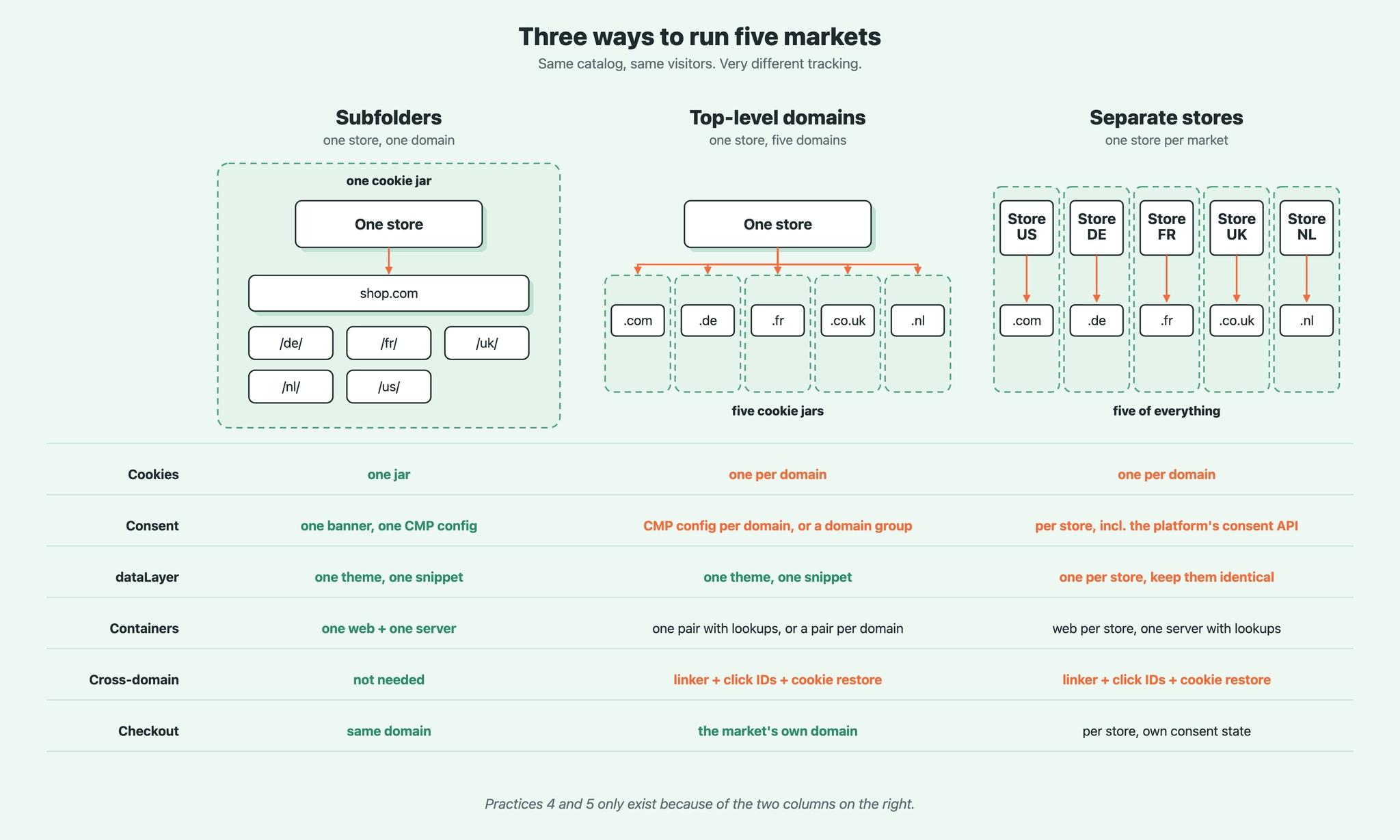
There are four ways to run several markets, and they are not equally hard to track. Most platforms offer the first three as a setting (Shopify Markets, WooCommerce multisite, Magento store views all work like this). The fourth is a business decision.
| Subfolders | shop.com/de, shop.com/fr | One domain, one cookie jar, one consent banner. Easiest to track. |
| Subdomains | de.shop.com, fr.shop.com | Cookies can be set on the parent domain (.shop.com), so every subdomain reads them. Almost as easy. |
| Top-level domains | shop.de, shop.fr | Separate cookie jars, separate consent. Needs practices 4 and 5. |
| Separate stores | One platform account per country | Separate everything, incl. checkout and cart. Needs 4 and 5. |
SEO and operations usually decide this, and that's fine. Subfolders share the authority of your main domain, country domains give the strongest local signal, separate stores are the only option when the catalog or the legal entity differs per country. Just ask the tracking question before the domains are bought, because the answer decides how much of the rest of this article applies to you.
What to do
- Write down every domain and subdomain the visitor can land on, including landing domains that only redirect.
- Mark which category each one falls in. Subfolders and subdomains: you can skip practices 4 and 5. Top-level domains or separate stores: you need all five.
- If the domains aren't live yet and SEO doesn't force country domains, choose subfolders. It removes two of the five practices.
2. One data model, then decide how many containers
The events your site sends have to look identical on every domain. Same event names, same parameters, same product IDs, the local currency in the currency field. GA4 converts currencies for you, Google Ads accounts are per currency anyway, and only identical events can be compared across markets later.
Then decide how many GTM containers you want. There are three options, and the right one depends on how much control you need per domain.
Option A: one container pair for all domains. One web container, one server container. Lookup table variables keyed on the hostname return the right IDs for each domain: the GA4 measurement ID, the Google Ads conversion ID, the Meta pixel, the consent banner ID.
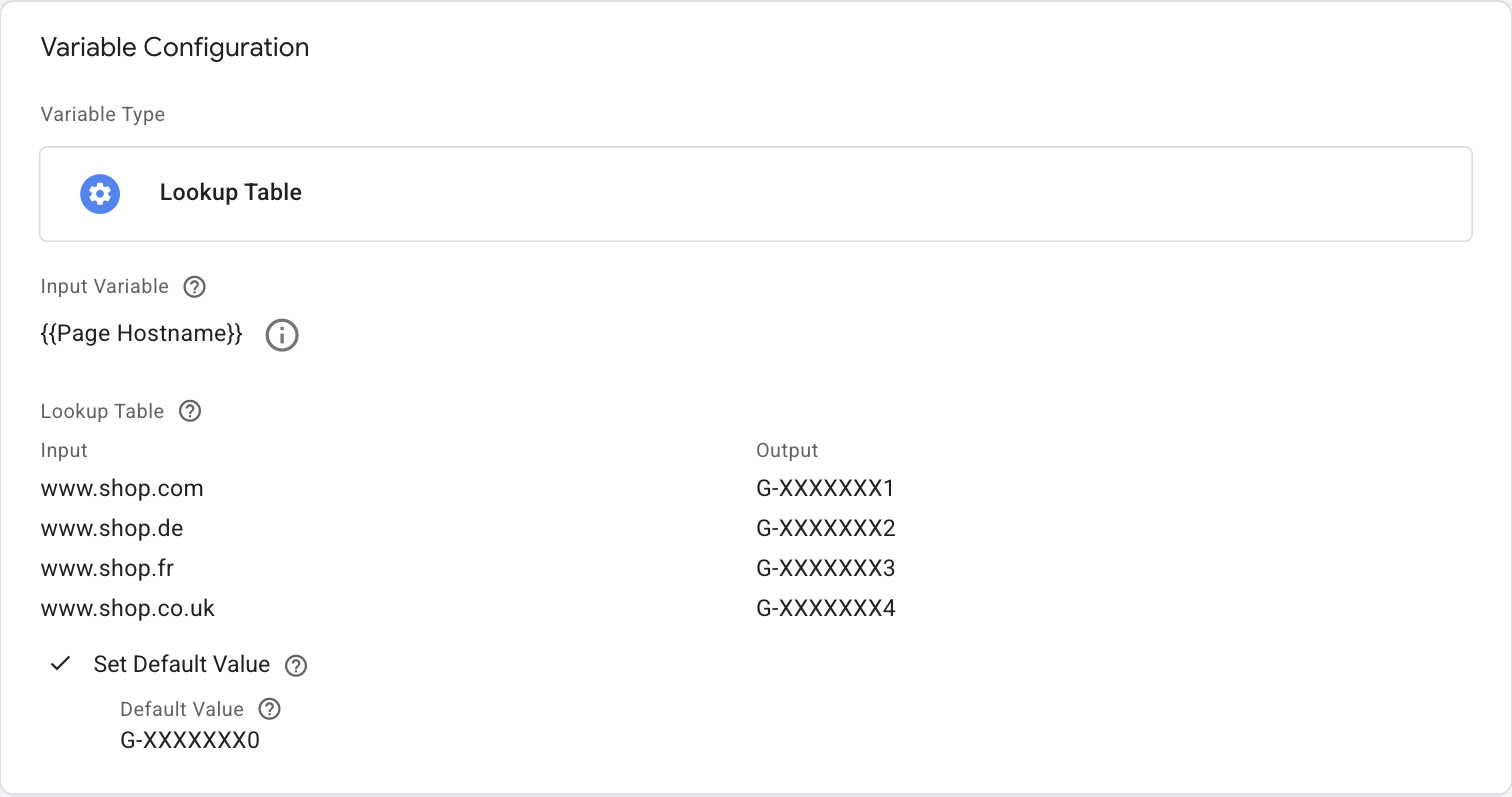
Pick this when all domains share a theme and the same set of platforms, one team maintains everything, and a change should land everywhere at once.
Option B: a container pair per domain. Full control per market. A tag that only exists in Germany, an agency that only gets access to the French container, a market that can break without taking the others with it. The cost is that every change has to be made five times. Copy containers with a script or an export, because by hand they drift apart within a month.
Pick this when markets use different platforms, different agencies or different consent setups.
Option C: web per domain, one shared server. This is what I build most. The web container is where the theme, the consent banner and the market-specific tags live, so that's where control per domain pays off. The server container is where the credentials live, and practices 3 and 4 need a single server container anyway.
Whichever you pick, watch the container size. GTM refuses to save once a container is full, and multi-domain containers fill up fast because every lookup table, every per-domain trigger and every exception counts. Stape's own test hit 85% with 41 tags. You can see the percentage under Admin, Container Versions.
What to do
- Put the same tracking snippet on every domain, and check that the same action produces the same event everywhere.
- Choose A, B or C using the "pick this when" lines above. When in doubt, C.
- Decide which IDs are shared and which are split. Usually: Meta and TikTok pixels shared (bigger audiences), GA4 per market plus one global property, Google Ads per currency.
- Check the container size now, and again after every market you add.
3. Keep every domain first-party on one server container
Here's the plain-language version of a topic that usually gets very technical.
A cookie's lifetime depends on who sets it. A cookie set by JavaScript in the browser, or by a server on someone else's domain, gets deleted by Safari after seven days. A cookie set by a server on your own domain lives as long as you tell it to. "First-party" simply means that: set by your own domain.
That server is your tagging server. On a single domain you give it one hostname, say data.shop.com. On a multi-domain store it needs a hostname under each domain, because a cookie set by data.shop.com is still a foreign cookie on shop.de.
Those hostnames can all point at the same container. Stape's Multi-Domains power-up maps up to 20 domains (Business plan) or 50 (Enterprise) to a single server container. Each domain keeps its own first-party cookies, you maintain one container.
Two details that make a real difference:
Don't use the obvious names. Ad blockers work from filter lists, and sst., gtm., data. and analytics. are on those lists. Give each domain a hostname or a path with a random prefix or postfix, and load GTM through Stape's Custom Loader so the script path is unique too. A hostname nobody else uses is on nobody's list.
- shop.de -> k7dq.shop.de or shop.de/k7dq/
- shop.fr -> m2xr.shop.fr or shop.fr/m2xr/
A path beats a subdomain in Safari. A subdomain that points at your tagging provider looks like "CNAME cloaking" to Safari, and Safari caps those cookies at seven days as well. A path on your own domain, proxied to the container, has no CNAME to detect. It needs a proxy in front of your site, so it's the option for stores that already run one. Otherwise the subdomain is fine.
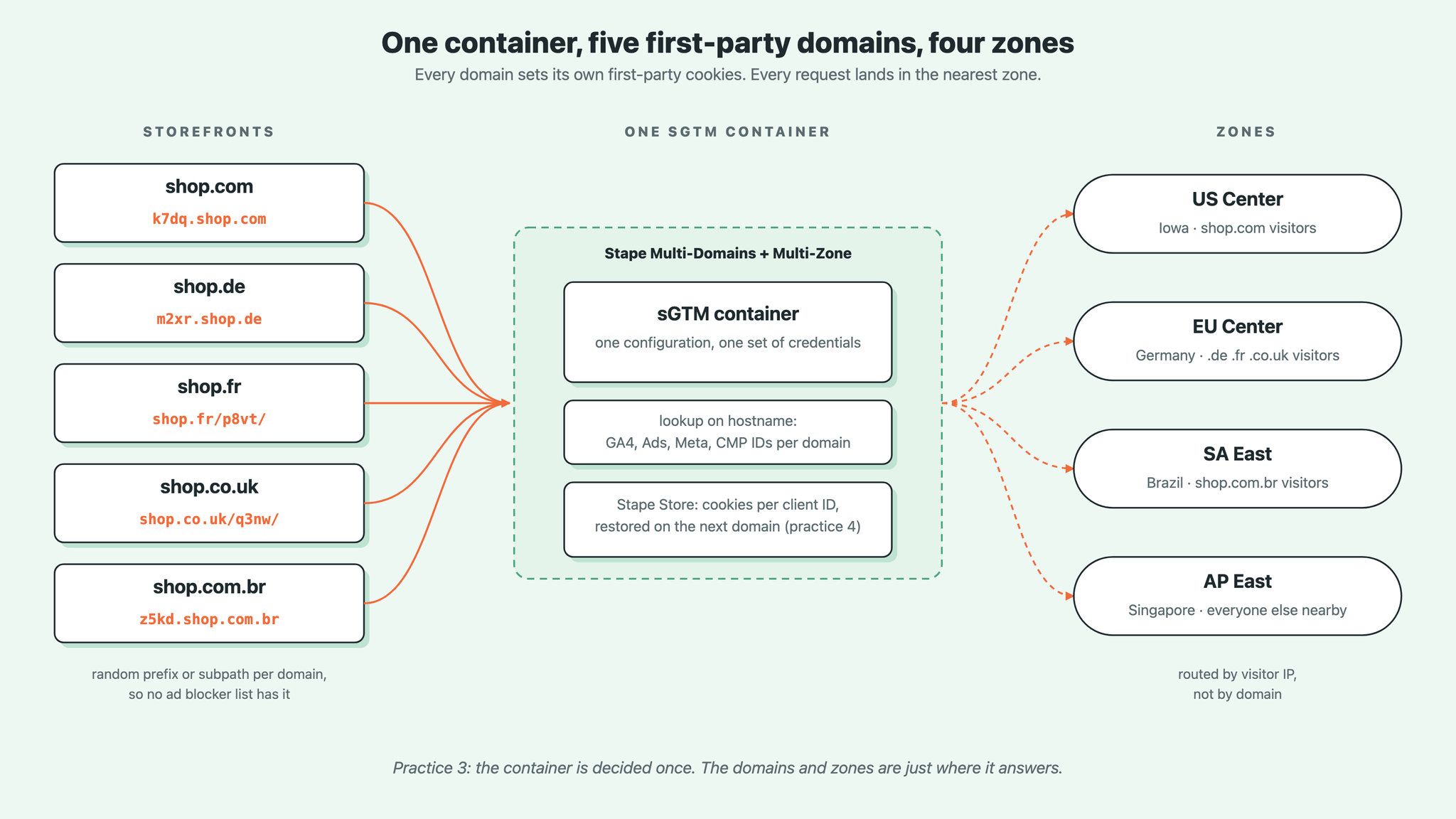
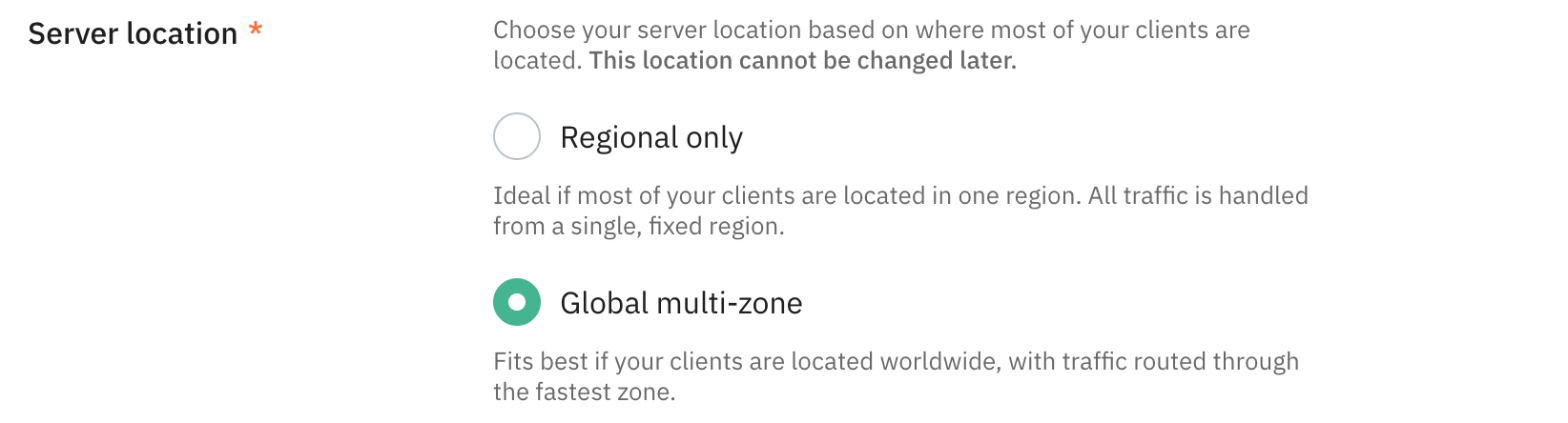
Then the part most setups miss: where the container runs. A visitor in the US sending events to a container in Germany waits a few hundred milliseconds per request, and on a slow mobile connection those are the events that never arrive. Stape's Multi-Zone hosting runs one container in four zones (Iowa, Germany, Brazil, Singapore) and routes every request to the nearest one based on the visitor's location. Same container, same configuration, no per-market setups.
It needs a Business plan or higher and you choose it when you create the container. An existing container can't be switched, so a store going international on an existing setup moves to a new one. Combine Multi-Zone with Multi-Domains and you have one container, every domain first-party, every visitor on the nearest zone.
What to do
- Create one server container. If your visitors are spread over more than one continent, pick Global multi-zone when you create it.
- Add a tagging hostname under every domain with the Multi-Domains power-up. Use a random prefix, not data. or gtm.
- Enable the Custom Loader and load GTM through it on every domain.
- Check in the browser that the cookies on each domain are set by that domain's own hostname.
4. Don't lose the visitor between domains
If you're on subfolders or subdomains, you can skip this one. On top-level domains or separate stores it is the practice that decides whether your ad platforms ever see a conversion from a visitor who switched countries.
There are three layers. Each one carries something the previous one can't.
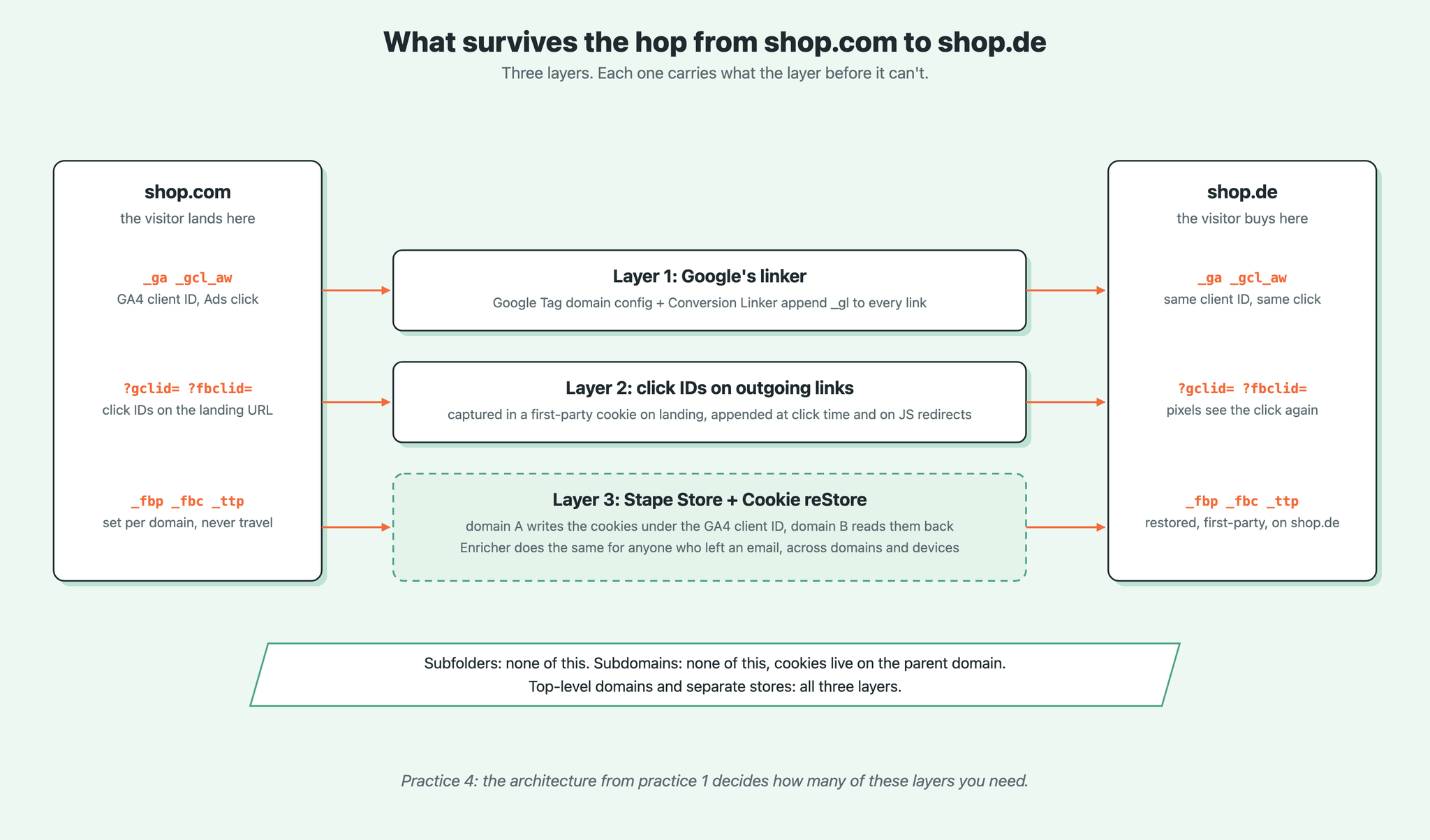
Layer 1: Google's own linker. Google has built this in, you only have to switch it on. Add every domain to the Google Tag's domain configuration and enable cross-domain linking in the Conversion Linker with the same list. Google then adds a _gl parameter to every link between those domains, carrying the GA4 client ID and the Google Ads click. On the other side, the Google Tag reads it and recreates the cookies. Only link domains that report to the same GA4 property: the global property needs it, the per-market properties don't. Then add all your own domains to unwanted referrals in every property, or the country switcher shows up as a traffic source.
Layer 2: click IDs on outgoing links. The linker carries Google's IDs and nothing else. Meta, TikTok and Microsoft have no idea the visitor came from an ad once the hostname changes. So capture the click IDs and campaign parameters when the visitor lands, store them in a first-party cookie, and append them to every link that points at one of your other domains:
gclidgbraidwbraidmsclkidfbclidttclidutm_sourceutm_mediumUtm_campaign
The pixels on shop.de then see the click as if the visitor had landed there. Watch out for redirects done in JavaScript. Age gates, geo redirects and country pop-ups don't use links, so no link decoration runs. Hook the redirect and add the parameters to the URL before it fires.
Layer 3: what a URL can't carry. Meta's _fbp and _fbc cookies, TikTok's _ttp, Klaviyo's _kx: all set per domain, none of them travel. Without them the CAPI event for that purchase has a lower match quality, and the ad platform attributes less.
This is where Stape Store comes in. Stape's Cookie reStore tag saves those cookies to Stape Store under the GA4 client ID on domain A. When the same client ID arrives on domain B through the _gl parameter from layer 1, the tag looks up the record and sets the cookies again, on domain B, first-party. It needs both domains on one server container, which practice 3 gave you.
Stape's Enricher power-up does the same for visitors you can identify. Once someone leaves an email address anywhere, at checkout, at login, in a newsletter form, Enricher stores their user data and marketing cookies and adds them to every later event on every domain the container serves. Across domains and across devices. Both only run with marketing consent, which brings us to the last practice.
What to do
- Google Tag: add all domains under "Configure your domains". Conversion Linker: enable cross-domain linking with the same list.
- GA4, every property: add your own domains to both “Configure your domains” and "List unwanted referrals".
- Add a small script that stores the parameters above on landing and appends them to links to your other domains, and to any JavaScript redirect.
- Server container: import the Cookie reStore tag, point it at Stape Store, fire it on every page view. Turn on Enricher.
- Test the whole path once, end to end. See "How to test" below.
5. Consent per domain, defaults per region
The consent a visitor gives is stored in a cookie, so it belongs to one domain like every other cookie. Someone who accepted on shop.com sees a fresh banner on shop.de, and until they accept again, every tag runs in denied mode and nothing from layer 3 above happens.
Most consent tools can do something about it. In Cookiebot, one Domain Group holds all your domains under one ID, and cross-domain consent sharing asks once for the whole group. Before you enable it, check what GDPR requires from you. Consent has to be informed and specific: the banner has to name the domains it covers, they have to belong to the same company, and the visitor has to be able to withdraw it on each of them. Sharing consent across different brands or legal entities is off the table. And Safari blocks the storage this sharing relies on, so keep the normal banner as the fallback.
Then the language. Most consent tools pick the legislation from the visitor's location and the banner language from the browser. That gives a German visitor on shop.fr a German banner on a French storefront, which looks broken and lowers acceptance. Map the banner language to the language of the storefront instead. In the Cookiebot template in GTM that is the Language field: set it to the store's language instead of auto-detect. With one web container serving several languages, use a lookup table on hostname for the language, the same way you did for the IDs.
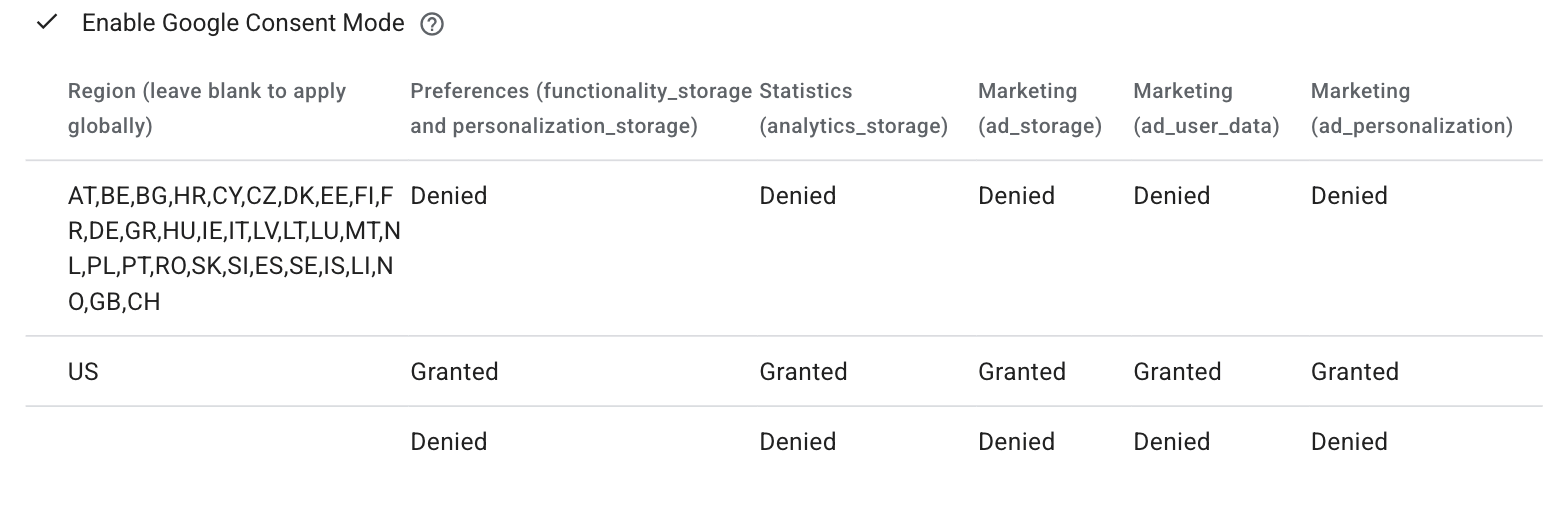
And set the Consent Mode defaults per region, not one default for everyone. Denied in the EEA, UK and Switzerland, whatever the local law requires elsewhere. In the Cookiebot template that is the region table under Consent Mode: one row for the EEA, UK and Switzerland with everything denied, one row per country where the law allows granted by default, and a blank row as the fallback for everyone else.
Two more things. If your platform has its own consent API (Shopify does), the consent tool has to pass the decision to it on every store, or the platform's own pixels and the checkout ignores it. And send the consent state to the server with every event, so CAPI, Cookie reStore and Enricher respect it on every domain.
What to do
- Put all domains of the same company in one domain group in your consent tool. Decide on cross-domain sharing with your legal team, not on your own.
- Set the banner language from the storefront language, not from the visitor's location.
- Set Consent Mode defaults per region.
- Forward the consent state to the server container and check that CAPI tags respect it.
Put it into practice
The order matters, because each step needs the one before it.
- 1.List your domains and decide which category you're in (practice 1).
- 2.Make the events identical on every domain, then choose your container setup (practice 2).
- 3.Create one server container, Multi-Zone if your visitors are global, and give every domain its own first-party hostname (practice 3).
- 4.Only on separate domains: switch on Google's linker, decorate outgoing links with click IDs, and set up Cookie reStore and Enricher (practice 4).
- 5.Group your domains in the consent tool, fix the banner language, set defaults per region (practice 5).
How to test
Walk the path a visitor takes. Open domain A with ?gclid=test&fbclid=test in the URL, accept the banner, switch to domain B through the country selector. Then check: the URL on domain B contains _gl and the click IDs, the _ga cookie has the same value on both domains, _fbp exists on domain B, and the banner on domain B is in the right language. Open the server container's preview and confirm the outgoing requests carry the IDs that belong to that hostname. Finally, compare purchases per market in GA4 against orders per market in your shop backend for the same week. A gap of more than a few percent is one of the five practices above.
Conclusion
Multi-domain tracking is single-domain tracking, repeated, with three things added: linking the visitor across domains, carrying what a URL can't, and keeping consent honest everywhere. Decide the architecture first, keep one data model, put every domain first-party on one container, and the rest is discipline.
Want to switch to the server side?
Try for freeRecommended for you
Jul 2, 2026
Blog
Server-side cross-domain tracking using Cookie reStore tag
Cross-domain tracking is a complicated process, but with the help of Stape's Cookie reStore tag, it can be made simple. Learn how to set it up.
Sep 19, 2025

Comments