Turn your Merchant Center feed into a tracking goldmine
Written by
Nicolai Hesselholdt
Key takeaways
- Product data in Google Merchant Center often represents the most complete and underutilized source for enriching tracking beyond a limited dataLayer.
- The Stape Merchant Center Lookup variable connects this feed with server-side GTM, enabling automatic event enrichment without front-end changes.
- Server-side ID mapping helps maintain remarketing match rates and campaign performance during CMS migrations or ID changes.
- A "minimal event in, fully enriched event out" setup enhances tracking with attributes like cost, variants, and categories, improving downstream analytics.
- Enriched data supports more advanced use cases, including profit-based bidding, variant-level GA4 reporting, and identifying out-of-stock demand.
- Reliable implementation depends on factors such as API call caching, feed update frequency, and well-defined fallback logic, especially in multi-market setups.
We have all been there: you are stuck with a "thin" dataLayer on your website, wishing you had more than just a basic Product ID and price to work with. You want richer product data for your marketing channels and to set up profit-based bidding, or perhaps you need to see which specific color variant of a certain product is flying off the shelves in GA4. Usually, this means opening a developer ticket, waiting for sprint planning, and hoping the changes go live before the next quarter.
But what if I told you that you already own the "gold" you're looking for? I recently sat down with Dan Murovtsev from Stape for a webinar on Next Level Server-Side Tracking. One of the most exciting topics we covered was the Stape Merchant Center Lookup variable. It is a tool that allows you to tap into your existing Google Merchant Center feed - data you are already maintaining for Shopping ads - and use it to enrich every single tracking event server-side, without touching the website code.
Let me tell you a little bit about that in this post.
The problem: your best data is trapped in a silo
Most eCommerce sites push decent product data through the dataLayer, but it is rarely "complete" from a marketing perspective. Your feed in Merchant Center, however, is likely your richest source of truth. It contains SKUs, availability status, colors, materials, categories, and maybe also cost data and custom labels.
The Merchant Center Lookup variable acts as the bridge between that siloed feed and your server-side Google Tag Manager (sGTM) container. On every incoming event, the variable looks up the item_id against your feed and returns whatever fields you need. These fields are then merged into the items array before the data is forwarded to GA4, Meta, Google Ads, or any desired channel.
Use case 1: saving performance during CMS migrations
I have been involved in quite a few platform migration projects. One of the biggest headaches during a migration (say, moving from a legacy CMS to Shopify or Magento) is that the product IDs often change.
When your item_id changes, your dynamic remarketing ads can no longer match the website products to your feed. Match rates drop, and your Google Ads or Meta algorithms lose the performance signals they have spent years building up. To the "remarketing engine," these products look brand new, and you usually have to sit through a painful performance dip while the algorithms re-learn everything.
The fix: by using the Merchant Center Lookup variable, you can keep your legacy IDs in a custom label within Merchant Center. Then, server-side, you use the variable to swap the new website item_id back to the legacy ID before the event reaches the ad platforms.
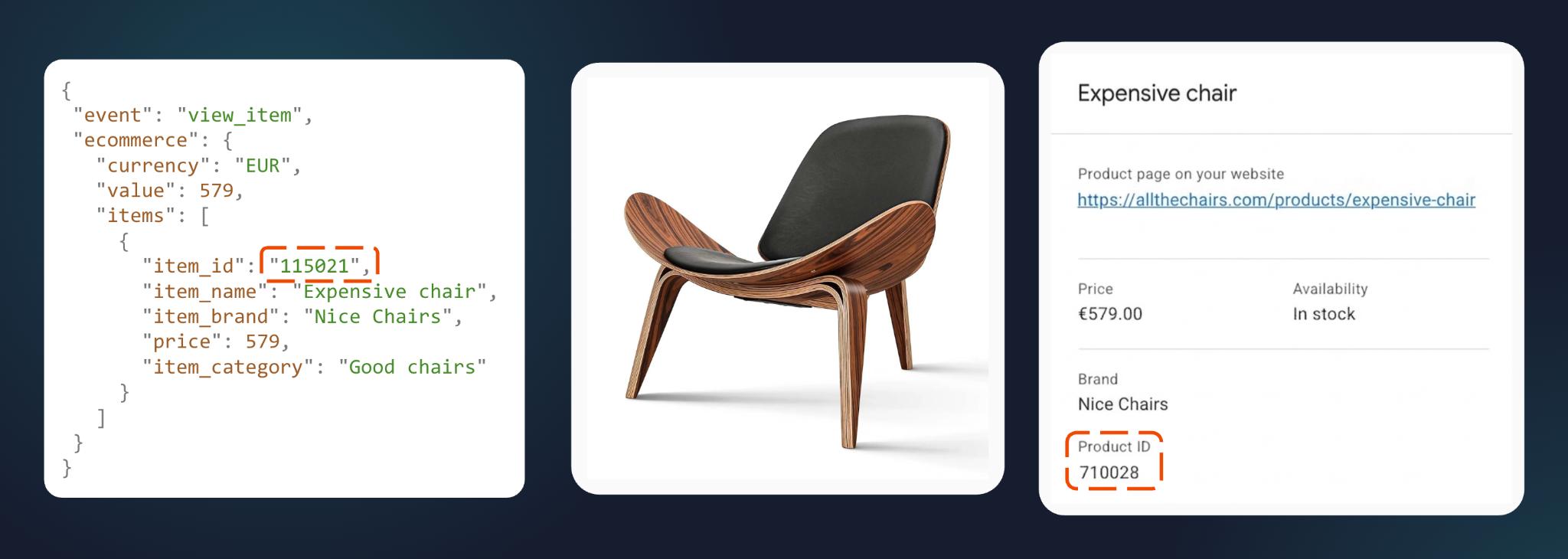
Here we see the dataLayer from a product page for a nice-looking chair. The ID doesn't match the one that your marketing channels know. But if you put the old ID in a custom field in your feed, and use that as your item_id in sGTM, the server-side logic ensures the marketing channels see the ID they expect, maintaining continuity for the algorithms.
Use case 2: enriching "thin" events with full attributes
Developers are often stretched thin, and tracking details like "product material" or "cost" aren't always a priority for the front-end team. If your dataLayer only sends the basics, your reporting suffers.
The fix: the Merchant Center Lookup variable allows for a "minimal event in, fully enriched event out" workflow.

On the left, we see a standard view_item event that only contains a currency, value, and a basic item ID. On the right, the server-side container has worked its magic. Suddenly, the event is packed with: item material, item color, item cost, discount info, and multi-level categories.
The website developer didn't have to touch a single line of code. All of this enrichment happened in sGTM using data you already had in your feed.
What can you actually do with this enriched data?
Data is only as good as the actions you take with it. Here are three high-value ways to use this enrichment:
1. Profit-based bidding
Standard tracking sends revenue to Google Ads. But if your margins vary wildly across products, revenue is a vanity metric. By pulling item_cost from the Merchant Center, you can calculate the actual margin server-side and send that as the conversion value. This allows the Google Ads "Maximize Conversion Value" bid strategy to optimize for profit, not just top-line sales.
2. Advanced GA4 reporting
Want to know which color variants are driving the most revenue? Without enrichment, GA4 might only show you the parent product.
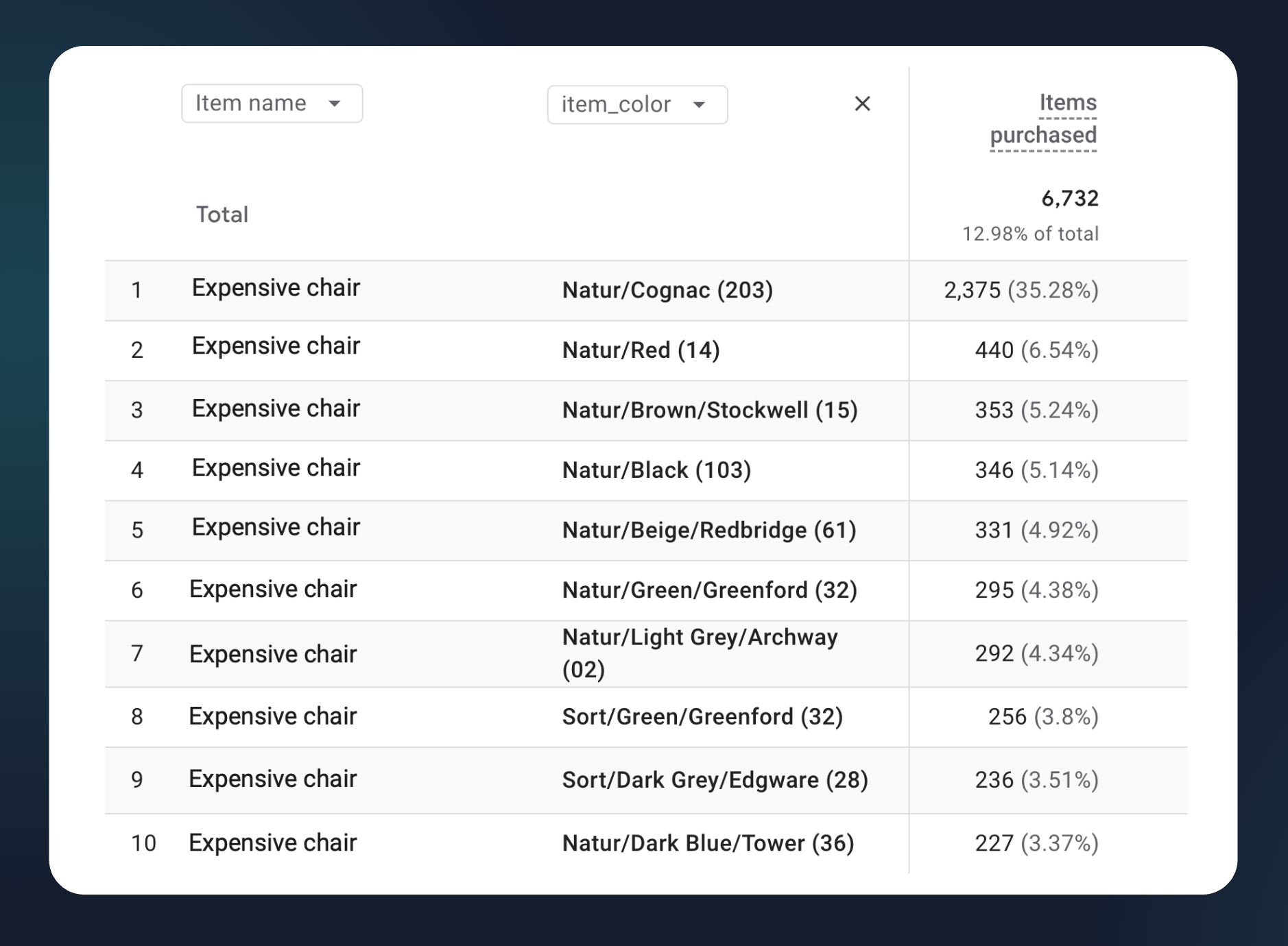
This table demonstrates a variant breakdown report in GA4. Since we enriched the data server-side, we can now see that the "Natur/Cognac" color variant of the chair accounts for 35.28% of purchases, whereas "Natur/Red" only makes up 6.54%. This is invaluable for inventory planning and creative direction.
3. Out-of-stock demand signals
One of my favorite use cases is tracking "lost" demand. If a user triggers a view_item for a product where the feed availability is out_of_stock, you can send a custom event to GA4. This creates a "Restock Prioritization" report, showing you exactly which out-of-stock items are getting the most traffic so you can restock them ASAP.
Practical things to keep in mind
Before you go all-in on enrichment, there are a few technical realities to consider:
- Caching is your friend: every lookup is a call to Google's Content API. While Google's quota is generous, it isn't unlimited. Make sure to enable the caching feature in the Stape variable configuration to avoid redundant API calls for repeated product views.
- Feed freshness: your lookups are only as current as your last Merchant Center sync. If you update a price in your CMS but the feed hasn't synced yet, the enriched data will reflect the old price.
- Fallback logic: always have a plan for what happens if an item is not found in the feed. The variable won't exactly fail just because a product cannot be found in the Merchant Center, but you need to know what it means for your marketing channels and analytics reports if you feed them with incomplete information.
Pro tip: handling the multi-market maze
If you're running a global operation, your data isn't just "thin", it's fragmented. You likely have different Merchant Center feeds for different countries (e.g., a DA-DK feed for Denmark and a DE-DE feed for Germany).
One of the powerful features of the Stape Merchant Center Lookup variable is that the Merchant ID and Feed details can be set as variables themselves. So you can set up logic that looks at the incoming country_code or the page_location from the website event. The server-side container then dynamically chooses the correct feed to look up, ensuring your German customers get German-language product attributes and the correct Euro pricing in their tracking events. It's a "set it and forget it" solution for international scaling.
Final thoughts
Your Merchant Center feed is a data asset you've already paid for and worked hard to maintain. By using the Merchant Center Lookup variable, you stop treating it as just an "ads thing" and start treating it as the backbone of your entire measurement stack.
At MCB, we have been proud partners with Stape since 2022. We specialize in exactly these kinds of complex server GTM setups: the ones that bridge the gap between marketing needs and technical constraints. If you're ready to stop waiting on dev tickets and start using the data you already own, the tools are right there waiting for you.
Ready to dive deeper? Check out Stape's full guide to the Merchant Center Lookup variable.
May your match rates be high and your dev tickets be few. Happy tracking!
Want to start on the server side?
Try for freeRecommended for you
Blog
30 tools every marketing agency should know
Explore the top 30 digital marketing agency tools for 2026 to optimize campaigns, improve efficiency, and deliver stronger results for clients' growth.
Aug 4, 2026

Comments