Sep 14, 2026
New customer tracking with sGTM and Stape Store: a complete guide
Written by
Luc Nugteren
Published Mar 4, 2026 comments
Key takeaways
- Most “new customer” metrics are less reliable than they seem.
- With sGTM and Stape Store, you can classify customers far more accurately.
- Using purchase_count creates a stable, first-party source of truth.
- Better signals lead to smarter bidding in Meta and Google Ads.
- First-click tracking shows whether paid traffic drove the user.
- Once set up, the system runs automatically with little upkeep.
Accurately identifying new vs. returning customers is one of the most valuable data points a performance team can have. Yet most setups, whether browser-based, platform-based, or built on ecommerce backend signals, fail to measure this reliably.
Cookies expire. Click IDs get lost. Users switch devices.Ad platforms fill gaps with modeled conversions.And most “new customer” metrics are little more than educated guesses.
With server-side Google Tag Manager (sGTM) and the Stape Store, you can build a first-party customer identity system that classifies customers with almost 100% accuracy, in real time, and without relying on third-party cookies or unstable browser data.
This guide walks through why this matters, how the system works, and the exact steps to implement it. It also includes an advanced extension for first-click new customer tracking, enabling you to identify whether a user’s first session originated from a paid channel.
Why new accurate customer tracking matters
From a performance marketing standpoint, not all purchases are created equal.
A returning customer purchase:
- Is cheaper to achieve.
- Has higher intent.
- Adds far less incremental revenue.
A new customer purchase, however:
- Expands your customer base.
- Improves acquisition visibility.
- Drives future purchasing behavior.
- Signals true demand generated from paid traffic.
But platforms like Meta and Google Ads don’t reliably know whether a purchase is from a new or returning customer. They infer based on:
- Cookie presence
- Account history
- Click-to-purchase timing
- Modeled user mapping
- Platform-side customer lists
None of these are consistently accurate.
By providing ad platforms with a first-party, deterministic new customer flag, you significantly improve bidding efficiency, audience expansion, signal quality, and budget allocation. Most importantly, you reduce the risk of overspending on returning customers who would have converted anyway.
System overview: what we’re building
The core of this setup revolves around three components:
1. A first-party customer database stored inside Stape Store
This is where hashed customer identifiers live.It’s permanent, secure, and independent of browser behavior.
2. A deterministic classification logic based on purchase_count
Instead of setting a boolean like new_customer = false, this system uses the cumulative number of purchases per customer to determine whether they are new or returning.
3. An advanced extension for first-click attribution
This tracks whether the user’s first session contained paid click IDs such as:
gclidwbraidgbraidfbclid
This enables not only new customer tracking, but also:
- New customer + first click Meta
- New customer + first click Google
This goes far beyond standard setups.
High-level architecture
Here is the full flow in plain language:
- 1.Upload all past customers into Stape Store, hashed via SHA-256, and stored with
purchase_count = 1or higher. - 2.When a purchase event arrives in your sGTM container, hash the incoming email.
- 3.Look up the hashed email in the Stape Store.
- 4.If no record exists → this is a new customer.
- 5.If
purchase_count ≥ 1→ this is a returning customer. - 6.Write updated purchase_count back to Stape Store.
- 7.Trigger the appropriate conversion tag in Google Ads or Meta.
- 8.(Advanced) Also check whether this user’s first session contained a click ID, enabling first-click new customer measurement.
This gives you deterministic classification, independent of browser cookies.
Step-by-step configuration
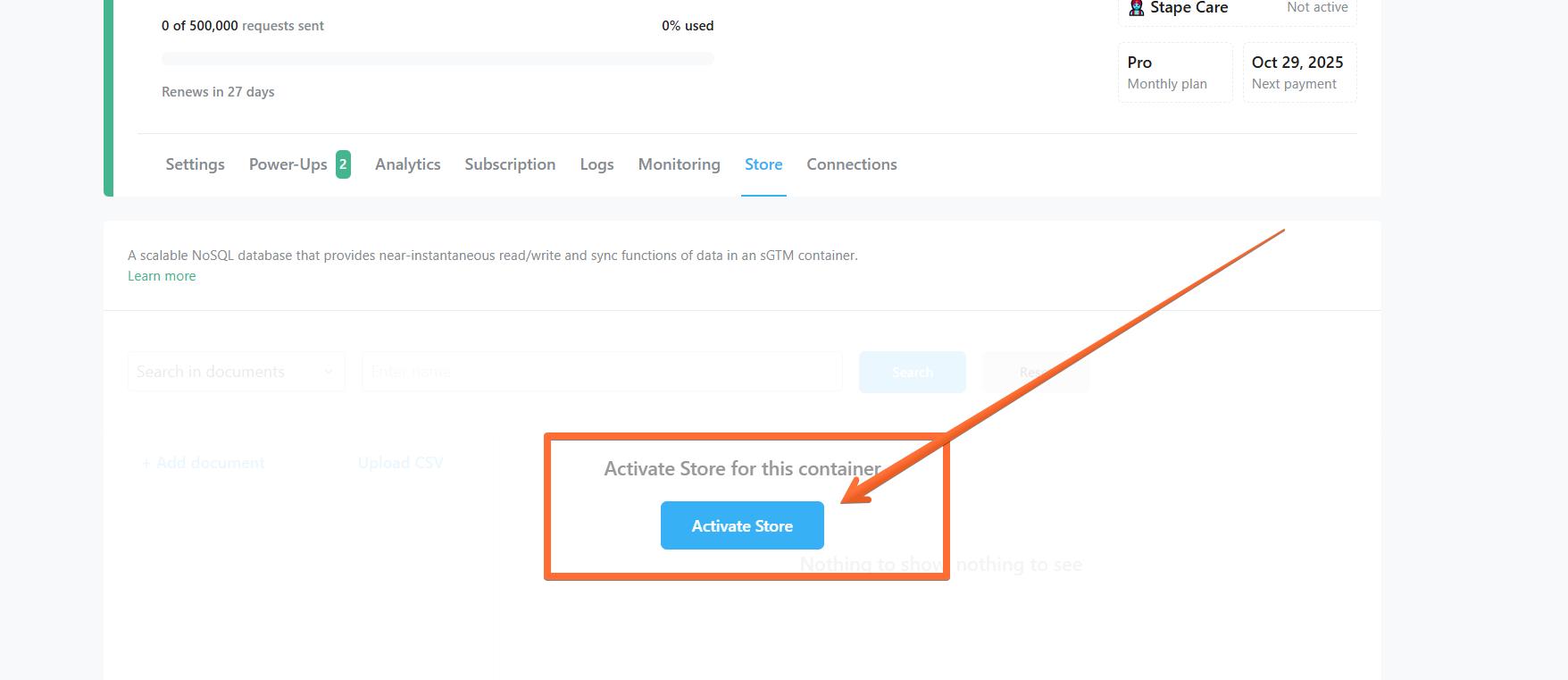
1. Activate Stape Store in your server container
To begin, enable the Stape Store within your tagging server:
- Open your Stape account.
- Navigate to the server container settings.
- Activate the Store (if not already enabled).
2. Hash and upload all past customer emails
Before real-time tracking begins, prepare your baseline customer dataset.
- 1.Export your entire customer email list.
- 2.Hash each email using a SHA-256 hashing tool.
- 3.Import the list into Stape Store (e.g. via .csv bulk upload).
- 4.For each email record, store:
email: <hashed_email>

purchase_count: 1
This ensures all existing customers are marked as returning from day one.
Consent requirement
Even though emails are hashed (irreversible), consent is still required before storing customer identifiers.
3. Hash incoming emails in sGTM and write to Stape Store
Whenever a purchase event arrives in sGTM:
- 1.Extract the user’s email from the event payload.
- 2.Hash the email using a SHA-256 hashing variable.
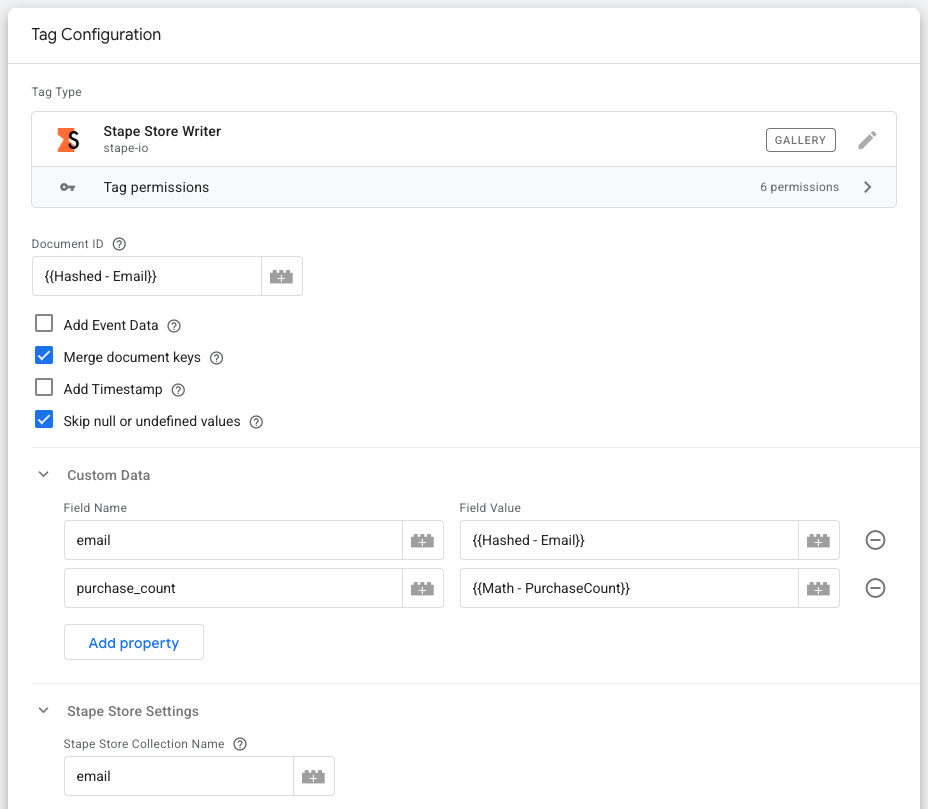
- 3.Write the hashed email to Stape Store via the Stape Store Writer tag.
- 4.Update their purchase_count accordingly (using a Math operation variable).
Example of a stored object:
email: <hashed_email>

purchase_count: {{purchase_count}}
Where:
purchase_count = 0→ new customerpurchase_count = 1or higher → returning customer
This is the fundamental logic behind classification.
4. Look up the hashed email in the Stape Store
Next, create a Stape Store Lookup variable inside sGTM.
- Input: the hashed email
- Output: purchase_count for that customer
Using this lookup:
- If
purchase_count = 0or undefined → New - If
purchase_count ≥ 1→ Returning
You now have a deterministic method for classifying each purchase event.
5. Create new vs. returning logic in sGTM
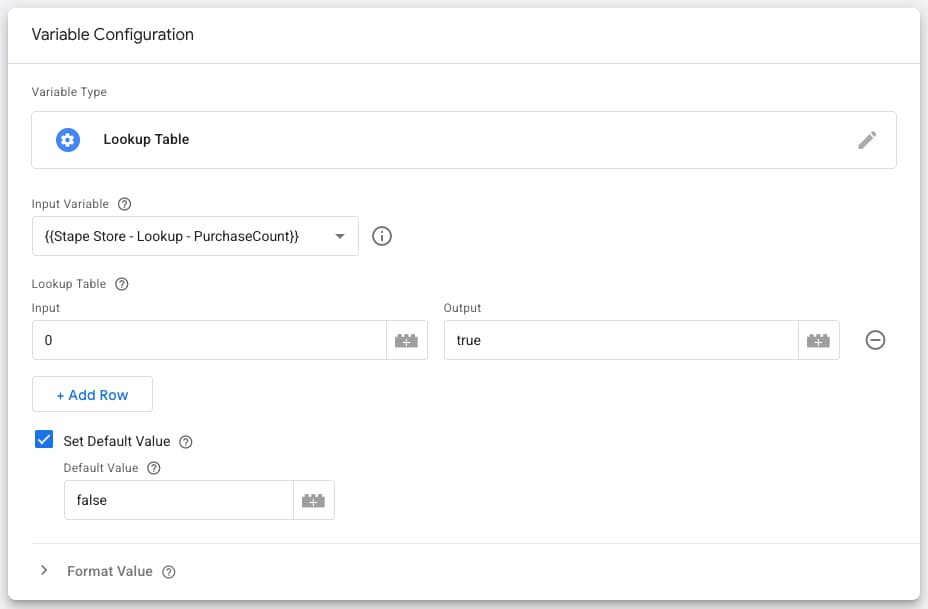
To make the value easy to use inside triggers:
- 1.Create a variable that evaluates the lookup result.
- 2.Return
truefor new customers. - 3.Return
falsefor returning customers.
This variable can be referenced in:
- Google Ads Purchase tags
- Meta Purchase tags
- Custom-built triggers
- Any advanced audience or attribution setup
6. Use these values in Google Ads and meta tags
The classification now becomes actionable.
| Platform | What you can do | Examples |
| Google Ads | - Send new customer purchases - Send returning customer purchases - Send combined signal with metadata | - Trigger a special new customer purchase conversion tag when purchase_count = 0- Trigger a returning customer purchase tag for all others- Add a custom parameter for new_customer on your primary purchase conversion action |
| Meta | - Fire separate custom conversions for new and returning customers - Build audiences around new customer purchasers - Improve Advantage+ Shopping algorithmic understanding |
This is the signal platforms have never had, and it makes a real difference.
Advanced extension: first-click new customer tracking
Many advertisers don't just want to know whether a purchaser is new.
They also want to know whether the first session that led to that purchase originated from paid traffic. The coldest possible traffic.
This setup tracks exactly that.
How it works
1. Count sessions in sGTM
A session counter writes session_count to Stape Store for each user with a page_view event and engaged session parameter equals false in event data.
x-ga-mp2-seg = 0
2. Capture click IDs when they appear
When the session_count is 0 or 1 and a click ID is present:
fbclid→ write fb_first_click = truegclid / gbraid / wbraid→ write google_first_click = true
3. Store these values under a per-user key
Instead of using email (which doesn’t exist on first session), this system uses Stape User ID, which you can track using a request header variable in sGTM.
4. On purchase, check the flags
Now you can classify:
- New customer + first click Google
- New customer + first click Meta
- Returning customer + first click Google
- Returning customer + first click Meta
Why this matters
This first session logic gives advertisers:
- True incrementality signals
- Better early-journey measurement
- Improved paid bidding behavior
- Cleaner attribution for nCAC / LTV modeling
It turns your sGTM container into a complete customer identification and acquisition measurement engine.
Validation and maintenance
Before going live:
- Verify hashed email logic.
- Test lookup accuracy.
- Confirm purchase_count increments.
- Ensure first-click events are stored correctly.
- Test Google Ads/Meta tag triggers.
- Confirm consent compliance.
Once validated, this system requires minimal maintenance and scales automatically.
Conclusion
Measuring new vs. returning customers accurately is no longer optional. It’s fundamental to efficient paid acquisition, especially as third-party cookies disappear and browser tracking becomes increasingly limited.
By combining:
- sGTM
- Stape Store
- purchase_count-based classification
- advanced first-click attribution
…you create a robust, deterministic measurement framework that dramatically improves the quality of signals your ad platforms receive.
The result:
- Better bidding
- Better incrementality
- Better growth
If you're looking to upgrade your acquisition measurement infrastructure, this system is a no brainer.
Want to try the server-side?
Try for freeRecommended for you
Apr 3, 2026
Blog
How to collect and use customer data for marketing
Discover effective customer data marketing strategies to collect valuable insights, personalize campaigns, and drive business growth.
Sep 7, 2026

Comments