Website tracking and analytics audit made easy
Written by
Maryna Semidubarska
Key takeaways
- 1.Website analytics and tracking audits focus on data collection: events, tags, cookies, and page speed.
- 2.They help you see if tools like GA4 and Meta receive complete and reliable data so that you can make better budget decisions.
- 3.Website Tracking Checker by Stape gives you a free tracking audit, plus step-by-step tips on how to improve tracking configuration.
- 4.You can use the Website Tracking Checker as a repeatable checklist: scan, fix issues, rescan, and share reports with your team or clients.
Audit done. Now show the impact to stakeholders.
See how to separate measurement lift from real business lift and present server-side tracking results with confidence.
What is a website audit?
A website audit is a structured review of how your site performs and how it is built.
It usually checks:
- Technical health: page speed, mobile use, status codes, internal links.
- Content: if pages are clear, complete, and easy to read.
- SEO: how search engines can crawl, index, and rank your pages.
- UX: how simple it is for visitors to move, read, and convert.
Different teams run different types of audits. An SEO consultant looks at content and indexation. A performance engineer focuses on load times. A GTM specialist checks analytics and tags.
In this article, we focus on tracking and analytics: how your website sends data to tools like GA4, Google Ads, and Meta through pixels, tags, and server-side tracking.
What is a tracking and analytics website audit?
A tracking and analytics website audit is a review of how your website collects and sends data to analytics and ad platforms.
It answers questions like:
- Is GA4 installed correctly on all key pages?
- Are events like purchases, signups, and form submits tracked once, with correct values?
- Do Meta and Google Ads receive the events they need to optimize campaigns?
- Are cookies and consent banners set up in a compliant way?
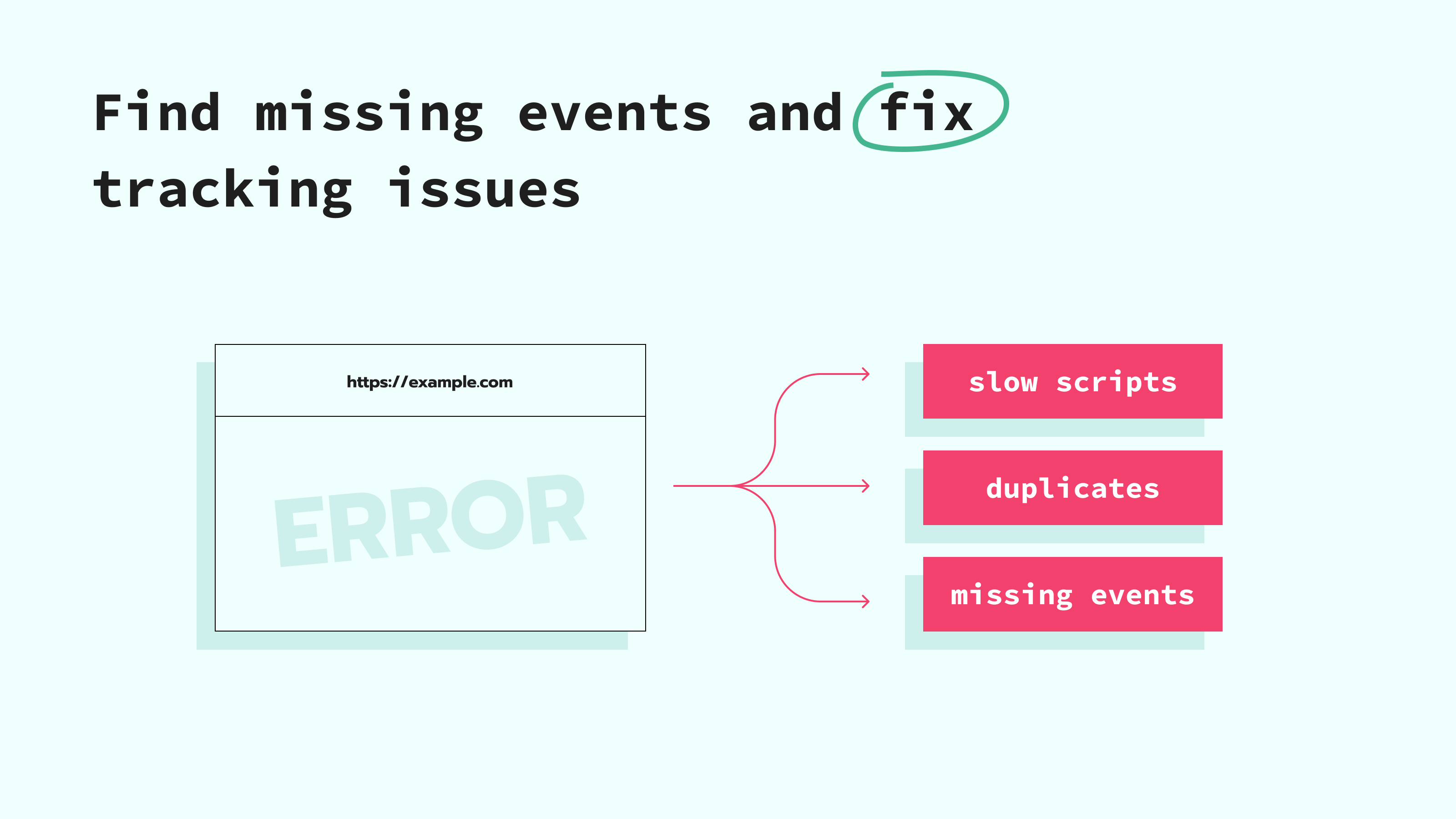
- Do tracking scripts slow the site?
This type of audit looks at the full measurement flow: from the browser, through tools like Google Tag Manager, to analytics and ad platforms – in practice, this is often what people mean by a website tag audit, since most of what you're reviewing lives inside your tags, triggers, and variables. For server-side tracking, it also checks how events go from the browser to a server Google Tag Manager container on a cloud server and then to platforms via APIs.
The goal is simple: see if your current tracking setup can support reliable reporting and better media decisions.
Benefits of website analytics and tracking audit
A tracking and analytics audit helps you understand how your website actually collects and sends information. It gives you a clear view of which events are recorded, which ones are missing, and how this affects reporting and ads. These are the main benefits you get from running this type of audit:
More reliable reporting
Tracking audits help you see gaps and double-counts in your data. Without this, specialists may trust numbers that are wrong, which may cost organizations a lot of money, and is a major problem for marketing data.
After an audit, you know which numbers are safe to use and which need fixing.
Less wasted ad budget
When events are missing or wrong, ad platforms cannot optimize well. A study by Forrester and Investis Digital found that marketing and advertising technologies not working well together lead to about 12% of ad budgets being wasted worldwide.
A tracking audit shows, for example, that:
- Purchases are not sent to Meta from some devices.
- Google Ads receives duplicate conversions.
- High-value events miss important parameters like currency or value.
You fix these issues, and platforms can use better signals to find customers, which helps your return on ad spend.
Clear view for decisions
Gartner found that marketing teams use analytics in only about 53% of their decisions, mostly because the data is hard to manage or incomplete.
With an audit in place, your team can answer:
- Which channel brings real conversions and not only clicks.
- Which campaigns drive revenue after returns, not just first orders.
- Which countries, devices, or creatives convert better.
This makes budget discussions more fact-based.
Better page speed and user experience
Tracking audits also look at how scripts affect performance. Some tags can be moved to server-side setups, which reduces the number of scripts running in the browser and can improve load times. Faster pages usually mean better UX and can support conversion rate.
Easier cooperation between marketing and tech
A good audit report is easy to share with developers, agencies, and business owners.
It describes:
- What is broken or missing.
- Why it matters for data and campaigns.
- What steps to take to fix it.
This removes many misunderstandings between teams.

Best website tracking audit tool and its benefits
You can run tracking audits manually with browser consoles, network tabs, and long spreadsheets. But this takes time and requires technical skills. Website Tracking Checker by Stape gives you a faster and simpler way. It helps you analyze the tracking health of your website and provides insights on how to improve data quality for both web and server-side tracking.
What the Checker reviews
Analytics: checks how tools like GA4 are set up on your site and how they send events from key pages.
Advertising: reviews how your setup sends events to Meta, Google Ads, and other ad platforms.
Cookies: audits cookie lifetime, consent mode configuration, and basic compliance with privacy rules.
SEO-impacting scripts: detects tracking scripts that slow your site and show which ones can move to server-side to reduce load on the browser.
Main benefits for your team
Free, fast audit: you only enter a URL, and the scan usually takes up to two minutes.
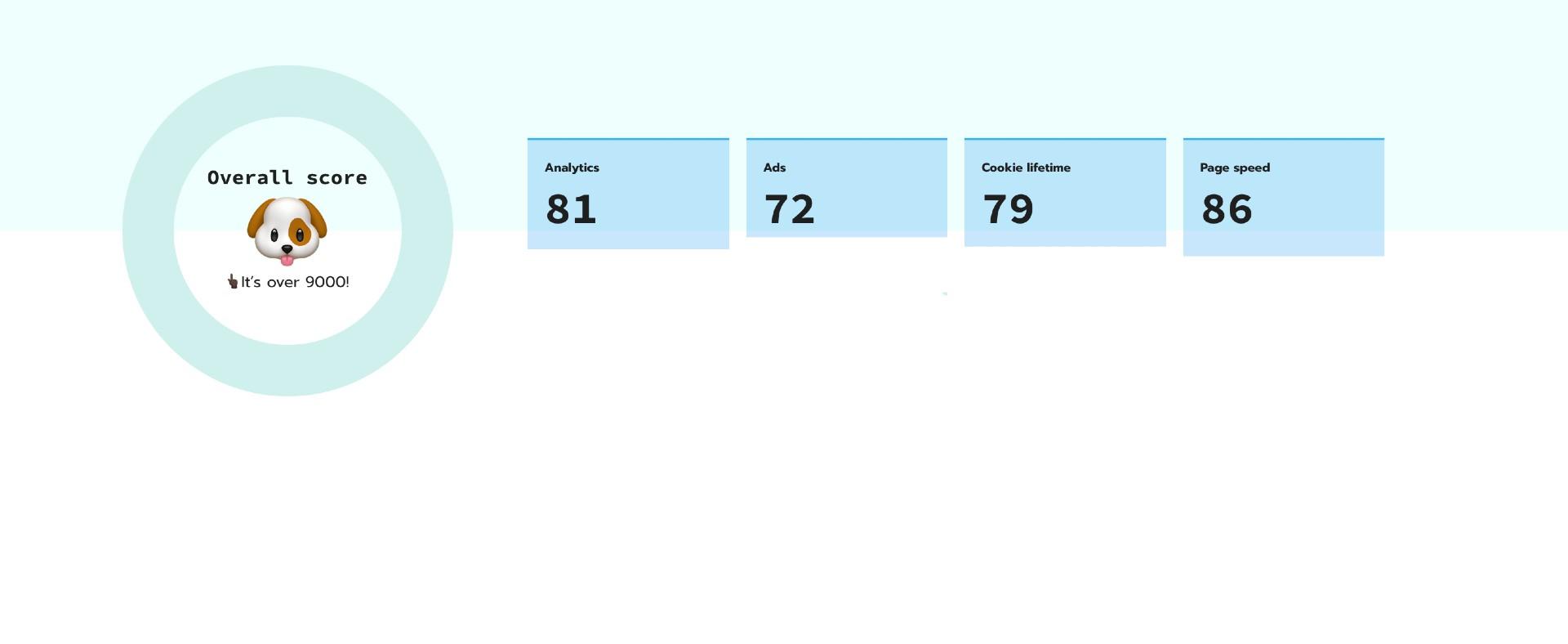
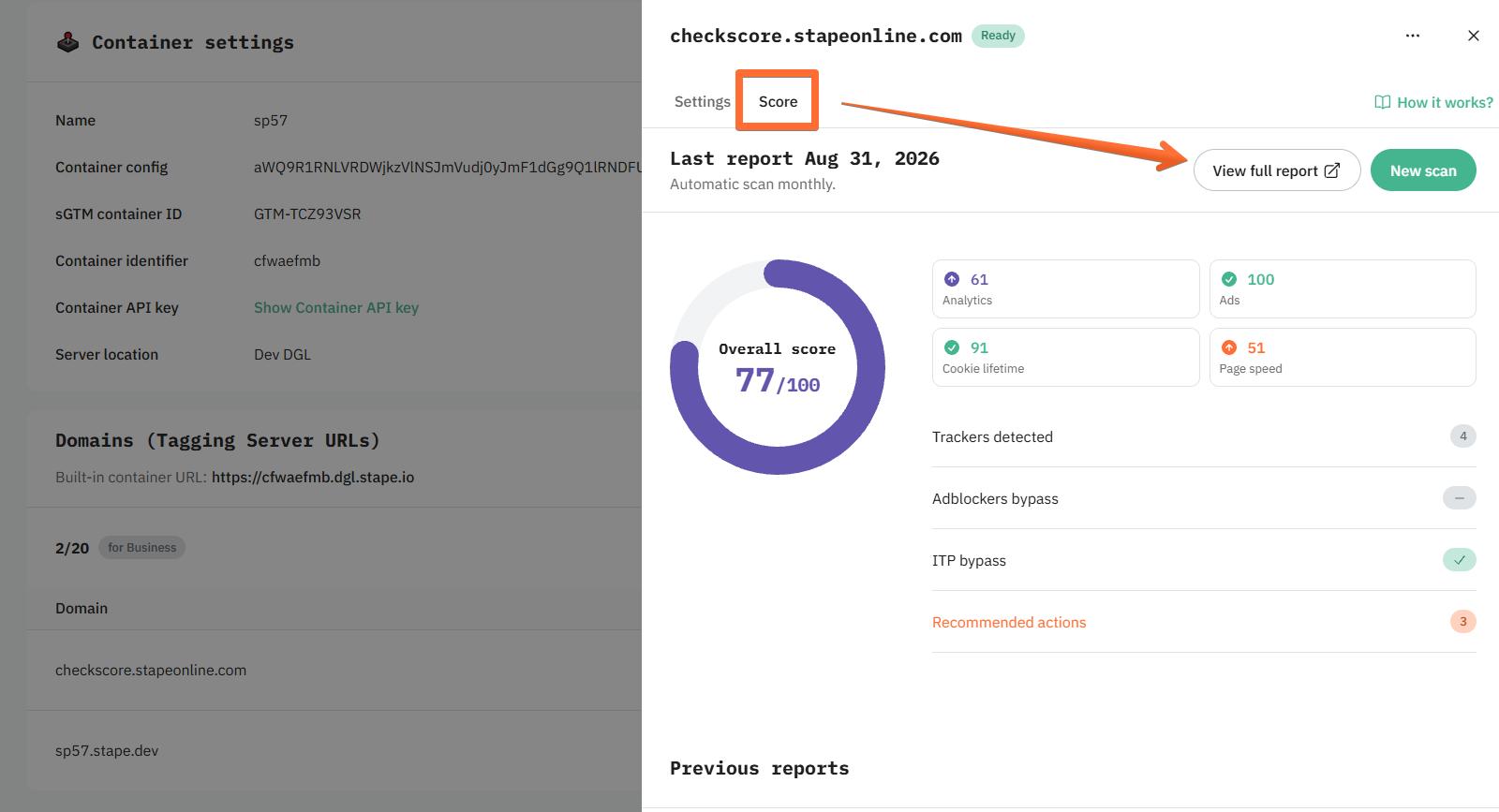
Clear tracking score: you get one overall score plus separate scores by area, so you can see where to start.
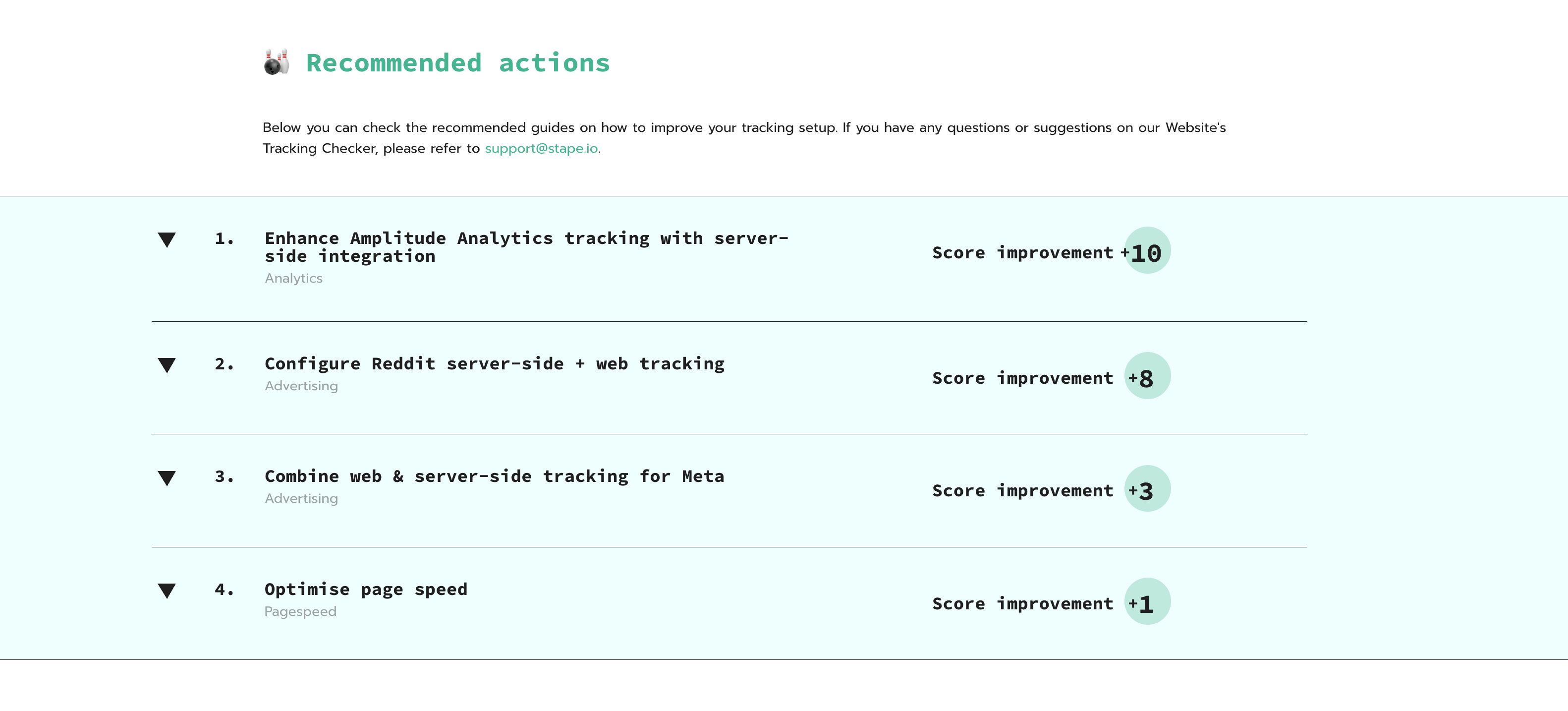
Practical recommendations: the report gives concrete steps on how to make your tracking better.
Works for agencies and in-house teams: you can scan any publicly accessible URL, use the report as a checklist, and share it as a deliverable or pre-audit.
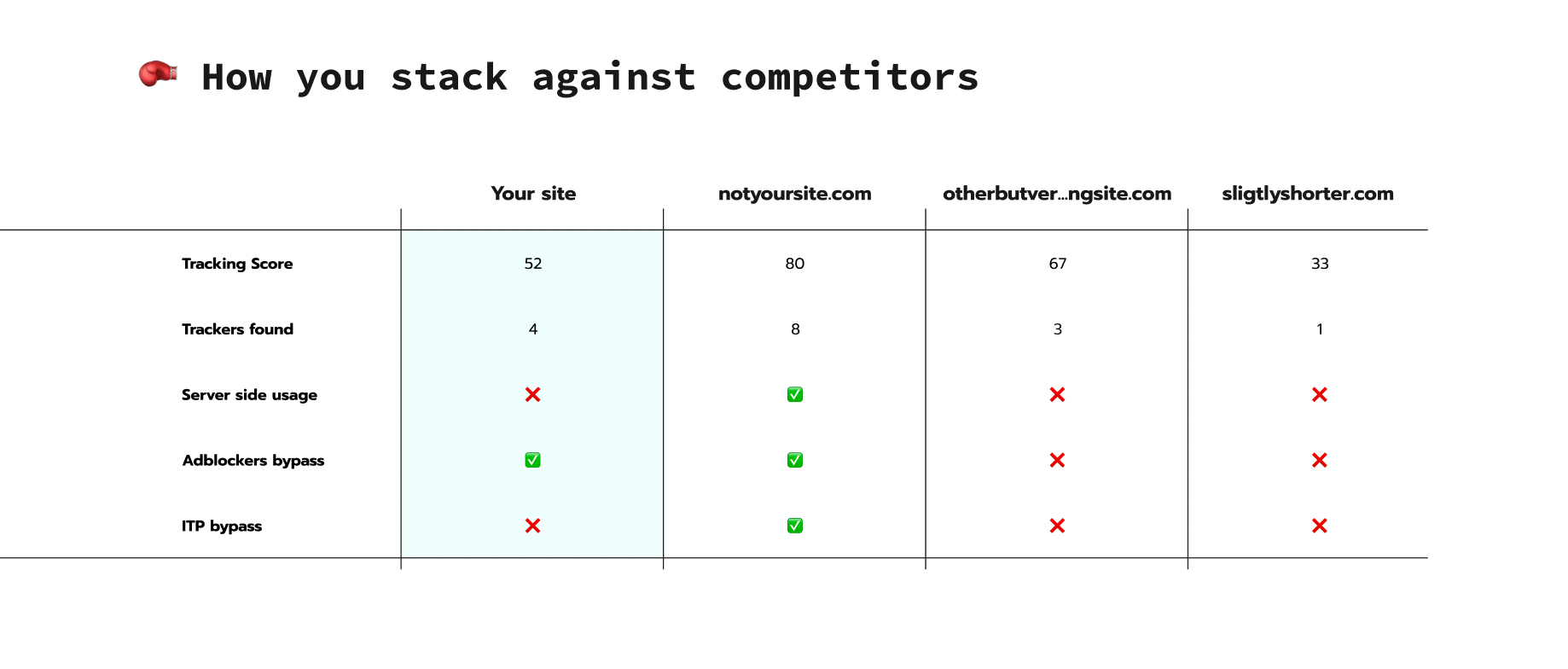
Competitive benchmarking: the tool analyzes the performance of your competitors and provides a benchmark.
Measurable gains: after applying fixes from Stape's Website Tracking Checker, many setups can reach up to 40% more tracked conversions, 35% better data quality, and 20% faster page speed.
Available within Stape: accounts with paid subscriptions will see Tracking Checker’s ratings within their sGTM containers (a consolidated rating and separate scores for each custom domain), with an option to view extended reports.
How to perform a website tracking audit with Stape
You can use this process on your own site or on a client site.
1. Define what you want to check
- 1.Write down your goal for this audit: for example, confirm that purchase and lead events fire on the right pages.
- 2.List the pages you want to test: homepage, main landing pages, product pages, checkout, and confirmation page. Plan to check them page by page, since the scan runs on a single URL at a time.
- 3.Make a short list of tools you use: GA4, Google Ads, Meta, TikTok, CRM, consent platform, etc.
This helps you read the report with context.
2. Open Stape's Website Tracking Checker
- 1.
- 2.Paste the URL you want to scan and start the audit.
You can scan as many publicly accessible URLs for free as you want.
3. Wait for the scan to complete
The audit usually takes up to two minutes. During this time, the Checker analyses:
- Which analytics and ad scripts load.
- How cookies behave.
- Which scripts can affect SEO and speed.
When the report is ready, you will see an overall score and detailed sections.
4. Obtain the overall score
The overall score shows the general health of your tracking setup.
- High score (80–100): your setup follows many best practices, but there can still be areas to refine.
- Medium score (50–79): some important parts of your tracking work, but you likely miss events or send incomplete data.
- Low score (0–49): tracking needs attention, and you should plan fixes soon, especially before high-season campaigns.
5. Go through each section
Use the detailed sections to plan your actions.
- Analytics: check if GA4 and other analytics tools are set up on the right pages and if your tags send the events you want to measure, like purchases, leads, and signups, with the right value and currency. Fix missing events or duplicated tags in your web container or server container.
- Advertising: verify that purchase and lead events reach platforms like Meta and Google Ads with value and currency. If the report suggests server-side tracking, plan how to
- Cookies: review lifetime, consent settings, and how cookies relate to analytics and ads. Align this with your consent banner rules.
- SEO-impacting scripts: check scripts that slow the website. Decide which ones to move to server-side or delay so that the main content loads first.
6. Fix issues with GTM and your platforms
After reading the report:
- Follow the steps in the Recommended actions section of the report to improve your setup.
- Use Google Tag Manager's preview and debug mode to test tags that need changes.
- Update web and server containers, remove duplicates, and correct triggers.
- Adjust platform settings in GA4, Google Ads, and Meta so that event names and parameters match best practices.
- Fix issues with GTM and your platforms
For complex changes or for clients with many sites, you can also consider Stape Care if you need expert help with implementation.
7. Rescan and compare
When changes are live:
- 1.Run Stape's Website Tracking Checker again for the same URL.
- 2.Compare the new score and recommendations with the old ones.
- 3.Save both reports so that you can show progress to your team or client.
You can keep using the Website Tracking Checker as a regular monitoring tool, for example, after big site releases or campaign launches.
How to perform a website tag audit in GTM
While the Website Tracking Checker gives you a scored overview, a tag audit means going into your GTM containers directly and reviewing each tag, trigger, and variable one by one. This is the step you'd take after the Checker flags an issue, or when you want to verify a setup the Checker can't fully see (like internal trigger logic or variable values).
- 1.List every tag in the container. Go to Tags in your web and server GTM containers and note what each one does, what fires it, and whether it's still needed. Old or unused tags are a common source of duplicate events.
- 2.Check each trigger's firing conditions. Confirm triggers fire on the intended pages or events only – a trigger set too broadly (or too narrowly) is one of the most common causes of missing or duplicated data.
- 3.Review variables for correctness. Confirm data layer variables, lookup tables, and custom JavaScript variables are still pulling the values you expect, especially after site or platform changes.
- 4.Use Preview and Debug mode. Step through a real user journey (page load, add to cart, purchase, etc.) and confirm each tag fires once, in the right order, with the right parameters.
- 5.Cross-check web and server containers together. If you use server-side tracking, confirm each web tag has a corresponding server tag where needed, and that deduplication (matching event IDs) is configured so the same event isn't double-counted.
- 6.Document what you find. Note broken tags, duplicate triggers, and outdated variables, then fix them in order of impact – starting with revenue-related events like purchase or lead.
| Note: another tool that provides automated website tracking monitoring is Stape’s Monitoring feature. After configuring the rules, you’ll receive alerts when the tracking setup breaks, so you can fix the problems early. |
Analytics and tracking audit vs SEO website audit
Analytics and tracking audits and SEO audits often happen at the same time, but answer different questions.
Analytics and tracking audit: "Is our data collection correct and complete enough to support decisions and ad optimization?"
SEO website audit: "Can search engines crawl, index, and rank our pages, and is our content optimized for the right queries?"
Where they overlap:
- Some tracking scripts can slow pages, and both audits will notice this.
- Poor tracking can hide the impact of SEO work on conversions.
- Moving heavy scripts to server-side can help both performance and SEO.
SEO work brings traffic. Tracking and analytics reports show what this traffic does and how it converts.
Web analytics audit checklist
This section works as an analytics tag audit on its own – these points are meant to go together with your Stape Website Tracking Checker report. Read the report first, then walk through the checklist and compare it with your current setup. It can help you see what already works, what needs a quick review, and what should be updated next.
- GA4 tracking was added on all important pages (not only the homepage).
- Main events tracked:
page_view,add_to_cart,begin_checkout,purchase,lead,signup, orsimilar. - Event parameters set: value, currency, items, transaction ID, where needed.
- No double-counting: purchase and lead events fire once per real action.
- Time zone, currency, and domains configured correctly in GA4.
Web tracking audit checklist
Use this checklist alongside the analytics checklist above – it covers how tracked data reaches ad platforms, how cookies and consent are handled, and how tracking scripts affect performance.
Advertising and server-side tracking
- Meta, Google Ads, and other ad platforms receive core events from real user actions, sent from the site to your server Google Tag Manager container, and then to the platforms.
- Events in ad platforms match GA4 numbers within normal limits for each channel.
- Conversion events use clear names and are linked to campaigns.
- Server-side tracking used for the main platforms or planned.
- Events from the browser and server are not sent as separate duplicates without deduplication logic.
Cookies and consent
- Consent banner appears where needed and is easy to understand.
- Cookies linked to analytics and ads respect the user consent status.
- No high-risk third-party scripts run before consent on sensitive pages.
SEO and performance
- Tracking scripts do not block the main content from loading.
- Heavy scripts are moved to the server-side where possible, or loaded later.
- Core Web Vitals are tested regularly after significant tracking changes.
Monitoring and maintenance
- Regular scans with Website Tracking Checker by Stape, for example, once per month or before big campaigns.
- Clear owner for tracking: one person or team is responsible for reviews.
- Change log kept for major tracking changes so that you can link data shifts to edits and keep debugging and monitoring of your server-side tracking configuration organized.
FAQs
Want to start on the server side?
Try for freeRecommended for you
Blog
What is event tracking in GA4: a guide to boosting your data insights
GA4 event tracking helps monitor user interactions, analyze data, and optimize marketing strategies. Set up accurate data collection with ease!
Sep 16, 2026

Comments