What are the /set_cookie requests in server-side Google Tag Manager (GTM)?
Written by
Giovani Ortolani Barbosa
If you've ever noticed mysterious /set_cookie requests appearing in your server-side Google Tag Manager (sGTM) logs, you may be wondering what they are, why they exist, and whether they indicate a problem. These requests often raise concerns about billing, data collection, and tag behavior.
The short answer is: this is expected behavior (and not documented by Google), not an error. These requests are part of a clever solution to a complex timing problem inherent in server-side tagging.
In this article, we'll break down what /set_cookie requests are and what role they play in ensuring reliable tracking and cookie collection in sGTM.
What triggers the /set_cookie request?
A /set_cookie request occurs when three conditions are met:
- 1.A tag calls the
sendPixelFromBrowserAPI in sGTM. - 2.Another tag attempts to set a cookie using the
setCookieAPI aftersendPixelFromBrowserAPI has already been called. - 3.The incoming request to your sGTM container includes the
richsstsseparameter in the end of its URL and without having any value (e.g.[...]&richsstsse).
Tags like Google Ads Conversion/Remarketing, Floodlights, and GA4 (when Google Signals is enabled) rely on firing pixels from the browser to sync third-party cookies. To do this effectively, the sendPixelFromBrowser API is often called very early in the tag's execution process to give the browser maximum time to collect these cookies from the vendor's domains (like doubleclick.net).
When this API is called, sGTM immediately sends the response back to the browser to initiate the third-party pixel syncing request.
Here's the catch: once the response has been sent, the server can no longer add new Set-Cookie headers to the response. Only the tags that set cookies using the setCookie API before sendPixelFromBrowser API was called will have their cookies set through Set-Cookie headers.
| This creates a problem. What if other tags are still running and need to set a first-party cookie? They've missed their chance because the headers are already gone. |
Solution: sending instructions in the Response Body
This is where the richsstsse parameter and the /set_cookie come in.
The richsstsse parameter acts as a flag, signaling that the entity that sent the event in the browser (usually a Google tag / gtag or Stape Data tag) supports a special "command protocol." This protocol allows the server to send instructions back to the browser in the response, such as setting cookies or firing third-party pixels, even after the initial response has already been sent.
And /set_cookie is a request back to the sGTM from the browser to pick up the cookies that should have been set previously, but didn't get a chance to.
In short: to ensure third-party cookies can be collected, sGTM sends its response early. To ensure first-party cookies can still be set after that, it uses a special protocol to send instructions in the response body. This protocol is what generates the /set_cookie requests.
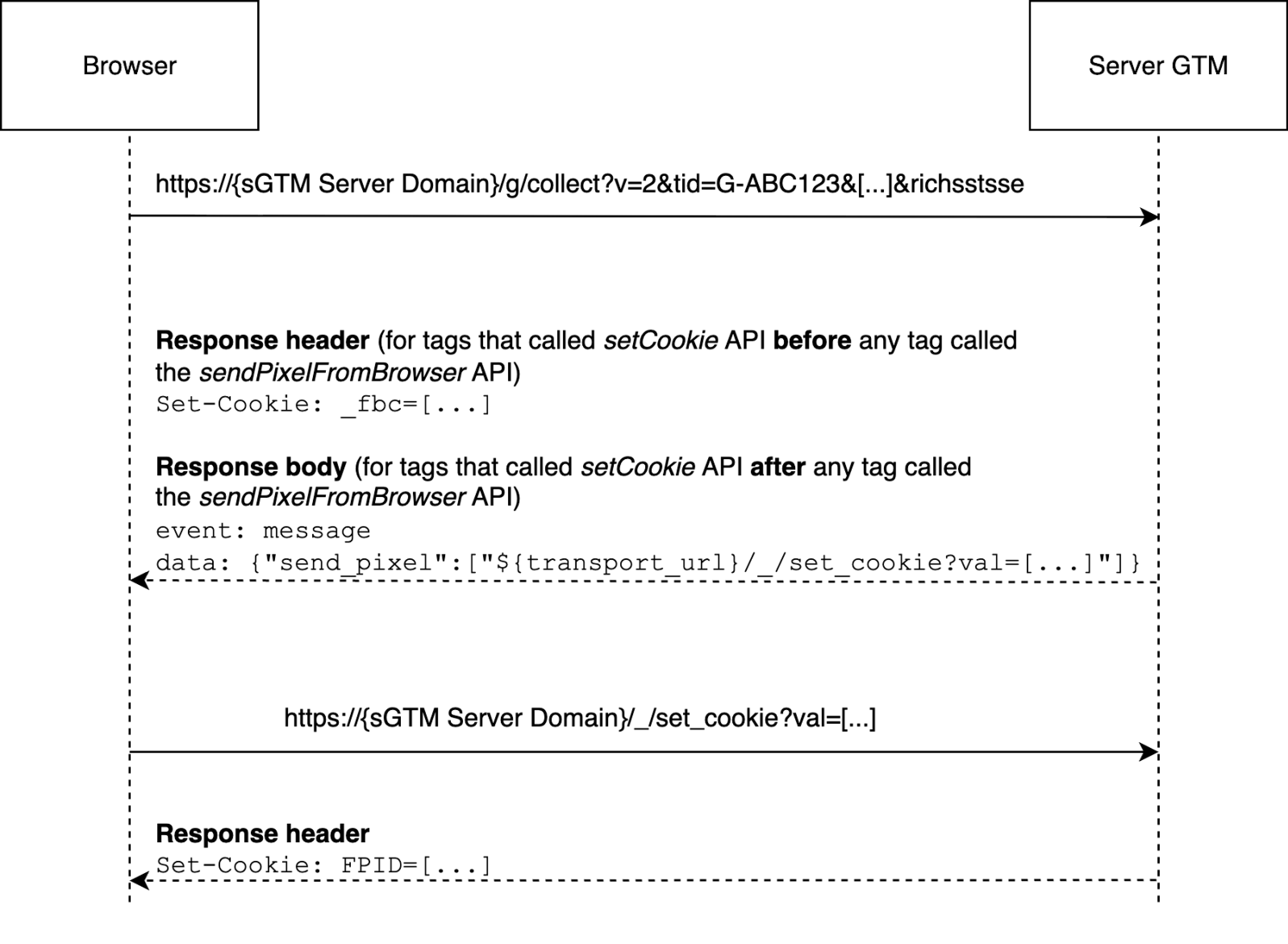
How it works: a look under the hood
When the richsstsse parameter is present in the incoming request to your sGTM container, sGTM sends the response body in a series of chunks. You can observe this in the sGTM Preview Mode page under the "Outgoing HTTP Requests from Browser" section.
The response body isn't delivered all at once, but in parts, with each new chunk appearing as tags execute the setCookie or sendPixelFromBrowser commands.
For example, the gtag (GA4 tags) library uses a ReadableStream to handle this. Each chunk contains a message with instructions, such as:
send_pixel: tells the browser to fire a pixel to a specific URL, which can be for third-party cookie syncing or other purposes.response: the final message in the stream, which contains the "real" HTTP status code and body that the client was expecting.
Here is an example of what these data chunks look like in the response body:
// Instruction to send a pixel to set a cookie via the sGTM endpoint
event: message
data: {"send_pixel":["${transport_url}/_/set_cookie?val=[...]&path=${encoded_path}"]}

// Instruction to send a pixel to a Google domain for third-party cookie syncing
event: message
data: {"send_pixel":["https://googleads.g.doubleclick.net/pagead/viewthroughconversion/[...]","fallback_url_method":"fetch"}}

// Instruction to send a pixel to a Google domain for third-party cookie syncing
event: message
data: {"send_pixel":["https://www.google.com.br/ads/ga-audiences?v=1&t=sr&slf_rd=1&_r=4&dma=0&[...]"],"options":{}}

// Instruction to send a pixel to a Google domain for third-party cookie syncing
event: message
data: {"send_pixel":["https://ad.doubleclick.net/activity;register_conversion=1;[...]"],"options":{"attribution_reporting":true}}

// The final response message
event: message
data: {"response":{"status_code":200,"body":""}}
Real-life demonstration
GA4 Tag event without richsstsse flag
GA4 Tag event with richsstsse flag
And also, please take a look here:
You can see in this last video that the response body is not received once, but in parts. The chunks list keeps increasing as soon as the tags execute the setCookie and sendPixelFromBrowser instructions.
Stape Data Tag event without richsstsse flag
Stape Data Tag event with richsstsse flag
Important technical details
For those who want a deeper understanding, here are a few key technical points derived from tests and observations.
Incoming request contains the richsstsse flag
- It's not limited to a set of tags: any tag or client using
sendPixelFromBrowsermay generate/set_cookierequests. - The initial HTTP request will always have a
200status code, regardless of what your client defines. The actual status code is delivered in the finalresponsemessage chunk. - If
sendPixelFromBrowseris not called, sGTM waits until all tags finish (or timeout at the default timeout of 20 seconds) before responding. - Fallback URLs: Some
send_pixelcommands include a fallback URL (seen in thefallback_urlparameter) in case the primary request is blocked. - Whenever possible,
setCookieorsendPixelFromBrowserAPIs must be called before runningdata.gtmOnSuccess()ordata.gtmOnFailure()in the tag's code. This ensures your commands are queued before the tag signals its completion.
Incoming request contains the richsstsse flag, but sendPixelFromBrowser is not called; or Incoming request doesn't contain the richsstsse flag
- sGTM will wait for all tags to finish executing (or time out after 20 seconds) before sending a response.
- All cookies will be set using traditional
Set-Cookieresponse headers. - Any calls to the
sendPixelFromBrowserAPI will be gracefully ignored. - Google Ads Conversion tags will trigger a console warning "The requestor does not support sending pixels from browser. Third party cookies will not be collected as a result.", while Google Ads Remarketing tags may simply show as Failed.
- No response body will be sent (for GA4 Client); and the response body defined by the Client itself will be returned for other Clients.
Other miscellaneous finding
- The "Fired in the background" tag execution status means the tag started its execution but has not yet called its success/failure handler.
Which tags trigger this behavior?
You'll most commonly see /set_cookie requests when using tags that rely on third-party cookie syncing for remarketing and conversion tracking. This includes:
- Google Ads Conversion & Remarketing tags
- Floodlight tags
- Google Analytics 4 tags (specifically when Google Signals is activated)
- Custom tags from vendors like Stape that utilize the
sendPixelFromBrowserAPI, such as the Microsoft UET CAPI tag and Amazon tag.
Is this a problem? Impact and management
Each /set_cookie request is a new incoming request that your tagging server infrastructure (like Google Cloud Platform or Stape) has to process. If you have a high volume of events that trigger this behavior, it can lead to an increase in your server costs.
They are normal and expected behavior in sGTM. They are not an error or a problem.
However, you can manage it with good tagging hygiene:
- Limit ad-related tags: be strategic about where and when your tags that rely on sendPixelFromBrowser fire. Do they need to fire on every single page view, or can you limit them to specific conversion events?
- Isolate tags: for tags that don’t need third-party cookie syncing, consider moving them to Stape Data Tag + Data Client without enabling the Support rich command protocol option.
Conclusion
The /set_cookie requests you see from your GTM are not a cause for alarm. Instead, they are a core part of the sophisticated mechanism that allows server-side tagging to effectively handle both first-party and third-party cookie requirements.
By sending an early response to facilitate third-party GTM cookie syncing and then using a chunked response body to send follow-up instructions, sGTM navigates the technical limitations of the HTTP protocol.
As an option to ease your mind:
- Be mindful of where and when you fire Google Ads or similar tags.
- Use Stape Data Tag and Client when third-party cookie syncing isn’t required.
Want to switch to the server side?
Try for free
Comments