So erreichen Sie mit sGTM und Data Store ein 100 % genaues Tracking auf Shopify
Verfasst von
Vlad Kononov
In diesem Artikel erfahren Sie, wie Sie mit Stape und serverseitigem GTM ein 100 % genaues Shopify-Tracking erreichen. Erfahren Sie, wie Sie Datenverluste vermeiden, die Attribution verbessern und Ihre Marketingleistung mit einer zuverlässigen und effektiven Tracking-Lösung optimieren. Präzise Shopify-Analytics sind entscheidend, um Ihre Geschäftsziele zu erreichen.
Sie benötigen zuverlässige Daten, um zu entscheiden, wie Sie Budgets verteilen, die Leistung Ihrer Kampagnen bewerten und den Return on Investment messen. Zu wissen, welche eCommerce-KPIs Sie tracken sollten, hilft Ihnen, diese Daten zu verstehen und effektiv zu nutzen. Der Verlust von Conversions kann zu einem unvollständigen Bild und falschen Entscheidungen führen. Glücklicherweise bietet Stape eine Lösung. In diesem Artikel erklären wir, wie Sie 100 % Ihrer Käufe auf Shopify unabhängig von den Umständen tracken und alle erforderlichen Daten an Analytics- und/oder Marketingplattformen übertragen können, damit Sie bessere Insights und präzise Attributionsberichte erhalten und Ihre Pixel effektiver trainieren können.
Obwohl Shopify eine Web Pixel API veröffentlicht hat, mit der wir verschiedene Events abonnieren und präziser tracken können, ist Ihnen vielleicht aufgefallen, dass manchmal trotzdem ein Prozentsatz der Bestellungen fehlt, die nicht an Ihre Werbe- oder Analytics-Plattformen gemeldet wurden. Dies kann verschiedene Gründe haben - Adblocker, ITP-Einschränkungen, eine langsame Internetverbindung, ein Fehler auf dem Gerät des Nutzers oder einfach unglückliche Umstände. Jeder dieser Faktoren kann dazu führen, dass Ihre Conversions nicht erfasst werden.
Aber keine Sorge, Stape bietet eine Lösung! Mit serverseitigem Shopify-Tracking können Sie diese häufigen Probleme umgehen.
Die Data Store-Funktion ist in den Pro-Tarifen und höheren Tarifen verfügbar. Wenn Sie eine individuelle Lösung wünschen, können Sie sich an unseren Vertrieb wenden.
Überspringen Sie die manuelle Einrichtung von Events
Stape Conversion Tracking für Shopify mit Setup Wizard installiert serverseitiges GTM in wenigen Minuten, erstellt automatisch wichtige eCommerce-Events und lädt einsatzbereite Tags für Google, Meta, TikTok und weitere Plattformen. Die Events laufen über die serverseitige Tracking-Plattform von Stape, sodass Sie bis zu 40 % mehr Conversions erfassen und den ROAS verbessern können.
Schritt-für-Schritt-Konfiguration
Kurz gesagt sieht der Implementierungsablauf so aus:
- 1.Richten Sie das Event-Tracking wie gewohnt mit Web- und Server-GTM-Containern ein.
- 2.Speichern Sie Marketing- und/oder Analytics-Cookies in Data Store und stellen Sie sie als Fallback bereit, falls das Purchase-Event nicht aus dem Web-Container gemeldet wurde.
- 3.Jedes aus dem Web gemeldete Purchase-Event wird im Data Store gespeichert. So können wir prüfen, welche Transaktionen gemeldet wurden.
- 4.Richten Sie einen Webhook mit der Stape's Conversion Tracking app aus dem Shopify Marketplace oder mit nativen Shopify-Webhooks ein, der alle erstellten Bestellungen an sGTM meldet.
- 5.Sobald der Webhook in sGTM empfangen wird - prüfen wir, ob eine solche Bestellung bereits in Data Store gespeichert wurde - das würde bedeuten, dass diese Transaktion live aus dem Web-Container gemeldet wurde. Wenn wir diese Bestellung nicht in Data Store finden, bedeutet dies, dass sie aus irgendeinem Grund nicht gemeldet wurde. Wir müssen daher den Webhook verarbeiten, die erforderlichen Cookies aus Data Store abrufen und die Daten über die Conversions API an die von Ihnen benötigten Marketing- und/oder Analytics-Plattformen melden.
Bevor Sie beginnen
Bevor Sie mit der Umsetzung der folgenden Anweisungen beginnen, müssen Sie Data Store aktivieren:
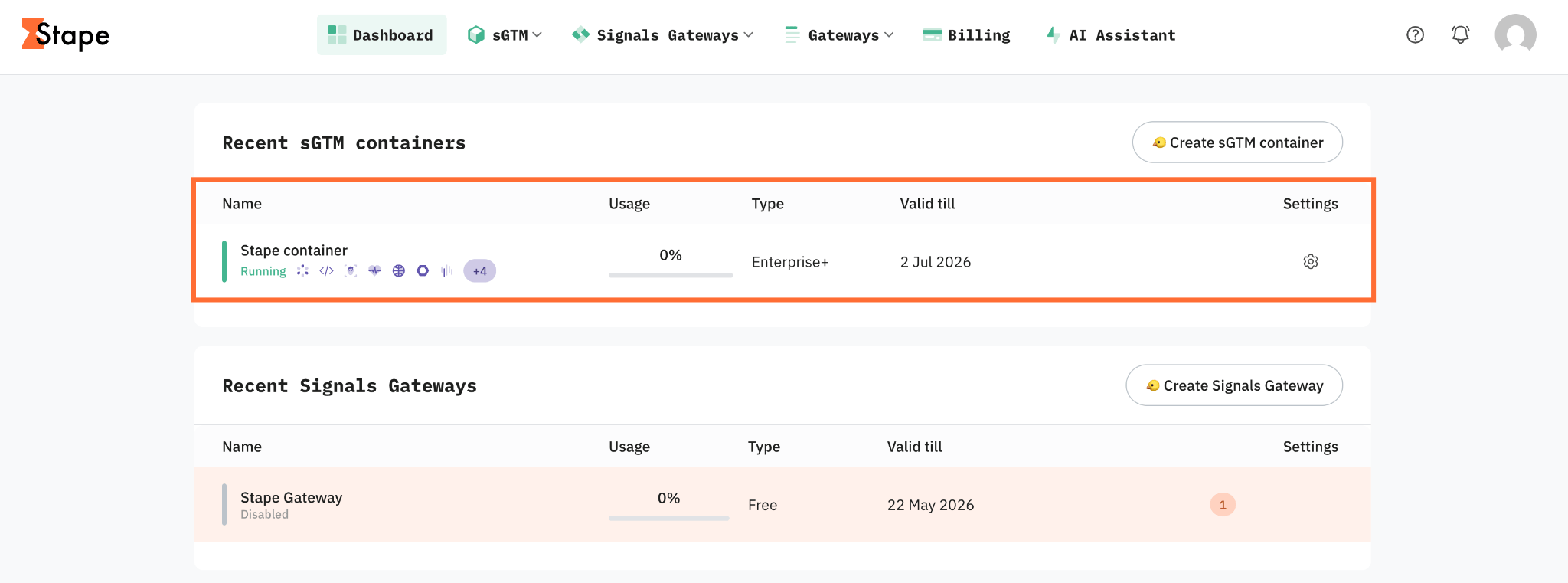
1. Melden Sie sich bei Ihrem Stape-Konto an und wählen Sie Ihren sGTM-Container im Dashboard aus.
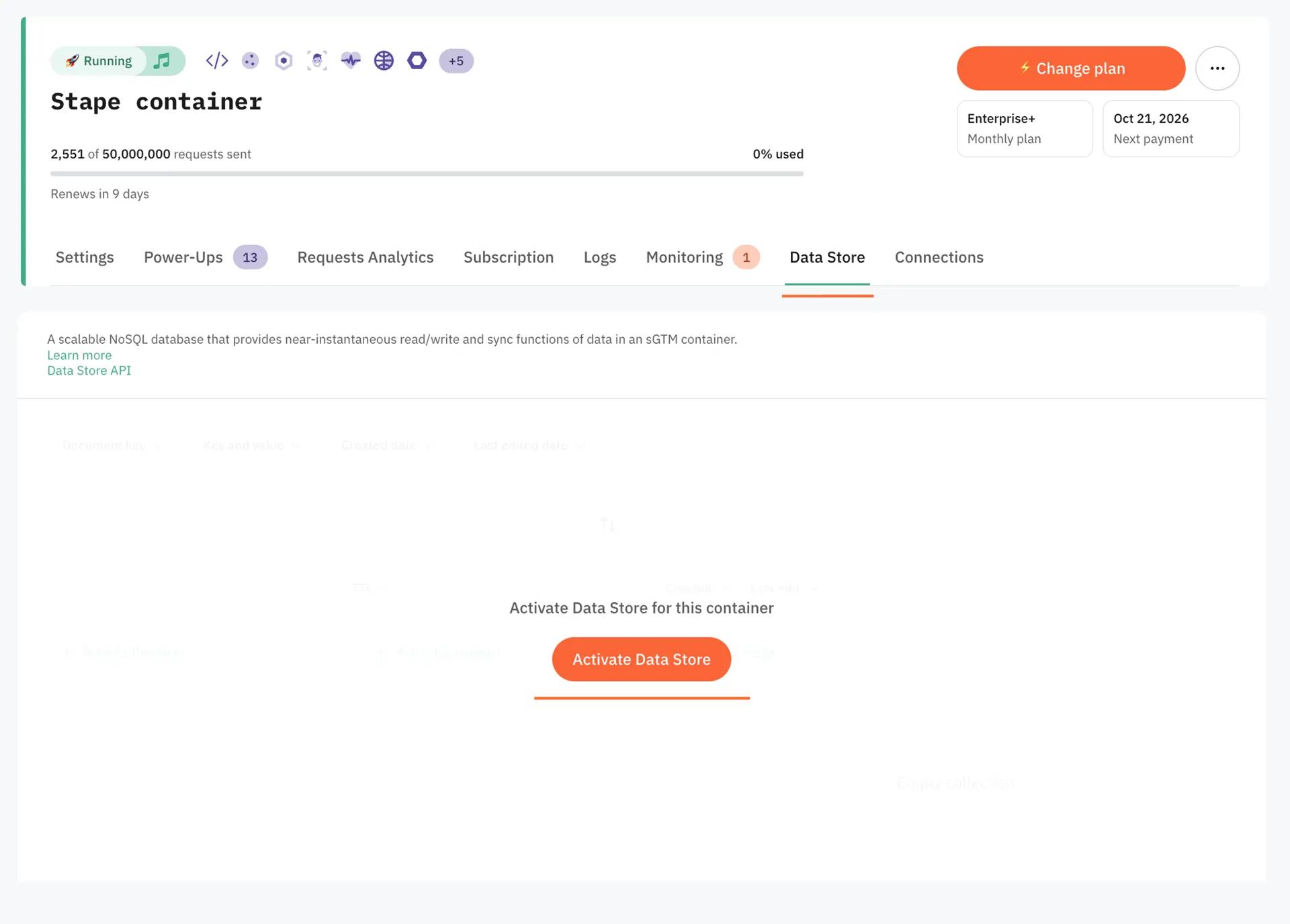
2. Klicken Sie auf den Tab Data Store.
3. Klicken Sie auf Activate Data Store.
Schritt 1. Implementieren Sie die grundlegende Tracking-Konfiguration mit der Stape Conversion Tracking app
Die Stape Conversion Tracking app für Shopify ermöglicht Ihnen, einfach den Custom GTM and GA4 Loader zu installieren und widerstandsfähiger gegenüber Adblockern zu werden. Nachdem Sie GTM auf Shopify eingerichtet haben, übernimmt diese grundlegende Ebene die für Ihren Server-Container erforderliche clientseitige Datenerfassung. In Kombination mit dem Power-up Cookie Keeper können Sie damit auch ITP-Einschränkungen umgehen.
Wir haben hervorragende Artikel und fertige Container-Vorlagen, die die Umsetzung dieses Schritts beschreiben. Sehen Sie sie sich an:
Shopify-Tracking mit Web- und Server-GTM debuggen: ein vollständiger Leitfaden – sobald Ihre grundlegende Konfiguration aktiv ist, überspringen Sie die Verifizierung nicht. Die Sandbox-Umgebung des Shopify-Checkouts kann dazu führen, dass Tags in der GTM-Vorschau scheinbar funktionieren, in der Produktionsumgebung jedoch unbemerkt fehlschlagen.
Schritt 2. Speichern Sie die erforderlichen Cookies in Data Store. Klicken Sie auf Activate Data Store.
Jetzt müssen wir die Cookies, die wir später benötigen könnten, im Data Store speichern.
In unserem Beispiel speichern wir Meta-Cookies beim Event „checkout_started“ und senden sie vom Shopify Web Pixel an sGTM. Zu diesem Zeitpunkt ist das Checkout-Token verfügbar, und wir können es als Stitching-Parameter verwenden, um den Webhook später mit dem Checkout und den Cookies abzugleichen.
Ein ähnlicher Prozess kann auf jede andere Plattform angewendet werden, an die Sie Daten senden möchten.
Das folgende Code-Snippet sendet einen Payload mit dem Checkout-Token und Meta-Cookies an die URL des Server-Containers. Der Data Client übernimmt diese Anfrage; standardmäßig akzeptiert er Anfragen am Pfad /data.
analytics.subscribe("checkout_started", (event) => {

  setTimeout(() => {

    async function getCookiesPayload() {

      try {

        const payload = {

          "event": "store_cookies",

          "cart_token": init.data.cart.id,

          "fbp": await browser.cookie.get('_fbp'),

          "fbc": await browser.cookie.get('_fbc')

        };

        return payload;

      } catch (error) {

        console.error('Error retrieving cookies:', error);

        return null;

      }

    }

    async function sendCookiesToSgtm() {

      const payload = await getCookiesPayload();

      if (payload) {

        fetch("https://sst.example.com/data", {

          method: "POST",

          headers: {

            "Content-Type": "application/json"

          },

          body: JSON.stringify(payload),

          keepalive: true

        }).then(response => {

          console.log('Payload sent successfully:', response);

        }).catch(error => {

          console.error('Error sending payload:', error);

        });

      }

    }

    sendCookiesToSgtm();

  }, 1500);

});
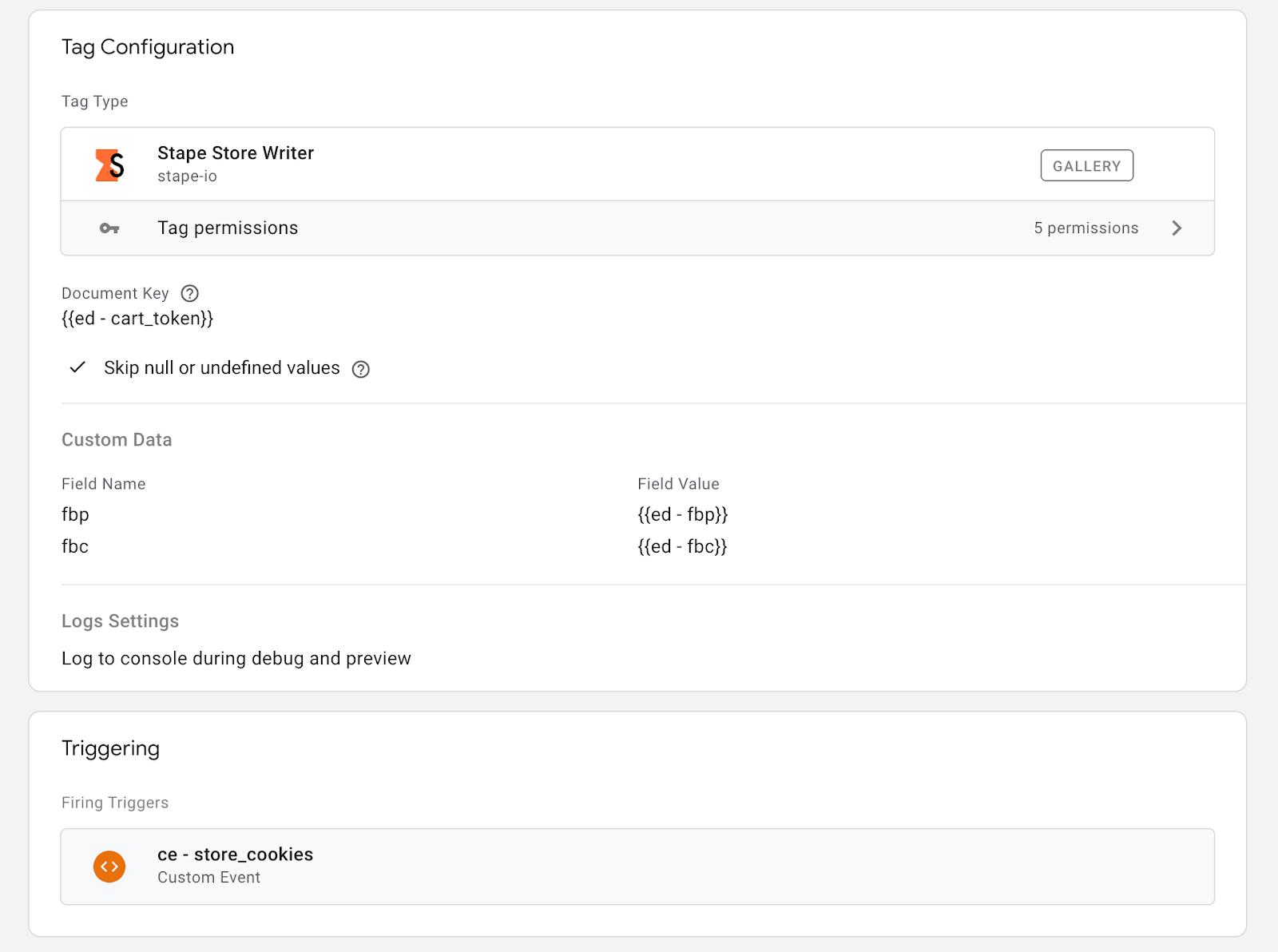
Jetzt müssen wir diese Cookies mit dem Stape Store Writer tag, der in der Server-GTM-Galerie verfügbar ist, in Stape Store speichern, damit wir sie später abrufen und über den Webhook an Meta melden können. Diese Cookies werden über den Cart-Token referenziert, der beim Event „store_cookies“ verfügbar ist und auch im nativen Webhook-Payload von Shopify enthalten sein wird.
Hier sehen Sie ein Beispiel dafür, wie der Stape Store Writer tag konfiguriert werden kann:
Falls zutreffend, berücksichtigen Sie bitte auch Datenschutzbestimmungen sowie den Einwilligungsstatus für Werbung und/oder Analytics Ihres Shops, damit Sie später feststellen können, ob dieser Nutzer seine Einwilligung erteilt hat und Sie diese Conversion melden dürfen. Wenn Ihr Consent-Banner die Shopify Privacy API unterstützt, können Sie alternativ Ihr Web Pixel so konfigurieren, dass es nur ausgelöst wird, wenn der erforderliche Einwilligungsstatus erteilt wurde.
Schritt 3. Speichern Sie jeden aus dem Web-Container gemeldeten Kauf in Data Store
Wir müssen jeden Kauf, der auf die „übliche“ Weise aus dem Web-Container gemeldet wird, in Data Store speichern, damit wir später feststellen können, ob diese Conversion bereits an Meta gemeldet wurde.
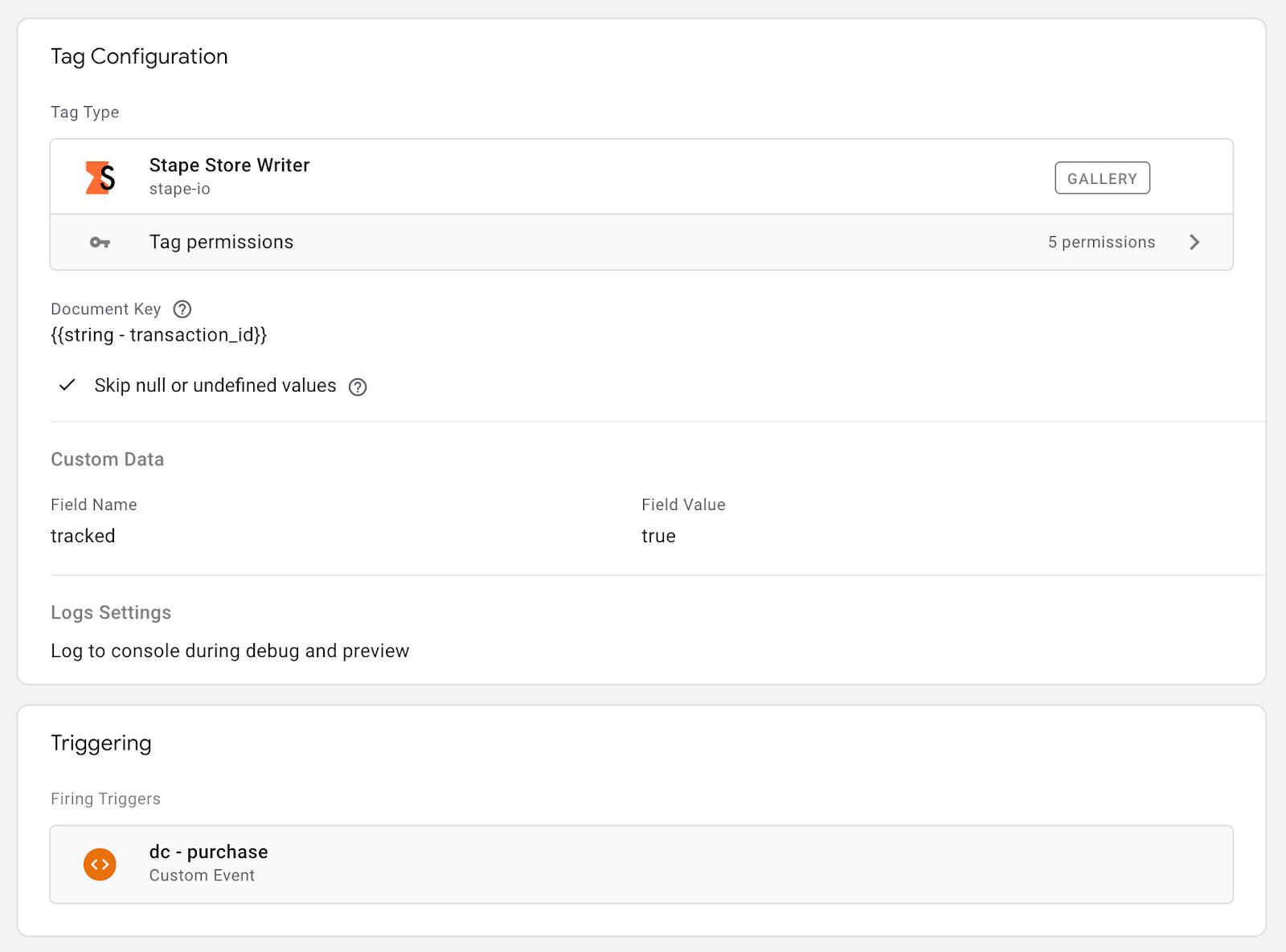
Wenden Sie einen ähnlichen Ansatz wie im vorherigen Schritt an, verwenden Sie diesmal jedoch transaction_id als Dokumentenschlüssel, der auch im Payload des Shopify-Webhooks verfügbar sein wird.
Hier sehen Sie ein Beispiel für einen Stape Store Writer tag, der dafür konfiguriert werden kann:
Es ist besser, den Variablentyp „number“ von transaction_id in einen String umzuwandeln, um Konflikte zwischen den in sGTM, Shopify und Data Store verwendeten Datentypen zu vermeiden. In der sGTM-Galerie gibt es eine Variable, mit der dies einfach möglich ist.
Schritt 4. Richten Sie einen Webhook in Shopify ein
Sie können einen Webhook in Shopify auf viele verschiedene Arten einrichten. Eine der einfachsten Möglichkeiten ist die Stape Conversion Tracking app – sie enthält alle erforderlichen Payload-Daten: Cart-Token, korrekt strukturierte Bestell- und Produktinformationen sowie Nutzerdaten. Sie können auch die native Webhook-Funktion oder eine andere App Ihrer Wahl verwenden.
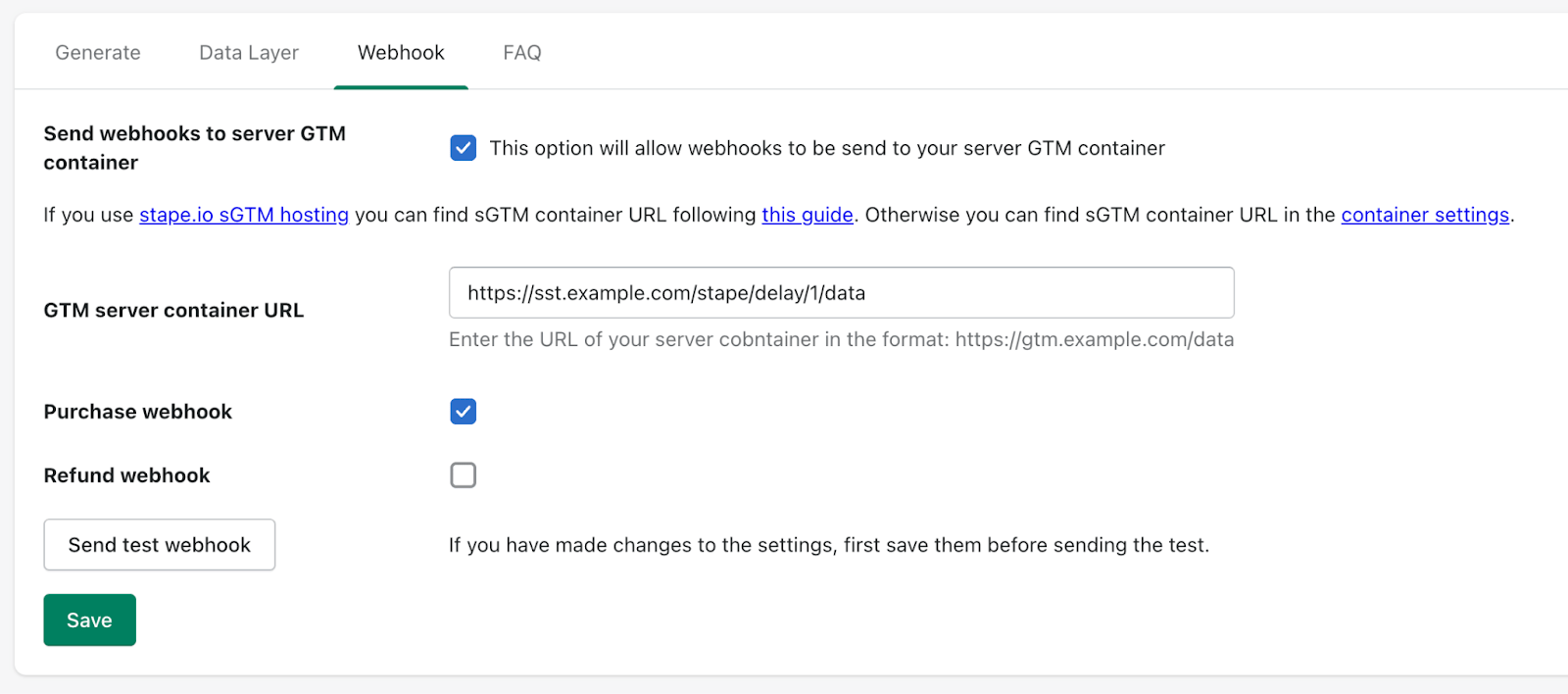
Wir empfehlen außerdem, Stape's Request Delay Power Up zu verwenden, um sicherzustellen, dass die vom Web-Container gesendete Anfrage den Server-Container vor dem Webhook vom Backend erreicht. So können wir die Reihenfolge der Anfragen explizit steuern, was für unseren Fall entscheidend ist. Eine Verzögerung von 1 Minute sollte ausreichen, damit die Purchase-Anfrage den Server-Container erreicht und alle erforderlichen Tags ausgelöst und die erforderlichen Anfragen verarbeitet werden können.
Schritt 5. Überprüfen Sie, ob die per Webhook gesendete Bestellung bereits verarbeitet wurde
In diesem Schritt verfügen wir bereits über Folgendes:
- 1.Alle erforderlichen Marketing- und/oder Analytics-Cookies werden in Data Store als cart_token-Dokument gespeichert.
- 2.Jeder aus dem Web-Container gemeldete Kauf wird in Data Store als transaction_id-Dokument gespeichert.
- 3.Sobald eine Bestellung in Shopify erstellt wird, wird mit einer kurzen Verzögerung ein Webhook an den Server-Container gesendet.
Jetzt müssen wir überprüfen, ob die eingehenden Webhooks verarbeitet und an Meta gemeldet oder ignoriert werden sollten, da die Bestellung bereits verarbeitet wurde.
Daher nehmen wir transaction_id aus dem eingehenden Webhook und prüfen mit der Stape Store Lookup variable, ob sie in Data Store verfügbar ist.
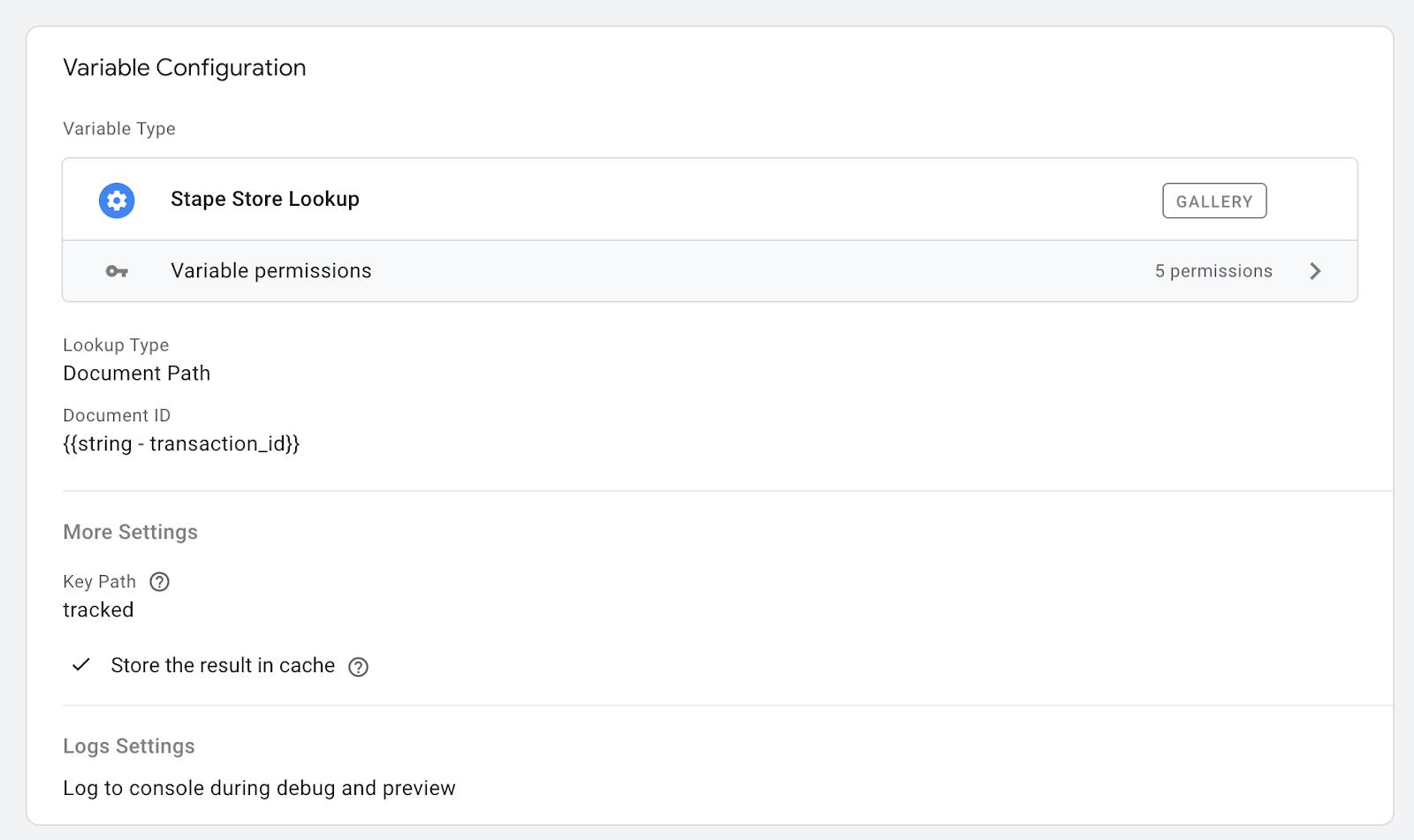
Unsere Variable gibt dann „true“ zurück, wenn diese transaction_id in Data Store gefunden wird. Das bedeutet, dass wir diesen Webhook ignorieren sollten, da diese Transaktion bereits aus dem Web-Container gemeldet wurde.
Wenn unsere Variable undefined oder false zurückgibt, bedeutet dies, dass diese Transaktion aus irgendeinem Grund nicht aus dem Web-Container gemeldet wurde und wir diesen Webhook verarbeiten sollten.
Richten Sie einen zusätzlichen Facebook-Tag für Shopify CAPI ein und füllen Sie ihn mit grundlegenden Informationen aus dem Webhook aus. B. value, currency, content_ids, Nutzerdaten usw.
Für eine möglichst genaue Attribution sollten Sie außerdem die Cookies _fbp und _fbc aus Data Store melden. Sie können mit der Stape Store Lookup variable abgerufen werden, die über den in Ihrem Webhook verfügbaren Cart-Token referenziert wird. Hier ist ein Beispiel:
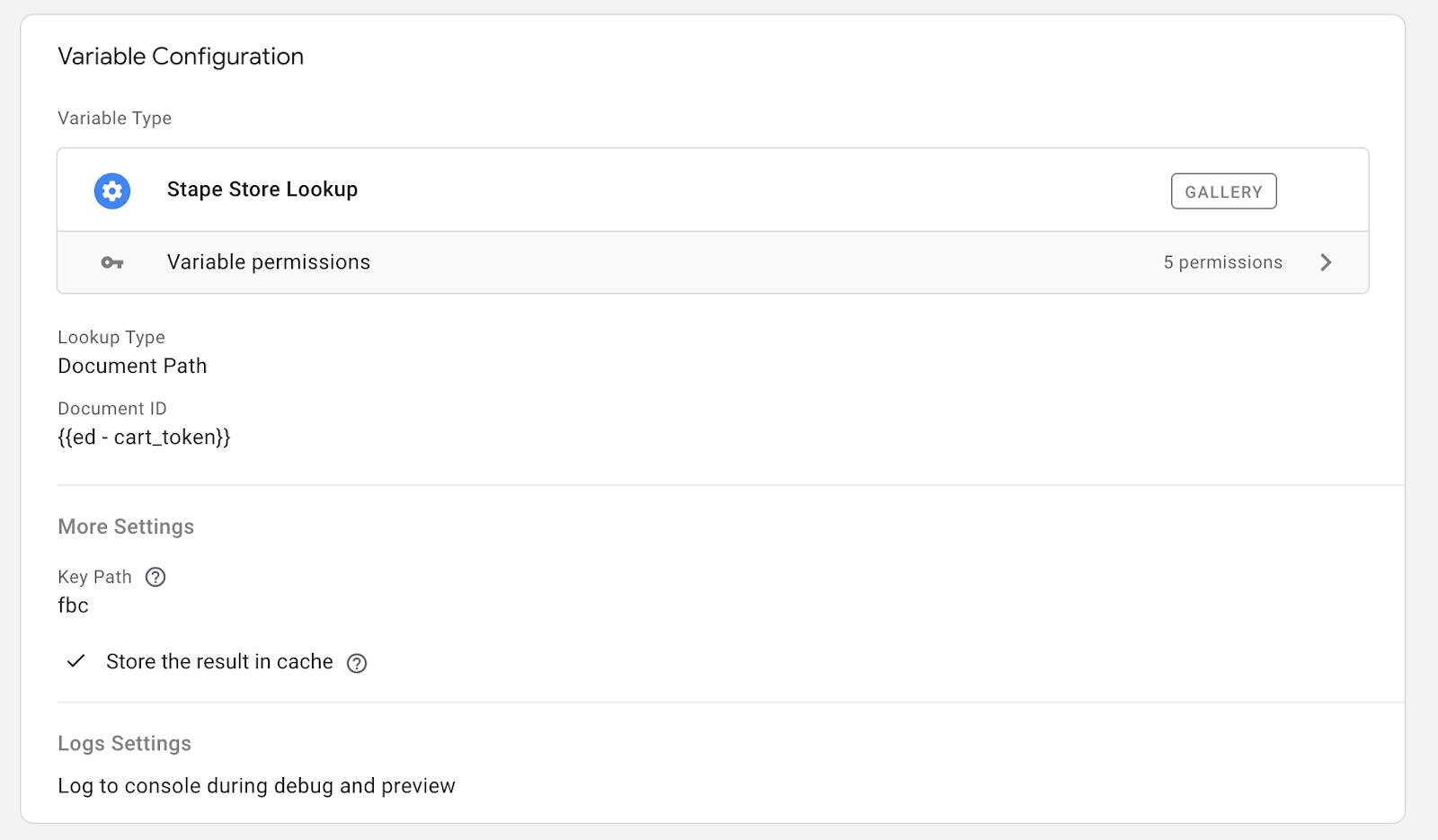
Die Stape Store Lookup variable für _fbp sollte den Parameter Browser ID im Facebook-Tag überschreiben, und Stape Store Lookup für _fbc sollte den Parameter Click ID überschreiben.
Dieser Facebook-Tag sollte ausgelöst werden, wenn unsere Stape Store Lookup variable für transaction_id einen Wert zurückgibt, der nicht true entspricht.
Falls zutreffend, führen Sie mit einem ähnlichen Ansatz eine zusätzliche Prüfung des Einwilligungsstatus durch.
Fazit
Mit diesem Ansatz erreichen Sie eine 100 % genaue Shopify-Conversion-Verfolgung, sodass Sie keine Conversion verpassen, die korrekt zugeordnet werden kann. Die Methode lässt sich auf jede von Ihnen benötigte Marketing- oder Analytics-Plattform erweitern. Stellen Sie einfach sicher, dass Sie in Schritt 2 alle erforderlichen Cookies speichern. In Schritt 5 können Sie dann einen zusätzlichen Tag für TikTok, Snapchat, GA4, Google Ads usw. erstellen. Sie müssen lediglich die erforderlichen Parameter mit den aus Data Store abgerufenen Cookie-Werten überschreiben.
Für komplexere Plattformen wie Google Ads bietet Stape bereits hervorragende Lösungen mit einem einfachen Authentifizierungsprozess, darunter das Google Ads Offline Conversion Tracking Tag und das Conversion Adjustment Tag, wenn Sie solche speziellen Anforderungen haben.
Wenn Sie Fragen haben, können Sie sich gerne an uns wenden.
Möchten Sie mit serverseitigem Tracking beginnen?
Kostenlos testen
Kommentare