3x lower sGTM costs: Stape vs. Google Cloud Run for Shopify | Analyzify

Ivanna Holubovska
AuthorKey takeaways:
When setting up server-side GA4 or Meta tracking, the biggest hurdle often isn’t the setup itself – it’s keeping hosting costs predictable as traffic grows. Many Shopify merchants start with Google Cloud Run (GCR). In this case, variable billing and scaling configuration can quickly turn hosting into an ongoing task.
Our Shopify-focused tracking and analytics partner, Analyzify, reviewed real request and cost data from two active stores. Their goal was to make the trade-offs clearer. Analyzify compared Google Cloud Run before and after optimization, then benchmarked those results against Stape’s fixed-plan hosting.
Running Shopify?
Challenge: unpredictable bills and "technical taxes"
For a fast-growing Shopify store, traffic never stays flat. Marketing campaigns and seasonal sales cause massive surges in event data. Merchants using Google Cloud Run faced 3 main "villains":
- Volatile billing. GCR charges based on request count and precise processing time. Every traffic spike or heavier script results in a different, often higher, bill.
- Complex optimization. To keep costs down, you need a DevOps expert to manually tune scaling parameters, CPU limits, and idle instances. Without this "technical fine-tuning," costs can reach €0.46 per 10k page_views requests.
- Scaling stress. Every time the site traffic grows, the hosting expense grows with it, making it difficult to forecast a stable marketing budget.
Solution: switching to Stape’s predictable model
Rather than relying on assumptions, Analyzify validated the cost side with real data. In October 2025, they analyzed two Shopify setups: Google Cloud Run running with default settings and then after optimization (scaling and resource tuning), and a Stape setup on a fixed request-based plan. This made it possible to compare how each option behaves as event volume increases – both in cost and in ongoing maintenance.
Based on the comparison, Stape stood out as the more predictable option for teams that want stable hosting costs without ongoing infrastructure tuning
Stape setup provided:
- Fixed pricing. Stape uses fixed monthly pricing (for example, €167/month for 20 million requests), giving you predictable costs even when traffic increases. This turns hosting from a variable cost into a predictable overhead.
- Hands-free scaling. No manual configuration is required. Stape handles auto-scaling and server maintenance automatically.
Stape products used for the case study:
- Server-side GTM hosting. High-performance, managed server environment.
- Stape Enterprise plan. 20 million monthly requests for a fixed annual or monthly fee.
Results: ~3x lower cost per GA4 page_view
The October 2025 comparison showed that Stape was both easier to manage and cheaper on a per-event basis than optimized Cloud Run.
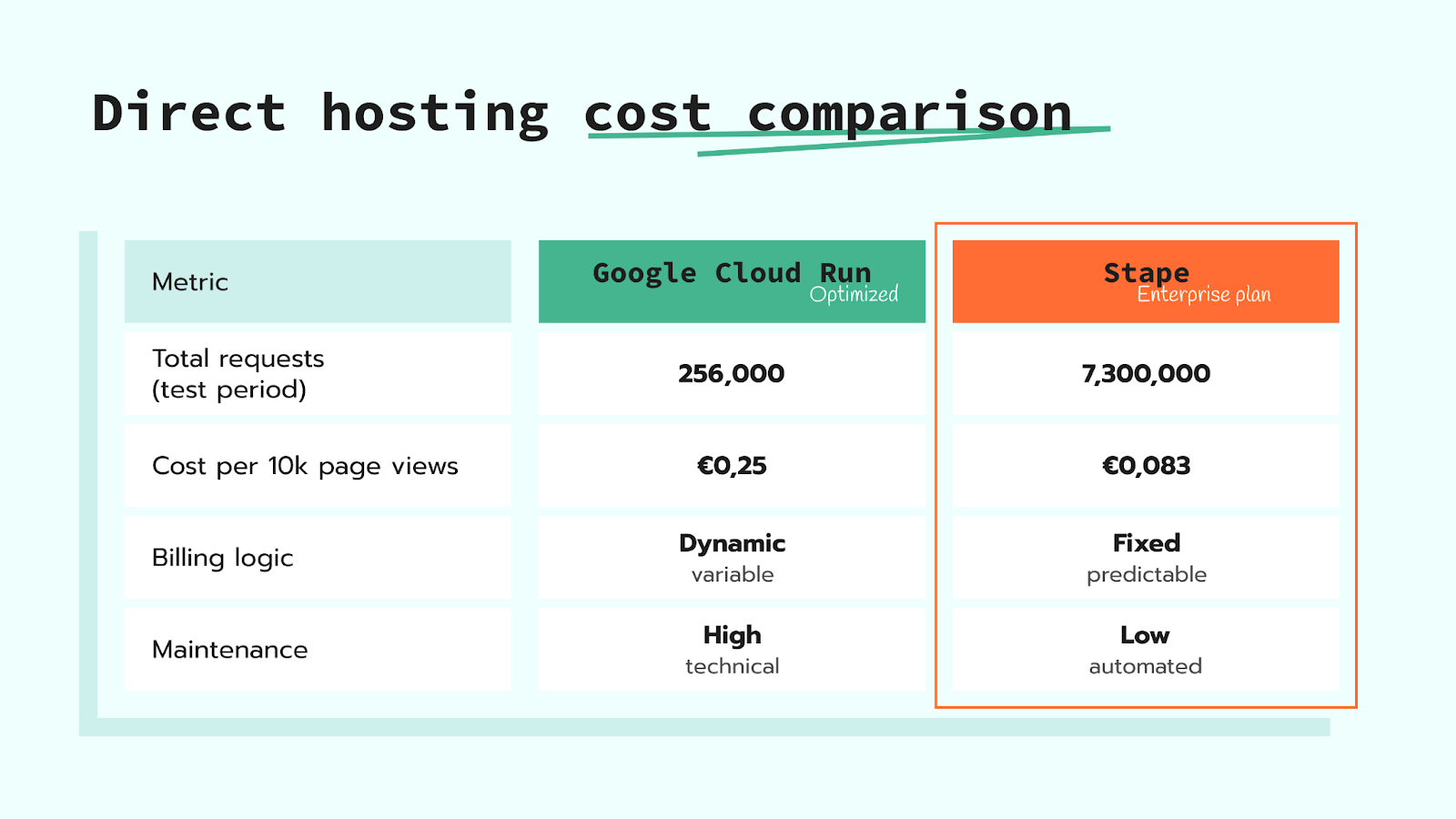
- 3x lower cost per request. Even after heavy optimization, GCR costs €0.25 per 10,000 page_view requests. Stape’s effective rate for the same volume was only €0.083.
- Total cost stability. During the test period (7.3M requests), the store on Stape paid a stable, pre-defined fee. On GCR, the same volume would have required daily monitoring to prevent cost spikes.
- Less overwork. Cloud Run requires ongoing configuration and monitoring; Stape is hands-off with auto-scaling and maintenance.
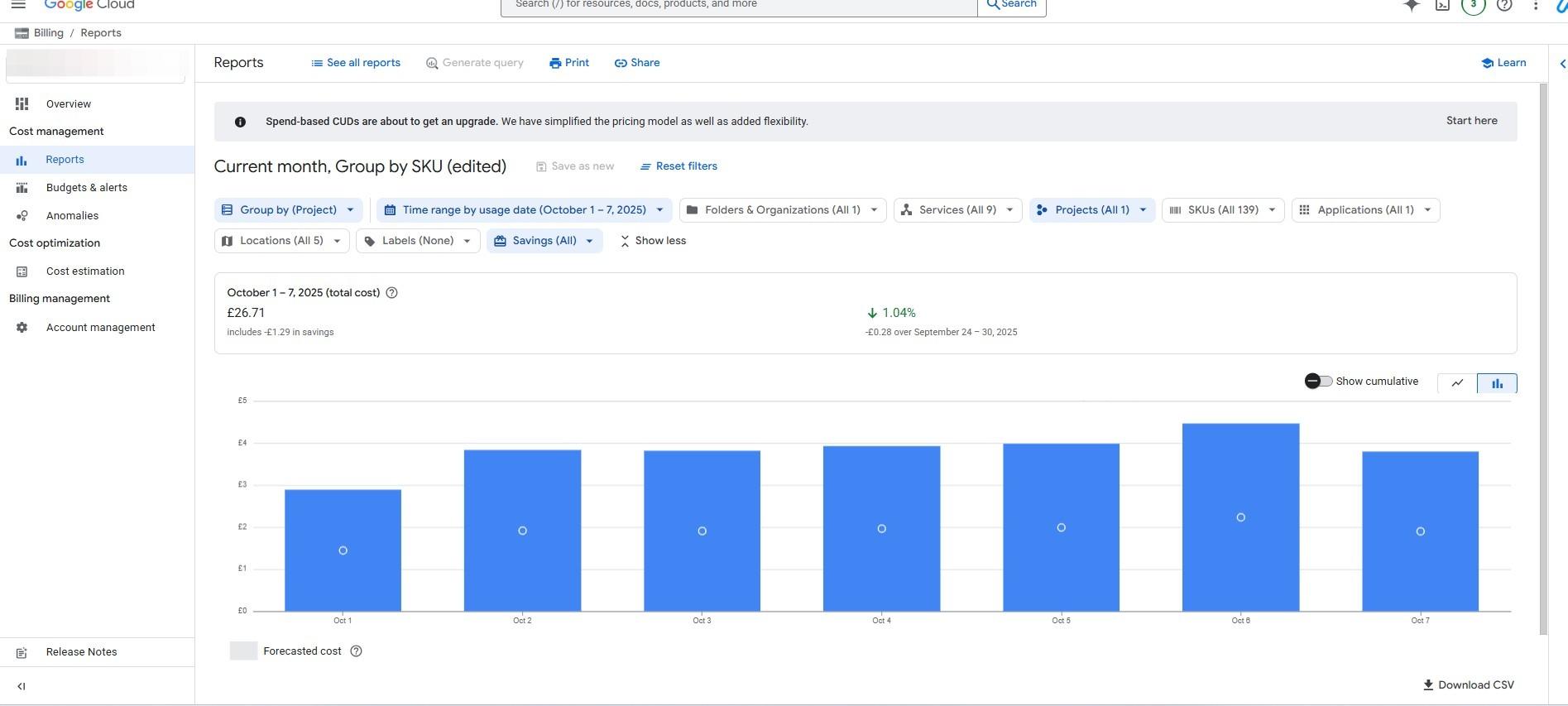
Google Cloud Run (before optimization, 1–7 Oct)
- Total requests: 574,000
- Total cost: €26.71
- GA4 requests: 280,000
- page_view requests: 80,000
- Cost per 10,000 page view requests: €0.46
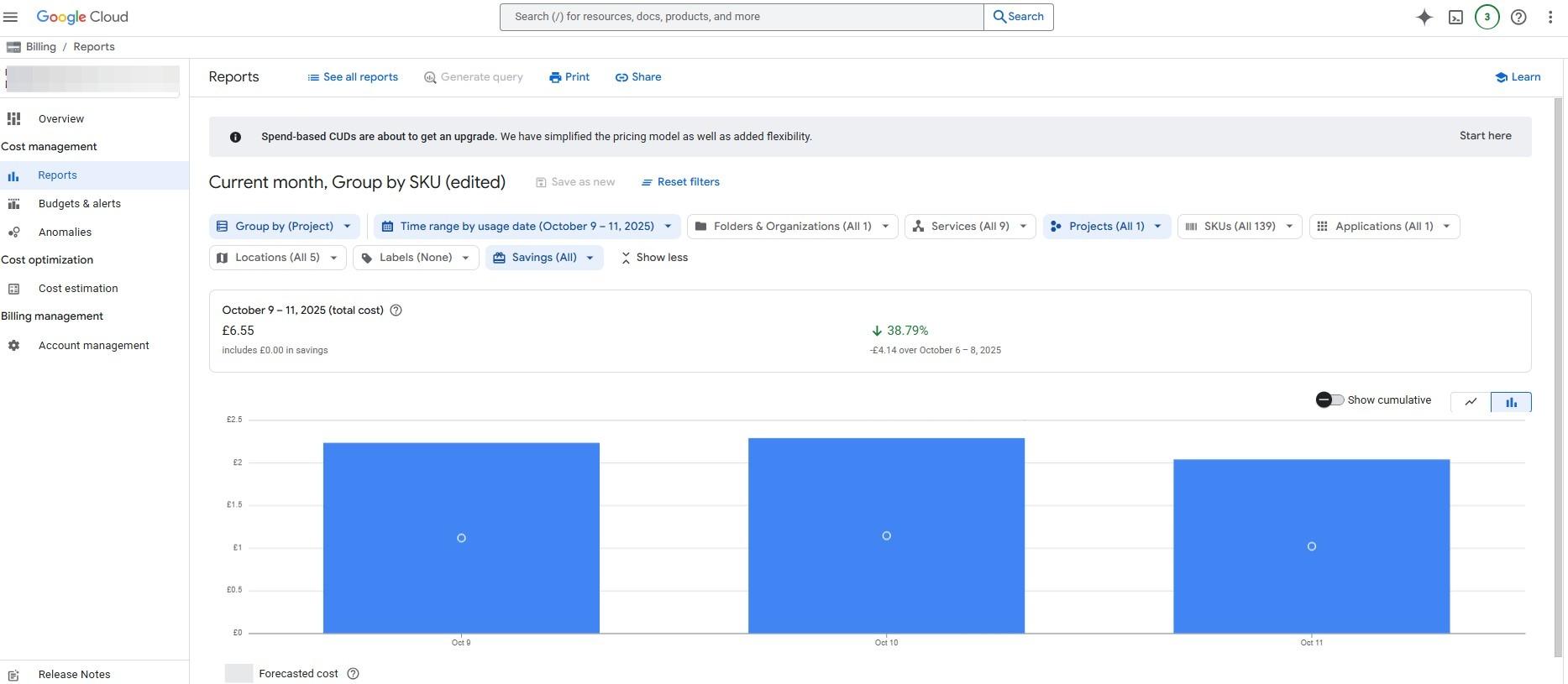
Google Cloud Run (after optimization, 9–11 Oct)
- Total requests: 256,000
- Total cost: €6.55
- GA4 requests: 117,000
- page_view requests: 38,000
- Cost per 10,000 page_view requests: €0.25
Stape (managed, 3–12 Oct)
- Total requests: 7,300,000
- GA4 requests: 3,100,000
- Cost per 10k page_views: €0.083
Client testimonial
| "Choose Stape if you value stability, predictable billing, and hands-free maintenance. It’s more practical for most Shopify stores that simply want accurate GA4 tracking without worrying about infrastructure." |
| — Analyzify Team |
Why choose Stape
- Fixed billing means no surprises, even during Black Friday spikes.
- Automated scaling removes the need for expensive in-house developers.
- Significant cost-per-request efficiency that improves as your volume grows, outperforming the variable 'compute-time' billing of general cloud providers.
- Proven recovery and ROI of your server-side setup in real-time.

Comments