Aug 3, 2026
Using Stape SDKs for server-side tracking
Written by
Alex Held
Updated Apr 8, 2025 comments
Web GTM isn’t always the best way to send events to server GTM - especially for server-side interactions like CRM events, subscription payments, or backend order updates. Stape SDKs provide a direct way to send data to your server GTM container without additional dependencies.
This guide covers setting up Stape SDKs for PHP, Node.js, iOS, and Android, configuring the Data Client, and ensuring your events are processed correctly.
What is SDK?
An SDK (Software Development Kit) is a set of tools and resources designed to help developers build applications for a specific platform, framework, or service.
Stape SDKs are tools for transferring data to the server Google Tag Manager container. It is possible to use them within server-side tags.
The server-side GTM container is designed to receive data without authorization keys or additional settings. The most common method for sending requests to this container is using JSON in GET or POST format.
In most server-side tracking setups via GTM, the web container acts as a signal source for the server container. For instance, you might use GA4 or Data Tag in the web container to collect and transfer data to the server.
However, in many cases, events cannot be collected using a web container (subscription payments, order cancellations, events in your CRM system, etc.). In this case, you can use the Stape SDK to transfer the needed data to the server.
It can also be helpful if you don't want to use the web GTM container and send data directly from the code to the server GTM container.
Here is what Stape has to offer:
The Stape SDK functions similarly to a Data Tag but is implemented within your codebase. It's designed to transfer events and data to sGTM, where the server's necessary tags can be used. If required, the SDK also handles data encoding (base64, md5, sha256base64, sha256hex).
The iOS and Android SDKs also support automatic copying and sending of events generated by the Firebase SDK.
Getting started with Stape SDK
You must configure the Stape Data Client within your server-side GTM container to properly receive and process events sent via the Stape SDK.
How to set up Stape Data Client in server GTM
1. Download Data Client from GitHub.
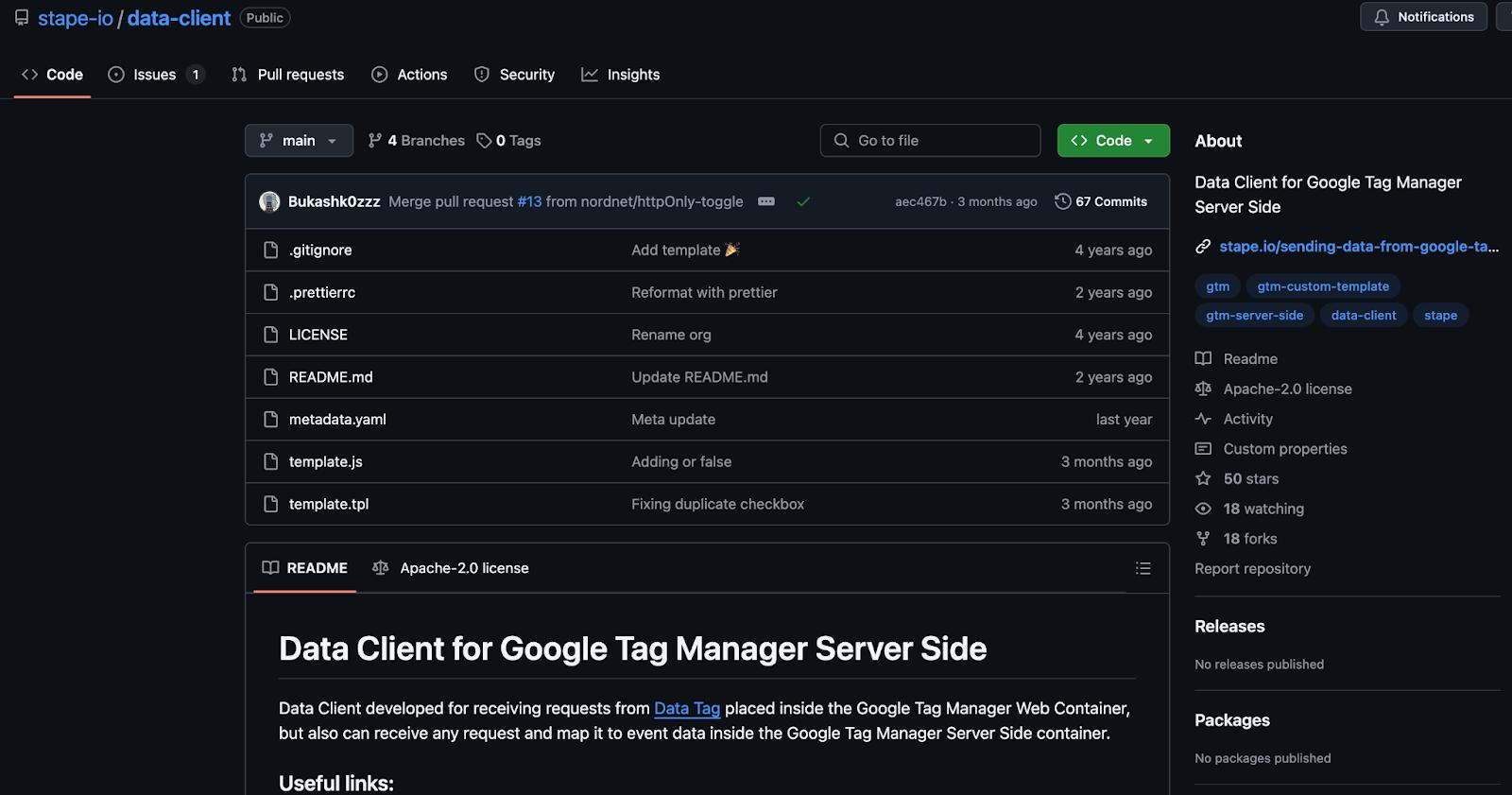
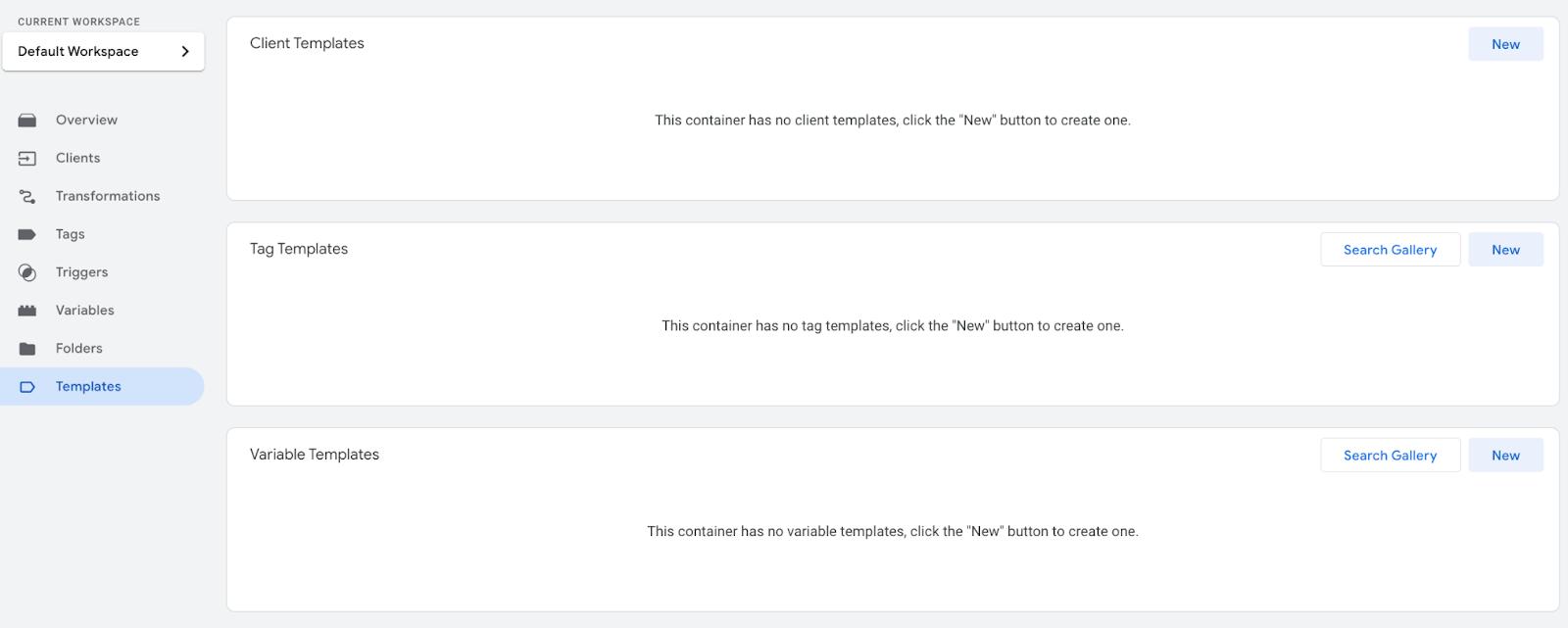
2. Go to your server GTM container ➝ Templates ➝ Add new Client template and select .tpl file that you loaded from GitHub.
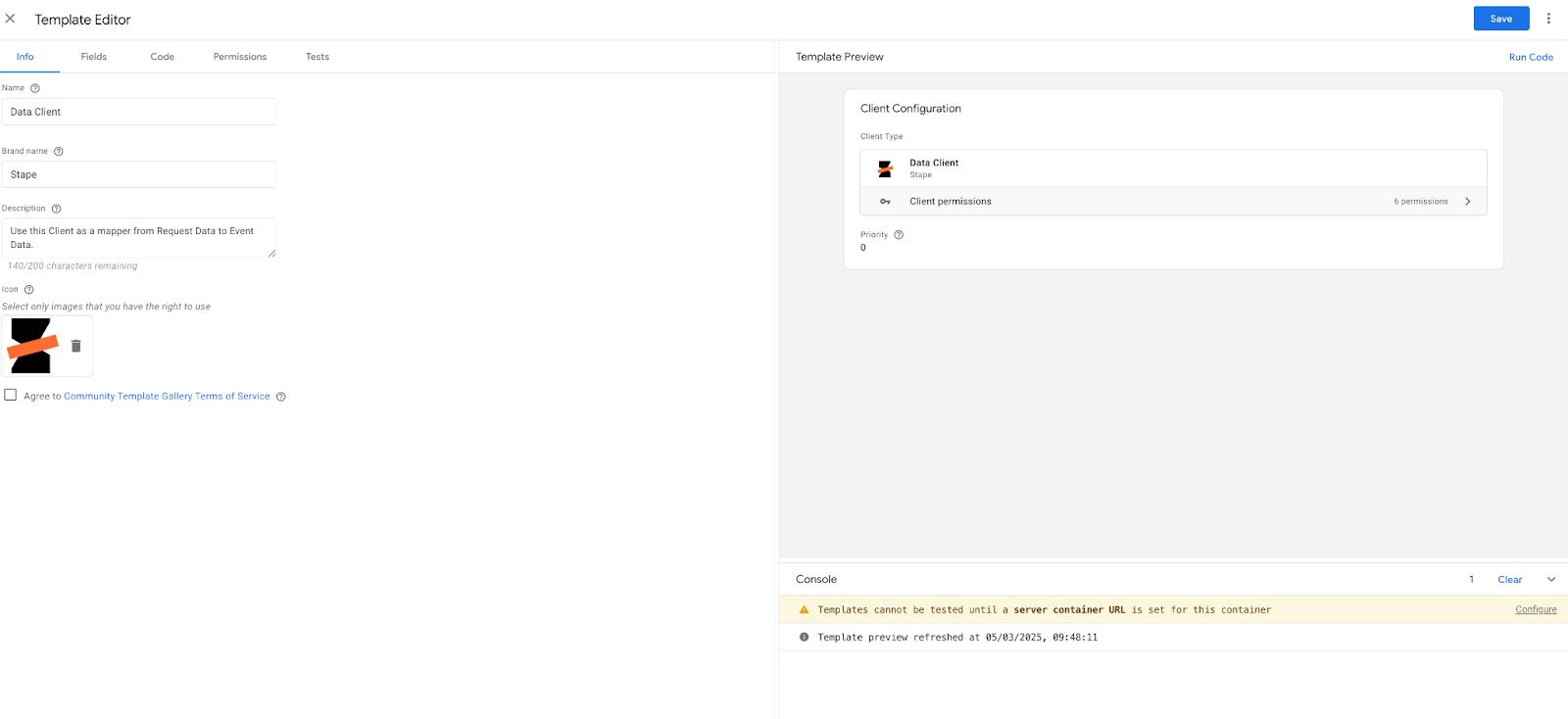
3. Go to ‘Clients’ section on your server GTM container ➝ New client ➝ Add Data Client from templates.
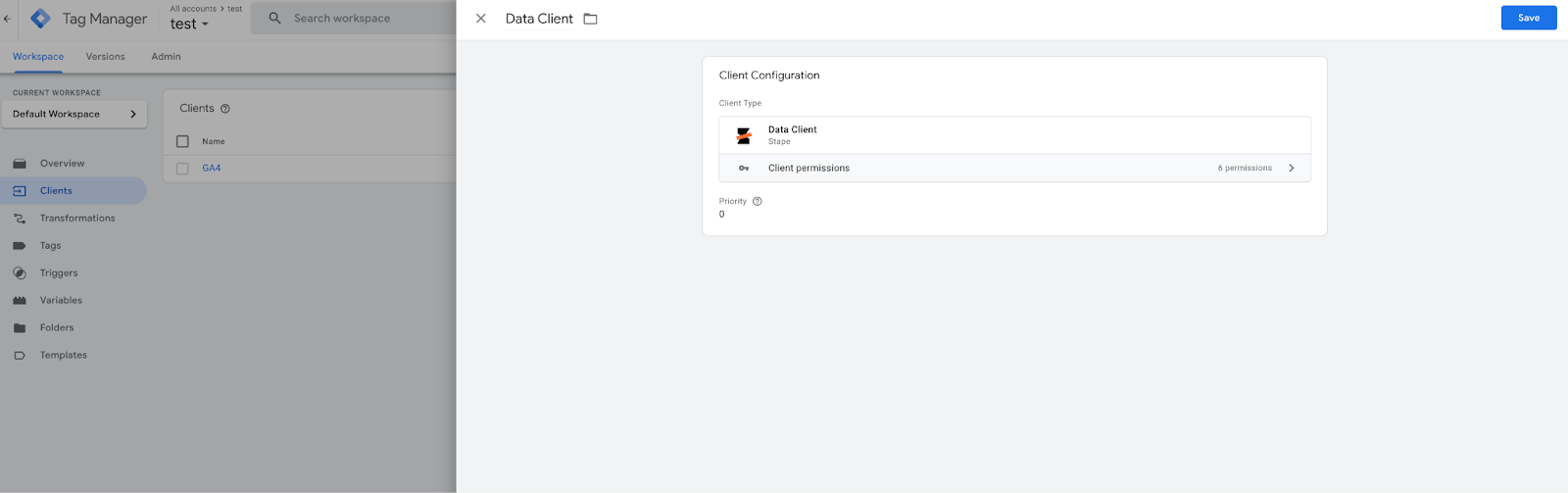
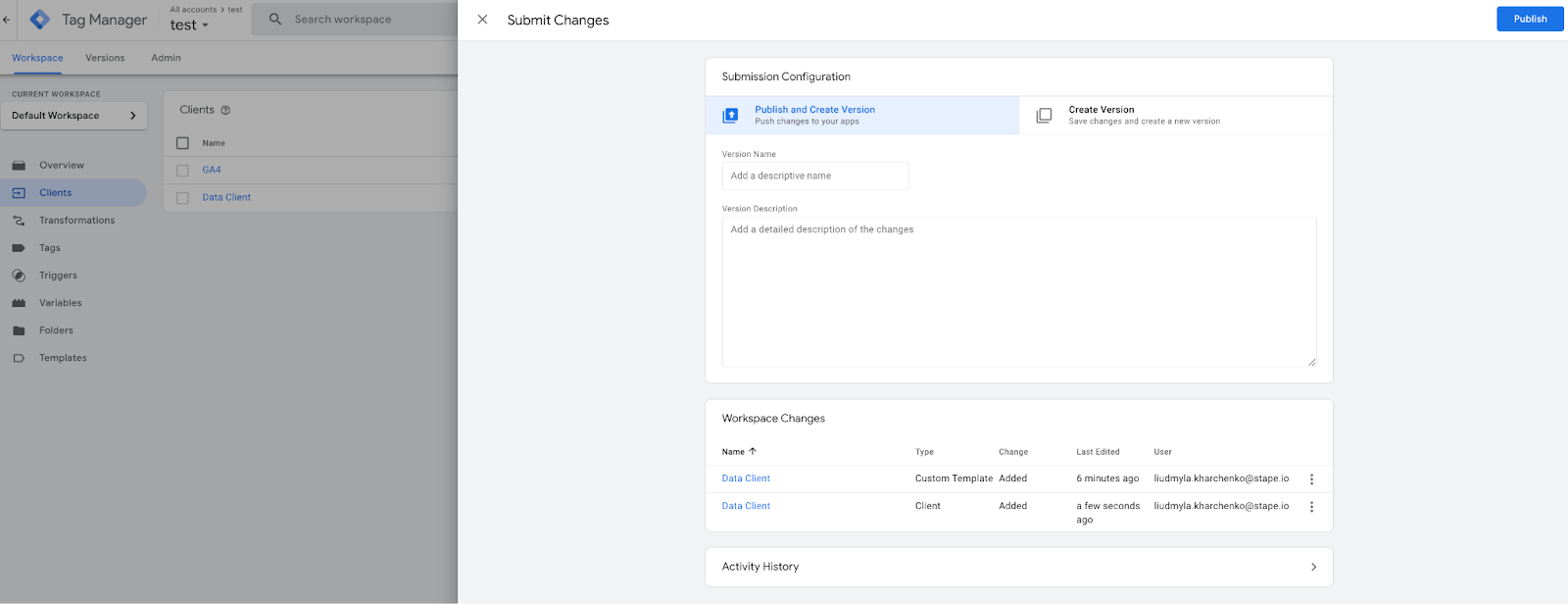
4. Submit changes on your server GTM container to make it live.
How to add Stape SDK to your project
You can integrate the Stape SDK using standard package managers for your language.
Node.js SDK
1. Install the code.
npm install stape-sgtm-nodejs2. Initialize the SDK in your Node.js project.
import StapeSGTM, { transformations, EventData } from 'stape-sgtm-nodejs';

const sgtm = new StapeSGTM({

  gtm_server_domain: 'https://gtm.example.com',

  request_path: '/data',

});

const eventData = {

  value: 68,

  currency: 'USD',

  page_hostname: 'stape.io',

  page_location: 'http://stape.io',

  user_data: {

    email: transformations.sha256hex('jhonn@doe.com'),

  },

};

sgtm.sendEventData('add_to_cart', eventData)

  .then((result) => console.log('✅ Event Sent:', result))

  .catch((error) => console.log('❌ Error:', error));
PHP SDK
1. Install the PHP SDK using Composer:
composer require stape/stape-sgtm-php2. Implement the SDK in your PHP project:
require_once __DIR__ . '/vendor/autoload.php';

use Stape\Sgtm\StapeSGTM;

use Stape\Sgtm\Transforms;

$sgtm = StapeSGTM::create('https://gtm.example.com', '/data');

$eventData = [

    'value' => 68,

    'currency' => 'USD',

    'page_hostname' => 'stape.io',

    'page_location' => 'http://stape.io',

    'user_data' => [

        'email' => Transforms::sha256hex('jhonn@doe.com'),

    ],

];

$response = $sgtm->sendEventData('add_to_cart', $eventData);

if ($response) {

    echo "✅ Event sent successfully!";

} else {

    echo "❌ Failed to send event.";

}
3. Implement passing the data you want on the events you wish to.
iOS SDK
1. Ensure you've installed the Stape SDK via CocoaPods:
pod 'StapeSDK'2. Run it through.
pod install3. Initialize SDK in your project.
import StapeSDK
class AppDelegate: UIResponder, UIApplicationDelegate {
var window: UIWindow?
func application(_ application: UIApplication,
didFinishLaunchingWithOptions launchOptions: [UIApplication.LaunchOptionsKey: Any]?) -> Bool {
// Initialize Stape SDK with your domain
if let url = URL(string: "https://gtm.example.com") {
let configuration = Stape.Configuration(domain: url)
Stape.start(configuration: configuration)
}
return true
}
}4. Replace "gtm.example.com" with your actual sGTM container domain.
5. Create and send event.
import StapeSDK

class ViewController: UIViewController {

    override func viewDidLoad() {
        super.viewDidLoad()
        // Send "add_to_cart" event
        sendAddToCartEvent()
    }

    func sendAddToCartEvent() {
        // Define event payload
        let payload: [String: Any] = [
            "value": 68,
            "currency": "USD",
            "page_hostname": "stape.io",
            "page_location": "http://stape.io",
            "user_data": [
                "email": sha256("jhonn@doe.com") // Hash email for privacy
            ]
        ]

        // Create event
        let event = Stape.Event(name: "add_to_cart", payload: payload)

        // Send event
        Stape.send(event: event) { result in
            switch result {
            case .success(let response):
                print("✅ Event Sent: \(response.payload)")
            case .failure(let error):
                print("❌ Error: \(error.localizedDescription)")
            }
        }
    }

    // SHA256 hashing function
    func sha256(_ input: String) -> String {
        guard let data = input.data(using: .utf8) else { return "" }
        var hash = [UInt8](repeating: 0, count: Int(CC_SHA256_DIGEST_LENGTH))
        data.withUnsafeBytes {
            _ = CC_SHA256($0.baseAddress, CC_LONG(data.count), &hash)
        }
        return hash.map { String(format: "%02x", $0) }.joined()
    }
}
| Note! Ensure you have the CommonCrypto library imported for the SHA256 hashing function. |
Firebase hooking
To start listening to Firebase events, you need to call Stape.startFBTracking() method after the call to Stape.start().
There is a handlers API to get responses for Firebase events dispatched to Stape Data Client.
It consists of a pair of methods to add and remove handler closures identified by keys:
public static func addFBEventHandler(_ handler: @escaping Completion, forKey key: String)

public static func removeFBEventHandler(forKey key: String)
Android SDK
1. Add the Stape SDK dependency to your build.gradle file.
implementation 'io.stape:android-sgtm:1.0'2. Initialize the SDK in your Application class.
import android.app.Application;
import io.stape.sgtm.Options;
import io.stape.sgtm.Stape;
public class MyApp extends Application {
public void onCreate() {
super.onCreate();
Options options = new Options("gtm.example.com");
Stape stape = Stape.withOptions(options);
}
}3. Replace "gtm.example.com" with your actual sGTM container domain, excluding https:// or http:// schemas.
4. Create and send the event from your activity or fragment.
import android.os.Bundle;
import androidx.appcompat.app.AppCompatActivity;
import io.stape.sgtm.Stape;
import java.util.HashMap;
import java.util.Map;
public class MainActivity extends AppCompatActivity {
private Stape stape;
protected void onCreate(Bundle savedInstanceState) {
super.onCreate(savedInstanceState);
// Initialize Stape instance
stape = Stape.getInstance();
// Send "Add to Cart" event
sendAddToCartEvent();
}
private void sendAddToCartEvent() {
// Create event data
Map<String, Object> eventData = new HashMap<>();
eventData.put("value", 68);
eventData.put("currency", "USD");
eventData.put("page_hostname", "stape.io");
eventData.put("page_location", "http://stape.io");
eventData.put("user_data", getUserData());
// Send event
stape.sendEvent("add_to_cart", eventData);
}
private Map<String, Object> getUserData() {
Map<String, Object> userData = new HashMap<>();
userData.put("email", sha256("jhonn@doe.com"));
return userData;
}
private String sha256(String input) {
try {
MessageDigest digest = MessageDigest.getInstance("SHA-256");
byte[] hash = digest.digest(input.getBytes(StandardCharsets.UTF_8));
StringBuilder hexString = new StringBuilder();
for (byte b : hash) {
String hex = Integer.toHexString(0xff & b);
if (hex.length() == 1) hexString.append('0');
hexString.append(hex);
}
return hexString.toString();
} catch (NoSuchAlgorithmException e) {
throw new RuntimeException(e);
}
}
}Example of using
| Note! Unlike data collection via web GTM, where many parameters are automatically populated, using an SDK requires manually collecting and including key tracking data. |
This includes:
- User IP Address: Needed for attribution & compliance.
- Cookies: Used for session tracking and conversion tracking (e.g., _ga, _fbc).
- User Agent & IP Override: Ensures platforms see the real user, not your server data.
Different advertising and analytics platforms have specific data requirements.
Before implementing events, check the official API documentation of the platforms you plan to send data (e.g., Meta CAPI, Google Ads, TikTok API).
Ensure user_agent and ip_override contain real user data, not your server’s IP or User Agent. If necessary, override these values in your sGTM tags.
Below is an example purchase event payload that could be used for Meta CAPI via the Node.js SDK. In the case of other SDKs, syntax changes are only made, but the approach remains completely the same.
import StapeSGTM, { transformations, EventData } from 'stape-sgtm-nodejs';

const sgtm = new StapeSGTM({

  gtm_server_domain: 'https://gtm.example.com', //your sgtm container url

  request_path: '/data', //default Data Client path

});

const eventData = {

  value: 50.69,

  currency: 'USD',

  items: [

    {

      item_id: '42082',

      item_name: 'LEGO Technic 42082',

      quantity: 1,

      price: 50.69,

    }

  ],

  content_ids: ["42082"],

  page_hostname: 'lego.com',

  page_location: 'http://lego.com/products/lego-technic-42082',

  page_path: '/products/lego-technic-42082',

  page_title: 'LEGO Technic 42082',

  page_referrer: 'http://google.com',

  ip_override: '195.234.12.69',

  user_agent: 'Mozilla/5.0 (Macintosh; Intel Mac OS X 10_14_6) AppleWebKit/537.36 (KHTML, like Gecko) Chrome/77.0.3865.120',

  language: 'en',

  user_data: {

    email: 'jhonn@doe.com',

    first_name: 'Jhonn',

    last_name: 'Doe',

    user_id: '437283'

  },

  facebook_click_id: 'IwY2xjawIgS11leHRuA2FlbQEwAGFkaWQBqxhD-YazOQEdX6Vv2-TU2AdiARCxJoWJWZBwf1IDdMusnodh0C47KbqQta4iab5tLmqj_aem_2BKiIsr7_LBVloJPeSYSLw',

};

sgtm.sendEventData('purchase', eventData)

  .then((result) => console.log('✅ Event Sent:', result))

  .catch((error) => console.log('❌ Error:', error));
Tracking events and conversions on marketing platforms requires sending click ID (click identifier) with the event data. This ID helps platforms attribute conversions to the original ad click, ensuring accurate measurement and optimization.
A click ID is a unique identifier assigned to users when they click on an ad. This parameter is included in the landing page URL and must be captured to be passed along with conversion events. For example, Meta ADS passes this parameter when clicking on the URL under the ‘fbclid’ key.
Since the click ID is only available when the user first lands on your website, you must store it for later use with all user events (in user cookies or your database).
Testing the setup
The server GTM preview only displays incoming requests sent from the tab adjacent to the Chrome browser where the preview mode runs. So, if you run sGTM preview and send a request through SDK, you will not see it in preview mode, although this does not prevent it from working.
You need to use the power-up sGTM Preview Header config to view and debug SDK requests. We have a blog post describing setting up and debugging incoming webhooks in the sGTM.
If you are configuring this on a live container that receives a lot of hits, activating the HTTP header may not be a good idea. It will display all requests coming to the server in the preview, which can lead to performance issues for the container if the preview receives hundreds or thousands of requests per second.
In such a case, it would be a good idea to start a ‘staging’ container on a free plan, where everything is configured and debugged, and then transfer that to a live container and the live URL of your server GTM.
The most common problem when using the SDK is getting a 400 error
400 error means that no client has processed your request. In this case, make sure that Data Client is installed on your server GTM container, and that these changes are omitted (check in the Versions tab that the latest version of the container is live).
Also make sure that the /path to which you send requests is specified in the Data Client (if you use something other than the standard /data).
Final thoughts
Stape SDKs offer a direct way to send data to your server GTM container, making tracking backend events like CRM interactions, subscription updates, and purchases easier. With support for PHP, Node.js, iOS, and Android, you can integrate server-side tracking without relying on a web container.
Setting up the SDK requires configuring the Data Client in sGTM and ensuring requests are sent correctly. Testing is essential, especially when debugging incoming requests. If you see a 400 error, check that the Data Client is installed and the request path is correct.
For those managing server-side tracking, Stape SDKs provide a straightforward solution to handle events efficiently.
Want to start using server-side tags?
Stape has lots of tags for server GTM! Click on Try for free to register and check them all.
Try for freeRecommended for you
May 8, 2026
Blog
What is Conversions API? How does it work & most popular platforms
Learn what the Conversions API is, how it works, and which platforms support it. Improve data tracking, enhance ad performance, and optimize marketing efforts.
Sep 18, 2026

Comments