Tracking iframe done right
Written by
Alex Held
The iframe is a popular and simple method for embedding content across various pages of a website.
To set up iframe tracking correctly, follow these steps:
- Verify the iframe: inspect the page code to determine if the elements you want to track are inside the iframe.
- Check iframe source: ensure the iframe’s domain is either the same as the parent or from a third-party domain.
- Add GTM to the iframe: if you can, embed the GTM snippet within the iframe or use Web APIs to track events.
- Send data from the iframe to the parent window: use window.postMessage() to pass events and data to the parent window.
- Configure tags: in the parent window, set up tags based on data layer events and send the data to the necessary platforms.
From a development perspective, it’s an easy solution to implement. Нowever, when it comes to tracking iframe content iframes can present significant challenges. The primary issue arises from the fact that any actions within the iframe are isolated from the parent window, meaning that GTM inserted in the parent window can't track these actions directly.
In this post, we'll explore how to effectively track events within iframe windows and highlight key considerations to keep in mind. We hope this post answers all of your Google Tag Manager iframe setup questions.
Detect iframe
First, verify if the elements you want to track are inside the iframe. While tracking clicks or form submissions within these elements is possible, it often doesn’t work as expected. These elements can look very similar to the rest of the site, so the easiest way to check is by inspecting the page code.
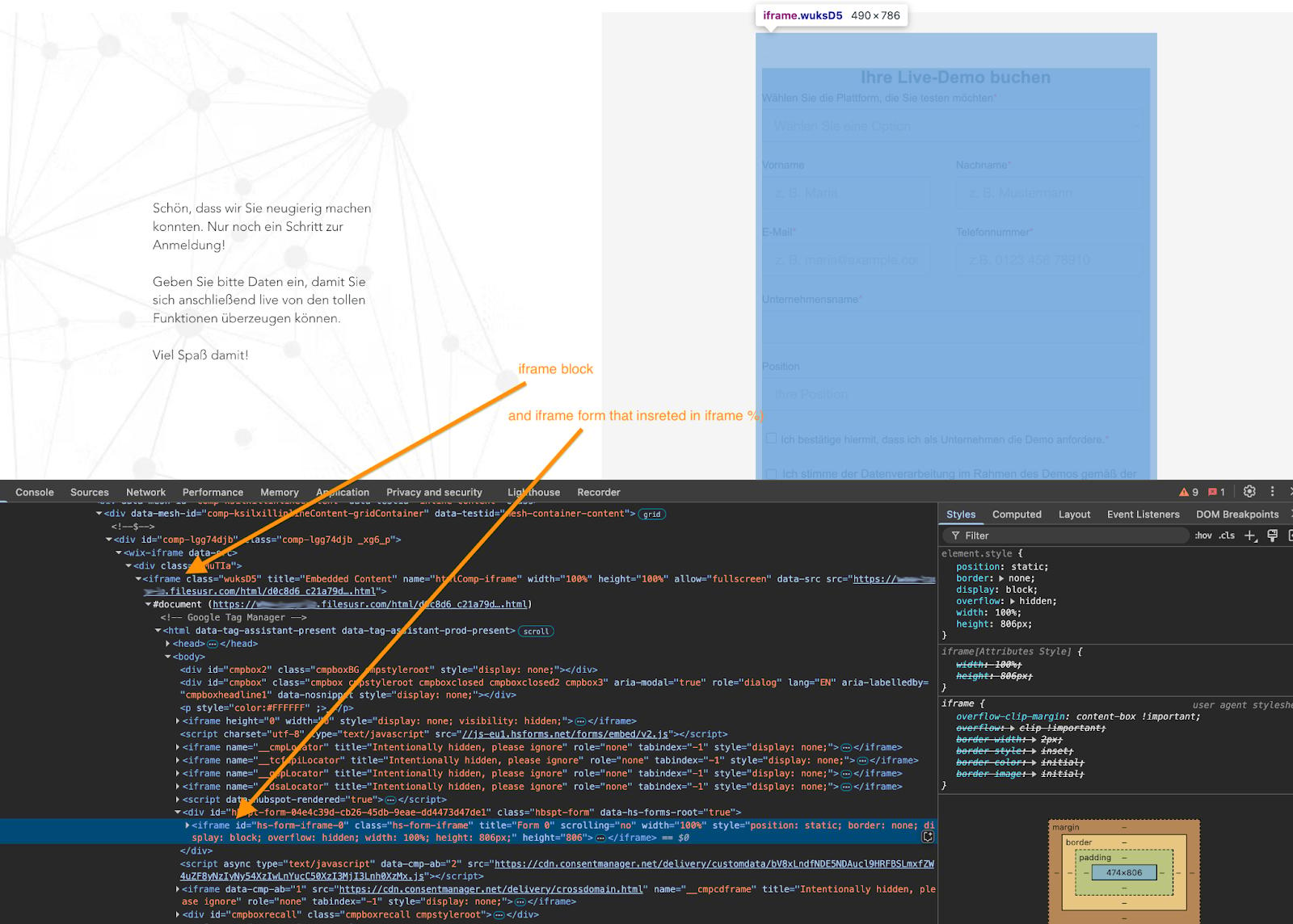
To do this, right-click the element and select "Inspect" from the context menu (in Chrome). In the element tree, look for the iframe. A search function can be helpful here, as multiple iframe attachments might exist:
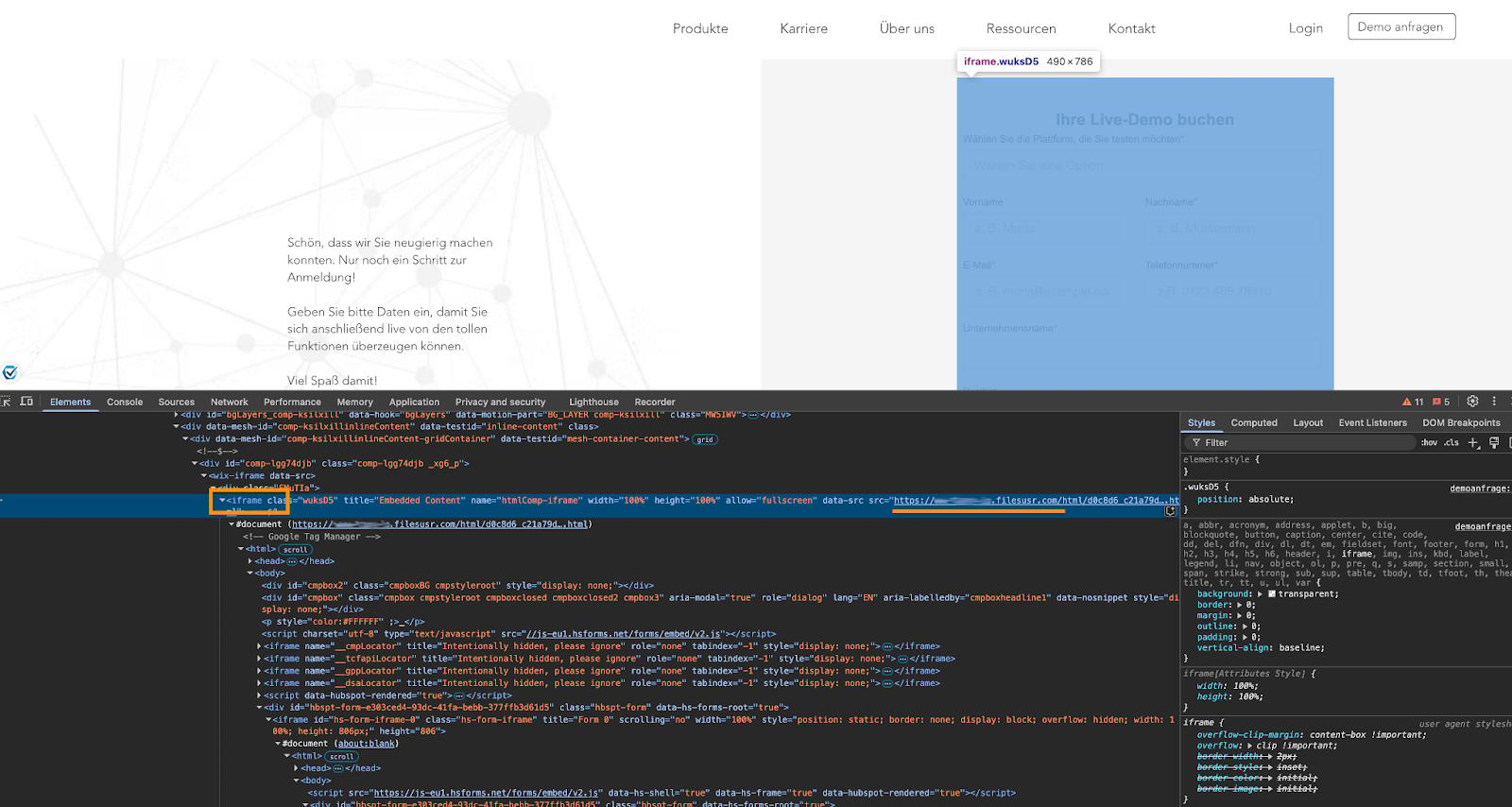
Additionally, take note of the iframe's source. If it's from a third-party domain, as in the example above, you’ll need to pass data from the iframe to the parent window. We'll cover how to handle this process below.
For instance, if the site is hosted on the example.com domain and an iframe from the domain filesusr.com is embedded, this introduces a cross-domain scenario that requires special handling.
Track events in iframe
Since actions within the iframe are isolated from the parent window, there are only two ways to track events occurring inside the iframe:
1. Web API
Many platforms, from major ones like YouTube and Google Maps to niche services like Calendly or TypeForm, use iframes to embed their content on your site. By default, these platforms are added via iframe. Fortunately, most offer web APIs that allow you to track events, build a data layer based on those events, or even send pre-built data layer events directly.
For example, in this documentation you can find the iframe API for YouTube.
These platforms work directly in the parent window, making it easy to build the necessary data layer events using their Web APIs and set up GTM tags based on this data.
However, the downside is that you can't always track clicks or capture all the parameters you might need, as the platform's API typically imposes limitations.
We won't dive into the specifics of this approach here, as it varies depending on the platform.
2. Add GTM to the iframe
If you have a custom iframe, or if the platform allows you to add GTM or custom code to the iframe, this offers more flexibility for GTM iframe tracking. With this setup, you can fully configure the iframe to track events and send the necessary data as you see fit.
However, in many cases, adding custom scripts or GTM isn’t possible due to security or system restrictions. For instance, this is typically the case with payment systems.
If you can't add GTM to the iframe and the iframe lacks a web API, tracking actions inside it is likely not possible.
Add the GTM snippet of your web container to the iframe and test it by running a preview on the site's page where the iframe exists. If everything is done correctly, you will see several tag assistant windows on the preview page.
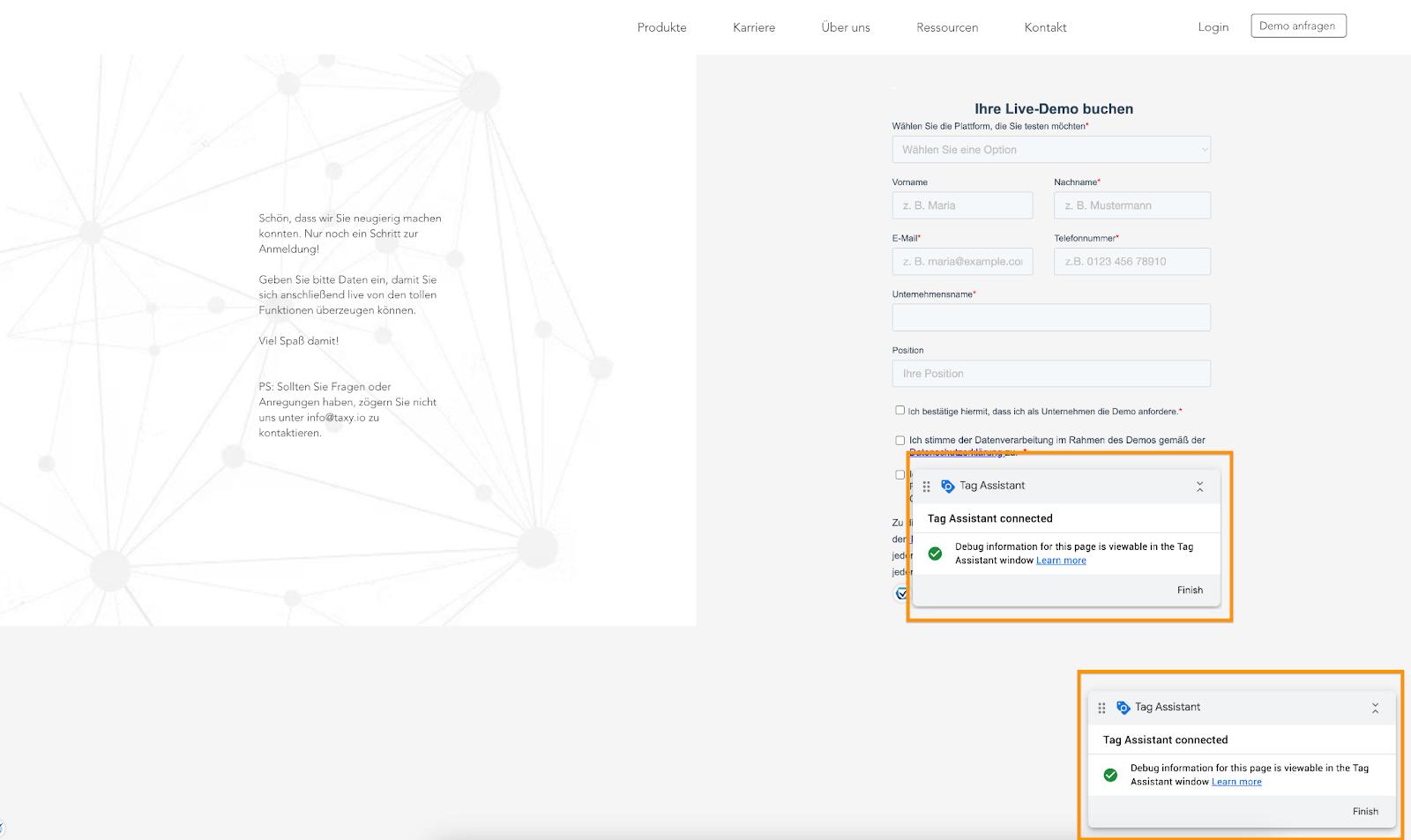
In the preview, you’ll see two pages (you’ll need to confirm that the preview works across domains): one from the parent window and the other from the iframe window.
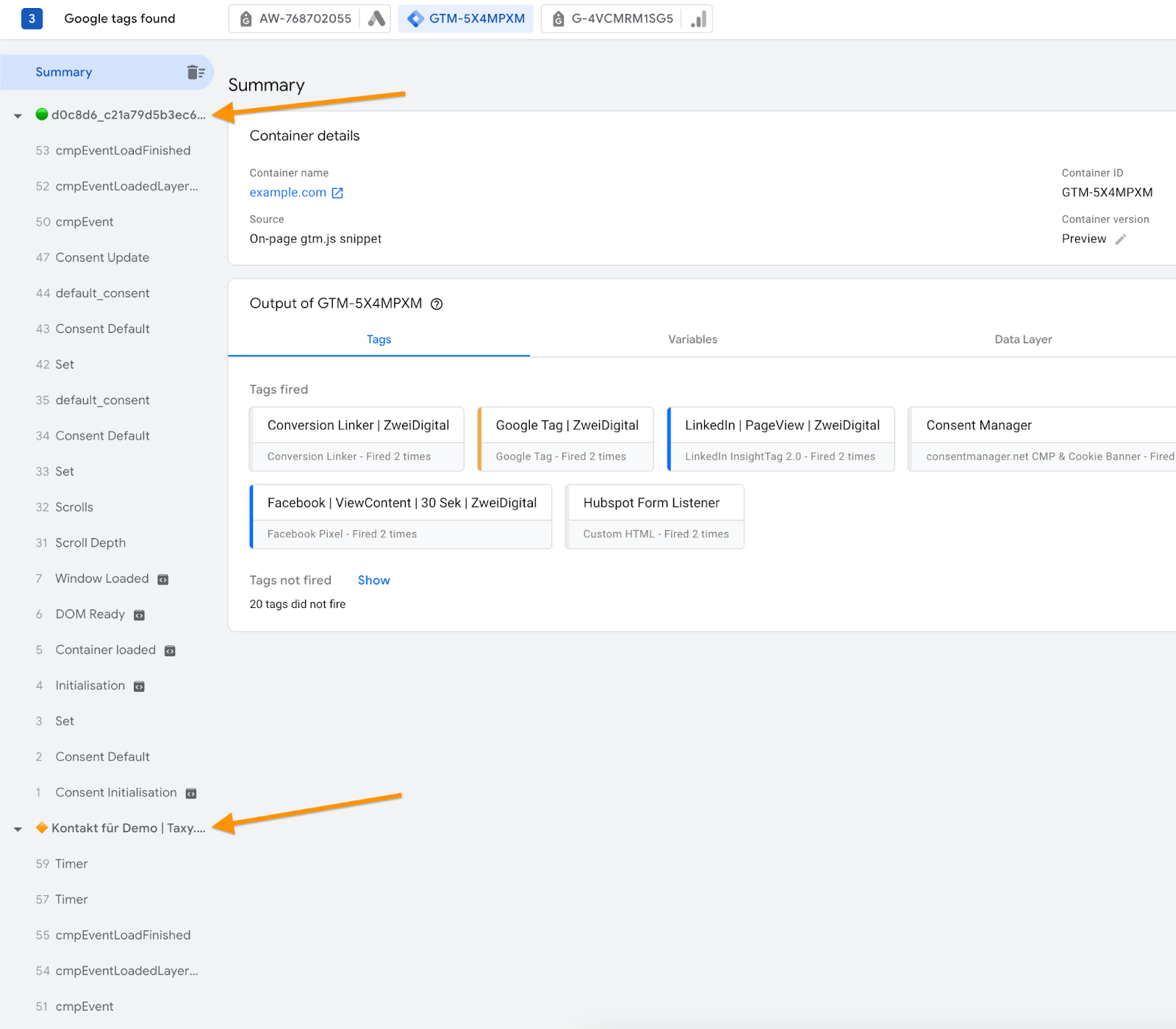
In our example, the site is hosted on the example.com domain, and an iframe with a form from the domain filesusr.com is embedded. Since the iframe operates on a different domain, sending data from it to third-party platforms won't carry over cookies set in the parent window, causing tracking issues.
If your iframe comes from a third-party domain, you’ll need to capture the necessary events within the iframe and pass this data to the parent window. From there, the data can be sent to the relevant platforms. More on this below.
On the other hand, if the iframe is hosted on the same domain or a subdomain, you can send events directly from the iframe to the platforms.
Send data from iframe to parent window
As mentioned earlier, in our example, the iframe is hosted on a third-party domain, so we can’t directly send events from there. Instead, we need to pass the events from the iframe to the parent window. This ensures that tracking works in a first-party context, with events correctly passed and cookies set as needed.
This process can be divided into four steps:
1. Limit the work of tags so that they do not trigger in an iframe
Since your GTM is loaded within the iframe, it will also trigger tags that use standard triggers like All Pages, Clicks, and so on. This can lead to incorrect data being sent to your platforms, so it's important to limit how tags function within the iframe.
The easiest way to do this is with an exception trigger like this:
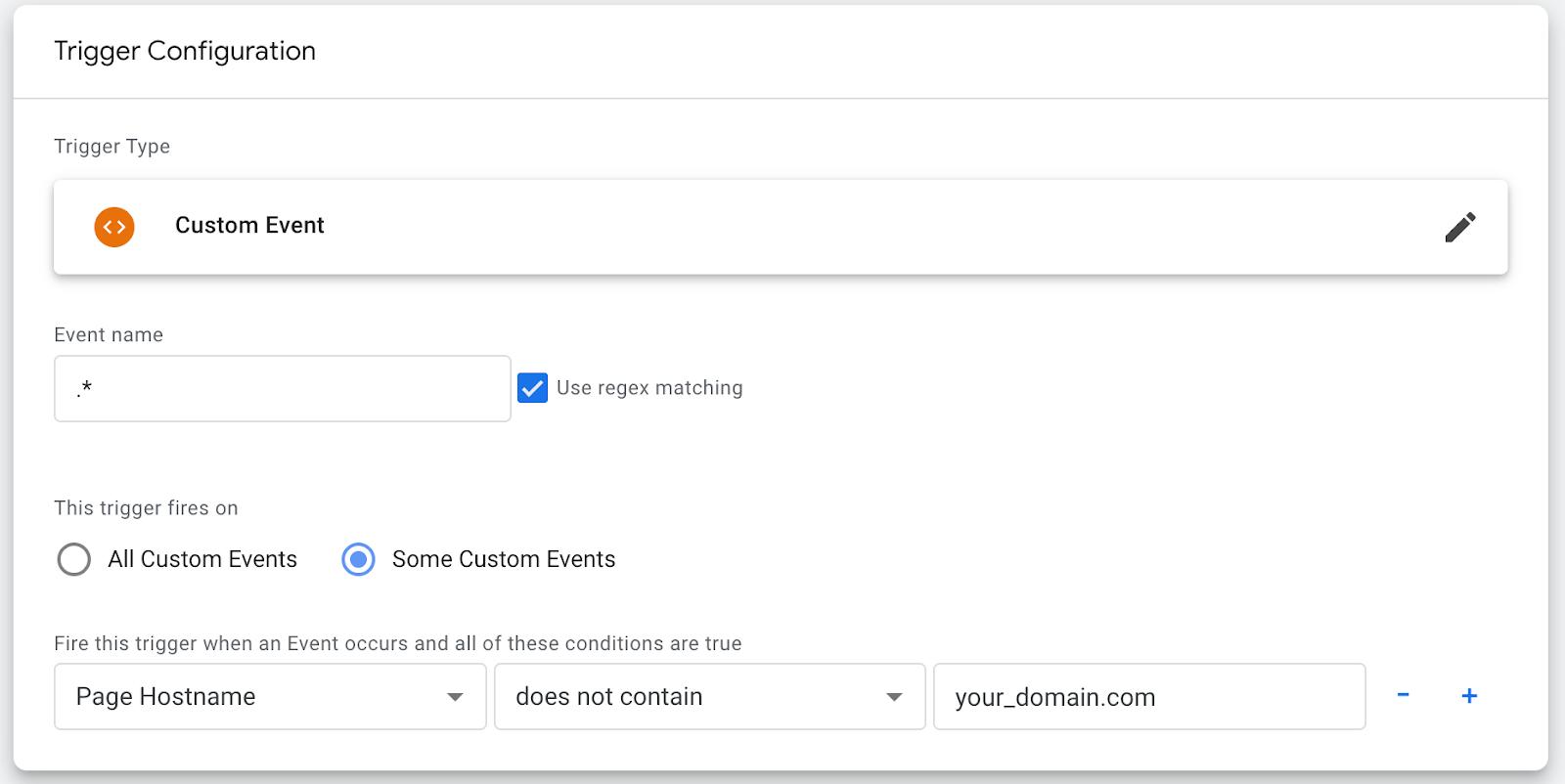
This trigger will exclude the tag if the page hostname doesn’t match the domain specified in the additional check. Be sure to add this exception trigger to all tags that could be triggered within an iframe.
2. Configure tracking of required events in an iframe
We have an iframe within the parent window that contains a HubSpot form, which is also embedded through another iframe. So, it's essentially an iframe inside an iframe.
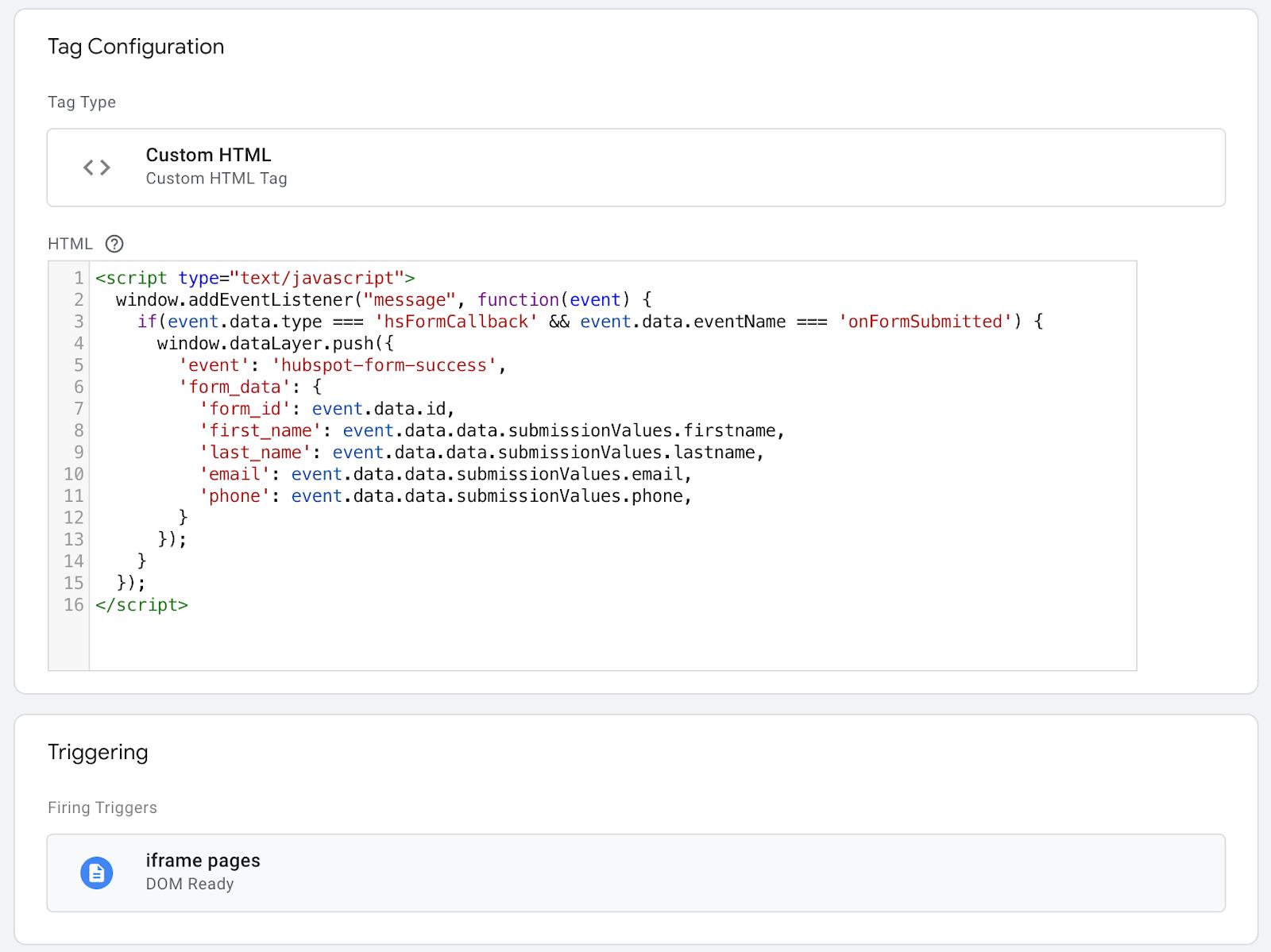
HubSpot provides a form callback that allows you to track form submissions and send the data to the data layer. Additionally, the data filled in by the user on the form can be accessed here and sent to the data layer simultaneously.
Here’s an example of such a script:
<script type="text/javascript">

  window.addEventListener("message", function(event) {

    if(event.data.type === 'hsFormCallback' && event.data.eventName === 'onFormSubmitted') {

      window.dataLayer.push({

        'event': 'hubspot-form-success',

        'form_data': {

          'form_id': event.data.id,

          'first_name': event.data.data.submissionValues.firstname,

          'last_name': event.data.data.submissionValues.lastname,

          'email': event.data.data.submissionValues.email,

          'phone': event.data.data.submissionValues.phone,

        }

      });

    }

  });

</script>
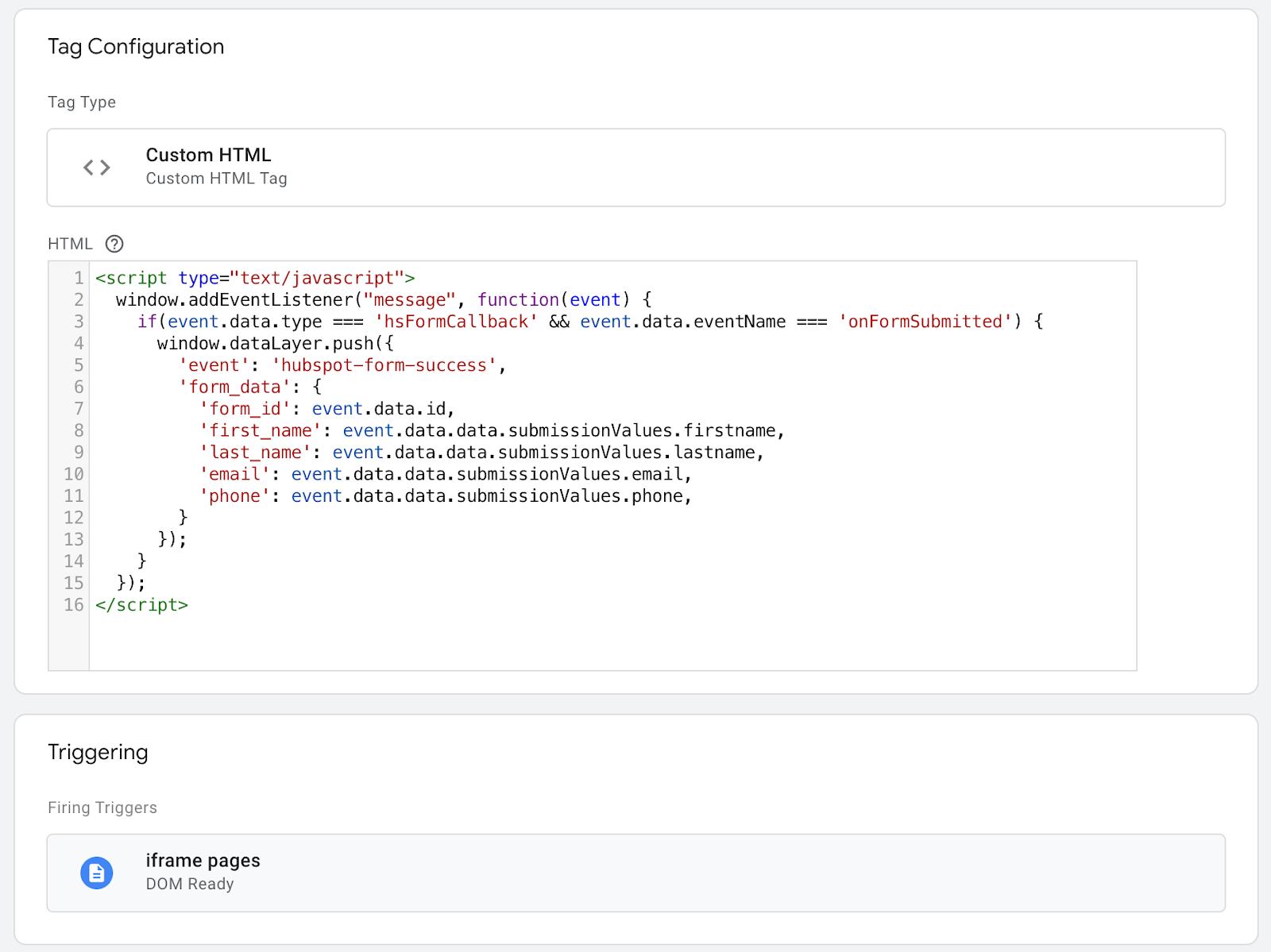
We add this script as a custom HTML tag and trigger it only on iframe pages by checking the hostname in the trigger.
In the preview, we verify that inside the iframe, the required event is now present in the data layer, along with the necessary data from the form when it’s filled out.
Your case may be different, and often in an iframe, you need to collect data with a custom script that will listen for actions with the desired elements. Once you have collected this, you can add it to the dataLayer.push()
If the iframe is on the same domain as the parent window, you can configure tags based on this data layer and send events to the required platforms. However, if the iframe is on a third-party domain, you'll need to pass this data to the parent window.
3. Pass the event to the parent window
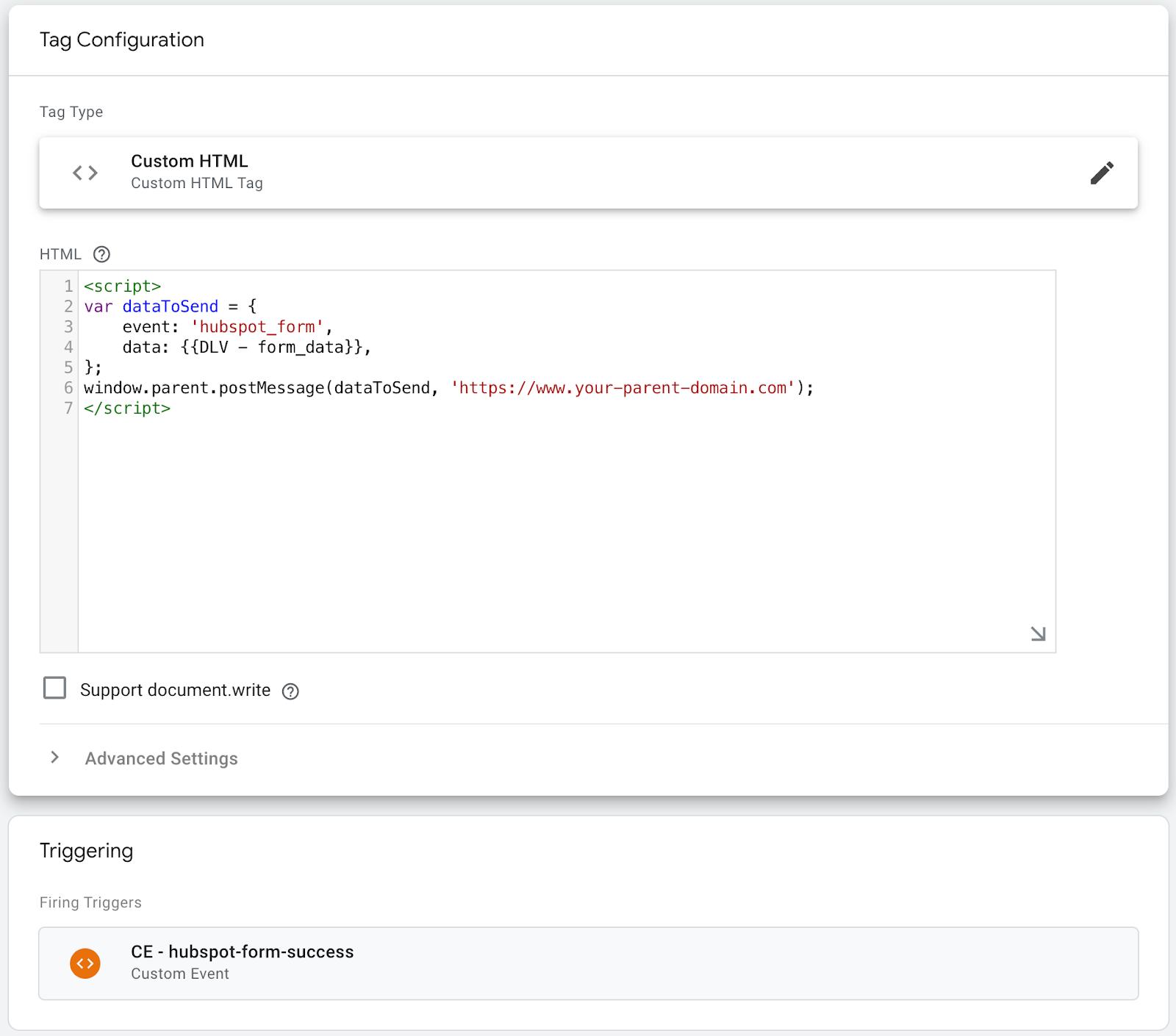
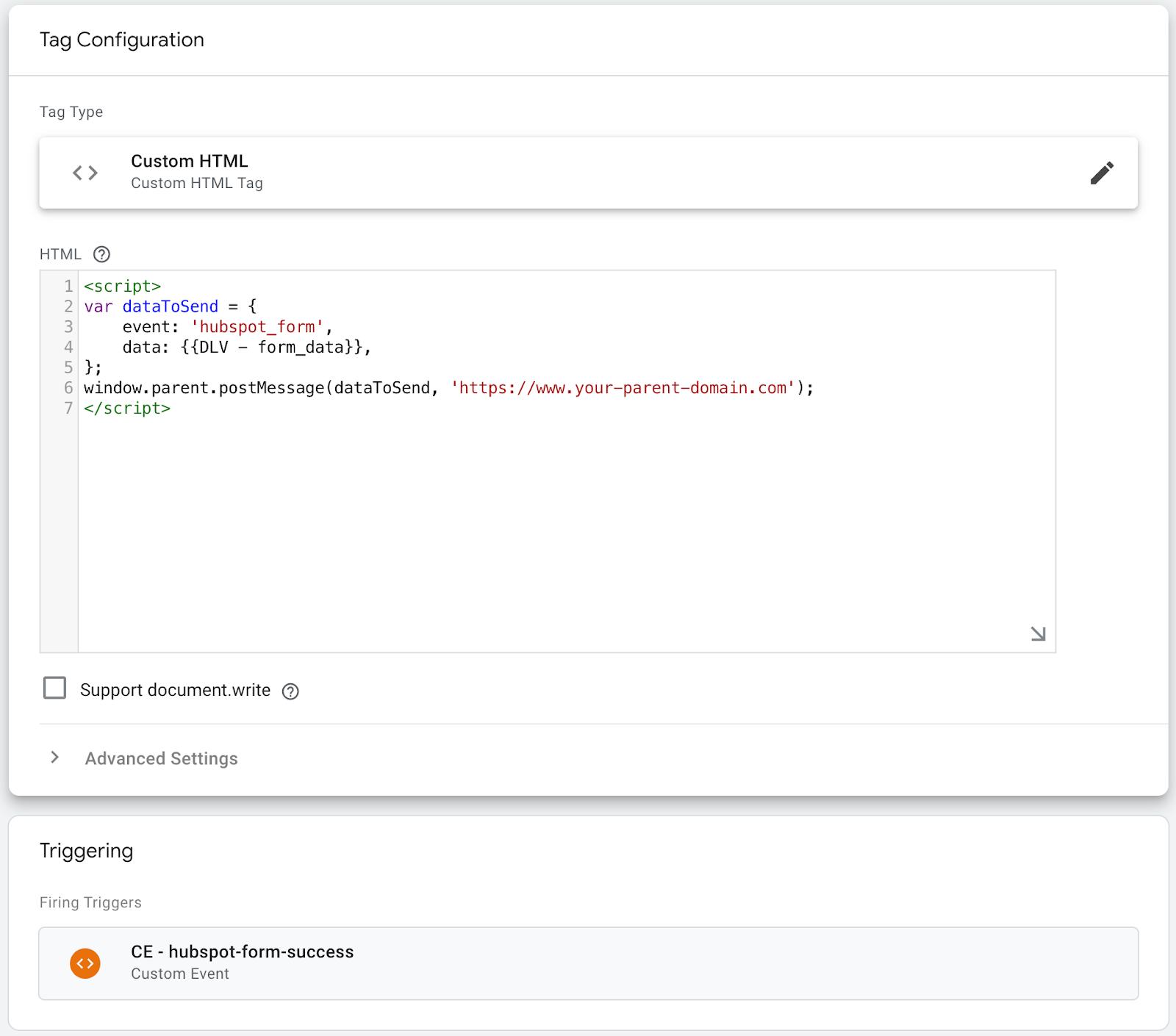
You can transfer data using the standard method window.postMessage().
To do this, we make a small script that fires on our iframe ‘hubspot-form-success’ event (from the previous step), takes data from the data layer, and sends it to the parent window.
<script>

// Data to be sent to the parent window

var dataToSend = {

    event: 'hubspot_form',

    data: {{DLV - form_data}},

};

// Send message to parent window

window.parent.postMessage(dataToSend, 'https://www.your-parent-domain.com');

// Specify the parent's domain for security reasons. You can use '*' to send data to any domain, but this is not recomended by security reason.

</script>
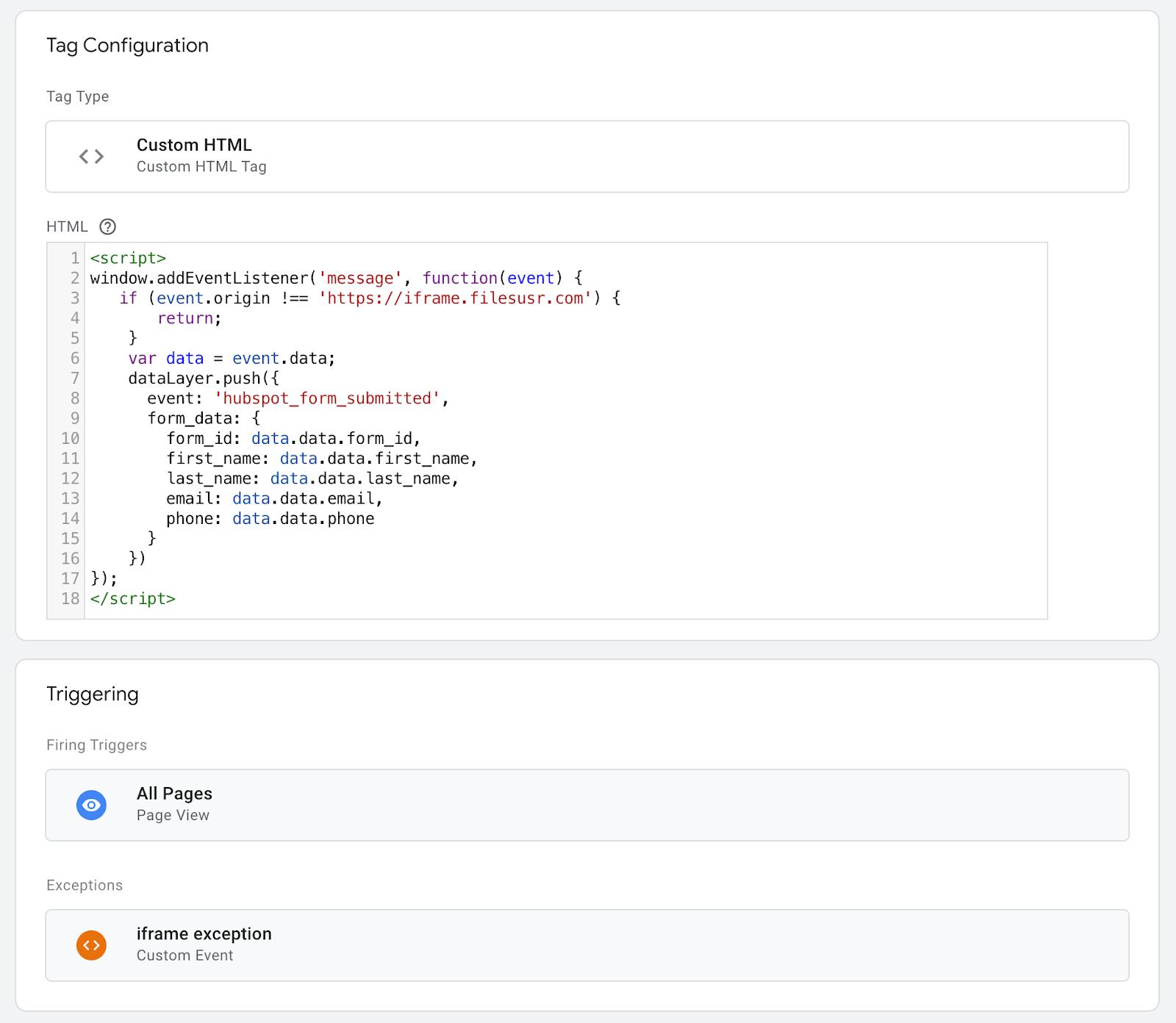
In the parent window, we need a script to receive this data. Here is an example of such a script. This tag works only on the main site pages, not in iframe.
The same script sends data to the data layer in the parent window.
<script>

window.addEventListener('message', function(event) {

// Check if the message came from a trusted source (for security reasons). Specify your iframe domain

   if (event.origin !== 'https://iframe.filesusr.com') {

       return;

    }

    var data = event.data;

// Map data and push it to data layer

    dataLayer.push({

      event: 'hubspot_form_submitted',

      form_data: {

        form_id: data.data.form_id,

        first_name: data.data.first_name,

        last_name: data.data.last_name,

        email: data.data.email,

        phone: data.data.phone

      }

    })

});

</script>
We have a total of three scripts now:
- Tracking required actions in an iframe and the data layer in the iframe.
- Sending data from iframe to parent window.
- Receiving data in the parent window and sending it to the data layer.
4. Testing
Run the preview, trigger the necessary events, and check if everything works correctly.
If everything is correct, it should look something like this:

Once the data is passed to the parent window, you can easily configure tags to work with data layer events and send the necessary data from the iframe to Google Analytics or any other platform you need.
Final thoughts
Of course, this process can be optimized. For instance, you could eliminate the need to send data to the data layer within the iframe and instead send it directly to the parent window as soon as the event occurs. However, during the setup phase, using the data layer approach is much easier. It the lPs you pinpoint exactly where things may be going wrong (and believe me, that will happen during setup like this one 🙂).
Want to start using server-side tags?
Stape has lots of tags for server GTM! Click on Try for free to register and check them all.
Try for freeRecommended for you
Blog
Attribution tracking guide
Learn how attribution tracking works, why it matters, and how Stape improves analytics with server-side tracking for accurate multi-channel attribution.
Apr 22, 2025

Comments