Request limits and pause logic
Updated Sep 1, 2026
Every Stape container and Signals Gateway has a monthly limit on how many requests or events it can process. The limit depends on your plan. This article explains what happens when you get close to that limit, when your container or Signals Gateway is paused, and how to get it running again.
How the limit works
Each container or Signals Gateway is counted separately. Containers count requests, Signals Gateways count events. The counter resets at the start of each billing cycle.
As you get close to your monthly limit, Stape sends you email notifications so you have time to upgrade.
If your usage goes over the limit by 10% (so you hit 110% of what your plan allows) your container or Signals Gateway is paused. The product stops processing requests/events completely until you upgrade or your next billing cycle starts.
What "paused" means by plan
The pause rule isn't the same on every plan:
- Free plan. No pause logic, but if you reach the Free-tier limit, the container/Signals Gateway is disabled and stays disabled. The limit doesn't reset in the next billing cycle either, you need to upgrade to a paid plan to get it running again. Allows up to 5 free containers / Signals Gateways per Stape account.
- Pro and Pro+. Paused immediately when you hit 110% of your limit. No grace period. After a new billing cycle hits - the product will be unpaused and the requests/events renew.
- Business, Business+, Enterprise, Enterprise+. The first time you ever go over the limit, you get a 30-day grace period. Your container/Signals Gateway keeps running for those 30 days, giving you time to upgrade. If you don't upgrade and you're still over the limit when the 30 days are up, it's paused. The 30-day grace period is a one-time courtesy per container or Signals Gateway. After it's been used, future overlimits are paused immediately, with no second grace period. After a new billing cycle hits - the product will be unpaused and the requests/events renew.
- Custom. No pause logic. Custom plans are handled directly by Stape and don't follow the standard pause rules.
Example
A container on the Business plan with a 5M requests limit overlimits for the first time on March 28, with usage hitting 5.5M (110% of the limit). A 30-day grace period begins automatically and the container stays active.
The grace period lasts until April 26. If the user doesn’t upgrade until then and hits 110% usage again after this date, the container is paused.
The container resumes the Running status immediately if the user upgrades, or automatically upon payment for the next billing cycle.
How to get a paused container/Signals Gateway running again
You have two options:
- 1.Upgrade to a higher plan. The pause is lifted right away as long as your usage so far this cycle fits under the new plan's limit. See How to change a plan.
- 2.Wait for the next billing cycle. The pause is lifted automatically at the start of your next cycle, when your request counter resets.
If you're on the Free plan and you've hit the limit, only the first option applies. The Free-tier limit can’t be reset on its own.
How to avoid being paused
Turn on auto-upgrade for the container or Signals Gateway:
- 1.Open the container or Signals Gateway.
- 2.Click the Subscription tab.
- 3.Toggle Upgrade container to the next tier automatically on.
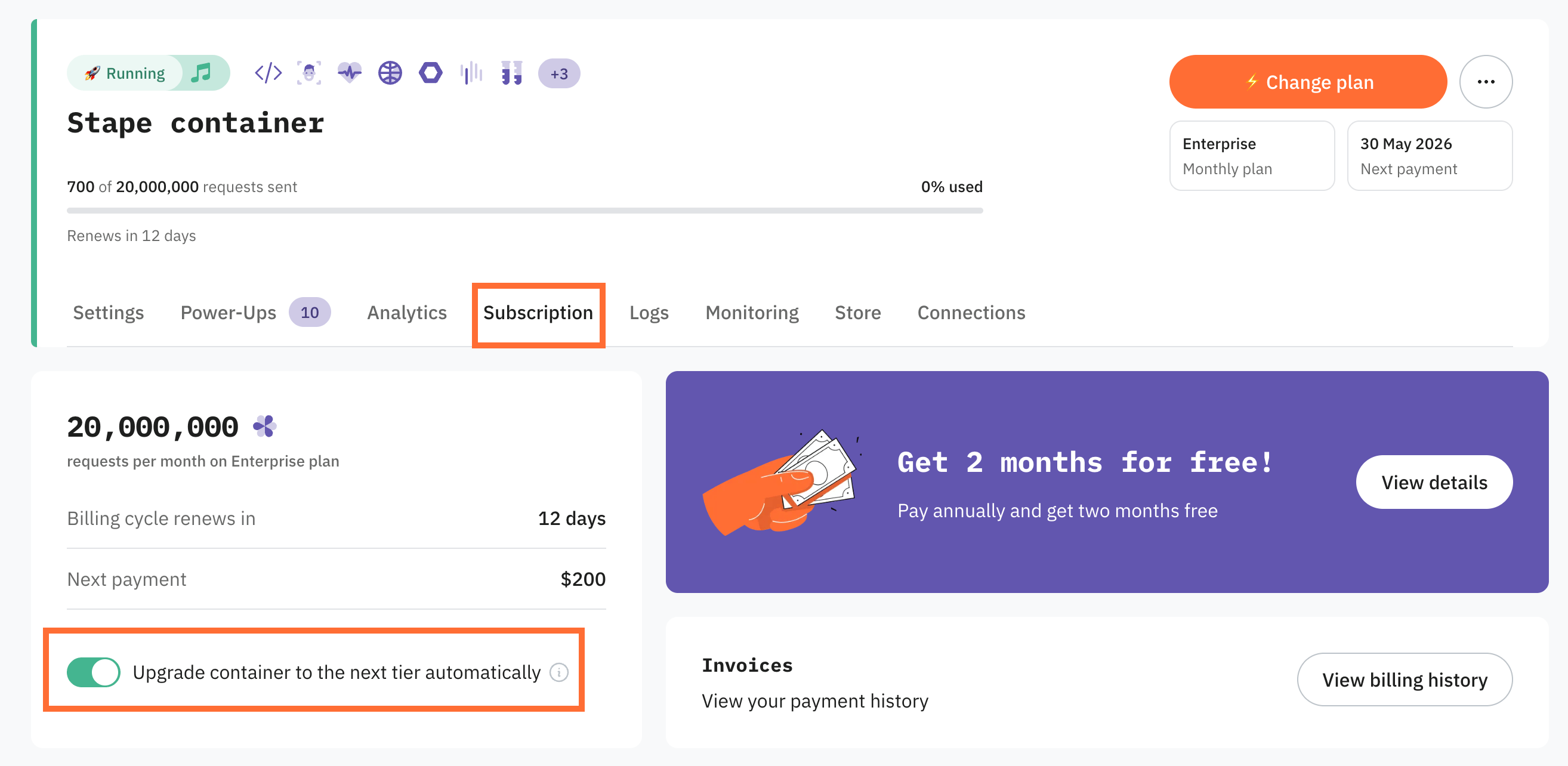
With auto-upgrade on, Stape moves the product up a subscription plan tier automatically when it goes over your current limit, so it’s never paused. You're charged for the new tier from that point.
For more information see How to use subscription auto‑upgrade.
Was this article helpful?
🍽 Table of content:
Comments