What happens if the container reaches the monthly request limit? And when does it reset?
Updated Sep 1, 2026
When a Stape sGTM container or Signals Gateway reaches its monthly request limit (requests for containers or events for gateways), we send email notifications asking you to upgrade. If the container/gateway exceeds its limit by 10% (reaching 110% of the plan's capacity), it will be transitioned to a Paused status. In this state, the container/gateway behaves as if it were disabled and stops processing all incoming requests/events.
The pause logic depends on your specific plan:
- Pro and Pro+ plans: the container/gateway is paused immediately once the 110% threshold is reached.
- Business, Business+, Enterprise, and Enterprise+ plans: we provide a 30-day grace period the very first time an overlimit is detected. This allows your service to remain active while you or the account owner arrange an upgrade. If you do not upgrade within those 30 days, the container/gateway will be paused upon the next overlimit check. Note that this grace period is a one-time courtesy – in future billing cycles, the pause will be applied immediately if you exceed the limit again.
- Free and Custom plans: are not subject to the pause logic.
For all paid plans, the container/gateway is automatically reactivated, and the pause is lifted at the start of the next billing cycle when your request/event quota resets. On the Free plan, requests/events do not renew if the limit is reached. Please keep in mind that you can have up to 5 free sGTM containers or Signals Gateways per Stape account.
Example of the pause logic
- 1.An account on the Business plan (limit: 5M requests) overlimits for the first time on March 28, with usage hitting 5.5M (110% of the limit). A 30-day grace period begins automatically and the container stays active.
- 2.The grace period lasts until April 26. If the user doesn’t upgrade until then and hits 110% usage again after this date, the container is Paused.
- 3.The container resumes the Running status immediately if the user upgrades or automatically on May 1 (the next billing cycle).
- 4.Starting May 1, any future usage exceeding 110% will result in an immediate Pause with no second grace period.
FAQ
How can I remove a pause?
If your container or Signals Gateway has been paused due to overlimit, you can restore service using one of two methods:
- 1.Upgrade your subscription: switching to a higher tariff plan will automatically and immediately remove the pause.
- 2.Wait for the next billing cycle: the pause is automatically removed when your next billing period begins.
How do I avoid service interruption caused by reaching the usage limits?
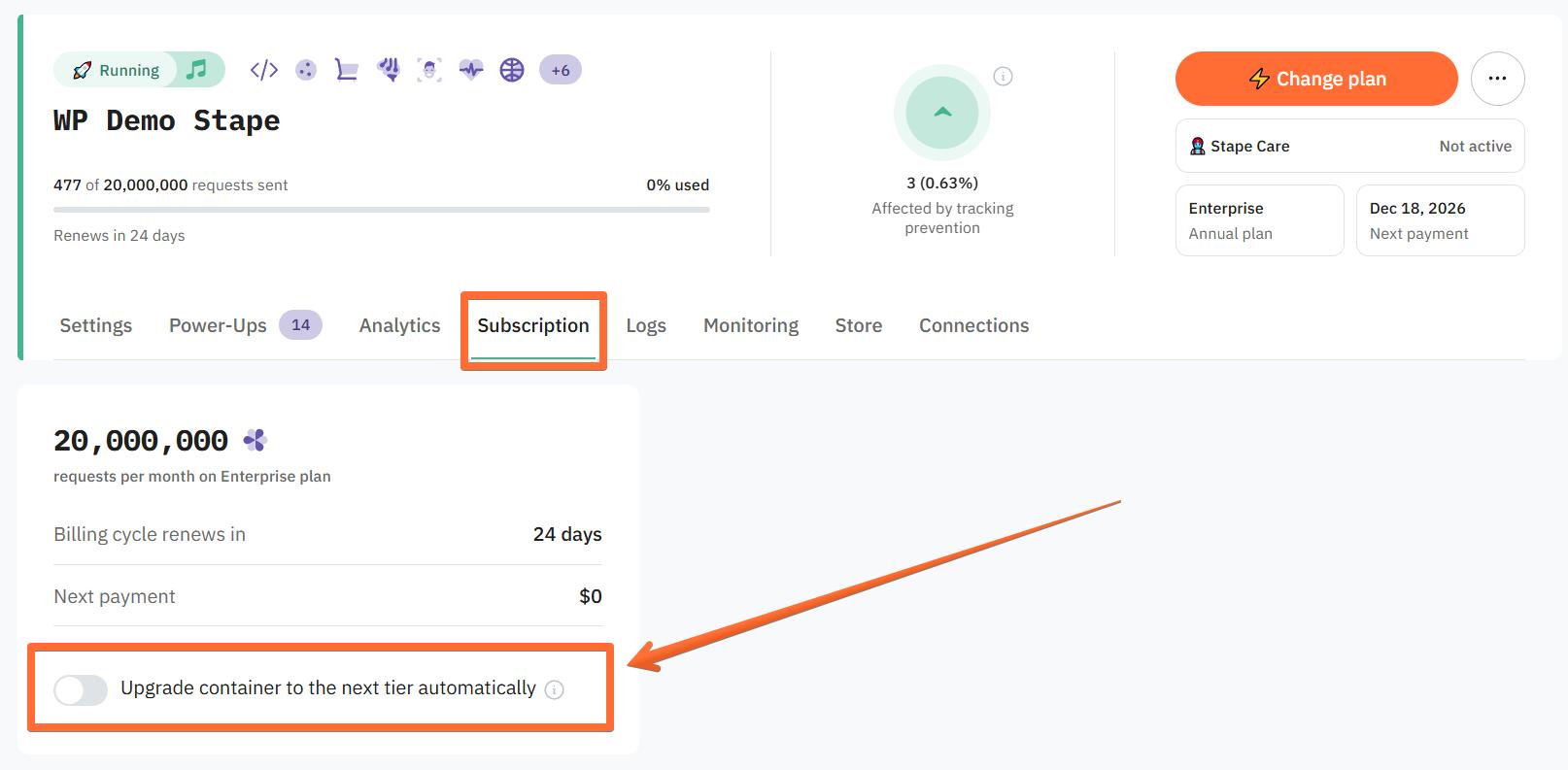
Open your Stape container or Signals Gateway and click the Subscription tab. Toggle the switch to Upgrade container to the next tier automatically. This way, you can ensure that, even if you miss a sudden spike in requests/events, your container/gateway will keep running smoothly.
Note: if auto-upgrade fails to charge you 6 times, the system will treat the container as if auto-upgrade is disabled and apply the pause logic as described above.
Was this article helpful?
🍽 Table of content:
Comments