How to subscribe to Stape Care after the initial setup?
Updated May 10, 2026
Stape Care is an optional subscription for users who want continuous, professional tracking support after the initial Stape Care setup. After Stape’s experts configure your tracking and provide monitoring for two weeks, the Stape Care subscription keeps everything running smoothly long-term.
It includes proactive monitoring, quick issue detection, ongoing optimization, and up to 3 hours of direct monthly consultations with tracking specialists. Instead of worrying about broken events, attribution problems, or new privacy updates, you get a dedicated team ensuring your GA4, Meta CAPI, TikTok, and server-side tagging stay accurate and up to date.
Step-by-step guide
1. Sign in to your Stape account.
2. Select the sGTM container that you wish us to take Care of.
Important! Stape Care subscription is an extension of the Stape Care service. The subscription is only available for containers where tracking was initially set up by the Care team. This means that you can’t enable a Stape Care subscription for containers with tracking that you configured yourself.
3. Click Change Plan → select your current subscription tier unless you want to upgrade it → toggle the Stape Care switch → click Continue and proceed with payment.
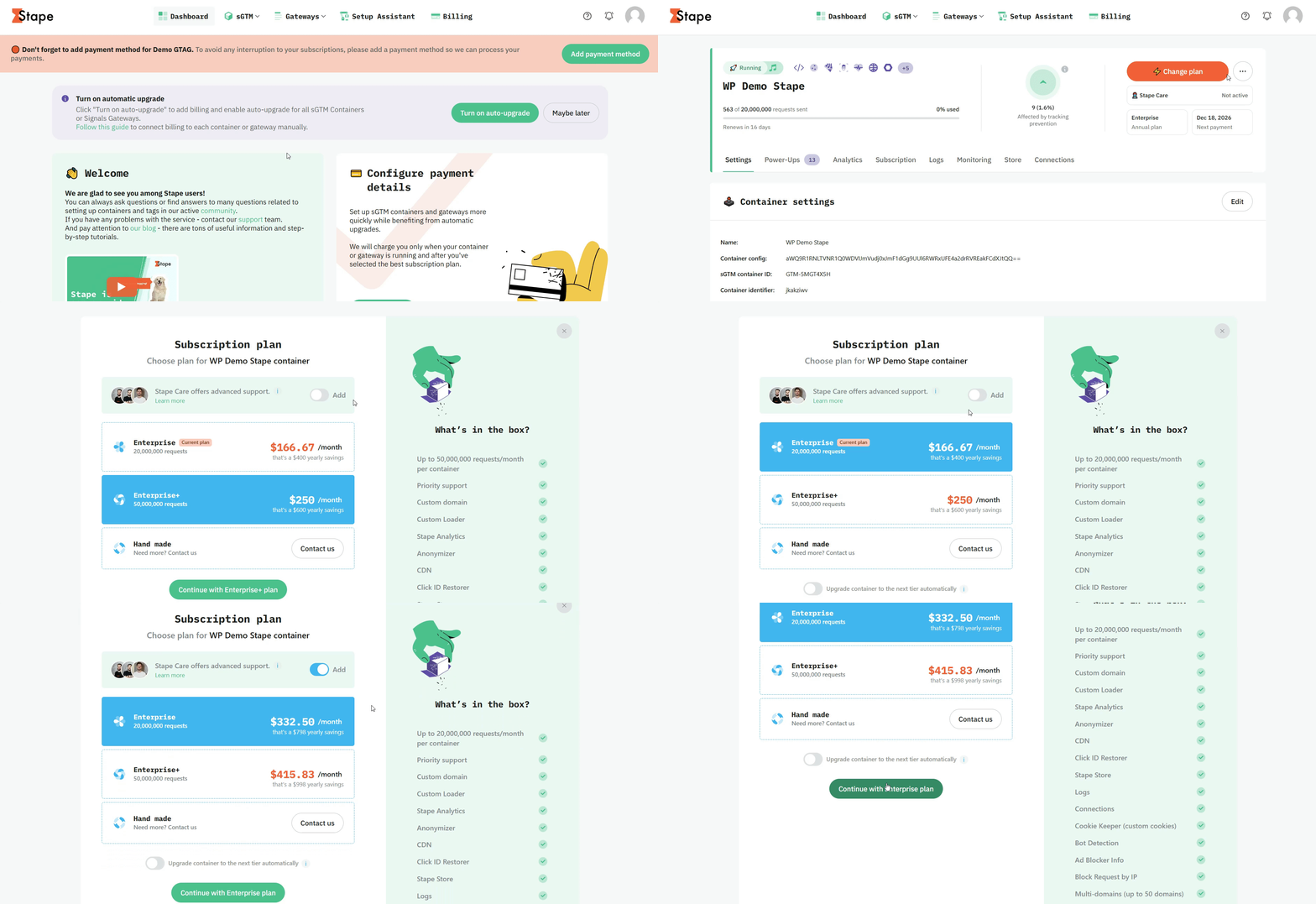
4. Congratulations! Your Care subscription will activate soon. Enjoy the peace of mind, knowing that your tracking is taken Care of.
Was this article helpful?
Comments