How to use the Website Tracking Checker API
Updated Mar 30, 2026
The Tracking Checker API gives partners direct access to the data behind Stape’s Website Tracking Checker. Instead of manually running scans through the web interface, you can send a request to the API and receive the full scan results in JSON format.
Tracking Checker API limitations:
- Single domain check per request.
- Up to 1000 requests per month.
- Up to 10 URLs requests per minute.
- Only for Partner accounts.
Who’s Tracking Checker API for?
The Tracking Checker API is available to Partner accounts. It was designed primarily for:
- Technical specialists and teams who want to analyze tracking setups at scale, as it eliminates the need to manually enter URLs into the web checker and receive reports in Stape’s interface.
- Agencies and consultants that need to audit tracking setups for many clients.
- For platform builders and developers, the API allows you to embed tracking diagnostics into your own products. You can display the results in any format you want, trigger automated checks, or build monitoring tools that detect tracking issues early.
How to use Tracking Checker API
1. Log in to your stape.io Partner account.
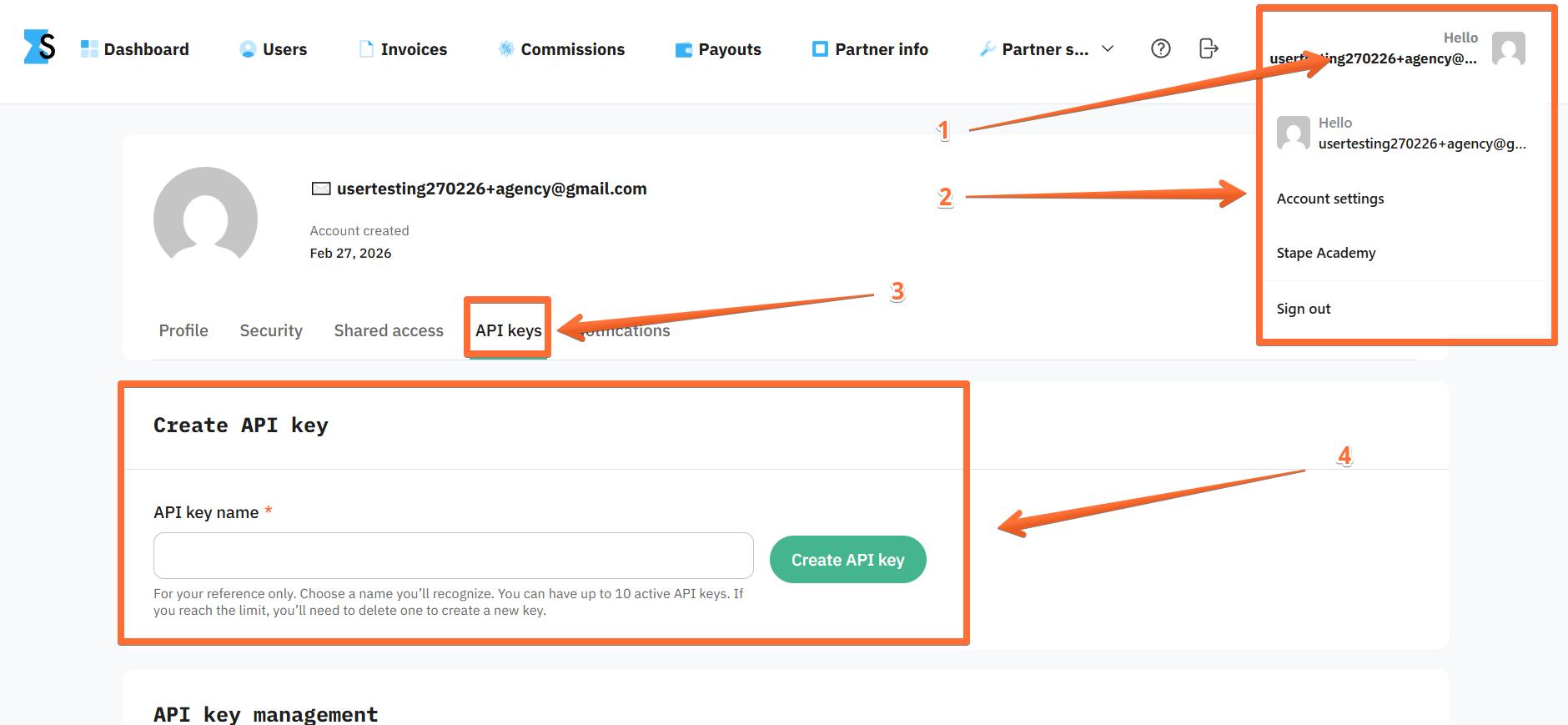
2. Click on your account name and select Account settings → open the API Keys menu → enter a descriptive API key name and click Create API key. For security reasons, you will only be able to view the generated API key once (right now, upon generation). So for future use, be sure to write it down or save it on your device.
3. Proceed to the Stape API Global or Stape API EU dashboard and search for the Partner Tracking Checker section. There you will find all the resources your developers need to integrate with Tracking Checker on the API level.
- POST: https://api.app.stape.io/api/v2/partner-tracking-checker - create a Tracking Checker report. Please keep in mind that callback may take up to 2 minutes.
- GET: https://api.app.stape.io/api/v2/partner-tracking-checker/limit - check your remaining monthly request limit.

4. Click Authorize and paste the API key.
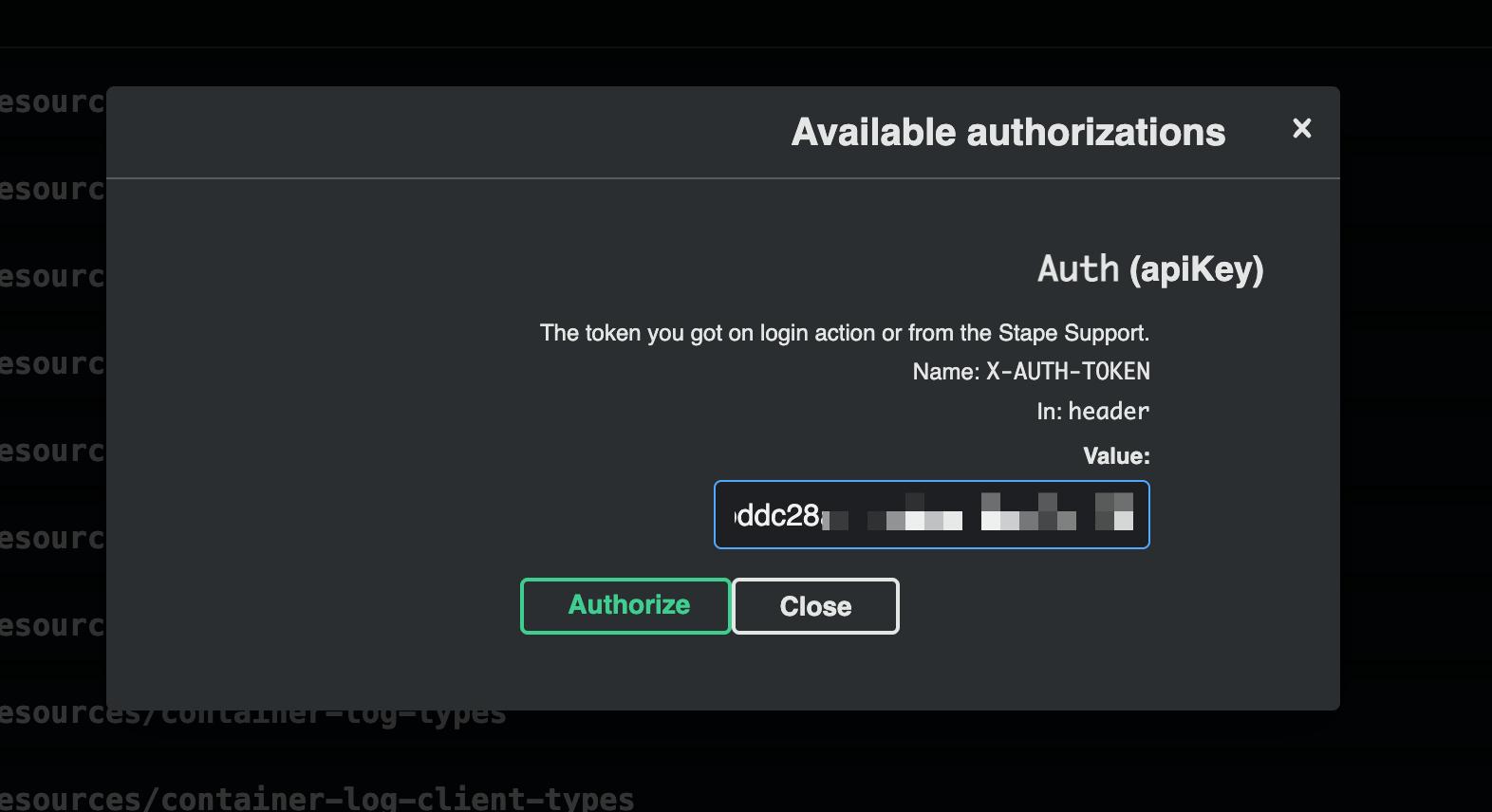
After that, you can either continue using this menu to run the code or use any other tools to send cURL requests like https://reqbin.com/curl.
5. Example of cURL:
curl -X 'POST' \
  'https://api.app.stape.io/api/v2/partner-tracking-checker' \
  -H 'accept: application/json' \
  -H 'X-AUTH-TOKEN: YOUR_API_KEY' \
  -H 'Content-Type: application/json' \
  -d '{
  "siteUrl": "https://example.com",
  "callbackUrl": "https://my-weebhook-example.com/getting-data"
}'- X-AUTH-TOKEN: replace YOUR_API_KEY with the API key you created at step 2.
- siteUrl: replace https://example.com with the site you wish to analyze with Website Checker.
- callbackUrl: replace https://my-weebhook-example.com/getting-data with your webhook URL.
Tracking Checker API use cases
This API allows you to automate your tracking setup troubleshooting or integrate tracking analysis directly into your own tools or dashboards. You can run website scans using an API key generated at the account level. The API returns structured data about detected trackers, cookies, scripts, tracking scores, and recommendations.
For instance, SEO agencies will find Tracking Checker API useful for analyzing their client websites’ rankings before and after optimization, and showcasing these results to them. Another example would be marketing and analytics agencies automatically scanning client websites to detect issues that may affect marketing data accuracy.
Was this article helpful?
Comments