Consent Management Platform (CMP) overview
Updated Nov 15, 2026
Stape CMP is a full Consent Management Platform built into Stape's server-side tracking infrastructure. It helps website owners collect, store, and manage visitor consent, control tracking technologies based on privacy choices, and send consent signals to the needed platforms.
Unlike standalone CMP solutions that require a separate subscription and integration with your tracking setup, Stape CMP is included in Stape subscriptions and deployed through the existing Custom Loader power-up. Such an approach brings consent and server-side tracking management together in one infrastructure.
With Stape CMP, you can:
- Manage the complete consent lifecycle – capture and store visitor choices, view consent history, and let visitors review, update, or withdraw their consent.
- Configure region-specific privacy rules – set up different rules and banners based on visitors' locations to comply with privacy regulations such as GDPR, CCPA/CPRA, VCDPA, LGPD, POPIA, and others.
- Manage data tracking based on the granted consent – block scripts until visitors grant permission; ensure tracking infrastructure respects users’ consent choices.
- Communicate the consent with advertising and analytics platforms – send consent signals through Google Consent Mode v2, Microsoft UET Consent Mode, Shopify Customer Privacy API, and IAB Transparency and Consent Framework (TCF).
- Connect consent with server-side tracking – deploy the CMP through Custom Loader and manage consent collection, signaling, and tracking within the same infrastructure in a Stape account.
- Maintain consent records – access consent interaction logs to see what choices visitors made, when they made them, and how their preferences changed.
- Customize consent banners – configure banner layouts, colors, content, languages, and consent options.
Stape CMP is available for all Stape users, with no separate CMP license fee. Each CMP script load counts as one additional Stape request.
For the step-by-step configuration, check the how-to set up Stape CMP guide.
How to find Stape CMP
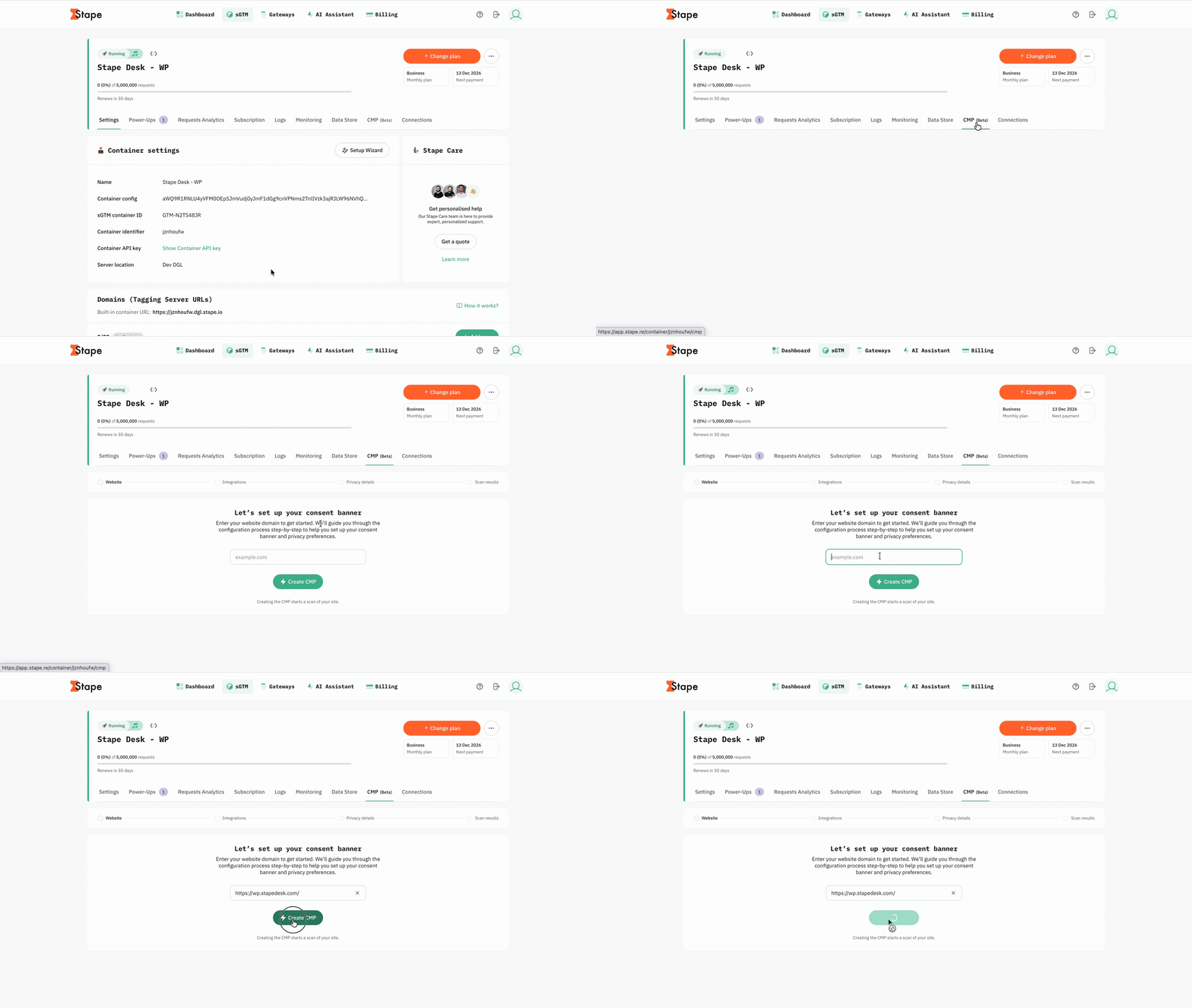
- 1.Log in to your Stape account → click on your sGTM container.
- 2.Open the CMP section in your Stape account.
- 3.Click “Create CMP” to start a new configuration.
- 4.Configure your website, consent behavior, banner, privacy rules, and integrations.
Use cases
1. Consent-aware server-side tracking. Integrate consent management into server-side tracking setup. Collect visitor choices through the CMP, communicate consent signals to the GTM entities, and configure tags to respect user choices.
2. Publisher advertising consent. Manage consent for advertising technologies and vendors using the IAB Transparency and Consent Framework (TCF). Collect standardized consent choices and communicate them across the advertising systems.
3. Advertising and analytics consent signaling. Ensure advertising and analytics platforms receive the correct consent signals. Integrate Google Consent Mode v2, Microsoft UET Consent Mode, and other supported platforms to adjust tracking behavior based on visitor choices.
4. Global privacy management. Adapt consent experiences to different privacy regulations across the globe. For example, display GDPR consent banners to EU visitors and provide opt-out options to visitors from the USA covered by CCPA/CPRA.
5. Multi-region and multilingual websites. Configure different banners, privacy policies, consent defaults, and language options based on visitor location. Manage consent experiences for audiences worldwide from one CMP configuration.
Was this article helpful?
Comments